

Re-Engagement Emails: The 2026 Playbook That Works
Your email list loses 22-30% of its value every year. People change jobs, abandon inboxes, switch providers, or just stop caring. That decay is silent - you don't notice it until your bounce rate spikes and Gmail starts throttling your domain.
Re-engagement emails are how you fight back. But most teams run them wrong and make the problem worse.
What a Re-Engagement Email Actually Is
A re-engagement email is any message sent specifically to subscribers who've stopped interacting with your campaigns. They haven't opened, clicked, or converted in a defined window - and you're making a deliberate play to pull them back before sunsetting them from your list.
Reactivating an existing subscriber costs roughly 5x less than acquiring a new one. Targeted re-engagement messaging can reactivate up to 45% of inactive subscribers, and even modest win-back rates of 14-29% translate to recovered revenue you'd otherwise write off.
Here's the thing: re-engagement isn't just a growth tactic. It's a hygiene operation. Every inactive address on your list is a potential hard bounce, spam trap, or complaint waiting to happen. The emails you send to people who don't want them actively damage your ability to reach people who do.
The Essentials
- Define "inactive" based on your send frequency. A daily sender's 60-day ghost is different from a monthly newsletter's 6-month ghost.
- Verify your list before sending. Inactive addresses go stale fast. Run them through an email verification tool to reduce bounces before they tank deliverability.
- Build a 3-4 email sequence, not a single Hail Mary. Space them 5-7 days apart and escalate.
- Throttle sends to 10% or less of daily volume. Blasting your entire inactive segment at once is a deliverability disaster.
- Measure clicks and conversions, not opens. Apple Mail Privacy Protection broke open tracking. Clicks are the only reliable engagement signal now.
When to Trigger a Win-Back Sequence
The biggest mistake teams make is using a universal inactivity threshold. "No engagement in 90 days" sounds reasonable until you realize you only send one email a month - meaning they've missed three messages, not thirty.
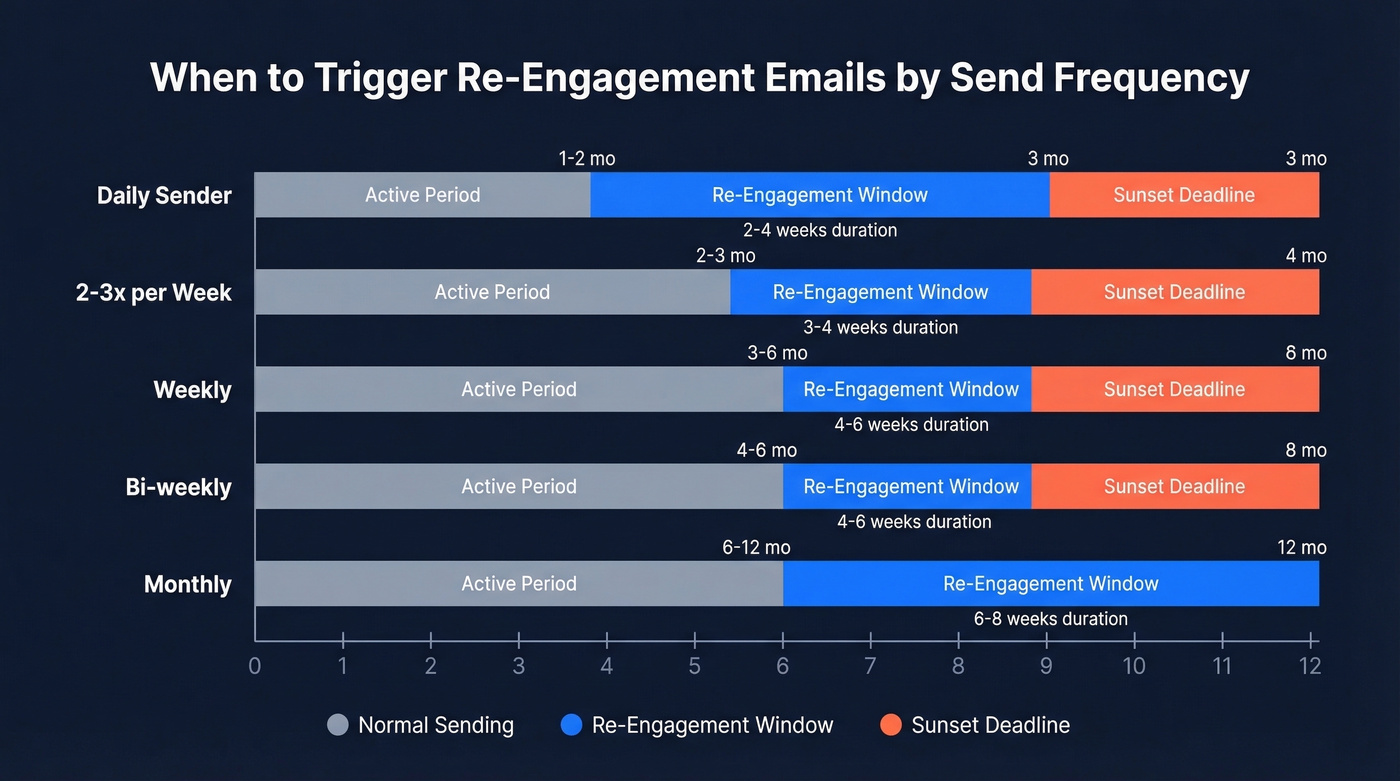
Your trigger should scale with your send frequency:
| Send Frequency | Inactivity Trigger | Re-Engagement Window | Sunset Deadline |
|---|---|---|---|
| Daily | 1-2 months | 2-4 weeks | 3 months |
| 2-3x/week | 2-3 months | 3-4 weeks | 4 months |
| Weekly | 3-6 months | 4-6 weeks | 6 months |
| Bi-weekly | 4-6 months | 4-6 weeks | 8 months |
| Monthly | 6-12 months | 6-8 weeks | 12 months |
Customer.io's deliverability team recommends enrolling contacts after 4 months of inactivity, then sunsetting at 6 months if they still don't engage. That's a solid default for most weekly-to-biweekly senders.
Don't treat this as a one-time project. Contacts drift into inactivity constantly, so your win-back sequence should be a standing automated flow - not a quarterly fire drill you scramble to set up when someone notices open rates cratering.
Types That Actually Convert
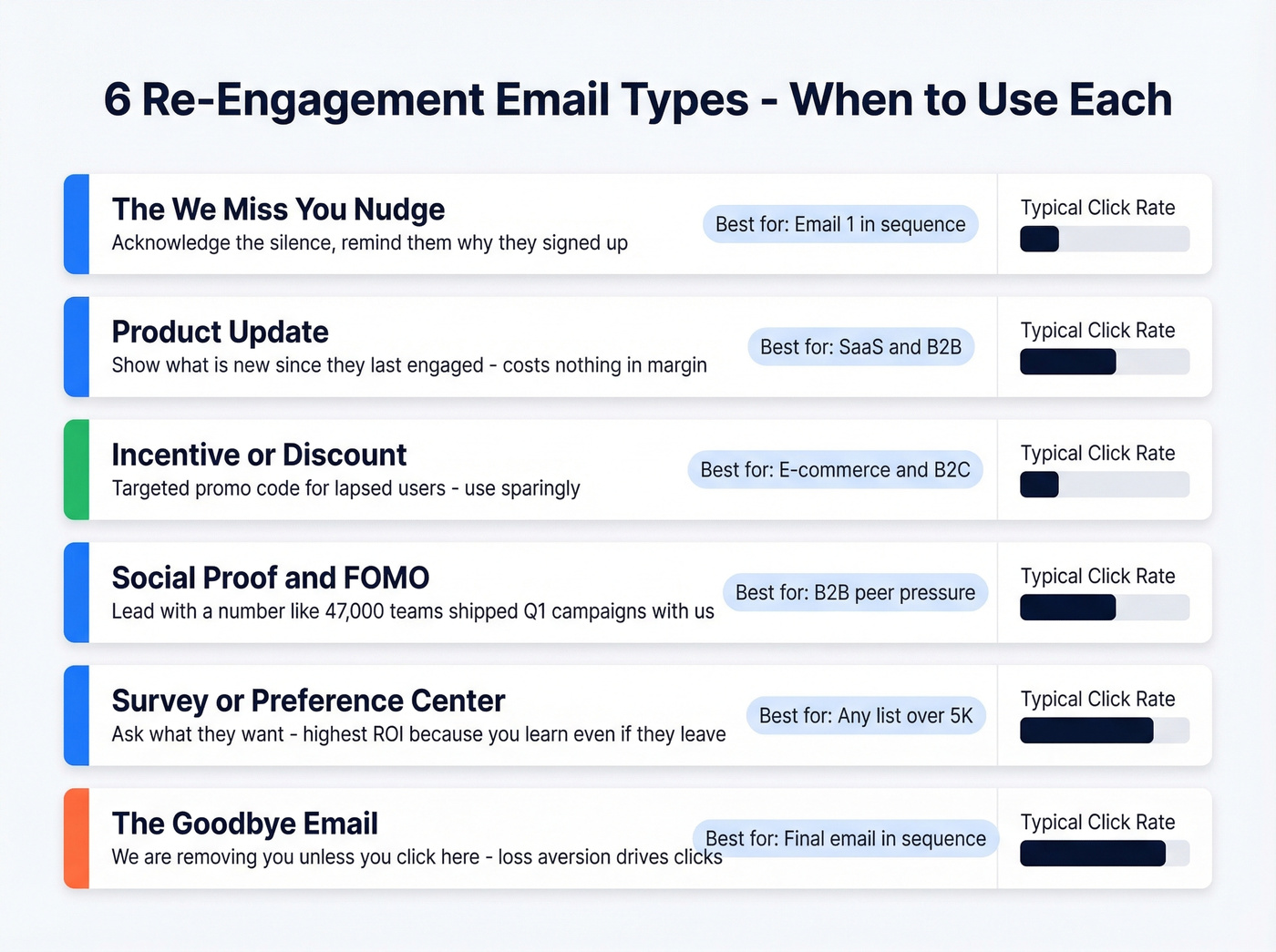
Understanding the different approaches helps you build a sequence that escalates naturally rather than repeating the same ask in different wrappers.
The "We Miss You" Nudge
The simplest play. Acknowledge the silence, remind them why they subscribed, and give them a reason to click. Keep it short. This is a tap on the shoulder, not a product deep-dive.
Incentive vs. Product Update
DoorDash nails the incentive angle with targeted promo codes for lapsed users. It works, but discounts train subscribers to wait for deals. Dropbox takes the opposite approach - "here's what's new since you've been gone." Product updates cost nothing in margin and give subscribers a genuine reason to come back.
In our experience, product updates outperform discount emails on long-term retention. If you're running SaaS, lead with what's new. Save the discount for email three.
Social Proof and FOMO
"47,000 teams shipped their Q1 campaigns with us." Numbers create urgency without desperation. This works especially well in B2B where buyers worry about falling behind peers. Lead with the number, not the pitch.
The Survey or Preference Center
Ask them what they actually want. "Too many emails? Wrong topics? Let us know." This is the highest-ROI type because you learn something even if they don't come back - the data from preference updates improves your entire email program going forward.
The Story or Milestone
AllTrails sends beautiful "look what you accomplished" emails to dormant users. Milestone emails work because they're about the subscriber, not about you. Any product with usage data can build these, and they feel personal in a way that generic win-back emails never will.
The Goodbye
"We're removing you from our list unless you click here." Sounds aggressive. Drives strong click rates. Loss aversion is real, and Skillshare layers a last-chance discount on top for maximum impact. This is always your final email in the sequence.

Step 2 of your re-engagement sequence says 'verify the list.' Prospeo's 5-step verification catches spam traps, honeypots, and catch-all domains before they tank your sender reputation. 98% email accuracy, bulk verification included.
Don't blast dormant contacts without cleaning them first.
Building the Sequence
- Segment your inactive contacts. Pull everyone who hasn't clicked - not just opened - in your defined inactivity window.
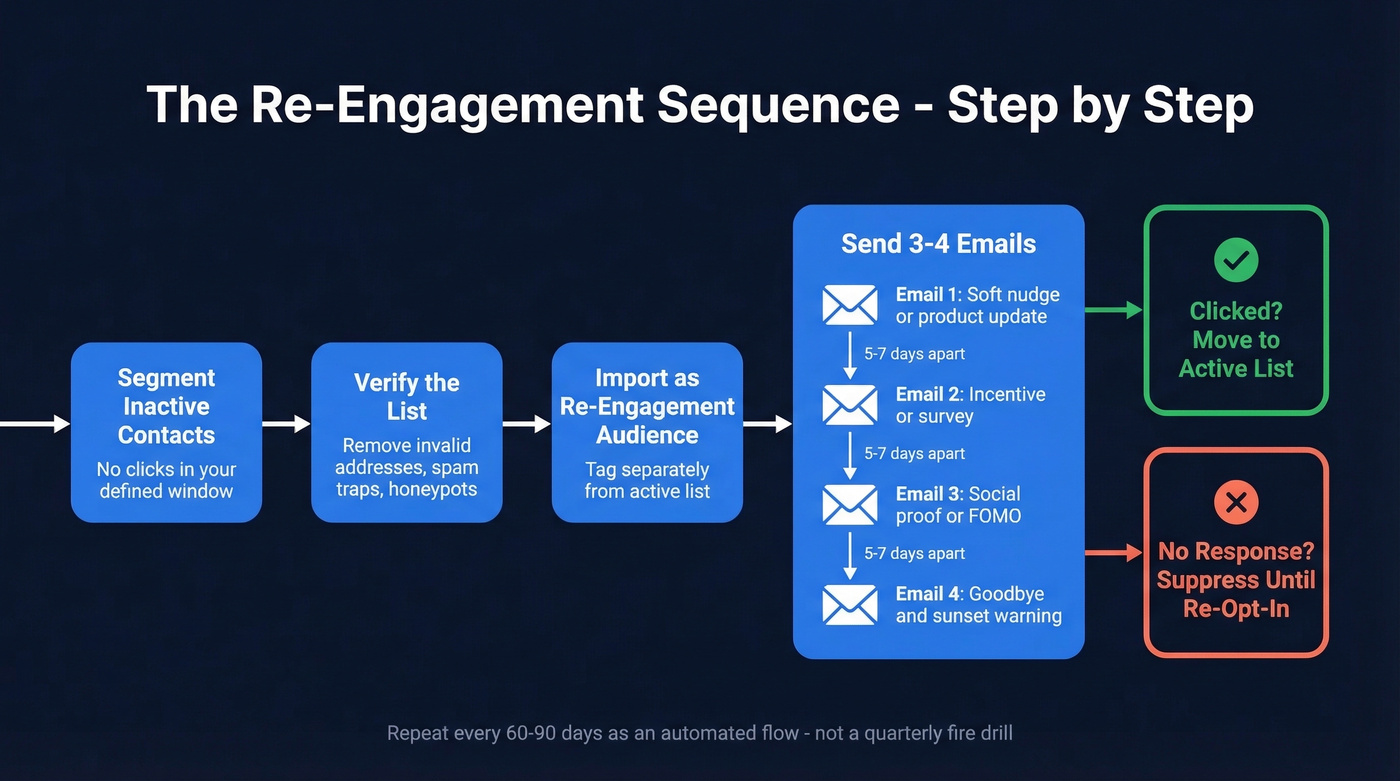
Verify the list. Run your inactive segment through a bulk email verification tool to catch invalid addresses, spam traps, and honeypots before they generate bounces. We've seen teams skip this step and regret it within hours of hitting send.
Import the verified segment back into your ESP as a dedicated re-engagement audience. Tag them so you can track results separately from your regular campaigns.
Send 3-4 emails spaced 5-7 days apart. Start soft with a product update or nudge, escalate with an incentive or survey, and close with a goodbye/sunset email.
Branch on engagement. Anyone who clicks gets moved back to your active list. Anyone who doesn't respond to the full sequence gets suppressed entirely until they re-opt-in through another channel.
Repeat every 60-90 days. Automate this flow so it runs without manual intervention.
The Deliverability Playbook
This is where most re-engagement guides fall short. They tell you what to write but not how to send it without destroying your sender reputation.
The 90/10 Rule
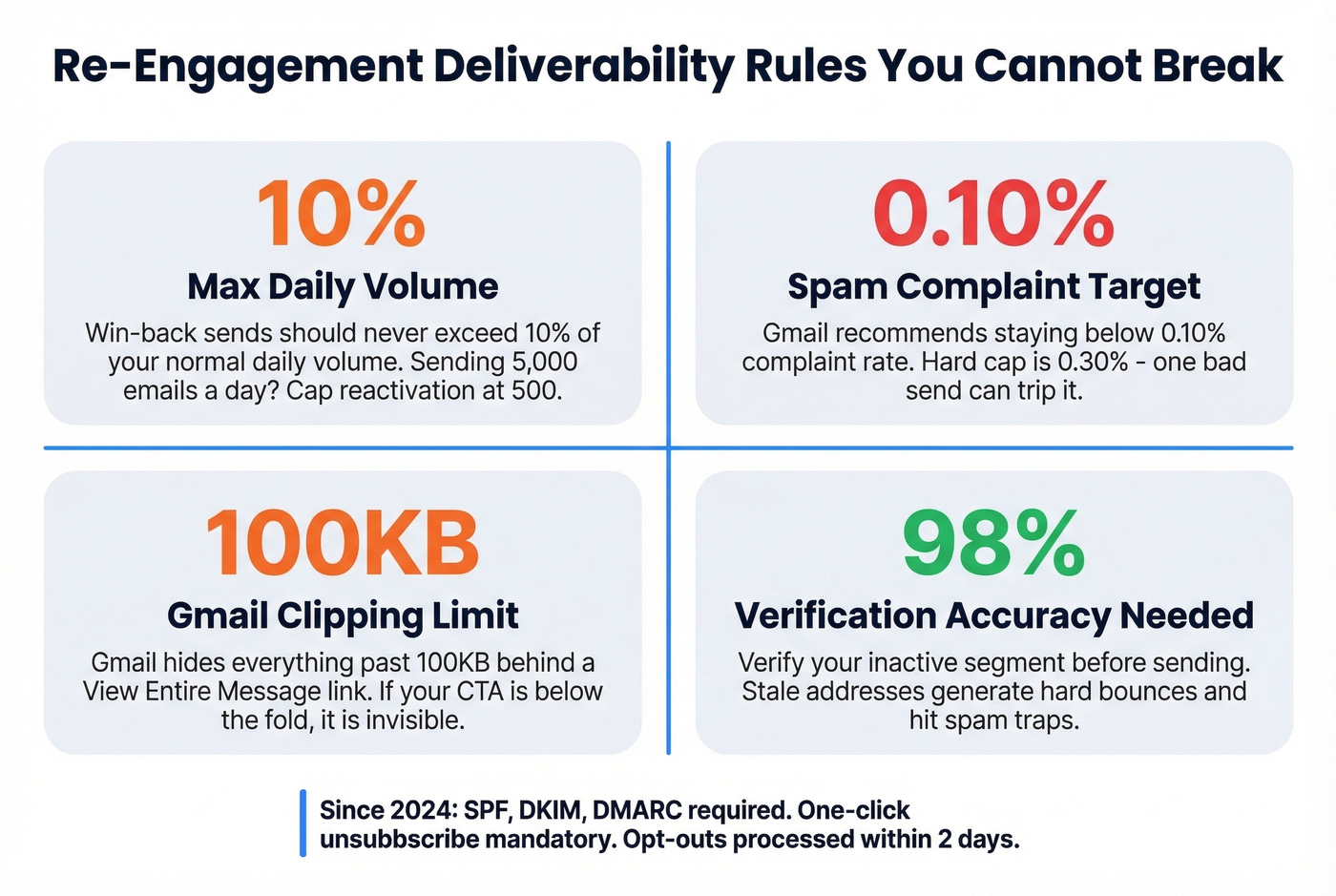
Win-back sends should never exceed 10% of your daily send volume. If you normally send 5,000 emails a day to engaged subscribers, cap your reactivation batch at 500. Blasting 20,000 dormant contacts in one send is the fastest way to trigger spam filters.
Gmail and Yahoo Requirements
Since early 2024 - now fully enforced - bulk senders must have SPF, DKIM, and DMARC properly configured. Gmail caps spam complaint rates at 0.3% and recommends staying below 0.10%. One-click unsubscribe via RFC 8058 is mandatory, and opt-out requests must be processed within 2 days. Campaigns targeting cold segments are the most likely to trip these thresholds, so if you're going to cut corners anywhere, don't cut them here.
The 100KB Trap
Gmail clips emails that exceed 100KB, hiding everything below the fold behind a "View entire message" link. If your CTA lives below that cutoff, it's invisible. Keep your messages lean - plain text or minimal HTML.
Verify Before You Send
Your inactive segment has been dormant for months. Addresses go stale. People change jobs, abandon inboxes, get deactivated. Sending to these generates hard bounces and can hit spam traps that ISPs use to identify careless senders.
Prospeo's 5-step verification process catches invalid addresses, spam traps, and honeypots with 98% accuracy at roughly $0.01 per email. Meritt used it for list verification and cut their bounce rate from 35% to under 4%. That's the difference between a healthy sender reputation and a blacklisted domain.
Braze's rule of thumb: sunset users who haven't opened in 6 months. But sunsetting only works if you've verified the list first - otherwise you're making deliverability decisions based on addresses that were already dead.
Skip this if your list is tiny: If you're under 5,000 subscribers, you probably don't need a win-back sequence at all. Just verify the list, remove the dead weight, and focus on sending better emails to the people who remain. Re-engagement sequences are a scaling tool. They solve a big-list problem.
Re-engagement recovers old subscribers. But the contacts who never respond? Replace them with verified buyers. Prospeo's database has 143M+ verified emails refreshed every 7 days - not the stale data that created your inactive segment in the first place.
Stop resuscitating dead leads when fresh, verified ones cost $0.01 each.
Measuring What Matters
Open rates are broken. Full stop.
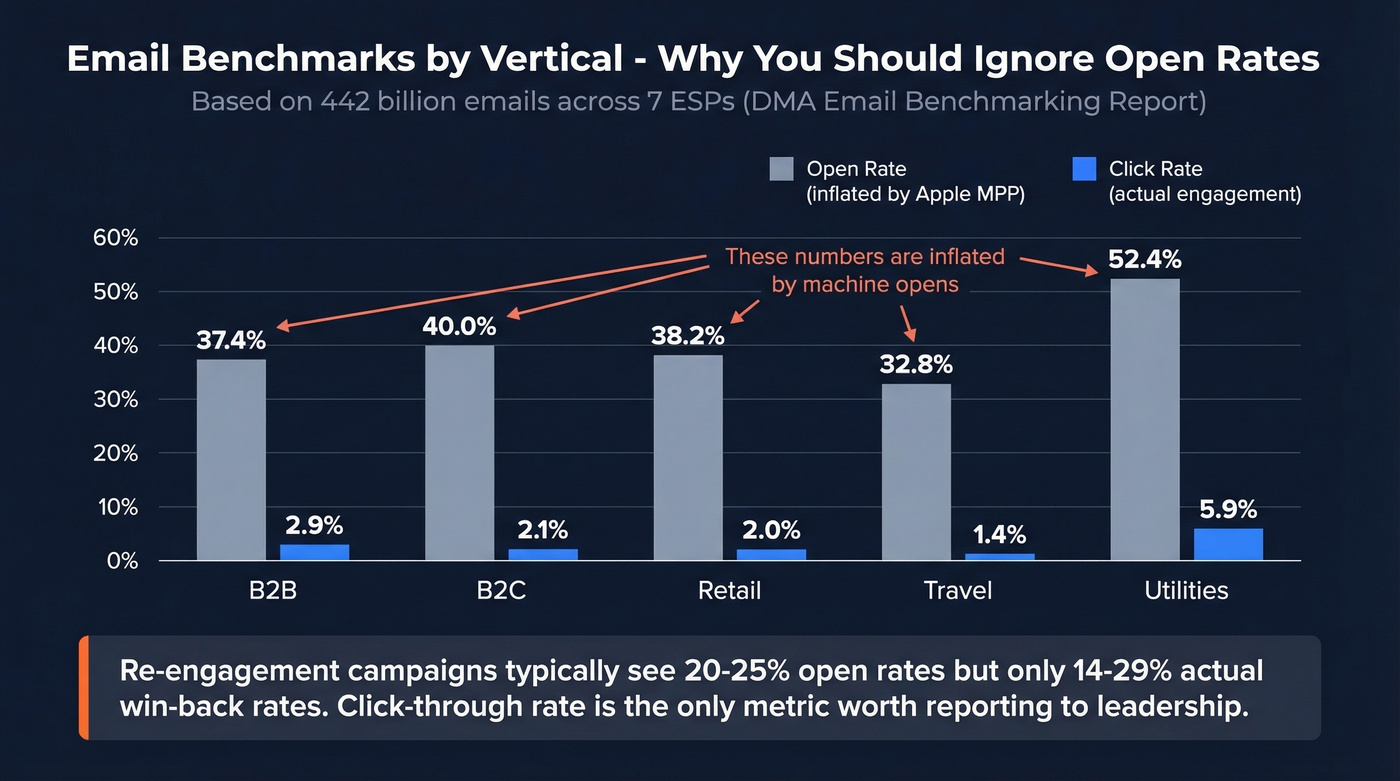
Apple Mail Privacy Protection pre-fetches tracking pixels, inflating open rates across the board. French retailer Tape a l'Oeil discovered that 60% of their email opens came from Apple Mail - meaning the majority of their "opens" were machines, not humans.
The DMA Email Benchmarking Report, covering 442 billion emails across seven ESPs, shows these channel-wide averages:
| Vertical | Open Rate | Click Rate | Delivery Rate |
|---|---|---|---|
| B2B | 37.4% | 2.9% | 90.7% |
| B2C | 40.0% | 2.1% | 99.2% |
| Retail | 38.2% | 2.0% | 99.5% |
| Travel | 32.8% | 1.4% | 99.3% |
| Utilities | 52.4% | 5.9% | 97.7% |
Re-engagement campaigns typically see 20-25% open rates, with top performers hitting 30%+. But those numbers are inflated by Apple MPP. Define "win-back" explicitly: a subscriber is reactivated when they click a link or complete a conversion action, not when a pixel fires. Win-back rates of 14-29% are typical for well-executed sequences.
A thread on r/Emailmarketing captured this well - one marketer ran a spin-the-wheel campaign that pulled a 10% click rate and 8% form submission rate despite below-average opens. The subset that opened engaged deeply. Let's be honest: click-through rate is the only metric worth reporting to leadership. Everything else is noise.
The consensus on r/Emailmarketing backs this up - marketers who switched from open-rate optimization to click-rate optimization saw better long-term list health because they stopped chasing phantom engagement from Apple's proxy servers.
Compliance You Can't Skip
Re-engagement emails sit in a legal gray zone. You're emailing people who haven't interacted in months, which means consent may be stale.
GDPR (EU/UK): If subscribers have been inactive for 12-24 months, trigger a re-permissioning flow. Explicitly ask them to re-consent before resuming marketing. Record consent metadata with timestamp, method, and consent statement version.
CAN-SPAM (US): Every message must include a clear unsubscribe mechanism, accurate sender identification, and non-deceptive subject lines. No exceptions, even for "goodbye" emails.
CASL (Canada): Implied consent from a business relationship has a 2-year window.
One-click unsubscribe: Mandatory for bulk senders under Gmail/Yahoo rules. Use the List-Unsubscribe header per RFC 8058.
Real talk: if your consent records are messy, a reactivation campaign can create more legal risk than it solves. Clean your records first.
Subject Line Swipe File
Curiosity: "Things have changed since you left" - "You're missing something (literally)" - "We updated [feature] - worth a look"
Incentive: "Come back for 20% off - this week only" - "Free month on us. No strings."
FOMO: "12,000 teams joined since your last login" - "Your competitors are using this"
Goodbye: "Should we stop emailing you?" - "This is our last email (unless you say otherwise)" - "Removing you in 48 hours"
Personal: "[First name], it's been a while" - "Still interested in [topic they signed up for]?"
The goodbye lines drive the strongest click rates. "Should we stop emailing you?" flips the power dynamic - the subscriber has to actively choose to leave, which triggers Loss aversion is real. We've tested this across multiple client campaigns and it consistently outperforms softer alternatives.
FAQ
How long should you wait before sending re-engagement emails?
Scale timing to your send frequency. Daily senders should trigger at 1-2 months of inactivity, weekly senders at 3-6 months, and monthly senders at 6-12 months. A safe default: enroll at 4 months, sunset at 6 if there's still no click activity.
What's a good click rate for a win-back campaign?
Expect 14-29% win-back click rates from a well-built sequence. Ignore open rates entirely - Apple Mail Privacy Protection inflates them with machine-generated pixel fetches, making opens meaningless as a reactivation metric.
Should you offer a discount in a win-back email?
Lead with product updates or preference-center surveys instead. Discounts pull short-term clicks but train subscribers to wait for deals, lowering long-term revenue per subscriber. Save the promo code for email three as a last resort.
How do you verify an inactive list before re-engagement?
Run your dormant segment through a bulk email verification tool to flag invalid addresses, spam traps, and honeypots. At 98% accuracy and roughly $0.01 per verification, Prospeo handles this well - and it's far cheaper than the deliverability damage from hard bounces on stale addresses.