

How to Find Real Email Addresses in 2026
You exported a few thousand leads from Apollo. Half came back with no email. You tried Clay to fill the gaps, but it's burning credits faster than expected and the interface feels like it was built for engineers. Now you need real email addresses - ones that won't bounce, won't tank your domain reputation, and won't waste another week of prospecting.
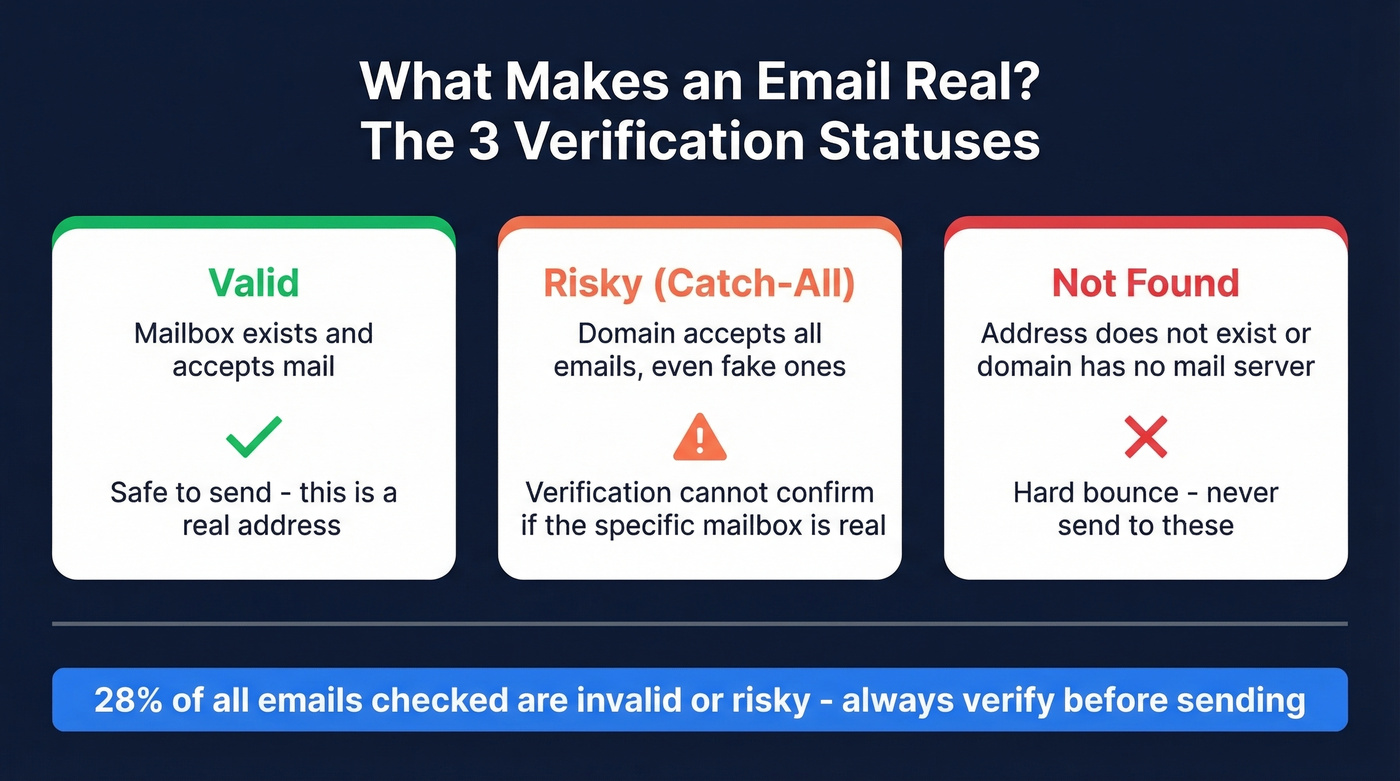
Here's the uncomfortable truth: nearly 28% of all emails checked were invalid or risky, up from roughly 22% two years earlier. The tools that promise millions of contacts don't always deliver millions of working contacts.
What You Need (Quick Version)
Every guide on this topic lists 10+ tools. That's useless. Most teams need two - a finder that verifies, and a manual fallback for edge cases.
- Free verification layer: Hunter's free tier handles 50 searches/month - solid for spot-checking addresses you've sourced elsewhere.
- Manual fallback: Google search operators for one-off lookups when tools come up empty.
Your target: keep total bounces under 2% and hard bounces under 1%. Anything above that and ESPs start throttling your sends. Three tools, max.
What Makes an Email "Real"?
Most email finders report inflated "found" rates. A tool says it found 5,000 emails from your list of 8,000 - great, right? Not if 600 of those hard bounce and another 400 belong to the wrong person at the wrong domain.
The number that actually matters is what Dropcontact calls the "real enrichment rate" in their 20,000-contact benchmark: found emails minus hard bounces minus wrong-domain matches. That single metric tells you how many addresses will actually land in an inbox.

A hard bounce means the address is permanently dead - invalid mailbox, nonexistent domain. A soft bounce is temporary - full inbox, server timeout. Brevo's analysis of over 44 billion emails draws this distinction clearly, and it matters because hard bounces damage your sender reputation while soft bounces usually resolve themselves.
Most verification tools return one of three statuses. Valid means the mailbox exists and accepts mail. Not Found means the address doesn't exist or the domain has no mail server. Risky usually means the domain is a catch-all - configured to accept email sent to any address, even ones that don't exist. Verification tools can't confirm whether a specific mailbox is real on a catch-all domain, which is why these addresses get flagged rather than confirmed. If you're prospecting into enterprise companies, you'll hit catch-all domains constantly, and how your tool handles them separates the good finders from the mediocre ones.
Why Verified Addresses Matter More Than You Think
The industry threshold is clear: keep total bounces below 2% and hard bounces under 1%. The industry average bounce rate sits at roughly 0.7%.
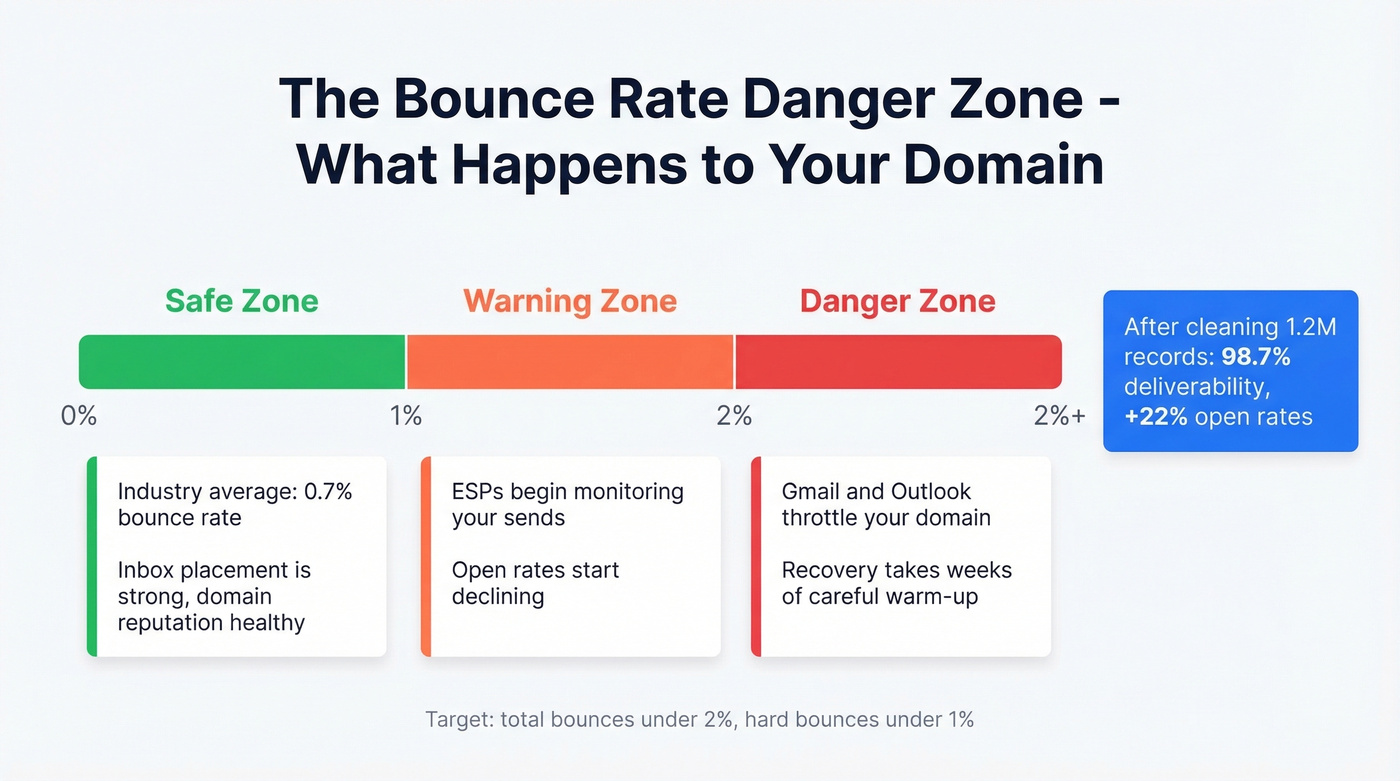
What happens when you blow past 2%? Your ESP starts filtering your sends. Gmail and Outlook throttle your domain. Your open rates crater - not because your copy is bad, but because your emails aren't reaching inboxes at all. Domain reputation damage compounds over time, and recovering from it takes weeks of careful warm-up that could've been spent closing deals.
The flip side is dramatic. One case study from EmailOversight showed a team that cleaned 1.2 million records and saw deliverability jump to 98.7%, with open rates improving 22%. That's not a marginal gain - that's the difference between a pipeline that works and one that doesn't.
Here's the thing: bad data is a worse tax than per-seat pricing. Per-seat pricing punishes you for hiring, and that's annoying. But bad data costs you domain reputation, which is harder to rebuild than a budget line item. We'd rather overpay for clean data than save money on dirty data every single time.
How to Find Verified Emails for Free
Free methods fall into three buckets: manual research, browser extensions, and freemium tools with monthly caps.
Manual Research
Slower but genuinely effective for one-off lookups. Google search operators are your best friend here:
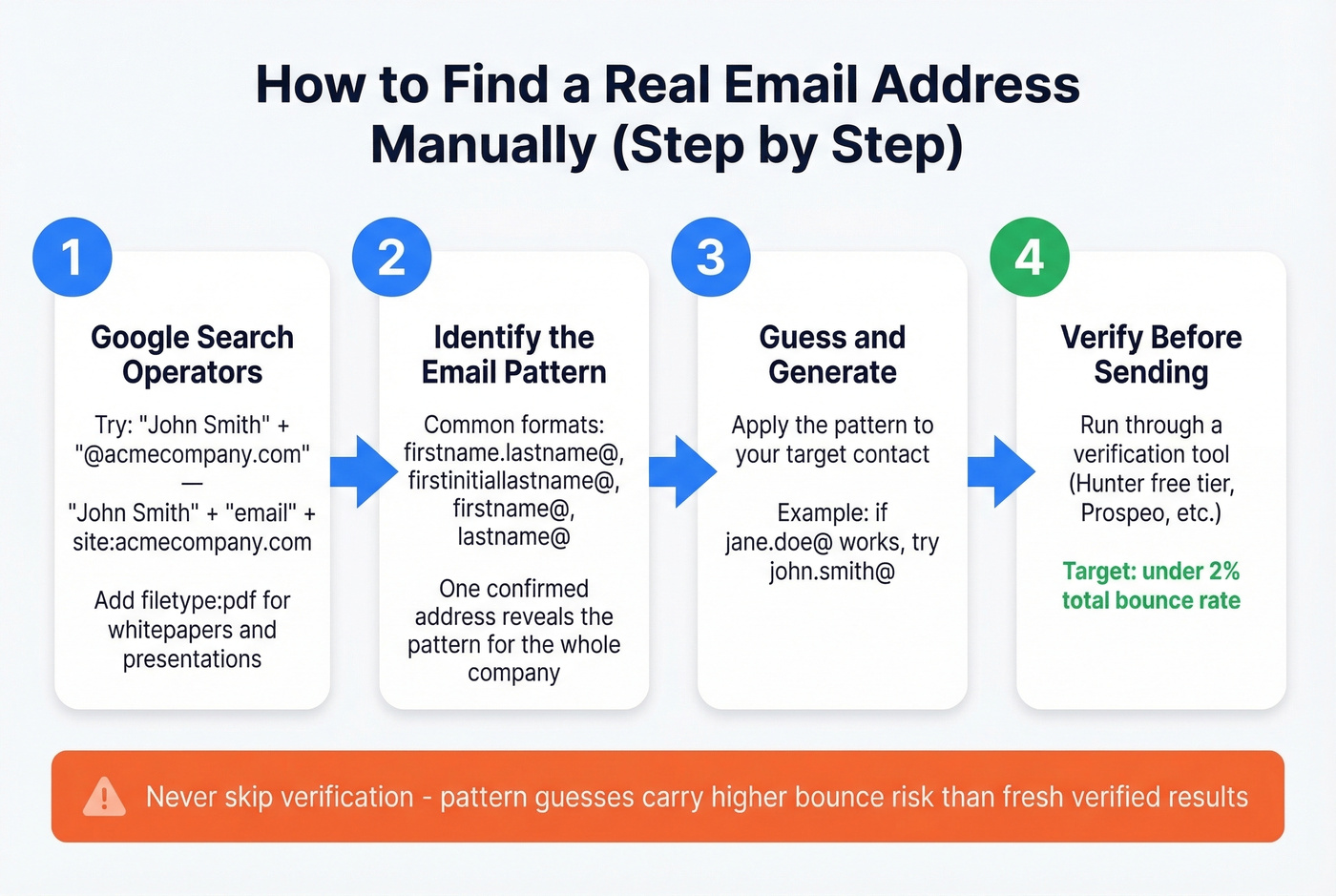
"John Smith" + "@acmecompany.com"- searches for the exact name paired with the company domain"John Smith" + "email" + site:acmecompany.com- finds contact pages and team directories- Add
filetype:pdfto surface emails buried in whitepapers and conference presentations
Once you find one confirmed address at a company, you can guess the pattern for everyone else. The most common formats are firstname.lastname@, firstinitiallastname@, firstname@, and lastname@. Pattern guessing carries bounce risk, though - always verify before sending.
Browser Extensions
These let you pull verified emails directly from company websites and professional profiles. Free tiers from tools like Hunter and Prospeo give you enough monthly lookups for targeted prospecting without spending anything.
Freemium Tools
Hunter offers 50 free searches/month. Snov.io has a free tier too. These are useful for verification, but don't expect deep coverage from free plans alone.
One important caveat: when a tool returns a "valid" result, don't re-verify it with a weaker verifier. Weaker tools sometimes incorrectly flag catch-all deliverable emails as invalid, which means you'd be throwing away good addresses. Trust the stronger tool's result. And remember that data decays - emails sourced from old databases or pattern guesses carry higher bounce risk than fresh, verified results.

You just read that 28% of emails are invalid or risky. Prospeo's 5-step verification - catch-all detection, spam-trap removal, honeypot filtering - delivers 98% email accuracy across 143M+ verified addresses. One step. No second tool needed.
Keep your bounce rate under 1% starting today.
Best Paid Tools for Finding Real Email Addresses
We've spent more time testing email finders than we'd like to admit. These are ranked by how reliably they deliver addresses that actually work - not by database size or feature count.
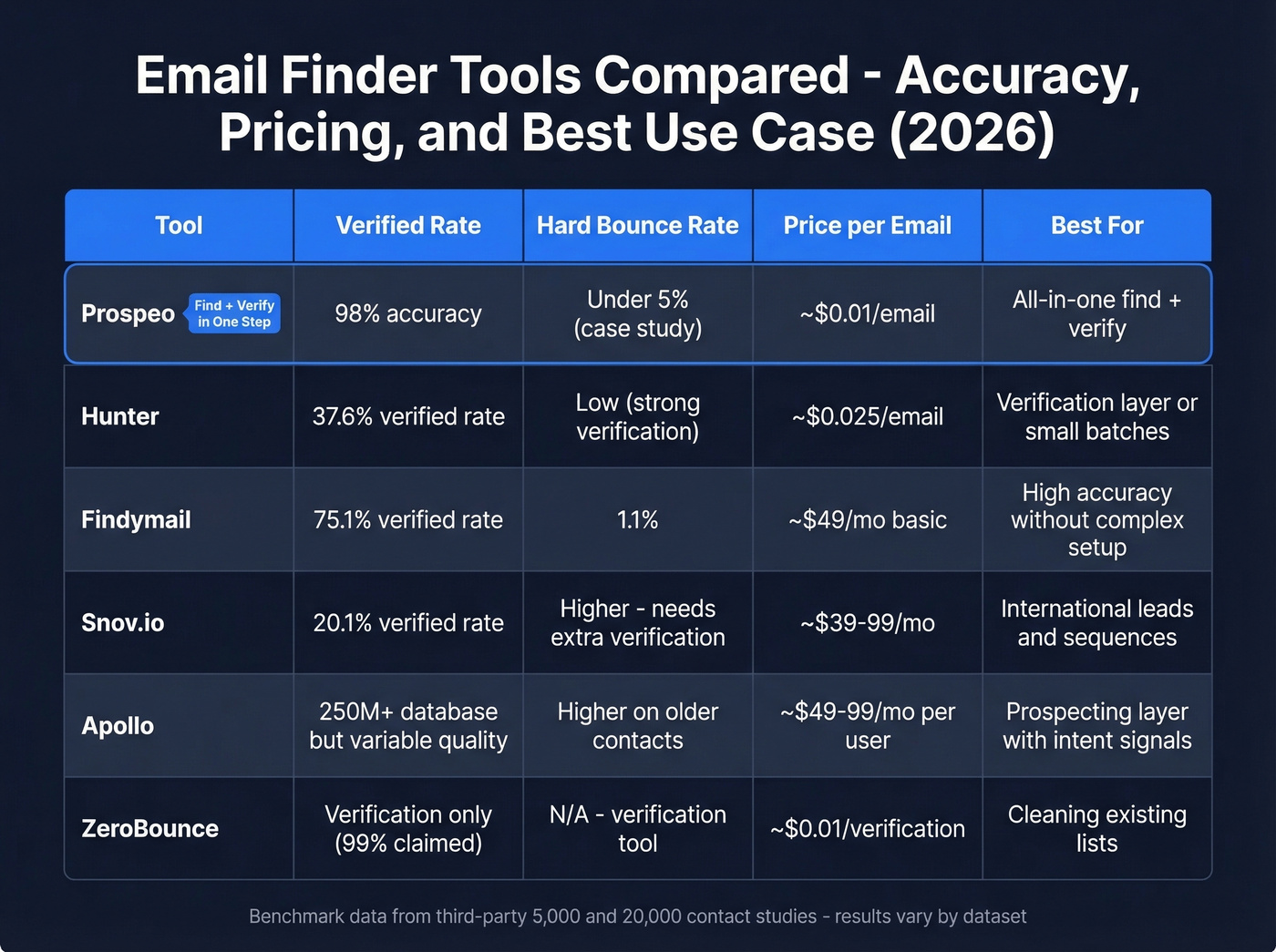
One note on benchmarks: third-party studies like the Anymail Finder 5,000-contact test and the Dropcontact 20,000-contact benchmark are useful directional signals, but results vary by methodology, dataset composition, and how each tool's infrastructure is optimized. We've seen tools post mediocre numbers in one benchmark and outperform in live sending campaigns. Take any single benchmark as one data point, not gospel.

Prospeo
Prospeo finds and verifies in a single step, which eliminates the "find emails with Tool A, then verify with Tool B" workflow that most teams end up running. Every email goes through a 5-step verification stack - syntax check, MX record lookup, SMTP handshake, catch-all detection, and spam-trap/honeypot filtering - delivering 98% email accuracy across 143M+ verified emails and 300M+ professional profiles.
The proprietary email-finding infrastructure is a genuine differentiator. Prospeo doesn't rely on third-party email providers, which means it's not subject to the same data quality fluctuations you'll see with aggregated tools. The 7-day data refresh cycle keeps records current while the industry average hovers around six weeks. The Chrome extension (40,000+ users) makes it easy to pull contacts while browsing company sites or professional profiles.
Pricing runs ~$0.01 per email with a free tier of 75 emails/month. No contracts, no sales calls required. For proof: Snyk's team of 50 AEs saw bounce rates drop from 35-40% to under 5% after switching, and Stack Optimize maintains bounce rates under 3% with zero domain flags across all their clients.
Hunter
Everyone's heard of Hunter, and the consensus on r/sales is that it's one of the most popular email finders out there. Verification accuracy is solid and the free tier makes it easy to test.
Use this if you need a reliable verification layer on top of another finder, or you're doing small-batch lookups under 50/month on the free tier.
Skip this if you need a primary email source for outbound at scale. In a 5,000-contact benchmark study, Hunter returned a 37.6% verified rate. That's not bad for verification quality, but it means nearly two-thirds of your list comes back empty. Paid plans start around $49-$99/month, with verification running about $24.50 per 1,000 emails.

Findymail
The numbers tell the story. In the same 5,000-contact benchmark, Findymail hit a 75.1% verified rate - second only to Anymail Finder itself. The Dropcontact benchmark backs it up: 39.9% real enrichment rate with just a 1.1% hard bounce rate.
The one blemish: a 5.2% wrong-domain rate, meaning roughly 1 in 20 emails goes to someone at the wrong company. That's not a bounce - it's a wasted touch that makes you look sloppy. In our testing, Findymail consistently delivered strong results for teams building prospect lists from professional profiles and company directories. The hard bounce rate is excellent, and the basic tier starts at ~$49/mo. For teams that want high accuracy without a complex setup, Findymail earns its spot.
Snov.io
Community sentiment on Snov.io is consistent: it's the go-to for international leads and teams that want email finding and sequences in one platform. The credit system is affordable, and the built-in automation saves you from stitching together separate tools. Free tier available, paid plans start around $39-$99/month.
The tradeoff is accuracy. A 5,000-contact benchmark put Snov.io at a 20.1% verified rate - the lowest of the tools tested. You're getting volume, not precision. If you're running high-volume cold email and can tolerate a verification pass on top, it works. If you need clean data out of the box, look elsewhere.
Apollo
Apollo's 250M+ contact database makes it the default starting point for a lot of teams. The free tier is generous, and the platform does more than just email - you get sequences, intent signals, and basic enrichment. Paid plans start around $49-$99/month per user.
But here's what keeps coming up in Reddit discussions: the data "feels bad sometimes," especially on older contacts. Bounces pile up. Per-seat pricing gets expensive once you're past three or four reps. We've seen teams use Apollo as their prospecting layer and then run every export through a dedicated verifier before loading into sequences. That extra step is mandatory if you care about your domain.
ZeroBounce
A verification-only tool - you bring the emails, ZeroBounce tells you which ones are real. Claims 99% accuracy, and at $10 per 1,000 verifications, the pricing is straightforward. ZeroBounce is the right choice if you already have a finder you trust and just need a cleaning pass before launch. It doesn't find emails, so pair it with something else.
NeverBounce, MillionVerifier, DeBounce
NeverBounce charges $8 per 1,000 with 97-99% claimed accuracy - a reliable mid-range verifier. MillionVerifier is the budget pick at ~$3.70 per 1,000, good enough for large-list cleaning where you're optimizing cost over precision. DeBounce is the cheapest option at $1.50-$2 per 1,000 - if you're cleaning six-figure lists on a tight budget, it's hard to beat on price. All three are verification-only; none find emails.
Verification Pricing Compared
Here's what you'll actually pay per 1,000 emails across the major options:
| Tool | Cost per 1,000 | Type | Best For |
|---|---|---|---|
| Prospeo | ~$10 (find + verify) | Finder + Verifier | Teams that need find + verify in one step |
| DeBounce | $1.50-$2 | Verifier only | Budget list cleaning at scale |
| MillionVerifier | ~$3.70 | Verifier only | Large lists, cost over precision |
| NeverBounce | $8 | Verifier only | Reliable mid-range verification |
| ZeroBounce | $10 | Verifier only | Highest claimed accuracy (99%) |
| Hunter | ~$24.50 | Finder + Verifier | Small-batch lookups, free tier testing |
The key distinction: Prospeo's cost includes both finding and verifying the email. Every other tool on this list either only verifies or charges separately for each function. When you factor in the total cost of finding and cleaning, the combined tools approach often costs more than a single integrated platform.
Bad data costs you domain reputation, not just credits. Prospeo refreshes 300M+ profiles every 7 days - not every 6 weeks - so you're never sending to dead addresses. At $0.01 per email, clean data costs less than one bounced campaign.
Stop paying the bad data tax. Switch to emails that actually land.
How Verification Actually Works
Not all verification is created equal. A basic syntax check just confirms the email follows the right format - name@domain.com rather than name@@domain. That catches typos but nothing else.
Real verification runs deeper. The best tools use a five-step process: syntax validation, MX record lookup (confirming the domain actually receives email), SMTP handshake (pinging the mail server without sending a message), catch-all detection, and spam-trap/honeypot filtering.
Catch-all domains remain the hardest problem in email verification. When a domain accepts everything, there's no way to confirm a specific mailbox exists through SMTP alone. That's why catch-all addresses get flagged as "risky" rather than "valid," even when they're often deliverable. The best you can do is use a tool with sophisticated catch-all handling and decide how you want to treat "risky" results in your outbound workflow - some teams send to them with a separate warm IP, others skip them entirely.
Legal Risks of Bad Email Data
Real talk: if you're sending to EU contacts without consent, the email being technically valid won't save you.
Bad email data isn't just a deliverability problem - it's a compliance liability. GDPR treats email addresses as personal data, and cumulative fines have reached ~EUR 5.88 billion across 2,245 enforcement actions. The penalty ceiling is EUR 20 million or 4% of global annual turnover, whichever is higher.
In the US, CAN-SPAM violations can cost up to $51,744 per email. The regulatory picture is fragmenting - Delaware, Iowa, Nebraska, Maryland, and Minnesota have all enacted state-level privacy laws with their own requirements.
The critical distinction: GDPR requires opt-in consent (with limited legitimate-interest exceptions for B2B). CAN-SPAM requires opt-out mechanisms. Buying email lists isn't just ineffective - it's a compliance liability that compounds with every send.
FAQ
Can I buy a list of real email addresses?
No. Purchased lists contain stale, unverified data and create serious compliance liability - GDPR fines have hit EUR 5.88 billion cumulatively. Build your own list with a verified finder instead. You'll get fresher data, lower bounces, and a defensible audit trail.
How fast do email addresses go bad?
Roughly 25-30% of B2B email data decays annually due to job changes, company closures, and domain migrations. A list you built six months ago has already lost 12-15% of its value. Tools with weekly refresh cycles minimize this decay significantly.
What's a catch-all domain?
A domain configured to accept email sent to any address, even nonexistent ones. Verification tools can't confirm whether a specific mailbox exists on catch-all domains, so these addresses get flagged as "risky." They're common at enterprise companies and require specialized handling during verification.
Is it legal to find someone's work email?
Generally yes for B2B outreach, but rules vary by jurisdiction. GDPR requires opt-in consent in the EU. CAN-SPAM requires a functioning opt-out mechanism and valid physical address in the US. State-level privacy laws add requirements depending on where your recipients are located.
What bounce rate should I target?
Keep total bounces below 2% and hard bounces under 1%. The industry average is ~0.7%. Anything above 2% risks ESP filtering and domain reputation damage that takes weeks of careful warm-up to recover from.