

Clay List Building: What It Actually Costs and How to Do It Right
You watched three YouTube tutorials, built your first Clay table, and burned half your monthly credits on 48 leads with unverified emails. Sound familiar?
Clay list building has a brutal learning curve. One startup tester on r/gtmengineering described it as "hard to navigate... lots of hidden logic," and the credit math is unforgiving if you don't know the tricks. Meanwhile, only 56% of B2B companies verify leads before passing them to sales, and just 35% of sales professionals feel confident in their data's accuracy. Let's fix both problems.
The Quick Version
Clay is an enrichment and orchestration platform that connects to 150+ data providers. Expect $185/mo for the Launch plan, which is the paid entry tier.
What Clay Credits Cost in 2026
Clay replaced its old credit system on March 11, 2026 with a dual-meter model. You now track Data Credits (consumed by enrichment pulls from Clay's 150+ providers) and Actions (consumed by platform operations like enrichment runs, AI calls, API requests, CRM pushes, and exports). Formulas and imports are free.
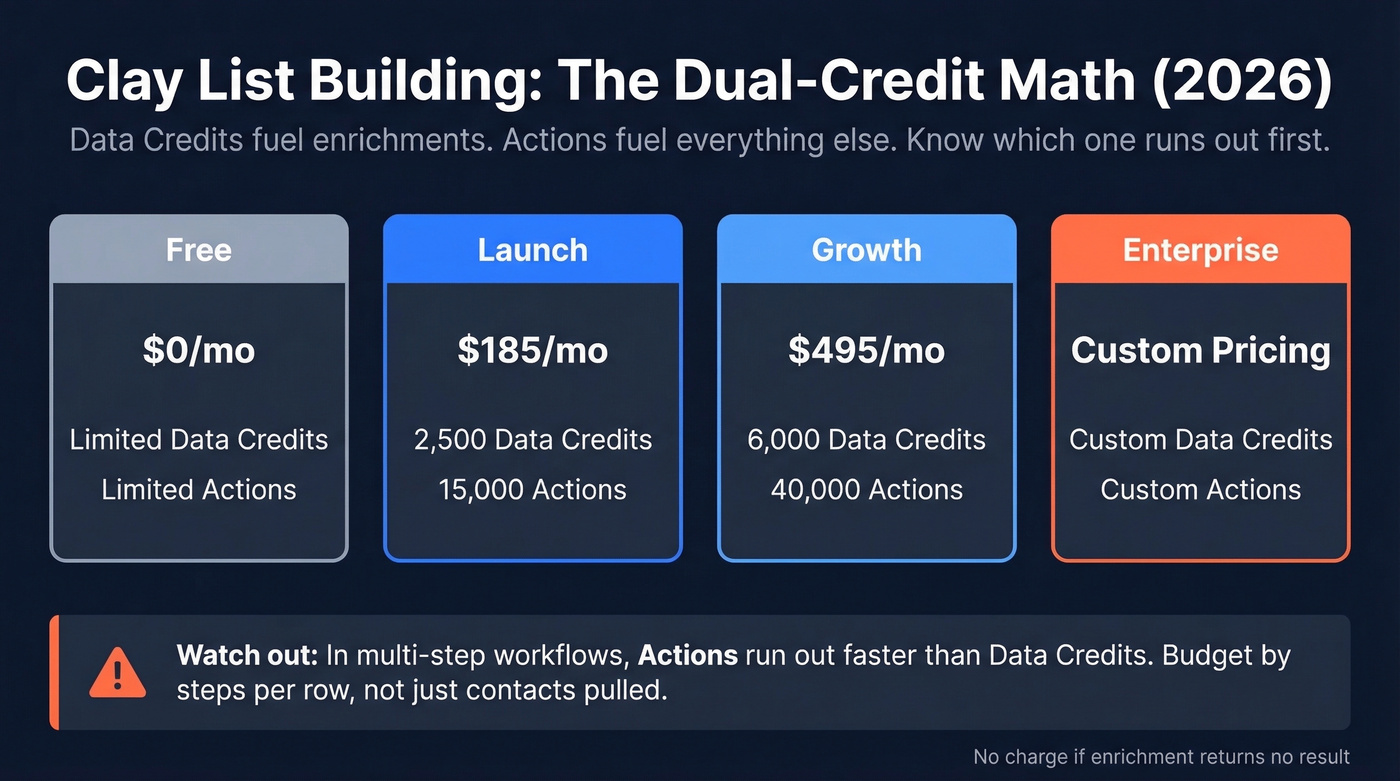
| Plan | Monthly Cost | Data Credits | Actions |
|---|---|---|---|
| Free | $0 | Limited | Limited |
| Launch | $185 | 2,500 | 15,000 |
| Growth | $495 | 6,000 | 40,000 |
| Enterprise | Custom | Custom | Custom |
Here's the part most people miss: in multi-step workflows, Actions become the constraint faster than Data Credits. Budget around how many steps you're running per row - enrichment plus AI plus exports plus CRM sync - not just how many contacts you're pulling.
Clay's guidance is that 90% of customers won't hit the Actions limit, but heavy enrichment users on Reddit dispute the day-to-day friction of the dual-meter model, even while noting 50-90% data cost cuts on top enrichments. One genuinely useful detail: if an enrichment returns no result, you aren't charged. That matters during experimentation.
For context, Clay is trusted by more than 300,000 GTM teams. It's a serious platform. But serious doesn't mean simple.

Clay's waterfall finds emails. But who verifies them? Prospeo's 5-step verification - with catch-all handling, spam-trap removal, and honeypot filtering - delivers 98% email accuracy on a 7-day refresh cycle. Meritt cut their bounce rate from 35% to under 4% by adding Prospeo after Clay enrichment.
Fix your Clay verification gap in under two minutes.
7-Step Workflow for Building Lead Lists in Clay
1. Start with "Find People." Filter by company attributes (industry, headcount, funding stage), job title keywords, and seniority. Tight filters up front mean fewer wasted enrichments downstream - especially if you’re doing lead enrichment across multiple sources.
2. Batch to ~50 leads per pull. Small batches let you QA results, catch filter mistakes, and test messaging angles before you scale. We've seen teams blow through a month of credits in one afternoon because they ran an unfiltered pull on 500 rows - don't be that team.
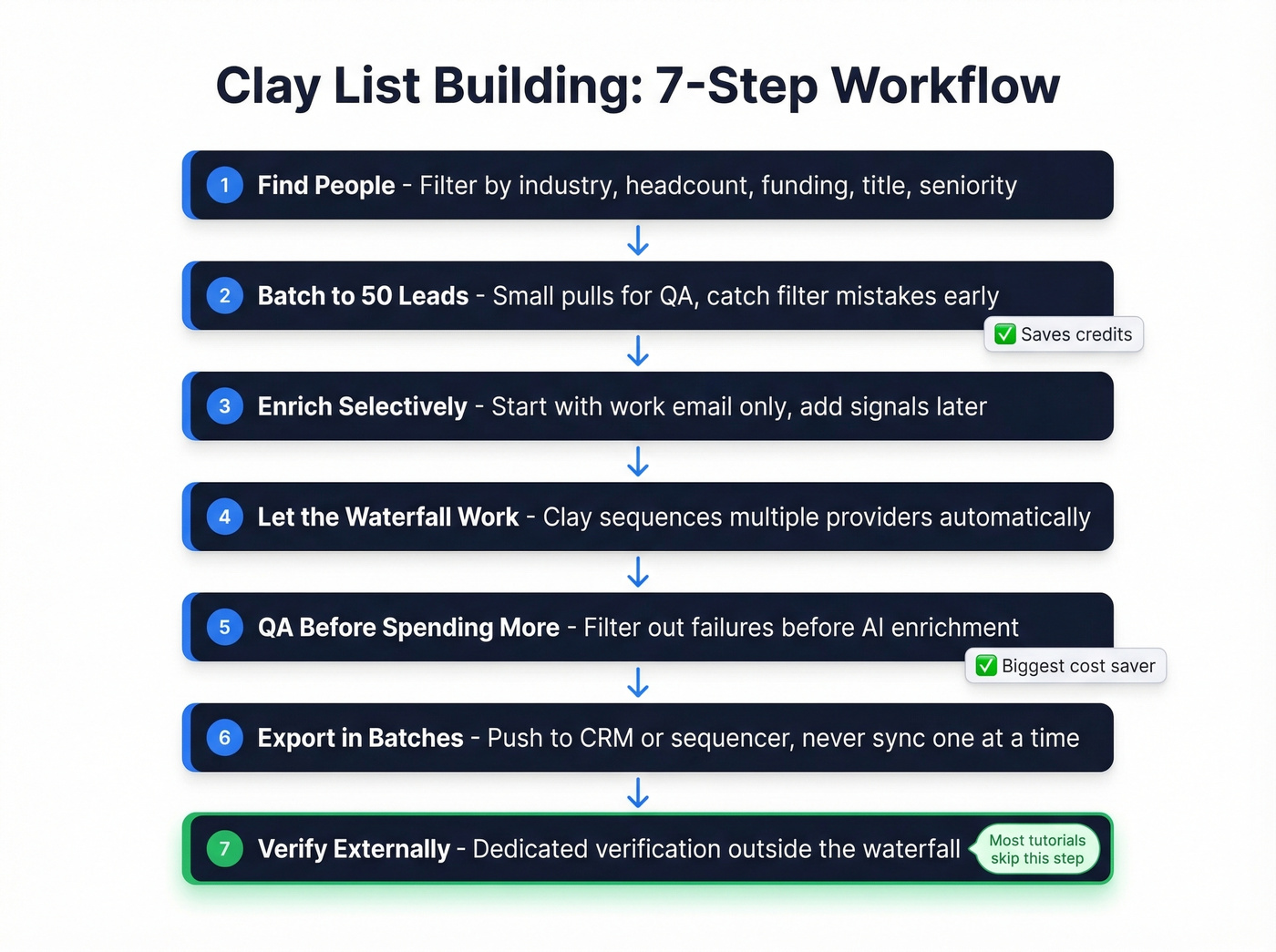
3. Enrich selectively. Start with work email only. Add phone numbers, company revenue, or technographics later, and only on leads that pass your ICP check.
4. Let the waterfall work. Clay runs your enrichment request through multiple providers - Hunter, LeadMagic, DropContact, and others - and returns the best validated result. You don't pick the provider; Clay's waterfall handles sequencing.
5. QA before spending more Actions. Filter out failures before running AI enrichment on qualified rows. This single habit saves more credits than any other trick in this article.
6. Export in batches. Push to Salesforce or HubSpot, send to Smartlead, Instantly, or Lemlist, or download CSV. CRM pushes cost Actions, so syncing one lead at a time is expensive - batch everything. (If you’re standardizing this handoff, it helps to document your lead generation workflow.)
7. Verify externally. This is the step most tutorials skip, and it's the one that saves your sender reputation.
The Verification Problem
Clay's waterfall is great at finding emails. Verification is where things fall apart.
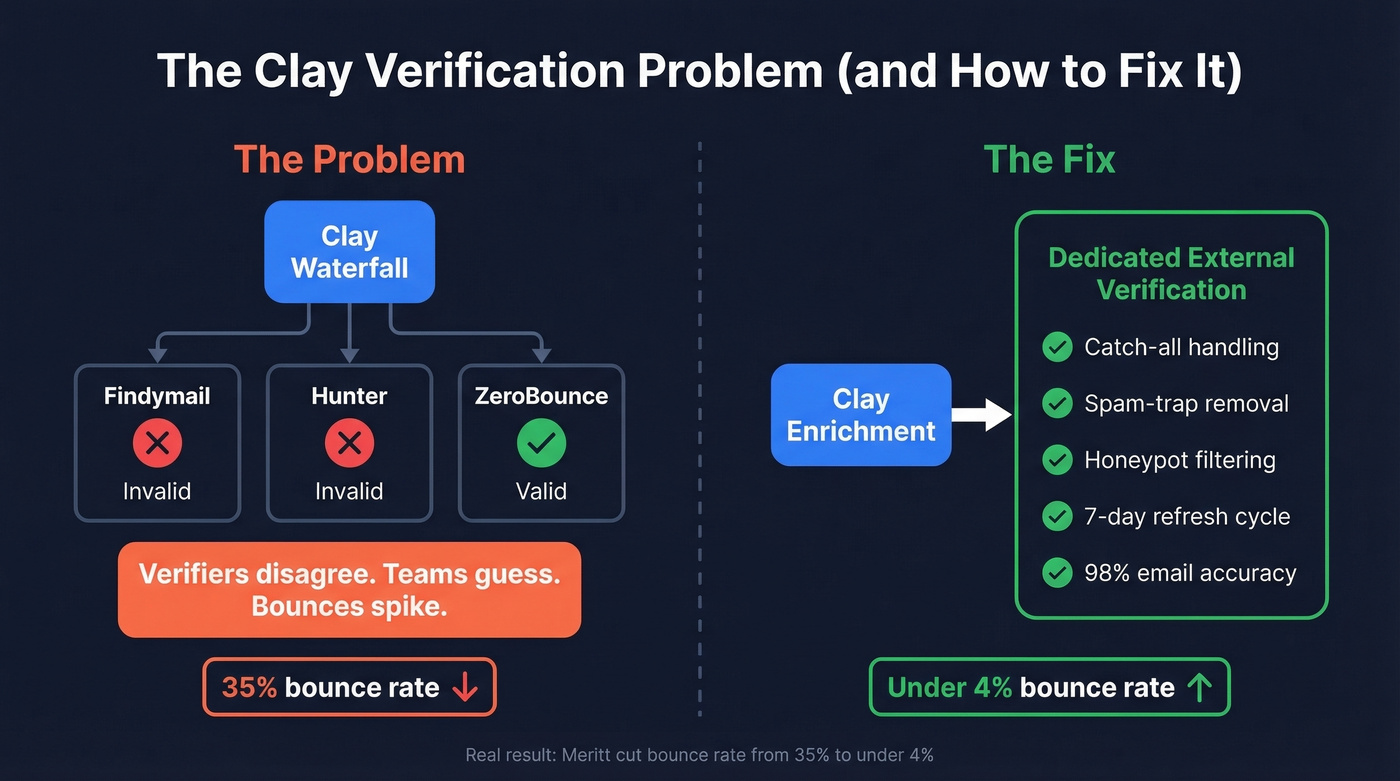
A thread on r/coldemail captures the frustration perfectly - verification providers inside Clay's waterfall frequently disagree. Findymail and Hunter mark an email "invalid" while ZeroBounce marks it "valid." Teams end up guessing which verifier to trust, and guessing wrong means bounced emails and damaged sender reputation (and a higher email bounce rate).

The fix is running a dedicated verification step outside the waterfall. Prospeo has a native Clay integration and uses a proprietary 5-step verification process - catch-all handling, spam-trap removal, honeypot filtering - that delivers 98% email accuracy on a 7-day refresh cycle versus the industry average of six weeks. Real results: Meritt cut their bounce rate from 35% to under 4% by adding this single verification layer after Clay's enrichment step. (If you’re comparing tools, start with Bouncer alternatives or a broader list of data enrichment services.)
When Clay Is Overkill
Here's our honest take: Clay is the best multi-signal research platform on the market right now. The orchestration layer justifies its cost when you're combining AI enrichment, conditional logic, and multiple data sources across hundreds of leads triggered by job changes, hiring surges, or funding rounds.
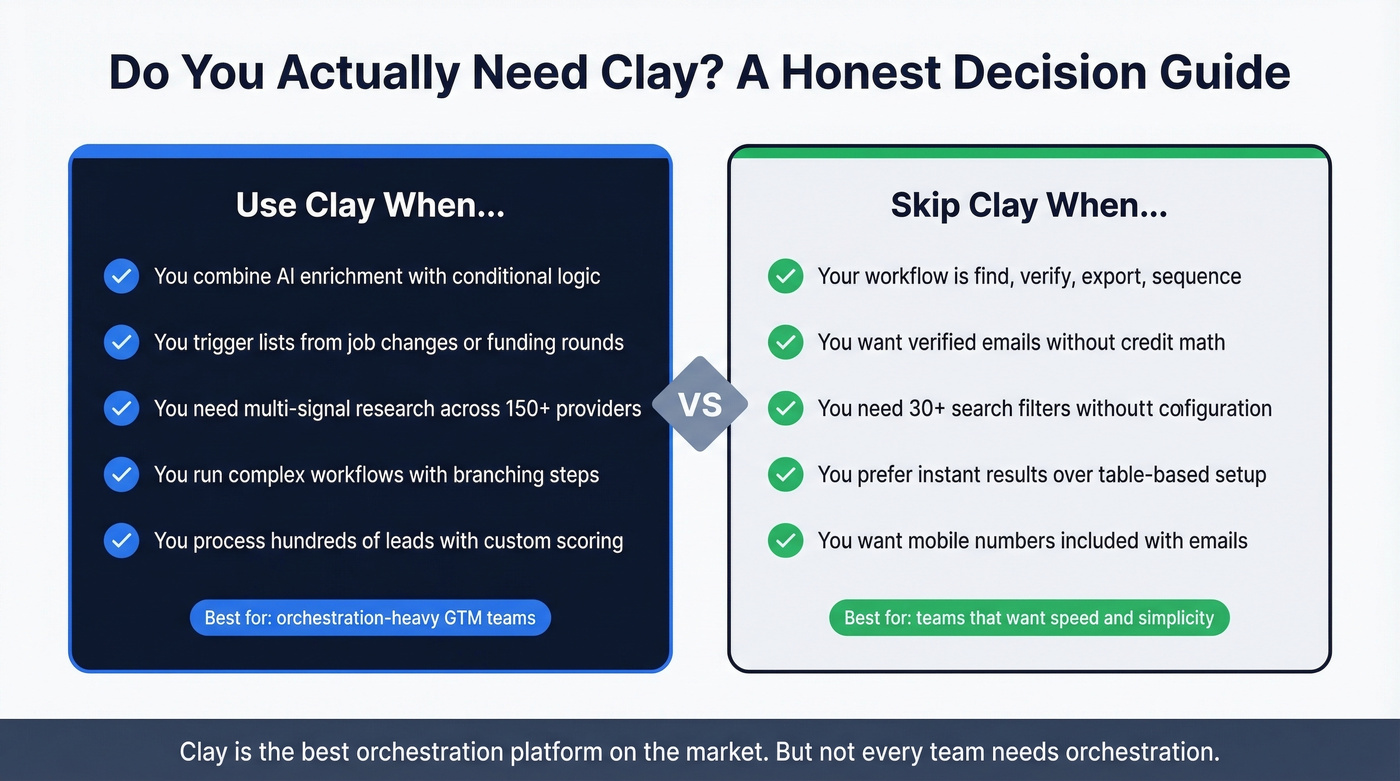
But if your workflow is basically "find contacts, verify, export, sequence"? You're overengineered. A standalone B2B database handles that loop faster and cheaper, without the learning curve or the dual-credit math. Skip Clay if you don't need the orchestration - you'll save time and money. (For options, see our breakdown of sales prospecting databases.)
If your Clay workflow is find-verify-export-sequence, you're paying for orchestration you don't need. Prospeo gives you 300M+ profiles, 30+ search filters, verified emails at 98% accuracy, and 125M+ mobile numbers - all at ~$0.01/email with no dual-credit math.
Skip the learning curve. Get verified leads in seconds.
FAQ
What are Clay Signals and when should I use them?
Clay offers six signal types: job change, job posting, promotion, new hire, news/fundraising, and brand mentions. You can schedule monitoring from daily to quarterly, though more frequent checks cost more credits. Signals shine for dynamic, ongoing list building triggered by real-time events - not one-time pulls.
What can Claygent do for lead lists?
Claygent is Clay's AI research agent that visits domains, finds specific information, and returns structured data. Navigator takes human-like actions - applying filters, filling forms, clicking buttons - to retrieve data from hard-to-scrape sites and connect to first-party data via custom MCP servers. By mid-2025, Claygent had surpassed 1 billion cumulative runs across 8,000+ teams. It's a power-user feature, not a beginner step.
Can I build lead lists without Clay?
Absolutely. For teams running a straightforward find-verify-export-sequence workflow, Clay's table-based architecture adds complexity you don't need. Standalone databases give you verified emails and mobile numbers with 30+ search filters for intent, technographics, and job changes - no workflow configuration required. Free tiers let you test a campaign before committing to any platform.