

Sales Mapping: Strategy, Frameworks, and Tools That Actually Work
Your top rep just quit. Nobody knows which accounts she was visiting, in what order, or why. Her "territory plan" was a mental map that walked out the door with her.
This is the moment most sales leaders realize they don't have a sales mapping problem - they have a documentation and data problem. Tools make mapping faster, but clean data and a simple framework make it possible in the first place. Here's the thesis: 80% of the value in sales mapping comes from verified data, a clear tiering model, and quarterly reviews. The remaining 20% is software. Most teams get this backwards - they buy a $1,250/year mapping tool, plot their accounts, and discover the underlying CRM data is full of bad addresses and outdated contacts. We've watched it happen more times than we'd like to admit. Don't be that team.
What You Need (Quick Version)
Not everyone reading this needs the same thing:
- Need a framework? Jump to the account-tier routing model - it's the highest-leverage section for field sales managers.
- Need a tool? Skip to the comparison table for pricing and recommendations by use case.
- Your data is a mess? Start with the data foundation section. Nothing else matters until that's fixed.
Three Types of Sales Maps
Sales mapping isn't one thing. It's three distinct disciplines that share a name, and conflating them is how teams end up buying the wrong tool for the wrong problem.
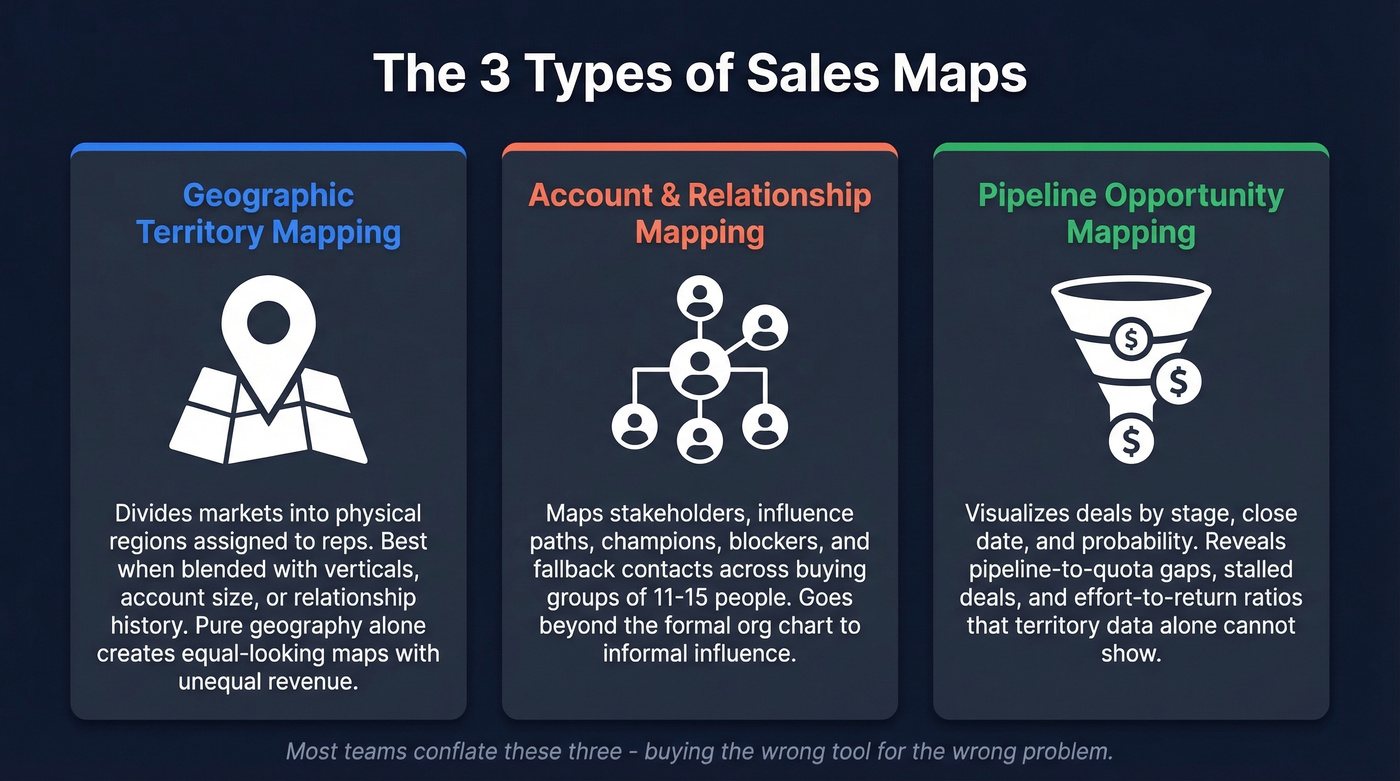
Geographic Territory Mapping
This is what most people picture: building a sales territory map by dividing a market into physical regions and assigning reps. But "geographic" is just the starting point. Territories can be carved by geography, account size, verticals, or relationship history. The best territory designs blend at least two of these dimensions - pure geography creates equal-looking maps with wildly unequal revenue potential.
Account and Relationship Mapping
This is the org-chart layer. Who are the stakeholders, what's their influence, and where are the gaps in your multi-threading? Modern B2B buying groups involve 11 to 15 stakeholders, which means a single champion isn't enough. Account mapping tools track decision-makers, influencers, blockers, and champions across every deal.
Go deeper than the formal org chart. Map informal influence paths - the VP who doesn't sign the contract but kills deals in executive reviews, the end-user whose opinion the CTO trusts more than any analyst report. Always identify fallback contacts: when your champion leaves mid-deal (and they will, eventually), you need a second thread already warm. If you're only mapping geography, you're missing the human terrain that actually closes deals.
Pipeline Opportunity Mapping
This is the revenue layer - visualizing where deals sit by stage, close date, and probability. Pipeline mapping answers questions like: "Which territories have pipeline-to-quota gaps?" and "Where are deals stalling at the proposal stage?" Key metrics include win rate by territory, lead stage velocity, and effort-to-return ratios. Less about physical location, more about identifying patterns that territory-level data alone can't reveal.
Why Territory Design Matters
"Better visibility" doesn't get budget approved. Revenue impact does.
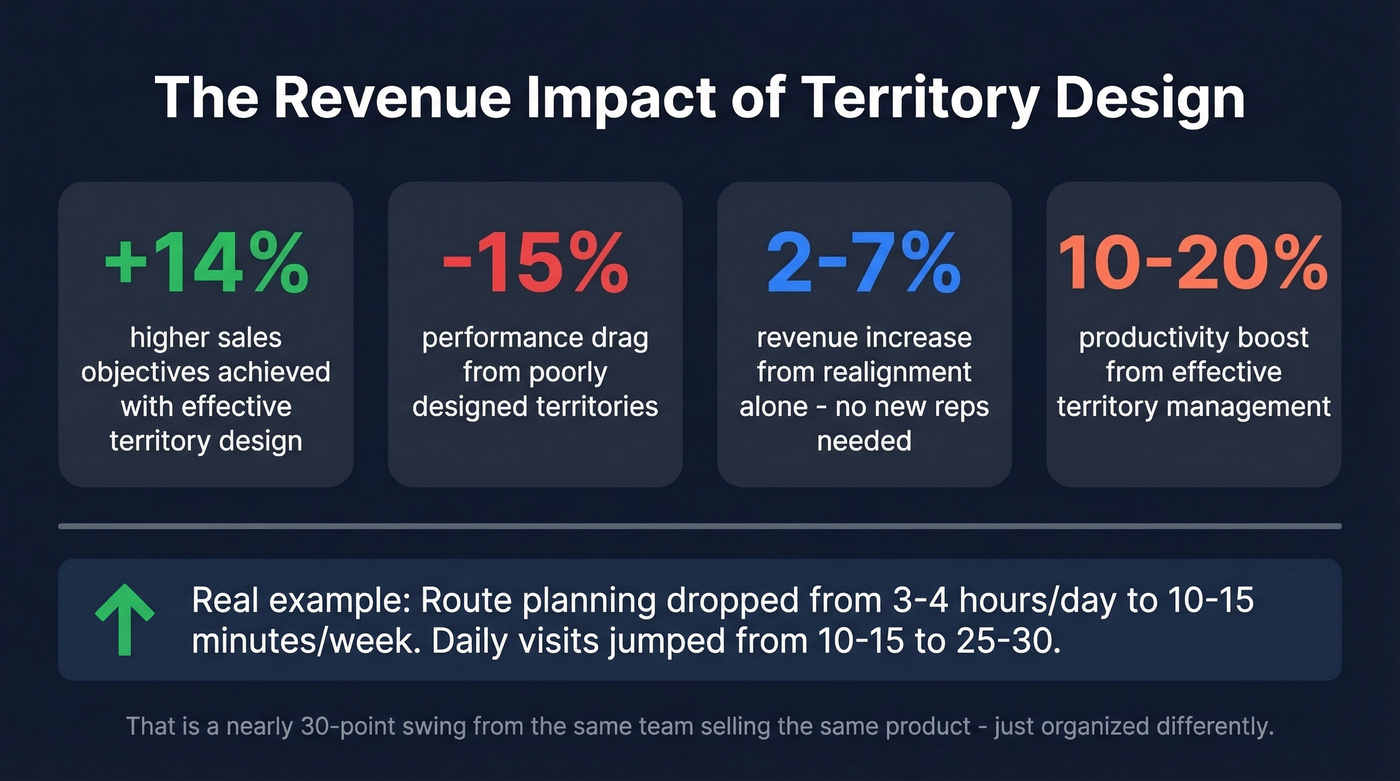
Effective territory design correlates with 14% higher sales objectives achieved. Poorly designed territories drag performance down by 15%. That's a nearly 30-point swing from the same team selling the same product - just organized differently. Territory realignment alone can increase revenue by 2-7% without adding a single rep. For a team doing $5M in annual revenue, that's $100K-$350K found in the existing book of business.
The field-level impact is even more tangible. Effective territory management produces a 10-20% productivity boost. One RepMove customer story puts it in concrete terms: route planning dropped from 3-4 hours per day to 10-15 minutes per week, and daily visits jumped from 10-15 to 25-30. For a rep averaging $22,560 in annual commissions, even a 7% lift means an extra $1,579 in their pocket. At 20%, that's $4,512. These aren't theoretical numbers - they're the difference between a rep spending half their day in the car guessing where to go next and a rep running an optimized route that prioritizes high-value accounts.
The Data Foundation - Fix This First
Here's the thing: nobody mentions this in mapping tool demos. You bought the software, plotted your accounts, and discovered the data is wrong and the contacts are stale. Your beautiful territory map is fiction. Every route it generates sends reps to the wrong buildings to meet people who don't work there anymore.
We've seen teams waste entire quarters on mapping tools before fixing their data. It's the most expensive mistake in this category.
Before you plot a single pin, your CRM needs a minimum dataset:
- Verified physical addresses, not just city and state
- Account status and renewal dates
- Opportunity stage and close date
- Last visit date and next scheduled visit
- Account tier and target visit cadence
Every item on that list degrades over time. People change jobs, companies move offices, deals go dark. If your data isn't being refreshed regularly, your map is decaying from the moment you build it.

This is where Prospeo fits into the workflow - not as a mapping tool, but as the data layer that makes mapping tools accurate. With 300M+ professional profiles, 143M+ verified emails at 98% accuracy, and 125M+ verified mobile numbers on a 7-day refresh cycle, it catches bounced emails, outdated contacts, and stale records before they corrupt your territory plan. The free tier gives you 75 email verifications per month plus 100 Chrome extension credits - enough to audit a territory segment and see how much of your data is actually current.
Hot take: If your average deal size is under $15K and your field team is under five reps, you probably don't need a dedicated mapping tool at all. You need clean data and a spreadsheet with an A/B/C tier column. The tool can come later. The data can't wait.

Bad data turns every sales map into fiction. Prospeo refreshes 300M+ profiles every 7 days - not every 6 weeks - so your territory pins, route plans, and account tiers reflect reality. At $0.01/email with 98% accuracy, fixing your data costs less than one wasted field visit.
Stop sending reps to meet people who don't work there anymore.
Account mapping falls apart when contacts go stale. With 143M+ verified emails and 125M+ verified mobiles, Prospeo fills the gaps in your org charts - champions, influencers, and fallback contacts - so one departure doesn't kill your deal. 83% enrichment match rate, 50+ data points per contact.
Multi-thread every account with contacts that actually pick up.
How to Build a Territory Map
Collect and Verify Your Data
Start with a clean CRM export. Pull every account with an address, contact info, opportunity data, and activity history. Then verify it. Stale data is the single biggest reason mapping projects fail - and most teams skip this step entirely because it feels like busywork. It's not.
Design Territory Boundaries
Resist the urge to draw neat geographic boxes. The best territories align to natural business clusters - groups of accounts that share a vertical, company size, or buying-cycle similarity. A territory with 50 mid-market SaaS companies in the same metro is more workable than a territory with 200 accounts scattered across three industries and four time zones.
Balance workload by account potential, not account count. This is the mistake that creates the "unfair territory" complaints every sales leader dreads. A rep with 40 enterprise accounts and a rep with 200 SMB accounts might have the same number of pins on a map, but wildly different workloads and revenue potential. Balance by revenue potential, growth indicators, and effort-to-convert - not just headcount.
For tool evaluation at this step, look for shapefile and KML import support, a draft territory mode so you can iterate before going live, and hierarchical parent-child territory structures for multi-level orgs.
Build an Account-Tier Routing Model
This is the framework that turns a static map into an operating system. Let's break it down by tier:
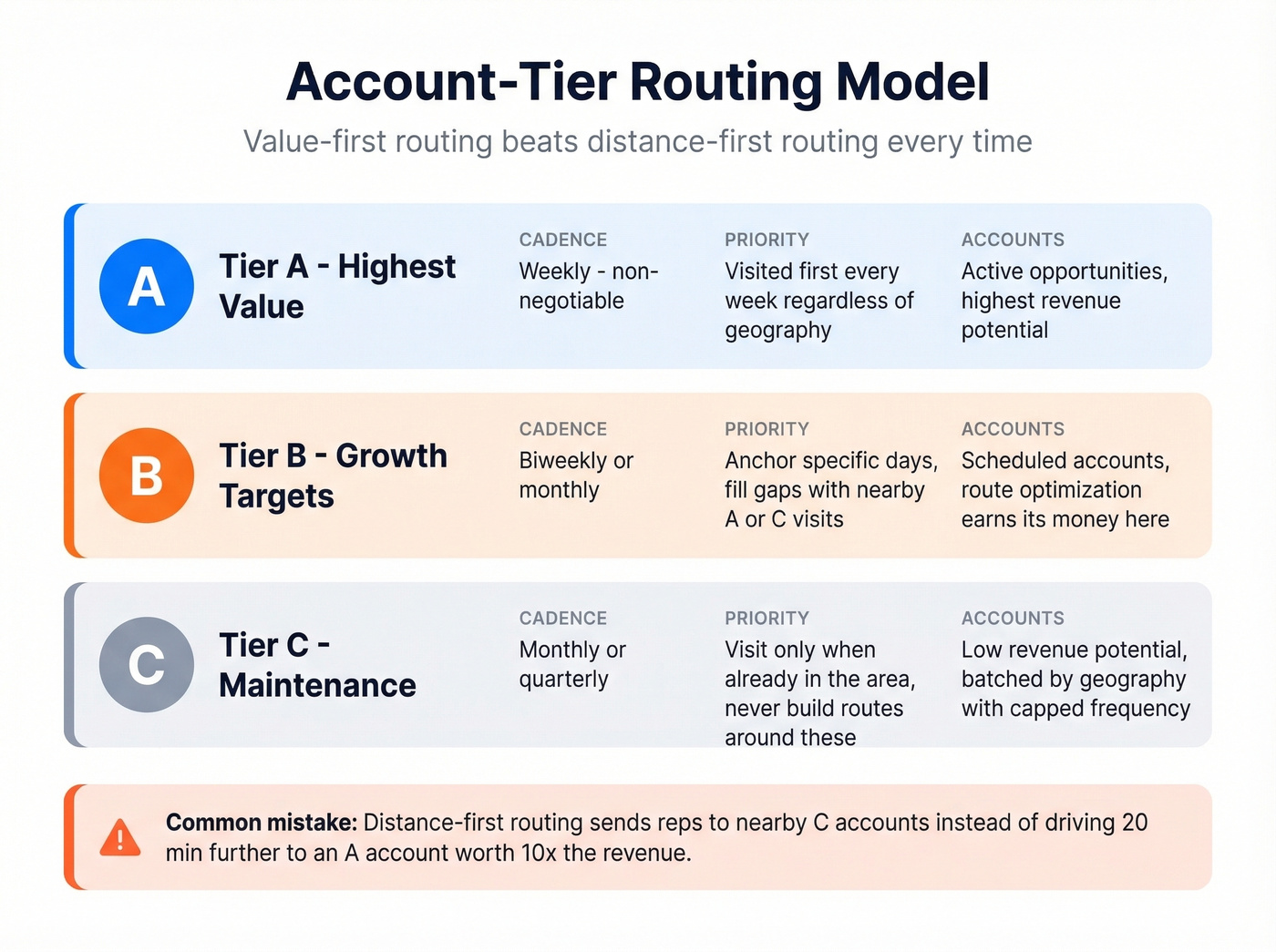
- A-level accounts get a non-negotiable weekly cadence. These are your highest-value accounts and active opportunities. They get visited first, every week, regardless of geography.
- B-level accounts anchor specific days plus opportunistic visits. Schedule them on set days, then fill gaps with nearby A or C accounts. This is where route optimization software earns its money.
- C-level accounts get batched by geography with capped frequency. Visit them when you're already in the area, but don't build routes around them. Monthly or quarterly touch is fine.
Distance-first routing is the most common mistake in field sales. Optimizing for "least miles driven" sounds efficient, but it often means reps spend their best hours on C-level accounts that happen to be nearby instead of driving 20 minutes further to an A-level account worth 10x the revenue. Value-first routing beats distance-first routing every time.
Set Visit Cadences by Tier
Lock cadences to tiers, not to individual rep preferences. A-level accounts get weekly visits. B-level accounts get biweekly or monthly. C-level accounts get quarterly at most.
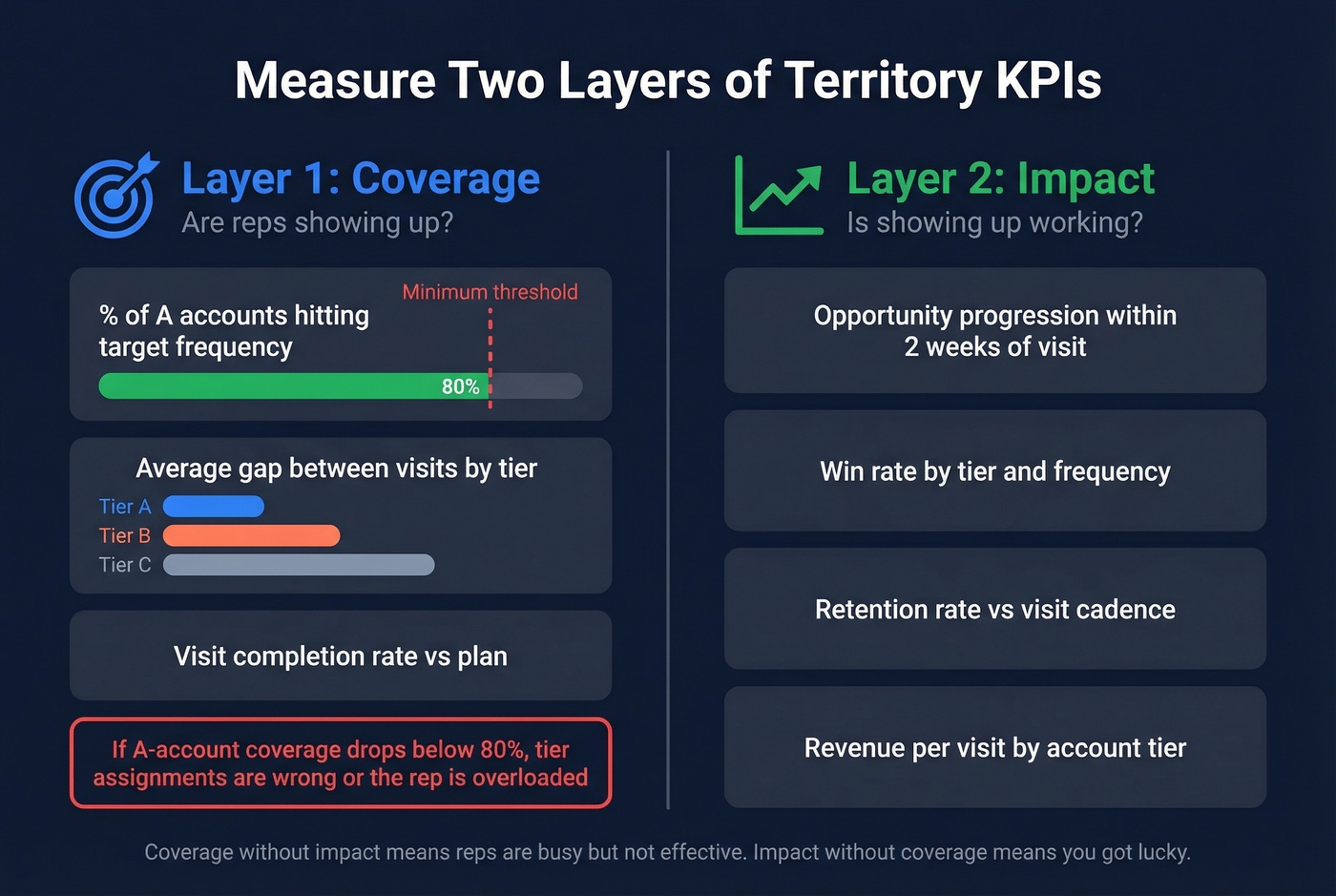
Then measure two layers of KPIs. First, coverage: what percentage of A accounts hit target frequency? What's the average gap between visits by tier? If your A-account coverage drops below 80%, something's broken - either the tier assignments are wrong or the rep is overloaded. Second, impact: track opportunity progression within two weeks of a visit, win rate by tier and frequency, and retention rate versus cadence. Coverage tells you whether reps are showing up. Impact tells you whether showing up is working.
Red Flags Your Territories Need Realignment
Don't wait for the annual planning cycle to catch these:
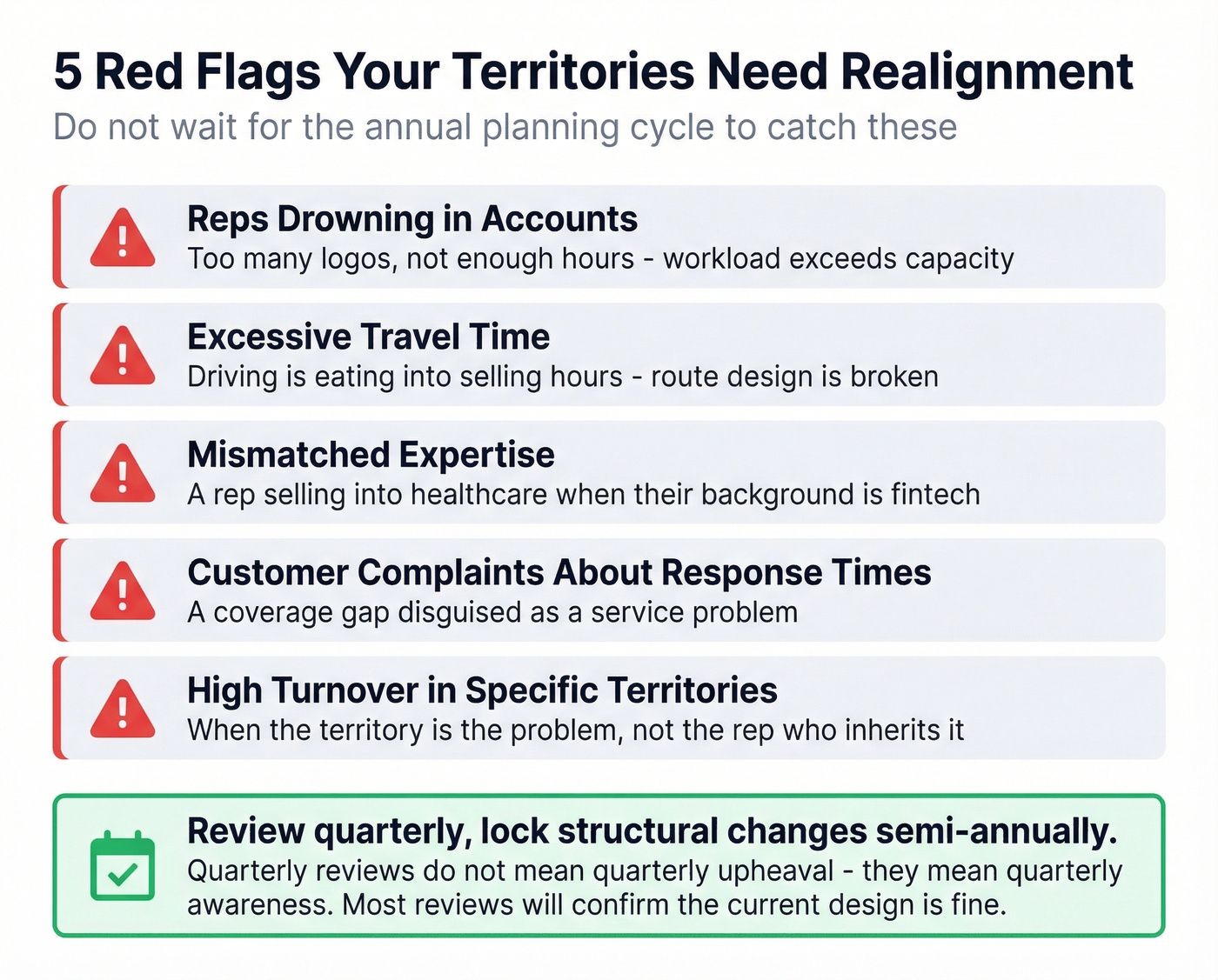
- Reps drowning in accounts - too many logos, not enough hours
- Excessive travel time eating into selling hours
- Mismatched expertise - a rep selling into healthcare when their background is fintech
- Customer complaints about response times - a coverage gap disguised as a service problem
- High turnover in specific territories - when the territory is the problem, not the rep
Market shifts, staffing changes, customer feedback, and persistent performance gaps that follow the territory (not the rep who inherits it) all warrant a fresh look too.
Kill the "once a year" myth. Review quarterly to catch misalignment early and lock larger structural changes semi-annually. Quarterly reviews don't mean quarterly upheaval - they mean quarterly awareness. Most reviews will confirm the current design is fine. But the ones that catch a problem early save months of lost productivity.
Best Sales Mapping Tools Compared
| Tool | Best For | Starting Price | Key Differentiator |
|---|---|---|---|
| Badger Maps | Solo/small field teams | $58/mo/user (annual) | Route + CRM in one |
| Salesforce Maps | SF enterprise shops | $75/user/mo (annual) | Native Salesforce integration |
| Maptive | Mid-market value | $1,250/user/yr | 70 stops/route |
| SPOTIO | B2B/B2C field teams | $39/user/mo | Activity tracking |
| eSpatial | Territory analytics | $1,495/user/yr | Data visualization |
| Maptitude | GIS-heavy analysis | $695/yr | Deep GIS features |
| BatchGeo | Quick visualizations | $99/mo | Drag-and-drop maps |
| ZeeMaps | Budget mapping | $19.95/mo | Lowest entry price |
| Geopointe | Salesforce add-on (lighter) | $70/mo | Salesforce-native, simpler |
| Google Maps | Zero-budget start | Free | Everyone has it |
Badger Maps
Use this if you're a solo rep or small field team that needs route optimization, CRM syncing, and territory visualization in one app without enterprise complexity. Business plans run $58/month per user on an annual contract, Enterprise $95/month.
Skip this if you're running a 50-person field org that needs hierarchical territory management, advanced analytics, or deep Salesforce automation. Badger Maps is built for the rep, not the VP of Sales Ops.
Salesforce Maps
Salesforce Maps is the obvious choice if your org already lives in Salesforce, and probably overkill if it doesn't. Everything renders on the map without data syncing or CSV exports: territories, accounts, opportunities, and activities all work directly against your Salesforce objects.
The tradeoff is cost and complexity. It's $75/user/month billed annually, as an add-on to your existing Salesforce licenses. Implementation isn't trivial either - you'll want an admin who knows both Salesforce and the Maps product. For enterprise Salesforce shops, it's the right call. For everyone else, it's like buying a commercial kitchen to make toast.
Maptive
Maptive hits the sweet spot for mid-market teams that need serious mapping capability without Salesforce lock-in. It supports up to 70 stops per route - well above the 40-50 stop benchmark many teams use - and can handle up to 100,000 locations per map.
Pricing is straightforward: $1,250/user/year for Individual, $2,500/year for Team plans. There's a 10-day free trial with no credit card required and a $250 45-day pass if you need more evaluation time. CRM integrations cover Salesforce, HubSpot, Pipedrive, Keap, and Zoho. For the price-to-capability ratio, Maptive is the best value in the category right now.
SPOTIO
SPOTIO targets B2B and B2C field sales teams with a focus on activity tracking and rep accountability - real-time visibility into who visited what, when, and what happened next. Capterra rates it 4.3/5 across 78 reviews with 83% positive sentiment. Pricing starts at $39/user/month, though their site is quote-based and requires a demo for exact numbers. That quote-based approach tells you these tools are built for procurement cycles, not for a sales manager who needs to decide this week.
eSpatial
eSpatial leans harder into territory analytics and data visualization than pure route optimization. At $1,495/user/year, it's positioned for teams that need to analyze territory performance, balance workloads visually, and present territory plans to leadership. Strong for sales ops teams running quarterly territory reviews. Less practical for individual reps who just need turn-by-turn directions to their next meeting.
Budget and Free Options
Maptitude ($695/year) is a full GIS platform with a steep learning curve - powerful for data-heavy analysis, not for casual mapping. BatchGeo ($99/month) lets you drag-and-drop a spreadsheet onto a map in minutes. ZeeMaps (from $19.95/month) is the cheapest paid option in this list. Geopointe (from $70/month) is a lighter Salesforce-native alternative to Salesforce Maps. And Google Maps is free - the right starting point for any rep who just needs to plot 20 accounts and figure out a driving order.
A spreadsheet plus Google Maps beats an expensive tool with bad data every time.
Cloud-Based vs. Desktop Mapping
Most modern tools handle online sales territory mapping through browser-based platforms, which means reps can update territories and routes from anywhere without installing desktop software. Cloud-based options like Maptive, eSpatial, and BatchGeo let distributed teams collaborate on the same territory plan in real time - a meaningful advantage over legacy GIS tools that lock data to a single machine. If your field team works across multiple regions, prioritize web-based tools that sync changes instantly.
Common Mistakes to Avoid
1. Distance-first routing instead of value-first routing. Optimizing for shortest drive time feels logical but sends reps to low-value accounts that happen to be nearby. Route around your A-tier accounts first, then fill gaps.
2. Static territory models with annual-only reviews. Markets shift faster than once a year. A competitor enters your strongest territory, a key rep leaves, a new vertical emerges - and you're stuck with last January's map until next January.
3. Mapping stale data. If your last data cleanup was six months ago, your map is already lying to you. Static territory models, spreadsheet reliance, and missing whitespace opportunities are the most common pitfalls we see.
4. Balancing by account count instead of account potential. Two territories with 100 accounts each can have wildly different revenue potential. Balance by TAM, deal size, and conversion likelihood - not pin count.
5. Ignoring data quality entirely. This is the meta-mistake that makes every other mistake worse. Run your prospect list through a verification tool before importing it into any mapping software. Bad data makes every other investment worthless.
If you want a deeper tool-by-tool breakdown, see our guide to sales mapping software: mapping tools.
If you're building territories from scratch, it helps to define your ideal customer profile first.
FAQ
What's the best tool for a solo field rep?
Badger Maps is the go-to - it combines route optimization, CRM integration, and territory visualization at $58/month on an annual plan. If budget is zero, Google Maps plus a well-maintained spreadsheet gets you 80% of the way there. Don't let the lack of a tool stop you from mapping.
How often should I realign territories?
Review quarterly, lock larger structural changes semi-annually. Annual-only reviews miss market shifts, rep departures, and emerging opportunities. Most quarterly reviews confirm the status quo - but the ones that catch problems early prevent months of lost revenue.
What data do I need before I start?
At minimum: verified physical addresses, account status, opportunity stage, last visit date, account tier, and target visit cadence. Unverified data produces an unreliable map.
Is free territory mapping software good enough?
For plotting pins and basic visualization, yes - ZeeMaps starts at $19.95/month and Google Maps is free. For route optimization, territory balancing, and CRM integration, you'll outgrow free tools within a quarter. The real question isn't free vs. paid - it's whether your data quality justifies the investment.
How do I keep my mapping data accurate?
Set up a verification workflow that refreshes records on a regular cycle - monthly at minimum, weekly for active prospecting lists. Re-verify your CRM export before each quarterly territory review. Data decay is constant: contacts leave, companies relocate, opportunities close. Treat verification as ongoing, not a one-time project.