

Salesforce Data Quality: The 2026 Playbook (From Messy CRM to Trusted Data)
Your VP of Sales asks for a list of Northeast customers with over $100K in ARR. Should take five minutes. Instead, you spend two hours untangling duplicate accounts, blank state fields, and contacts who left the company three years ago. The list you finally deliver has an asterisk: "best guess - data may be incomplete."
That's not a reporting problem. It's a salesforce data quality crisis, and it's costing more than anyone wants to admit. Nearly a third of CRM users say their company loses over 20% of annual revenue to poor-quality data. Gartner pegs the average annual cost of bad data at $12.9M per organization. Those numbers aren't abstract - they're the deals your team can't find, the segments you can't trust, and the forecasts that fall apart every quarter.
What You Need (Quick Version)
- Governance first. Assign a data steward, define your six quality dimensions, set a weekly 15-minute check-in.
- Enforce at the gate. Validation rules, required fields, picklists - stop bad data before it enters Salesforce.
- Verify what's already there. Deduplication handles structure; email and phone verification fixes accuracy. You need both.
Why CRM Data Degrades
B2B contact data decays fast. People change jobs, companies rebrand, phone numbers get reassigned. 79% of CRM admins reported that data decay accelerated during the pandemic - and it hasn't slowed down since.
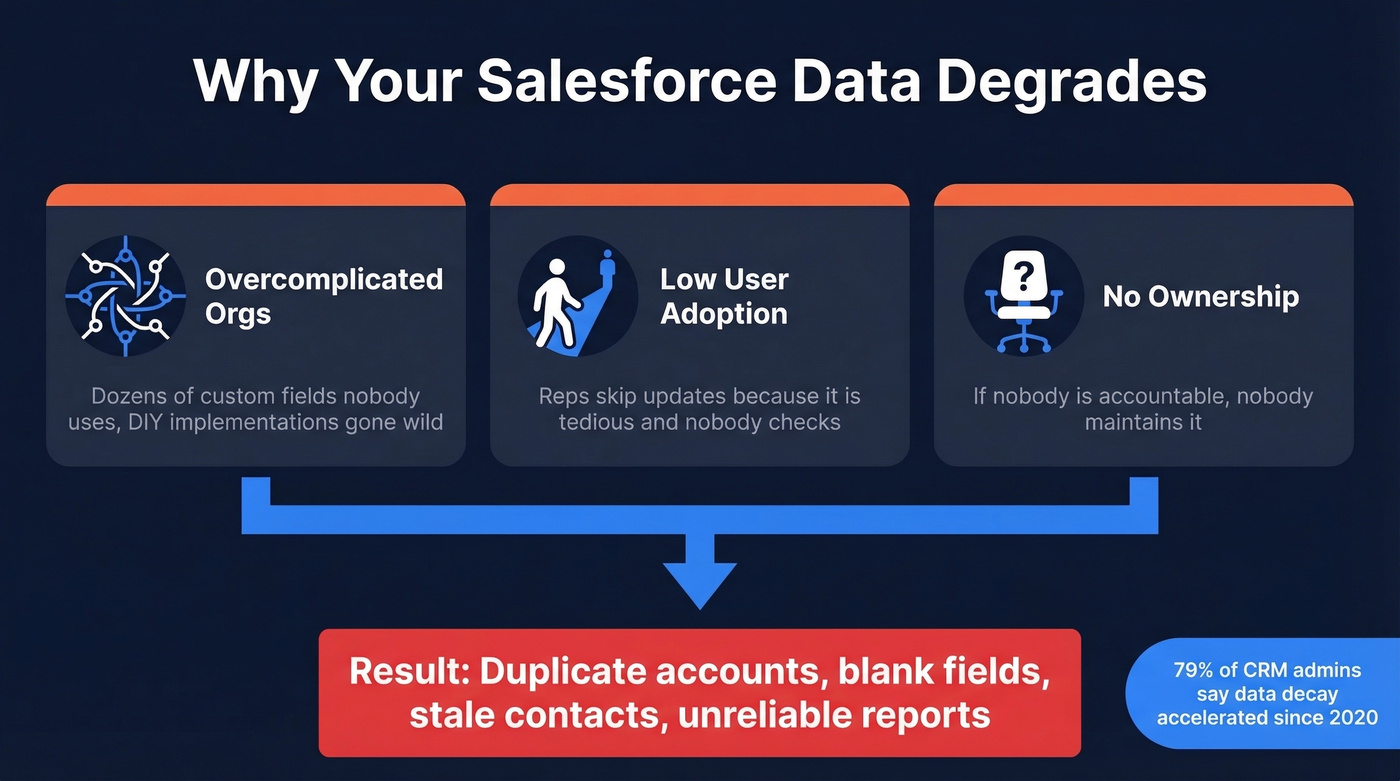
Decay isn't the only culprit, though. The three root causes we see over and over again come straight from the trenches:
- Overcomplicated orgs - DIY implementations with dozens of custom fields nobody uses.
- Low user adoption - reps don't update records because it's tedious and nobody's watching.
- No ownership - if nobody's accountable, nobody maintains it.
Reddit threads on r/salesforce echo this constantly: users can't segment clients or pull reliable lists because the org is a mess and nobody owns the cleanup. Here's the thing - most data problems are people problems, not technology problems. The tools exist. The discipline usually doesn't.
The Six Data Quality Dimensions
Before you fix anything, you need a shared vocabulary for what "quality" means. These six dimensions give your team a framework to measure against.

| Dimension | Definition | Example SF Report | What "good" looks like |
|---|---|---|---|
| Accuracy | Data reflects reality | Contacts with bounced emails | Low bounce rates and high deliverability |
| Completeness | Required fields populated | Leads missing phone or title | High fill rates on the fields you actually use |
| Consistency | Same format across records | State = "CA" vs "California" | Standardized values (picklists > free text) |
| Timeliness | Records updated recently | Contacts not modified in 90+ days | Fresh records with clear update SLAs |
| Uniqueness | No duplicate records | Duplicate Account report | Low duplicate rates |
| Validity | Data conforms to rules | Emails matching regex pattern | Records consistently pass validation rules |
In orgs without active governance, duplicate rates can hit double digits and field completeness drops far below what you need for trustworthy reporting. The point isn't perfection - it's getting to a place where your dashboards don't need an asterisk.
If six dimensions feel heavy, SalesforceBen references a simplified "3 Cs" framework: Compliance, Completeness, and Correctness. Use whichever framing gets buy-in from your team.
Salesforce Data Quality Governance
Stop treating this as a cleanup project. It's an ongoing operating function - and it needs ownership, cadence, and artifacts.
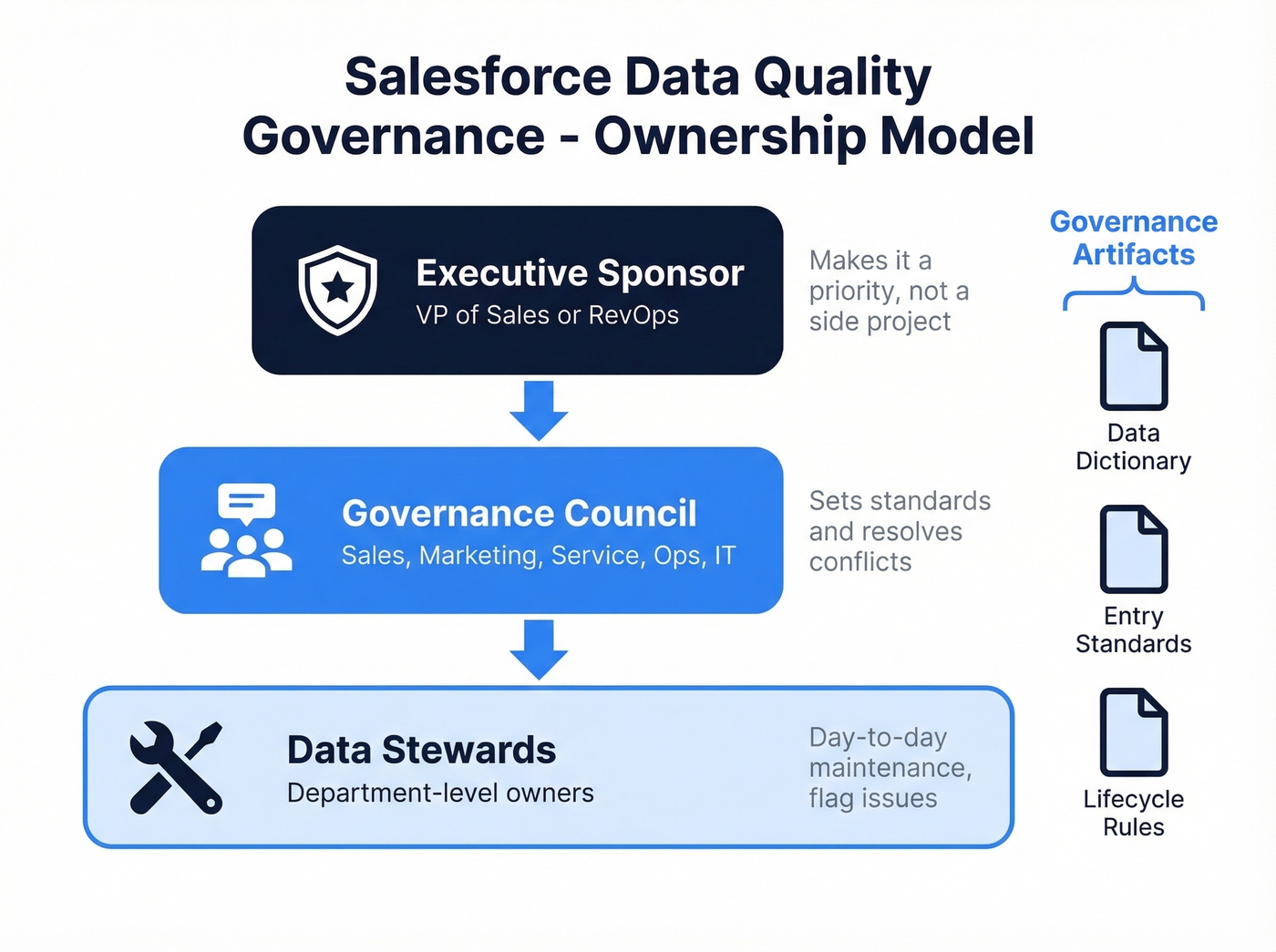
Ownership Model
You need three layers:
- An Executive Sponsor (VP of Sales or RevOps) who makes it a priority, not a side project.
- A Governance Council - cross-functional reps from sales, marketing, service, ops, and IT - that sets standards and resolves conflicts.
- Data Stewards at the department level who handle day-to-day maintenance and flag issues.
This is a RACI model in practice: the council is accountable, data owners set standards, stewards execute.
Governance Artifacts
Three documents keep everyone aligned:
- Data dictionary defining every field, its purpose, and acceptable values
- Entry standards covering naming conventions, required fields, and format rules
- Lifecycle rules governing how records get created, merged, updated, and archived
Operating Cadence
| Frequency | Activity |
|---|---|
| Weekly | 15-minute steward check-in - review flagged records and integration errors |
| Monthly | Dashboard review covering duplicate rates, field completeness, and freshness KPIs |
| Quarterly | Deep audit - run dedupe reports, validate completeness scores, review exception patterns |
| Annually | Full governance policy refresh, including validation rule updates and steward reassignment |
Phased Rollout
Don't flip every validation rule on at once - you'll break imports and alienate reps. Start with critical fields like email format and required industry, then add format enforcement for ZIP and phone, then layer in business logic rules.
Use permission sets to create bypass paths for trusted integrations and data loads.
Enforce Standards with Validation Rules
Validation rules are your first line of defense. They stop bad data at the point of entry, which is infinitely cheaper than cleaning it up later.
Three copy-paste formulas you can deploy today:
Email format validation:
REGEX(Email, "[a-zA-Z0-9._%+-]+@[a-zA-Z0-9.-]+\\.[a-zA-Z]{2,4}")
US ZIP code (5-digit or ZIP+4):
REGEX(MailingPostalCode, "\\d{5}(-\\d{4})?")
State code (2 uppercase letters):
AND(LEN(MailingState) = 2, UPPER(MailingState) = MailingState)
A caveat on the ZIP and state rules: if you sell internationally, these will reject valid non-US formats. Build in conditional logic or separate rules by country. International postal codes vary wildly - Canada uses alphanumeric, the UK uses a completely different pattern.
Beyond formulas, layer in required fields on key objects, picklists instead of free text where possible, and field dependencies to enforce logical relationships. For guided data entry, Screen Flows walk reps through a structured input process - especially useful for complex objects like Opportunities where you need stage-specific fields populated correctly. Progressive profiling through Screen Flows is an underrated strategy: instead of demanding 15 fields upfront and getting garbage, collect 4-5 fields per interaction and build a complete record over time. Reps actually comply, and your completeness scores climb without the usual pushback.

Validation rules stop bad formats. But they can't fix contacts who left the company two years ago. Prospeo enriches your Salesforce CRM with 98% verified emails, 125M+ direct dials, and 50+ data points per record - all refreshed every 7 days, not every 6 weeks.
Enrich your Salesforce records so your dashboards never need an asterisk again.
Deduplication: Native Tools and Limits
How Native Duplicate Management Works
Salesforce gives you three components out of the box:
- Matching Rules define what constitutes a potential duplicate - same email, or similar name plus company.
- Duplicate Rules determine what happens when a match is found: alert the user, block the save, or log it.
- Duplicate Jobs scan your existing database in bulk to surface duplicates after the fact.
Where Native Dedupe Falls Short
Salesforce's native tools are a starting point, not a solution. Let's break down the gaps.
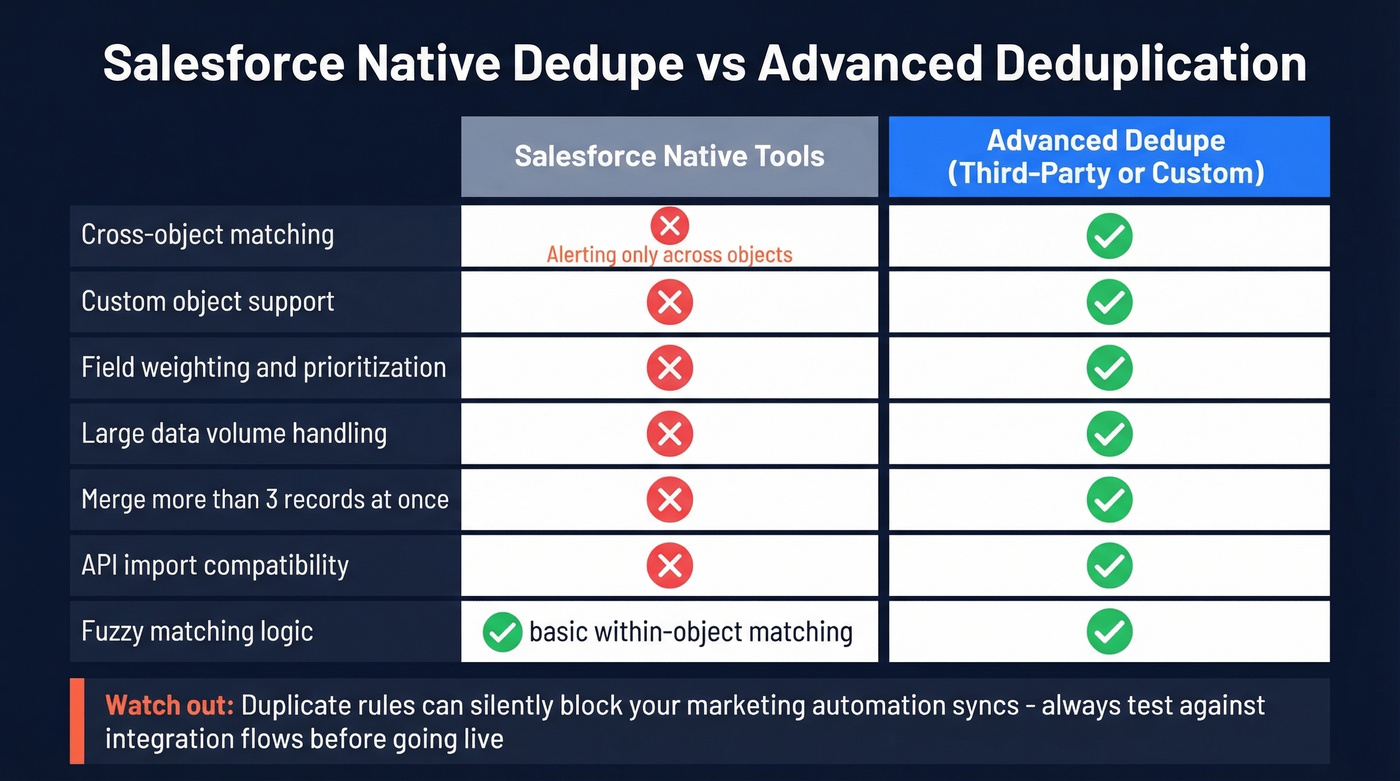
| Limitation | Impact |
|---|---|
| Edition gating | Duplicate Jobs are typically limited to higher editions like Performance/Unlimited |
| Cross-object blind spots | Jobs run within-object only; cross-object is alerting only |
| Merge cap | Max 3 records per merge operation |
| LDV risk | Jobs can fail in orgs with large data volumes |
| Custom objects | No compare/merge on custom objects |
| No field weighting | Can't prioritize email match over first-name match |
| Import blocking | Duplicate rules can inadvertently block API imports |
That last row trips up more teams than you'd expect. You set up duplicate rules to protect manual entry, and suddenly your marketing automation sync starts silently dropping records. Always test duplicate rules against your integration flows before going live.
Custom Dedupe Patterns
When native tools aren't enough, escalate in tiers:
- Native Matching + Duplicate Rules for straightforward scenarios
- Record-Triggered Flows using Get Records + Decision elements to catch duplicates on custom objects
- Apex triggers for complex cross-object logic
One useful pattern: combine Flows with Duplicate Rules to bypass alerts for trusted integrations while still protecting manual entry.
Verify and Enrich Contact Data
Every data quality guide tells you to deduplicate and standardize. Almost none address the fact that a huge chunk of your contact data is simply wrong. Emails bounce. Phone numbers disconnect. People change jobs. A record can pass every validation rule, survive every dedupe scan, and still contain a dead email address.
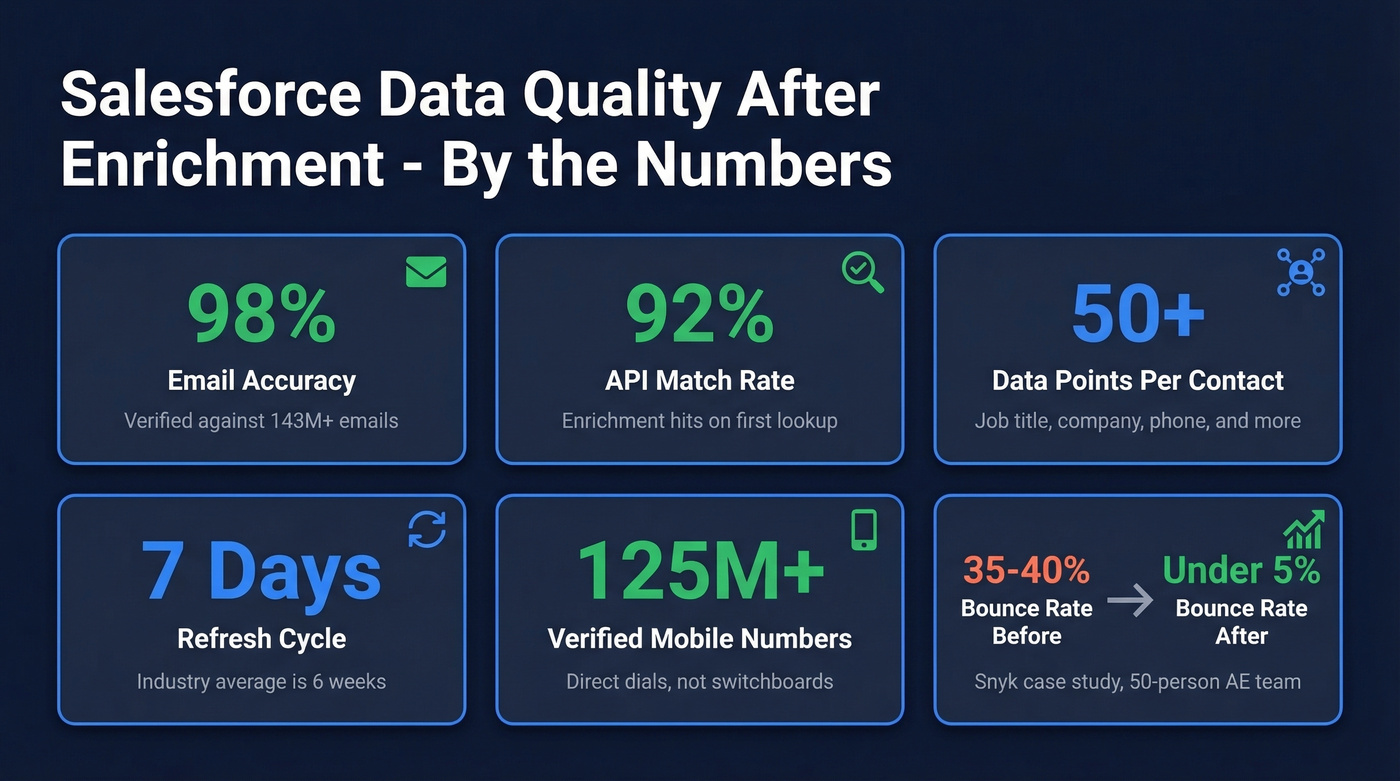
This is the overlooked pillar of salesforce data quality.
Prospeo's native Salesforce integration verifies and enriches contact records directly inside your CRM, drawing from 300M+ professional profiles - 143M+ verified emails and 125M+ verified mobile numbers. The numbers speak for themselves: 98% email accuracy, 92% API match rate, 83% enrichment match rate returning 50+ data points per contact, all on a 7-day refresh cycle. That refresh cadence matters. The industry average is six weeks, which means most enrichment tools are already stale by the time you use the data.
We've seen this play out at scale. Snyk's 50-person AE team was running bounce rates of 35-40% before implementation. After switching, bounces dropped below 5% and AE-sourced pipeline jumped 180%. That's not a "nice cleanup" - that's a revenue shift.
The free tier covers 75 email verifications per month with full Salesforce sync. Enough to test on a single territory and see the difference before committing budget.
Deduplication fixes structure. But your real Salesforce data quality problem is decay - stale emails, dead phone numbers, outdated job titles. Prospeo's enrichment API returns verified contact data at a 92% match rate for ~$0.01 per email, with native Salesforce and HubSpot integrations.
Replace decayed CRM records with verified data that connects you to real buyers.
Third-Party Tools Compared
Here's how the major tools break down by category and use case:
| Tool | Primary Function | Best For | Differentiator | Est. Pricing |
|---|---|---|---|---|
| Prospeo | Verification & enrichment | Email/phone verification | 98% email accuracy, 7-day refresh, native SF sync | Free tier; ~$0.01/email |
| Cloudingo | Deduplication & merging | Mid-market dedupe | SF-native, handles what Duplicate Management can't | ~$500/mo+ |
| Plauti Deduplicate | Dedupe & data management | Complex dedupe at scale | Advanced matching + bulk operations | ~$500-2,000/mo |
| DataGroomr | ML-powered deduplication | Small orgs, ML matching | In-record Lightning component, undo via Auditr | ~$99/mo+ |
| DemandTools (Validity) | Bulk data management | Enterprise bulk ops | Legacy standard, deep SF integration | ~$1,000-3,000/mo |
| Informatica Cloud MDM | Enterprise data quality | Multi-system enterprise | Cross-system unification, identity resolution | ~$2,000-10,000+/mo |
Our recommendations: For deduplication, start with Cloudingo or Plauti - they handle the merge caps, custom object limitations, and LDV issues that native tools can't. For contact data verification and enrichment, Prospeo is the strongest option at any price point. For enterprise-scale data management across multiple systems, look at Informatica or DemandTools if you've got the budget and the implementation team.
Skip DataGroomr if you're dealing with large data volumes or custom objects - it's interesting for smaller orgs but we haven't tested it deeply enough to recommend it broadly.
Real talk: if your average deal size is on the smaller side, you don't need Informatica-level tooling. A combination of native dedupe rules plus a solid verification tool gets you 80% of the way there at 10% of the cost. Save the enterprise MDM budget for when you're actually operating at enterprise scale.
Prepare Your Data for AI
You turn on Einstein Lead Scoring, and the model keeps surfacing junk leads. You dig in and discover 40% of lead records have missing or outdated contact info. The AI isn't broken - your data is.
Salesforce's AI stack - Einstein, Agentforce, Data Cloud - all depend on clean, complete, fresh records. Data Cloud acts as the unification layer, pulling customer data from multiple systems into a single source of truth. Einstein and Agentforce sit on top, running predictions, scoring, and automated actions. The entire stack follows the oldest rule in computing: garbage in, garbage out.
65% of businesses have adopted CRM with generative AI capabilities, yet fewer than half of business leaders say they can reliably generate timely insights from their data. That gap isn't a technology problem - it's a data problem.
If you're planning to invest in any Salesforce AI feature in 2026, invest in your data quality first. The models will thank you.
Salesforce Data Quality FAQ
How often should I audit Salesforce data quality?
Weekly steward check-ins plus monthly KPI dashboards is the sweet spot for most teams, with a quarterly deep audit and an annual policy refresh. As a baseline, review duplicates, required-field fill rates, and "last modified" freshness every month, then set a 90-day target to improve the worst metric by 20-30%.
What's an acceptable duplicate rate?
A practical target is to get out of double digits and stay there - aim for under 5% duplicates on Accounts and Contacts within 90 days, then keep pushing down. Start by measuring with a Duplicate Account report, pick one merge policy, and enforce it with matching rules plus a dedicated dedupe tool if you're at scale.
Can native tools handle deduplication at scale?
Native Duplicate Management helps, but it hits limits fast: Duplicate Jobs are often edition-gated, merges cap at 3 records, and cross-object matching is limited. For large data volumes, custom objects, or complex match logic, tools like Cloudingo or Plauti are usually worth the investment.
Does bad data quality affect Salesforce AI features?
Yes - missing fields, stale contacts, and duplicates directly degrade Einstein scoring, Agentforce actions, and Data Cloud segmentation. If 20-40% of Leads lack key attributes like title, industry, phone, or verified email, expect noisier predictions and weaker routing. Fix completeness and verification first, then retrain and monitor lift.
What to Do Next
If you want salesforce data quality you can actually trust - not just "clean enough for a dashboard screenshot" - do it in this order:
- Assign ownership and cadence (stewards + monthly KPIs).
- Block bad inputs (validation rules, picklists, Screen Flows).
- Reduce duplicates (native rules first, then Cloudingo/Plauti if needed).
- Verify and refresh contacts so "valid-looking" records aren't quietly wrong.
Do those four things consistently, and your CRM stops being a liability. It starts acting like the system of record it was supposed to be.