

How to Write a Meeting Invitation Email That Actually Gets Accepted
We've declined more meetings over bad invites than bad timing. And we're not alone - 71% of meetings are deemed unproductive, costing US businesses an estimated $37 billion a year. Every time you schedule a meeting invitation email, you're either earning someone's time or wasting it.
The invite is where meetings go right or wrong.
Quick version: State the purpose in the subject line. Answer five questions in the body - Why, Who, How long, When, How. Send a calendar invite the second someone confirms. Need templates? Jump to the copy-paste section.
The 5-Question Framework
Every meeting invite should answer five questions before the recipient finishes reading. Why are we meeting? Who needs to be there? How long will it take? When - with specific proposed times? And how - video, phone, or in person?
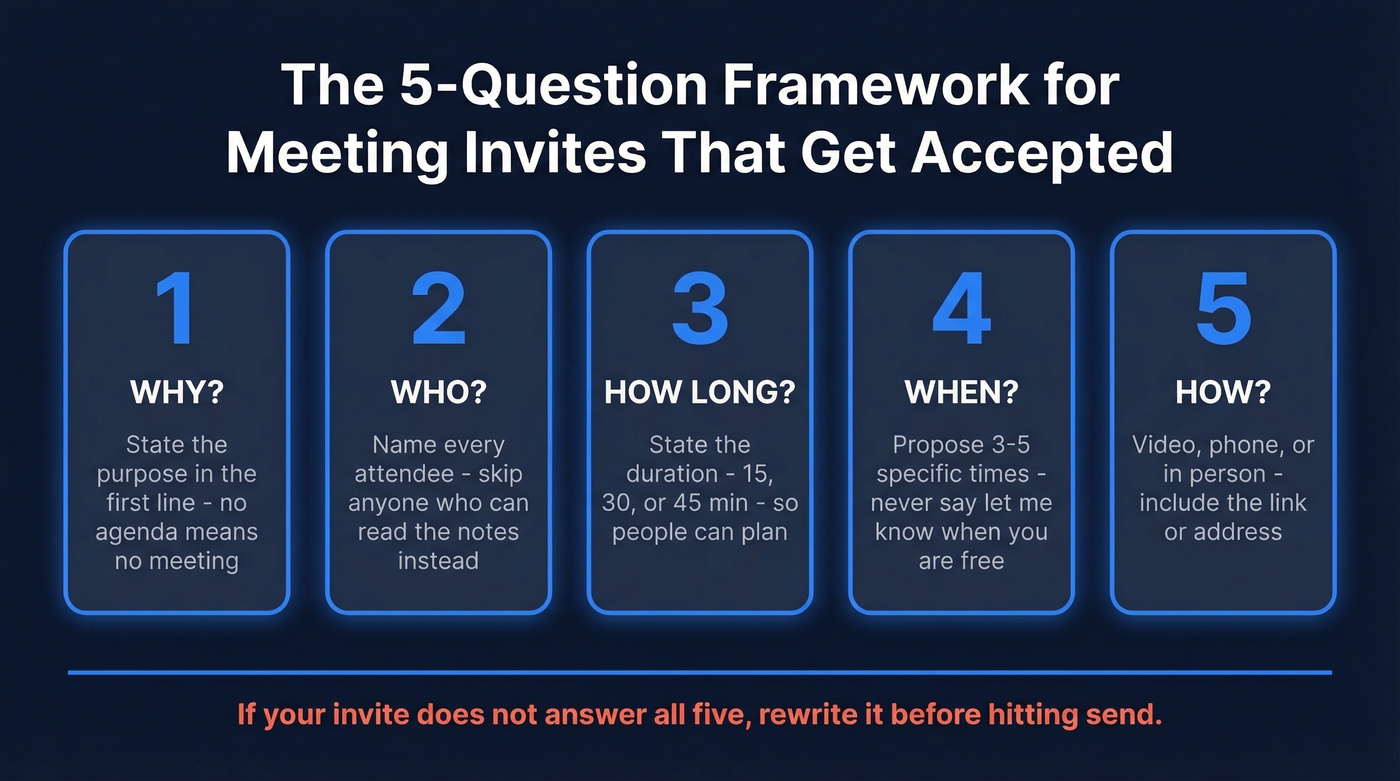
Put the purpose in the first 140 characters or so. If there's no agenda, cancel the meeting. You don't need a "quick sync." You need a Slack message.
One critical rule: propose 3-5 specific times. Never write "let me know when you're free." That pushes scheduling work onto the recipient and adds 5-8 back-and-forth messages for external meetings, turning a 30-second confirmation into a week-long thread.
Subject Lines That Get Opened
A Belkins analysis of 5.5 million emails found that 2-4 word subject lines hit a 46% open rate - the highest of any length bracket. Personalized subject lines outperformed generic ones by 11 percentage points. Keep subject lines under 50 characters for mobile; 33 characters guarantees full visibility across Apple and Android devices.
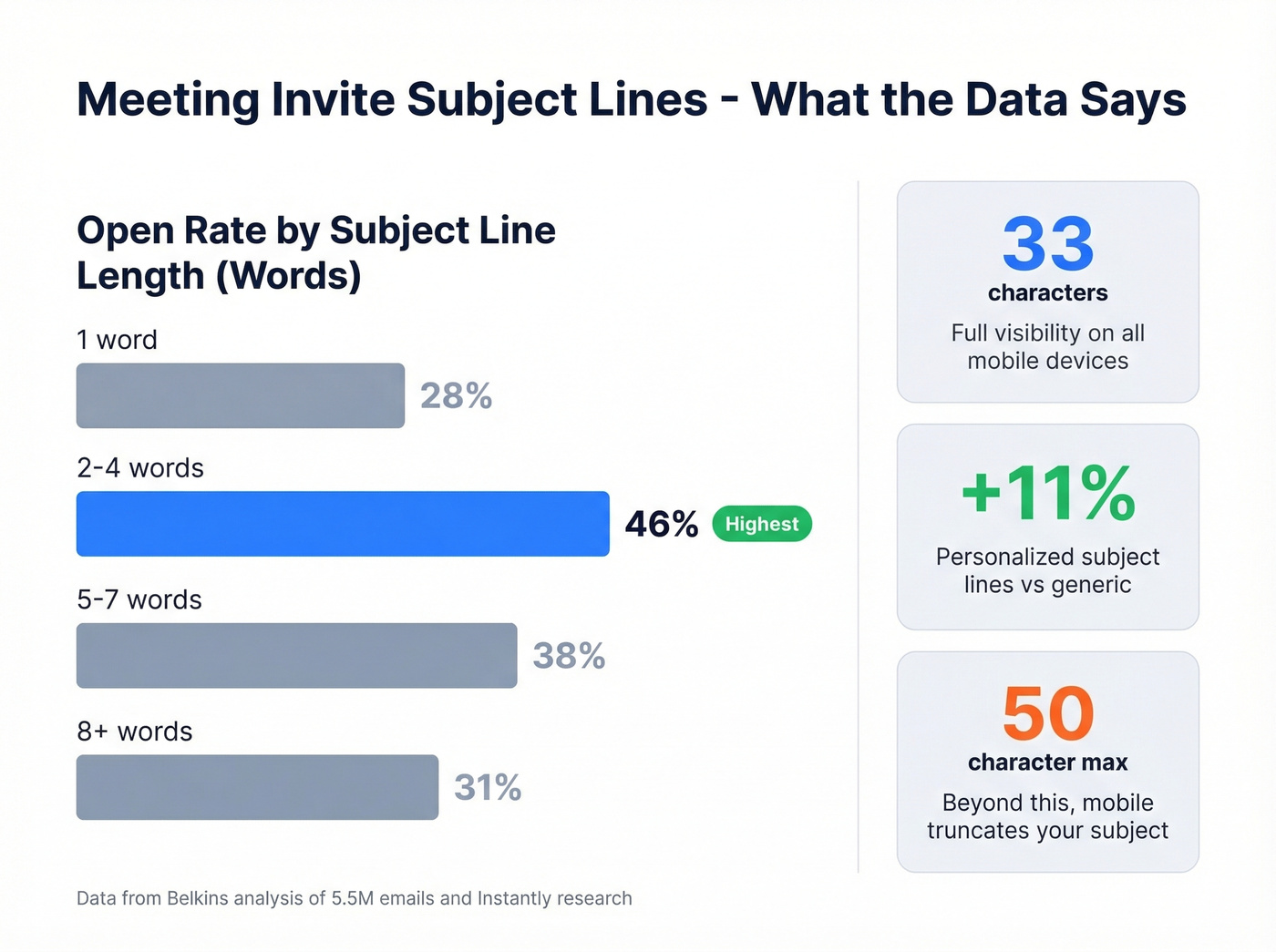
Short beats clever every time. Set your "from" field to [Name] from [Company], not just your email address. Then use subject lines like these:
- Internal: "Q3 Pipeline Review - Tuesday"
- Client: "Onboarding Kickoff - [Company]"
- Cold request: "15 Min - [Specific Value Prop]?"
- Interview: "Interview: [Role] - [Date]"
Copy-and-Paste Templates
Most meeting invites fail because they're written like announcements, not requests. Every template below makes it easy to say yes.
Internal Team Meeting
Subject: Sprint Retro - Thursday 3pm ET
Hi team - Bi-weekly sprint retro this Thursday. Agenda:
- What shipped last sprint
- Blockers for next sprint
- Resource asks
30 min | Zoom (link in calendar invite). Reply by EOD Wednesday if this time doesn't work.
One-on-One
Subject: 1:1 - Career Growth Check-In
Hey [Name] - Want to grab 30 minutes to talk through your Q3 goals and the team lead opportunity. Tuesday 10am, Wednesday 2pm, or Thursday 11am ET - which works? I'll send the invite.
Client or External Meeting
Subject: [Your Company] x [Their Company] - Implementation Kickoff
Hi [Name] - Now that the contract's signed, let's align our implementation teams on timeline, technical requirements, and key contacts.
45 min | Video call. A few options:
- Mon 3/17 at 1pm ET
- Tue 3/18 at 10am ET
- Wed 3/19 at 2pm ET
Or grab a slot on my [scheduling link]. I'll send the calendar invite once you confirm.
Cold Meeting Request
This is the hardest one to get right, because you're asking a stranger for time they didn't plan to give you. The trick is making the value obvious in under ten seconds.
Subject: 15 Min - Cut Your List Bounce Rate
Hi [Name] - I noticed [Company] is scaling outbound this quarter. We help teams like yours cut email bounce rates from 30%+ down to under 4%, which directly protects domain reputation and improves deliverability.
Worth 15 minutes Thursday 3/20 at 11am, Friday 3/21 at 2pm, or Monday 3/24 at 10am ET? Either way, happy to send a one-pager instead.
Interview Scheduling
Subject: Interview - Senior PM Role, March 20
Hi [Name] - We'd like to schedule your second-round interview for the Senior Product Manager position with [Interviewer], VP of Product, and [Interviewer], Engineering Lead.
60 min | Google Meet. Available slots: Thu 3/20 at 10am PT, Fri 3/21 at 1pm PT, or Mon 3/24 at 11am PT.
To prepare: Review the product roadmap doc (attached) and bring 2-3 questions about the team's current priorities. Please confirm and I'll send the calendar invite with all details.

That cold meeting request template above? It only books meetings if it reaches a real inbox. Prospeo's 98% email accuracy and 5-step verification keep your bounce rate under 4% - so your perfectly crafted invite doesn't die in a spam folder.
Stop writing great invites to bad email addresses.
Handling Time Zones
One-third of meetings span multiple time zones. Timezone abbreviations are a trap - CST means Central Standard Time in the US and China Standard Time in Asia. Use UTC plus city names: "2:00 PM UTC / 10:00 AM New York / 3:00 PM London." Check overlapping hours at time.is/compare before proposing times.
Look, scheduling someone for 7am their time without asking is the calendar equivalent of calling before sunrise. If you don't know their working hours, ask.
Email Invite vs. Calendar Invite
Email gets attention; calendar gets commitment. 57% of meetings happen ad-hoc with no calendar invite at all, and those are the ones people miss.
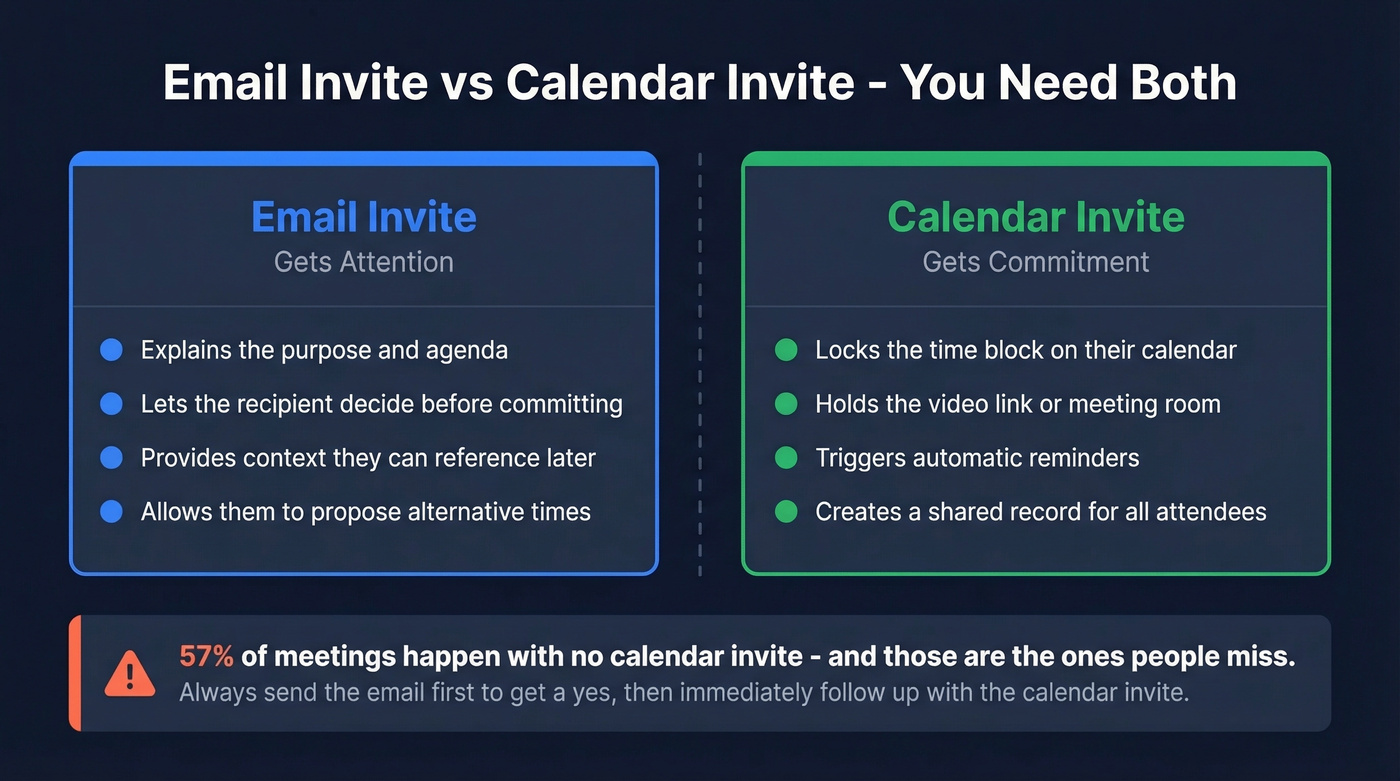
Always send both. The email gives context and lets the person decide. The calendar invite locks the block, holds the video link, and triggers a reminder. Skip either one and you're gambling on memory.
Mistakes That Kill Your Invite
Calendar bombing. Dropping a meeting on someone's calendar because the slot looks open is the workplace equivalent of showing up unannounced. An open slot isn't an invitation. Ask first.
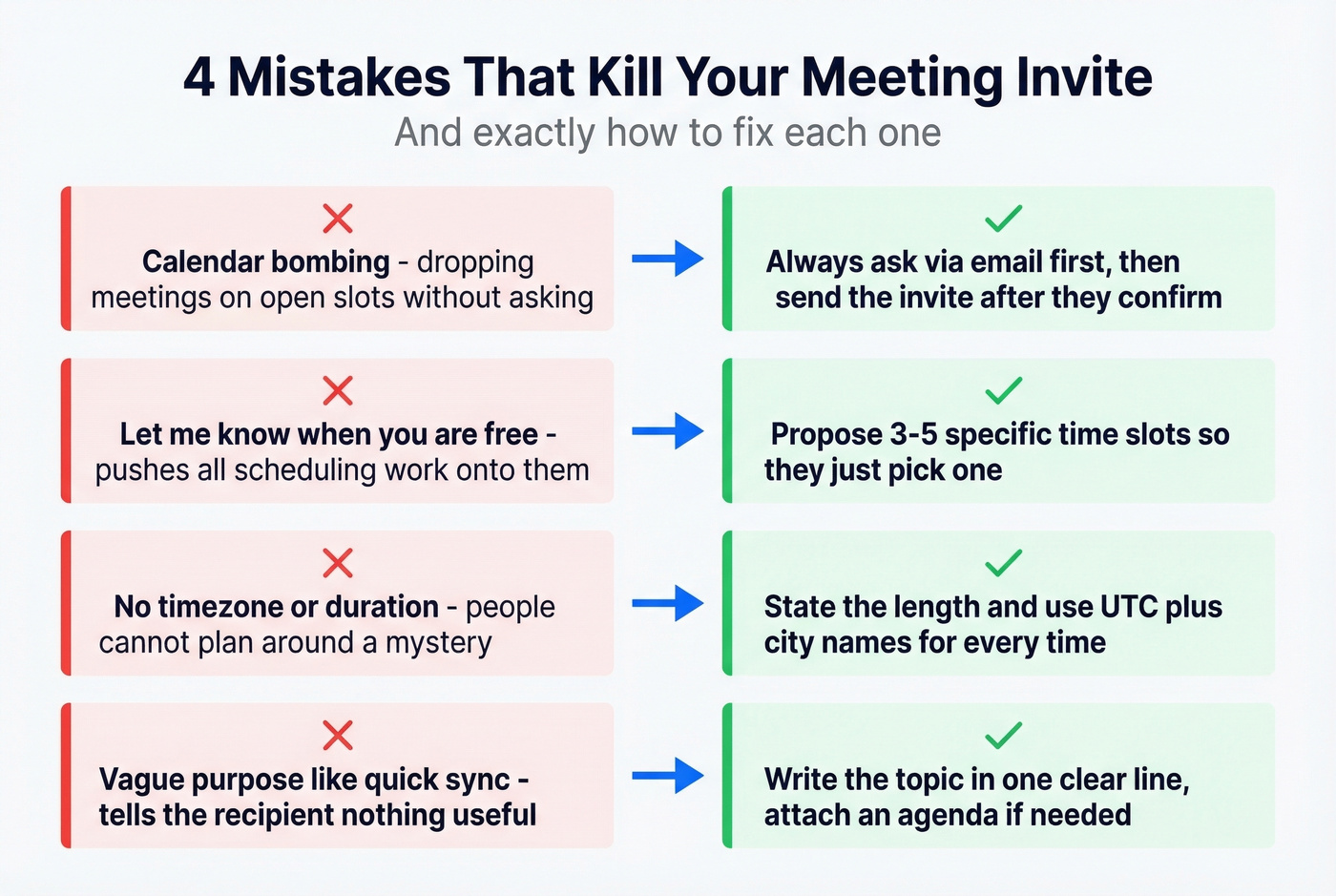
"Let me know when you're free." You just made scheduling their problem. Propose 3-5 times instead.
No timezone or duration. If even one attendee is remote, include timezone context. Always state the length - people can't plan around a mystery.
Vague purpose, no calendar invite. "Quick sync" tells the recipient nothing. State the topic in one line. Once confirmed, send the actual invite so it exists on their calendar with a link and a reminder.
In our experience, the single biggest scheduling friction isn't availability - it's invites that don't justify the time they're asking for. If your average deal is a few thousand dollars, most of your meetings should be 15 minutes or async. A well-written Loom or a two-paragraph email often replaces a 30-minute call entirely, and people will respect you more for suggesting it.
If you're sending these as part of outbound, pair this with proven sales follow-up templates so the thread doesn't die after the first ask.
Before you schedule a single meeting invitation email, make sure you're reaching the right person. Prospeo gives you verified emails at ~$0.01 each and 125M+ direct dials with a 30% pickup rate - so when the invite doesn't land, you have a phone number to follow up.
Verified contact data turns cold requests into booked meetings.
FAQ
How long should I wait before following up on a meeting invite?
Two to three business days. One follow-up is appropriate; two is the absolute maximum. After that, assume it's a no and move on.
How many time options should I propose?
Three to five specific slots. Fewer than three feels rigid. More than five creates decision paralysis and slows down the reply.
Who sends the calendar invite?
The person who requested the meeting. You asked for their time - you own the invite, the agenda, and the follow-up. No exceptions.
How do I find the right email for a cold meeting request?
Use an email finder with built-in verification so your invite actually reaches the recipient. Prospeo returns verified addresses at 98% accuracy across 300M+ profiles, and the free tier gives you 75 lookups a month - enough to test cold outreach without risking bounces.