


StackCrawler Pricing, Reviews, Pros and Cons
$295 a month for BuiltWith's Basic plan is a lot of money when all you need is a quick "what CMS is this site running?" check. StackCrawler starts at $9/mo and handles lightweight tech detection well. But cheap and useful aren't always the same thing - and the gap between "I can see their tech stack" and "I can actually do something with that info" is where most of these tools fall short.
(Quick note: don't confuse this with STACK, the construction estimating software that dominates search results for similar queries.)
What Is StackCrawler?
StackCrawler is a website platform checker that detects the technologies behind any URL - CMS, ecommerce platforms, JavaScript frameworks, themes, and plugins. The tool has checked over 300,000 websites and offers both a web app and a Chrome extension for in-browser detection. It also publishes category usage statistics like most popular CMS and ecommerce platforms. Think of it as a lightweight BuiltWith for individual lookups.
30-Second Verdict
Use StackCrawler if you need occasional, one-off tech stack checks and don't want to pay for an enterprise-grade technographics platform. The 30 free lookups per month and low-cost paid tier make it one of the cheapest options in the category.
Skip StackCrawler if you need bulk scanning, historical data, lead list building, or broad technology coverage. It can't replace BuiltWith's 113,027 tracked technologies or the lead-generation workflows baked into tools like Wappalyzer.
We didn't find StackCrawler covered on the usual big review platforms - G2, Capterra, TrustRadius - so you won't get the same volume of third-party validation you'd see with more established tools.
StackCrawler Pricing Breakdown
| Plan | Price | Lookups | API Access | Key Limits |
|---|---|---|---|---|
| Free | $0 | 30/mo | No | Full website profilings |
| Paid | From $9/mo | Unlimited | No | Feature set depends on plan |
| Advanced | ~$49-99/mo (estimated) | Unlimited | Yes (REST) | Unlimited requests/month |
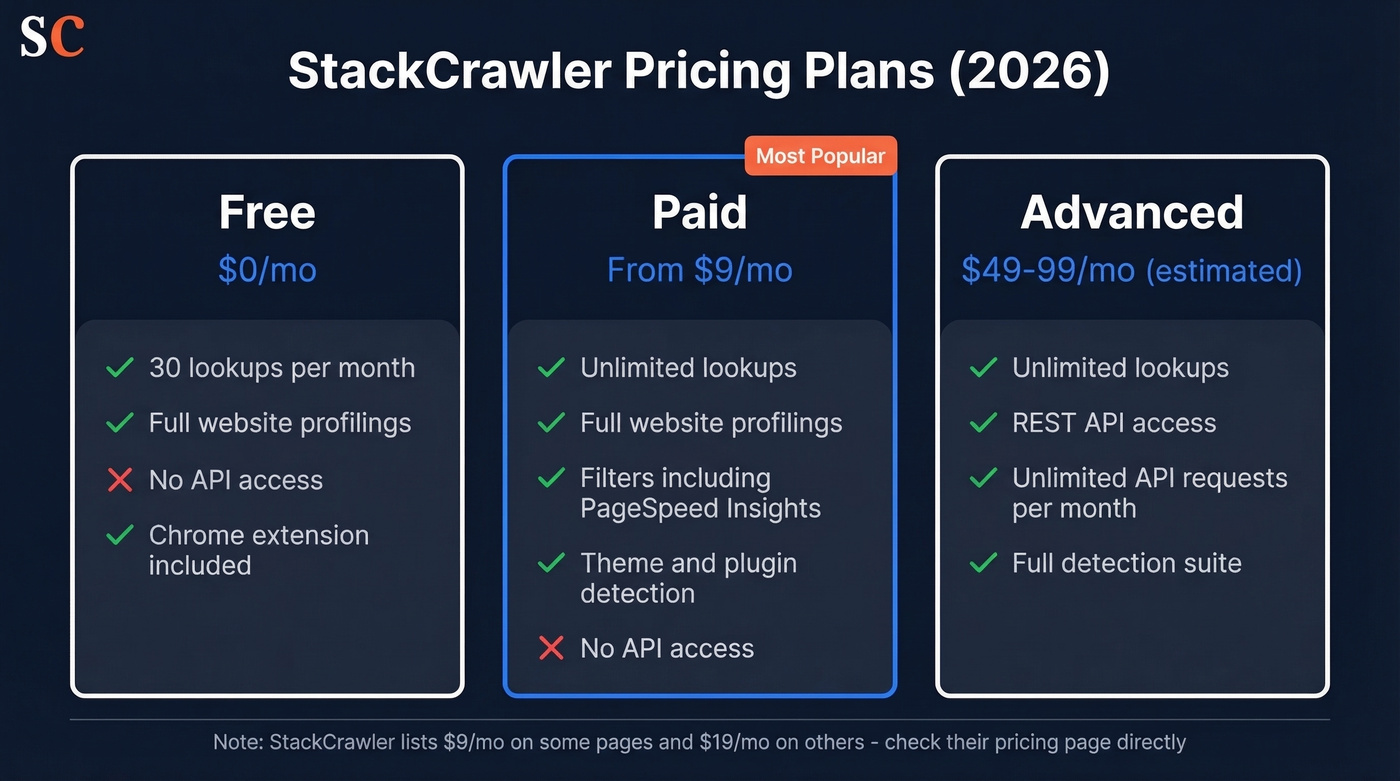
One thing we noticed: StackCrawler's own site isn't fully consistent on the starting price. Their BuiltWith alternatives post says paid plans start at $9/mo, while their Wappalyzer alternatives post lists $19/mo. Not a huge deal, but worth checking their pricing page directly before you commit.
The Advanced plan price isn't shown on the API page. Based on the tool's positioning and feature set, $49-99/mo is a reasonable estimate for an API-enabled tier.
Even at $19/mo, StackCrawler is still far cheaper than BuiltWith Basic ($295/mo) or Wappalyzer Pro ($250/mo). Worth noting that BuiltWith also offers free individual site lookups with no time limit.

StackCrawler tells you what tech a company runs. Prospeo tells you who to email about it. Filter 300M+ profiles by technographics, get 98% accurate emails at ~$0.01 each, and skip the manual gap between detection and prospecting.
Go from "they use Shopify" to a verified contact list in seconds.
Pros and Cons
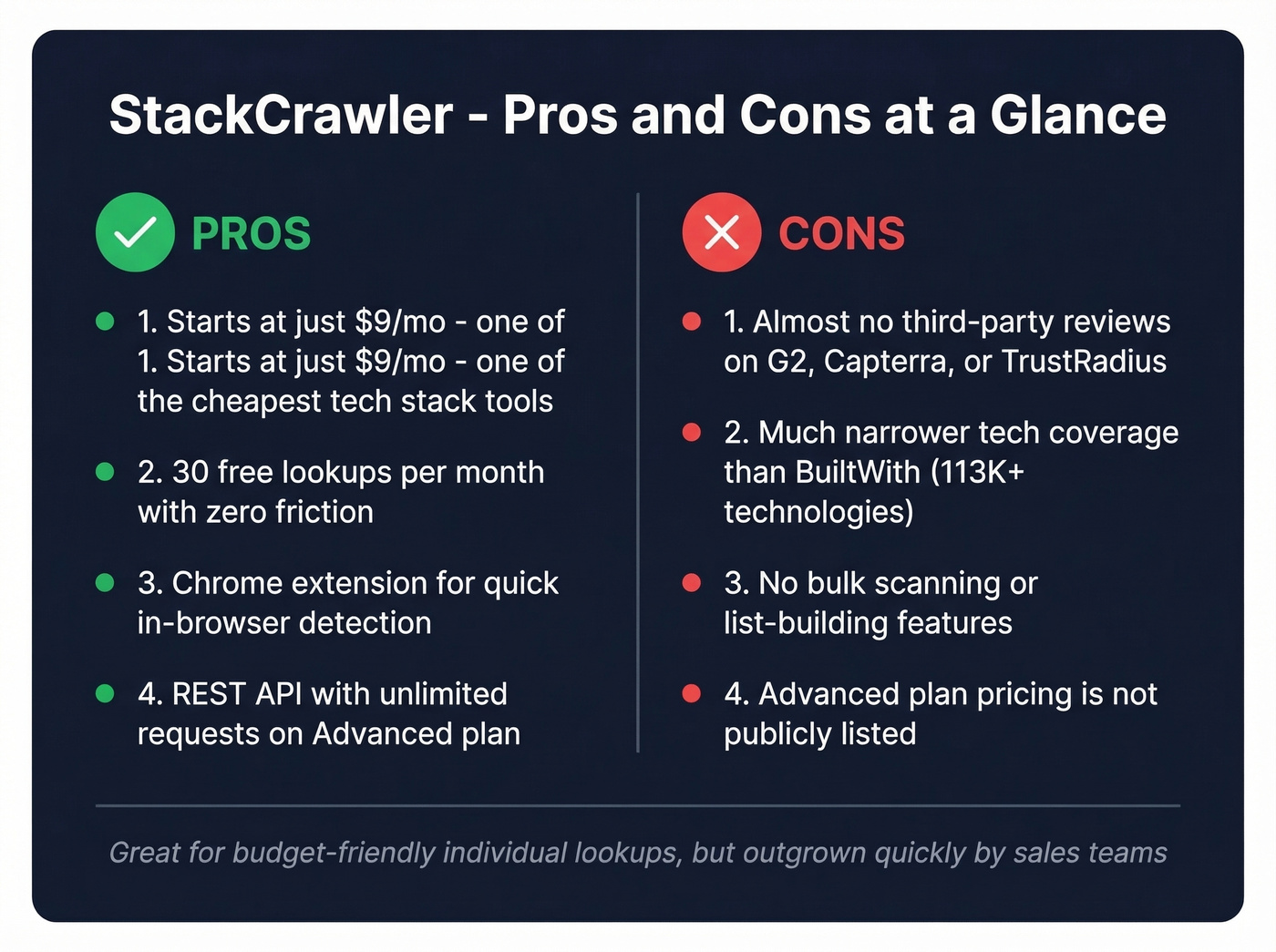
Pros:
- One of the cheapest paid tech stack tools - starting at $9/mo
- 30 free lookups per month with no paywall friction
- Chrome extension for quick in-browser detection
- REST API on the Advanced plan with unlimited requests per month
Cons:
- Almost zero third-party review coverage compared to mainstream tools
- Narrower technology coverage than BuiltWith (which tracks 113,027 technologies)
- No bulk scanning or list-building capabilities
- Advanced plan pricing isn't publicly listed
StackCrawler vs Competitors
| Feature | StackCrawler | BuiltWith | Wappalyzer | WhatRuns |
|---|---|---|---|---|
| Free Tier | 30 lookups/mo | Free individual lookups | 50 lookups/mo | Free extension |
| Starting Paid | $9/mo | $295/mo | $250/mo | Free only |
| Bulk/API | API on Advanced plan | Yes, 1.2M credits/yr on Team | Yes, API credits included | No |
| Best For | Budget tech checks | Enterprise list-building + deep coverage | Lead lists + alerts | Quick one-off Chrome checks |
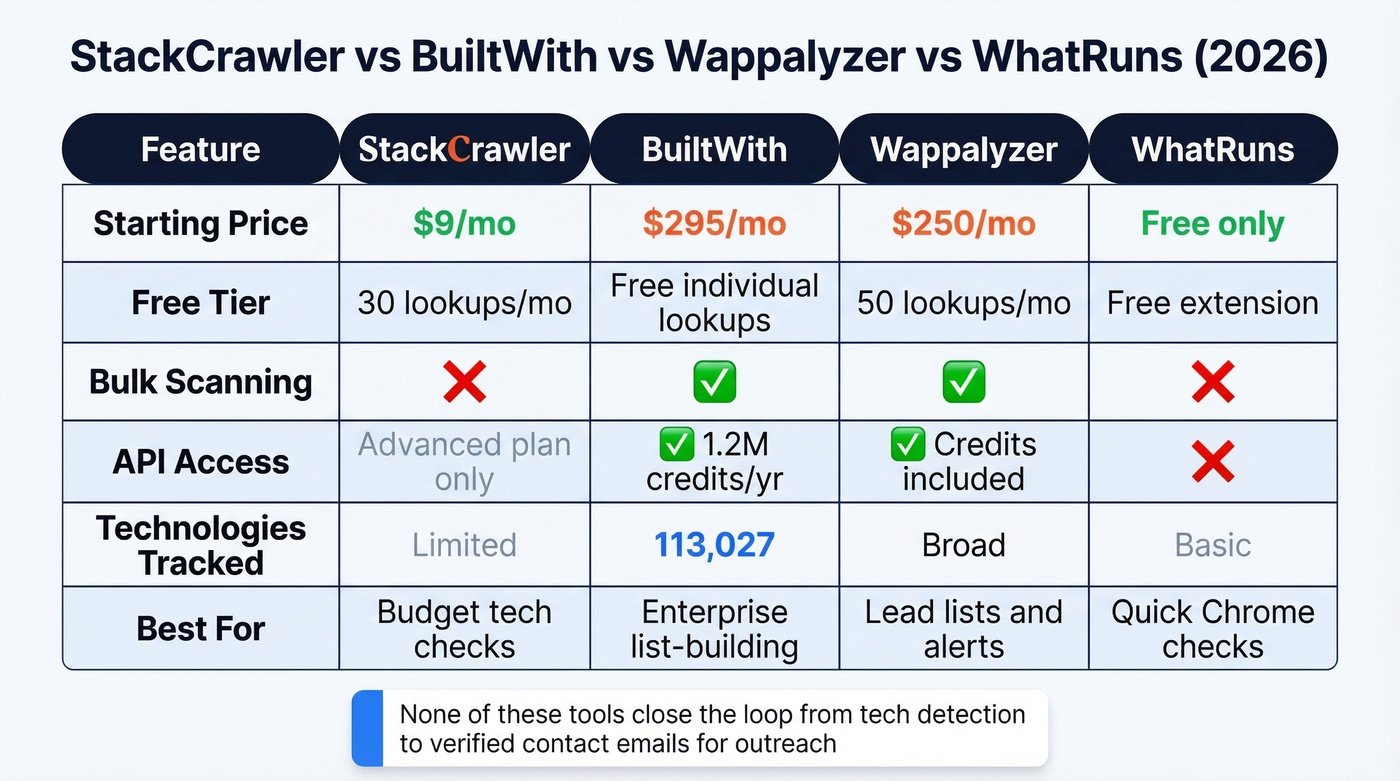
BuiltWith is the gold standard for depth - data from 414M domains, 113,027 technologies, and history going back over 40 years. That said, Reddit threads consistently mention purchase friction, with users reporting ID verification issues and unresponsive support.
Wappalyzer is a commonly recommended BuiltWith alternative. Plans run $250-$850+/mo with lead list features built in. One catch: API credits expire after 60 days, which can sting if your usage is uneven.
WhatRuns is free and Chrome-only. It scores a 3.0/5 on Product Hunt, with users calling it "very basic." No API, no bulk anything.
Here's our honest take: if you're spending more than 10 minutes a week on tech stack lookups, you've already outgrown StackCrawler. And if your goal is actually selling to companies based on their tech stack, none of these tools close the loop from "they use Shopify" to "here's the decision-maker's email." That's a fundamentally different problem.
Who Should Use StackCrawler?
Let's be real - most people researching this tool's pricing are trying to avoid paying $295/mo for BuiltWith.
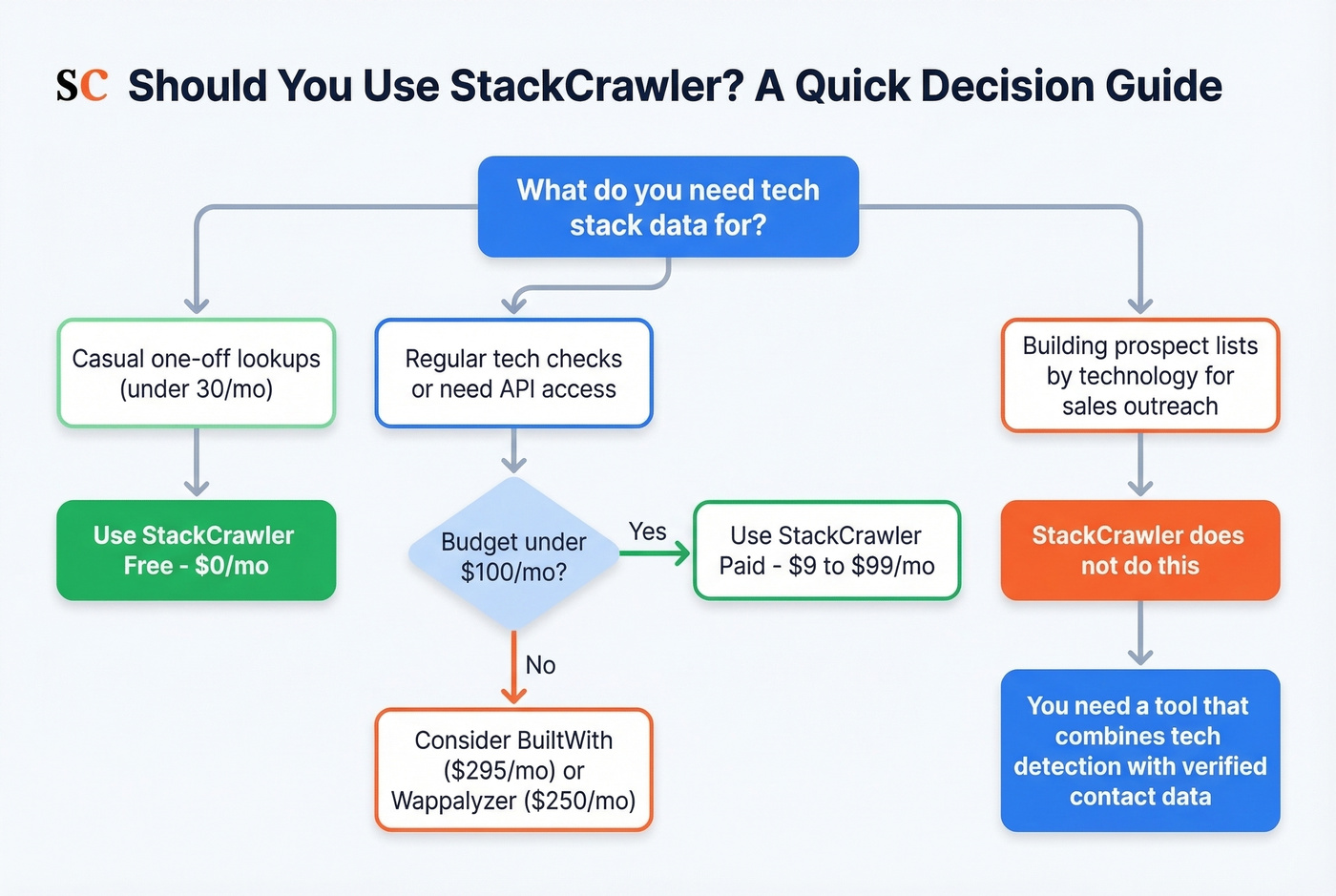
Casual individual lookups: StackCrawler is great. The free tier handles 30 checks a month, and the entry paid tier starts at $9/mo for unlimited website profilings. Hard to beat on price.
Developers needing API access: The Advanced plan works if the price is right. In our testing, the Chrome extension detected mainstream stacks like WordPress, Shopify, and React reliably, though we didn't stress-test it against more obscure frameworks.
Sales teams building prospect lists by technology: This is where StackCrawler falls short. It tells you what tech a site runs, but it doesn't tell you who to email. For teams that need to go from "they use Shopify" to an actual outreach list, Prospeo's 30+ search filters include technographic data alongside 300M+ profiles with 98% verified emails - so you skip the manual gap between detection and prospecting entirely.
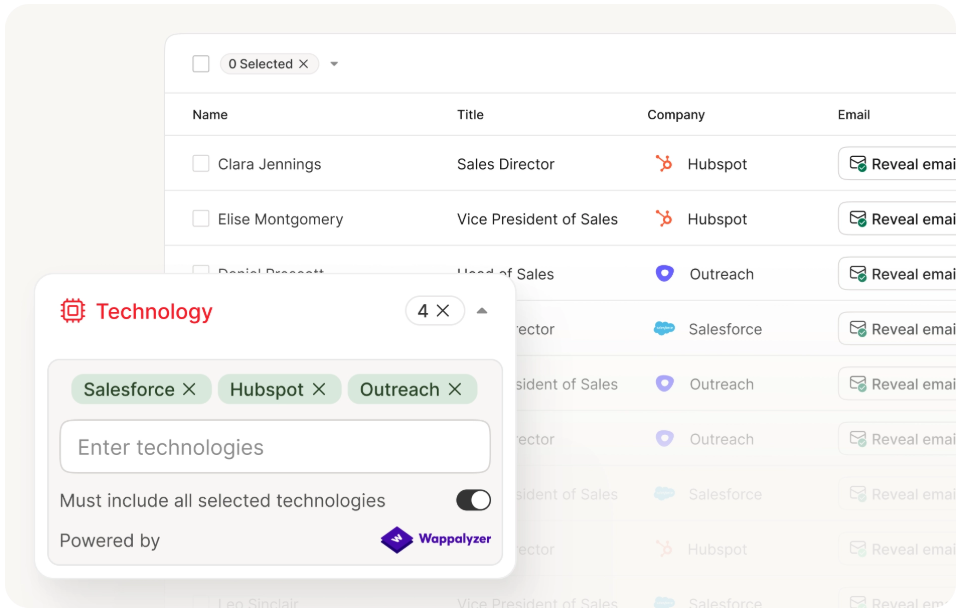
Paying $9/mo for tech detection and $295/mo for BuiltWith lead lists? Prospeo bundles technographic filters with 30+ other search criteria - buyer intent, headcount growth, funding, job changes - plus 143M+ verified emails refreshed every 7 days. No contracts.
Replace two tools with one platform that actually closes the loop.
FAQ
Is StackCrawler free?
Yes - 30 full website profilings per month at no cost. Paid plans start from $9/mo and include unlimited lookups, filters (including PageSpeed Insights), plus detection for themes and plugins across popular CMS and ecommerce platforms.
Does StackCrawler have an API?
Yes, on the Advanced plan. It's a REST API with unlimited requests per month. Pricing for the API tier isn't publicly listed - expect roughly $49-99/mo based on the tool's positioning.
Is StackCrawler better than BuiltWith?
For low-cost individual lookups, yes. For bulk analysis, historical data, and list-building at scale, BuiltWith wins decisively with 113,027 tracked technologies and data spanning 414M domains.
What are the best StackCrawler alternatives in 2026?
BuiltWith ($295/mo) for enterprise-grade technographics, Wappalyzer ($250/mo) for lead lists with tech filters, and WhatRuns (free) for quick Chrome-based checks. For teams that need to go from tech detection to outbound prospecting, Prospeo combines technographic filtering with verified emails starting at roughly $0.01 per lead.