

What Is a DKIM Record? Setup and Troubleshooting
Roughly one in six emails never reaches the inbox. That's often an authentication problem. If you're sending outbound email without a properly configured DKIM record, you're giving mailbox providers a reason to distrust every message your domain sends - and every campaign you run bleeds leads as a result. Understanding what a DKIM record is and how to set one up correctly is the first step toward fixing deliverability for good.
Quick Version
A DKIM record is a DNS TXT record that stores a public cryptographic key. Receiving mail servers use this key to verify that an email genuinely came from your domain and wasn't altered in transit. It's one of three core email authentication protocols - alongside SPF and DMARC - that determine whether your messages land in the inbox or disappear.
- DKIM is a DNS TXT record storing a public key that verifies your emails are authentic and unaltered.
- Gmail and Yahoo require SPF and DKIM (plus a DMARC policy) for bulk senders (5,000+ messages/day). It's no longer optional.
- The hardest part isn't the DNS record - it's making sure signing is actually enabled and nothing breaks it in transit.
How DomainKeys Identified Mail Works
DKIM stands for DomainKeys Identified Mail, defined in [RFC 6376](https://datatracker.ietf.org/doc/html/rfc6376). It lets a sending domain cryptographically sign outgoing emails so receiving servers can verify two things: the message actually came from that domain, and it wasn't tampered with after sending.
The record itself lives in your DNS as a TXT entry at a specific subdomain following the format selector._domainkey.yourdomain.com. The "selector" is a label you choose - or your email provider assigns - that lets you run multiple keys for different sending services without conflicts. When a receiving server gets your email, it reads the selector from the DKIM-Signature header, looks up the corresponding DNS record, retrieves the public key, and checks the signature.
The key distinction: DKIM doesn't validate who sent the email from a network perspective (that's SPF's job). It validates that the content and headers are intact and tied to a specific domain.
Why DKIM Matters in 2026
Email authentication used to be a nice-to-have. That changed when Google and Yahoo began enforcing SPF, DKIM, and DMARC requirements for bulk senders (5,000+ messages/day). Miss the requirements, and your deliverability takes a hit even if your content is perfectly clean.
The numbers tell the story. Global inbox placement sits around 84%, meaning roughly one in six emails never reaches the recipient. Gmail's inbox rate is 87.2%, but Microsoft hovers at just 75.6%. Those aren't terrible numbers until you multiply them across thousands of outbound emails per month - suddenly hundreds of messages are vanishing.
What makes it worse: only 33.4% of the top one million domains publish a valid DMARC record, and 85.7% of those that do don't actually enforce it. The authentication gap is massive, and mailbox providers are tightening the screws in response.
Here's the thing: DKIM authenticates your domain, but sending to invalid addresses tanks your sender reputation regardless. Authentication and data quality are two pillars of the same deliverability equation. We've seen teams nail their DKIM setup and still crater their reputation with a 15% bounce rate from stale contact lists - tools like Prospeo's email verification (98% accuracy) handle that side of the problem.

The Signing and Verification Process
The process runs in three steps:
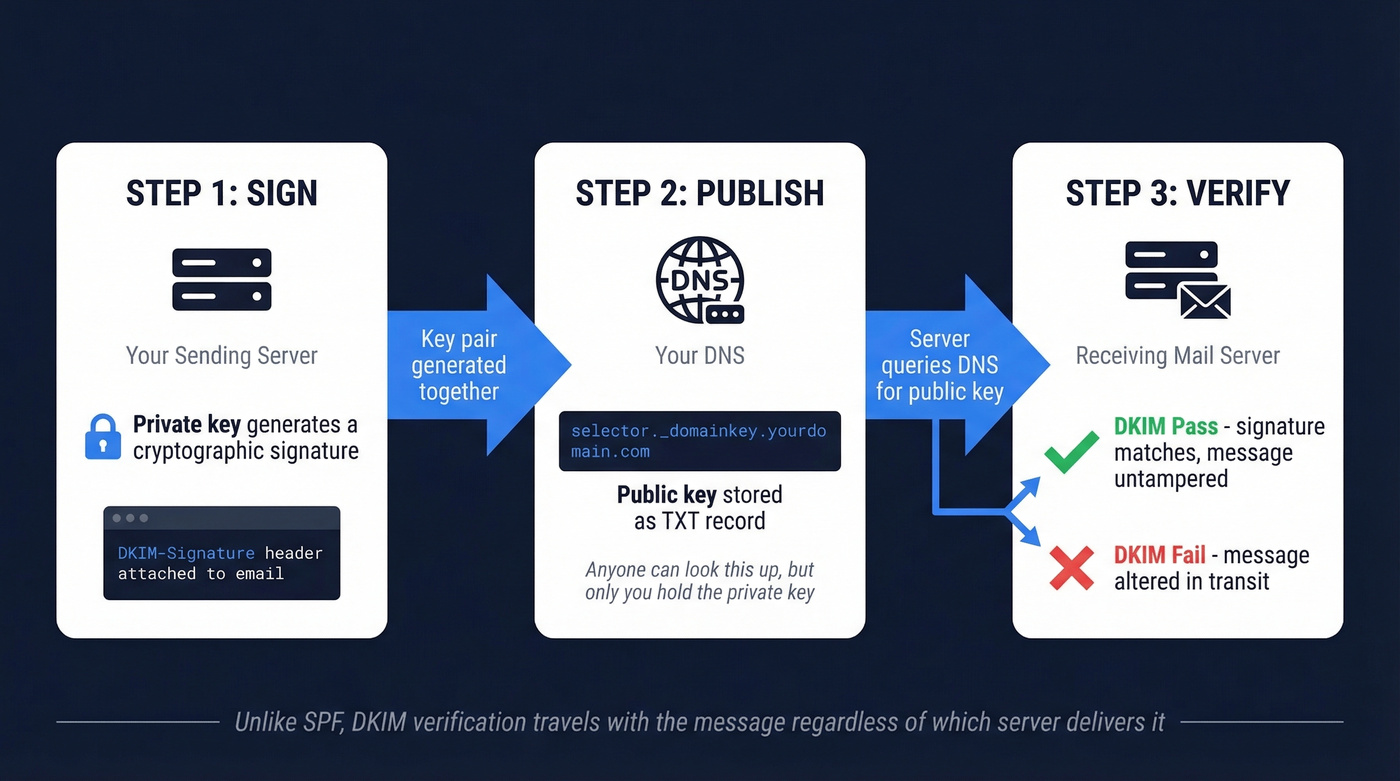
Sign. Your sending server uses a private key to generate a cryptographic signature of the outgoing message. This signature covers specific headers and the message body, and it's attached as a DKIM-Signature header. The From header must always be included in the signed headers.
Publish. You publish the corresponding public key in your DNS as a TXT record at selector._domainkey.yourdomain.com. This is the DKIM record. Anyone can look it up, but only your sending server holds the private key that generated the signature.
Verify. The receiving mail server reads the DKIM-Signature header, extracts the selector and domain, queries DNS for the public key, and runs the cryptographic verification. If the signature matches, DKIM passes. If the message was altered in transit - even a single character - verification fails.
Unlike SPF, which only checks the sending server's IP address, DKIM verification travels with the message and works regardless of which server ultimately delivers the email. That's why it survives most legitimate relay scenarios, though forwarding is another story - more on that in troubleshooting.

DKIM authentication is half the deliverability equation. The other half is sending to real addresses. Prospeo's 5-step email verification delivers 98% accuracy - so your perfectly authenticated emails don't bounce off invalid contacts and torch your sender reputation.
Stop perfecting DKIM just to send emails that bounce.
Anatomy of a DKIM Record
DKIM involves two distinct sets of tags: the ones in your DNS record and the ones in the DKIM-Signature header attached to each email. Confusing these is a common mistake, so let's separate them.
DNS Record Tags
Your DNS record lives at selector._domainkey.yourdomain.com and looks like this:
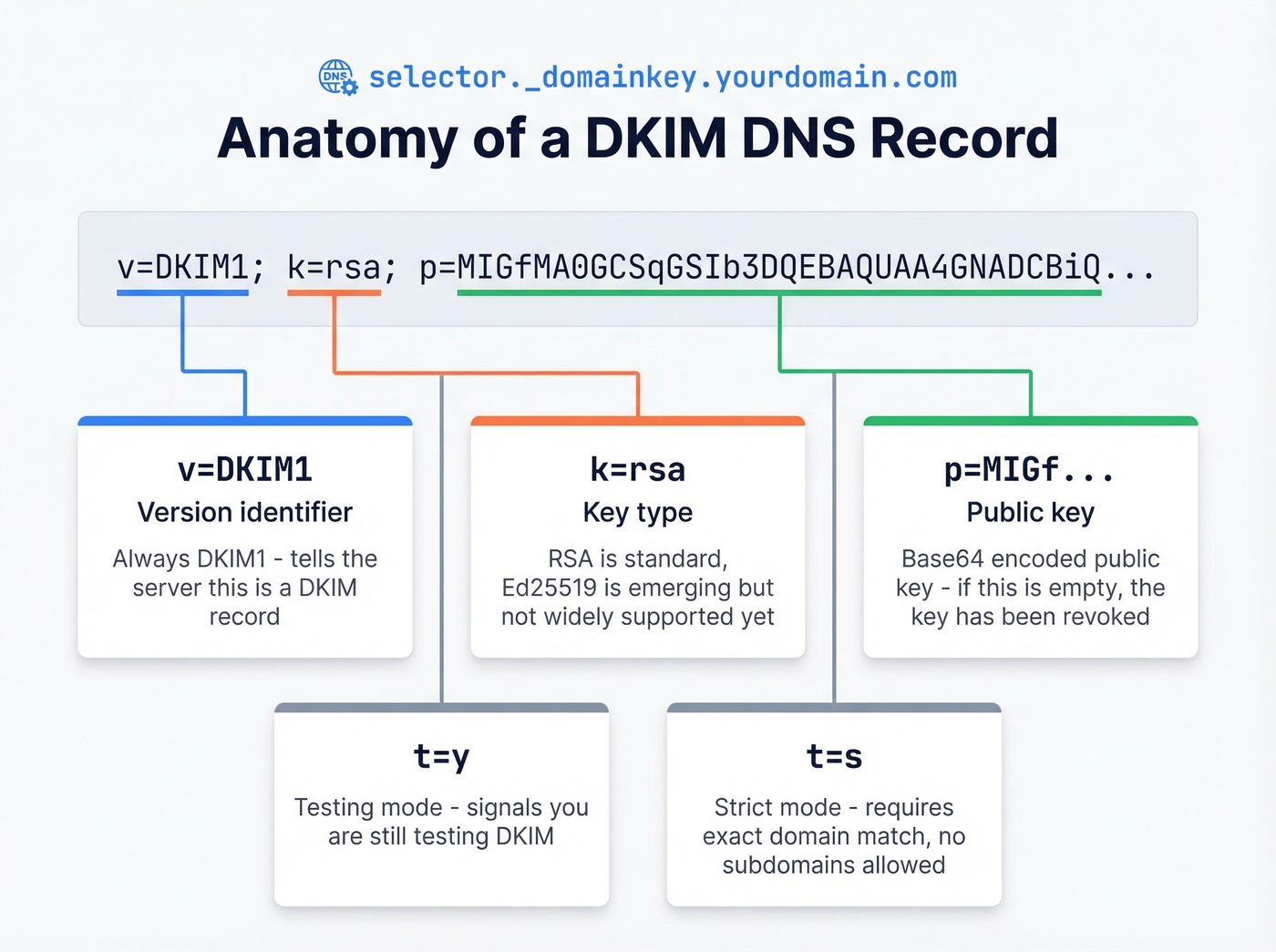
v=DKIM1; k=rsa; p=MIGfMA0GCSqGSIb3DQEBAQUAA4GNADCBiQKBgQ...
The common tags: v=DKIM1 (version identifier), k=rsa (key type - RSA is standard, Ed25519 is emerging), and p=MIGf... (the base64-encoded public key itself - if empty, the key has been revoked). You'll also see t=y for testing and t=s for strict mode, which requires exact domain matching with no subdomains.
A common TTL is 6000 seconds (about 100 minutes), though many setups use shorter TTLs. The selector name is arbitrary - Cloudflare's documentation uses big-email._domainkey.example.com, and Google Workspace defaults to google._domainkey.
DKIM-Signature Header Tags
This is the header your sending server attaches to every outgoing email:
DKIM-Signature: v=1; a=rsa-sha256; d=example.com; s=big-email;
    h=from:to:subject:date; bh=2jUSOH9NhtVGCQWNr9BrIAPreKQjO6Sn7XIkfJVOzv8=;
    b=AuUoFEfDxTDkHlLXSZEpZj79LICEps6eda7W3deTVFOk2yFUjhfL...;
    c=relaxed/relaxed; t=1717027200; x=1717631999
Required tags: v=1 (signature version), a=rsa-sha256 (signing algorithm), d=example.com (signing domain - what DMARC checks for alignment), s=big-email (selector for DNS lookup), h=from:to:subject:date (which headers were signed), bh= (hash of the canonicalized body), and b= (the actual signature).
The most important optional tag is c=relaxed/relaxed, which controls canonicalization. "Relaxed" tolerates minor whitespace changes during transit; "simple" requires an exact match. Relaxed/relaxed is the safer default for most senders. The t= and x= tags handle signature creation and expiration timestamps.
Setting Up Your Record
Regardless of your email provider, setup follows four steps: generate a key pair (most providers handle this automatically), publish the TXT record in your DNS at the selector subdomain your provider specifies, enable signing in your sending server's admin console, and verify using a free tool like MXToolbox or Google Admin Toolbox.
That third step - enabling signing - is the one people forget. Publishing the DNS record alone does nothing.
TXT Records vs. CNAME Delegation
The RFC requires DKIM records to be TXT records. But many ESPs - SendGrid, Mailchimp, Amazon SES - use CNAME delegation instead. You point your selector subdomain via CNAME to a TXT record the ESP hosts on their infrastructure, letting them manage key rotation without you touching DNS every time.
The critical rule: you can't have both a CNAME and a TXT record at the same DNS name. If your ESP uses CNAME delegation and you also add a TXT record at the same selector, DNS will break. Pick one approach per selector. Also watch for TTL delays during key rotation - plan for a 24-48 hour overlap window.
Provider-Specific Notes
Google Workspace uses the selector google._domainkey. Generate the key in Admin Console under Apps > Google Workspace > Gmail > Authenticate Email, publish the TXT record, then click "Start Authentication." That last click is what actually enables signing.
Microsoft 365 uses CNAME records with two selectors (one active, one reserved for rotation). Custom domains aren't DKIM-signed by default - you need to enable signing in Microsoft Defender. The .onmicrosoft.com domain is signed automatically, but that won't help your custom domain's DMARC alignment. Microsoft 365's signing domain must align with your From domain for DMARC to count the pass. Microsoft's documentation walks through the CNAME setup.
ESPs like SendGrid and Mailchimp typically provide two or three CNAME records to add to your DNS. Follow their specific instructions - selector names and target domains vary by provider.
Key Length and Rotation
Use 2048-bit RSA keys. This isn't a suggestion - it's the current minimum recommended length, and some providers now require it. Smaller keys (512, 768, 1024) are widely considered weak.
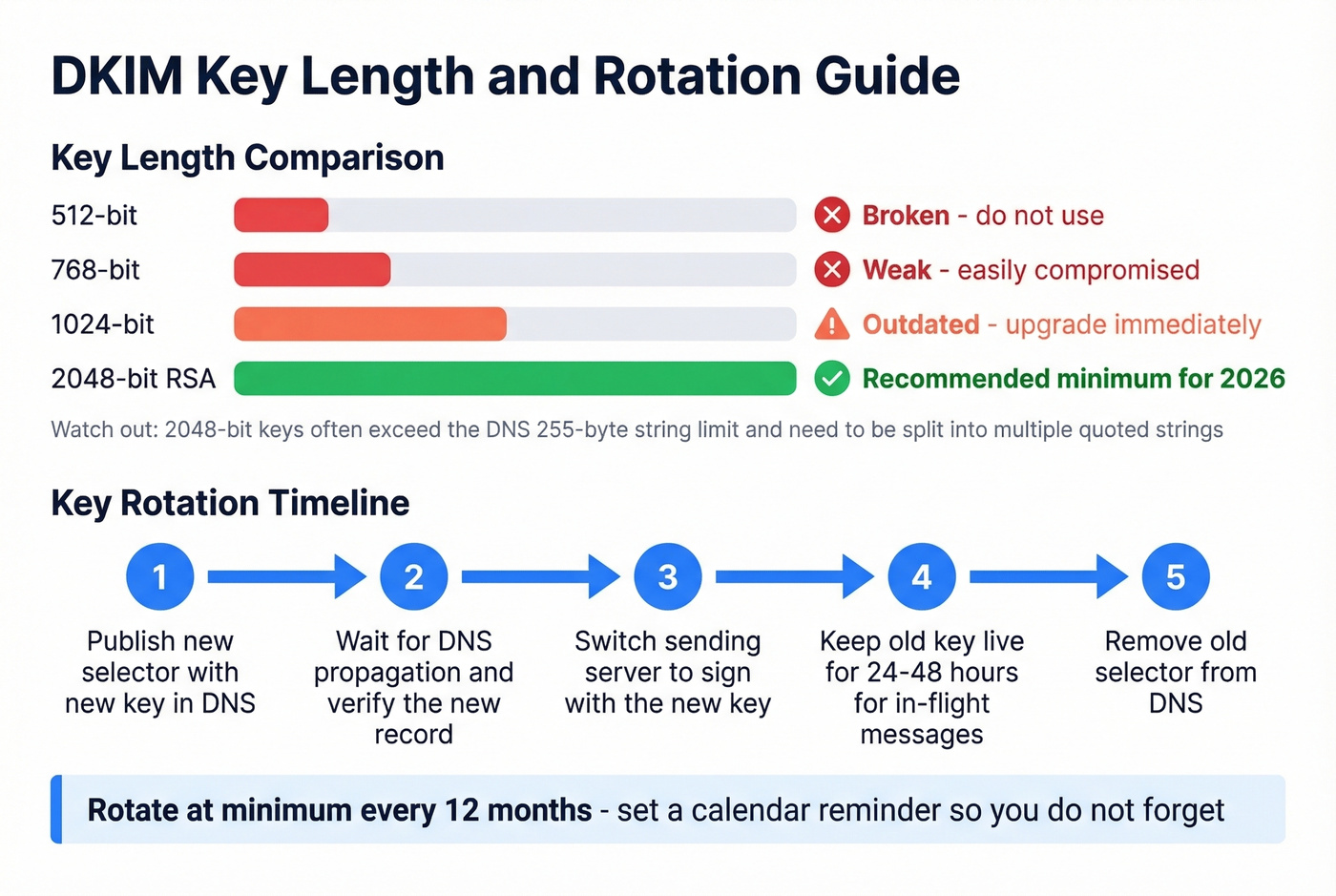
Look, if you're still running 1024-bit keys in 2026, you're not "behind best practices." You're running the equivalent of a screen door on a submarine. Upgrade today, not next quarter.
In our experience, the most common pitfall with 2048-bit keys is the DNS 255-byte string limit. A 2048-bit key often must be split into multiple quoted strings within a single TXT record. Some DNS interfaces handle this automatically; others require manual splitting. If your verification suddenly fails after upgrading from 1024 to 2048 bits, check this first - it's almost always the cause.
Ed25519 keys are a faster, shorter alternative, but receiver support isn't universal yet. Stick with RSA-2048.
For rotation: rotate your keys at minimum every 12 months. Publish a new selector with the new key, verify it propagates, switch your sending server to sign with the new key, keep the old key live for 24-48 hours to cover in-flight messages, then remove it.
DKIM, SPF, and DMARC Together
These three protocols form the email authentication triad, each handling a different piece.
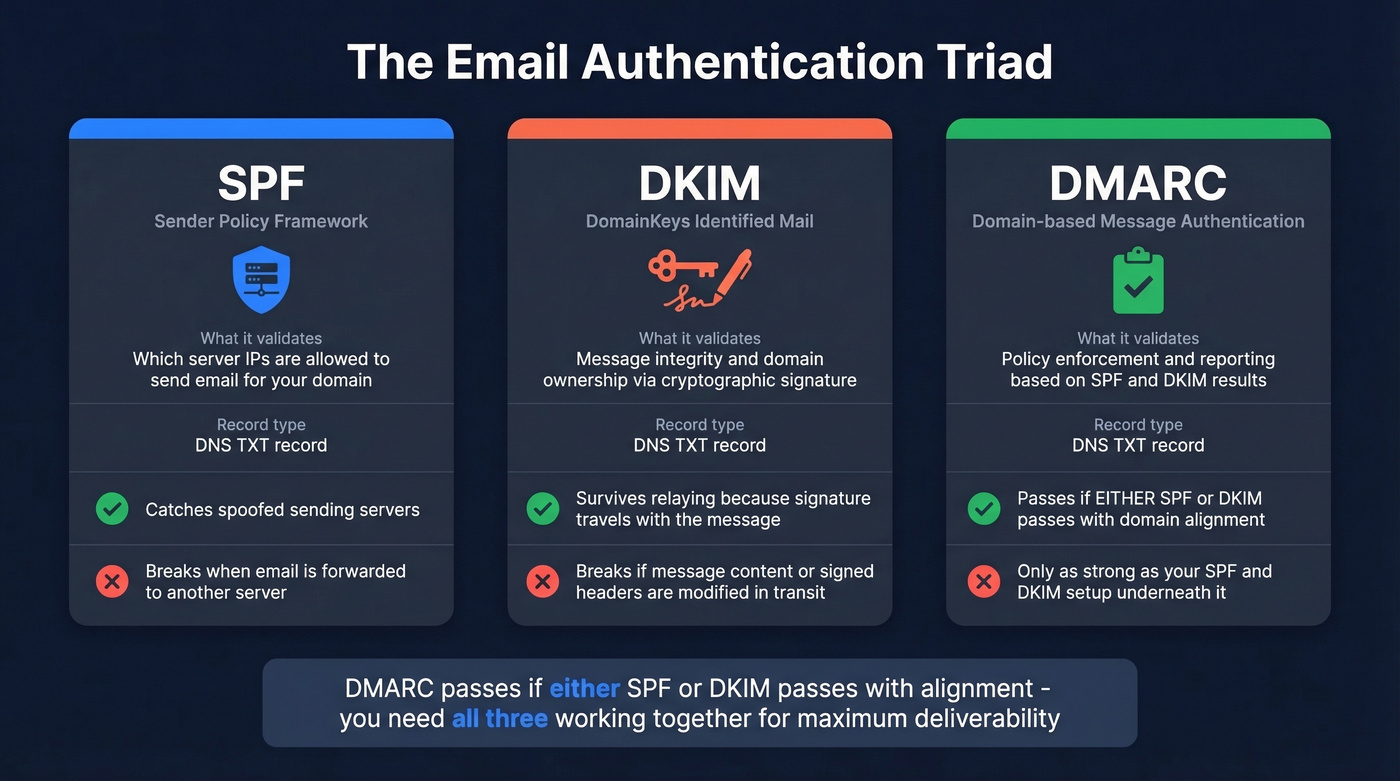
| Protocol | Validates | Record Type | Key Limitation |
|---|---|---|---|
| SPF | Sending server IP | DNS TXT | Breaks on forwarding |
| DKIM | Message integrity + domain | DNS TXT | Breaks if content modified |
| DMARC | Policy + reporting | DNS TXT | Only as strong as SPF/DKIM |
DMARC passes if either SPF or DKIM passes with domain alignment. A DKIM failure doesn't automatically mean a DMARC failure - if SPF passes and aligns with your From domain, DMARC still passes.
The adoption gap is real, though. While 33.4% of top domains publish valid DMARC records, 85.7% of those don't enforce it - they're running p=none. That means most domains are collecting reports but not actually protecting against spoofing. If you're setting up DKIM, take the extra step to move your DMARC policy to p=quarantine or p=reject once you've confirmed your legitimate mail passes.
Troubleshooting Common Failures
Record Published But Messages Not Signed
Your DNS record looks fine, MXToolbox retrieves the public key, but email headers show dkim=none. This is the most common failure we see, and it's almost never a DNS problem.
The cause: signing isn't enabled on your sending server or ESP. Publishing the DNS record only makes the public key available - it doesn't tell your server to start signing. In Google Workspace, you need to click "Start Authentication." In Microsoft 365, you need to enable DKIM in Defender. Reddit threads are full of people who waited days for "DNS propagation" when signing was never turned on.
Failures After Forwarding
Third-party forwarding is the most frustrating authentication failure because it's often outside your control. When a university, legacy mail system, or corporate relay forwards your email, it can modify headers or body content - invalidating the signature. Mailing lists that append footers, antivirus scanners that inject headers, and MIME rewriting by corporate gateways all break signatures the same way.
The r/sysadmin consensus is blunt: some forwarding organizations won't fix their setups, and the "fix" is often organizational rather than technical. Monitor DMARC aggregate reports, identify which forwarding paths break authentication, and either work with those organizations or accept the failures as known exceptions. ARC (Authenticated Received Chain) is designed to preserve authentication results across forwarding hops, but it isn't universal.
Signature Did Not Verify
This is a cryptographic verification failure - the signature is present but doesn't match the public key. Common causes: a selector mismatch, a 2048-bit key truncated by your DNS UI during entry, or a canonicalization mismatch between what the sender used and what the message looks like after transit.
One important nuance: dkim=fail doesn't necessarily mean dmarc=fail. As one r/Emailmarketing thread demonstrated, Gmail can show dkim=fail while still reporting dmarc=pass because SPF passed and aligned with the From domain. Check your full Authentication-Results header before panicking.
2048-Bit Key Doesn't Fit in DNS
You've generated a 2048-bit key, pasted it into your DNS provider's interface, and verification fails. The problem is the 255-byte DNS string limit. Your key needs to be split into multiple quoted strings within a single TXT record:
"v=DKIM1; k=rsa; p=MIIBIjANBgkqhkiG9w0BAQEFAAOCAQ8AMIIBCgKCAQEA..."
"...remaining key data here..."
Some DNS providers (Cloudflare, Route 53) auto-chunk this. Others require manual splitting. If your key looks correct but verification fails, query it directly with dig TXT selector._domainkey.yourdomain.com to confirm the full key is being served.
Skip this section if you're using a provider that handles key management for you - most modern ESPs do, and you'll never touch the raw key.
Teams that nail SPF, DKIM, and DMARC still see campaigns fail when 15% of their list bounces. Prospeo refreshes 300M+ profiles every 7 days - not every 6 weeks - so your contact data stays as fresh as your DNS records.
Protect the sender reputation your DKIM setup is built to support.
FAQ
What is a DKIM record used for?
A DKIM record stores a public cryptographic key that receiving mail servers use to verify an email was authorized by the sending domain and wasn't altered in transit. It's essential for passing DMARC checks and protecting your domain from spoofing.
Is DKIM required for all senders?
Gmail and Yahoo require SPF, DKIM, and a DMARC policy for bulk senders (5,000+ messages/day). Even below that threshold, missing DKIM measurably hurts inbox placement. Treat it as mandatory for any domain sending business email in 2026.
Can I have multiple DKIM records on one domain?
Yes. Each record uses a unique selector (e.g., google._domainkey, sendgrid._domainkey), so you can publish separate keys for Google Workspace, your ESP, and your transactional email provider without conflict.
Does DKIM encrypt email content?
No. DKIM uses cryptography to verify the sender's identity and message integrity, but email content remains readable in transit. For encryption, you need TLS (in-transit) or end-to-end solutions like S/MIME and PGP.
What happens when DKIM fails?
The outcome depends on your DMARC policy. With p=none, the email delivers normally. With p=quarantine, it lands in spam. With p=reject, it's blocked outright. DMARC can still pass via SPF alignment even when DKIM fails.