

AI Professional Email Generator: What Actually Works in 2026
You're staring at a blank compose window, cursor blinking, trying to write a cold email to a VP you've never met. You know the first line matters. You know "I hope this email finds you well" is a death sentence. So you open an AI email generator, type a vague prompt, and get back something that sounds like a cover letter from 2014.
49% of B2B marketers already use generative AI to create emails. The tools are everywhere. But most people use them wrong - and a surprising number pay for something they can get free.
What You Need (Quick Version)
Three picks that cover 90% of use cases:
- ChatGPT - Best free option. Handles any tone or format, and you probably already have an account.
- Rytr - Best dedicated tool if you want a purpose-built email UI (from $7.50/mo). Templates, tone presets, and quick generation without prompt engineering.
- Grammarly - Best for polishing emails you've already drafted (from $12/mo). Tone detection, clarity suggestions, and formality controls.
For enterprise teams on Microsoft 365, Copilot in Outlook is the obvious choice - native thread summaries, tone controls, and attachment summaries without leaving your inbox.
Here's the thing most "best tools" articles won't tell you: you probably don't need a dedicated AI email tool at all. Most of them are wrappers around the same models you can access for free. The real gap in your workflow isn't writing - it's sending to verified addresses.
The Truth About These Tools
An AI email writing tool takes your prompt, routes it through a large language model (usually GPT-4 or a close variant), and returns a draft you're supposed to edit. That's the whole trick. Prompt, LLM, draft, your red pen.
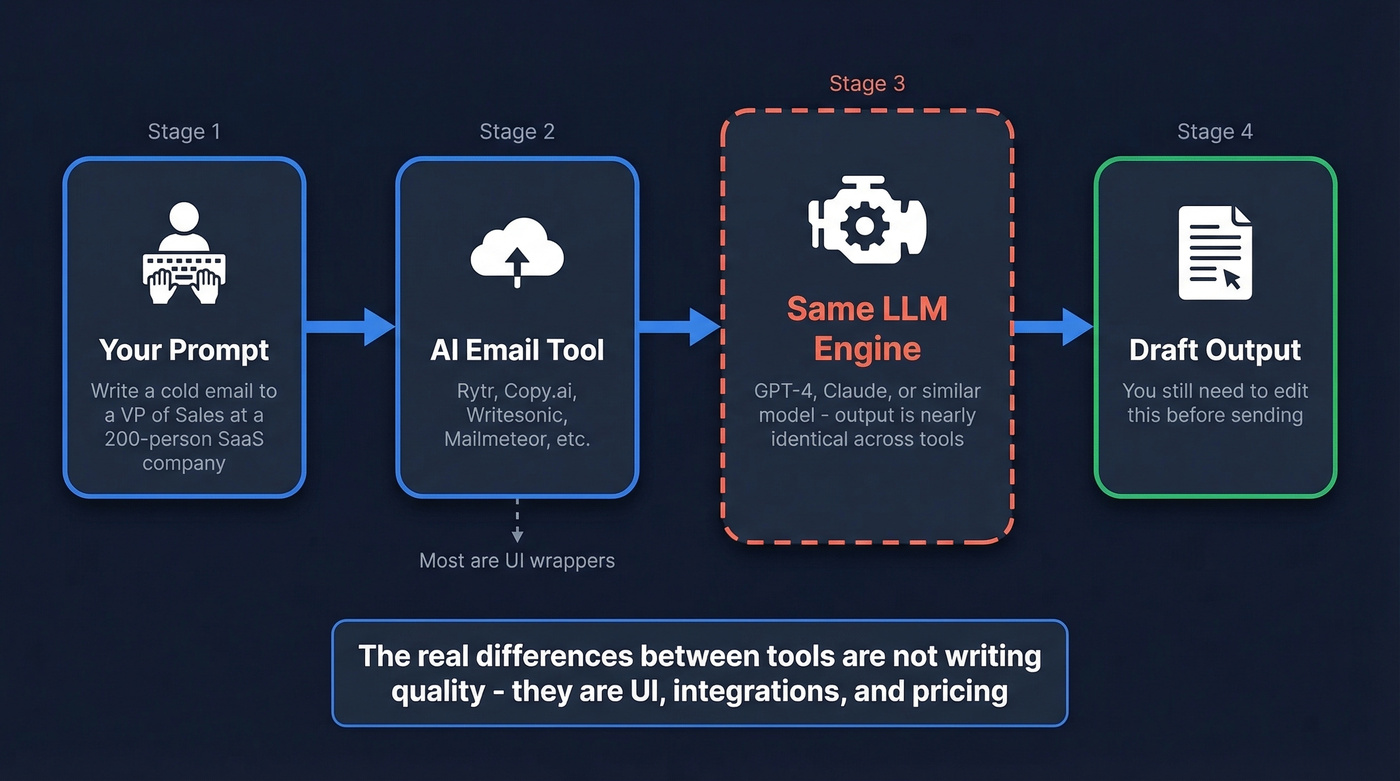
MailerLite's own testing confirmed what most power users already suspect: "All of these tools use similar large language models... output is similar across the board." The meaningful differences aren't in writing quality. They're in UI, workflow integration, template libraries, and pricing.
This changes how you should evaluate them. Don't ask "which one writes the best emails?" Ask "which one fits my workflow with the least friction?" A Chrome extension that drafts inside Gmail saves more time than a standalone app with marginally better prose, and a tool with Outlook integration beats one that requires copy-paste even if the copy-paste version has fancier templates.
What actually matters: do you need inbox-native drafting, team collaboration features, or multilingual support? If you don't need any of those, ChatGPT plus a free Grammarly account handles everything.
Do Recipients Care If You Used AI?
This is the question everyone asks and nobody answers honestly.
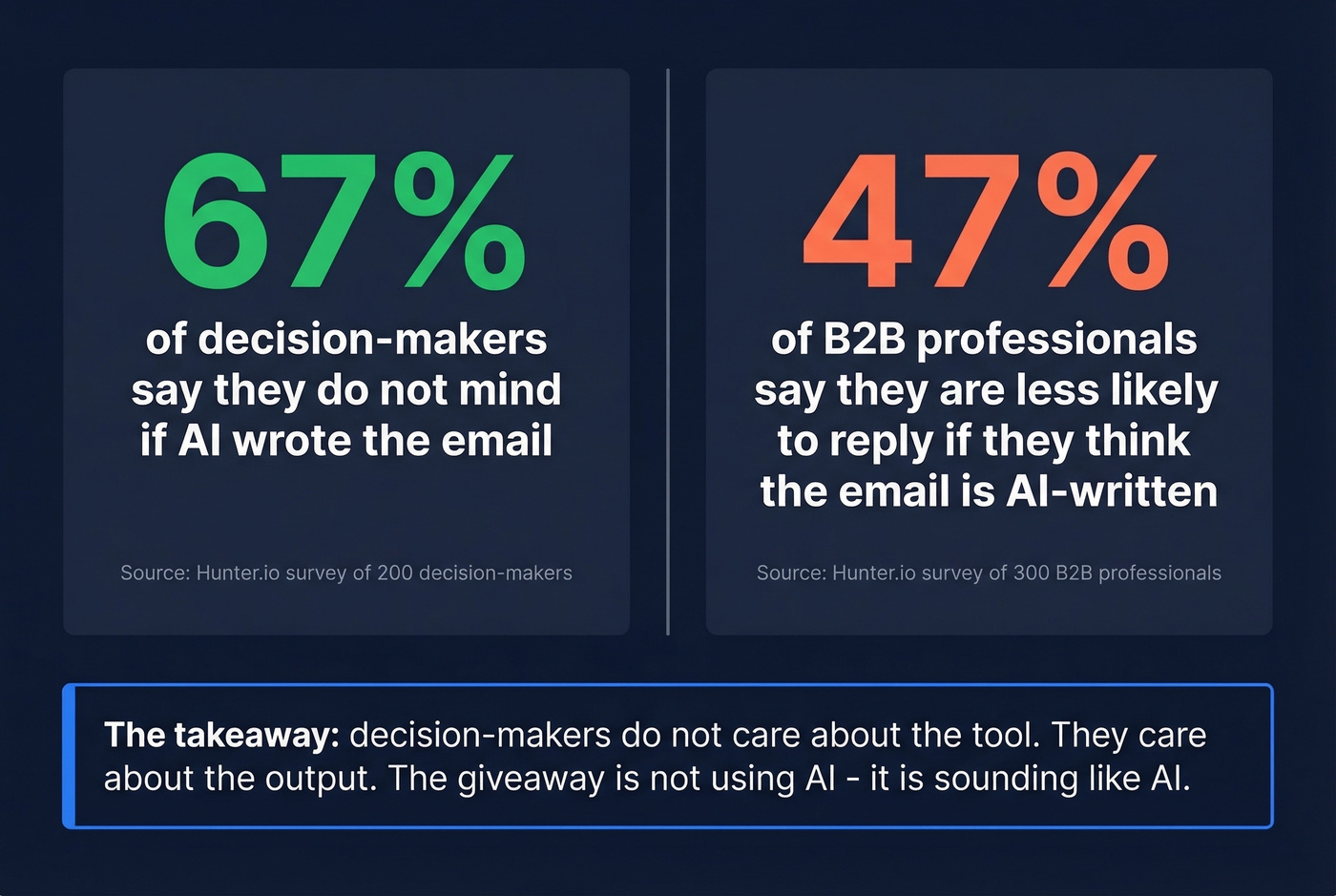
A Hunter survey of 200 decision-makers and 300 B2B professionals found that 67% of decision-makers don't mind if AI wrote an email. Sounds like a green light - until you see the other number. 47% of B2B professionals said they'd be less likely to reply if they thought the email was AI-written.
Both stats are true simultaneously. Decision-makers don't care about the tool. They care about the output.
The same research found that recipients correctly identify AI-written emails about half the time - essentially a coin flip. The giveaway isn't "this was written by AI." It's over-formality, repetitive structure, and that unmistakable ChatGPT cadence where every paragraph opens with a transition word. The problem isn't using AI. It's sounding like AI.

The best AI-written email is worthless if it bounces. Prospeo gives you 143M+ verified emails at 98% accuracy - so every draft your AI generator creates actually reaches a real inbox. Teams using Prospeo cut bounce rates from 35% to under 4%.
Stop perfecting emails that never get delivered.
Best AI Email Generators Compared
| Tool | Best For | Free Plan | Paid From | Key Limitation |
|---|---|---|---|---|
| ChatGPT | Overall flexibility | Yes | $20/mo | Copy-paste, no inbox |
| Grammarly | Editing & tone | Yes (basic) | $12/mo | Better editor than writer |
| Rytr | Dedicated email UI | 10K chars/mo | $7.50/mo | Tight free-tier cap |
| Mailmeteor | Gmail workflow | 50 emails/day | $4.99/mo | Gmail-only |
| QuillBot | Paraphrasing & rewrites | Yes (basic) | $10/mo | Rewrites, doesn't generate |
| Copy.ai | Marketing emails | 2K words/mo | $24-49/mo | Free tier burns fast |
| Writesonic | Multilingual (25+ langs) | Trial credits | $12.67-39/mo | Confusing pricing tiers |
| Spike | Team collaboration | Yes | $5/mo | Smaller ecosystem |
| Copilot | Enterprise Outlook | Some M365 plans | ~$30/user/mo | Only if company pays |
The ChatGPT + Grammarly combo covers 90% of professional email use cases at zero cost. ChatGPT generates the draft, Grammarly catches tone issues and tightens the prose. We've seen teams run this workflow for months before realizing they don't need anything else.
Dedicated tools earn their price only when you need inbox-native drafting - Mailmeteor for Gmail, Copilot for Outlook - or team-level features like Spike offers. Copilot is the enterprise standout: it breaks thread summaries into clickable bullet points and generates attachment summaries for Word, PDF, and PPT files. But it's not worth buying a Microsoft 365 subscription just for email AI. Marketing platforms like MailerLite ($9/mo) and ActiveCampaign (from $15/mo) also include AI email writing, but they're overkill if you just need help drafting individual messages.
One thing to watch: free-tier limits are tighter than they look. Copy.ai's 2,000 words burns through in a single outreach sequence. Mailmeteor caps free users at 50 emails per day, which is generous for individual use but limiting for outbound campaigns.
How to Write Professional Emails with AI
The tool matters less than the prompt. Here are five rules that consistently produce better output.
Specify a word count
Without a constraint, AI defaults to 200-300 words. Most professional emails should be 50-100. Add "keep it under 75 words" to every prompt - this single change eliminates the multi-paragraph walls of text that make AI emails obvious. One state employee on Reddit described a colleague whose emails ballooned after Copilot was installed: "Nobody talks like this."
Define tone by example
This is the highest-leverage prompting trick, so let's break it down with a before/after:
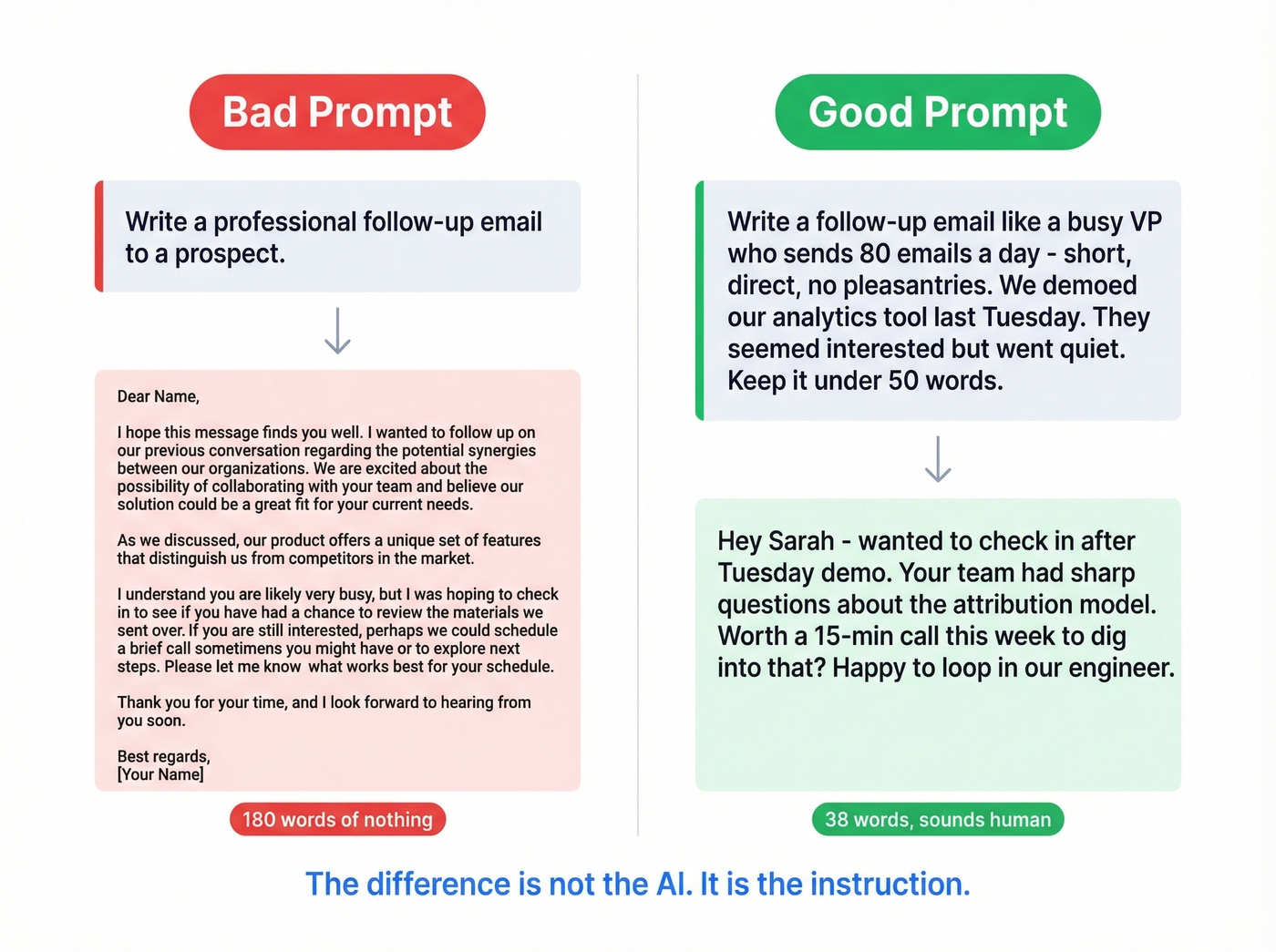
Bad prompt: "Write a professional follow-up email to a prospect."
Output: "Dear [Name], I hope this message finds you well. I wanted to follow up on our previous conversation regarding the potential synergies between our organizations..." - 180 words of nothing.
Good prompt: "Write a follow-up email like a busy VP who sends 80 emails a day - short, direct, no pleasantries. We demoed our analytics tool last Tuesday. They seemed interested but went quiet. Keep it under 50 words."
Output: "Hey Sarah - wanted to check in after Tuesday's demo. Your team had sharp questions about the attribution model. Worth a 15-min call this week to dig into that? Happy to loop in our engineer." - 38 words, sounds human.
The difference isn't the AI. It's the instruction.
Include recipient context
"Write a cold email" is a bad prompt. "Write a cold email to a Head of RevOps at a 200-person SaaS company who just raised Series B and is probably evaluating CRM enrichment tools" gives the model something to work with. The more specific your input, the less editing you'll do afterward.
Ask for multiple variants
Don't settle for the first draft. Prompt "give me three versions: one direct, one curiosity-driven, one that leads with a stat." Pick the best pieces from each. This is faster than iterating on a single draft and gives you A/B test material for free.
Always edit the output
Look, if you're sending AI-generated emails without editing, you're the person whose colleagues are complaining about on Reddit. Read it aloud. Cut the first sentence - it's almost always filler. Replace any word you wouldn't say in conversation. Our team has a rule: if a sentence sounds like it belongs in a press release, it gets rewritten or deleted.
Privacy and Data Security
Before you paste that sensitive client email into ChatGPT, know what happens to it. OpenAI's standard policy retains user inputs for up to 30 days for abuse monitoring. On a personal account with model training enabled, your content can be retained longer as training data.
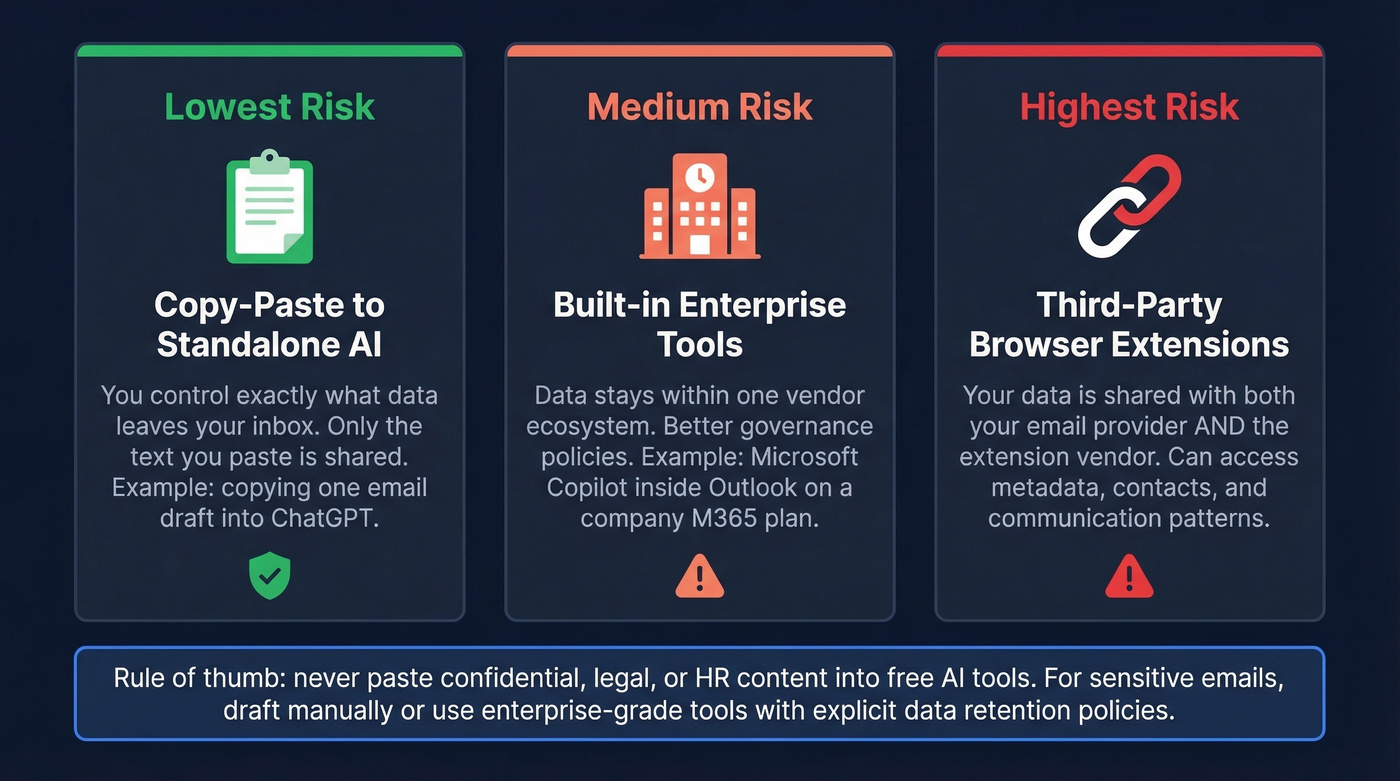
The risk compounds with integrated tools. Connecting an AI assistant to your inbox creates persistent data pathways - the tool doesn't just see the email you're drafting. It can access metadata, contact relationships, and communication patterns. That's a meaningful difference from copy-pasting a single message into a standalone tool.
Built-in assistants like Copilot within Microsoft 365 generally offer better data governance than third-party extensions, because your data stays within one vendor's ecosystem. Third-party tools mean sharing data with both your email provider and the extension vendor. Gartner predicts that by 2028, 40% of large enterprises will use AI to monitor employee moods and behaviors - the infrastructure for that starts with email AI.
Don't paste confidential, legal, or HR content into free AI tools. For sensitive communications, draft manually or use an enterprise-grade tool with explicit data retention policies.
Verify the Address Before Sending
Here's the mistake nobody talks about in AI email generator articles: teams obsess over copy and ignore data quality. You can craft polished professional emails all day long and still get crushed by bounces, spam placement, and domain reputation damage if you're sending to bad addresses.
Writing the email is step two. Finding a verified address is step one. AI handles the writing. Prospeo handles the data - 98% email accuracy and a 7-day refresh cycle so you're not sending to addresses that went stale three months ago. Start free with 75 verified emails per month, no credit card required.
If you're building a repeatable outbound system, pair this with AI cold email automation and a clean prospecting workflow so your drafts, targeting, and deliverability improve together.
You just learned the writing part is solved - ChatGPT plus a good prompt handles that. The real bottleneck is sending to valid addresses. Prospeo's 300M+ profiles refresh every 7 days, so your AI-crafted outreach hits real people, not dead inboxes.
Great copy deserves data that connects - starting at $0.01 per email.
FAQ
What's the best free AI professional email generator?
ChatGPT handles most use cases better than dedicated tools, and it's free. Output quality matches or beats purpose-built alternatives like Rytr and Copy.ai. Dedicated tools add inbox integration and templates but cap free usage heavily - Rytr limits you to 10,000 characters per month.
Can recipients tell if an email was AI-written?
About half the time. Hunter's survey found recipients correctly identify AI emails roughly 50% of the time - essentially a coin flip. The giveaway is over-formality and repetitive structure, not the fact that AI was involved. Edit ruthlessly, cut the first sentence, and you'll pass undetected.
Are AI email generators safe for work emails?
It depends on the tool. OpenAI retains inputs for up to 30 days on standard accounts. Don't paste confidential, legal, or HR content into free tools. Enterprise options like Microsoft Copilot offer better data governance with explicit retention policies and admin controls.
What's the best AI email tool for sales outreach?
ChatGPT for writing the email. Prospeo for finding and verifying the recipient's address - 98% email accuracy, 75 free emails per month. The email copy matters far less than whether it reaches a real inbox. A perfect cold email that bounces is worth exactly nothing.
Do I need a paid AI email generator?
Probably not. ChatGPT's free tier plus Grammarly's free tier covers most professional use cases. Pay only if you need native inbox integration (Copilot, Mailmeteor), team collaboration (Spike), or multilingual support at scale - Writesonic covers 25+ languages. For everyone else, the free stack works.