

Analytical CRM: What It Is, How It Works, and Why Data Quality Decides Everything
Your VP of Sales just pulled up the Q3 forecast and it's off by 40%. Not because the model was wrong - because half the contact records feeding it were incomplete, outdated, or flat-out duplicated. That's the dirty secret of analytical CRM: the analytics are only as good as the data underneath them. And 76% of CRM users say less than half their data is accurate or complete.
This isn't a tools problem. It's a foundation problem.
The Short Version
In one sentence: Analytical CRM is the layer that sits on top of your operational CRM data and turns it into forecasts, segments, churn predictions, and next-best-action recommendations.
Dedicated tool vs. built-in analytics: Most mid-market teams don't need a separate product. Your existing CRM's reporting handles 80% of use cases. You only need a standalone BI tool when you're blending data across multiple platforms or running advanced statistical models.
The prerequisite nobody talks about: If more than 20% of your contact records are incomplete or outdated, no analytics tool will save you. Fix the data first.
What Is Analytical CRM?
CRM software falls into three categories, though the boundaries have blurred as platforms mature.
| Type | Purpose | Key Functions | Example Use Case | Example Tools |
|---|---|---|---|---|
| Operational | Automate daily work | Contact mgmt, pipeline, task automation | Auto-logging calls, sending follow-ups | Salesforce, HubSpot, Pipedrive |
| Analytical | Analyze & predict | Segmentation, forecasting, churn models | Predicting which accounts churn next quarter | Salesforce CRM Analytics, Zoho Analytics |
| Collaborative | Share across teams | Shared notes, cross-dept visibility | Support flagging upsell signals to sales | Slack + CRM integrations, Freshsales |
Analytical CRM specifically focuses on mining your customer data - transactions, support tickets, engagement scores, deal velocity, win/loss patterns - and surfacing insights that drive better decisions. It's the difference between knowing you closed 47 deals last quarter and understanding why enterprise deals in the healthcare vertical close 2.3x faster when a VP attends the demo.
The CRM market hit $112.91B in 2025 and is projected to reach $262.74B by 2032. With 91% of companies with 11+ employees already using a CRM, the land grab has shifted from adoption to monetizing analytics layers and embedded BI. Salesforce charges $140-$220/user/month for CRM Analytics - on top of the base CRM license.
The real question isn't whether you need CRM analytics. You do. The question is whether you need a dedicated product or whether your existing platform's built-in reporting covers it. For most teams under 500 people, it's the latter.
How It Works Under the Hood
Most articles stop at "it analyzes your data." Let's walk through the actual architecture, because understanding the pipeline explains why things break.
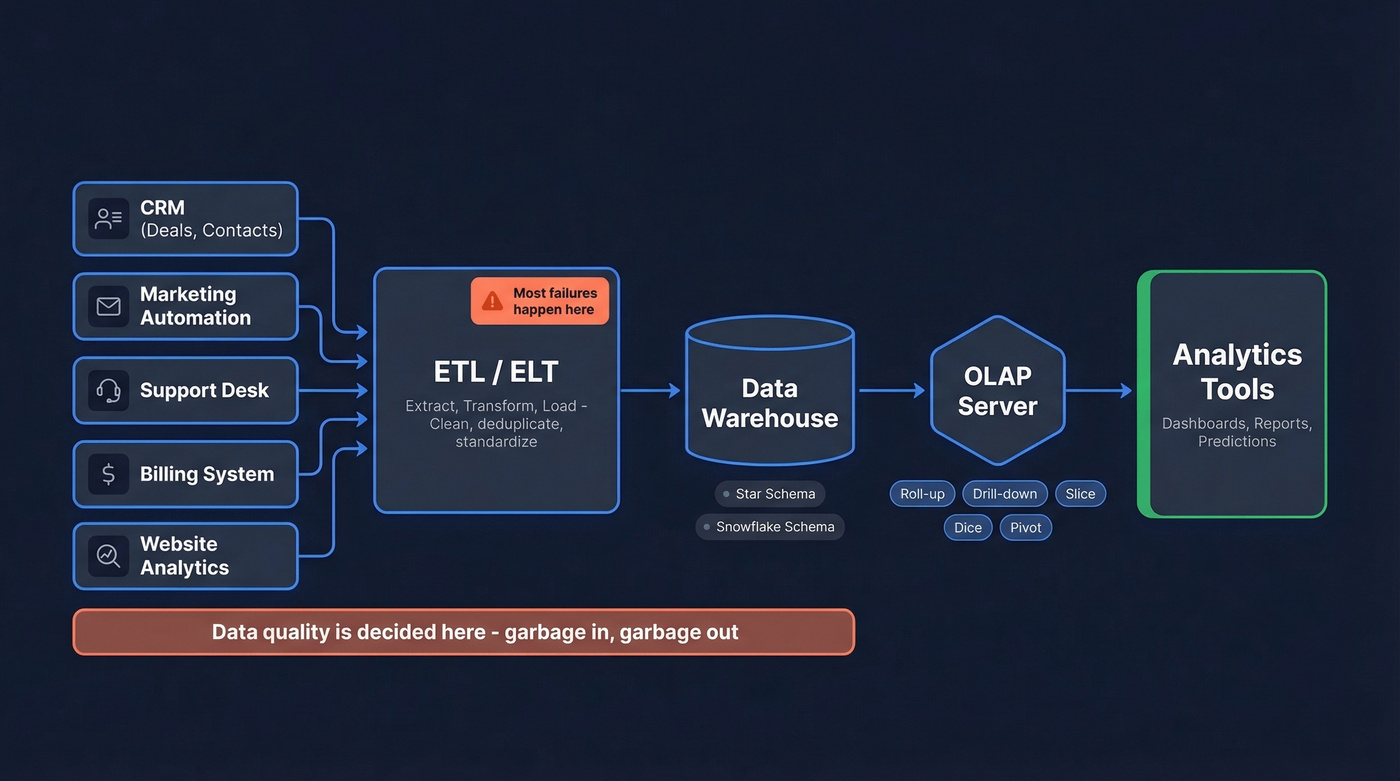
The standard system follows a five-stage flow: data sources -> ETL/ELT -> data warehouse -> OLAP server -> analytics tools.
It starts with extraction. Your CRM, marketing automation platform, support desk, billing system, and website analytics all generate customer data. ETL (Extract, Transform, Load) or ELT tools pull that data, clean it, standardize formats, deduplicate records, and load it into a centralized data warehouse. This is where most implementations quietly fail - if the ETL process doesn't handle duplicates or inconsistent field formats, every downstream analysis inherits those errors. The quality of your relationship data determines whether the entire pipeline produces trustworthy outputs.
The data warehouse stores both current and historical data in a structure optimized for analysis, not transactions. Two common schemas dominate: star schema (a central fact table surrounded by dimension tables) and snowflake schema (normalized dimension tables).
On top of the warehouse sits the OLAP (Online Analytical Processing) server. OLAP is fundamentally different from OLTP (Online Transaction Processing), which your CRM uses for day-to-day operations. OLTP handles high-frequency, row-level transactions - logging a call, updating a deal stage. OLAP handles complex, read-heavy queries across large datasets - "show me average deal velocity by segment, region, and quarter for the last three years."
OLAP implementations come in three flavors: MOLAP (fast, precalculated cubes), ROLAP (flexible, queries relational databases directly), and HOLAP (hybrid). OLAP uses precalculated multidimensional models called cubes to support the core operations that power CRM analytics dashboards:
- Roll-up: Aggregate data upward (individual deals -> team totals -> regional totals)
- Drill-down: Go deeper (Q3 revenue -> October revenue -> week-by-week)
- Slice: Filter one dimension (show only enterprise deals)
- Dice: Filter multiple dimensions simultaneously (enterprise deals in EMEA closed by reps with 2+ years tenure)
- Pivot: Rotate the data cube to view a different dimension as the primary axis
The analytics tools - whether Salesforce CRM Analytics, Zoho Analytics with Zia, or a standalone BI platform like Tableau - sit at the top of this stack and translate OLAP queries into the dashboards, reports, and predictions your team actually sees.
Four Types of CRM Analytics
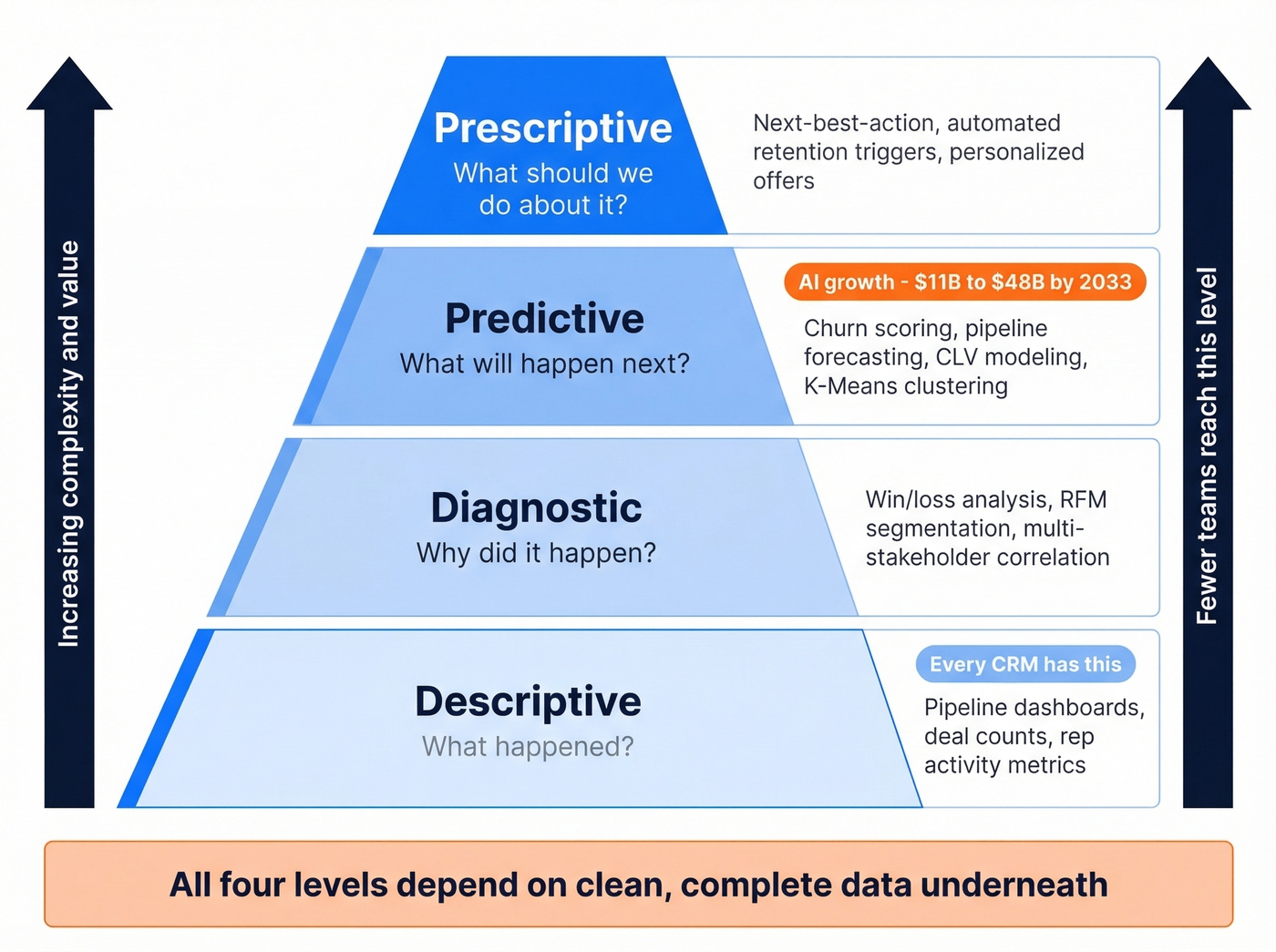
Not all CRM analytics do the same thing. There are four distinct levels, and most teams only use the first two.
Descriptive
The "what happened" layer. Your pipeline dashboard showing last quarter's closed-won revenue, average deal size by segment, and rep activity metrics - that's descriptive analytics. Every CRM includes this. Table stakes.
Diagnostic
This answers "why did it happen." Win/loss analysis is the classic example: you're not just seeing that Q3 missed target, you're identifying that deals involving more than three stakeholders closed at 2x the rate of single-threaded deals. RFM analysis (Recency, Frequency, Monetary value) is another workhorse here - segmenting customers by purchase behavior to identify your highest-value cohorts and understand what drives their engagement.
Predictive
Here's where the category gets genuinely powerful. Predictive models - typically logistic regression or random forest algorithms - score accounts on churn probability, forecast pipeline with confidence intervals, and identify which leads are most likely to convert. K-Means clustering handles customer segmentation, grouping accounts by behavioral patterns rather than arbitrary firmographic buckets. Customer lifetime value modeling sits here too, projecting the total revenue a customer will generate over the relationship - critical for SaaS companies deciding how much to spend on acquisition and retention.
The AI-in-CRM market is projected to grow from $11.04B in 2025 to $48.4B by 2033. Most of that growth is in predictive and prescriptive capabilities, which explains why every CRM vendor is racing to bolt on AI features. A telecom company using churn prediction models can identify at-risk subscribers three months before contract renewal and trigger retention offers - turning a reactive process into a proactive one.
Prescriptive
The most advanced layer: "what should we do about it." Next-best-action recommendations - this account's churn score just spiked, trigger a retention sequence. This e-commerce customer's browsing pattern matches high-value buyers, surface a personalized offer. Prescriptive analytics requires clean data, well-trained models, and tight integration with operational workflows. Few teams get here, but the ones that do see outsized results.
One question practitioners raise: are the qualitative notes reps leave in CRM fields worth analyzing? Yes - but only with NLP tools that can extract structured signals from unstructured text. That's exactly where revenue intelligence platforms start overlapping with CRM analytics.

You just read that 76% of CRM users say less than half their data is accurate. Prospeo fixes this at the source - 300M+ profiles verified on a 7-day refresh cycle, 98% email accuracy, and 50+ data points per enrichment. Plug clean data into your analytical CRM and your forecasts actually mean something.
Stop analyzing garbage. Start with data you can trust.
Analytical CRM vs. BI vs. Revenue Intelligence
The category confusion is real. We've talked to teams who bought three overlapping tools because nobody could explain where one ended and another began.
| Category | Data Analyzed | Primary Output | Example Tools | When You Need It |
|---|---|---|---|---|
| Analytical CRM | Structured customer data (deals, tickets, scores) | Segments, forecasts, churn models | Salesforce CRM Analytics, Zoho Analytics | Always - it's your baseline |
| Revenue Intelligence | Unstructured conversation data (calls, emails, meetings) | Deal risk scoring, coaching insights | Gong, Clari | When pipeline visibility from CRM data alone isn't enough |
| BI Platform | Any structured data across systems | Custom dashboards, ad-hoc queries | Tableau, Power BI, Looker | When you need cross-platform data blending |
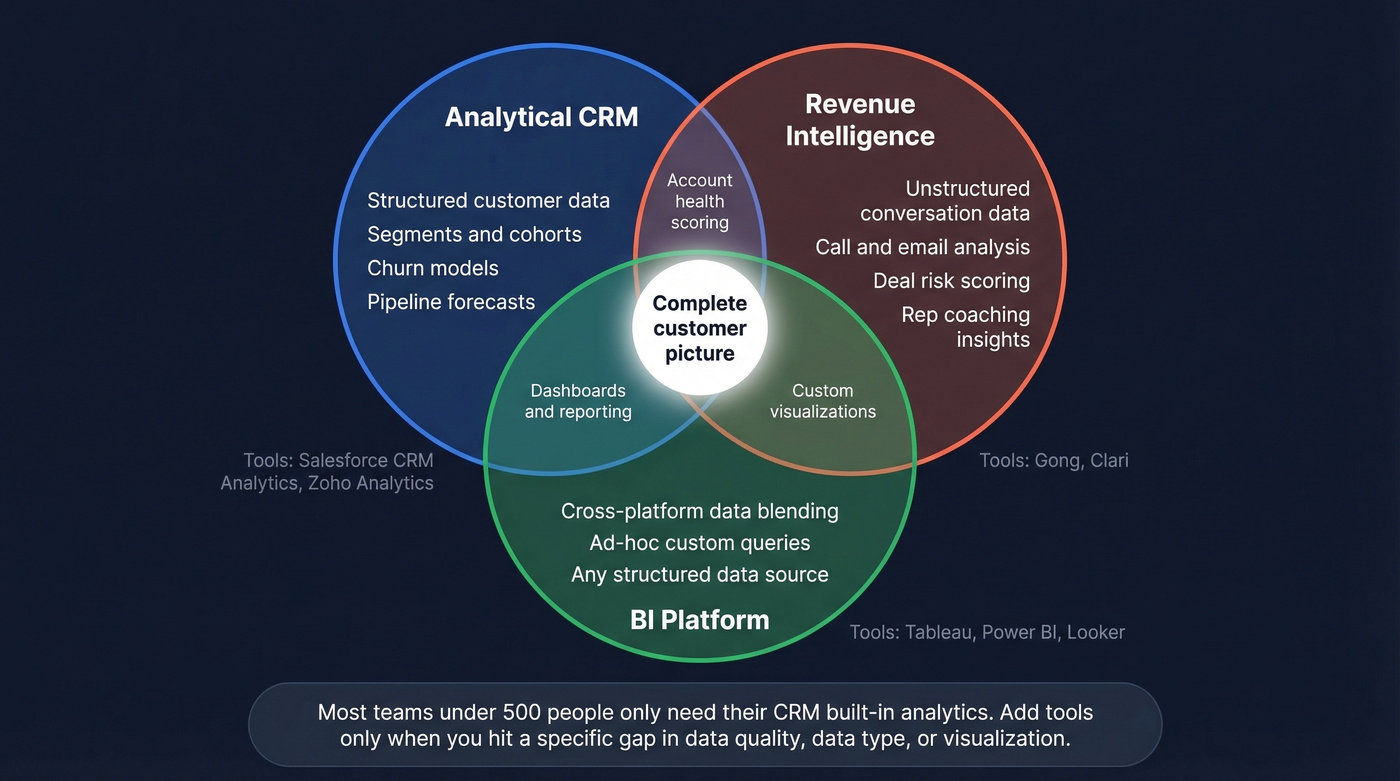
CRM analytics works with structured data already in your CRM. Revenue intelligence analyzes unstructured data - call recordings, email threads, meeting transcripts - to surface insights your CRM fields can't capture. BI platforms sit underneath both as the visualization and query layer.
As Ray Wang at Constellation Research has noted, demand is shifting away from standalone analytics toward embedded analytics within CRM systems, and revenue intelligence is rapidly encroaching on traditional territory. The global BI market hit $32B in 2024 and is projected to reach $63.2B by 2032 - with a lot of that growth coming from embedded BI inside CRM platforms.
For most teams, the boundaries don't matter. What matters is whether your current stack answers the questions you're asking. If it doesn't, figure out whether the gap is data quality, data type (structured vs. unstructured), or visualization capability - then fill that specific gap.
Best Analytical CRM Tools in 2026
| Tool | Best For | Analytics Depth | Starting Price | Standout Feature |
|---|---|---|---|---|
| Salesforce CRM Analytics | Enterprise, dedicated admins | ★★★★★ | $140/user/mo (add-on) | Einstein Discovery AI |
| HubSpot | Marketing attribution | ★★★★☆ | Free; Professional from $1,450/mo | Multi-touch attribution |
| Zoho Analytics | SMBs wanting real depth | ★★★★☆ | Always Free plan | Zia NLP queries |
| Dynamics 365 | Microsoft-stack orgs | ★★★★☆ | $65/user/mo | Native Power BI |
| monday CRM | Adoption-first teams | ★★★☆☆ | $12/seat/mo | Visual dashboards |
| Pipedrive | SMB pipeline visibility | ★★★☆☆ | $14/user/mo | Clean deal reports |
| Freshsales | Budget AI scoring | ★★☆☆☆ | Free (3 users) | Freddy AI |
| SugarCRM | On-premise requirements | ★★★☆☆ | $59/user/mo | Data residency options |
| Creatio | Custom no-code workflows | ★★★☆☆ | ~$25/user/mo | No-code analytics builder |
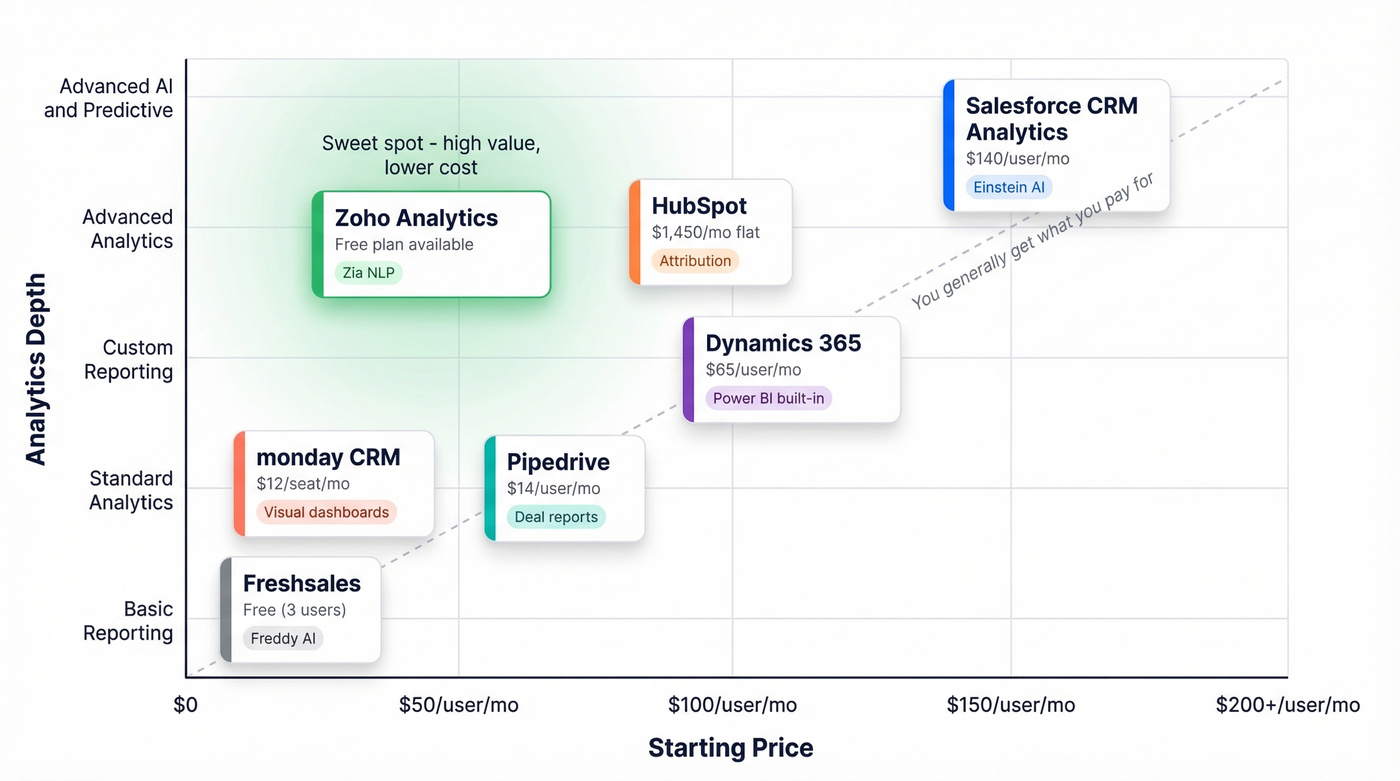
If forced to pick one: Zoho Analytics for teams under 50, Salesforce CRM Analytics for enterprise. Everyone else should start with their existing CRM's built-in reporting and see how far it takes them.
Salesforce CRM Analytics
The most powerful option on the market - and the most expensive and complex.
Pricing runs $140/user/month for Growth, $165 for Plus (adding Einstein Discovery), and $220 for Revenue Intelligence. These are add-on costs on top of your base CRM license. A 10-person sales team stacking a higher-tier CRM license plus CRM Analytics Plus can easily land in the $250-$350/user/month range before implementation and services.

Einstein Discovery is genuinely impressive for predictive modeling - it builds and explains models without requiring a data scientist. But without governance, CRM instances accumulate unused fields and conflicting automation rules that poison the very data the models analyze. The analytics output looks sophisticated, but it's built on sand.
Use this if you're enterprise with 500+ employees and a dedicated admin. Skip this if nobody's job is maintaining data quality inside Salesforce.
HubSpot
HubSpot's pricing catches teams off guard: Professional runs $1,450/month for 5 seats, Enterprise is $4,700/month for 7 seats, and there's a required onboarding fee ($3,000 for Professional, $7,000 for Enterprise). So why does it still win?
Marketing attribution. Multi-touch revenue attribution, campaign performance analytics, and content ROI reporting are genuinely best-in-class. The free CRM includes basic reporting that's usable for small teams. For sales-heavy organizations needing deep pipeline forecasting or predictive churn scoring, HubSpot's analytics feel thin compared to Salesforce or Zoho - it's a marketing-first platform, and the analytics reflect that priority. But the implementation and maintenance overhead is dramatically lower than Salesforce, and many teams run it without a dedicated CRM admin.
Zoho Analytics
Best value in the category, and it's not close.
Zoho Analytics offers an Always Free plan, supports 500+ third-party connectors, and scales from $25/month (Basic) to $455/month (Enterprise) - a fraction of Salesforce's per-user add-on pricing. The AI assistant, Zia, handles natural language queries well. Type "show me deal conversion rate by industry for Q2" and get a usable chart without touching a formula. For teams under 50 people who want real segmentation, forecasting, and cross-source data blending without enterprise pricing or complexity, Zoho is the obvious starting point.
Microsoft Dynamics 365
Power BI integration is the killer feature. If your organization already runs on Microsoft 365, Teams, and Azure, Dynamics 365 plus Power BI Pro ($14/user/month add-on) creates a CRM analytics stack that feels native. Sales Professional starts at $65/user/month, Enterprise at $105, Premium at $150.
monday CRM
monday wins on adoption, and that matters more than most teams admit. Pricing starts at $12/seat/month billed annually (minimum 3 seats). The analytics depth is limited - don't expect predictive modeling. But for teams where the primary bottleneck is getting reps to actually enter data, monday solves the right problem first.
Pipedrive
Clean, intuitive pipeline reporting for small sales teams. Starts at $14/month billed annually. Lower tiers have report limits (15 reports on Lite, 50 on Growth). If you need segmentation, predictive analytics, or cross-source data blending, you'll hit a ceiling fast.
Freshsales, SugarCRM, and Creatio
Freshsales is free for 3 users, with Growth at $9/user/month and Enterprise at $59. Freddy AI Agent sessions cost $49/100. Decent for budget-conscious teams who want basic AI scoring without a big commitment.
SugarCRM runs $59-$135/user/month with a 15-user minimum. The on-premise option matters for companies with strict data residency requirements - most cloud-only CRMs can't match that.
Creatio starts around $25/user/month with a no-code workflow builder and built-in analytics. Good for teams that want to customize without hiring developers.
Why Most Implementations Fail
76% of CRM users say less than half their data is accurate or complete. Three out of four organizations are running analytics on a foundation they don't trust. We've seen six failure patterns come up over and over.
Poor Data Quality
Garbage in, garbage out. Incomplete records, outdated emails, wrong job titles, duplicate contacts - all of it corrupts your segmentation, skews your forecasts, and erodes trust in the entire analytics function. Before trusting any forecast, run your contact database through an enrichment and verification tool. Prospeo's CRM enrichment returns 50+ data points per record at a 92% API match rate and refreshes data every 7 days - compared to the 6-week industry average - so your segmentation and churn models work with current, complete records rather than stale guesses.

Low User Adoption
A clunky UI, no training, and zero leadership buy-in means reps don't log activities. If reps aren't logging, your CRM analytics are analyzing a fiction. Role-specific training and leadership actually using the system are non-negotiable.
Over-Engineering
Too many custom fields, too many automation rules, too many workflow branches. Complexity kills adoption and creates maintenance debt. Start with core workflows, add complexity only when you've proven the basics work. We've seen teams with 200+ custom Salesforce fields where reps fill in maybe 12 of them - and then wonder why their forecasts are unreliable.
Siloed Data Across Teams
When sales, support, and marketing each maintain separate records, your analytics only see a fraction of the customer picture. Prioritize real-time sync via APIs or native integrations - batch imports that run weekly aren't good enough for operational analytics.
No Governance
Without clear ownership, CRM instances accumulate unused fields, conflicting automation rules, and orphaned workflows. Assign a data steward. Audit quarterly. Delete what's not being used.
Hidden Costs
Per-user add-ons, mandatory onboarding fees, implementation consultants, and admin overhead. A 10-seat Salesforce CRM Analytics deployment can easily cost $50K+/year all-in. Budget for the real number, not the per-user sticker price.
When teams get these right, the results are significant. An illustrative case study using K-Means clustering for segmentation and random forest models for churn prediction shows retention moving from 58% to 74% and monthly churn dropping from 4.5% to 2.6% within a year. That's what "good" looks like when the data and execution are disciplined.
How to Choose the Right Tool
| Company Size | Budget Range | Recommended Tools | Data Maturity Prerequisite |
|---|---|---|---|
| Enterprise (500+) | $100K+/year | Salesforce CRM Analytics, Dynamics 365 + Power BI | Dedicated admin + governance |
| Mid-market (50-500) | $20-60K/year | HubSpot Professional/Enterprise, Zoho Analytics | Clean data, basic reporting habits |
| SMB/Startup | Under $10K/year | monday CRM, Pipedrive, Freshsales | Consistent entry, deduplication |
Here's the thing: most companies don't need a dedicated analytical CRM. They need clean data and a CRM with decent built-in reporting. The consensus on r/sales and r/salesforce echoes this - teams feel their CRMs tout "100+ features" but they only use 5-8 of them. Adding an analytics add-on to a CRM with dirty data is like putting a turbocharger on an engine with no oil.
Audit your data quality first. Enrich incomplete records. Deduplicate. Standardize fields. Then evaluate whether your existing CRM's reporting answers the questions you're actually asking. If it does, you just saved yourself $20-100K/year and six months of implementation pain. If you need a broader vendor comparison first, start with data enrichment services before you commit to a workflow.
Your ETL pipeline can't fix what was broken at ingestion. Prospeo's CRM enrichment returns verified contacts at a 92% match rate - with catch-all handling, spam-trap removal, and deduplication built in. That's the data foundation your OLAP cubes and churn models actually need.
Clean data in, accurate predictions out. It starts at $0.01 per email.
FAQ
What's the difference between analytical and operational CRM?
Operational CRM automates day-to-day processes - logging calls, sending follow-ups, managing pipeline stages. Analytical CRM sits on top of that operational data and turns it into forecasts, segments, and churn predictions. Most modern platforms include both, though the analytical capabilities often require a higher-tier plan or add-on.
How much does analytical CRM software cost?
It ranges from free (Zoho's Always Free plan, HubSpot basic reporting) to $220+/user/month (Salesforce Revenue Intelligence). Mid-market teams typically spend $50-150/user/month for meaningful analytics. Factor in onboarding fees, admin overhead, and BI tool add-ons - the sticker price is rarely the real price.
Can I use my existing CRM for analytics instead of buying a separate tool?
Yes. HubSpot, Salesforce, Zoho, and Dynamics 365 all include built-in analytics sufficient for 80% of use cases. You only need a separate BI tool like Tableau or Power BI when your analysis requires cross-platform data blending or advanced statistical modeling beyond what your CRM offers natively.
How do I fix bad CRM data before running analytics?
Start with deduplication and field standardization - remove duplicate records and enforce consistent formatting for job titles, company names, and phone numbers. Then enrich incomplete records using a data enrichment tool that refreshes on a regular cycle rather than a one-time batch. Schedule data audits quarterly at minimum to prevent decay.
What ROI should I expect from CRM analytics?
Industry benchmarks show $8.71 return per $1 invested in CRM overall. Well-instrumented analytics programs commonly drive meaningful retention lifts and churn reduction within the first year - but only when the underlying data is clean and teams actually use the system consistently.