

15 Examples of a CRM: Real Pricing, Real Opinions
The CRM market hits $126.17B in 2026. That's a lot of software fighting for your budget. And yet, 22% of sales professionals still aren't sure what a CRM actually does - while 43% of the people who have one use fewer than half its features.
Here are 15 real examples of a CRM, what they cost, and which ones are worth your time.
The numbers make the case: CRMs drive a 29% increase in sales revenue, a 34% boost in sales productivity, and shorten sales cycles by 8-14 days. The average return is $8.71 for every $1 spent. But that's an average - it includes companies that nailed implementation and companies that abandoned the rollout after three months. 91% of companies with more than 11 employees use a CRM. The question isn't whether you need one. It's which one won't waste your time.
Quick Picks
If you don't want to read 2,500 words, here's the short version:
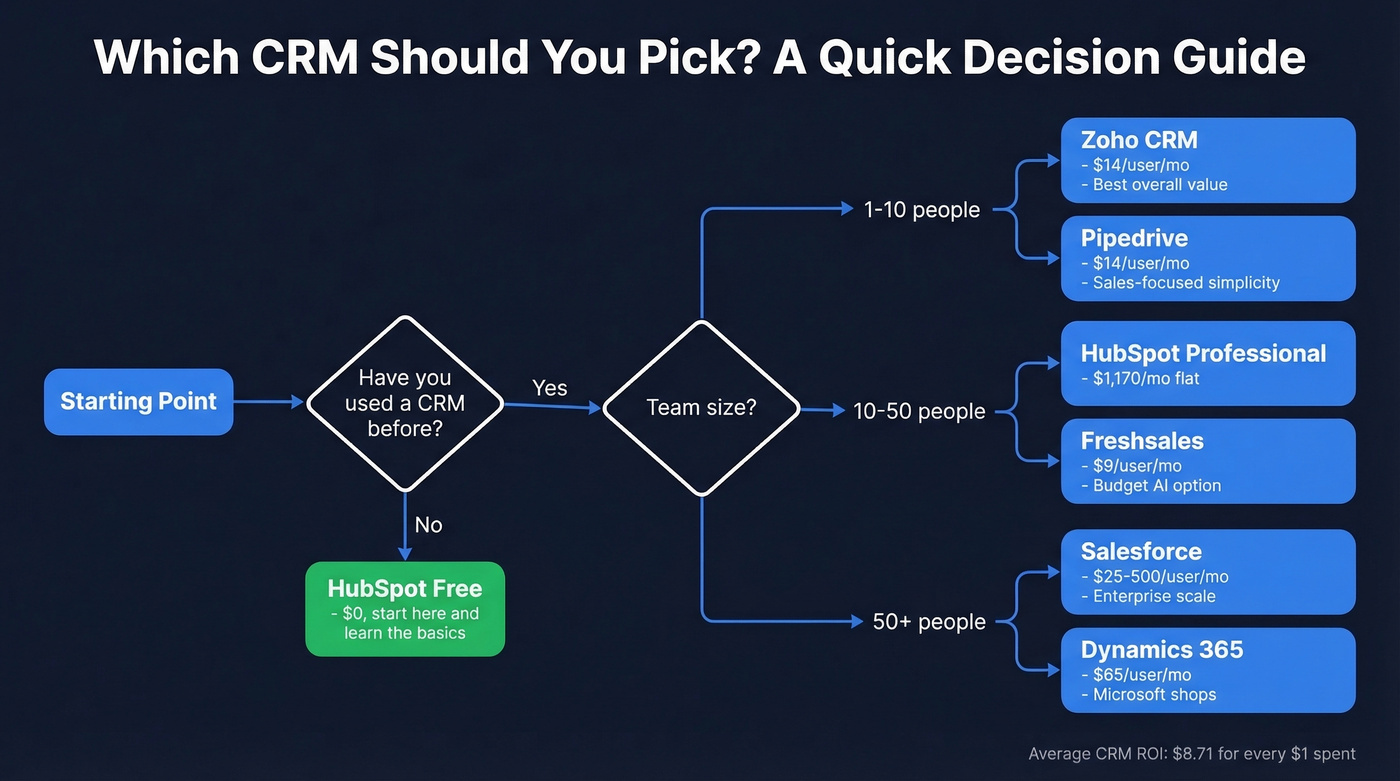
- Small team, first CRM: HubSpot Free, then Zoho CRM, then Pipedrive. Start free, upgrade when you hit a wall.
- Mid-market, need scale: Salesforce Starter, HubSpot Professional, or Freshsales. Budget for implementation, not just licenses.
| Situation | Top Pick | Why |
|---|---|---|
| Never used a CRM | HubSpot Free | Zero cost, generous free tier |
| Best overall value | Zoho CRM | PCMag's Best Overall, $14/user/mo |
| Sales-first teams | Pipedrive | Visual pipeline, no bloat |
What Is CRM Software?
A CRM - customer relationship management - is software that tracks every interaction between your company and your customers. Contacts, deals, emails, calls, support tickets, marketing touches. All in one place, accessible to everyone who needs it.
If you're still deciding whether you need a CRM or just a lighter tool, start with contact management basics first.
87% of businesses now run cloud-based CRMs, up from 12% in 2008. The shift is complete. On-premise CRM is effectively dead outside of heavily regulated industries.
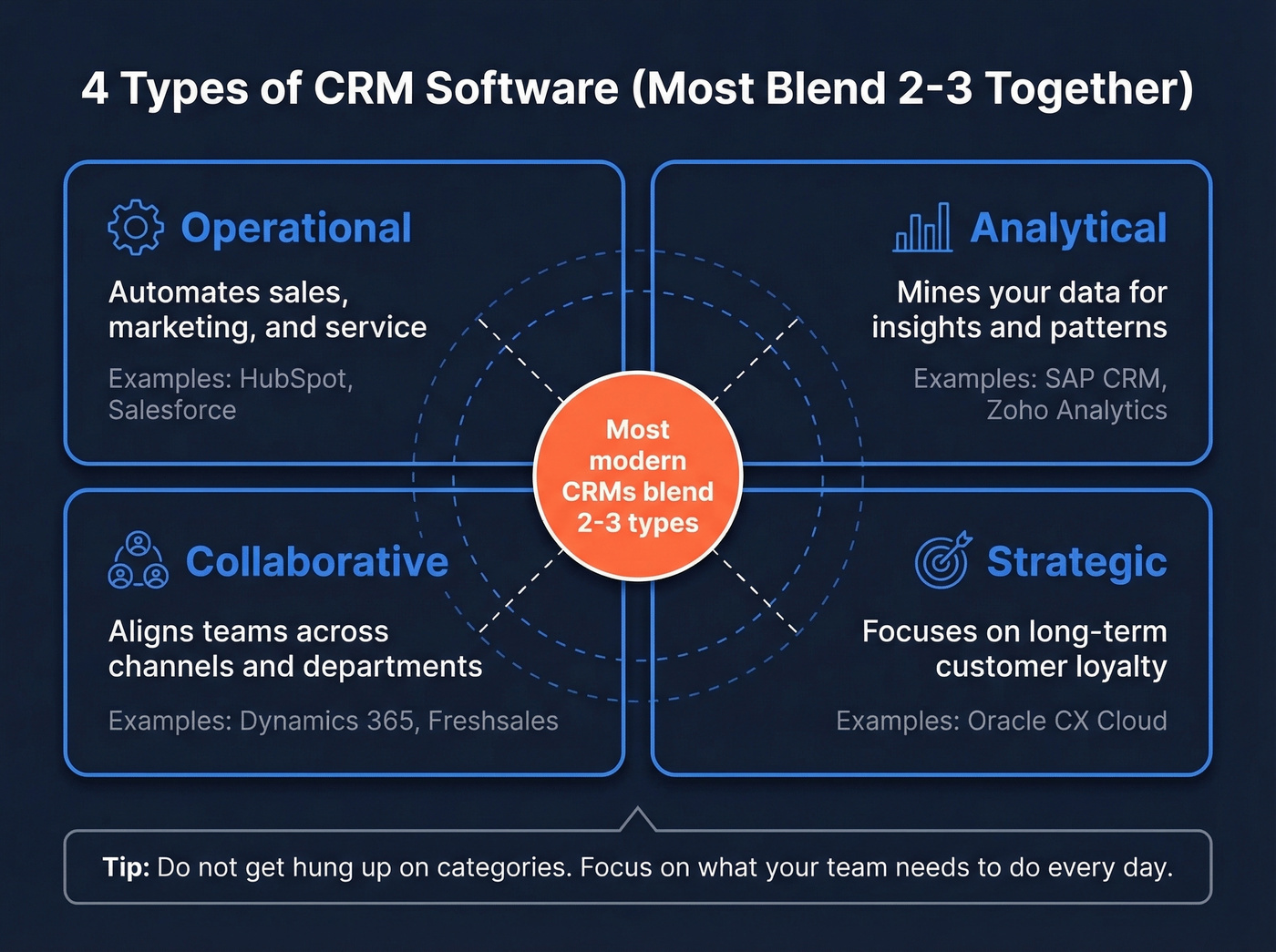
There are four types, and they overlap more than vendors want to admit:
| Type | What It Does | Example |
|---|---|---|
| Operational | Automates sales/marketing/service | HubSpot, Salesforce |
| Analytical | Mines data for insights | SAP CRM, Zoho Analytics |
| Collaborative | Aligns teams across channels | Dynamics 365, Freshsales |
| Strategic | Long-term loyalty focus | Oracle CX Cloud |
Most modern CRMs blend two or three of these. Salesforce is operational and analytical. HubSpot is operational and collaborative. Don't get hung up on taxonomy - focus on what your team actually needs to do every day.
15 CRM Systems With Pricing
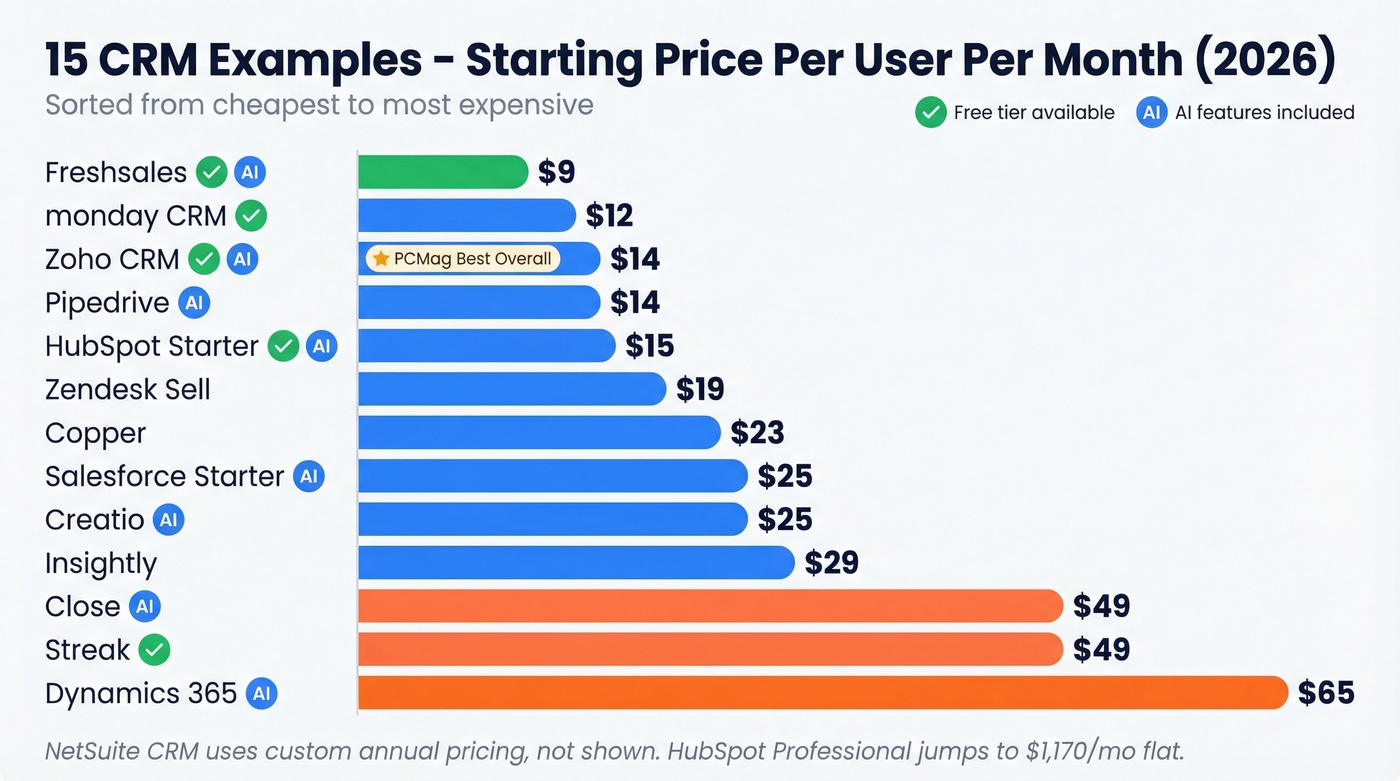
Here's the pricing comparison, then a breakdown of each tool.
| CRM | Best For | Starting Price | Free Tier | AI Features |
|---|---|---|---|---|
| HubSpot | First-time buyers | $15/seat/mo | ✅ | Breeze AI |
| Salesforce | Enterprise w/ admin | $25/user/mo | ❌ | Einstein, Agentforce |
| Zoho CRM | Best value overall | $14/user/mo | ✅ 3 users | Zia AI |
| Pipedrive | Sales-focused teams | $14/user/mo | ❌ | AI Sales Assistant |
| Dynamics 365 | Microsoft shops | ~$65/user/mo | ❌ | Copilot |
| Freshsales | Budget AI CRM | $9/user/mo | ✅ | Freddy AI |
| monday CRM | Project-first teams | $12/seat/mo | ✅ | Basic automations |
| Zendesk Sell | Support-first orgs | $19/agent/mo | ❌ | Limited |
| Copper | Google Workspace | ~$23/user/mo | ❌ | Limited |
| Streak | Gmail-native workflow | ~$49/user/mo | ✅ Limited | Limited |
| Close | Inside sales / SDRs | ~$49/user/mo | ❌ | AI call summaries |
| Insightly | SMB project + CRM | ~$29/user/mo | ❌ | Limited |
| Creatio | No-code workflows | $25/user/mo | ❌ | Process AI |
| NetSuite CRM | ERP-integrated orgs | Custom (annual) | ❌ | Limited |
HubSpot CRM
Best for: Teams that have never used a CRM and want to start free.
HubSpot's free tier is genuinely generous - contact management, deal tracking, email integration. For a five-person team that just needs to stop tracking deals in spreadsheets, it's the obvious starting point.
Here's the thing, though. The jump from Starter ($15/seat/mo) to Professional ($1,170/mo flat) is a cliff, not a step. Enterprise hits $4,300/mo. That's the price you pay for marketing automation, custom reporting, and sequences. We've seen teams get locked into HubSpot's free tier, build their entire workflow around it, and then face a brutal budget conversation when they outgrow it.
Best entry point if you don't know what you need yet. Just go in with eyes open about the upgrade path.
Salesforce
Why it wins: Nothing else matches Salesforce's ecosystem depth. AppExchange, custom objects, Einstein AI, Agentforce for autonomous agents, multi-currency, territory management - it does everything.
The cost reality: You need a dedicated admin. Probably a consultant for implementation. A 10-seat deployment with Sales Cloud Enterprise, CPQ, and Einstein runs around $50-100k/year before implementation costs. Starter Suite begins at $25/user/mo, and pricing can climb to $500/user/mo depending on edition and add-ons. The "talk to sales" pricing model is a common frustration on r/CRM - and for good reason.
If you want the deeper breakdown on editions and hidden costs, see our Salesforce pricing guide.
Right for companies with a six-figure software budget and the headcount to manage it. For everyone else, it's overkill.
Zoho CRM
Most underrated CRM on the market. PCMag gave it 4.5/5 and Best Overall - ahead of Salesforce, HubSpot, and everyone else. That's not a fluke.
Standard plan runs $14/user/mo (annual). Enterprise is $40/user/mo. Free tier covers up to 3 users. Zia AI handles lead scoring, anomaly detection, and workflow suggestions. The customization depth rivals Salesforce at a fraction of the cost.
The learning curve is real - Zoho packs a lot into the interface, and advanced features gate behind higher tiers. But for a mid-market team that wants Salesforce-level flexibility without Salesforce-level pricing, Zoho is the answer. It punches well above its price point.
Pipedrive
What Salesforce would be if Salesforce respected your time.
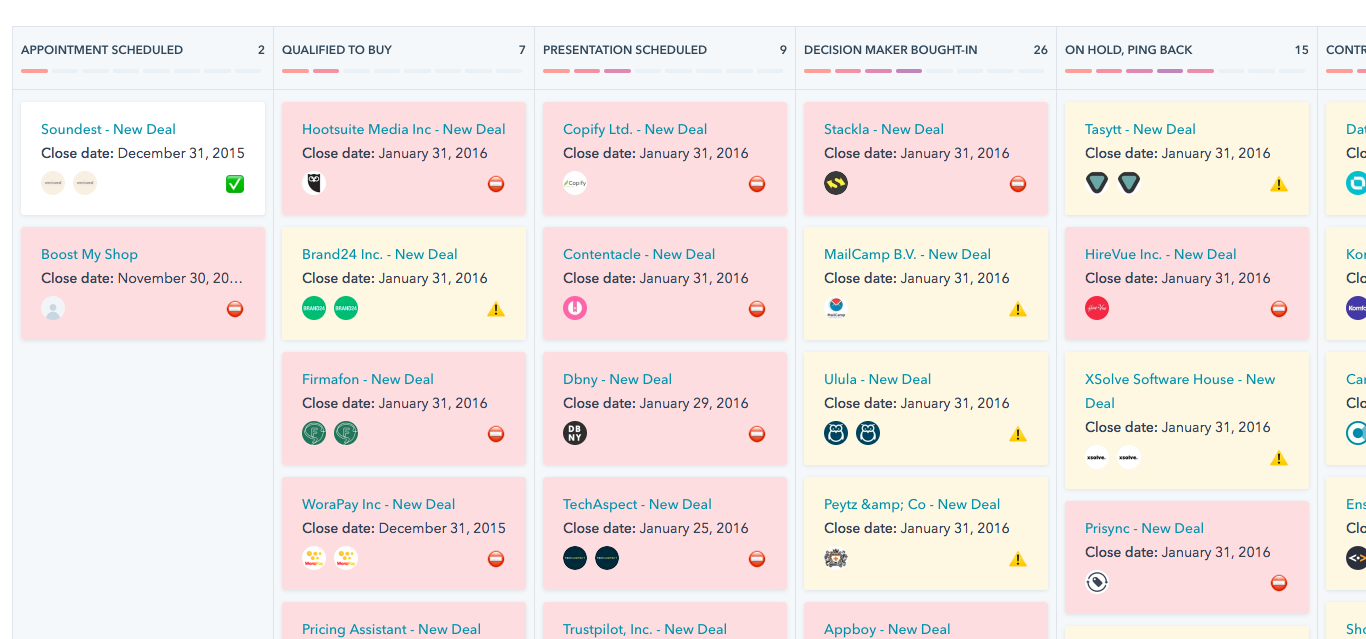
Pipedrive does one thing exceptionally well: visual pipeline management for sales teams. Drag deals between stages, set activity reminders, track emails - all without a certification course. Starts at $14/user/mo, scales to $79/user/mo for the full suite.

Use this if your team is 5-50 reps and pipeline velocity is the metric that matters. Skip this if you need deep marketing automation or customer support workflows - Pipedrive doesn't pretend to be an all-in-one platform, and that's a feature, not a bug.
If you're comparing these two specifically, here's a full Copper vs Pipedrive breakdown.
Microsoft Dynamics 365
If your company already runs on Microsoft 365, Teams, and Outlook, Dynamics 365 is the natural fit. Copilot AI integration works well for email drafting and meeting summaries. Starts around $65/user/mo - steep for small teams, reasonable for enterprises already paying the Microsoft tax.
Budget 2-4 months for a mid-market rollout. The implementation is heavier than HubSpot or Pipedrive, but the payoff is tight integration with the tools your team already uses daily.
Freshsales
The budget AI CRM. Freddy AI handles lead scoring, deal insights, and workflow automation starting at $9/user/mo. There's a free tier too. For teams that want AI-powered CRM without HubSpot's pricing cliff or Salesforce's complexity, Freshsales is the quiet winner. The trade-off: smaller ecosystem and fewer third-party integrations than the big three.
If you're weighing ecosystems and rollout effort, see our Freshworks vs Salesforce comparison.
monday CRM
monday started as a project management tool and bolted on CRM functionality. It shows - in a good way. The interface is intuitive for teams that think in boards and columns rather than traditional CRM views. Starts at $12/seat/mo with a free plan available. Best for teams where project delivery and client management blur together. Not ideal for high-volume outbound sales.
Zendesk Sell
Best for: Support-first organizations that need sales visibility.
Skip if: You don't already use Zendesk's support suite - the standalone value doesn't justify the price.
Starts at $19/agent/mo, scales to $169+/agent/mo at enterprise. If you're running Zendesk for support tickets, Sell gives your sales team context on every customer interaction without a second platform.
Copper
Cheaper than Pipedrive but less flexible than Zoho - and that's fine, because Copper isn't trying to compete with either. It lives inside Gmail and Google Calendar. That's the entire pitch. At around $23/user/mo, it's the simplest way to get CRM functionality without leaving your inbox. Ideal for agencies, consultancies, and small teams under 20 people who refuse to open another tab.
Streak
Gmail-native CRM that turns your inbox into a pipeline. r/CRM often recommends Streak for teams that live in email - and they're right. The entire CRM experience happens inside Gmail. No context switching, no separate app. There's a limited free plan for basic use, with paid plans around $49/user/mo for full pipeline features.
Look, if your team won't adopt a standalone CRM, Streak is the only tool they'll actually use.
Close
Built for inside sales teams that live on the phone. Built-in calling, SMS, and AI call summaries on paid plans starting around $49/user/mo. One Reddit user put it well: "Close is what you use when your reps make 80+ dials a day and everything else feels like overhead." Skip it if your sales motion is primarily email or social-driven.
If you're building an SDR stack around calling + CRM, start with these SDR tools too.
Insightly
SMB-friendly CRM with project management baked in. Around $29/user/mo. Solid for professional services, manufacturing, and construction teams that need to track deals and deliverables in one place.
Creatio
No-code workflow automation platform with CRM functionality. $25/user/mo with a 5-user minimum. Best for ops-heavy teams that want to build custom processes without developers.
NetSuite CRM
Oracle's ERP-integrated CRM. Custom pricing on annual licenses. Only makes sense if you're already running NetSuite for financials and want a unified platform.
CRM Examples by Use Case
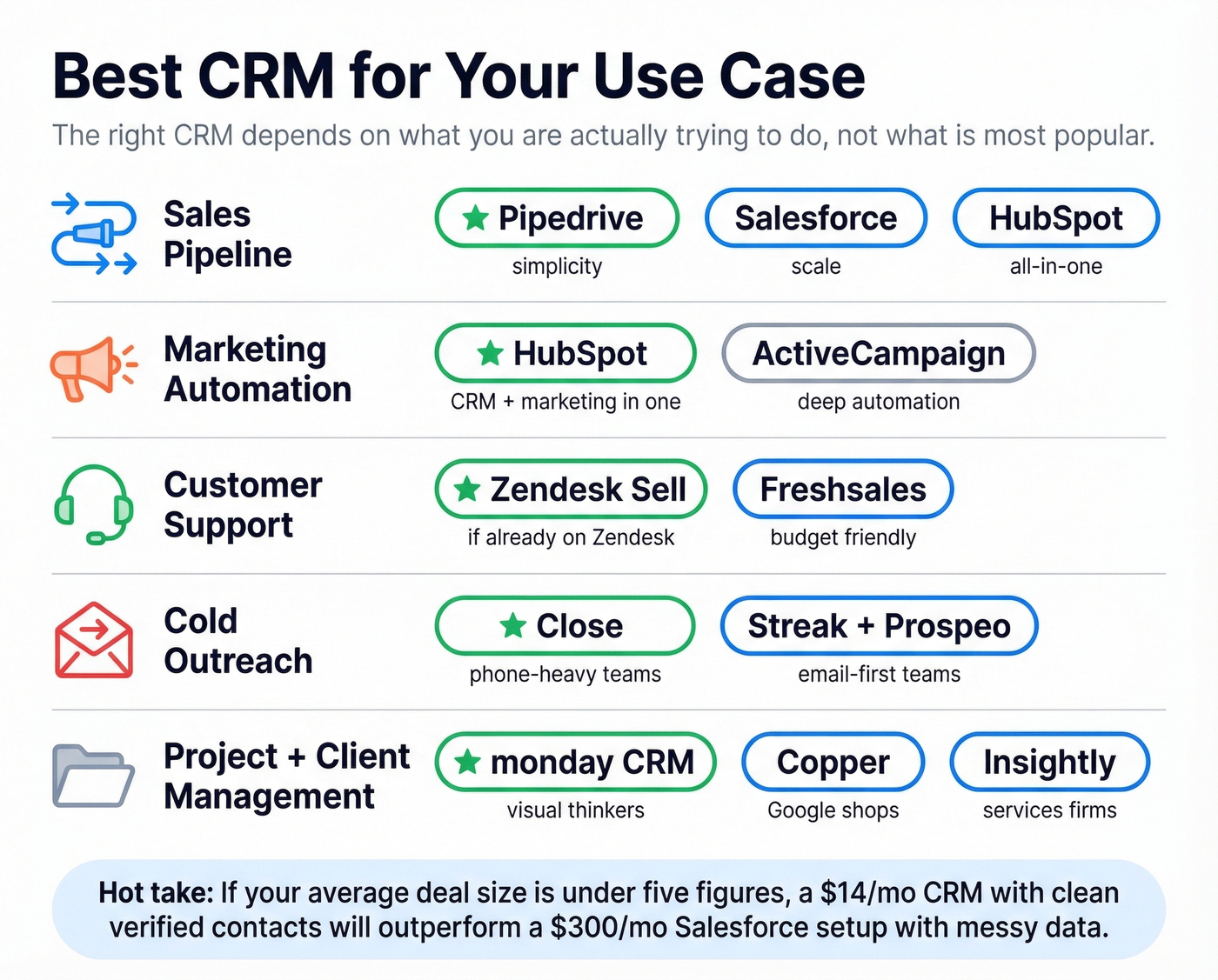
The right CRM depends on what you're actually trying to do. In our experience, the tool choice matters far less than the workflow you build around it.
If you're designing the process around the tool, use a simple lead generation workflow so nothing falls through the cracks.
| Use Case | Best CRMs | Notes |
|---|---|---|
| Sales pipeline | Salesforce, HubSpot, Pipedrive | Pipedrive for simplicity, Salesforce for scale |
| Marketing automation | HubSpot, ActiveCampaign* | HubSpot if you want CRM + marketing in one |
| Customer support | Zendesk Sell, Freshsales | Zendesk if you're already on their support suite |
| Cold outreach | Close, Streak + Prospeo | Pair your CRM with verified data before launching campaigns |
| Project + client mgmt | monday, Copper, Insightly | monday for visual thinkers, Copper for Google shops |
*ActiveCampaign isn't in the main 15 but deserves a look for marketing-heavy teams that need deep automation without HubSpot's pricing.

Hot take: If your average deal size is under five figures, you probably don't need Salesforce-level data infrastructure. A $14/mo Pipedrive account with clean, verified contacts will outperform a $300/mo Salesforce seat filled with stale emails. The CRM is just a container - what you put in it determines the ROI.
If you're fixing the "what you put in it" part, start with data enrichment services and a repeatable lead enrichment process.
Picks by Industry
Different industries lean on different CRM strengths. Retail teams using segmentation see up to 40% higher email open rates. SaaS companies need pipeline velocity and churn tracking - Salesforce or HubSpot handle that well. Healthcare and financial services often require SOC 2 compliance and stricter governance, which narrows the field to enterprise suites like Dynamics 365 and Salesforce. Real estate teams gravitate toward visual pipeline tools like Pipedrive or industry-specific platforms.
We've worked with teams across all of these verticals, and the pattern is consistent: pick the CRM that matches your sales motion, not your industry's default.

Every CRM on this list has the same weakness: garbage in, garbage out. Prospeo enriches your CRM with 98% verified emails, 125M+ mobile numbers, and 50+ data points per contact - refreshed every 7 days. HubSpot, Salesforce, Pipedrive, Zoho - we integrate natively with all of them.
Stop evaluating CRMs and start filling the one you have with data that converts.
CRM by Company Size
| Factor | Small (< 50) | Mid-Market (50-500) | Enterprise (500+) |
|---|---|---|---|
| Budget | $10-$50/user/mo | $50-$150/user/mo | $100-$300/user/mo |
| Setup time | 1-2 weeks | 1-3 months | 3-12 months |
| Top picks | HubSpot Free, Zoho, Pipedrive | Salesforce Starter, HubSpot Pro | Salesforce, Dynamics 365 |
| Admin needed | No | Part-time | Dedicated team |
The TCO warning nobody gives you: a $20/user/mo CRM can cost 3-10x more after implementation, training, customization, and ongoing admin. A 50-person team on Salesforce Enterprise isn't paying $9,000/year - they're paying $40-80k when you factor in everything. Budget for the real number, not the sticker price.
There's a sweet spot for companies with 50-250 employees: enterprise-ready small business CRMs like Zoho Enterprise or HubSpot Professional give you room to grow without the implementation burden of full Salesforce.
AI in CRM - What Works in 2026
Every CRM vendor slapped "AI" on their marketing page in 2024. By 2026, the gap between real AI and a rebranded feature with an AI sticker is obvious.
HubSpot's Breeze AI is the most tangible: teams using HubSpot AI sales features report a 48% decrease in average time to close. HubSpot also reports that 83% of users say it's effective at unifying company data in one place. Those are real numbers tied to real workflows - predictive lead scoring, AI-generated email drafts, automated data entry.
Zoho's Zia handles anomaly detection and workflow suggestions. Salesforce Einstein and Agentforce are powerful but require significant configuration. Freshsales Freddy does lead scoring and deal insights at $9/user/mo - the cheapest AI CRM entry point on the market.
The distinction that matters: AI that automates data entry and scores leads is useful today. AI that "predicts revenue" or "autonomously closes deals" is still marketing copy. Look for CRMs where AI reduces manual work, not where it promises magic.
If you're operationalizing follow-ups with AI, pair this with AI sales follow-up workflows.
The Data Quality Problem
43% of CRM users use fewer than half their features. The most common reason isn't complexity - it's bad data. Reps stop trusting the CRM when half the phone numbers are disconnected and emails bounce at 15%.
Bailey International proved what happens when CRM data is actually good: they automated contact routing and retrieval, cut call-answer times by 15%, and reduced call abandonment by 60-70%. The CRM didn't change. The data quality did.
Industry estimates suggest CRM data decays at 25-30% per year. People change jobs, companies merge, phone numbers rotate. If you're not actively refreshing your data, your CRM is rotting.
If you're seeing bounces climb, track your email bounce rate and fix the source before scaling outbound.
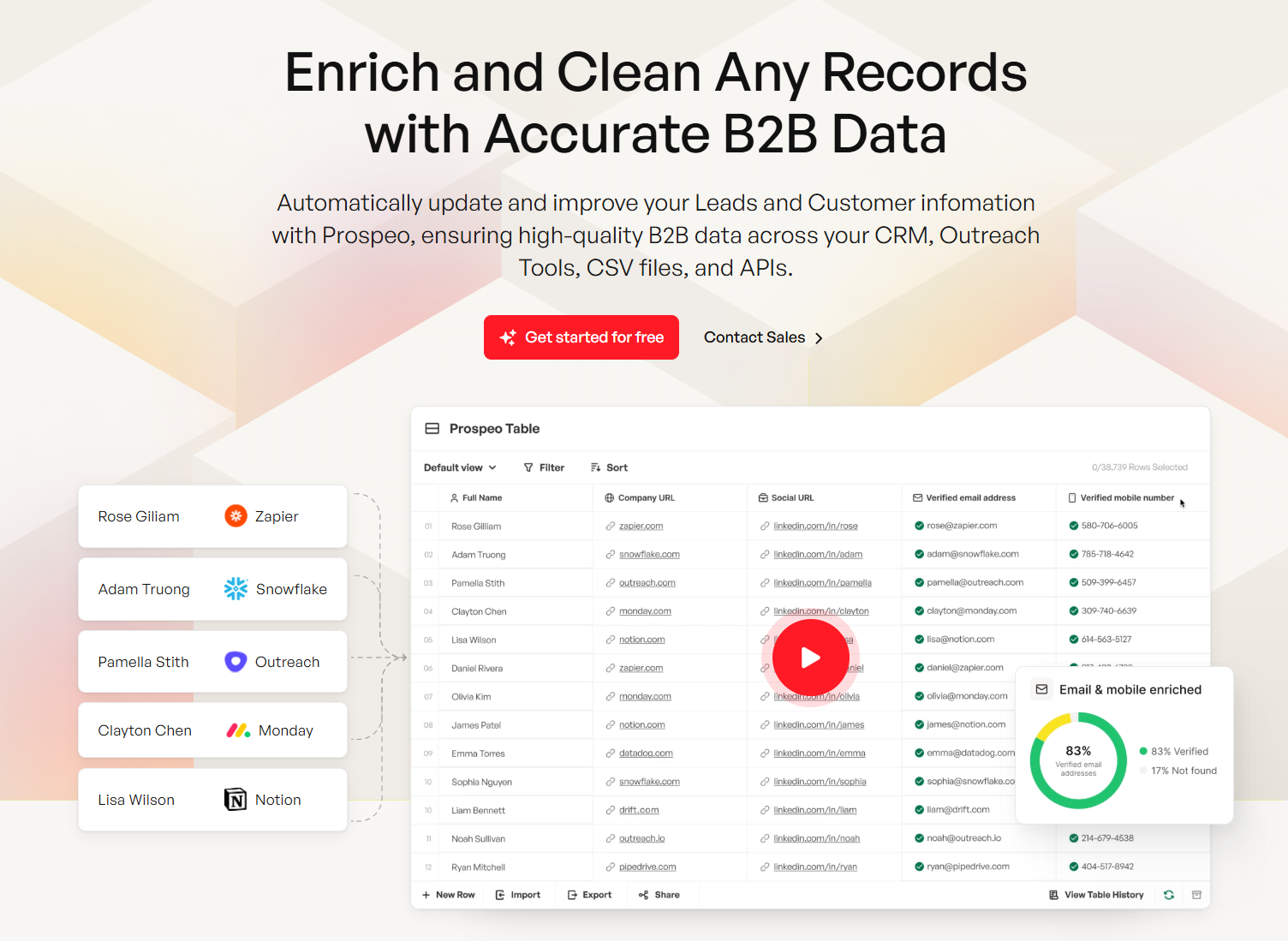
Teams using Prospeo with their CRM book 26% more meetings than ZoomInfo users and 35% more than Apollo users. Our CRM enrichment returns contact data on 83% of leads at $0.01 per email - no contracts, no sales calls required.
Your CRM picked. Now give your reps verified contacts worth calling.
How to Choose the Right CRM
The consensus on r/CRM is blunt: "Most CRMs don't fail because they're missing features - they fail because no one wants to use them." We've tested dozens of setups across different team sizes, and the pattern holds. Here's how to avoid that:
Identify the real problem. "We need a CRM" isn't a problem statement. "Reps are losing deals because follow-ups fall through the cracks" is. Start there. If follow-ups are the leak, use these sales follow-up templates.
Match to workflow. If your team lives in Gmail, look at Streak or Copper before Salesforce. The best CRM is the one people actually open.
Check TCO, not sticker price. That $25/user/mo Salesforce Starter needs an admin, a consultant, and 3 months of setup. Factor it all in.
Define success metrics upfront. "Increase pipeline by 20%" is measurable. "Better visibility" isn't. Teams that skip this step are the ones calling the CRM a failure six months later.
Run a team trial. Not a solo trial where the manager clicks around for 20 minutes. Get 3-5 reps using it for a real week with real deals.
Plan for adoption. Budget training time. Assign a CRM champion. If nobody owns adoption, nobody adopts. 65% of salespeople using mobile CRM meet quotas vs 22% who don't - so make sure whatever you pick works on a phone.
Common CRM Mistakes
Too many fields too early. Start with 5-10 required fields. You can always add more. You can't undo the damage of reps abandoning the CRM because logging a call takes 4 minutes.
Rolling out everything at once. Phase it. Pipeline management first. Reporting second. Marketing automation third. Trying to launch all three simultaneously is how implementations die.
No change management. A CRM rollout is a behavior change, not a software install. If leadership doesn't use it, reps won't either.
Neglecting data quality. Garbage in, garbage out. Enrich and verify your data before import, and set up a recurring refresh process. This is the mistake that compounds fastest - and the one most teams don't realize they're making until bounce rates spike and reps start ignoring the system entirely.
FAQ
What are common examples of a CRM?
HubSpot, Salesforce, Zoho CRM, Pipedrive, Freshsales, Microsoft Dynamics 365, and monday CRM are the most widely used. Each targets a different team size and workflow - HubSpot for beginners, Salesforce for enterprise, Pipedrive for sales-focused teams.
What are the 4 types of CRM?
Operational CRMs automate sales, marketing, and service workflows. Analytical CRMs mine data for insights and segmentation. Collaborative CRMs align teams across channels. Strategic CRMs focus on long-term customer loyalty and retention. Most modern platforms blend two or three types.
How much does a CRM actually cost?
Small business CRMs run $10-$50/user/month, while enterprise platforms cost $100-$300/user/month. Total cost of ownership is typically 3-10x the sticker price after implementation, training, customization, and ongoing administration. Always budget for the real number.
How do I keep CRM data accurate?
Use a data enrichment tool like Prospeo that verifies emails and refreshes records on a 7-day cycle. Contact data decays at roughly 25-30% per year - bad data is the #1 reason CRMs underperform.
What's the best free CRM?
HubSpot offers the most generous free tier - contact management, deal tracking, and email integration at zero cost. Zoho CRM's free plan covers up to 3 users with solid functionality. Freshsales also has a free tier worth testing for teams that want AI lead scoring without paying upfront.