

The 12 Best Contact Management Software Tools for 2026
The CRM market hit $71 billion in 2023 and is racing toward $157 billion by 2030. That growth isn't coming from enterprise giants upgrading Salesforce instances - it's coming from small teams realizing their spreadsheet just broke. A contact list of fifty is manageable in Google Sheets. At five hundred, it isn't. And somewhere between those two numbers, every growing team starts hunting for something better.
Here's the thing: most "best CRM" lists throw 20 tools at you with identical 200-word blurbs. We've actually tested these tools, compared pricing pages, and talked to teams using them daily. Below are 12 picks sorted by what they're genuinely best at, with real pricing and honest tradeoffs.
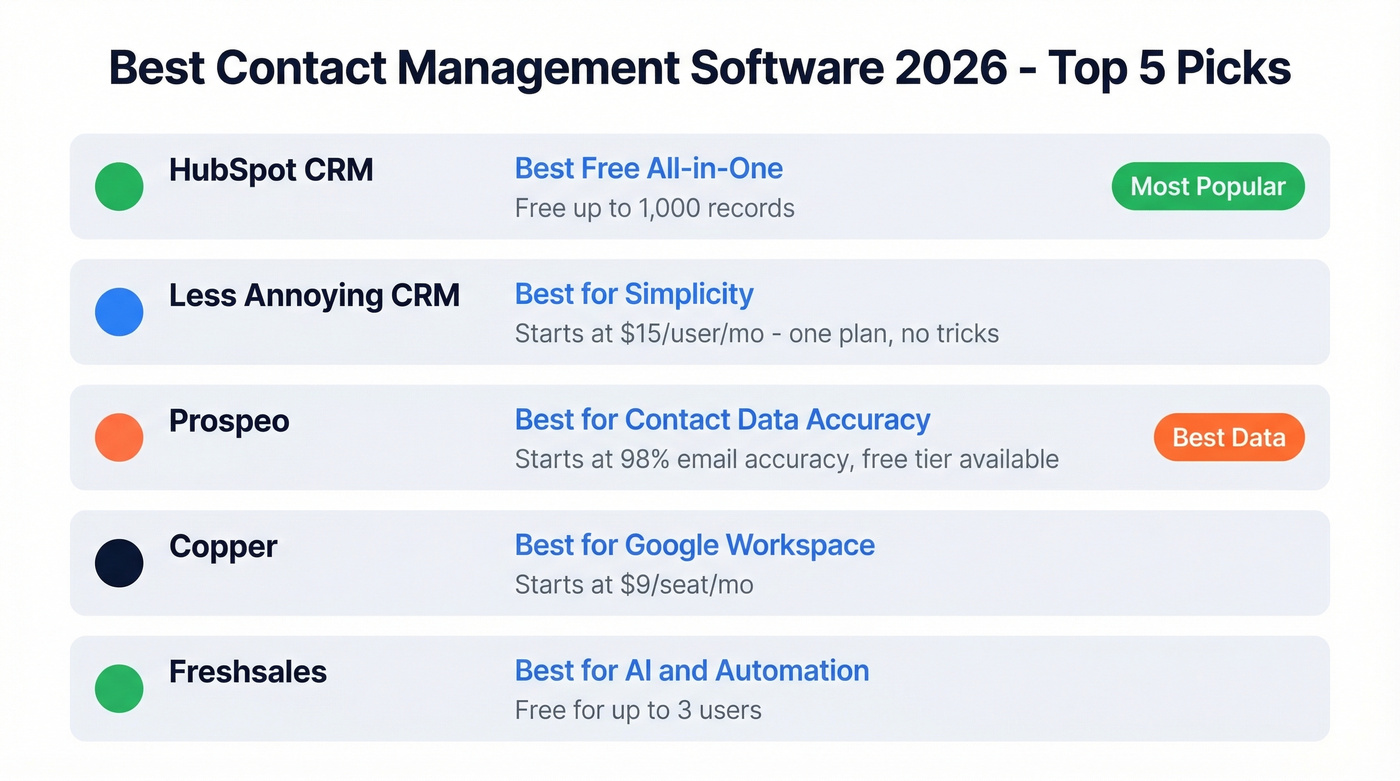
Our Picks (TL;DR)
| Use Case | Pick | Why |
|---|---|---|
| Best free all-in-one | HubSpot CRM | Deepest integrations, scales to enterprise |
| Best for simplicity | Less Annoying CRM | $15/user/mo, one plan, no games |
| Best for contact data accuracy | Prospeo | 98% email accuracy, 143M+ verified emails |
| Best for Google Workspace | Copper | Native Gmail/Calendar/Drive integration |
| Best for AI & automation | Freshsales | Freddy AI lead scoring out of the box |
Most teams don't need a CRM. They need a clean contact list and a habit of logging notes. If you're under 10 people with no defined sales stages, start with HubSpot's free tier and a data verification platform for clean contacts. That combo covers 80% of what small teams actually need.
Contact Manager vs. CRM
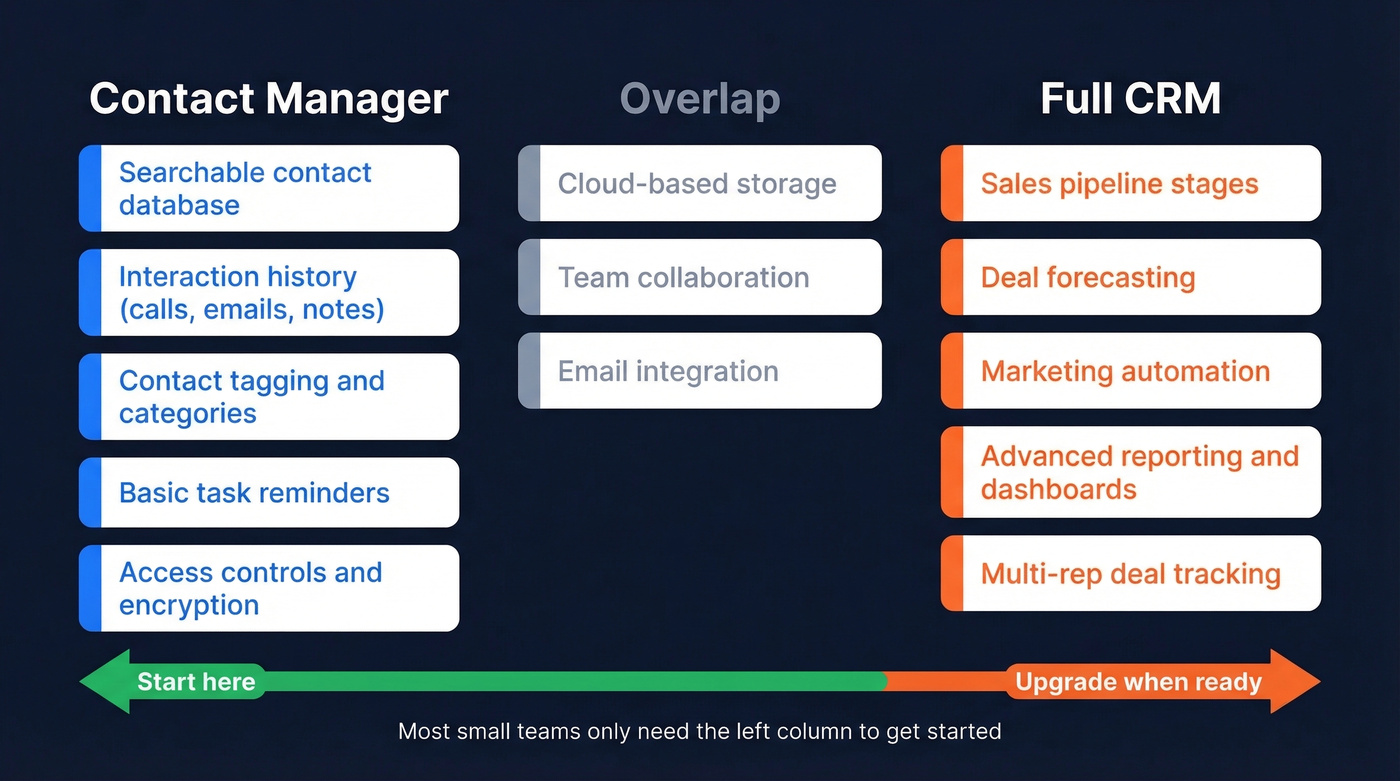
This distinction matters more than most people realize. Contact management software gives you a searchable database of people plus interaction history - calls, emails, meetings, notes - automatically attached to the right record. A CRM layers on sales pipeline tracking, deal forecasting, marketing automation, and reporting.
As PCMag puts it, a full CRM isn't just software - it's an overhaul of your sales process and data strategy. That's too much overhead for a 5-person team that needs to sell now, not spend three months configuring workflows.
There's also a security angle worth flagging: a spreadsheet on someone's laptop has no access controls, no audit trail, and no encryption. One lost device and your entire contact list is exposed. Cloud-based contact managers solve this by default.
- You need a contact manager if you're tracking people, logging interactions, and tagging contacts by category. No pipeline stages, no deal forecasting.
- You need a CRM if you have a defined sales process with stages, multiple reps working deals, and you need pipeline visibility.
- You need both if your sales process is structured but your contact data is a mess - a data enrichment platform feeding a CRM is the cleanest setup.
Start with contact management. Get your data clean. Upgrade to a full CRM when your sales process demands defined stages and pipeline reporting. Doing it the other way around is how teams end up with a $50k Salesforce contract and 40% adoption.
The 12 Best Tools for 2026
HubSpot CRM - Best Free All-in-One
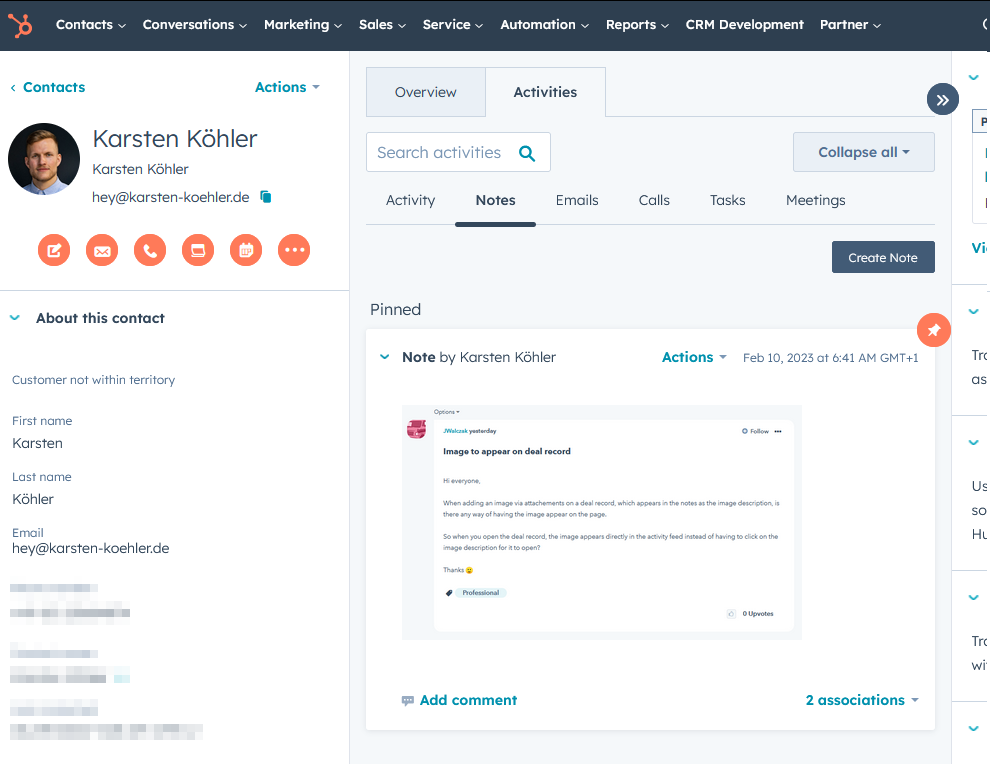
HubSpot is the safe default, and there's a reason it keeps showing up in every recommendation thread on r/sales and r/smallbusiness. The free plan gets you up to 1,000 contact and company records, two users, and a unified timeline that tracks marketing and sales activity in one view. The integration ecosystem is the deepest in the category, and that matters when you're connecting your email, calendar, forms, and eventually your marketing stack.
The tradeoff is upsell pressure. HubSpot's free tier is genuinely useful, but the moment you need advanced automation or serious reporting, you're jumping to paid tiers that escalate quickly. We've seen teams go from $0 to $600/month faster than they expected.
Pricing: Free (up to 1,000 records, 2 users) -> paid plans start at $15/user/mo.
Use this if you want a CRM that grows with you and you're comfortable with eventual upsells. Skip this if you're a 3-person team that doesn't need marketing automation - you'll be paying for capability you won't touch.
Less Annoying CRM - Best for Simplicity
The most honest product in this category. $15/user/mo. One plan. No tiers, no contracts, no annual commitments, no "talk to sales" gates. Month-to-month billing.
Less Annoying CRM does exactly what a small team needs: contact management, interaction logging, task tracking, and a simple pipeline view. It won't win any feature wars against HubSpot or Freshsales, and it doesn't try to. The 30-day free trial gives you enough time to import your contacts and see if the simplicity is a feature or a limitation for your workflow.
Pricing: $15/user/mo, no tiers, no contracts. Data stored one calendar year after account closure.
If you've been burned by CRM complexity and just want something that works, this is the one.
Prospeo - Best for Contact Data Accuracy
Your contact manager is only as good as the data inside it. Prospeo isn't a CRM - it's the data layer that makes every other tool on this list actually work. It covers 300M+ professional profiles with 98% email accuracy across 143M+ verified emails and 125M+ verified mobile numbers.

The workflow is straightforward: search by 30+ filters - job title, company size, technographics, buyer intent, funding stage - export verified contacts, and push them directly into HubSpot or Salesforce via native integrations. The Chrome extension (40,000+ users) pulls verified data from any website or professional profile in one click, returning 50+ data points per contact.
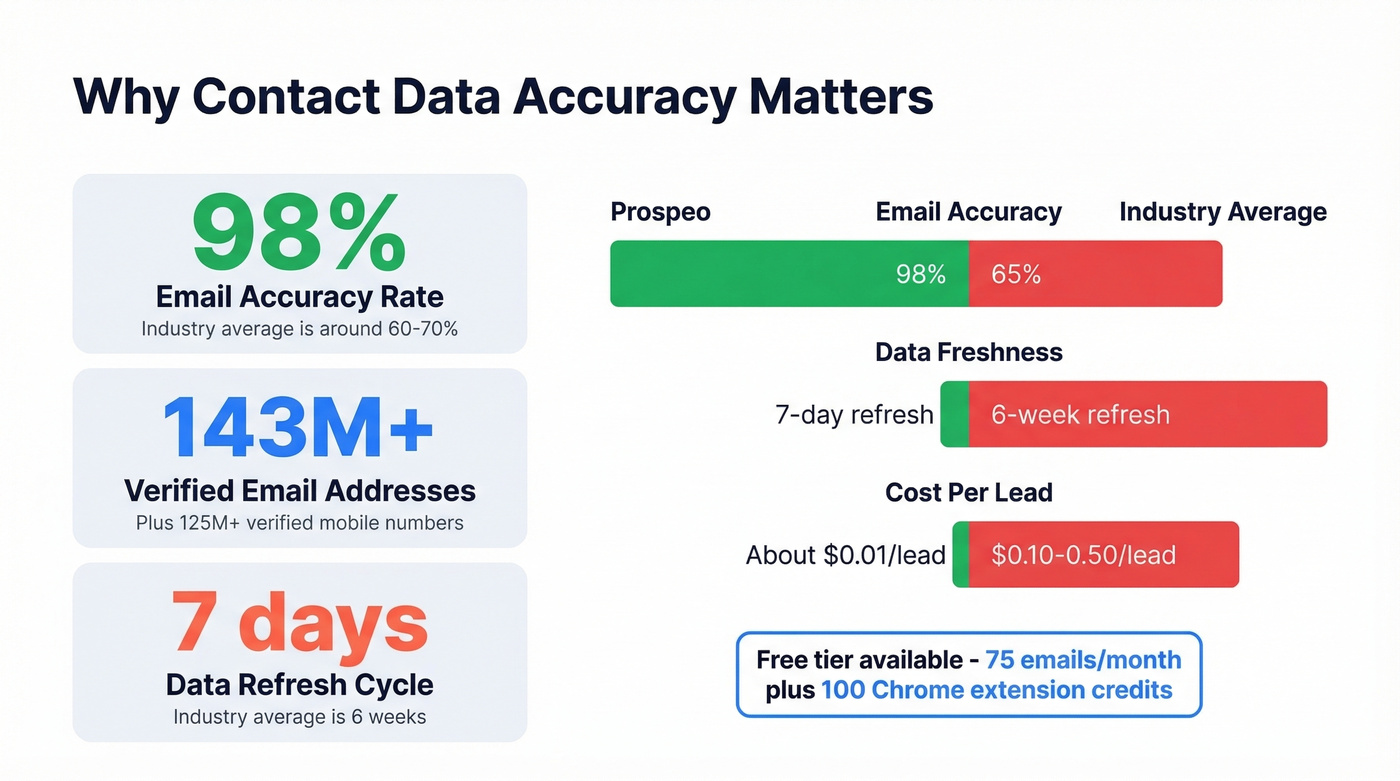
What makes this indispensable is the 7-day data refresh cycle. The industry average is six weeks. That means the emails and phone numbers you pulled last Monday are re-verified before the next Monday. At roughly $0.01 per lead with a free tier of 75 emails/month, it's a fraction of what enterprise data providers charge for worse accuracy.
Pricing: Free tier (75 emails/mo + 100 Chrome extension credits). Paid plans start at ~$39/mo, credit-based, no contracts.
Freshsales - Best for AI & Automation
If you want AI doing the work on day one - not month three - Freshsales is the pick. Freddy AI handles lead scoring and automated enrichment out of the box, which means your reps spend less time qualifying and more time selling.
The free plan supports three users, which is generous. Growth at $11/user/mo (annual billing) adds core sales features for small teams. The integration ecosystem is smaller than HubSpot's, but it covers the essentials - Gmail, Outlook, Zapier, and the broader Freshworks suite.
Pricing: Free (up to 3 users) -> Growth $11/user/mo.
Skip this if you need 50+ native integrations. The Freshworks ecosystem is solid but narrower than HubSpot's.
Copper - Best for Google Workspace
Underrated if you live in Google Workspace. Overpriced if you don't.
Copper's Chrome extension and native Gmail/Calendar/Drive sync mean you never leave your inbox to log contacts, track emails, or update deals. It feels less like a separate CRM and more like a Google Workspace feature you didn't know you had.

The catch is contact limits and feature gating. Starter ($9/seat/mo) caps you at 1,000 contacts and 10 custom fields - fine for a freelancer, tight for a growing team. Basic ($23/seat/mo) adds pipelines and SAML SSO but still limits you to 2,500 contacts. You need Professional ($59/seat/mo) for workflow automation, reporting, and bulk email. Business ($99/seat/mo) finally removes the contact cap.
| Plan | Price (annual) | Contact Limit | Key Unlock |
|---|---|---|---|
| Starter | $9/seat/mo | 1,000 | Core Google sync |
| Basic | $23/seat/mo | 2,500 | Pipelines, SAML SSO |
| Professional | $59/seat/mo | 15,000 | Automation, reporting |
| Business | $99/seat/mo | Unlimited | Email series, multi-currency |
Zoho CRM / Bigin - Best Budget Option
Bigin is Zoho's stripped-down contact manager - free for one user, with paid plans starting at $7/user/mo on annual billing. It's pipeline-focused, dead simple, and perfect for solopreneurs or micro-teams who don't need the full Zoho CRM experience.
When you outgrow it, Zoho CRM Standard starts at $20/user/mo and scales to Enterprise at $50/user/mo with Zia AI included. The migration path between Bigin and Zoho CRM is smoother than jumping between separate vendors, which matters when you've spent six months building custom fields and workflows.
Use this if budget is the primary constraint and you want room to grow within one ecosystem.
Pipedrive - Best Visual Pipeline
Pipedrive's drag-and-drop pipeline is the most intuitive in the category. Everything is built around deal stages - you see your pipeline, you drag deals forward, you know exactly where every conversation stands. It's sales-first by design, which means contact management is solid but secondary to pipeline velocity.
Pricing: $14/user/mo (Essential). No free plan. The lack of a free tier is a real drawback for bootstrapped teams, but the 14-day trial is enough to know if the visual approach clicks for you.
Nimble - Best for Relationship Management
Nimble pulls a 4.4/5 from 1,867 reviews on Capterra, with the vast majority of positive reviews praising the intuitive UI and relationship management features. It's built for people who manage relationships, not pipelines - consultants, agencies, BD professionals who need to remember context about hundreds of contacts without a formal sales process.
The most common complaints are bugs, mobile app reliability, and confusing pricing. At $29.90/user/mo for a single plan, it's not cheap for what's essentially a smart contact manager.
Use this if relationship context matters more than pipeline tracking. Skip this if you need rock-solid mobile access.
monday CRM - Best for Project-Heavy Teams
monday CRM makes sense if your team already lives in monday.com for project management. The CRM module sits on top of the same board-based interface, so client management and project delivery share one workspace. With a three-seat minimum, pricing starts at $45/month - reasonable, but the per-seat cost adds up fast for larger teams.
Best for: agencies and service businesses that blend project management with client management.
Contacts+ - Best Pure Contact Manager
Contacts+ is what you get when you strip away every CRM feature and focus purely on organizing people. The free plan syncs one account with 1,000 contacts. Premium ($9.99/mo) adds enrichment, five account syncs, and 25,000 contacts. Teams ($12.99/user/mo) adds a shared address book with permissions and shared notes.
Best for: people who want a contact organizer, not a sales tool. You'll eventually need a separate CRM for pipeline tracking.
Capsule - Solid Lightweight CRM
Clean UI and a straightforward setup. Capsule is a good fit if you want something lighter than HubSpot but more structured than a pure contact organizer. It integrates with Gmail, Outlook, and Mailchimp.
Pricing: Starts at $21/user/mo.
Streak - Gmail-Native but Pricey
Streak lives inside Gmail like Copper and starts at $59/user/mo. A free plan exists for personal use, but business features only unlock at the Pro tier - and at that price, Copper's Professional plan is the better value for most teams.
Unless you have a specific Streak workflow you can't replicate elsewhere, Copper is the better Gmail-native option at every price point.

Every contact management tool on this list depends on one thing: clean data. Prospeo feeds your CRM 143M+ verified emails and 125M+ verified mobiles refreshed every 7 days - not the 6-week industry average. At $0.01 per lead, your contact database stays accurate without the enterprise price tag.
Stop managing stale contacts. Start with data that's verified this week.
Pricing Compared
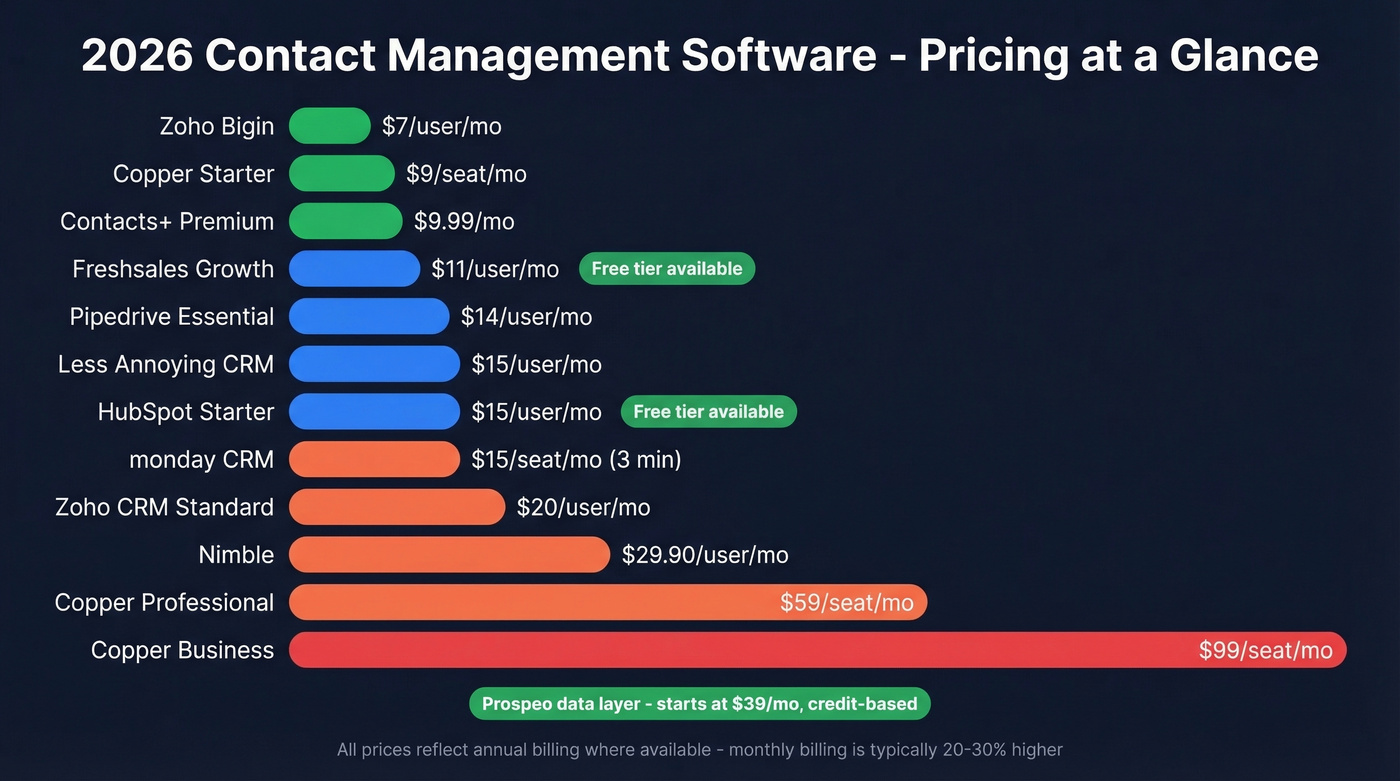
Pricing shifts fast in SaaS. Here's what each tool costs as of early 2026, with free plan availability and key limits. All paid prices reflect annual billing unless noted.
| Tool | Free Plan | Starting Price | Contact Limit | Key Feature Unlock |
|---|---|---|---|---|
| HubSpot CRM | Yes | $15/user/mo | Up to 1,000 records (free) | Unified timeline + integrations |
| Less Annoying | No (30-day trial) | $15/user/mo | Unlimited | Full features, one plan |
| Prospeo | Yes (75 emails/mo) | ~$39/mo | 300M+ profiles | Verified emails + enrichment |
| Freshsales | Yes (up to 3 users) | $11/user/mo | Unlimited | Freddy AI lead scoring |
| Copper | Yes (trial) | $9/seat/mo | 1,000 (Starter) | Native Google Workspace sync |
| Zoho Bigin | Yes (1 user) | $7/user/mo | Varies | Pipeline-focused simplicity |
| Pipedrive | No (14-day trial) | $14/user/mo | Unlimited | Drag-and-drop pipeline |
| Nimble | Yes (trial) | $29.90/user/mo | Varies | Relationship management |
| monday CRM | No (14-day trial) | $45/month (3 seats) | Varies | Board-based project + CRM |
| Contacts+ | Yes | $9.99/mo | 1,000 (free) | Multi-account sync + enrichment |
| Capsule | Not public | $21/user/mo | Varies | Lightweight CRM setup |
| Streak | Yes (personal) | $59/user/mo | Varies | Full Gmail-native CRM |
Your CRM Is Only as Good as Your Data
Let's be honest about the real failure mode here. You spend a weekend migrating 2,000 contacts from a spreadsheet into your shiny new CRM. You launch your first email sequence on Monday. By Wednesday, bounce rates spike. Your domain reputation takes a hit, your deliverability drops, and now even the good emails are landing in spam.
Garbage in, garbage out. It's the oldest cliche in data, and it's still the number-one reason CRM implementations fail.

This is where a data verification layer fixes the problem before it starts. Running your list through verification at 98% email accuracy means you're catching bad addresses before they damage your sender reputation. CRM enrichment integrations keep your records fresh automatically, with an 83% enrichment match rate returning 50+ data points per contact. And a 7-day refresh cycle instead of the industry-standard six weeks means the data doesn't decay between quarterly "clean-up" projects that nobody actually does.
We've run enrichment tests across multiple providers - a weekly refresh cycle consistently catches stale records that tools refreshing every 4-6 weeks miss entirely. The difference shows up in bounce rates within the first campaign.
Here's what a clean import workflow looks like: export your CSV, deduplicate rows, verify emails through a data platform, import only verified contacts, then set up auto-enrichment to keep records fresh going forward.
You just picked your contact management software. Now fill it with contacts that actually connect. Prospeo's 30+ search filters - buyer intent, technographics, funding stage, headcount growth - let you build targeted lists that push directly into HubSpot or Salesforce. 98% email accuracy means your bounce rate stays under 4%, not 35%.
Your CRM is empty without verified data. Fix that in two minutes.
5 Mistakes That Kill Your Setup
1. Importing messy data. Don't dump your entire spreadsheet into a new CRM. Clean first - remove duplicates, standardize formatting, verify emails. Import only qualified contacts you'd actually reach out to.
2. Trying everything at once. Start with three habits: add notes after every call, set follow-up reminders, and track one pipeline. Master those before touching automation or custom reporting.
3. Leaving defaults untouched. Rename pipeline stages to match your actual sales process. Hide unused fields. Tailor your dashboard to show what your team needs to see daily - not what the vendor thinks is impressive.
4. Ignoring team adoption. The best contact management software is useless if reps don't use it. Show quick wins in the first week - automated follow-up reminders, shared notes that save meeting prep time. Assign a CRM champion who owns data quality and answers questions. In our experience, teams that skip this step see adoption crater within 60 days.
5. Skipping data quality. Verify and enrich before importing, not after. A bad first campaign will kill team confidence in the tool faster than any UX complaint. Build verification into your import workflow from day one.
How to Choose - 8-Point Checklist
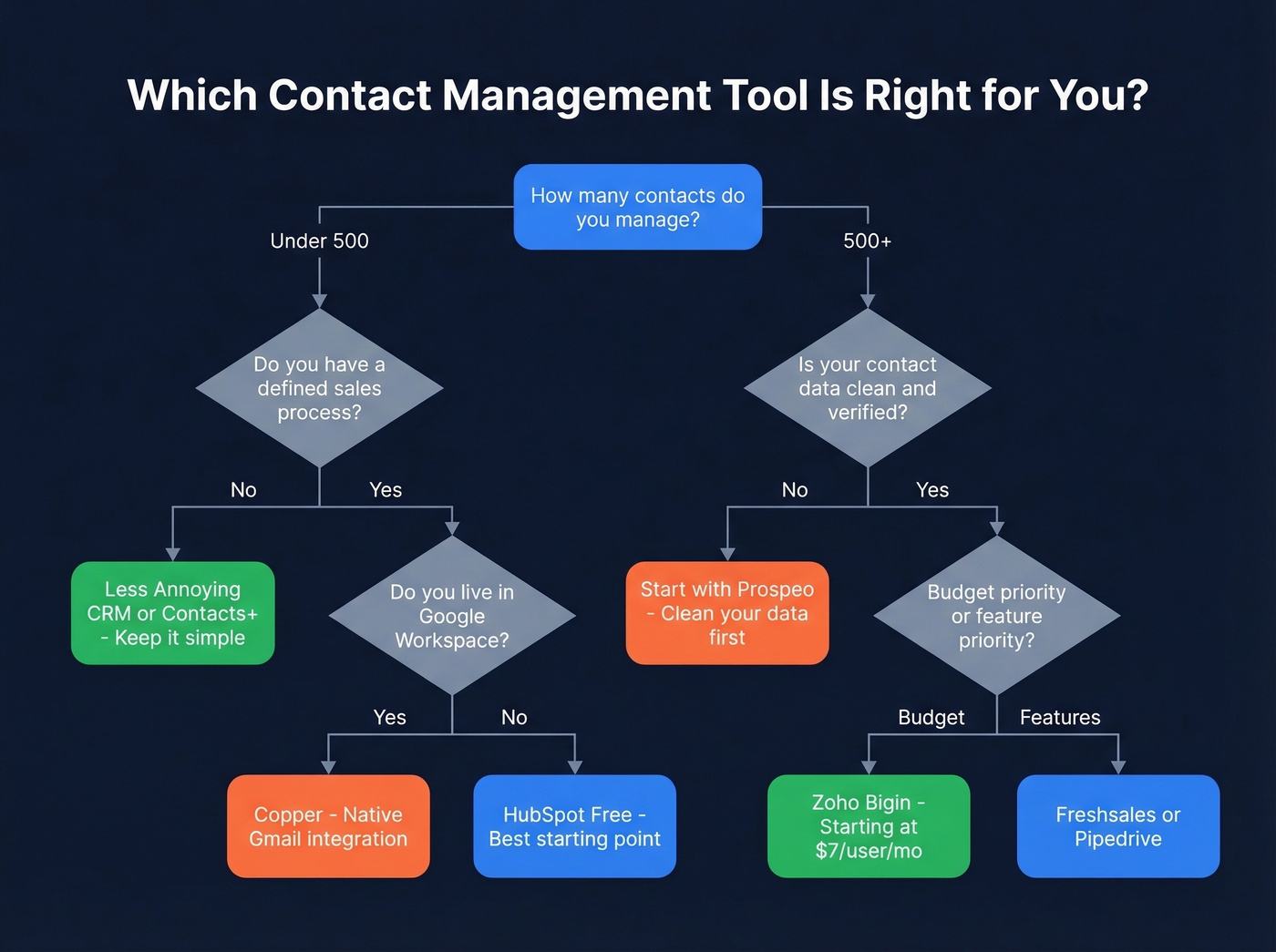
- Team size and budget. Solo or 2-3 people? Free tiers work. 10+ seats? Budget for $15-50/user/mo.
- Contact volume. Check limits carefully - Copper's Starter caps at 1,000. HubSpot's free caps at 1,000 records.
- CRM vs. contact manager. If you don't have defined sales stages, you don't need a CRM yet. Start simpler.
- Integration requirements. Gmail or Outlook? Google Workspace or Microsoft 365? Calendar sync? This narrows the field fast.
- Automation needs. For AI lead scoring and automated workflows, look at Freshsales or a paid HubSpot tier. For simplicity, Less Annoying CRM.
- Data quality and enrichment. Your tool is only as good as what's inside it. Factor in a data enrichment platform alongside your CRM choice - bad data compounds monthly.
- Mobile access. If your team works from phones, test the mobile app during your trial. Nimble's mobile app draws consistent complaints; Pipedrive and HubSpot are stronger here.
- Data ownership and export. Can you export everything cleanly as a CSV if you leave? If the answer is no or unclear, you're signing up for vendor lock-in. And can you get going in under 30 minutes? If setup takes a full day, the tool is too complex for your team size.
FAQ
Is Google Contacts enough for my business?
For under 50 contacts with no sales process, Google Contacts works fine. Beyond that, you need interaction tracking, tagging, segmentation, and automation that Google Contacts doesn't offer. The moment you're wondering if it's enough, it probably isn't.
What's the difference between a contact manager and a CRM?
A contact manager stores people and interaction history - who you talked to, when, and what was said. A CRM adds sales pipeline tracking, deal forecasting, and marketing automation on top. Start with contact management; upgrade to a full CRM when you need defined stages and pipeline visibility.
Can I migrate from a spreadsheet without losing data?
Yes - every tool on this list supports CSV import. Clean your data first: remove duplicates, standardize formatting, and verify email addresses before importing. A messy import creates deliverability problems that compound over months.
What's the best free contact management tool?
HubSpot CRM's free plan (up to 1,000 records, 2 users) is the most capable free option. Bigin by Zoho (free for 1 user) and Contacts+ (1,000 contacts free) are solid alternatives with less complexity and faster setup.
How do I keep contact data accurate over time?
Use a data enrichment tool to verify emails and refresh records automatically. Stale data is the number-one reason CRM adoption fails - a weekly refresh cycle prevents the slow decay that makes teams stop trusting their own database. Schedule quarterly audits on top of automated enrichment, and you'll avoid the "nobody trusts the CRM" spiral that kills so many implementations.