

ApexVerify vs SalesQL: You're Comparing a Verifier to a Finder
You're looking at ApexVerify vs SalesQL, but these tools solve completely different problems. One finds emails, the other checks if emails are real. That's like comparing a fishing rod to a food thermometer - so let's sort out what actually matters before you buy the wrong thing.
30-Second Verdict
- Need to find contacts from professional profiles? SalesQL gets you there, but budget for a separate verifier and know that account restriction risk is real.
- Already have a list and need to clean it? ApexVerify does the job at $0.005/email, with no charge for unknowns.
- Want finding + verification in one workflow? Prospeo covers both - 300M+ profiles, 98% email accuracy, 7-day data refresh, starting free.
What Each Tool Actually Does
SalesQL is a contact finder. It pulls emails and phone numbers from professional profiles via a Chrome extension, drawing from 127M work emails, 89M personal emails, and 30M phone numbers. It includes a built-in email verifier with credits that renew each billing period - monthly plans include 5,000 to 20,000 verification credits depending on your tier, annual plans 60,000 to 240,000. Users have strong opinions about that verifier's reliability, though. More on that below.
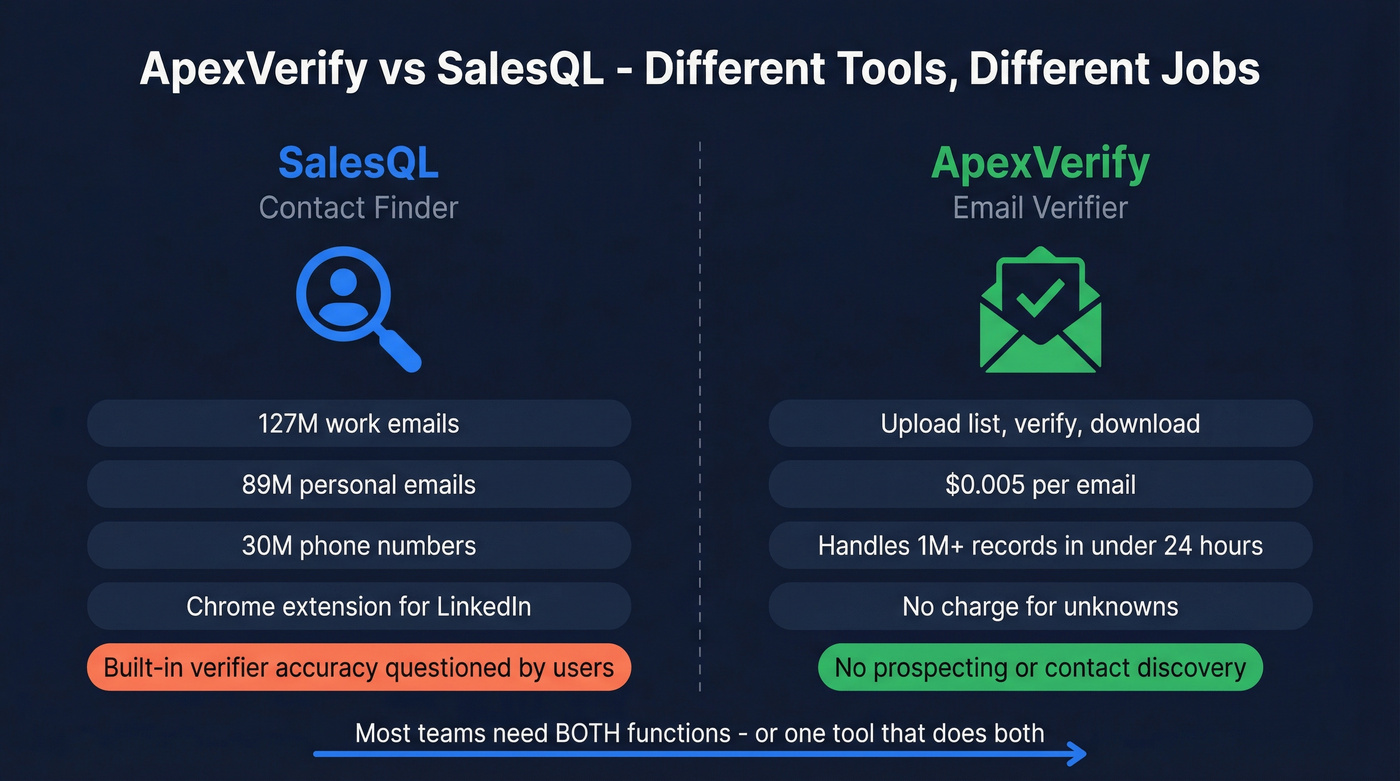
ApexVerify is purely a verification tool. Upload a list, it checks deliverability, you download results. It handles 1M+ records in under 24 hours at $5 per 1,000 emails. No prospecting, no database, no contact discovery.
Side-by-Side Comparison
| Category | SalesQL | ApexVerify | Prospeo |
|---|---|---|---|
| Core function | Contact finder | Email/phone verifier | Finder + verifier |
| Starting price | $39/mo (2,000 credits) | $5/1,000 emails | ~$0.01/email |
| Free tier | 100 credits (1 seat) | 100 email + 25 phone test credits | 75 emails + 100 ext. credits/mo |
| Capterra rating | 3.8/5 (46 reviews) | 4.8/5 (18 reviews) | 15K+ companies |
| Key integrations | HubSpot, Salesforce, Zapier | Google Sheets, Excel, LibreOffice | Salesforce, HubSpot, Smartlead, Instantly, Zapier, Lemlist, Clay |
| Key risk | Account restrictions on professional networks | Small review sample | - |
| Credits expire? | Monthly reset | Prepaid credits don't expire | Monthly reset |
These tools barely overlap. The only scenario where you'd pick between them is if you think SalesQL's built-in verifier is good enough to skip a dedicated tool. Based on Capterra reviews, multiple users don't think it is.


Why manage two tools and two billing cycles? Prospeo finds emails from 300M+ profiles and verifies them in the same workflow - 98% accuracy, catch-all handling included, 7-day data refresh. No stacking, no debugging which tool broke.
Replace your finder and verifier with one platform - starting free.
SalesQL - What Users Say
Use this if you need a cheap, fast way to extract contact info from professional profiles and you'll verify elsewhere.
Skip this if you can't afford account restrictions, need reliable customer support, or expect the built-in verifier to be accurate.
SalesQL's reviews are polarized. One reviewer reported just 13 undeliverables out of 300+ emails - roughly a 4% bounce rate. But a 2026 reviewer warned that profiles "get blocked as soon as you start using SalesQL," even with conservative usage. Another called the built-in verification "completely inaccurate" and recommended running everything through NeverBounce instead.
Here's the thing: the account restriction risk isn't theoretical. It's a recurring topic in sales communities, and it's happening to real users right now. Customer support sits around 3.3/5 on review breakdowns, and billing complaints on Software Advice keep popping up - users report refused refunds and blocked accounts after disputes.

ApexVerify - What Users Say
Use this if you already have email lists and need affordable, straightforward verification.
Skip this if you need to find contacts. ApexVerify doesn't do prospecting.
ApexVerify's 4.8/5 Capterra rating holds up across sub-scores: ease of use at 4.7, value for money at 4.8, and a 9.4/10 likelihood to recommend. The collaborative cache mechanic is genuinely clever - if someone else already verified that email, you get up to 50% of your credits refunded. Unknowns aren't charged at all, which matters more than people realize when you're running large lists with stale data.
One 2.0/5 review flags unresponsive support and undelivered service. With only 18 reviews total, a single bad experience moves the needle more than it should. We'd want to see that review count climb before drawing firm conclusions either way.

The Real Cost Per Contact
This is where the "wrong comparison" framing actually costs you money.
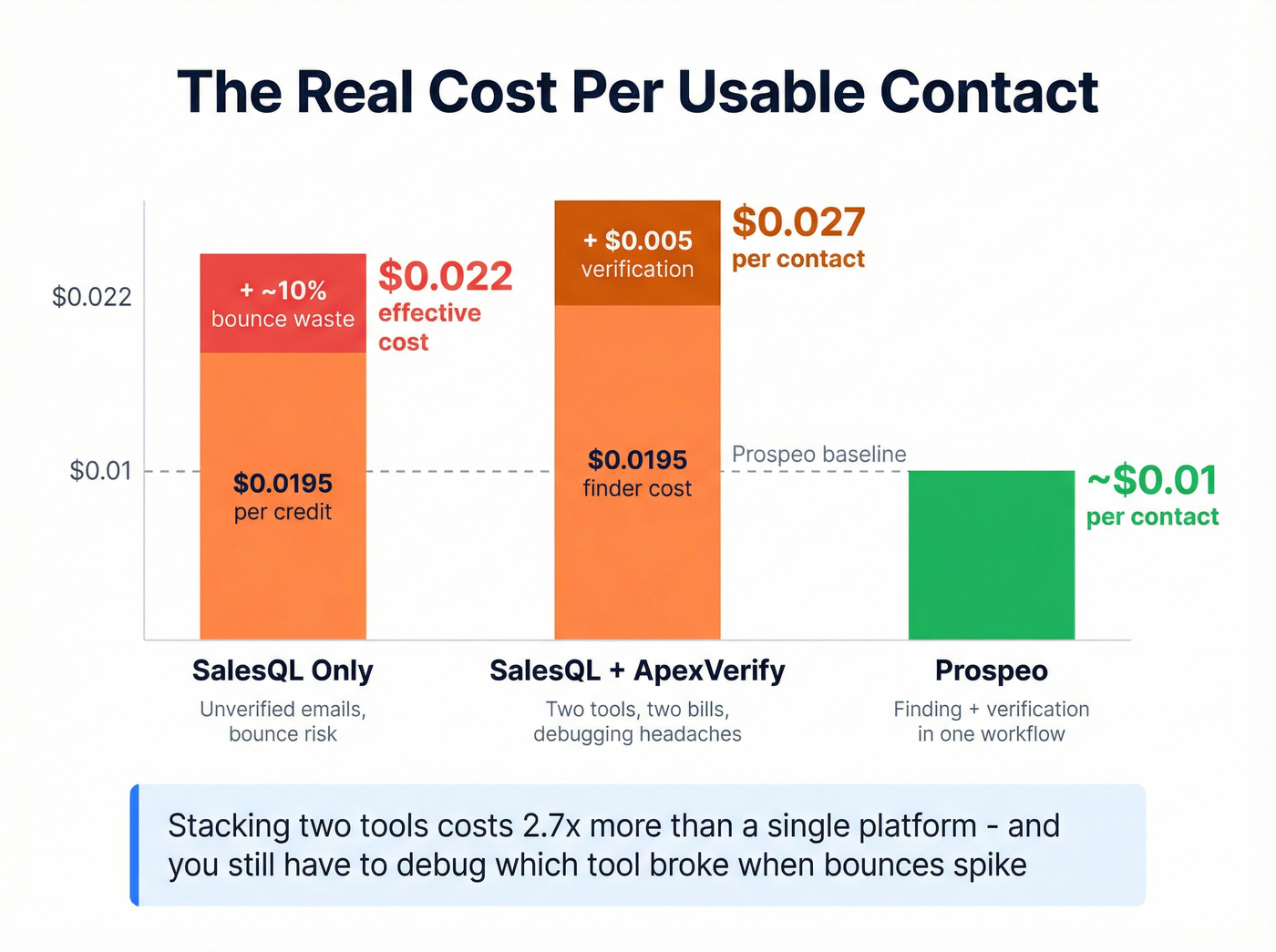
SalesQL Basic runs $39/mo for 2,000 credits - $0.0195 per profile. The positive Capterra reviewer saw ~4% bounces, but the negative reviewer called verification "completely inaccurate." If you conservatively estimate 10% bounces on unverified SalesQL emails, your effective cost per deliverable contact climbs to ~$0.022. Stack ApexVerify at $0.005/email on top, and you're at ~$0.027 per usable contact while managing two tools and two billing cycles.
That math is why we recommend a single-platform approach for most teams. In our testing, stacking a finder and a separate verifier introduces a debugging headache every time bounces spike - you never know which tool broke. Was the finder pulling bad data? Did the verifier miss a catch-all domain? You end up playing detective instead of selling.
One more thing worth understanding: in a LeadMagic test of 10,000 B2B emails, 28% sat on catch-all domains - the type of result that inflates "valid" counts from basic verifiers. Catch-all handling is the quiet differentiator between verification tools that look good on paper and ones that actually protect your sender reputation.
Let's be honest: if your average deal size is under $5K, you probably don't need to stack a premium finder with a premium verifier. Pick one tool that does both well and spend the saved hours actually selling.
When to Use Each Tool
Your choice depends on where you are in the workflow.
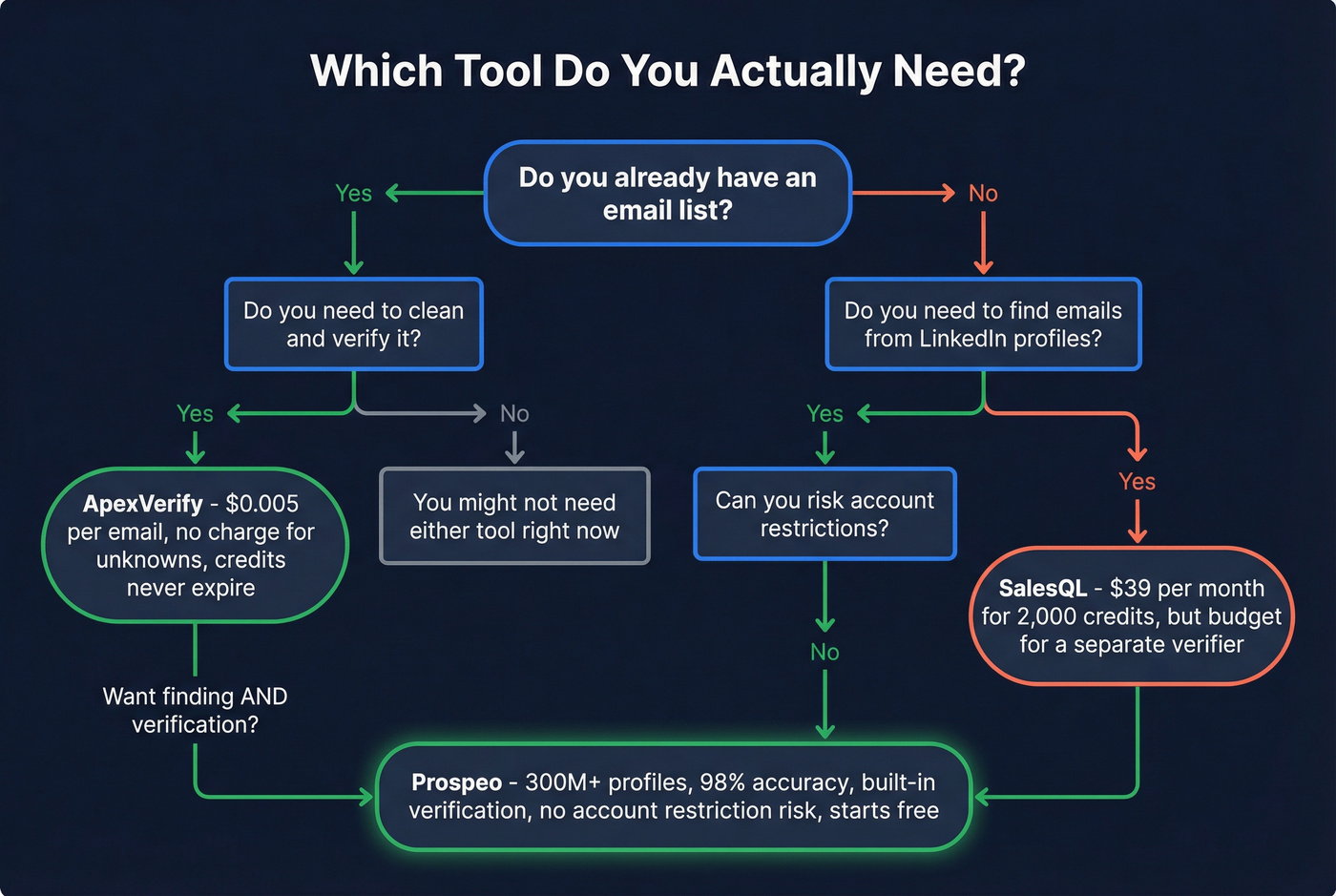
SalesQL makes sense if you're specifically extracting contacts from professional profiles and you'll verify elsewhere. Factor in the account restriction risk and budget for a second tool. For teams doing light sales prospecting - under 2,000 contacts a month - the $39 entry point is reasonable, but the total cost of ownership climbs fast once you add verification.
ApexVerify is the right pick if you already have lists from other sources and need cheap, reliable verification. Credits don't expire, unknowns aren't charged, and $0.005/email is hard to beat for pure verification. Just know it won't help you build those lists in the first place.
At ~$0.01/email, Prospeo costs less than stacking SalesQL + ApexVerify - and you get 300M+ profiles, built-in 5-step verification with catch-all handling, and zero account restriction risk. No contracts, 75 free emails/month.
One tool. One cost. Better data than both combined.
FAQ
What's the main difference between ApexVerify and SalesQL?
They solve different problems entirely. SalesQL finds contact information from professional profiles (127M work emails, 89M personal emails). ApexVerify verifies emails you already have at $0.005/email. You'd typically use both together, or replace both with a platform that handles finding and verification in one step.
Does ApexVerify find emails or just verify them?
ApexVerify only verifies - it has no prospecting or contact discovery features. You need a separate finder to source emails first. ApexVerify's entire workflow is upload, verify, download.
Will SalesQL get my account restricted on professional networks?
It's a documented risk in 2026. Capterra reviewers report account blocks even with conservative usage. This isn't theoretical - it's happening to real users. Factor this into your decision, especially if your account is tied to active sales conversations.