

How to Authenticate Email: SPF, DKIM, DMARC, ARC & BIMI in 2026
You just sent a 50,000-contact campaign. Open rates look fine - until you check deliverability. Forty percent landed in spam. Your domain isn't blacklisted, your content is clean, and your list is fresh. The problem? You never set up proper protocols to authenticate email. Mailbox providers don't trust you because you haven't proven you're you.
38.8% of senders aren't even sure if they have DMARC set up. Global DMARC adoption rose from 27.2% to 47.7% between 2023 and 2025, with enforcement policies up 50% - but that still means most domains don't have DMARC at all, and plenty of the ones that do are stuck in monitor-only mode. In regions with strong enforcement, phishing success rates dropped from 69% to 14%. Where enforcement is weak? Rates climbed to 97%. Setting up SPF, DKIM, and DMARC isn't optional anymore - it's the baseline.
The Protocol Stack You Need
If you send more than 5,000 emails per day, Google, Yahoo, and Microsoft now expect the three core protocols to be in place:
- SPF record - tells receiving servers which IPs can send on your behalf
- DKIM signing - cryptographically signs each message so tampering is detectable
- DMARC at enforcement - aligns SPF and DKIM with your visible From domain and tells receivers what to do with failures
- ARC awareness - preserves authentication when messages get forwarded through intermediaries
- BIMI as the visual payoff - displays your brand logo in the inbox once everything else is locked down
Let's set them up.
How to Authenticate Email: Five Protocols Explained
SMTP was built in the early 1980s for a small network of trusted universities - identity verification wasn't a concern. Anyone can put any address in the "From" field. That's not a bug; it's how the protocol was designed. Authentication layers were bolted on later to fix this.
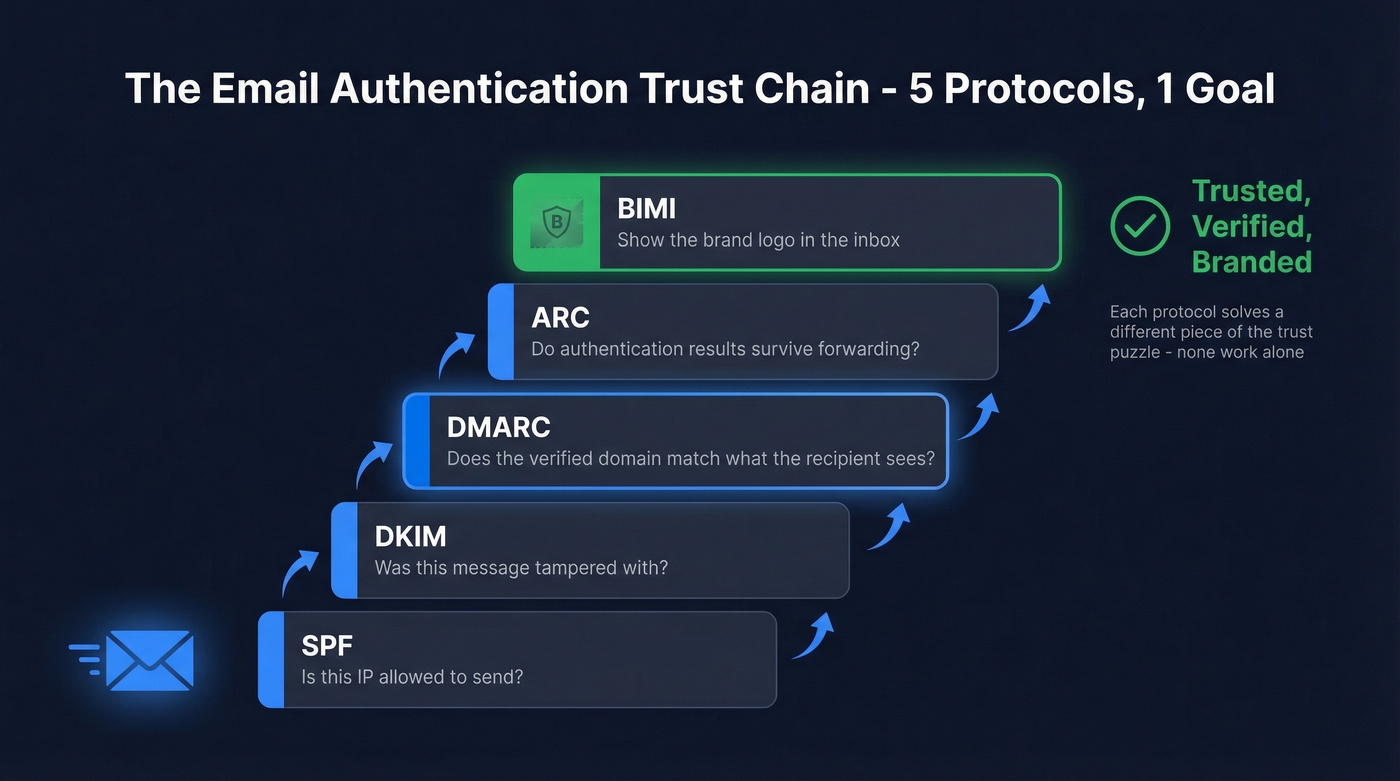
Valimail frames it as five key standards: SPF, DKIM, DMARC, ARC, and BIMI. Each solves a different piece of the trust puzzle, and none of them work alone. SPF validates the Return-Path domain - not the visible From address. DKIM's signing domain can differ from the From domain entirely. A phisher can pass SPF and DKIM while still spoofing your brand. DMARC closes that gap by requiring alignment with the visible From domain between the verified domain and what the recipient actually sees.
ARC and BIMI handle edge cases and brand visibility. Together, the five protocols form a complete chain from "is this IP allowed to send?" all the way to "show the sender's logo in the inbox."
SPF (Sender Policy Framework)
SPF lets you declare which IP addresses and services are authorized to send email for your domain. You publish a single TXT record in DNS:
v=spf1 ip4:203.0.113.0/24 include:_spf.google.com include:sendgrid.net ~all
Each include: adds a DNS lookup. SPF has a hard 10-lookup limit - nested includes count toward it. Exceed the limit and you get a permerror, which means SPF evaluation fails entirely. Around 20% of Fortune 500 companies hit this limit at some point in 2024.
You can't have multiple SPF records on the same domain. Two v=spf1 TXT records cause a permerror per RFC 7208. Merge everything into one record.
To verify what's actually published:
dig +short TXT yourdomain.com | grep spf
Start with ~all (softfail) while you're confirming all legitimate senders are included, then move to -all (hardfail) once you're confident.
DKIM (DomainKeys Identified Mail)
DKIM adds a cryptographic signature to every outgoing message. The receiving server checks the signature against a public key you've published in DNS:
default._domainkey.example.com TXT "v=DKIM1; k=rsa; p=MIIBIjANBgkq..."
The default portion is the selector - your ESP might use google, s1, k1, or something custom. Find the active selector by inspecting the DKIM-Signature header in any raw email you've sent.
Use 2048-bit keys minimum. Rotate them every 6-12 months following this sequence: publish the new selector in DNS, update your sending platform to sign with the new key, then remove the old record after a grace period. Doing it out of order breaks signatures on in-flight messages, causing DMARC failures until those messages clear.
Why SPF and DKIM Matter Together
SPF and DKIM each solve half the problem. SPF confirms the sending server is authorized; DKIM confirms the message wasn't tampered with in transit. Neither one verifies that the authenticated domain matches the visible From address - which is exactly what phishers exploit. DMARC enforces that alignment.
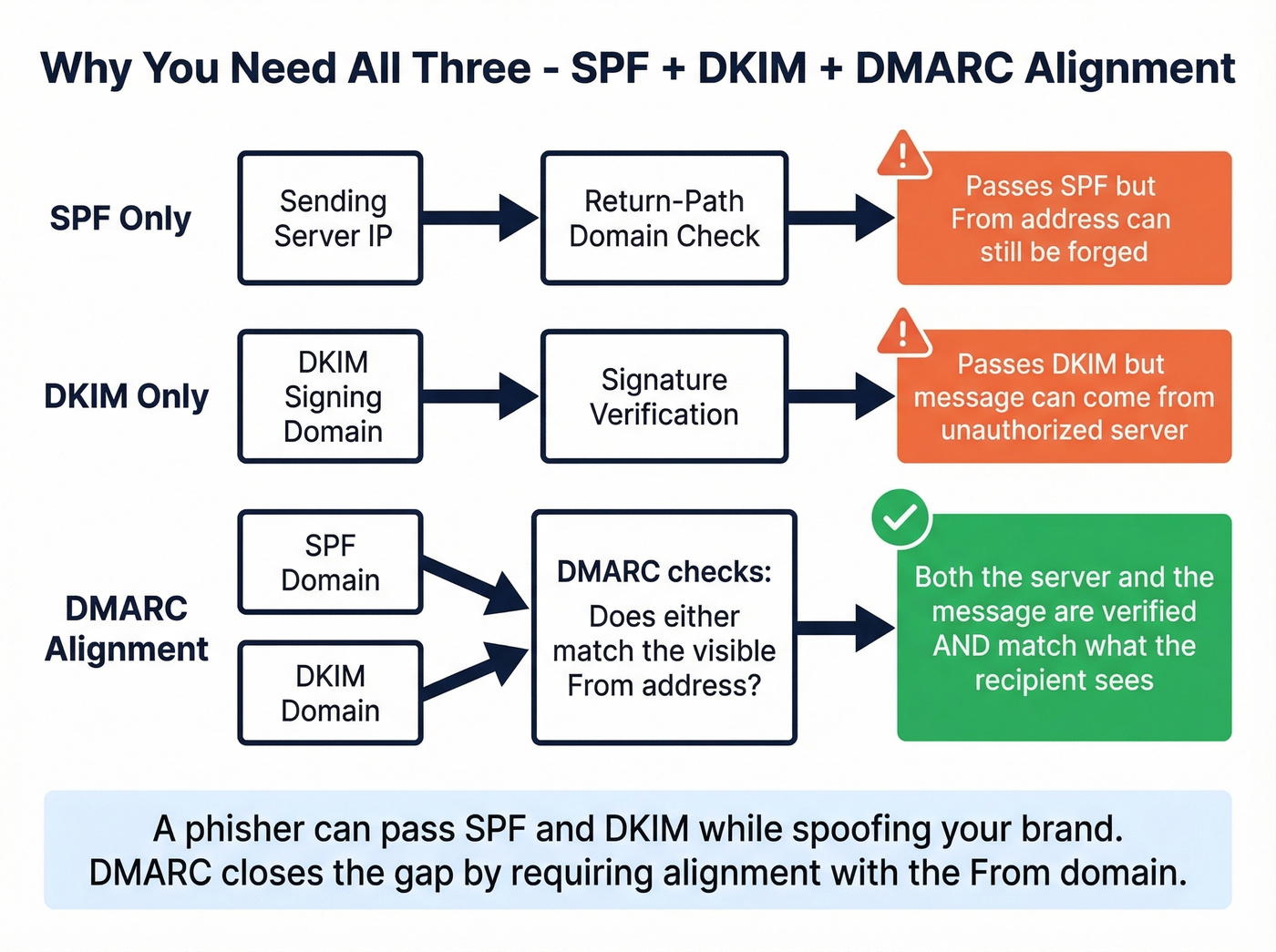
Without both in place, DMARC has nothing to align against. A message that passes only SPF can still carry a forged DKIM signing domain. A message that passes only DKIM can originate from an unauthorized IP. These protocols prevent spoofing most effectively when they work together under a DMARC policy.
DMARC (Domain-based Message Authentication)
DMARC ties SPF and DKIM together by requiring alignment with the visible From domain. It also tells receiving servers what to do when authentication fails:
_dmarc.example.com TXT "v=DMARC1; p=reject; rua=mailto:dmarc@example.com"
The critical concept is alignment. SPF can pass and DKIM can pass, but if neither authenticated domain matches your From address, DMARC fails. This is the most common gotcha - your ESP signs with its own domain (DKIM d=sendgrid.net) while your From is example.com.
Moving from p=none to p=reject with proper alignment yields an 8-12% inbox placement improvement within 60 days. Enforcement doesn't just protect your brand - it actively improves inbox rates.
Here's the full tag reference:
| Tag | Purpose | Example |
|---|---|---|
| p | Policy | none / quarantine / reject |
| rua | Aggregate reports | mailto:dmarc@example.com |
| ruf | Forensic reports | mailto:forensic@example.com |
| adkim | DKIM alignment | r (relaxed) / s (strict) |
| aspf | SPF alignment | r (relaxed) / s (strict) |
| sp | Subdomain policy | reject |
| pct | % of mail to apply policy | 100 |
Set sp=reject explicitly if you want a clear subdomain policy. Without an sp tag, subdomains follow the organizational domain's policy.
ARC (Authenticated Received Chain)
Forwarding breaks authentication. When a mailing list or security filter relays your message, the sending IP changes (SPF fails) and content modifications like footer injection can invalidate the DKIM signature. DMARC fails as a consequence, even though you did everything right.
ARC preserves the original authentication results across intermediaries using three headers:
- ARC-Authentication-Results (AAR) - records SPF/DKIM/DMARC at each hop
- ARC-Message-Signature (AMS) - a DKIM-like signature of the message
- ARC-Seal (AS) - signs and verifies the ARC chain itself
Microsoft 365 lets admins configure trusted ARC sealers so that original authentication results survive forwarding and modification. If you're seeing legitimate forwarded mail land in spam, ARC trust configuration is the fix.
BIMI (Brand Indicators for Message Identification)
BIMI is the visual reward for getting everything else right. It displays your brand logo next to your emails in supporting inboxes.
Prerequisites:
- DMARC at
p=quarantineorp=rejectwithpct=100 - A compliant SVG Tiny-PS logo
- A VMC or CMC certificate (provider-dependent)
The DNS record:
default._bimi.example.com TXT "v=BIMI1; l=https://example.com/logo.svg; a=https://example.com/brand.pem"
VMC (Verified Mark Certificate) gets you the blue checkmark on Gmail and purple checkmark on Yahoo. It requires a registered trademark and typically costs $1,000-$2,000/year from CAs like Entrust or DigiCert. CMC (Common Mark Certificate) is the newer alternative - Google now accepts CMCs, and they don't require a trademark. You'll need proof of at least 12 months of prior logo use. Yahoo and Fastmail also accept self-asserted logos without any certificate, though you won't get the verification badge.
DMARC Enforcement Rollout Strategy
Don't jump straight to p=reject. Here's the timeline we recommend:
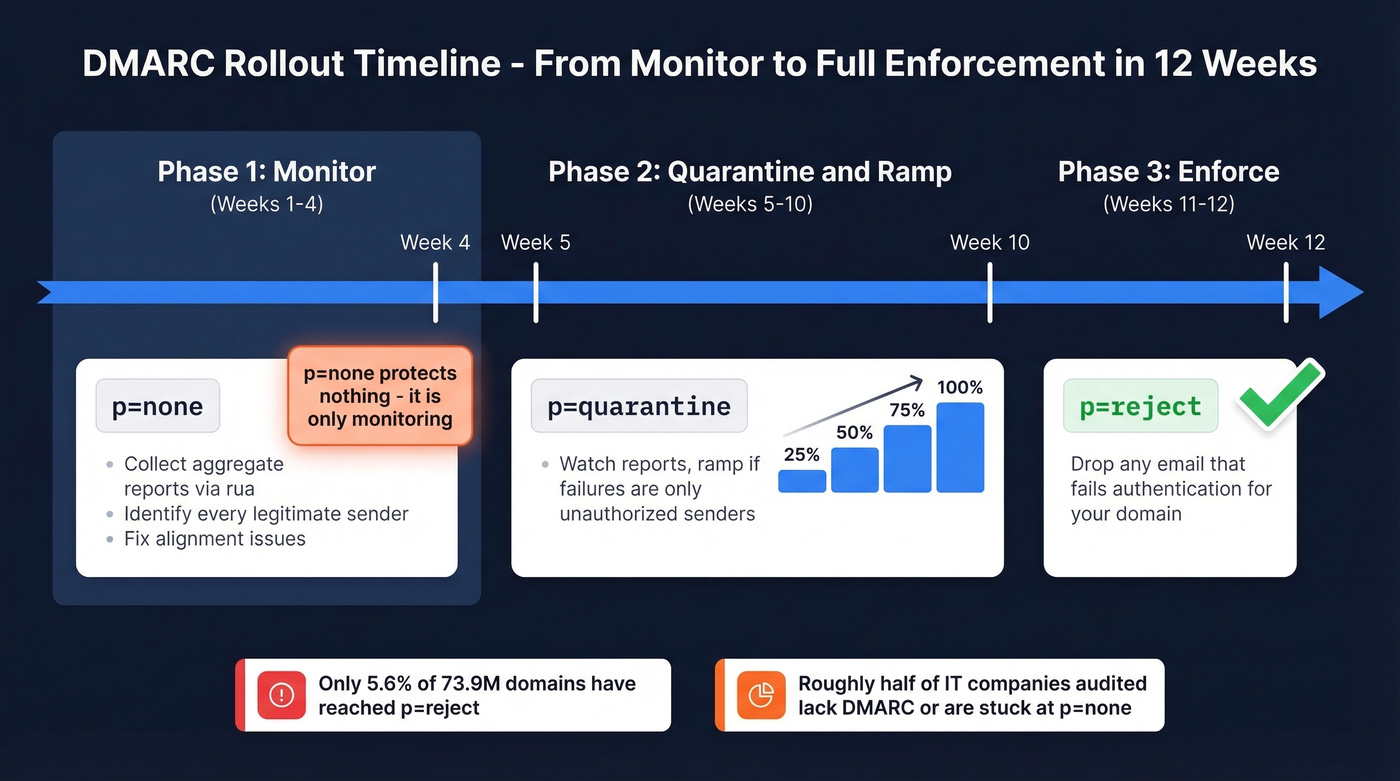
Weeks 1-4: Monitor. Set p=none and collect aggregate reports via rua. Identify every legitimate sender and fix DMARC alignment issues. Be clear-eyed about this: p=none is monitoring, not authentication. It doesn't protect you from anything.
Weeks 5-10: Quarantine and ramp. Move to p=quarantine; pct=25. Watch your reports. If failures are only from unauthorized senders, ramp pct to 50, then 75, then 100 over 4-6 weeks.
Weeks 11-12: Enforce. Switch to p=reject. You're now telling the world to drop any email that fails authentication for your domain.
Total timeline: 8-12 weeks. The data on adoption is sobering - of 73.9 million domains tracked by Red Sift, only 5.6% have reached p=reject. Another 11% are stuck at report-only. On r/sysadmin, consultants regularly report that roughly half the IT companies they audit either lack DMARC entirely or have it parked at p=none indefinitely. Don't be in that group.
Here's our honest take: most companies stall at p=none because they're afraid of breaking something. The irony is that p=none breaks nothing and protects nothing. You're paying for monitoring you never act on. If your aggregate reports have been clean for four weeks, move to quarantine. Stop waiting for permission.

Perfect SPF, DKIM, and DMARC won't save you if 35% of your list bounces. Prospeo's 5-step verification and 7-day data refresh keep bounce rates under 4% - so your freshly authenticated domain stays pristine.
Protect the domain reputation you just worked so hard to build.
2026 Bulk Sender Requirements
Google and Yahoo enforced new requirements starting in 2024. Microsoft followed in May 2025. For anyone sending 5,000+ emails per day, here's what's mandatory:
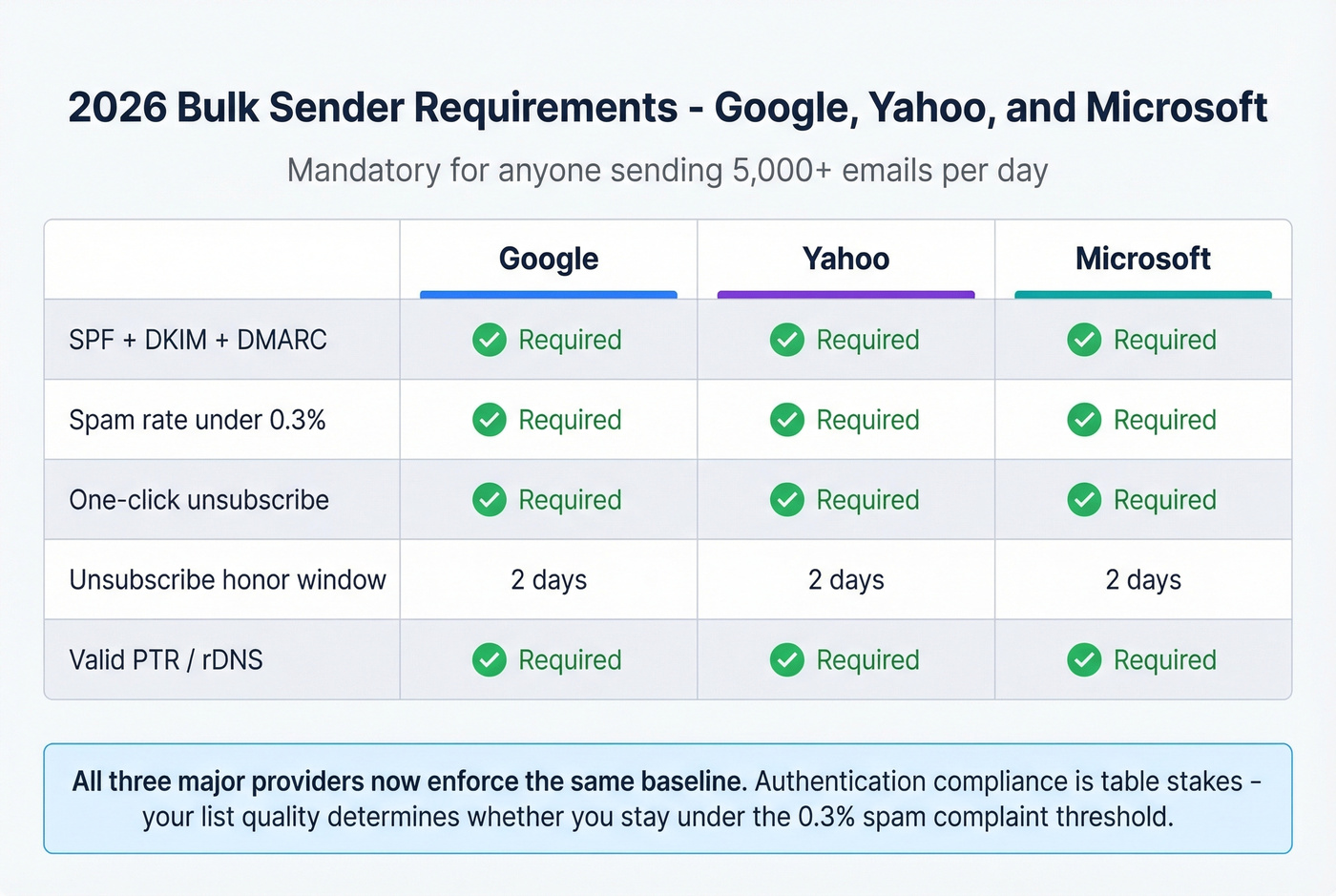
| Requirement | Yahoo | Microsoft | |
|---|---|---|---|
| SPF + DKIM + DMARC | Required | Required | Required |
| Spam rate < 0.3% | Required | Required | Required |
| One-click unsub | Required | Required | Required |
| Unsub honor window | 2 days | 2 days | 2 days |
| Valid PTR/rDNS | Required | Required | Required |
One-click unsubscribe means including both List-Unsubscribe and List-Unsubscribe-Post headers. Most modern ESPs handle this automatically, but verify yours does.
Authentication compliance is only half the equation - your list quality determines whether you stay under that 0.3% spam complaint line. Sending to outdated or invalid addresses generates bounces and complaints that push you over. Prospeo's email verification catches invalid addresses, spam traps, and honeypots before they hit your sending infrastructure, keeping complaint rates well below that threshold.
How to Test Your Setup
If you only use one tool, make it MXToolbox. It checks SPF, DKIM, DMARC, and blacklist status in one pass and catches recursive loops, duplicate includes, and void lookups. We run these checks after every DNS change - it's the fastest way to confirm your records are correct.
| Tool | What It Checks | Cost |
|---|---|---|
| MXToolbox | SPF/DKIM/DMARC/blacklists | Free |
| mail-tester.com | End-to-end deliverability | Free (limited) |
| Google Postmaster Tools | Domain reputation/spam rate | Free |
| PowerDMARC | SPF syntax + lookup count | Free checker |
| Red Sift BIMI Checker | BIMI policy/SVG/VMC gaps | Free |
For quick terminal checks:
# Check SPF
dig +short TXT yourdomain.com | grep spf

# Check DMARC
dig +short TXT _dmarc.yourdomain.com

# Check DKIM (replace 'default' with your selector)
dig +short TXT default._domainkey.yourdomain.com
We use mail-tester.com as the final validation before any major campaign launch - send a test email to their generated address and get a scored report covering authentication, content, and blacklist status.
Common Failures and Fixes
These are the issues we see most often. They're almost always configuration mistakes rather than protocol limitations.
SPF exceeds 10-lookup limit. Every include:, a:, mx:, and redirect: counts. Use dedicated sending subdomains per service (marketing.example.com, transactional.example.com) to keep each SPF record simple. Subdomains are cleaner than SPF flattening tools, which can introduce their own issues.
Multiple SPF records. Two v=spf1 TXT records on the same domain cause a permerror. This happens when someone adds a new ESP's SPF without merging it into the existing record. Merge all mechanisms into one record.
Doubled domain name in DNS UI. You enter _dmarc.example.com as the hostname, but your DNS provider automatically appends .example.com, creating _dmarc.example.com.example.com. Just enter _dmarc as the hostname.
DKIM selector mismatch. Your ESP generates a DKIM key with selector s1, but you published the DNS record under default._domainkey. Check the s= value in your DKIM-Signature header and match it exactly.
ESP alignment failure. DKIM passes because your ESP signed the message, but the d= value is sendgrid.net while your From is example.com. DMARC fails on alignment. Configure custom DKIM signing with your own domain in your ESP settings - this is the single most common DMARC failure we've debugged for outbound teams.
Forwarding breaks everything. A security filter or mailing list relays your message, changing the IP and modifying content. This is an ARC problem on the receiver's side - configure trusted ARC sealers if you control the receiving infrastructure.
Mailchimp DKIM "couldn't be validated." Usually DNS propagation - CNAME records can take up to 48 hours. This is a perennial source of confusion on r/MailChimp. Check that you entered just the hostname portion, not the full domain, and remember that Mailchimp's DKIM setup is separate from Google Workspace DKIM.
Beyond Authentication: List Quality
Authentication proves your domain is legitimate. It doesn't prove your recipients are real.
You can have perfect SPF, DKIM, and DMARC configuration and still destroy your sender reputation by emailing invalid addresses, spam traps, and honeypots. Bounces and spam traps are the fastest way to tank deliverability, even with flawless DNS records. The 0.3% complaint threshold that Google and Yahoo enforce doesn't care about your authentication setup. It cares about whether real people want your email.
This is where email verification completes the picture. Prospeo runs a 5-step verification process that handles catch-all domains, removes spam traps, and filters honeypots - the threats that authentication can't touch. With 98% email accuracy and a free tier, it handles the data-quality side of deliverability that DNS records simply can't address.

You're setting up authentication to improve inbox placement. The next bottleneck is data quality. Prospeo delivers 98% email accuracy at $0.01/lead - teams using it see bounce rates drop from 35%+ to under 4%.
Don't let bad data undo your authentication work.
FAQ
Do I need all three protocols (SPF, DKIM, DMARC)?
Yes. Since 2024, Google, Yahoo, and Microsoft require all three for bulk senders dispatching 5,000+ emails per day. SPF or DKIM alone can't prevent spoofing because neither verifies alignment with the visible From address. DMARC closes that gap - all three working together is the only way to fully protect your sending domain.
How long does DNS propagation take for authentication records?
Most changes propagate within 15 minutes to 4 hours, but edge cases can take up to 48 hours. Use dig or MXToolbox to verify records are live before launching campaigns or changing DMARC policy.
Can I authenticate email with a free email address?
No. You need DNS access to your sending domain to publish SPF, DKIM, and DMARC records. Free addresses (Gmail, Yahoo, Outlook) use the provider's domain, which you can't configure. A custom domain is required.
What's the difference between SPF softfail and hardfail?
Softfail (~all) marks failures as suspicious but doesn't reject them. Hardfail (-all) tells receivers to reject unauthorized messages outright. Start with softfail while confirming all legitimate senders are included, then move to hardfail once your aggregate reports are clean.
Does authentication alone guarantee inbox placement?
No. Authentication proves you're a legitimate sender, but list quality determines whether providers keep trusting you. Sending to invalid addresses and spam traps tanks your reputation regardless of DNS setup. Pairing authentication with email verification - catching bad addresses before they hit your sending infrastructure - is what actually keeps you in the inbox long-term.