


7 Best Browse AI Alternatives for 2026
Your Browse AI robot worked perfectly for three weeks. Then the target site updated its layout, the robot started pulling gibberish, and you burned through half your monthly credits before you noticed. We've tested the major Browse AI alternatives so you don't have to repeat that cycle - the right pick depends on what you're actually trying to do.
Our Picks (TL;DR)
| Pick | Best For |
|---|---|
| Prospeo | B2B contact data - skip scraping entirely |
| Octoparse | No-code scraping on dynamic sites |
| ScrapingBee | API-first scraping at scale |
Here's the thing most people miss: if you're building prospect lists, you don't need a scraper. You need a data platform. Scrapers are for extracting product pricing, job posts, or other structured content from websites. Mixing those up is how teams waste months on brittle robots that break every other Tuesday.
Why People Leave Browse AI
Browse AI's G2 rating is a strong 4.8/5 across 59 reviews. Its Trustpilot score tells a different story: 2.9/5 from 13 reviews. That gap reflects three recurring pain points.
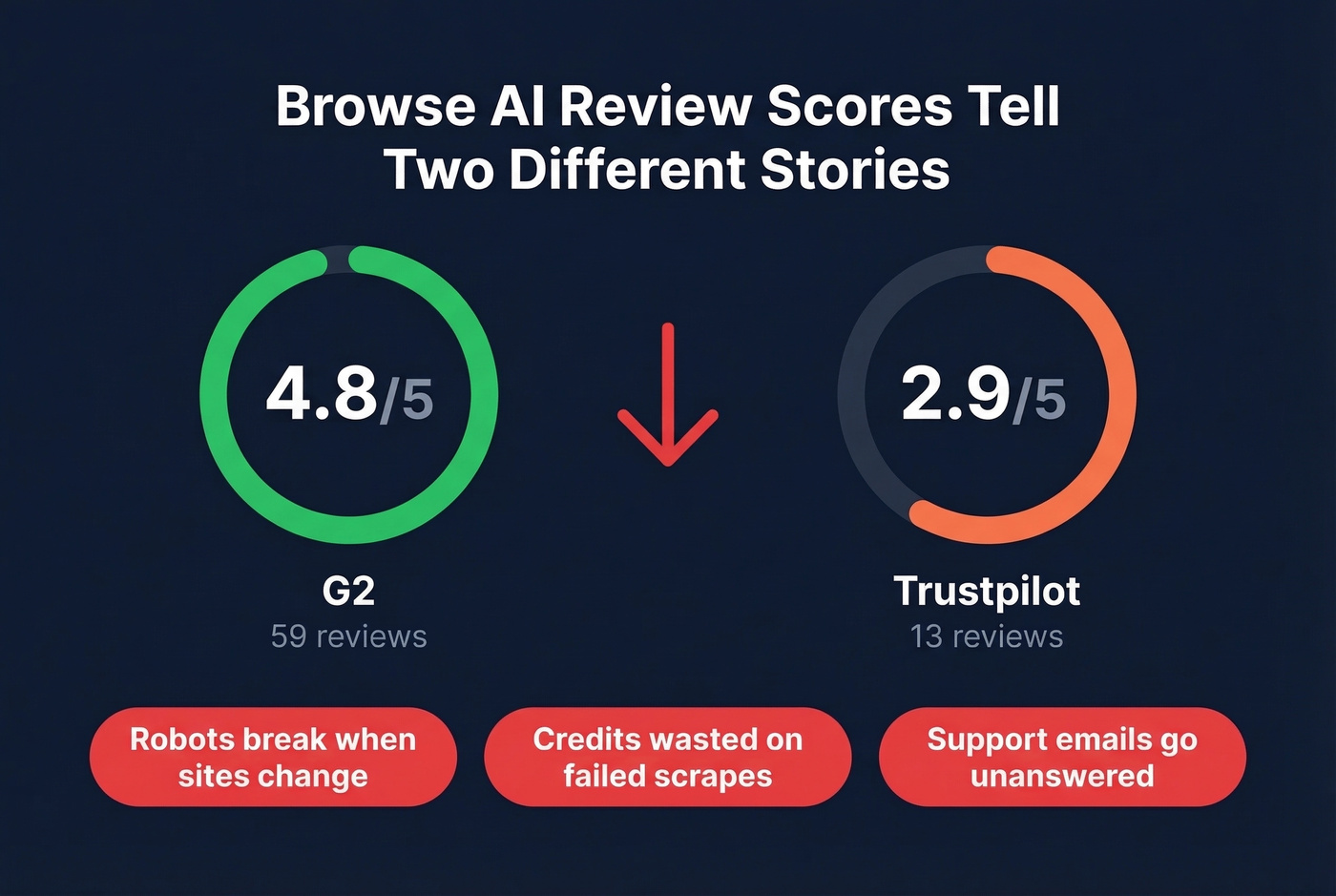
Execution failures on dynamic sites. Robots trained on a page layout break when the site changes. Trustpilot reviews include complaints about scrapes failing or returning garbage on certain targets - and you often don't realize it until you've already spent the credits.
The credit system feels punishing. The free tier gives you 50 credits/month, enough for a test run but not real work. If a robot fails mid-run, those credits are gone.
Support responsiveness. Multiple Trustpilot reviewers describe sending consecutive emails with no response. For a tool where robots can silently break, slow support isn't just annoying - it's a dealbreaker.
Browse AI Pricing
Browse AI uses plan-based billing with included monthly credits:
| Plan | Monthly Billing | Annual Billing | Credits |
|---|---|---|---|
| Free | $0 | $0 | 50 credits/month |
| Personal | $48/month | $19/month | 2,000 credits/month |
| Professional | $87/month | $69/month | 5,000 credits/month |
| Premium | - | From $500/month | 600,000+ credits/year (custom) |
The annual prepay discount is roughly 20%. If you need 3,000 credits one month and 500 the next, you'll end up choosing a plan that fits your peak usage and overpaying the rest of the time.

You're reading this because your Browse AI robots keep breaking - and you're burning credits on data you could get instantly. Prospeo gives you 300M+ professional profiles with 98% email accuracy, refreshed every 7 days, at ~$0.01 per lead. No robots to train, no layouts to monitor, no credits wasted on failed scrapes.
Replace your broken scraping workflow with verified B2B data in seconds.
How to Pick the Right Alternative
Before you trial anything, ask three questions. Does the tool handle anti-bot measures like proxy rotation and CAPTCHA solving? What happens when a scrape fails mid-run - do you still pay? And do you actually need to scrape at all, or do you just need the data that scraping would produce?
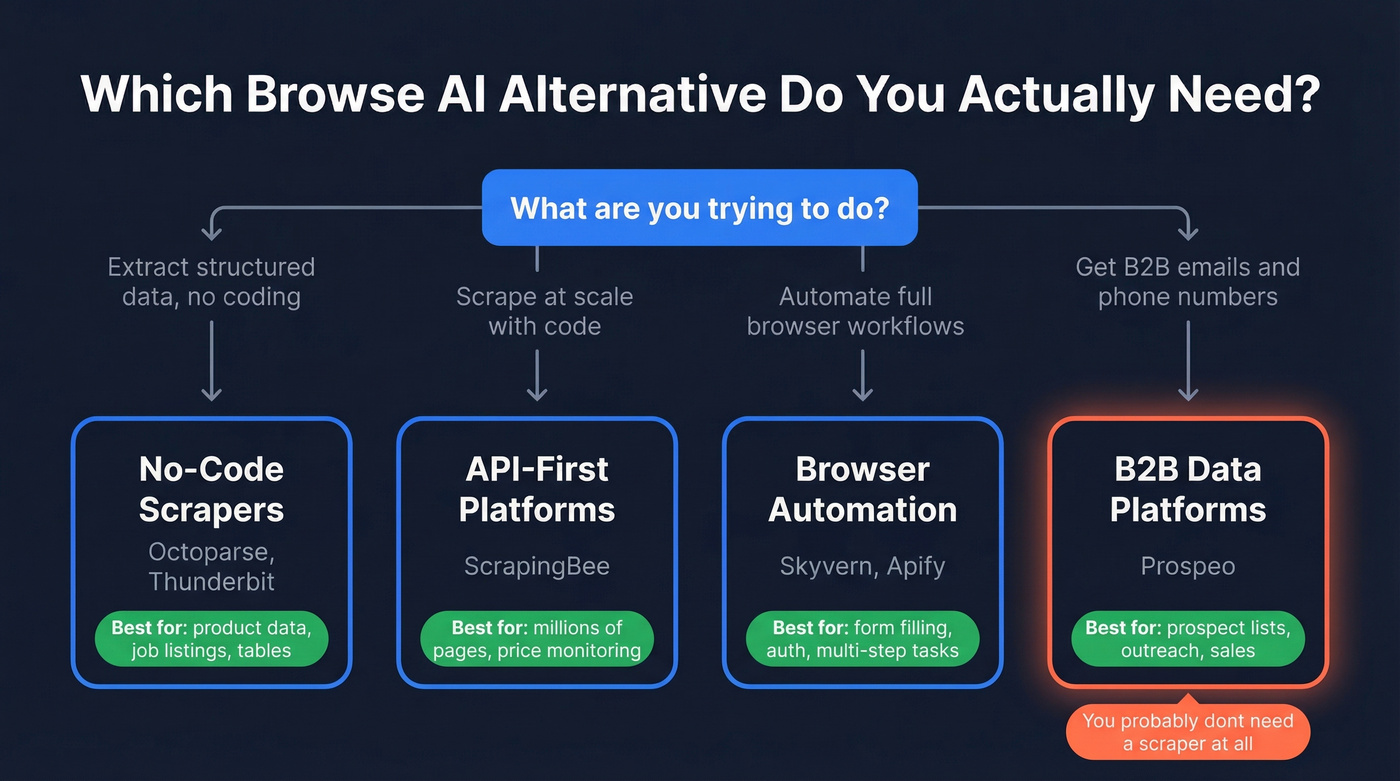
Those questions sort alternatives into four buckets. No-code scrapers like Octoparse and Thunderbit offer point-and-click setup with visual workflow builders, ideal for non-technical users extracting structured data. API-first platforms like ScrapingBee give you proxy rotation, rendering, and CAPTCHA handling behind a clean API - built for developers who want control without managing infrastructure. Browser automation tools like Skyvern and Apify go beyond scraping into form filling, authentication, and multi-step workflows. And B2B data platforms like Prospeo give you verified contact data directly, no robots required. If you're comfortable writing code and want full control, Playwright is a powerful open-source option, but it's a framework, not a managed service.
The 7 Best Browse AI Alternatives
Prospeo - Best for B2B Contact Data
Use this if you were burning Browse AI credits to scrape business directories or company websites for emails and phone numbers. Prospeo gives you 143M+ verified emails and 125M+ verified mobile numbers in a searchable database with 30+ filters - no scraping required.
The database covers 300M+ professional profiles with 98% email accuracy and a 7-day refresh cycle, while most data providers refresh every four to six weeks. You can search by job title, company size, technographics, buyer intent across 15,000 Bombora topics, funding stage, and more. The Chrome extension (40,000+ users) pulls verified contact data from any website in one click, which is what most Browse AI users were trying to accomplish with far more effort.

Pricing starts free (75 emails + 100 extension credits/month) and scales at roughly $0.01 per lead. No annual contracts, no credits that evaporate on complex scraping jobs that fail halfway through. One of our customers, Stack Optimize, built from $0 to $1M ARR using Prospeo data with bounce rates under 3% and zero domain flags across all their clients.
Skip this if you need to extract product pricing, job listings, or non-contact structured data from websites. That's a scraping problem, not a data platform problem.
Octoparse - Best No-Code Scraper
A common complaint with no-code scrapers is that they break on infinite scroll and "load more" buttons. In a Reddit thread asking for a scraper that handles those patterns, the OP explicitly says Octoparse works well. That tracks with our experience - it's one of the most reliable visual scrapers for dynamic content.
The free plan includes 10 tasks, 2 concurrent runs, and a 50K/month data export limit, which is generous enough for real testing. Paid plans start at $83/month on the Standard tier.
Watch the add-ons, though. Residential proxies cost $3/GB, CAPTCHA solving runs $1-$1.5 per thousand, pay-per-result templates range from $0.001-$3 per thousand results, and crawler setup starts at $399. Those extras can quietly double your bill if you're scraping sites with aggressive anti-bot measures, so factor them in before committing.

Skip this if you need API-level control or you're running millions of pages/month. Octoparse is built for visual users, not developers.
ScrapingBee - Best API-First Platform
If you have a developer (or are one) and want transparent pricing without training robots, ScrapingBee is the answer. It handles proxy rotation, JavaScript rendering, and CAPTCHA solving behind a simple API. You send a URL, you get back HTML or JSON.
Pricing is straightforward: $49/mo for 250K API credits, $99/mo for 1M, $249/mo for 3M, $599/mo for 8M. There's a 1,000-call free trial with no credit card required. We've found it particularly useful for monitoring competitor pricing pages at scale - the kind of recurring scrape where Browse AI robots tend to break.
Skip this if you can't write API calls or don't want to. This isn't a no-code tool.
Apify - Best for Power Users
Apify's model is powerful but metered: you pay a base plan plus usage. The free tier includes $5 prepaid usage, Starter is $29/mo, and Scale jumps to $199/mo. On top of that, compute is billed in CUs (1 CU = 1 GB RAM for 1 hour) at $0.30/CU on lower tiers, dropping to $0.20/CU on Business. Residential proxies run $8/GB on Free/Starter.
The pre-built "Actors" for common scraping tasks are genuinely useful - there are thousands of them for everything from Google Maps extraction to social media monitoring. But as one Reddit user put it: "Solid infrastructure and prebuilt actors, but heavier than I needed for smaller jobs."
Skip this if you want simplicity. Apify's power comes with complexity, and metered billing can surprise you if you're not watching your CU consumption closely.
Thunderbit - Best Budget Option
Thunderbit is a Chrome extension-based AI scraper with a 4.1/5 on Trustpilot from 21 reviews. Paid plans start at just $15/month, making it the cheapest option on this list.
Let's be honest about the tradeoffs, though. Trustpilot reviews include complaints about scraping stopping after 10-21 pages, credits getting wasted on infinite loops, and cancellation friction. The tool works well for simple, small-scale jobs - grabbing a table from a static page, pulling a short list of results. Push it harder and the cracks show fast.
Skip this if you need reliability at scale or you're scraping complex, paginated sites.
Skyvern - Best for Browser Automation
Skyvern uses computer vision and LLMs to automate full browser workflows - not just scraping, but form filling, authentication, and 2FA handling. It's a different category than Browse AI entirely.
Pricing is credit-based: Free includes roughly 1,000 credits/month, Hobby is $29/mo with about 30,000 credits, and Pro is $149/mo with around 150,000 credits plus residential proxies, an advanced CAPTCHA solver, and 2FA/TOTP support.
Use this if you need to automate multi-step browser tasks beyond data extraction. Skip this if you just need to scrape a table off a webpage - you'd be paying for capabilities you'll never touch.
Gumloop - Best for Scrape-and-Analyze Workflows
Gumloop positions itself as "scrape + analyze + act." You extract data, process it through AI, and trigger downstream actions in one workflow. For teams whose bottleneck isn't extraction but what happens after, that's a real differentiator.
The Free plan includes 2,000 credits/month. Paid plans start at $37/month, with a Team plan at $244/month and Enterprise pricing for larger orgs.
Worth a look if you're currently stitching together a scraper, a spreadsheet, and a Zapier workflow to accomplish what Gumloop does natively.
Stack Optimize built a $1M agency on Prospeo data with bounce rates under 3% and zero domain flags. That's what happens when you stop scraping for contact data and start using a platform with 143M+ verified emails, 125M+ verified mobiles, and 30+ search filters - including buyer intent across 15,000 topics.
Your competitors aren't scraping for emails anymore. Neither should you.
Pricing Comparison
| Tool | Entry Price | Mid-Tier | Free Tier | Watch Out For |
|---|---|---|---|---|
| Browse AI | $19/mo (annual) or $48/mo | $69/mo (annual) or $87/mo | 50 credits/mo | Plan-based credits |
| Prospeo | ~$0.01/lead | Scales with usage | 75 emails/mo | B2B contacts only |
| Octoparse | $83/mo | $299/mo | 10 tasks, 50K export | Proxy + CAPTCHA add-ons |
| ScrapingBee | $49/mo | $249/mo | 1,000 API calls | JS rendering costs more |
| Apify | $29/mo (+ usage) | $199/mo (+ usage) | $5 prepaid credit | CU metering adds up fast |
| Thunderbit | $15/mo | ~$38-$75/mo | Free plan | Billing/cancellation issues |
| Skyvern | $29/mo | $149/mo | ~1,000 credits | Credits vary by complexity |
| Gumloop | $37/mo | $244/mo | 2,000 credits/mo | Credit-based usage |
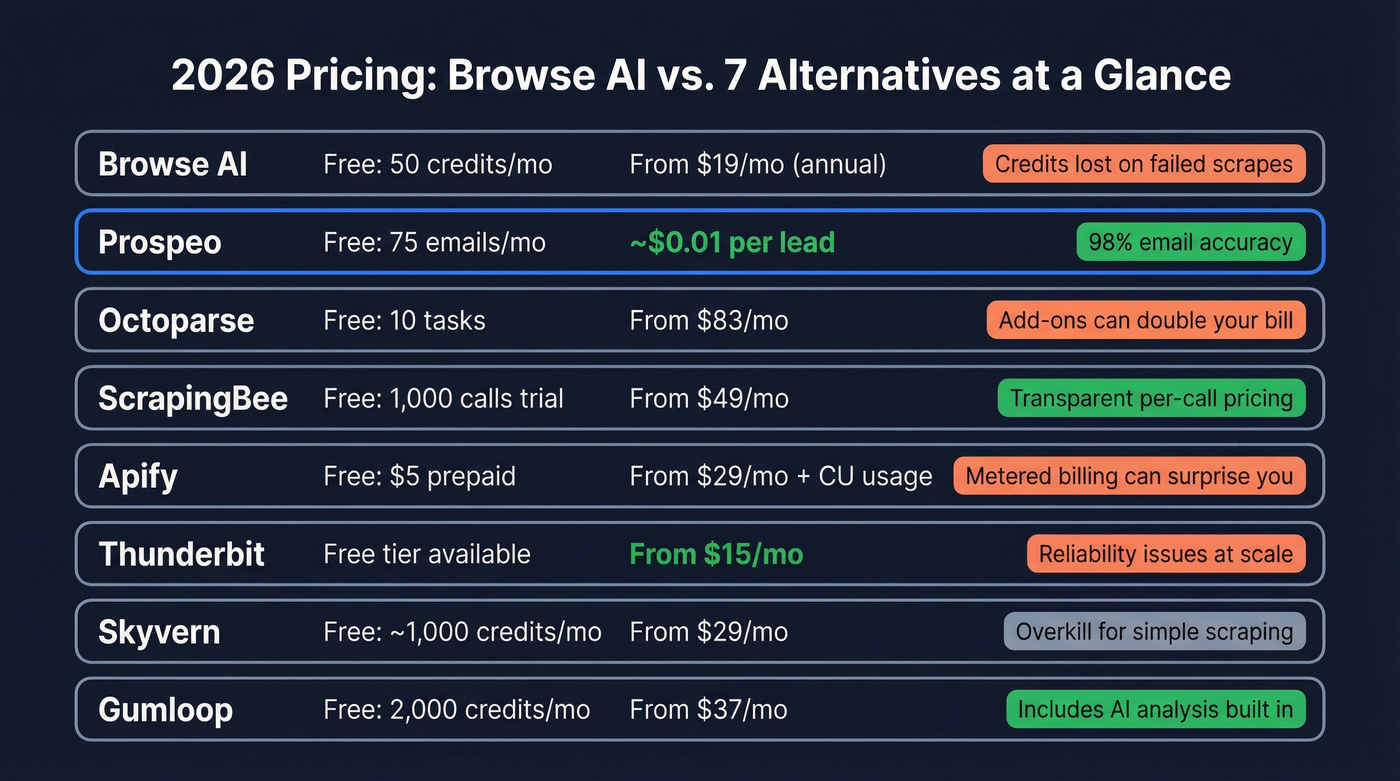
The biggest pricing lesson across all these tools: credit-based models punish failed runs. If a scraper breaks halfway through a job, you've paid for nothing. Look for tools that charge for results, not compute time.
FAQ
Is there a free Browse AI alternative?
Yes. Apify includes $5 prepaid usage on its free tier, Octoparse offers 10 tasks with a 50K/month data export limit, and Prospeo gives you 75 verified emails monthly. All three are functional enough to evaluate before paying.
What's the best option for dynamic websites?
Octoparse. It's one of the most commonly recommended no-code options for handling infinite scroll and "load more" patterns. ScrapingBee is the developer-friendly equivalent with full JavaScript rendering support.
Can I scrape without writing code?
Octoparse and Thunderbit are both no-code visual scrapers. For anything with heavy JavaScript rendering, Octoparse is the safer bet. Thunderbit works for simpler, smaller-scale extraction jobs.
Is web scraping legal?
Generally yes for publicly available data, but it depends on what you scrape, how you access it, and what you do with the results. Always respect the site's terms of service and be careful with personal data under GDPR and similar privacy regulations.