

Business Meeting Invite Templates You Can Copy, Paste, and Send Today
Between 36 and 56 million meetings happen every day in the US alone. Most start with a sloppy calendar invite - no agenda, no context, no reason for half the attendees to show up.
You don't need a pretty Canva card for your next business meeting. You need the actual words. Below: eight copy-and-paste templates, subject line formulas, platform-specific workflows, and the etiquette rules that separate professionals from calendar spammers.
Quick Version - Top 3 Templates
If you're in a hurry, grab one and go. These cover 80% of meetings:
- Team Sync / Recurring Standup - Tight agenda, status updates, 30 minutes max. [Jump to template](#team-sync - recurring-standup)
- Client Discovery Call - First meeting with a prospect, sets context, includes a booking link. Jump to template
- One-on-One Check-In - Manager-to-report format with time-boxed agenda items and space for the report to add topics. Jump to template
Need something more specific? Five more templates below, including a vendor meeting invitation and a board meeting format.
What Every Meeting Invitation Email Needs
A meeting invite is a mini-contract. If you can't fill in the basics, you probably don't need the meeting. Here's the 8-part framework that separates useful invites from noise:
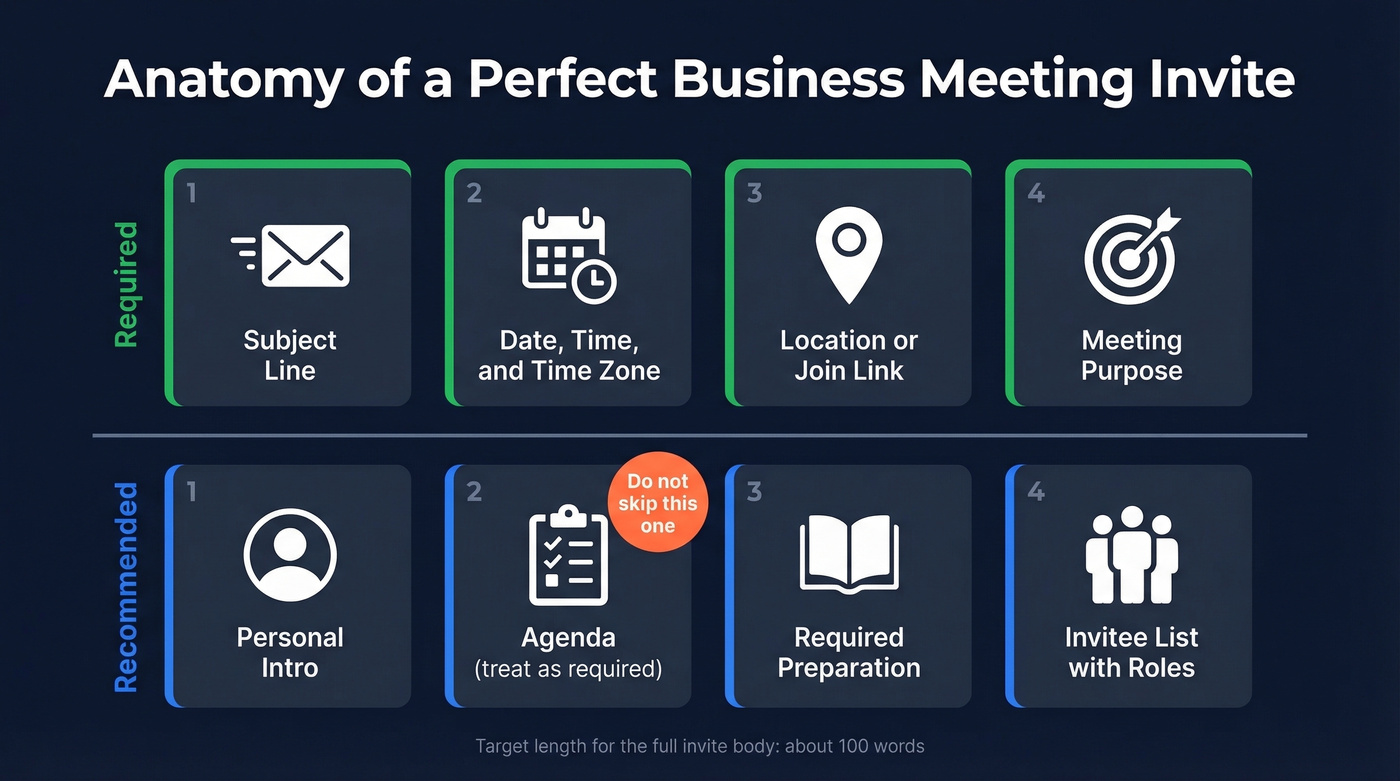
| Required | Optional (But Recommended) |
|---|---|
| Subject line | Personal intro |
| Date, time, and time zone | Required preparation |
| Location or join link | Invitee list with roles |
| Meeting purpose | |
| Agenda* |
*The original framework lists agenda as optional. In practice, skip it and you should cancel the meeting. Every template below includes one for a reason.
Spell out month names - "June 12" not "6/12" - because date formats vary internationally and you don't want a European colleague showing up on December 6th. Always include duration in the invite itself, not just the calendar block. For virtual meetings, put the phone dial-in number in the location field so mobile users can tap to join without hunting through the description.
Target length for the entire invite body? About 100 words. If it takes longer to read the invite than the meeting itself, you've written too much.
Subject Lines That Get Opened
47% of recipients decide whether to open an email based on the subject line alone. For meeting invites, a bad subject line doesn't just get ignored - it gets declined or forgotten.
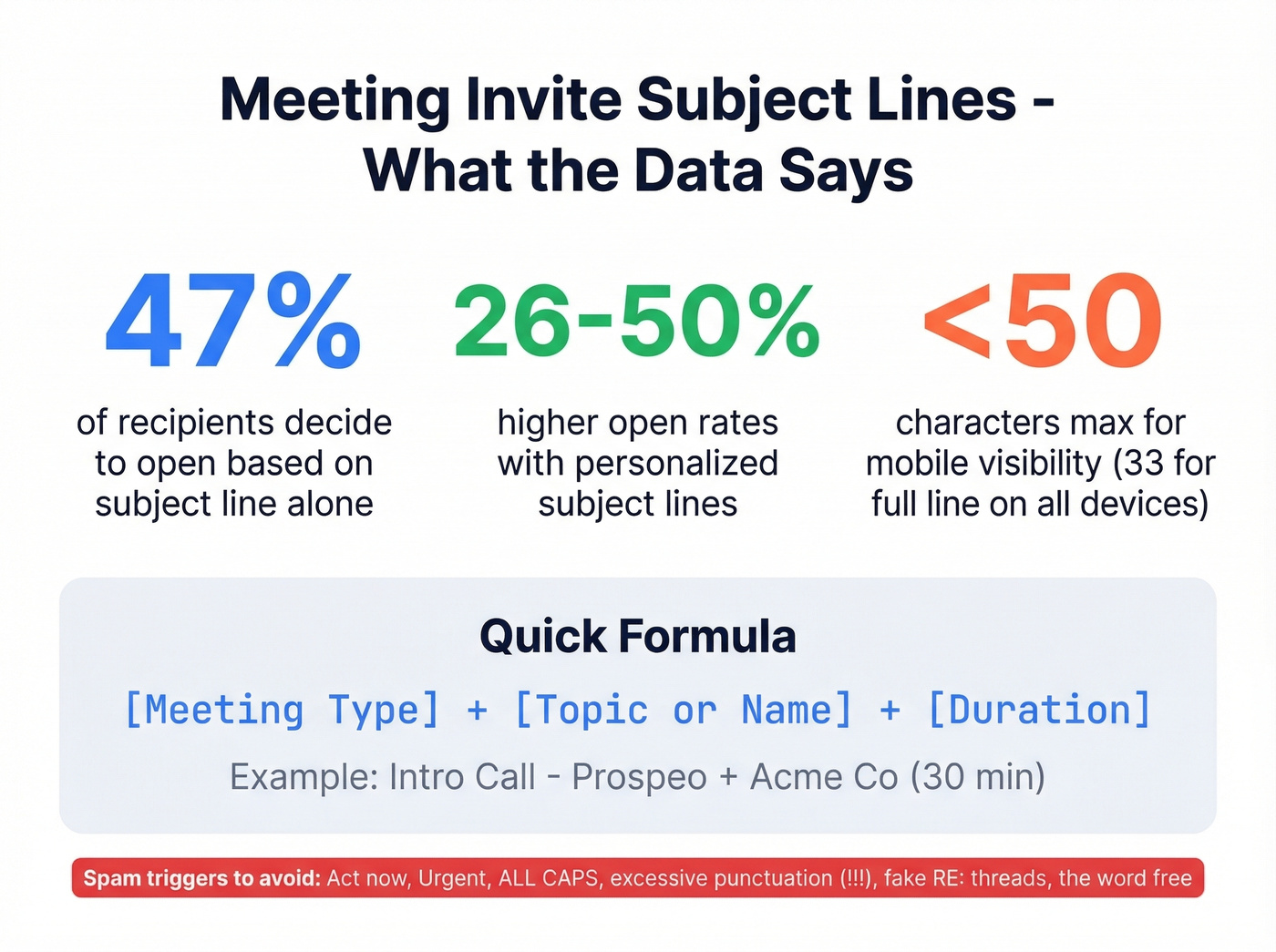
Keep it under 50 characters for mobile visibility (33 if you want the full line visible on every device). Personalized subject lines deliver 26-50% higher open rates, so include a name, topic, or date. The single highest-impact change? Include the duration. "30 min" in a subject line tells the recipient exactly what they're committing to.
Here's the thing: most people write subject lines that are either too vague ("Quick chat") or too long ("Follow-up discussion regarding Q2 pipeline review and next steps"). Neither works.
Subject lines by meeting type:
- Internal sync: "Team Sync: Q1 Goals (30 min)" / "Weekly standup - [Date]"
- Client meeting: "Intro call: [Your Co] + [Their Co]" / "[Name], quick call re: [topic]?"
- One-on-one: "1:1 Check-In - [Date]" / "[Name] + [Name]: Weekly 1:1"
- Presentation/demo: "Product Demo: [Feature] (30 min)" / "[Co] Demo for [Their Team]"
- Reschedule: "Rescheduled: [Meeting] -> [New Date]" / "New time: [Meeting], [Date]"
- Follow-up: "Follow-up: [Topic] from [Date]" / "Next steps from our [Day] call"
- Confirmation: "Confirmed: [Meeting] on [Date]" / "You're set: [Meeting], [Time] [TZ]"
Spam triggers to avoid: "Act now," "Urgent," ALL CAPS, excessive punctuation (!!!), fake "RE:" threads, and the word "free." These won't just hurt open rates - they can route your invite straight to spam.
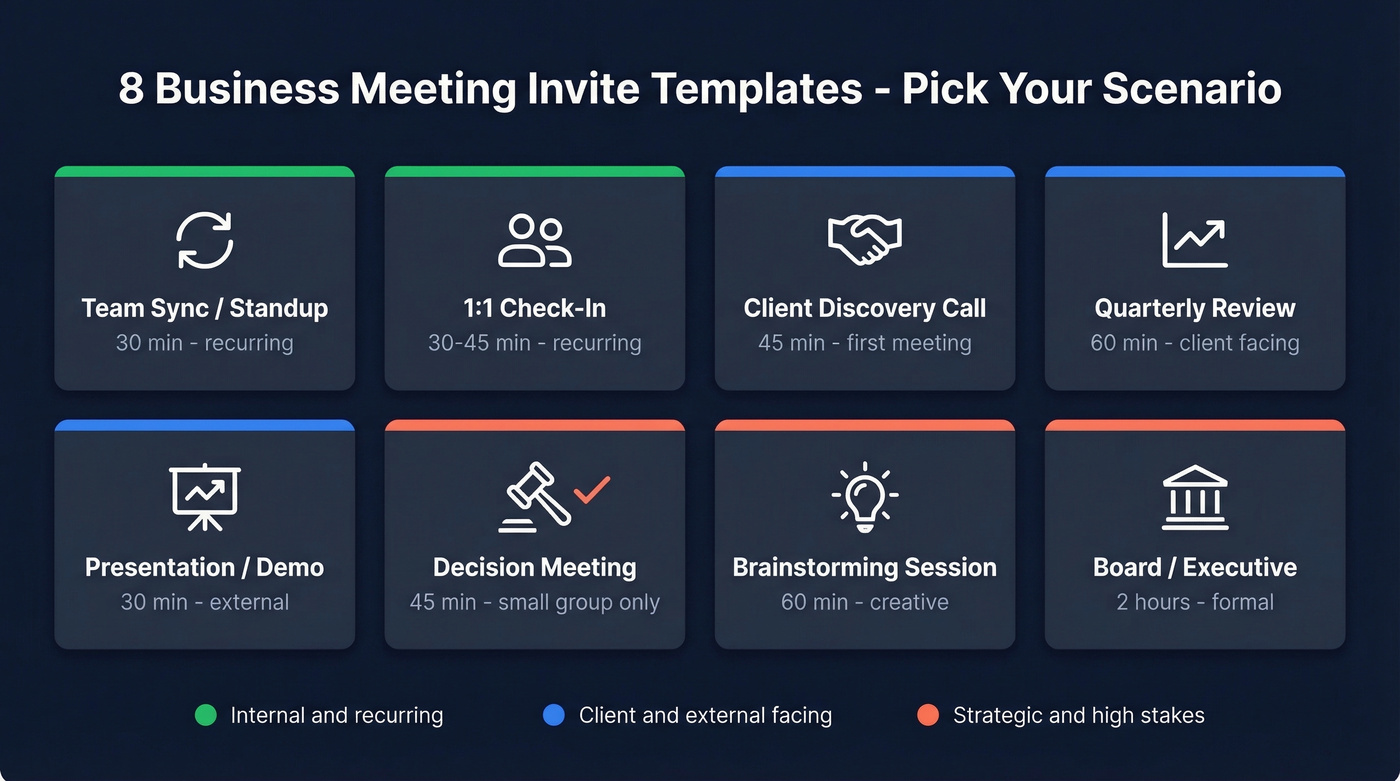
8 Copy-Paste Invite Templates
Every template below includes a subject line and body with placeholders. Copy, replace the brackets, send.
Team Sync / Recurring Standup
This is the meeting your team already has. The template just makes it worth attending.
Subject: Team Sync: [Topic/Sprint Name]   -   [Date] (30 min)

Hi team,

Our [weekly/biweekly] sync is scheduled for:

📅 [Day, Month Date] at [Time] [Time Zone]
📍 [Meeting link] | Dial-in: [Phone number]
⏱️ 30 minutes

Agenda:
- Blockers and escalations (10 min)
- Progress updates   -   come ready to share (15 min)
- Action items and next steps (5 min)

Can't make it? Drop your update in [Slack channel/doc link] beforehand.

[Your name]
One-on-One Check-In
The best 1:1 invites give the report ownership. Notice the shared doc link - that's where the real agenda lives.
Subject: 1:1 Check-In   -   [Your Name] + [Report Name], [Date]

Hi [Name],

Our next 1:1:

📅 [Day, Month Date] at [Time] [Time Zone]
📍 [Meeting link or office location]
⏱️ [30/45] minutes

Draft agenda (add your items):
- Your priorities this week (10 min)
- [Specific topic, e.g., project X update] (10 min)
- Career development / feedback (10 min)

Add anything you'd like to discuss to [shared doc link] by [day before].

[Your name]
Client Discovery Call
First impressions matter here. We've seen discovery calls fall apart because the invite bounced to an old email address - the prospect never saw it, and the sales rep wasted a week following up on silence. A well-crafted meeting invitation to a client sets the tone for the entire relationship.
Subject: Intro Call: [Your Company] + [Their Company] (45 min)

Hi [Name],

Thanks for connecting. I'd love to learn more about [their challenge] and share how we might help.

📅 [Day, Month Date] at [Time] [Time Zone]
📍 [Meeting link]
⏱️ 45 minutes

I'll be joined by [colleague name, role]. Feel free to include anyone involved in [relevant area].

If this time doesn't work: [Booking link]

Please confirm by [RSVP date]. Looking forward to it.

[Your name]
[Title, Company]
Client Catch-Up / Quarterly Review
Skip this template if your "quarterly review" is really just a status update email in disguise. If there's no two-way discussion to be had, send a Loom video instead.
Subject: Quarterly Review: [Your Co] + [Client Co]   -   [Date] (60 min)

Hi [Name],

Time for our [quarterly/monthly] check-in. I've attached our progress report as a pre-read   -   please review before the call so we can focus on discussion.

📅 [Day, Month Date] at [Time] [Time Zone]
📍 [Meeting link]
⏱️ 60 minutes

Agenda:
- Key results since [last meeting date] (15 min)
- Your feedback and concerns (15 min)
- Next-quarter priorities (20 min)
- Open Q&A (10 min)

[Your name]
Presentation or Demo Meeting
Subject: [Product/Feature] Demo for [Their Team]   -   [Date] (30 min)

Hi [Name],

We've put together a demo of [product/feature] tailored to [their use case]:

📅 [Day, Month Date] at [Time] [Time Zone]
📍 [Meeting link]
⏱️ 30 minutes

Pre-read: [Link to deck or one-pager]   -   a 5-minute skim will help us skip the basics and focus on your questions.

Please confirm attendance by [date].

[Your name]
Decision-Making Meeting
Real talk: if your "decision meeting" has more than a handful of people, it's a presentation. Keep the invite list ruthlessly small.
Subject: Decision Meeting: [Topic]   -   [Date] (45 min)

Hi [Names],

We need to make a call on [specific decision]. Come prepared to vote.

📅 [Day, Month Date] at [Time] [Time Zone]
📍 [Meeting link or room]
⏱️ 45 minutes

Decisions on the table:
1. [Decision A   -   context in 1 sentence]
2. [Decision B   -   context in 1 sentence]

Pre-read: [Link to background doc]

If you're not a decision-maker on these items, I'll share the outcome afterward.

[Your name]
Brainstorming Session
Subject: Brainstorm: [Topic]   -   [Date] (60 min)

Hi team,

We're running a brainstorm on [topic/challenge]. The goal: [specific outcome, e.g., "3 viable campaign concepts for Q3"].

📅 [Day, Month Date] at [Time] [Time Zone]
📍 [Meeting link or room]
⏱️ 60 minutes

Come with at least 2 ideas. No bad ideas at this stage   -   we'll filter later.

Please confirm so I can plan the format for the right headcount.

[Your name]
Board / Executive Meeting
Subject: [Board/Executive] Meeting   -   [Month Date, Year] (2 hrs)

Dear [Board Members / Leadership Team],

📅 [Day, Month Date, Year] at [Time] [Time Zone]
📍 [Location / Meeting link]
⏱️ 2 hours

Agenda:
- Financial review and forecast (30 min)   -   [CFO Name]
- Strategic initiatives update (30 min)   -   [CEO Name]
- [Topic] deep dive (30 min)   -   [Presenter Name]
- Open discussion and vote on [item] (30 min)

Pre-read packet: [Link to board materials]
Please review all materials prior to the meeting.

RSVP by [date   -   at least 2 weeks out]. Agenda additions to [organizer] by [date].

Regards,
[Your name], [Title]

A perfect meeting invite means nothing if it bounces. Prospeo gives you 98% accurate emails so your discovery calls, demos, and client check-ins actually reach the right inbox - not a dead address.
Stop crafting invites for email addresses that don't exist.
Save Templates in Outlook and Google Calendar
Writing a great meeting invite template once is the easy part. The hard part is not rewriting it from scratch every Tuesday morning.
Outlook Templates (OFT + Quick Steps)
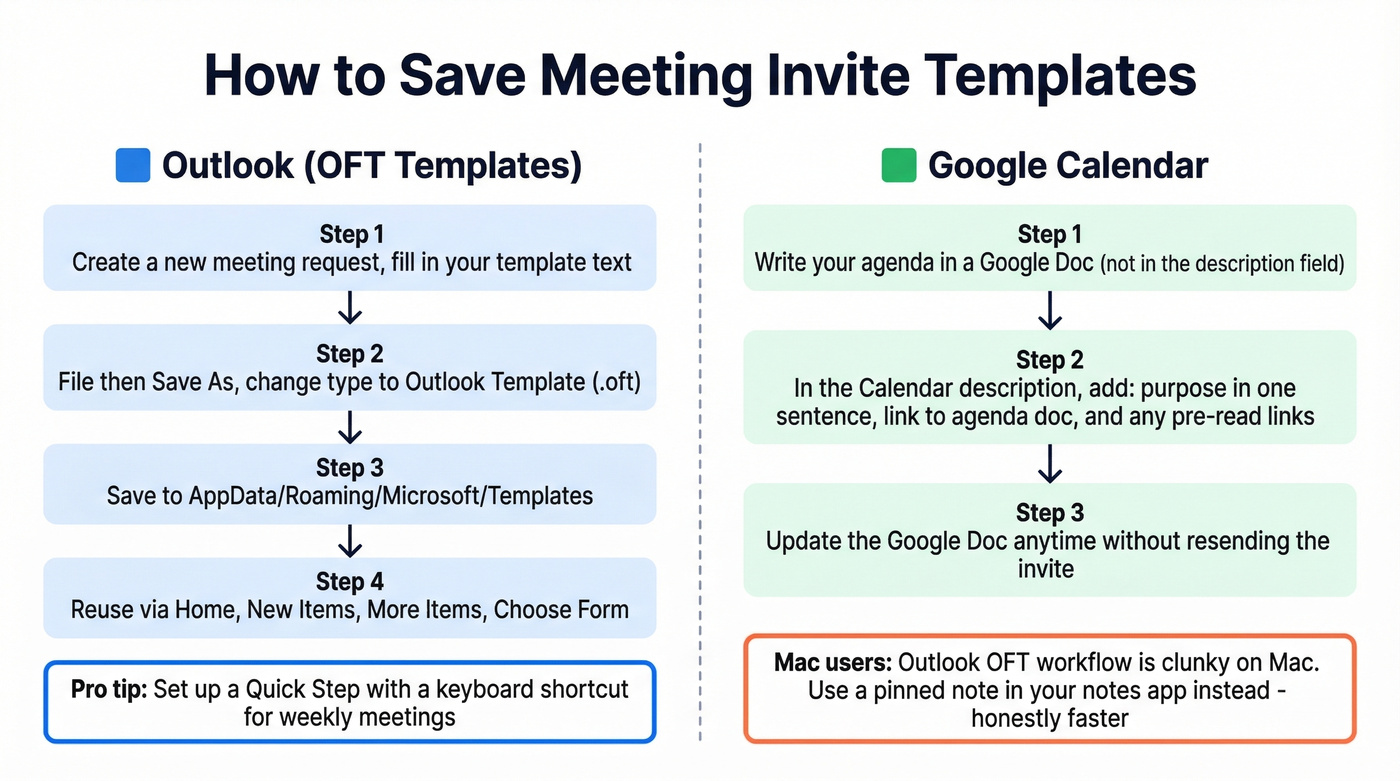
Outlook lets you save any meeting invite as a reusable template file. The workflow from Ablebits:
- Create a new meeting request and fill in your template text.
- Go to File > Save As and change the file type to Outlook Template (*.oft).
- Save to the default path:
C:\Users\[YourName]\AppData\Roaming\Microsoft\Templates. - To reuse: Home > New Items > More Items > Choose Form, then select User Templates in File System.
For meetings you send weekly, set up a Quick Step: Home > Quick Steps > New Quick Step > New Meeting. Pre-fill the subject, location, and body text. You can assign a keyboard shortcut so your weekly standup invite is two keystrokes away.
On Outlook for Mac, the template workflow is clunkier - users on Reddit report resorting to copy-paste from saved text files since Mac lacks the same dropdown template insertion. We've tested both approaches, and on Mac, a pinned note in your notes app is honestly faster than fighting the OFT workflow.
Google Calendar Description Field
Google Calendar gives you a description field with link support, but don't overload it.
Put your agenda in a linked Google Doc rather than typing it into the description. This lets you update the agenda without resending the invite, and attendees always see the latest version. In the description field, keep it to three things: the meeting purpose in one sentence, a link to the agenda doc, and any pre-read materials as links. Skip attachments when you can - they get blocked by corporate email security more often than you'd think.
Pro tip: put the video join link and phone dial-in number in the Location field, not the description. Mobile users can tap to join directly from the calendar notification.
Meeting Invite Etiquette
Seven rules that separate thoughtful organizers from calendar chaos agents:
- Give 72 hours' notice minimum. Same-day invites signal poor planning. For executive or board meetings, send invites 2+ weeks out. In our experience, the 72-hour rule is the single biggest attendance predictor - more than agenda quality, more than seniority of attendees.
- Include the time zone. Every time. Even for internal meetings. Remote teams span continents, and "3 PM" means nothing without a zone.
- Ask before you invite. Fellow's research recommends requesting permission before adding someone - especially cross-team or external contacts. A quick Slack message takes 10 seconds.
- Share the agenda 24 hours before. Attendees who prep contribute. Attendees who don't prep waste everyone's time.
- Right-size the attendee list. Small meetings decide. Medium meetings brainstorm. Large meetings communicate. If you've got 15 people in a "decision" meeting, you've got a presentation.
- Never embed calendar invites in cold emails. The consensus on r/sysadmin is clear: vendors who drop calendar invites into unsolicited emails come across as intrusive, not efficient. Send a normal email first. Earn the calendar slot.
- Link, don't attach. Pre-reads and reports should be linked (Google Drive, Notion, SharePoint), not attached. Large attachments get blocked by corporate email security.
Mistakes That Kill Your Invite
No agenda? Cancel the meeting. Jessica Gilmartin, CRO at Calendly, puts it bluntly: "If there's no agenda, cancel the meeting." If you can't articulate the purpose in one sentence, you don't need 30 minutes of everyone's time.
Abbreviations in subject lines. "Q2 OKR Sync w/ PMM re: GTM" makes perfect sense internally. Send that to a client and they'll have no idea what you're talking about. Spell it out for external recipients.
The "update dump" meeting. If the meeting is just people reading status updates aloud, replace it with a shared doc. Use meeting time for discussion and decisions, not information transfer. Hyper Island's research calls this out as one of the most common meeting failures. Let's be honest: if your deal sizes are under $50k, you probably don't need a standing weekly client call at all. A shared dashboard and a monthly check-in will get you further.
Sending to outdated email addresses. CRM contact data decays fast. Before sending external meeting invites, run a quick verification - you won't waste a week wondering why a prospect never responded to an invite that bounced. If you're cleaning up your contact list, start with contact management software so duplicates and stale records don't spread.
The "ghost follow-up." Meeting ends, everyone nods, nobody writes down who does what by when. The fix starts in the invite: include an agenda item for "action items and owners" and follow through with a recap email within 24 hours.
Post-Meeting Follow-Up Template
The meeting invite gets people in the room. The follow-up email makes sure something actually happens afterward.
Subject: Recap + Action Items: [Meeting Name], [Date]

Hi all,

Thanks for joining. Quick recap:

Decisions made:
- [Decision 1]
- [Decision 2]

Action items:
- [Task]   -   [Owner]   -   Due [Date]
- [Task]   -   [Owner]   -   Due [Date]

Next meeting: [Date, Time, Time Zone]

If anything looks off, reply with corrections by [date]. Otherwise, we're locked in.

[Your name]
If you need a few more options for nudging people after the meeting, keep a set of sales follow-up templates handy.
Discovery calls fall apart when your invite hits an outdated email. Prospeo refreshes 300M+ contacts every 7 days - so the prospect email you found this morning is still valid when you send that calendar invite this afternoon.
Find the right contact before you write the perfect invite.
FAQ
How long should a meeting invitation email be?
About 100 words. Include the subject line, purpose, date/time/location, agenda, and RSVP request. If the invite takes longer to read than the meeting itself, cut it down. Brevity signals respect for your attendees' time.
How far in advance should I send a meeting invite?
72 hours minimum for standard meetings, two or more weeks for executive or board sessions. Same-day invites signal poor planning and almost guarantee lower attendance. The more senior the attendees, the more lead time you need.
Should I include an agenda in every invite?
Yes. Always. If you can't write a one-sentence purpose, you don't need the meeting. Even a three-bullet agenda transforms attendance and preparation - attendees who know what's coming contribute more and waste less time.
How do I make sure my invite doesn't bounce?
Verify the email address before sending. For internal contacts, keep your directory updated and flag bounces immediately so CRM data stays clean. For external contacts, tools like Prospeo handle real-time verification so you're not chasing ghosts.
Can I create reusable templates in Outlook?
Yes. Save any meeting as an .oft file via File > Save As > Outlook Template, then access it through New Items > More Items > Choose Form. Quick Steps take this further - assign a keyboard shortcut to create a pre-filled meeting request in two keystrokes.