

How to Check If Your Email IP Is Blacklisted (And What to Do About It)
It's Monday morning. Slack lights up - "Are our emails even landing?" Open rates cratered over the weekend, and your sequences are returning cryptic bounce messages. Roughly 84% of emails reach the inbox on a good day - one in six never makes it. When your IP hits a blacklist, that ratio gets much worse, fast.
The fastest way to check email IP blacklist status takes about 30 seconds. Fixing it takes longer, but it's entirely doable. Here's the whole process - diagnosis, delisting, and making sure it doesn't happen again.
What You Need (Quick Version)
- Check now: Run your sending IP through MxToolbox (scans 100+ lists in one query) or Spamhaus Lookup (the highest-impact list to check first). If you're unsure which IP to check, look at your ESP's sending logs - not your home router.
- Already listed? Jump to the delisting playbooks below - each major blacklist has a different process.
- Want to prevent it? Skip to the prevention section. Bad data is the #1 upstream cause of blacklisting.
How to Check Your IP for Blacklist Issues
Before you run any scanner, check your bounce logs first. The SMTP rejection message tells you exactly which list flagged you - before any third-party tool does. Look for lines like 550 5.7.1 ... blocked using Spamhaus or 554 5.7.1 [IP] blocked by SpamCop. That's your answer, no scanner needed.
If you want a broader picture, three methods:
MxToolbox Aggregator. Paste your IP, get results across 100+ blacklists in seconds. Free for basic checks, and it's the most popular way to scan your mail server's IP against multiple DNSBLs in one shot.

Spamhaus Direct Lookup. If you only check one list, make it Spamhaus. Their ZEN composite list is what most mailbox providers query, and it's the first place you'll feel a real deliverability hit.
Skip this unless you're technical: Manual dig command. Run dig +short 2.0.0.127.zen.spamhaus.org from your terminal. A 127.0.0.x response means you're listed. No response means you're clean. Fast and scriptable, but most people don't need it.
Which Blacklists Actually Matter
Not all blacklists are created equal. We've seen teams panic over listings on obscure regional lists that have zero impact on actual delivery. Focus on the ones mailbox providers actually query when deciding whether to accept your mail.
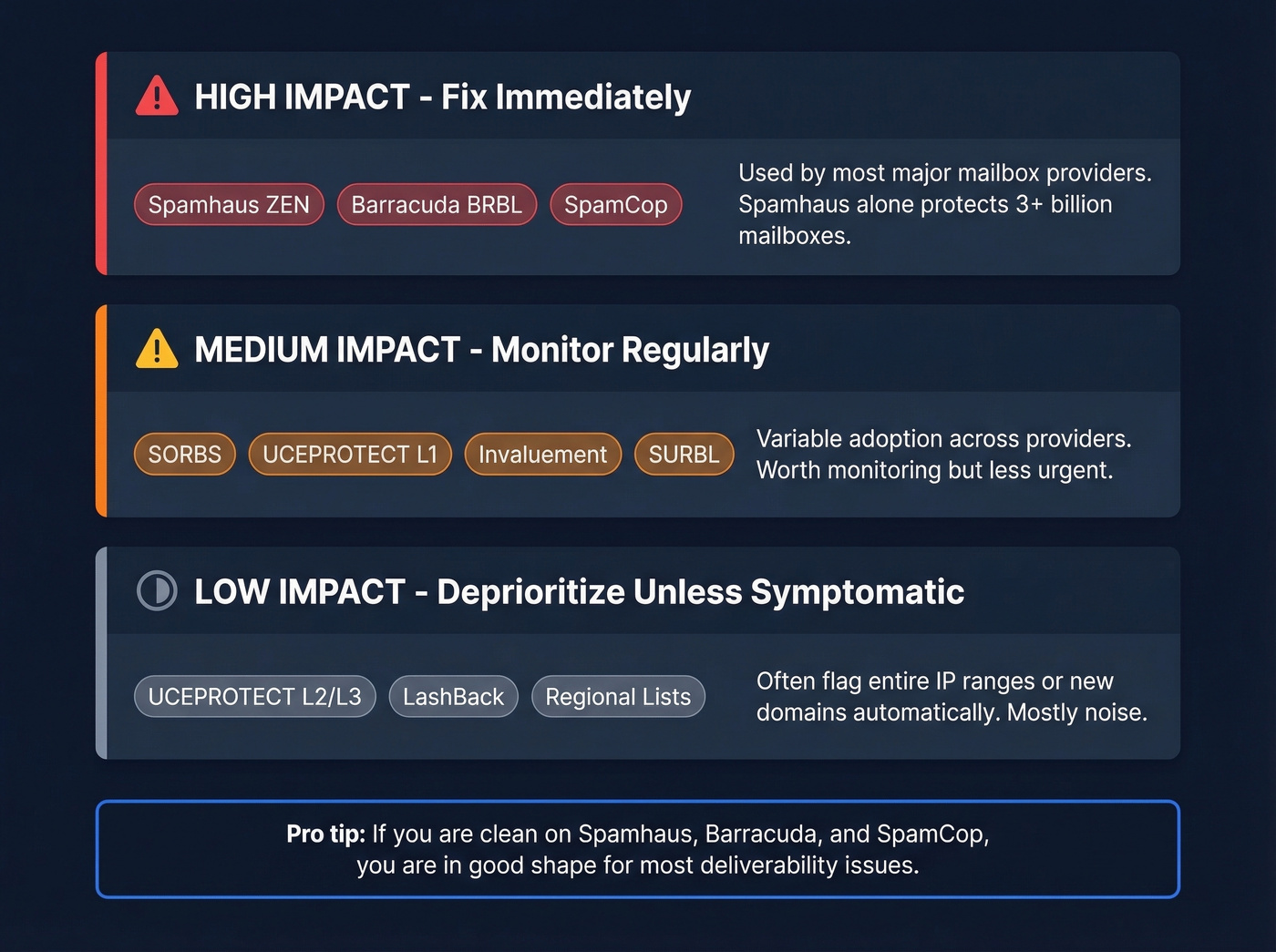
| Impact Tier | Blacklists | Why It Matters |
|---|---|---|
| High (fix now) | Spamhaus ZEN, Barracuda BRBL, SpamCop | Commonly used and widely felt |
| Medium (monitor) | SORBS, UCEPROTECT L1, Invaluement, SURBL | More variable adoption |
| Low (deprioritize unless symptomatic) | UCEPROTECT L2/L3, LashBack, obscure regional lists | Usually less impactful than the top tier |
Spamhaus protects over 3 billion mailboxes and distributes seven key DNSBLs: SBL, CSS, XBL, PBL, DBL, ZRD, and HBL. Most providers use ZEN, which bundles SBL, CSS, XBL, and PBL into a single query. ZEN rejects roughly 85% of a typical mail relay's incoming traffic - that's how aggressively it filters.
CBL (the Composite Blocking List) has been folded into Spamhaus XBL. If you see old guides referencing CBL separately, that's outdated.
Here's the thing: UCEPROTECT Level 3 listings are mostly noise. They flag entire IP ranges based on the behavior of a few addresses. The consensus on r/sysadmin and r/email echoes what we've seen - many "super niche" blacklists flag brand-new domains and IPs automatically with no spam activity at all. If you're clean on Spamhaus, Barracuda, and SpamCop, you're in good shape for most deliverability issues tied to public DNSBLs.
How Email IP Blacklisting Works
When your mail server connects to a recipient's server, the receiving server performs a DNS query against one or more blacklist zones. It reverses your IP address, appends the blacklist domain, and checks for a response. A positive match returns a 127.0.0.x address - the specific last octet tells the receiving server which sub-list flagged you.
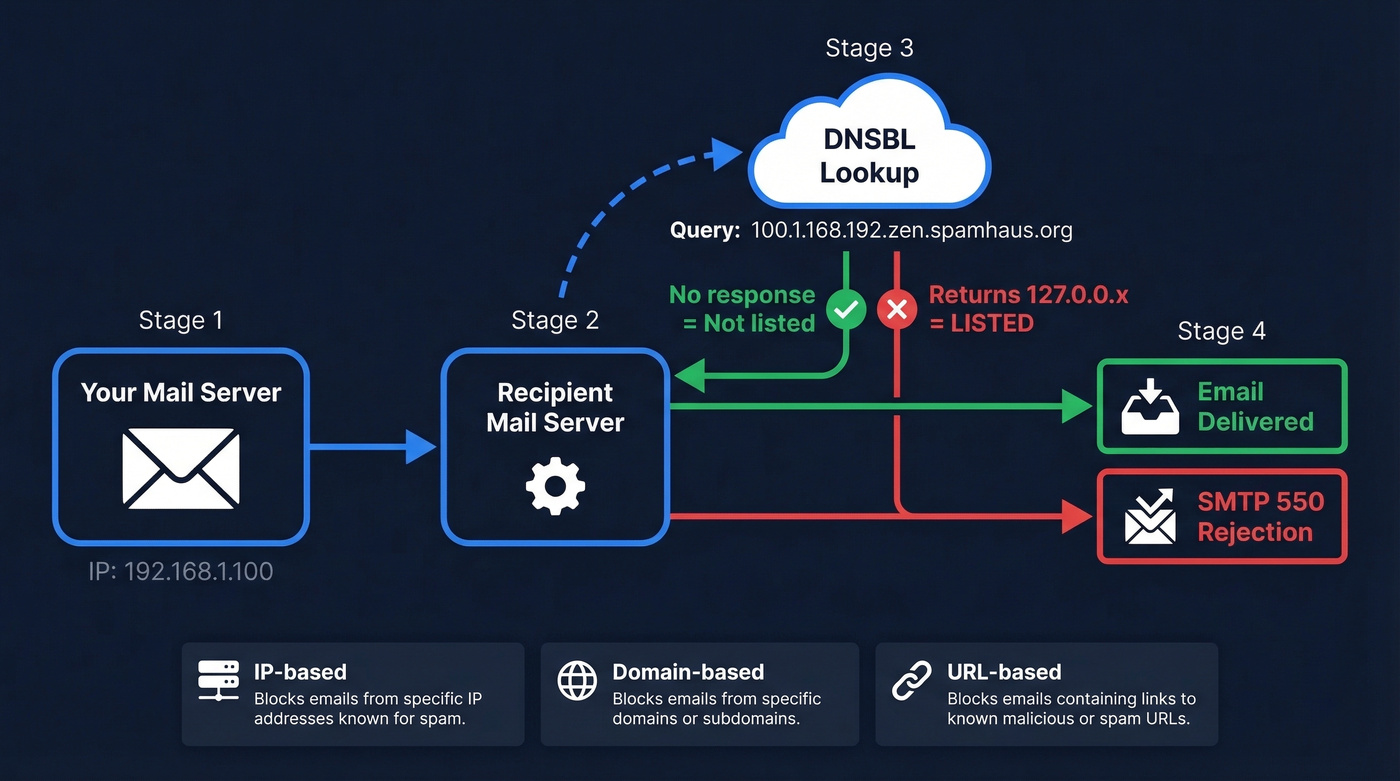
If you're listed, the receiving server rejects the connection and sends back an SMTP bounce code:
550 5.7.1 Service unavailable; client host blocked using Spamhaus554 5.7.1 [your IP] blocked by SpamCop
Three types of blocklists exist: IP-based (flags your sending server's address), domain-based (flags your sending domain regardless of IP), and URL-based (flags links inside your email body). Standard blacklist checker tools typically cover IP-based lists. Domain and URL reputation require separate lookups - your IP can be perfectly clean while a flagged URL in your email signature tanks delivery. For full coverage, running both domain and IP lookups should be part of your regular monitoring routine.
Why You Got Blacklisted
Blacklists don't flag you randomly. Here are the concrete triggers, with the thresholds that matter:
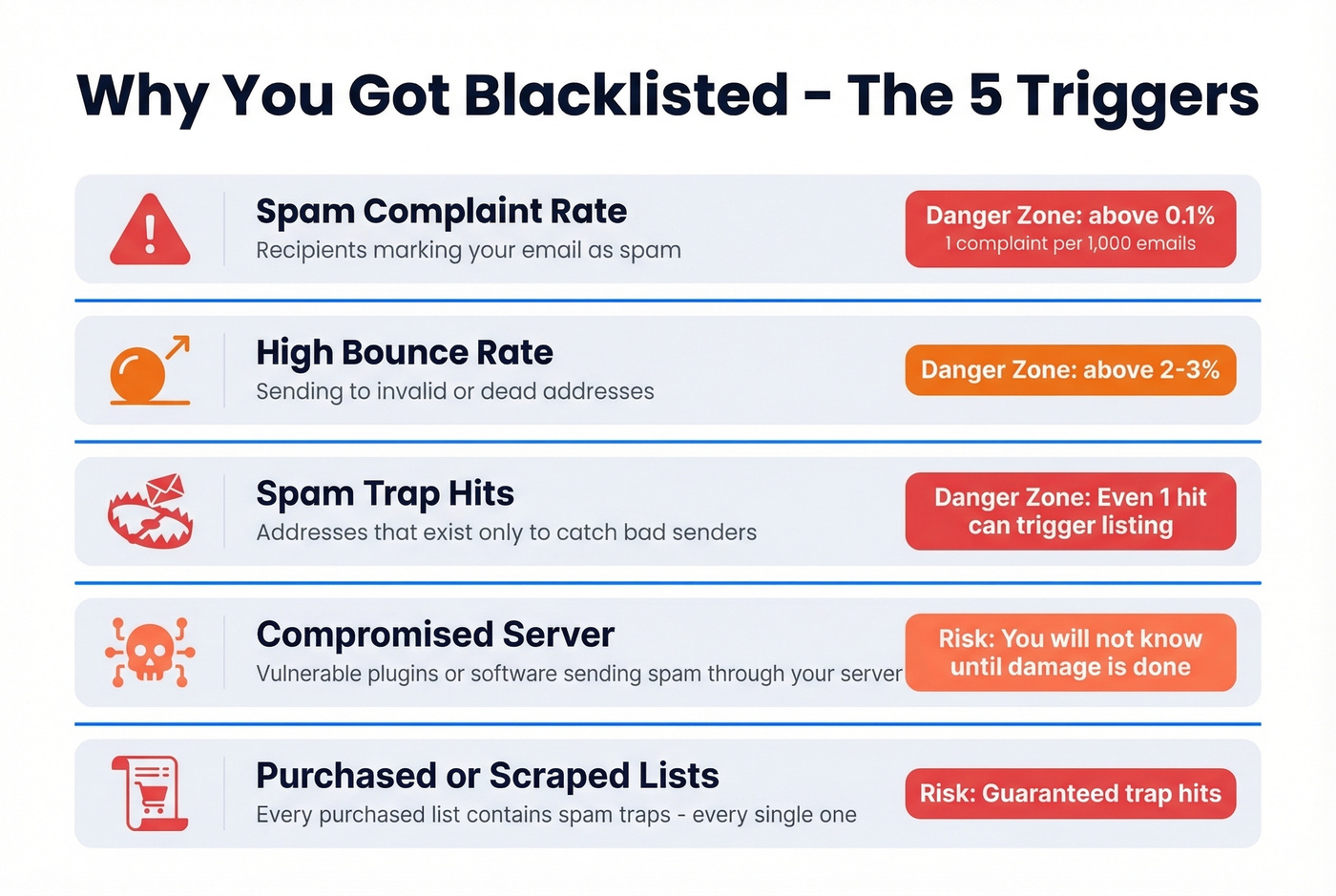
- Spam complaint rate above 0.1% - just 1 complaint per 1,000 emails. Google's Postmaster Tools will show you this number. Cross the line consistently and you're getting listed.
- Bounce rate above 2-3% - sending to invalid addresses signals you aren't maintaining your list. Blacklists interpret this as spammer behavior.
- Hitting spam traps or honeypots - email addresses that exist solely to catch senders using purchased or scraped lists. One trap hit can trigger an immediate listing.
- Compromised server - a WordPress plugin with a vulnerability starts sending spam through your mail server. You won't know until the damage is done.
- Purchased or scraped lists - every "verified" purchased list contains spam traps. Every single one.

Bad data is the #1 upstream cause of blacklisting - and you just read why. Prospeo's 5-step email verification with spam-trap removal and honeypot filtering keeps your bounce rate far below the 2-3% danger zone. 98% email accuracy, refreshed every 7 days.
Stop fixing blacklist damage. Start sending to verified emails only.
IP Reputation vs Domain Reputation
These are two separate scores, and they recover on very different timelines.
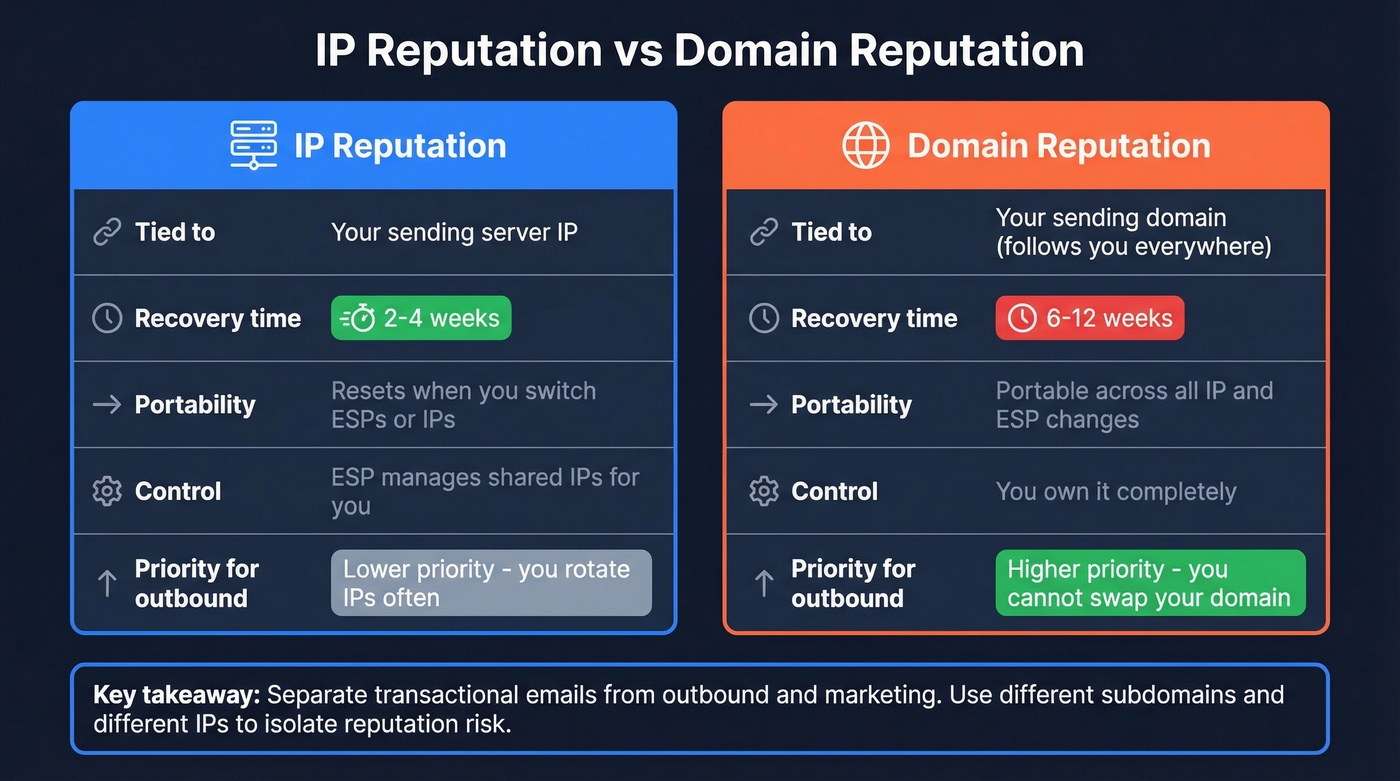
IP reputation is tied to your sending server. Switch ESPs, and you get a fresh IP (for better or worse). Domain reputation follows you everywhere - it's portable across IP changes, and it takes 6-12 weeks to recover versus 2-4 weeks for IP reputation. Understanding the difference between an IP-level block and a domain-level problem determines your entire recovery strategy.
If your deal sizes are under five figures and you're running outbound sequences, domain reputation matters more than IP reputation. You'll rotate IPs and ESPs constantly. Your domain is the one thing you can't swap out. Protect it above all else.
Separate your transactional emails (order confirmations, password resets) from marketing and outbound streams. Use different subdomains and, ideally, different IPs. If your outbound prospecting tanks your domain reputation, you don't want password reset emails going to spam too.
How to Get Delisted
Each blacklist has its own process. Here are the playbooks for the ones that actually matter - acting quickly is critical because the longer you wait, the harder recovery becomes.
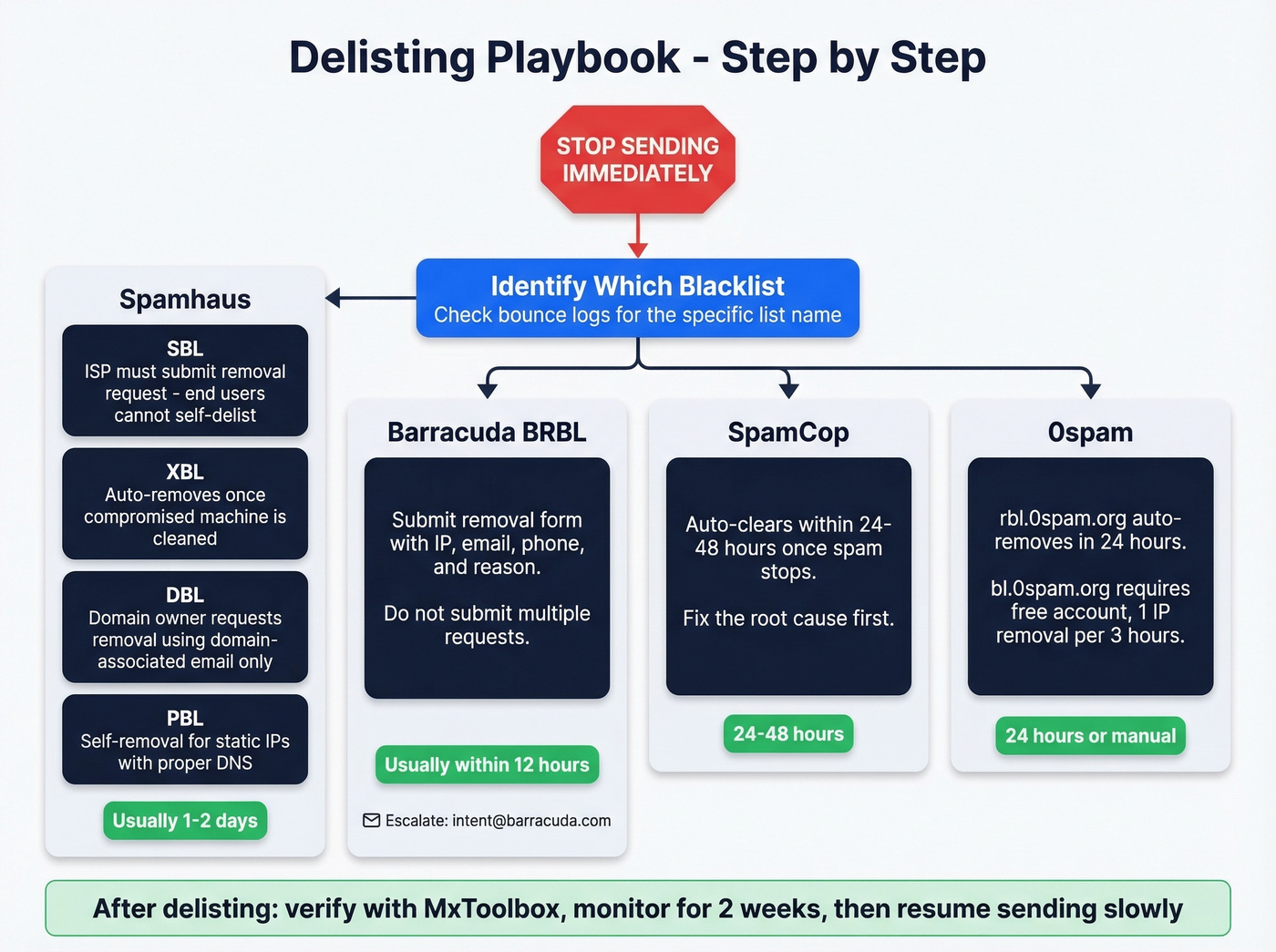
Spamhaus (SBL / XBL / DBL / PBL)
Step one, always: stop sending immediately. Continuing to send while listed delays removal.
SBL: The ISP or network owner must submit the removal request - end-users can't self-delist. Use the Spamhaus Lookup Tool to find the "Contact the SBL Team" link on your listing page.
XBL: Auto-removes once the compromised machine is cleaned and stops sending. Since CBL is now part of XBL, cleaning up the underlying compromise is the only path.
DBL: Domain owners can request removal directly, but you must use an email address associated with the listed domain. Gmail, Yahoo, or other free webmail addresses won't work.
PBL: Self-removal is possible for static IPs running legitimate mail servers with proper DNS configuration. The lookup tool walks you through it.
Timeline: Spamhaus often replies within a day or two when requests are valid. No paid fast-track option exists.
Barracuda BRBL
The removal request form requires your email server IP, email address, phone number, and an optional reason field. Fill it out completely - "requests without valid information will be ignored. Multiple requests will also be ignored." Don't spam the form.
Processing typically happens within 12 hours with a valid explanation. For escalation after submitting, email intent@barracuda.com.
SpamCop
SpamCop listings often clear within 24-48 hours once the spam stops. It's one of the fastest to clear if you've already fixed the underlying issue.
0spam
Their rbl.0spam.org list auto-removes IPs within 24 hours once spam stops - manual removal isn't possible. For bl.0spam.org, create a free account and you can remove 1 IP every 3 hours.
Shared IP - Not Your Fault, Still Your Problem
If you're on a shared IP through your ESP, another sender on that pool can get you blacklisted. You didn't cause it, but your emails still bounce.
The escalation workflow: confirm the listing via the blacklist's lookup tool, then notify your ESP immediately with the IP address and the specific bounce messages referencing the blacklist. The ESP owns the delisting responsibility on shared infrastructure. If they don't respond within 24 hours, escalate. For Barracuda specifically, emailing intent@barracuda.com can expedite things once the underlying issue is resolved.
Clean Check, Still Bouncing
Every blacklist scanner shows green, but emails still aren't landing. This scenario drives people crazy.
One case from r/sysadmin involved a compromised WordPress site - the domain wasn't on any public blacklist, but the website URL in the email signature was flagged by Safe Browsing and URL reputation databases. Removing the link from the signature restored delivery immediately. A similar thread on r/coldemail described a sender who found an older domain listed on a niche DNSBL that didn't appear in standard scanners - switching to a fresh domain and warming it properly solved the problem.
Public DNSBLs are just one layer. Private enterprise filters like Microsoft's SmartScreen and Google's internal reputation systems don't appear on any public list. URL reputation databases flag links in your email body independently of your sending IP. And SPF/DKIM/DMARC authentication failures compound blacklist risk - if your authentication is broken, even a clean IP won't save you. A bounce rejection is just the visible symptom; the root cause often runs deeper.
One more gotcha we see constantly: people check their home router IP instead of their actual sending IP. When you send through an ESP, the sending IP belongs to that platform. Check your email headers or ESP dashboard for the real address.
How to Prevent Blacklisting in 2026
Delisting is reactive. Prevention is the actual fix.
SPF, DKIM, and DMARC on every sending domain are non-negotiable. Beyond authentication, the operational discipline comes down to two numbers: keep your bounce rate under 2% and your complaint rate under 0.1%. Monitor both through Google Postmaster Tools and your ESP's dashboard. Remove stale contacts aggressively - an email that was valid six months ago might be a spam trap today. Run a quick blacklist scan monthly; about a minute of prevention beats days of delisting.
The causal chain is straightforward: bad data leads to bounces, bounces lead to complaints, complaints lead to blacklisting. Fix the data, and you break the chain at the source.
Best Free Blacklist Checker Tools
Most blacklist checker tools are interchangeable - the tool doesn't matter nearly as much as what you do with the results. That said, here's a quick comparison:
| Tool | Lists Checked | Cost | Best For |
|---|---|---|---|
| MxToolbox | 100+ | Free (basic) | Quick all-in-one check |
| Spamhaus Lookup | Spamhaus only | Free | High-impact direct lookup |
| ZeroBounce | 300+ | Free | Broadest coverage |
| Barracuda BRBL | Barracuda only | Free | Direct lookup + removal |
| DNSChecker | 100+ | Free | Secondary confirmation |
Pick one, run it monthly, and save the drama for when something actually shows up.
FAQ
Does my home router IP affect email deliverability?
No. When you send through an ESP, the sending IP belongs to that platform's infrastructure. Your home router IP is irrelevant to email blacklists. Only check the IP shown in your ESP's sending logs or email headers.
How long does blacklist removal take?
Barracuda processes valid requests within 12 hours. Spamhaus responds within 1-2 days. Auto-expiring lists like SpamCop often clear within 24-48 hours. Budget 1-3 days for most manual delisting processes.
Should I worry about niche blacklists I've never heard of?
Rarely. Many obscure lists auto-flag brand-new IPs without any spam activity. If you're clean on Spamhaus, Barracuda, and SpamCop, you're covered for the DNSBLs that major mailbox providers actually query.
How often should I run a blacklist check?
Monthly for routine monitoring. Immediately if open rates drop suddenly or bounce messages reference a specific blacklist. Setting up automated alerts through MxToolbox catches listings without manual effort.
Can bad contact data cause blacklisting?
Absolutely - it's the #1 upstream cause. Invalid emails bounce, spam traps trigger instant listings, and stale addresses generate complaints that push you over the 0.1% threshold. Verifying your list before sending is the single most effective prevention step you can take.
Every purchased list contains spam traps. Prospeo doesn't sell scraped data - it verifies 300M+ profiles through proprietary infrastructure with catch-all handling, honeypot filtering, and a 7-day refresh cycle. The result: under 4% bounce rates across 15,000+ companies.
Replace the list that got you blacklisted with data you can trust.