

How to Check If an Email Domain Is Valid (2026)
You imported 5,000 leads from a trade show last quarter. Your first sequence bounced 8%, and your ESP flagged the account for suspension. The problem wasn't your copy or your targeting - it was dead domains and nonexistent mailboxes sitting in your list like landmines.
Knowing how to check if an email domain is valid before you hit send is the difference between a healthy sender reputation and a deliverability crisis.
What You Need (Quick Version)
Three paths depending on your situation:
Check one domain right now. Open a terminal and run dig example.com MX +short (Mac/Linux) or open nslookup, type set q=mx, then enter the domain (Windows). If MX records come back, the domain can receive email.
Check a handful of emails. Use MXToolbox as a free email domain checker, or Hunter.io's free tier for up to 100 mailbox verifications per month.
Verify at scale with catch-all handling. Prospeo's 5-step verification handles catch-all domains - 98% email accuracy, 75 free verifications per month. When 40-60% of B2B emails sit on catch-all domains, that matters more than raw speed.
Domain Validation vs. Verification
These terms get used interchangeably, but they're different jobs.
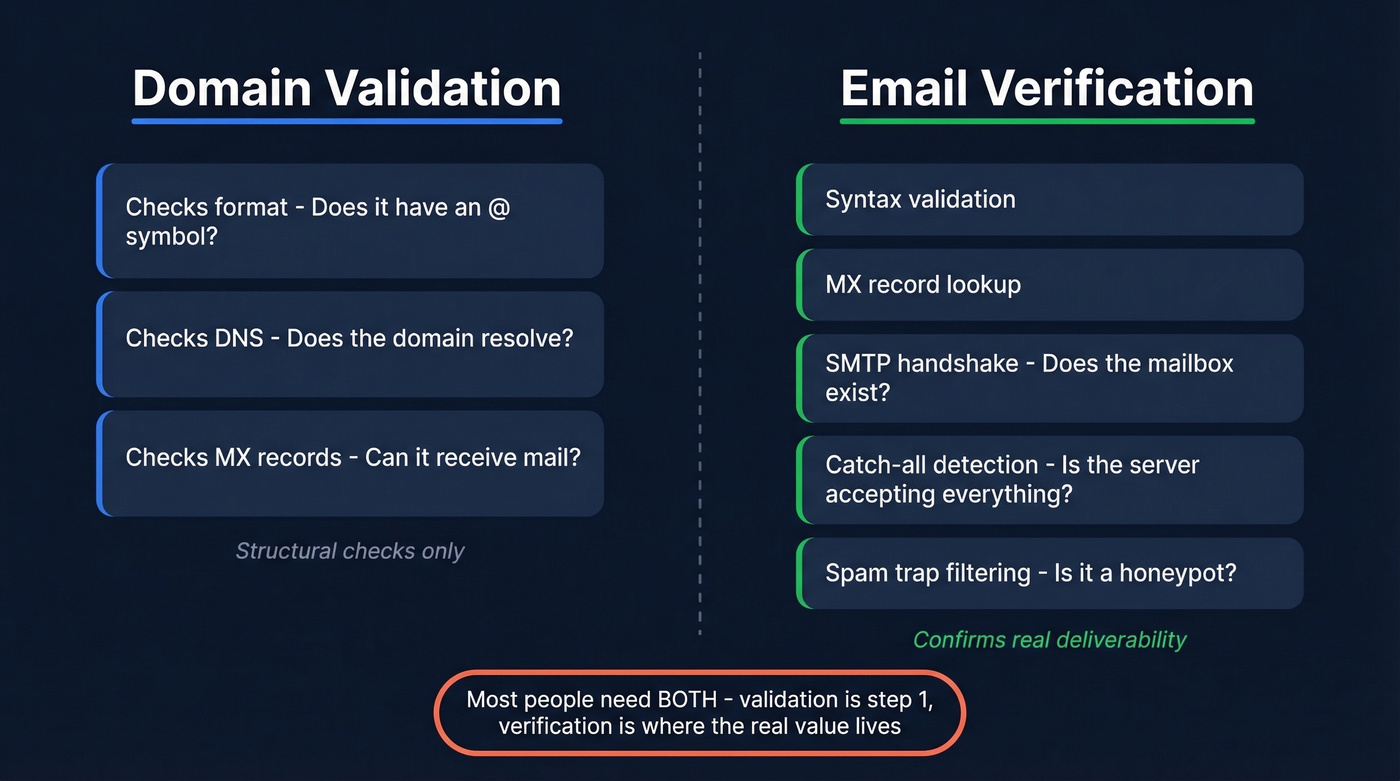
Validation checks whether an email could exist. Does it have an @ symbol? Is the format correct? Does the domain resolve? This is structural - it catches typos and garbage data, but it can't tell you whether a real human checks that inbox. When you validate an email domain, you're confirming the infrastructure is in place, not that a specific person receives mail there.
Verification confirms whether the mailbox does exist and can receive email. It goes deeper: MX record lookups, SMTP handshakes, catch-all detection, spam-trap filtering. When people want to check if an email domain is valid, they usually need both. Domain validation is step one. Mailbox verification is where the real value lives.
Why Domain Validity Checks Matter
Bounce rates are the canary in the coal mine for list quality. The thresholds are straightforward: below 2% is healthy, 2-5% signals problems, and above 5% causes active sender reputation damage. Gmail and Yahoo tightened enforcement starting in 2024, making these thresholds more consequential than ever.
Here's the thing - "average" bounce rates are meaningless if your industry starts at 2%:
| Industry | Avg. Bounce Rate |
|---|---|
| Ecommerce | 0.19% |
| IT / Software | 0.90% |
| Financial Services | 1.20% |
| Government | 1.30% |
| Construction / Manufacturing | 2.20% |
If you're in construction or manufacturing, you're already flirting with the danger zone before you send a single cold email. Validating an email domain before import is the cheapest insurance you'll find. One cross-industry benchmark pegged the average bounce rate at 10.68% - that's what happens when teams skip verification entirely.

The 5 Layers of Domain Validation
Not all checks are equal. Here's the full stack, from weakest to strongest:
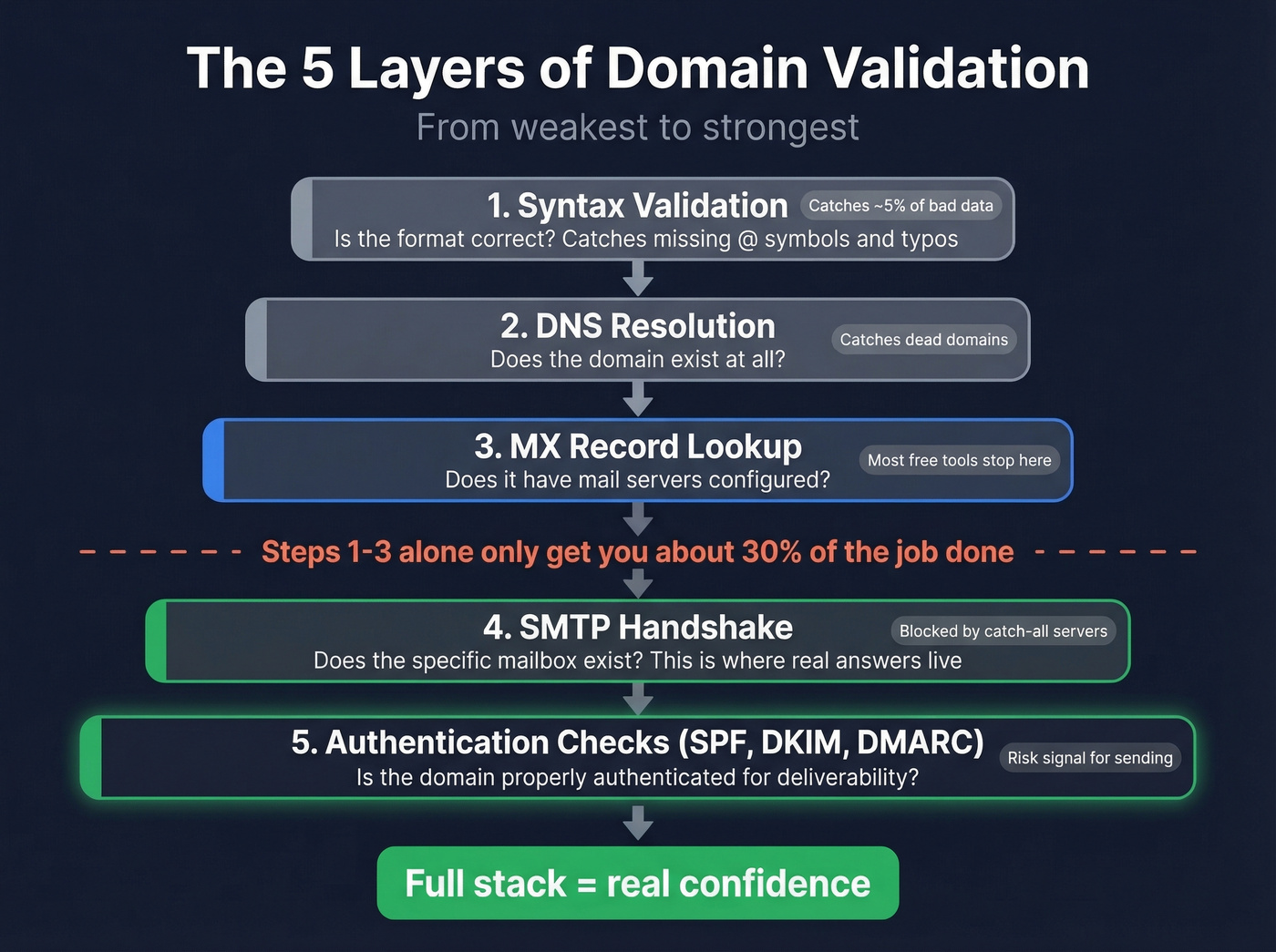
- Syntax validation. Does the address follow
local-part@domain.tldformat? Catches obvious garbage - missing @ symbols, spaces, double dots - but nothing beyond formatting errors. - DNS resolution. Does the domain exist at all? A failed DNS lookup means the domain is dead or was never registered.
- MX record lookup. Does the domain have mail exchange records pointing to a mail server? No MX records is a strong signal the domain isn't configured for email.
- SMTP handshake. Can you connect to the mail server and check if a mailbox exists for a specific address? This is where you get real answers - or get stonewalled by catch-all configurations.
- Authentication checks. Does the domain have SPF, DKIM, and DMARC records configured? Missing authentication doesn't mean the domain is invalid, but it's a risk signal for deliverability.
Let's be honest: steps 1 and 3 alone get you maybe 30% of the job done. They'll catch dead domains and typos, but they won't tell you whether john@company.com actually exists or if the server just accepts everything. You need the full stack for real confidence.

MX lookups and DNS checks only get you 30% of the way there. Prospeo's 5-step verification runs syntax checks, MX lookups, SMTP handshakes, catch-all detection, and spam-trap filtering - all in one pass. 98% email accuracy, and you only pay for valid addresses at ~$0.01 each.
Get 75 free verifications and see what clean data actually looks like.
How to Check MX Records Manually
On Windows
Windows ships with nslookup built in. Open Command Prompt and run:
C:\> nslookup
> set q=mx
> microsoft.com
The output shows each mail exchanger hostname with a preference number:
microsoft.com MX preference = 10, mail exchanger = microsoft-com.mail.protection.outlook.com
If you get "Non-existent domain" or no MX records, the domain can't receive email through standard mail routing.
On Mac/Linux
dig is the go-to on Unix systems and gives you more control over output formatting:
# Full output with all sections
dig example.com MX

# Script-friendly   -   just the records
dig example.com MX +short

# Clean answer section only
dig example.com MX +noall +answer
For troubleshooting DNS propagation issues, add +trace to follow the resolution path from root servers down, or +dnssec to check DNSSEC validation. The +short flag is what you want if you're piping results into a script or just need a quick yes/no answer on whether a domain has mail servers configured.
Reading the Output
MX records have three fields that matter:
| Field | Meaning | Example |
|---|---|---|
| Hostname | Mail server address | mx1.example.com |
| Priority | Lower = tried first | 10 |
| TTL | Cache duration (sec) | 3600 |
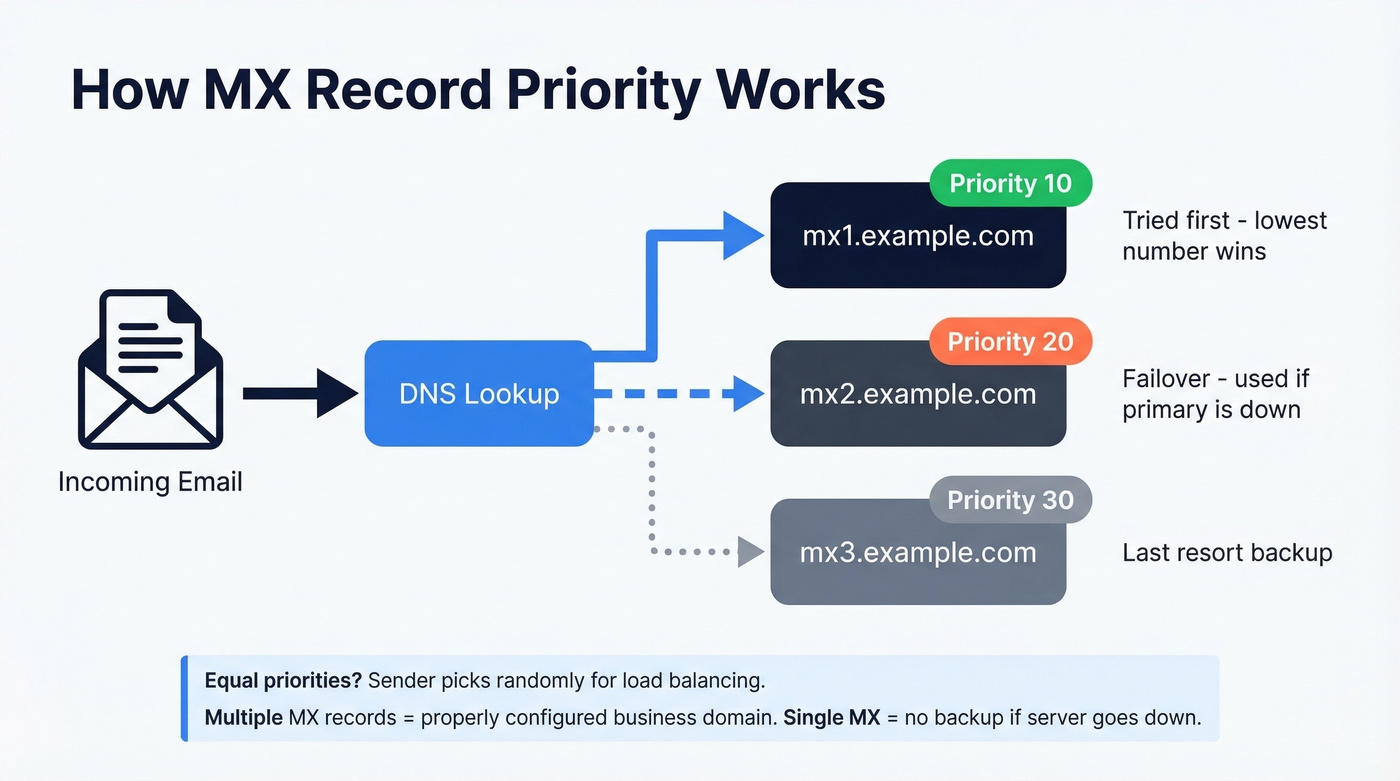
When a domain has multiple MX records, sending servers try the lowest priority number first. Equal priorities mean load balancing - the sender picks randomly. Multiple MX records with different priorities create failover redundancy, which is what you'd expect from a properly configured business domain. A single MX record isn't a red flag, but it does mean there's no backup if that server goes down.
Validating Email Domains in Code
Node.js
const dns = require('dns').promises;

async function checkMX(domain) {
  try {
    const records = await dns.resolveMx(domain);
    records.sort((a, b) => a.priority - b.priority);
    return { valid: true, records };
  } catch (err) {
    return { valid: false, error: err.code };
  }
}
The resolveMx method returns an array of objects with exchange and priority properties. Sort by priority to see which server handles mail first. This approach lets you verify an email domain programmatically before passing addresses to your outbound tools like an AI bulk email sender.
Python
def check_mx(domain):
    try:
        answers = dns.resolver.resolve(domain, 'MX')
        records = sorted(answers, key=lambda r: r.preference)
        return [(str(r.exchange), r.preference) for r in records]
    except dns.resolver.NoAnswer:
        return None
You'll need the dnspython package (pip install dnspython). The preference attribute maps to MX priority - lower values are preferred. For a lightweight email domain verifier built in-house, this function handles the DNS layer; you'd still need SMTP-level checks for full mailbox verification.
DNS Error Codes Reference
| Error Code | Meaning | Action |
|---|---|---|
| ENODATA | No MX records | Domain likely can't receive email |
| ENOTFOUND | Domain doesn't exist | Remove from list immediately |
| ETIMEOUT | Server unreachable | Retry later; could be transient |
| ESERVFAIL | DNS server failure | Retry; check if domain's NS is down |
Edge Cases That Break Verification
Catch-All Domains
This is the single biggest gap in email verification - and the #1 reason verification results mislead teams. Browse any thread on r/coldemail or r/sales and you'll find the same frustration: teams get "unknown" results on half their list and don't know what to do with them.
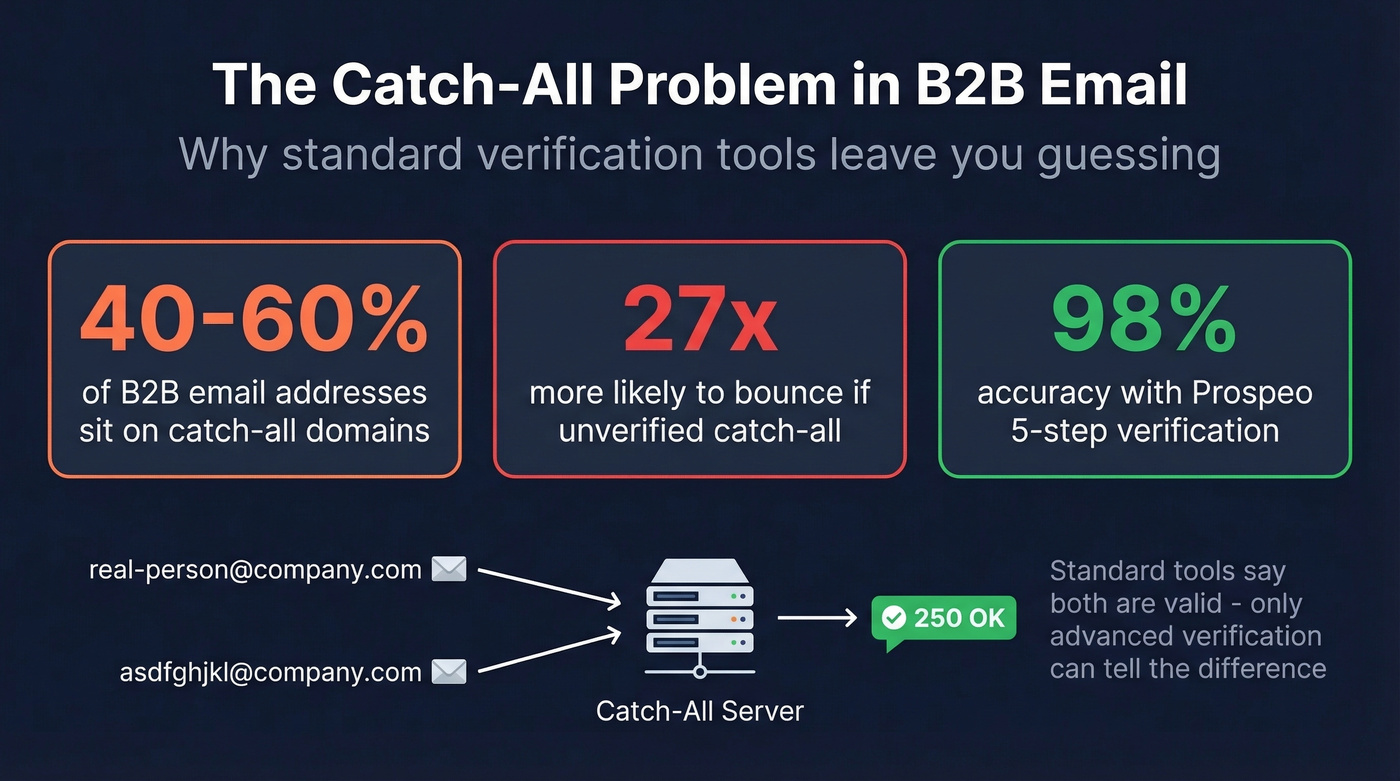
A catch-all domain accepts mail for any address - real-person@company.com and asdfghjkl@company.com both get a "250 OK" from the SMTP server. Standard verification can't distinguish real from fake.
The prevalence across typical B2B outbound lists is staggering: 40-60% of B2B email addresses sit on catch-all domains. And unverified catch-all emails are 27x more likely to bounce than properly verified ones. That's not a rounding error - it's a list quality crisis hiding behind "valid" results. Most verification tools return "unknown" or "risky" for these addresses and leave you to decide. Prospeo's 5-step verification turns those "unknown" results into actionable data by going beyond the SMTP handshake to determine whether a specific mailbox is real.
Disposable Email Domains
Disposable email services rotate through domains constantly, and even well-maintained blacklists only cover 60-80% of them. Detection requires multiple layers working together.
Domain blacklists catch known providers but miss new domains. Pattern recognition flags suspicious TLDs like .tk, .ml, .ga, and .cf, plus keywords like "temp" or "throwaway" in domain names. MX clustering is the most interesting approach - disposable providers reuse mail infrastructure across hundreds of domains. Run dig MX powerscrews.com +short and you'll get 10 in.mail.tm., revealing it's served by mail.tm's disposable infrastructure.
Domain age is a useful weak signal too. Domains registered within the last 30-90 days carry higher risk, especially when combined with other indicators.
Greylisting and Anti-Enumeration
Greylisting is an anti-spam technique where the mail server deliberately rejects the first delivery attempt with a temporary error code. Legitimate senders retry; spammers usually don't. But verification tools making a single SMTP probe get that same temporary rejection and return "unknown."
Anti-enumeration firewalls take it further - they detect patterns of address probing and block verification attempts entirely. Both create false "unknown" results for perfectly valid addresses. There's no clean workaround except using verification services that retry intelligently and maintain warm IP pools.
One more thing to keep in mind: DNS propagation after MX changes takes 24-48 hours, sometimes 72. Lower your TTL to 300 seconds before making changes to speed things up.
Best Tools for Email Domain Validation
We've tested most of these tools against real B2B outbound lists. The differences are smaller than vendors want you to believe - until you hit catch-all domains, where the gap becomes enormous.
If your deal sizes are modest and you're sending fewer than 1,000 emails a month, MXToolbox plus a free verification tier is probably all you need. The premium tools earn their keep at scale, where a 2% accuracy difference across 50,000 emails means 1,000 bounces you didn't have to eat.
| Tool | Accuracy | Catch-All Resolution | Cost (10k emails) | Best For |
|---|---|---|---|---|
| Prospeo | 98% | Yes (5-step) | ~$100 | B2B catch-all resolution |
| ZeroBounce | 97.8% | 12% | ~$65 | Deliverability scoring + inbox testing |
| NeverBounce | 96.9% | 8% | ~$50 | No-subscription bulk cleaning |
| MillionVerifier | 95.8% | 5% | ~$6 | High-volume newsletters on a budget |
| MXToolbox | N/A | N/A | Free | Domain-level DNS health checks |
| Hunter.io | - | Limited | Free (100/mo) | One-off address checks |
Prospeo
Use this if you're running B2B outbound and catch-all domains are eating your list quality. Prospeo's 5-step verification process handles catch-all resolution, spam-trap removal, and honeypot filtering through proprietary email infrastructure - no third-party verification providers in the chain. That's how it hits 98% verified email accuracy across 143M+ verified emails.
The 7-day data refresh cycle means you're not verifying against stale records. Most competitors refresh around every 6 weeks, which is an eternity in B2B where people change jobs constantly.
Pricing: ~$0.01 per email. Free tier gives you 75 verifications per month - enough to test the accuracy yourself. Paid plans start around $39/mo with no annual contracts. Upload a CSV, paste addresses, or use the API for programmatic verification.
For domain-level DNS checks only, MXToolbox is free and instant - Prospeo's value kicks in when you need mailbox-level verification with catch-all resolution.
ZeroBounce
Use this if you're focused on deliverability beyond just verification. ZeroBounce bundles email scoring, abuse detection, and inbox placement testing alongside its core verification engine. At 97.8% accuracy, it's genuinely strong.
The weakness is catch-all handling - 12% resolution rate means 88% of catch-all addresses still come back as "unknown." For B2B lists where catch-all domains are the majority, that's a significant blind spot. Pricing runs ~$65 per 10,000 emails, or $0.008/email on pay-as-you-go.

Skip this if catch-all resolution is your primary concern. The 12% rate won't move the needle on a heavily catch-all B2B list.
MXToolbox
The best free tool for answering one question: "Is this domain set up to receive email?" MXToolbox shows MX records, SPF/DKIM/DMARC status, blacklist presence, and DNS configuration in one lookup. We use it as a first-pass sanity check before running anything through a paid tool. It's an excellent way to inspect an email domain at the infrastructure level without spending a dime.
The limitation is scope, not quality. MXToolbox won't tell you whether john@example.com exists - only that example.com has mail servers configured.
NeverBounce
Straightforward pay-as-you-go verification at ~$50 per 10,000 emails with no subscription required. Processing speed is solid - 18 minutes for a 10k batch in our benchmark testing. Best for teams that verify in bursts rather than continuously.
At 8% catch-all resolution and 96.9% accuracy, it's a tier below the leaders on B2B lists. But if you're cleaning a newsletter list or verifying event registrations where catch-all domains are rare, the economics work well.
MillionVerifier
The budget king at $0.0003 per email - roughly $6 per 10,000. For high-volume, low-stakes lists like newsletter signups or event registrations, the economics are hard to argue with.
Look, at 95.8% accuracy and only 5% catch-all resolution, you're essentially gambling on a big chunk of a typical B2B list. The money you save on verification, you'll spend on bounced emails and reputation repair. Great for newsletters, risky for outbound.
Hunter.io
Hunter's free plan gives you 100 email verifications per month. Good for occasional one-off checks when you need a quick answer on a specific address. Catch-all handling is limited - don't rely on it for B2B lists at scale. If you're comparing options, see these Hunter alternatives.
Writing Python scripts and running dig commands works for one-off checks, but it falls apart at scale - especially on catch-all domains that accept everything. Prospeo handles catch-all verification across 143M+ emails with a 7-day data refresh cycle, so you're never sending to stale addresses.
Replace your manual domain checks with verification that actually catches bad data.
What to Do With Your Results
Once you've run verification, sort your list into four buckets:
Valid - Send with confidence. These addresses exist and accept mail.
Invalid - Remove immediately. Sending to these damages your sender reputation with every bounce (more on email bounce rate).
Unknown / Catch-all - Re-verify with a tool that handles catch-all resolution. Don't send to unresolved catch-all addresses - they're 27x more likely to bounce.
Disposable - Block at signup if you're collecting emails through forms. Remove from outbound lists.
One technical note for admins: MX records can't point to a CNAME - they must resolve to an A or AAAA record. This is a common misconfiguration that causes intermittent delivery failures even when the domain looks valid. If you're also trying to protect deliverability, use email reputation tools and follow an email deliverability guide.
FAQ
Can a domain have no MX records and still receive email?
Technically yes - some mail servers fall back to the domain's A record for delivery. But missing MX records is a strong signal the domain isn't configured for email. For outreach purposes, treat no-MX domains as invalid and remove them from your list.
How do I check if an email domain exists?
Run a DNS lookup to confirm the domain resolves, then query MX records using dig, nslookup, or MXToolbox. If MX records are present, the domain accepts email. To verify a specific mailbox at that domain, you need SMTP-level verification - tools with catch-all resolution handle this end to end.
Why does my verification tool return "unknown" for valid-looking emails?
Most likely a catch-all domain. The mail server accepts everything, so SMTP verification can't distinguish real from fake addresses. You need a tool with dedicated catch-all resolution - standard SMTP handshakes alone can't determine whether a specific recipient exists on these servers.
What bounce rate should I worry about?
Below 2% is healthy. Between 2-5% signals list quality issues. Above 5% causes active sender reputation damage. Since Gmail and Yahoo raised enforcement standards, even a 3% bounce rate can trigger throttling on cold outbound.
Is checking MX records enough to validate an email address?
No. MX records confirm the domain can receive email, but they don't confirm a specific mailbox exists. You need SMTP-level verification - and catch-all handling - to validate individual addresses. Domain-level checks are step one, not the finish line.