

How to Check If an Email Address Actually Works
You just hit send on a 500-contact sequence. By morning, 47 have bounced. Your ESP flags your domain, deliverability tanks, and the next three campaigns land in spam - even the ones going to perfectly good addresses.
That's the cost of not checking whether an email works before you send.
The global inbox placement rate sits around 85%, meaning roughly 15% of emails never reach the inbox under normal conditions. Bad addresses make that number much worse. And if you think verification tools solve this completely, the ~45% "definitive validation" ceiling via SMTP alone will change your mind.
What You Need (Quick Version)
If you just want to verify an email address right now, Hunter has a free verifier - paste it in, get a result, no signup. For the full picture of what's happening behind the scenes and why tools fail, keep reading.
- One-off check: Hunter verifies a single email for free. No signup, no credit card.
- Bulk list cleaning on a budget: MillionVerifier runs about $3.70 per 1,000 emails. Hard to beat for raw volume.
- Skip verification entirely: Prospeo's database has 143M+ pre-verified emails at 98% accuracy, refreshed every 7 days. Instead of buying data and then paying again to clean it, you start with emails that are already clean. 75 free emails/month to test it.
The right path depends on whether you're fixing a list you already have or building one from scratch. If it's the latter, verification is a symptom. Data quality is the actual problem.
When You Actually Need Verification
Not every list needs a full verification pass. If your bounce rate is under 1%, you're in great shape. Under 2% is acceptable. Anything above that and you're actively damaging your sender reputation.

Here's what healthy bounce rates look like by industry:
| Industry | Avg Bounce Rate |
|---|---|
| Beauty & Personal Care | 0.33% |
| Agriculture & Food | 0.50% |
| Business & Finance | 0.55% |
| Consulting | 0.79% |
| Creative Services | 0.93% |
| Construction | 1.28% |
If you're above these benchmarks, your list has a hygiene problem. Re-verify active outbound lists every 30-90 days. People change jobs, mailboxes get deactivated, and domains expire faster than most teams realize - for large databases, quarterly is the bare minimum. Brevo's analysis of 44 billion emails confirms similar decay patterns.
How Email Verification Works
Every verification tool - whether it's Hunter, ZeroBounce, or a script you wrote yourself - runs the same fundamental process called an SMTP handshake. It pretends to send an email without actually delivering one.
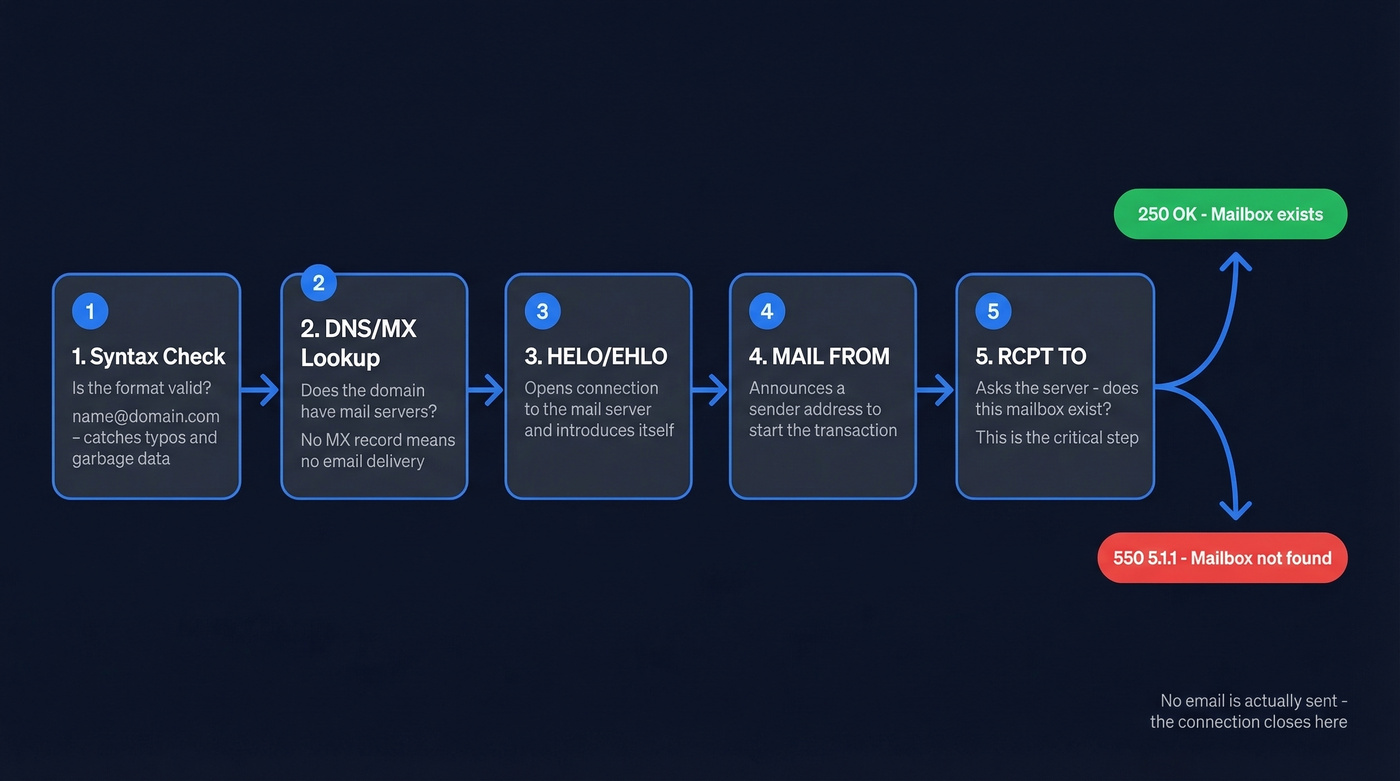
Here's the step-by-step flow:
Syntax check. The tool confirms the address follows a valid format -
name@domain.com, notname@@domainorname@.com. This catches typos and garbage data instantly. Most tools also flag disposable addresses like Mailinator and Guerrilla Mail that are technically valid but worthless for outreach.DNS/MX lookup. The tool queries DNS records to find the domain's mail exchange servers. No MX record? The domain can't receive email. Done.
HELO/EHLO. The tool opens a connection to the mail server and introduces itself, just like any email client would.
MAIL FROM. It announces a sender address to initiate the transaction.
RCPT TO. This is the critical step. The tool tells the server "I want to deliver to
john@company.com." The server responds with either an acceptance (250 OK) or a rejection - typically a550 5.1.1error meaning "mailbox doesn't exist."
The connection closes right there. No email is composed, no message body is transmitted, nothing lands in anyone's inbox. The tool reads the server's response and makes a judgment call. This works because SMTP's handshake protocol was never designed with privacy in mind - it freely tells you whether a recipient exists before you commit to sending anything.
Why Verification Isn't Perfect
SMTP verification has a hard ceiling. Verifiers can definitively validate only about 45% of business email addresses via SMTP with full confidence. The rest fall into gray zones, and no amount of money spent on tooling changes that.
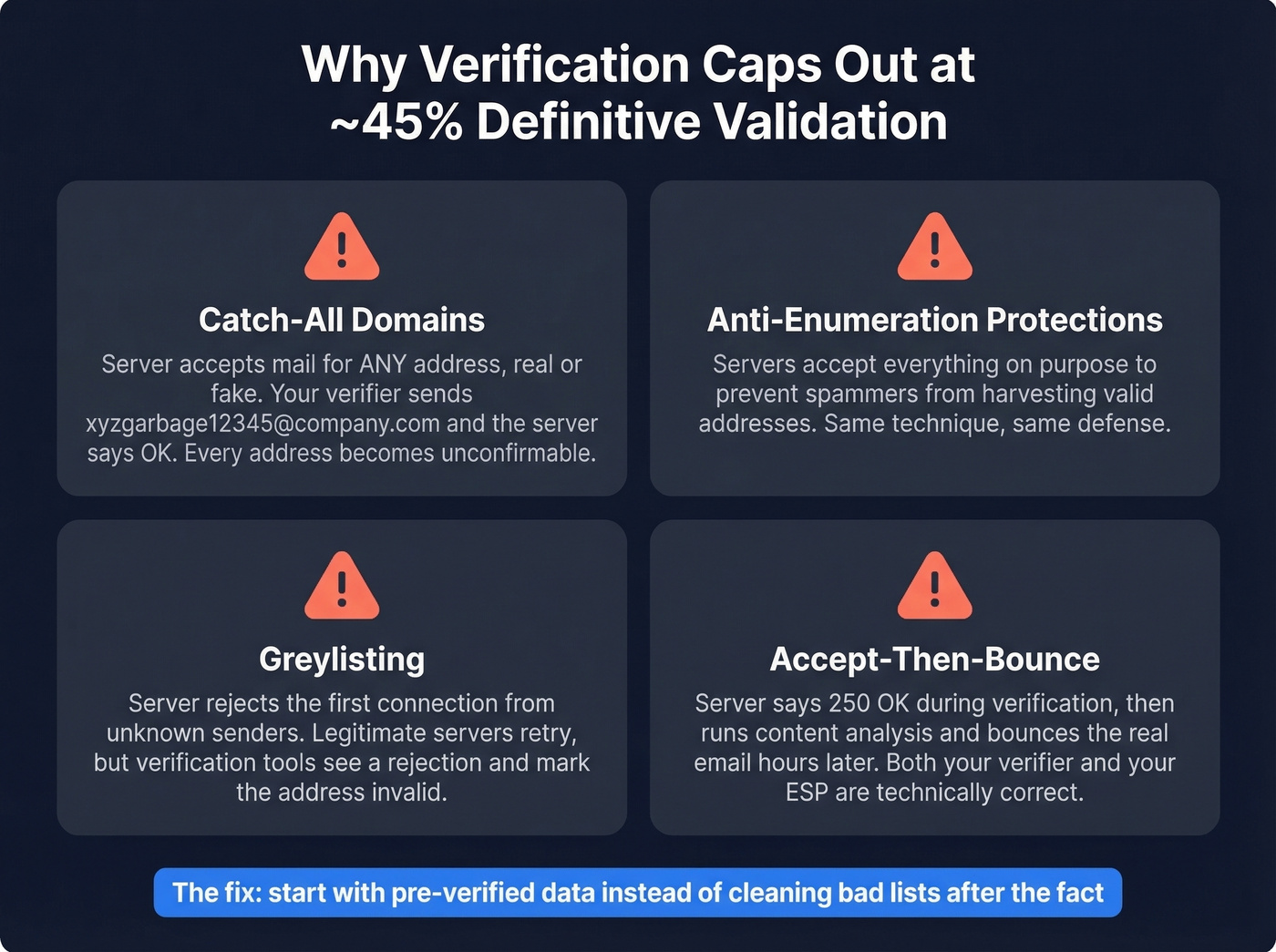
Catch-all domains are the biggest culprit. A catch-all server accepts mail for any address - real or fake. Verifiers detect these by sending a probe to a known-fake address like xyzgarbage12345@company.com. If the server accepts it, every address at that domain gets flagged as "catch-all" and can't be individually confirmed. Many mid-market companies run catch-all configurations, which is why this problem is so pervasive.
Anti-enumeration protections are increasingly common. Organizations recognize that SMTP verification is essentially the same technique spammers use to harvest valid addresses, so they configure servers to accept everything and avoid revealing whether a mailbox exists.
Greylisting) throws another wrench in. Some servers intentionally reject the first connection attempt from unknown senders, expecting legitimate servers to retry. A simplistic verification script sees the rejection and marks the address as invalid - even though it's perfectly fine.
Enterprise accept-then-bounce behavior is the sneakiest failure mode. The server says "250 OK" during verification, then runs content analysis and bounces the actual email hours later. Your verifier said it was valid. Your ESP says it bounced. Both are technically correct.
Here's the thing: we've seen teams burn through three different verification tools trying to solve catch-all unknowns, only to realize the problem was upstream. Their data source was the issue, not their verification stack.

You just read why SMTP verification caps out at ~45% definitive validation. Catch-all domains, greylisting, and accept-then-bounce behavior mean even the best tools leave you guessing. Prospeo skips the guesswork entirely - 143M+ pre-verified emails at 98% accuracy, refreshed every 7 days, with catch-all handling and spam-trap removal built in.
Stop cleaning bad lists. Start with emails that already work.
How to Read Your Results
Every verification tool returns results using roughly the same taxonomy. Understanding what each status means saves you from expensive mistakes.
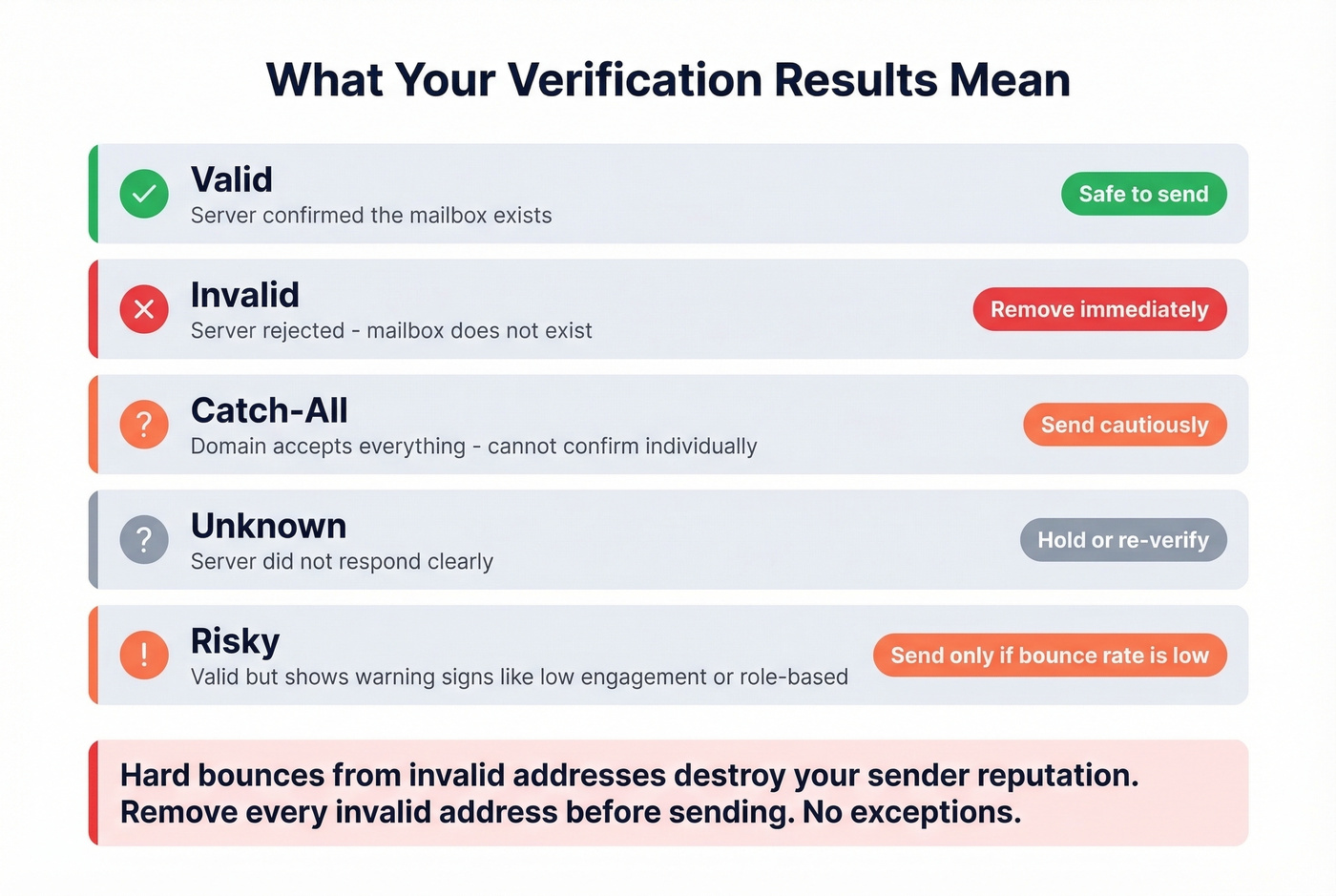
| Status | Meaning | Action |
|---|---|---|
| Valid | Server confirmed the mailbox exists | Safe to send |
| Invalid | Server rejected - mailbox doesn't exist | Remove immediately |
| Catch-all | Domain accepts everything; can't confirm | Send cautiously |
| Unknown | Server didn't respond clearly | Hold or re-verify |
| Risky | Valid but shows warning signs | Send only if bounce rate is low |
Hard bounces from invalid addresses are the ones that destroy your sender reputation. Remove every invalid address before sending. No exceptions.
Soft bounces - full mailboxes, temporary server issues - are less damaging but still worth monitoring. Three soft bounces to the same address across campaigns means it's effectively dead.
For catch-all and unknown results, segment them into a separate sending pool with lower daily volume. If bounces stay under 2%, keep sending. If they spike, pull the list.
How to Verify an Email Manually
You can verify an email address using nothing but a terminal. Run nslookup -type=mx company.com to find the mail server, then telnet mail.company.com 25 to open a connection. Type HELO test.com, then MAIL FROM:<test@test.com>, then RCPT TO:<target@company.com>. A 550 5.1.1 response means the mailbox doesn't exist. There's also the VRFY command, but almost no modern mail server supports it - it was disabled years ago to prevent address harvesting.
It works. For one address. Maybe two.
Then reality kicks in. Greylisting blocks your connection. The server rate-limits you. Some servers silently accept everything and discard later, giving you false positives. And if you're doing this from your own IP, you risk getting it blacklisted. Manual SMTP checking is useful for understanding how verification works. It's terrible for production use.
Best Tools to Check If an Email Works
| Tool | Free Tier | Cost/1K | Accuracy | Best For |
|---|---|---|---|---|
| Prospeo | 75 emails/mo | ~$10 | 98% | Pre-verified data |
| Hunter | Free single checks (no signup) | Paid plans available | Not public | Free single checks |
| ZeroBounce | 100/mo | ~$10 | 99.6% (guaranteed) | Enterprise/compliance |
| NeverBounce | 10 credits | $8 | 95-99% (self-reported) | Cold email stacks |
| Bouncer | - | $7 | 97%+ (self-reported) | Cold email at scale |
| MillionVerifier | - | ~$3.70 | Not public | Budget bulk cleaning |
| Verifalia | Free singles | Varies by plan | 99% (claimed) | Quick one-off checks |
| Mailmeteor | 50/mo (Sheets) | Free (fair-use) | Not public | Google Sheets users |
| Email Hippo | 100/day | Free tool; paid plans available | Not public | Light daily use |
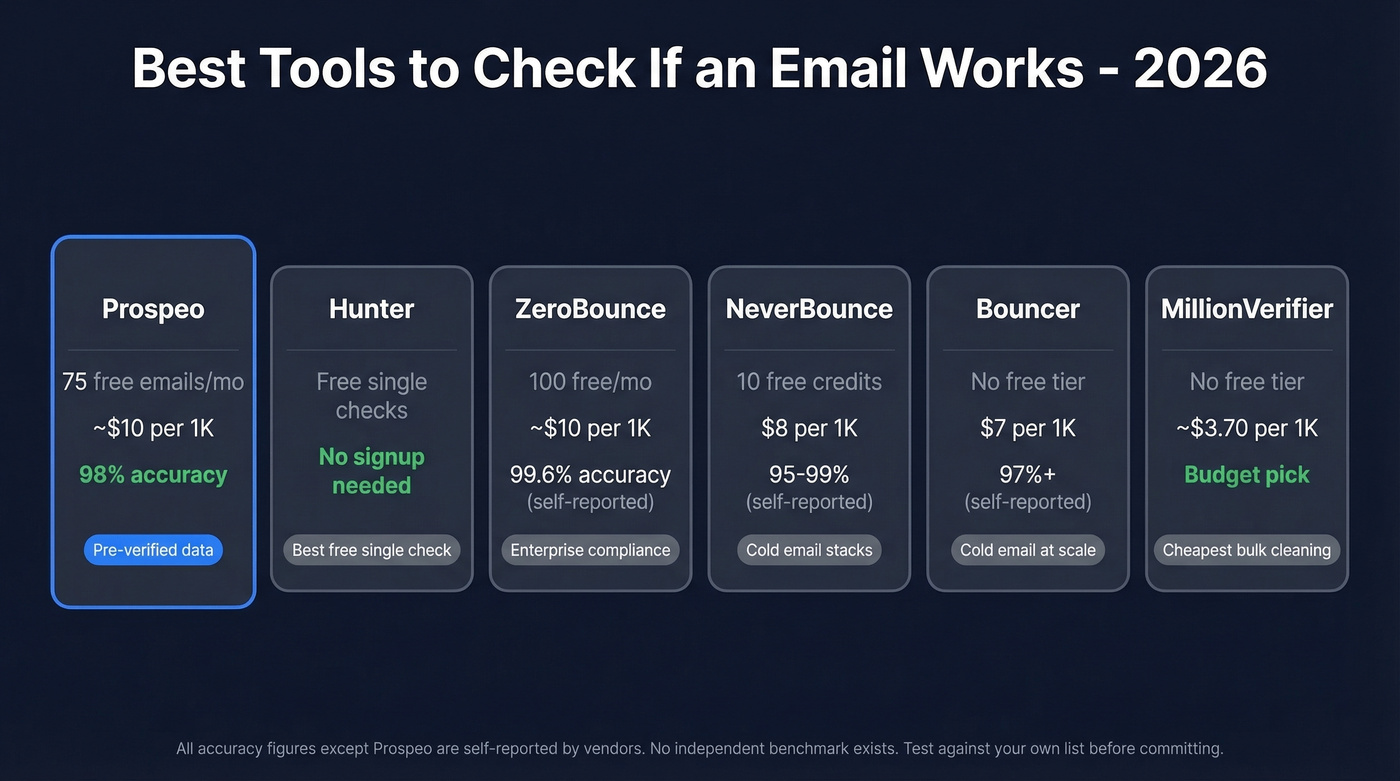
Every accuracy figure above except Prospeo's is self-reported by the vendor. No independent benchmark with transparent methodology exists for email verification tools - even the "benchmarks" you'll find online are often run by companies with skin in the game. The consensus on r/sales and r/coldemail is that you should test any tool against your own list before committing.

Hunter - Best Free Single Check
Hunter's the tool you use when someone gives you an email address at a conference and you want to know if it's real before you follow up. Paste it into their free verifier - no signup, no credit card - and you get a result in seconds.
If you create an account, Hunter's free plan includes 100 verifications per month, which is plenty for individual contributors who aren't running bulk campaigns. Where it falls short is catch-all handling. If the domain accepts everything, the result is often "we can't confirm." For non-catch-all domains, it's reliable enough for spot checks.
ZeroBounce - Enterprise Compliance Pick
Use this if you're in a regulated industry like healthcare or finance and need SOC 2 Type 2, ISO 27001, and HIPAA compliance documentation from your verification vendor. ZeroBounce checks those boxes and guarantees 99.6% accuracy.
Skip this if you're price-sensitive. Pricing works out to about $10 per 1,000 checks with a 2,000-check minimum tier. The 100 free monthly verifications let you test before committing. For teams where compliance paperwork matters more than per-unit cost, it's the safe pick.
NeverBounce
NeverBounce is a workhorse in a lot of cold email stacks. At $8 per 1,000 emails, it's competitively priced and integrates with many outbound tools. The free tier is stingy - just 10 credits - so you're committing to paid from day one. Accuracy falls in the 95-99% range on non-catch-all domains, which is solid for outbound prospecting. If you're comparing options, see our breakdown of SDR tools that pair well with verification.
MillionVerifier and Bouncer
MillionVerifier is the budget king at roughly $3.70 per 1,000 emails. If you're cleaning a 100K-contact list and accuracy on catch-all domains isn't your primary concern, it's hard to justify paying 2-3x more elsewhere. No free tier, but the entry cost is low enough that it barely matters.
Bouncer runs $7 per 1,000 and has built a strong following in the cold email community - it's commonly featured in Woodpecker's tool ecosystem and known for solid catch-all handling at the price point. If you're evaluating alternatives, compare more options in our guide to Bouncer alternatives. If you're also choosing a finder, our list of Hunter alternatives can help.
Verifalia, Mailmeteor, Email Hippo
Verifalia offers free single-address checks and runs an over-30-step verification process. Overkill for most use cases, but useful if you need one thorough check fast. Mailmeteor is a Google Sheets add-on that verifies up to 50 emails per month for free, no sign-up required - if your workflow lives in spreadsheets, it's the path of least resistance. Email Hippo has been around since 2009 and offers a free verifier with up to 100 checks per day, resetting at midnight UTC. Not the most modern tool, but for light daily use it does the job without friction.
Start with Verified Data Instead
Let's be honest: if your deals average under $15k, you probably don't need a verification tool at all. You need a better data source.
The verify-after-purchase workflow has three costs, not one. You buy a list from a data vendor - cost one. You run it through a verification tool - cost two. You still get bounces because catch-all domains and greylisting fooled the verifier - cost three, measured in damaged sender reputation.
In our experience working with outbound teams, the ones with the worst deliverability problems aren't the ones skipping verification. They're the ones buying cheap data and trying to verify their way out of it. Verification is a band-aid. Data quality is the cure.

Prospeo's 5-step verification process - including catch-all handling, spam-trap removal, and honeypot filtering - runs before you ever access a record. With a 7-day refresh cycle (the industry average is 6 weeks), the data stays current without you lifting a finger. If you're building lists from scratch, it helps to understand the full lead generation workflow and where verification fits. Stack Optimize built from $0 to $1M ARR running client campaigns with 94%+ deliverability, bounce under 3%, and zero domain flags across all clients - not by stacking verification tools, but by starting with pre-verified data from the source.
Buying data from one provider and paying a second tool to verify it is a tax on bad sourcing. Prospeo's 5-step verification runs on proprietary infrastructure before you ever see an email - no third-party providers, no stale records. At $0.01 per email, you pay less than most verification-only tools charge.
One platform. Already verified. 98% accurate. No cleanup required.
FAQ
Can you check if an email works without sending a message?
Yes. Verification tools use SMTP handshake commands to test whether a mailbox exists without delivering anything. The connection opens, sends partial commands up to RCPT TO, reads the server's response, and closes before any message body is transmitted. Nothing lands in anyone's inbox.
Why did a "verified" email still bounce?
Catch-all domains, greylisting, and enterprise mail systems that accept during verification but reject later are the main culprits. No verifier achieves 100% accuracy - via SMTP alone, roughly 45% of business emails can't be definitively validated.
How often should I re-verify my email list?
Re-verify active outbound lists every 30-90 days. People change jobs, mailboxes get deactivated, and domains expire constantly. For teams running weekly campaigns, monthly re-verification is worth the cost.
What's a catch-all domain and why does it matter?
A catch-all domain accepts mail for any address, including nonexistent ones. Verifiers detect them by testing a fake address - if the server accepts randomgarbage@company.com, individual addresses can't be confirmed as valid or invalid. This is why SMTP verification alone can only definitively validate about 45% of business emails.
Is there a free way to check if an email address is valid?
Hunter lets you verify a single address for free with no signup. Mailmeteor offers 50 free checks per month via Google Sheets. Email Hippo provides up to 100 free checks per day. For ongoing needs, Prospeo includes 75 free verified emails monthly - pre-verified at 98% accuracy, so you skip the verification step entirely.