

Checking Email Addresses for Validity: The Complete 2026 Guide
You cleaned your list last Tuesday. Ran it through a verification tool, got the green light, launched a 5,000-email sequence - and woke up to a 7.3% bounce rate. Your domain reputation took a hit before lunch.
The tool said "99% accurate." The inbox said otherwise.
That gap between what verification tools promise and what actually happens when checking email addresses for validity is where deliverability goes to die. A bounce rate under 2% is safe. Above 5%, mailbox providers start throttling you. Between those numbers is a gray zone where most teams live - and most verification tools fail to protect them.
What You Need (Quick Version)
Email verification works in three stages: syntax check to confirm the format is valid, domain check to verify the mail server exists, and SMTP handshake to test whether the specific mailbox accepts mail. The metric that separates good tools from mediocre ones isn't overall accuracy - it's catch-all resolution, meaning how well they handle domains that accept mail to any address.
How Verification Actually Works
Every verification tool runs the same fundamental process, with varying levels of sophistication layered on top.
Syntax and Domain Checks
The first pass is pure format validation. The tool checks whether the address conforms to RFC 5322 - the standard defining valid email address syntax. Missing @ symbols, illegal characters, malformed domains all get caught here. Every tool nails this part.
Next comes the MX record lookup. The tool queries DNS to confirm the domain has mail exchange servers configured. No MX record usually means the domain won't accept email. This catches typo domains like gmial.com and outlok.com, plus defunct company domains that nobody's maintained in years.
The SMTP Handshake
Here's where real verification happens. The tool opens a connection to the mail server on port 25 and runs through a handshake sequence:
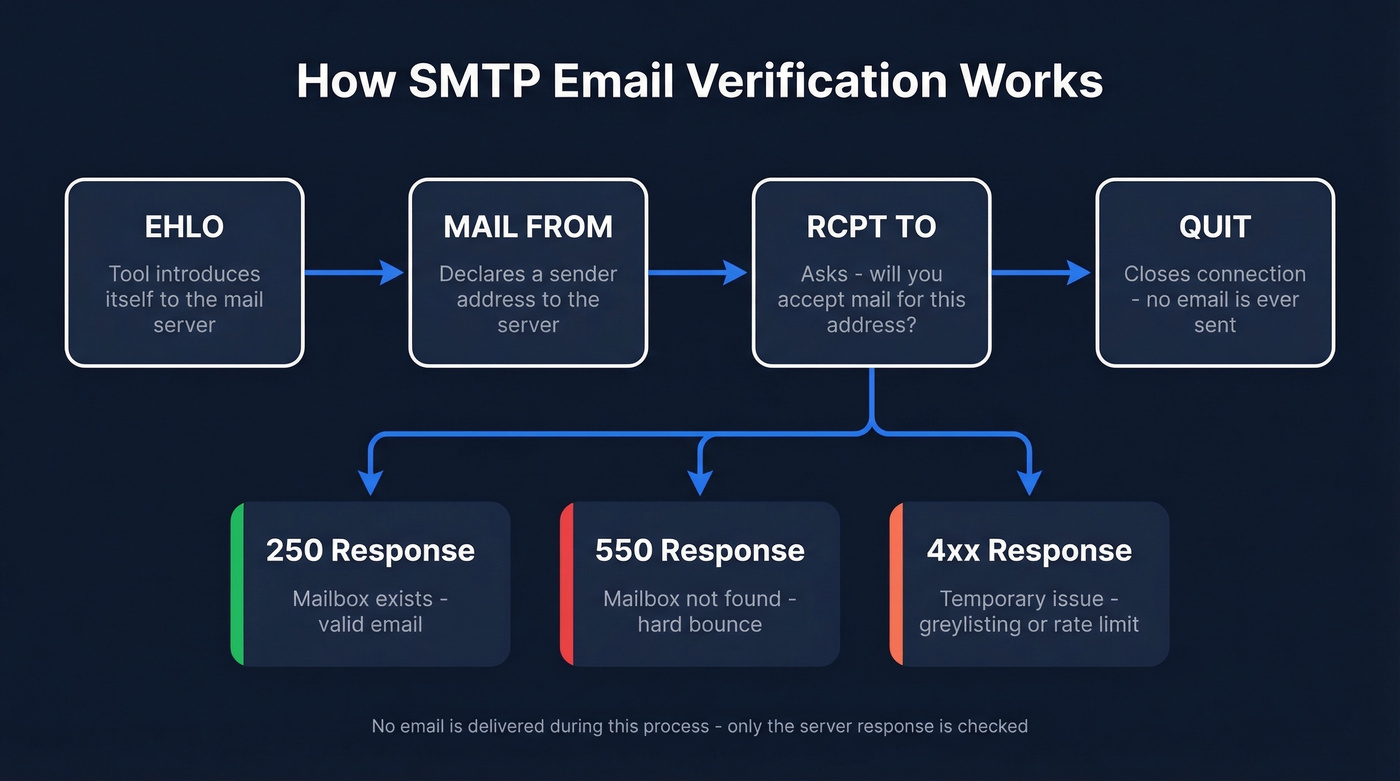
- EHLO - introduces itself to the server
- MAIL FROM - declares a sender address
- RCPT TO - asks "will you accept mail for this specific address?"
- QUIT - closes the connection without sending anything
The server's response to RCPT TO is the key signal. A 250 response means the server accepts the recipient. A 550 means it doesn't - hard bounce. Codes in the 4xx range indicate temporary issues like greylisting or rate limiting.
No email gets sent during this process. The tool checks whether the mailbox is accepted without delivering anything.
Where It Breaks Down
The SMTP handshake works beautifully - until three things break it. Catch-all domains accept mail to any address, so RCPT TO always returns 250 regardless of whether the mailbox exists. Greylisting temporarily rejects the first connection attempt, which some tools interpret as invalid. And anti-enumeration defenses can rate-limit or block verification attempts entirely.
These edge cases are why "99% accuracy" is a fantasy for most real-world lists.
The Catch-All Problem
In a 10,000-email benchmark test, 28% of the addresses sat on catch-all domains. That's more than a quarter of a typical B2B list that standard verification can't definitively confirm.
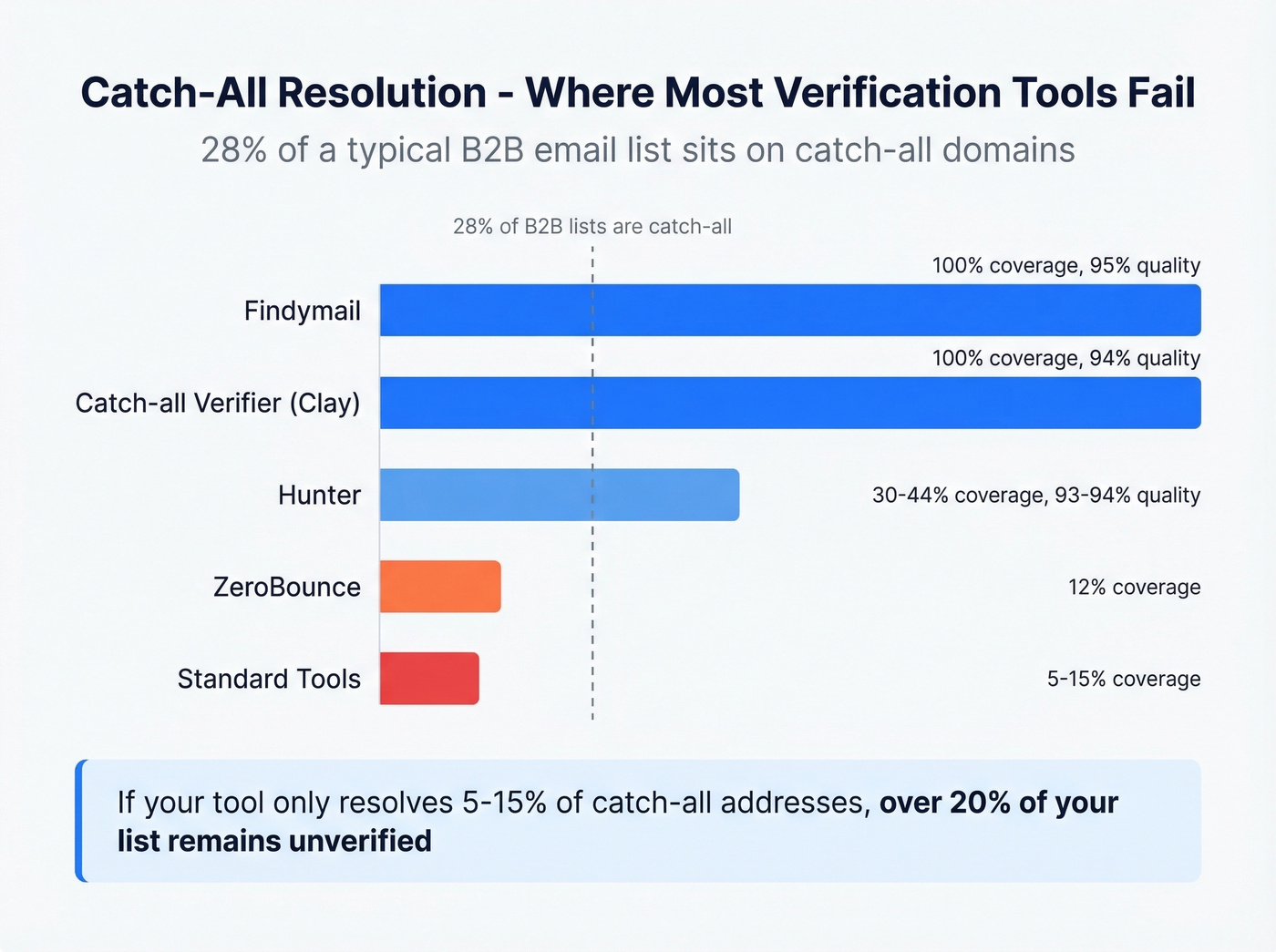
Let's be honest: catch-all resolution is where tools diverge dramatically, and it's the single biggest factor most buyers ignore when shopping for a verifier. Many standard tools resolve only 5-15% of catch-all addresses. The specialized ones do much better, but there's a quality-versus-coverage tradeoff.
| Tool | Quality | Coverage | Notes |
|---|---|---|---|
| Findymail | 95% | 100% | Best coverage |
| Hunter | 93-94% | 30-44% | High quality, low coverage |
| Catch-all Verifier (via Clay) | 94% | 100% | Full coverage, requires Clay |
| Standard tools | Varies | 5-15% | Many leave catch-alls unresolved |
Reading Your Verification Results
Every tool returns results in slightly different language, but they all map to four buckets. Clearout's "Safe to Send" taxonomy is the clearest framework we've come across.
| Result | What It Means | What to Do |
|---|---|---|
| Valid | Mailbox confirmed | Send confidently |
| Invalid | Mailbox doesn't exist | Remove immediately |
| Risky | Catch-all or temp issue | Send only if bounce rate < 5% |
| Unknown | Can't determine status | Retry later, don't assume invalid |
The critical mistake teams make is treating "unknown" as "invalid" and deleting those contacts. Unknown means the server didn't give a clear answer - maybe it was greylisting, maybe it was rate-limited. Retry those addresses 24-48 hours later. A meaningful percentage will resolve to valid on the second pass.
Risky addresses require a judgment call. If your current bounce rate is well under 2%, you can afford to send to risky contacts. Hovering around 4%? Skip them.

Prospeo's 5-step verification handles catch-all domains, spam traps, and honeypots before you ever see the email. 98% accuracy across 143M+ verified addresses - no second tool required.
Skip the verification step entirely. Every Prospeo email ships pre-verified.
Why "99% Accuracy" Is Misleading
Every verification vendor markets "99% accuracy." The number is technically defensible and practically meaningless.
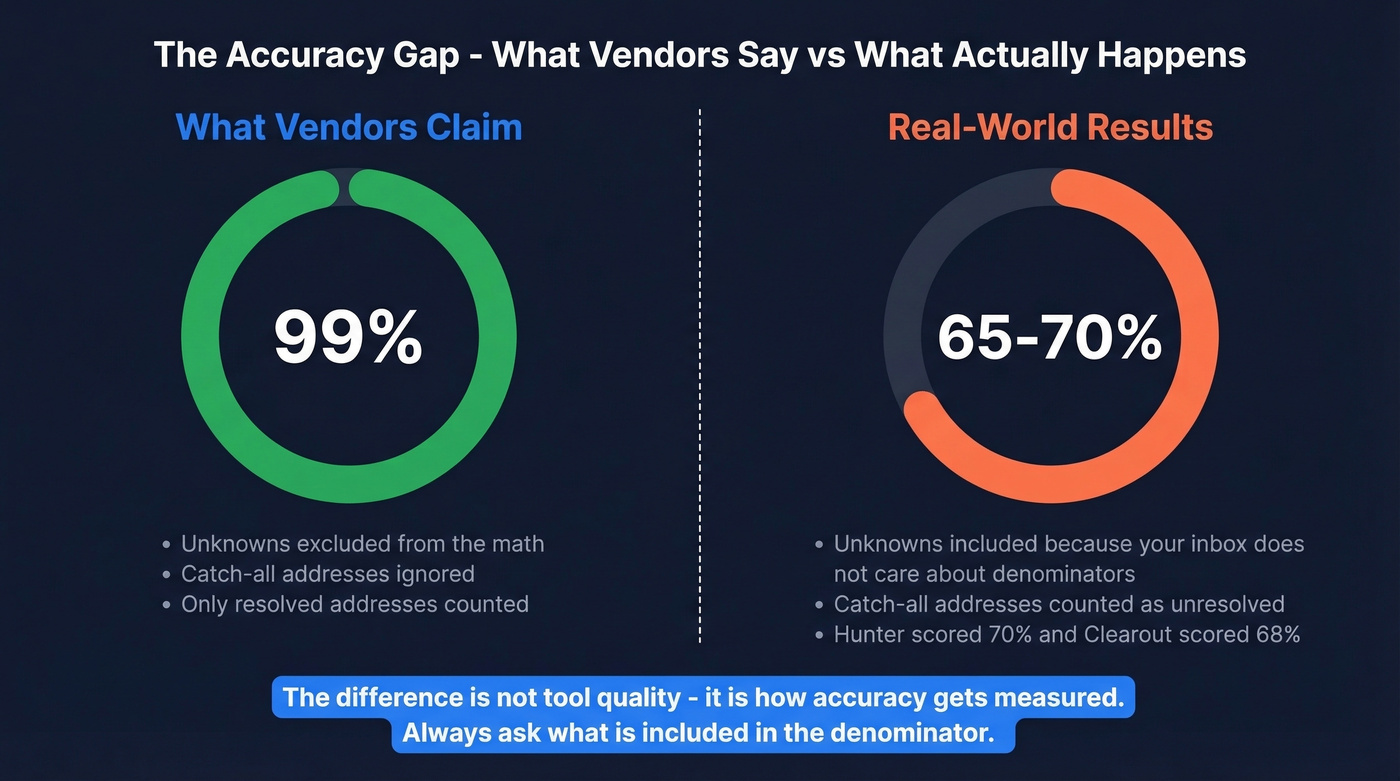
A 10-tool benchmark on 10,000 real B2B emails showed accuracy ranging from 95.8% to 99.5%. That's a tight band, and it makes every tool look good. But the test was run by LeadMagic's founder, whose own tool topped the chart. Take the specific rankings with a grain of salt.
More revealing is Hunter's 15-provider benchmark using 3,000 real business emails. When unknown results penalize accuracy - which is how accuracy should be measured in the real world - the numbers drop to 65-70%. Hunter itself scored 70%. Clearout hit 68.37%. Kickbox landed at 67.53%. The gap between "99%" and "67%" comes down to definition: exclude unknowns and catch-alls from the denominator, and accuracy looks great; include them, because your deliverability doesn't care about denominators, and the picture changes entirely.
Our take: If your deals average under five figures, you probably don't need a premium verifier at all. MillionVerifier's 95.8% accuracy is good enough when the cost of a few extra bounces is lower than the cost of a premium tool. Save the ZeroBounce money for lists targeting enterprise accounts where every contact matters and catch-all domains are everywhere.
Best Tools for Validating Email Addresses
| Tool | Accuracy | Catch-All | Cost/10K | Best For | |------|----------|-----------|----------|----------| | Prospeo | 98% | Included | ~$100 | Find + verify in one step | | ZeroBounce | 97.8% | 12% | ~$64 | Standalone list cleaning | | Bouncer | 96.5% | 15% | Mid-volume value | | NeverBounce | 96.9% | 8% | ~$50 | CRM integrations | | MillionVerifier | 95.8% | 5% | ~$6 | Budget bulk | | Hunter | 70%** | 30-44% | ~$149 | B2B database combo |
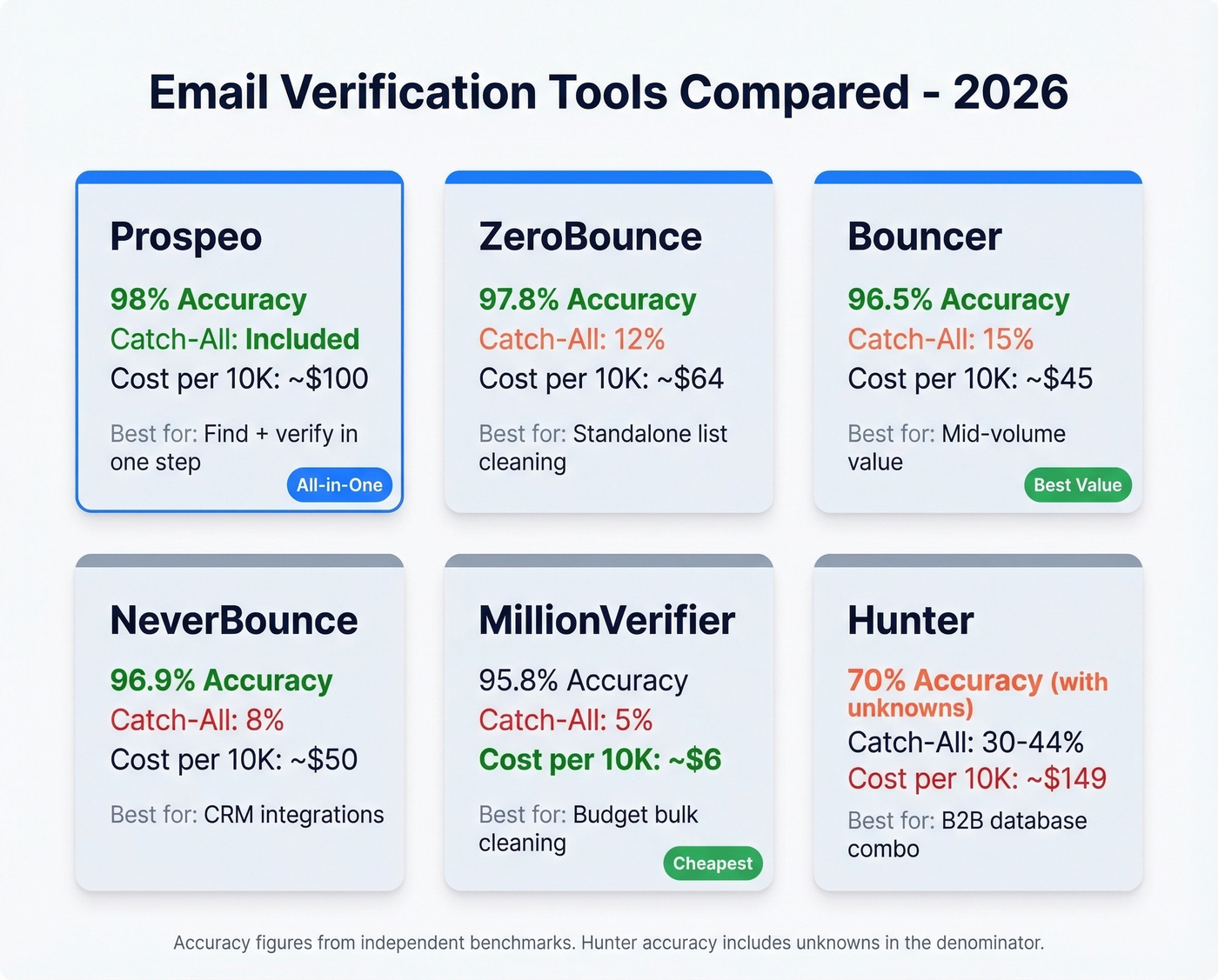
**Hunter's accuracy includes unknowns in the denominator; on resolved addresses, it's competitive.
Prospeo
Most verification tools solve half the problem - they tell you whether an email you already have is valid. Prospeo solves the whole thing. Its database of 300M+ professional profiles with 143M+ verified emails means you're finding contacts and verifying them in a single step, not paying one tool to find emails and another to clean them. The 5-step verification process runs every record through syntax validation, MX lookup, SMTP handshake, catch-all resolution, and spam-trap/honeypot filtering, delivering 98% email accuracy with a 7-day refresh cycle while most competitors refresh every 4-6 weeks.

That freshness gap matters more than people realize. An email that was valid six weeks ago might belong to someone who changed jobs last month. Snyk's sales team went from 35-40% bounce rates to under 5% after switching, with 50 AEs now sourcing 200+ new opportunities per month. The free tier gives you 75 verified emails monthly plus 100 Chrome extension credits - enough to test whether the accuracy holds up on your specific ICP.
ZeroBounce
Pure verification accuracy is ZeroBounce's calling card. It hit 97.8% in the 10-tool benchmark, and its G2 rating of 4.7/5 across 1,361 reviews reflects consistent user satisfaction. The 45 direct integrations mean it plugs into most marketing stacks without custom work.
The tradeoff: catch-all resolution sits at just 12%, which means a quarter of your B2B list might come back as "unknown." Users on G2 consistently flag pricing as a pain point - at ~$64 per 10K verifications, it's not cheap for high-volume teams. Pricing starts at $0.008/email pay-as-you-go or $15/mo for 2,000 emails. 100 free credits per month.

Bouncer
This is the sweet spot for teams verifying 10K-100K emails monthly who want the best accuracy-to-price ratio. Bouncer scores 96.5% accuracy with 15% catch-all resolution - better catch-all handling than ZeroBounce at a lower price point. At ~$45 per 10K with volume discounts, it sits right where mid-volume teams need it. Review scores are remarkable: Capterra 4.9 with 233 reviews, G2 4.8 with 232 reviews.
Skip this if you need a find-and-verify workflow or deep CRM integrations. Bouncer is a specialist - it verifies lists, and it does that exceptionally well. Free trial includes 1,000 credits.
NeverBounce
NeverBounce's strength is integration breadth, not verification depth. At 96.9% accuracy it's solid, but 8% catch-all resolution is below average. G2 rates it 4.2/5 across 141 reviews - respectable but noticeably lower than Bouncer or ZeroBounce.
Reviewers praise the easy integrations but consistently complain about the credit system: credits expire, rollover policies are confusing, and the billing model feels designed to extract maximum spend. At ~$50/10K, Bouncer gives you better results for similar money unless your stack already connects to NeverBounce natively.
MillionVerifier
The budget play, and it's not even close. At ~$6 per 10,000 verifications, MillionVerifier costs roughly 10x less than ZeroBounce. The tradeoff is real: 95.8% accuracy and only 5% catch-all resolution.
For massive lists where you're doing a first-pass cleanup before running survivors through a higher-quality tool, the economics are unbeatable. We've seen teams use MillionVerifier as a pre-filter, then run the "valid" results through ZeroBounce for final confirmation - total cost still lower than running everything through a premium tool once.
Hunter
Hunter combines a B2B email database with built-in verification. Its verifier checks syntax, domain information, server response, and also cross-references Hunter's own database. In the benchmark that penalizes unknowns, Hunter scored 70% accuracy. Catch-all coverage runs 30-44% - better than most - but at ~$149 per 10K, it's the most expensive standalone verifier on this list. The free plan with 100 verifications per month is useful for spot-checking but not for production workflows.
Quick Mentions
EmailListVerify is the cheapest standalone option at $24/10K - worth testing if budget is the primary constraint. Clearout at $58/10K offers the best result taxonomy with its Safe-to-Send classification. Kickbox at $80/10K is reliable but overpriced for what you get. Verifalia offers free single-email checks through its web interface, handy for one-off lookups, with paid plans in the $50-$80/10K range.
What Email Verification Costs
| Tool | Cost per 10K | Cost per 100K | Free Tier |
|---|---|---|---|
| MillionVerifier | ~$6 | ~$60 | None |
| EmailListVerify | ~$24 | ~$240 | None |
| Bouncer | ~$45 | ~$450 | 1,000 trial |
| NeverBounce | ~$50 | ~$500 | None |
| Clearout | ~$58 | ~$580 | None |
| ZeroBounce | ~$64 | ~$640 | 100/month |
| Kickbox | ~$80 | ~$800 | None |
| Prospeo | ~$100 | ~$1,000 | 75/month |
| Hunter | ~$149 | ~$1,490 | 100/month |
For teams verifying 100K-1M emails monthly, expect annual verification spend in the $3,000-$50,000 range depending on tool and volume. The cheapest tool isn't always the worst deal, and the most expensive isn't always the best. MillionVerifier at $6/10K trades catch-all resolution for price - fine for first-pass cleaning, risky as your only verification layer.
The Verify-and-Forget Trap
Verification isn't a one-time event. Roughly 2% of a verified list goes invalid within four weeks. People change jobs, companies shut down domains, IT teams decommission mailboxes. A list you verified in January is measurably worse by February.
The operational playbook is straightforward: re-verify before every major send. Running weekly sequences? Verify weekly. Monthly campaigns? Verify the day before launch. And before you burn credits re-verifying your entire database, filter out contacts who haven't engaged in 90+ days. No point paying to verify addresses you're not going to email anyway.
If you're running outbound sequences at scale, pair verification with an email deliverability checklist and monitor sender reputation so bounces don't compound into inboxing issues.
That 7.3% bounce rate from the intro? Prospeo users stay under 4%. Proprietary email infrastructure verifies on a 7-day refresh cycle - not the 6-week industry average that lets data rot between checks.
Fresh data beats re-verified stale data every time. Try it free.
FAQ
Can I verify an email without sending one?
Yes. Every tool in this guide uses the SMTP handshake method - connecting to the mail server, asking whether the mailbox exists via the RCPT TO command, then disconnecting without delivering a message. The recipient never knows you checked.
What's a catch-all domain and why does it matter?
A catch-all domain accepts mail sent to any address at that domain, so SMTP verification always gets a "yes" response regardless of whether the specific mailbox exists. Catch-all domains represent roughly 28% of typical B2B lists and are the single biggest blind spot when checking email addresses for validity.
How often should I re-verify my list?
Re-verify before every major send, or at minimum every four weeks. Approximately 2% of a verified list becomes invalid within a month due to job changes and domain decommissions. Tools with shorter refresh cycles - like a 7-day refresh - reduce this decay automatically.
Is there a free way to check email validity?
Several tools offer free tiers: ZeroBounce gives 100 verifications per month, Bouncer offers 1,000 trial credits, and Prospeo provides 75 verified emails monthly with full catch-all handling. Verifalia has a free web-based verifier for one-off lookups. These free tiers are enough to benchmark accuracy before committing to a paid plan.
What bounce rate is too high?
Keep it under 2% - that's the threshold where mailbox providers consider your sending reputation healthy. Above 5%, you're in active danger of spam filtering or outright domain blocking. If you hit 5%, stop sending immediately and clean your list before resuming outreach.