

DaaS Explained: Desktop as a Service, Data as a Service, and How to Choose in 2026
DaaS means two completely different things depending on who you're talking to, and most articles pick one definition and ignore the other. Sometimes the person searching wants Desktop as a Service - cloud-hosted virtual desktops streamed to any device. Other times they mean Data as a Service - on-demand data delivery via APIs. We're covering both here, with a deep dive on the desktop side where the real complexity and budget risk live.
Quick version: DaaS most commonly refers to Desktop as a Service, where a cloud provider hosts and manages virtual desktops you access remotely. It also refers to Data as a Service, where you consume data on demand through APIs or browser tools. For Desktop as a Service, Gartner's 2026 Magic Quadrant Leaders are Microsoft, AWS, Citrix, and Omnissa. For Data as a Service in B2B, providers like Prospeo deliver verified contact data on demand with credit-based pricing starting free.
What Is Desktop as a Service?
Desktop as a Service is exactly what it sounds like: your desktop environment lives in the cloud, and you access it over a network. Instead of running Windows on a physical machine under your desk, a virtual machine runs in a provider's data center and streams the display to whatever endpoint you're sitting in front of - a laptop, a thin client, a tablet, even a browser tab.
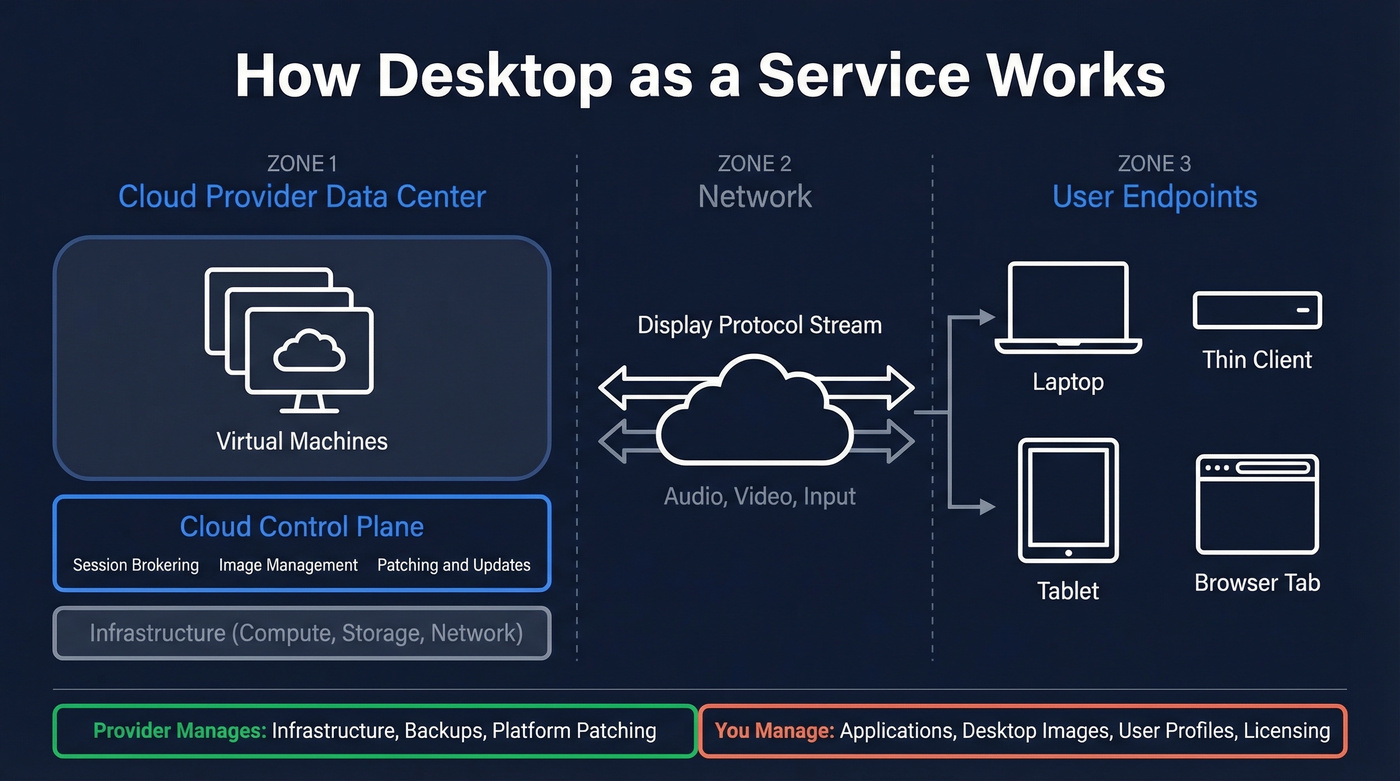
Gartner defines this model as virtual desktops provided by a public cloud or service provider, built around a vendor-managed cloud control plane that brokers connections and provides a management interface. That control plane is the key differentiator from traditional VDI - someone else runs it.
The mandatory capabilities Gartner requires for a product to qualify tell you what the market considers table stakes: endpoint support across Windows, macOS, and thin-client operating systems; tools to manage resources, users, and assignments; orchestration of both persistent and non-persistent compute and storage; central image updates and app publishing; and real-time audio/video optimization for Teams, Webex, and Zoom. If video calls stutter, nobody cares how elegant your architecture is.
Here's the thing: Desktop as a Service doesn't eliminate IT work. Your provider manages the infrastructure, backups, and patching of the platform itself. But you still own the applications, desktop images, user profiles, and licensing inside that environment.
What Is Data as a Service?
Data as a Service flips the model. Instead of hosting desktops, providers deliver data on demand - typically through APIs, browser interfaces, or file exports. You don't build or maintain the underlying data infrastructure. You just consume what you need, when you need it.
Pricing follows a few common patterns: volume-based (pay per record or per thousand rows), pay-per-API-call, or data-type-based where contact data costs differently than firmographic data, which costs differently than intent signals. Snowflake Marketplace and AWS Data Exchange are the big horizontal B2B data marketplace platforms. Some vendors also use the term to describe operational data layers that modernize access to legacy systems - a niche interpretation, but one you'll encounter.
Types of Data as a Service
Not every provider delivers the same thing. The market breaks into several categories based on what's being delivered:
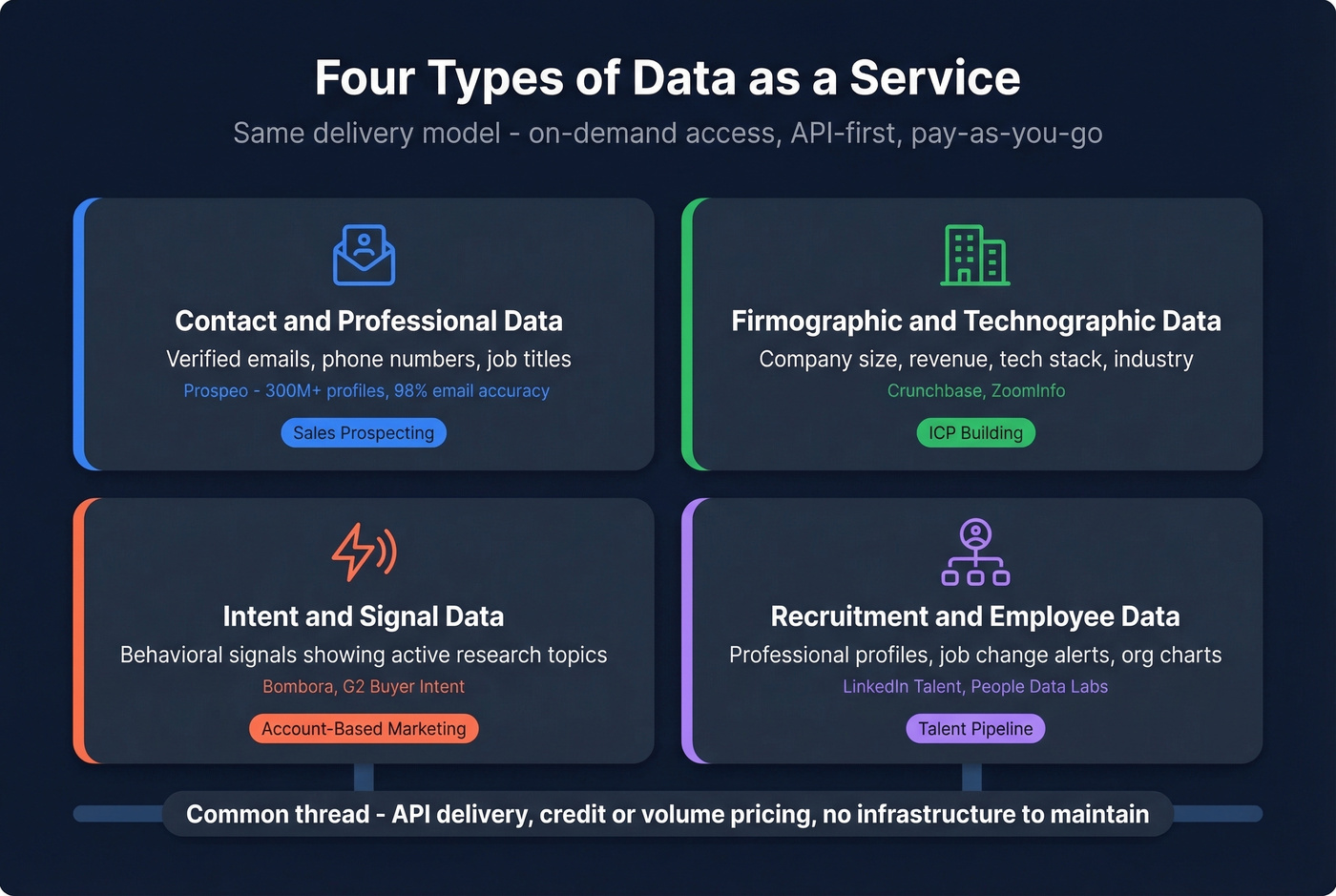
- Contact and professional network data - Verified emails, phone numbers, and job titles sourced from public profiles and proprietary crawls. This is the backbone of B2B data for sales and marketing.
- Firmographic and technographic data - Company size, revenue, tech stack, and industry classification. These help teams build ideal customer profiles and run company searches at scale.
- Intent and signal data - Behavioral signals showing which accounts are actively researching topics relevant to your product. This powers account-based marketing programs.
- Recruitment and employee data - Professional profiles, job change alerts, and org charts. Teams use this to fill talent pipelines faster than manual searches allow.
Each category serves different buyers, but the delivery model is the same: on-demand access, API-first architecture, and pay-as-you-go pricing.
Data as a Service Examples
Prospeo is a clean example of data as a service applied to sales prospecting - 300M+ professional profiles with 98% email accuracy on a 7-day refresh cycle, delivered via API, CSV export, or Chrome extension. Pricing is credit-based starting with a free tier. Other examples include Snowflake Marketplace for analytics datasets, AWS Data Exchange for third-party data feeds, and specialized providers like Bombora for intent signals and Crunchbase for company profiling data.

Why DaaS Matters in 2026
The Desktop as a Service market is growing fast. Gartner forecasts spending at $4.3B in 2025, rising to $6.0B by 2029 - a 7.9% CAGR. Other firms are more aggressive: Future Market Insights pegs the market at $9.1B in 2025 with an 18.3% CAGR through 2035, while Zion Market Research estimated $5.9B in 2023 growing at 21.5% CAGR through 2032. SMEs account for nearly half of revenue at 47.6%, and public cloud deployment dominates at 58.9% share.
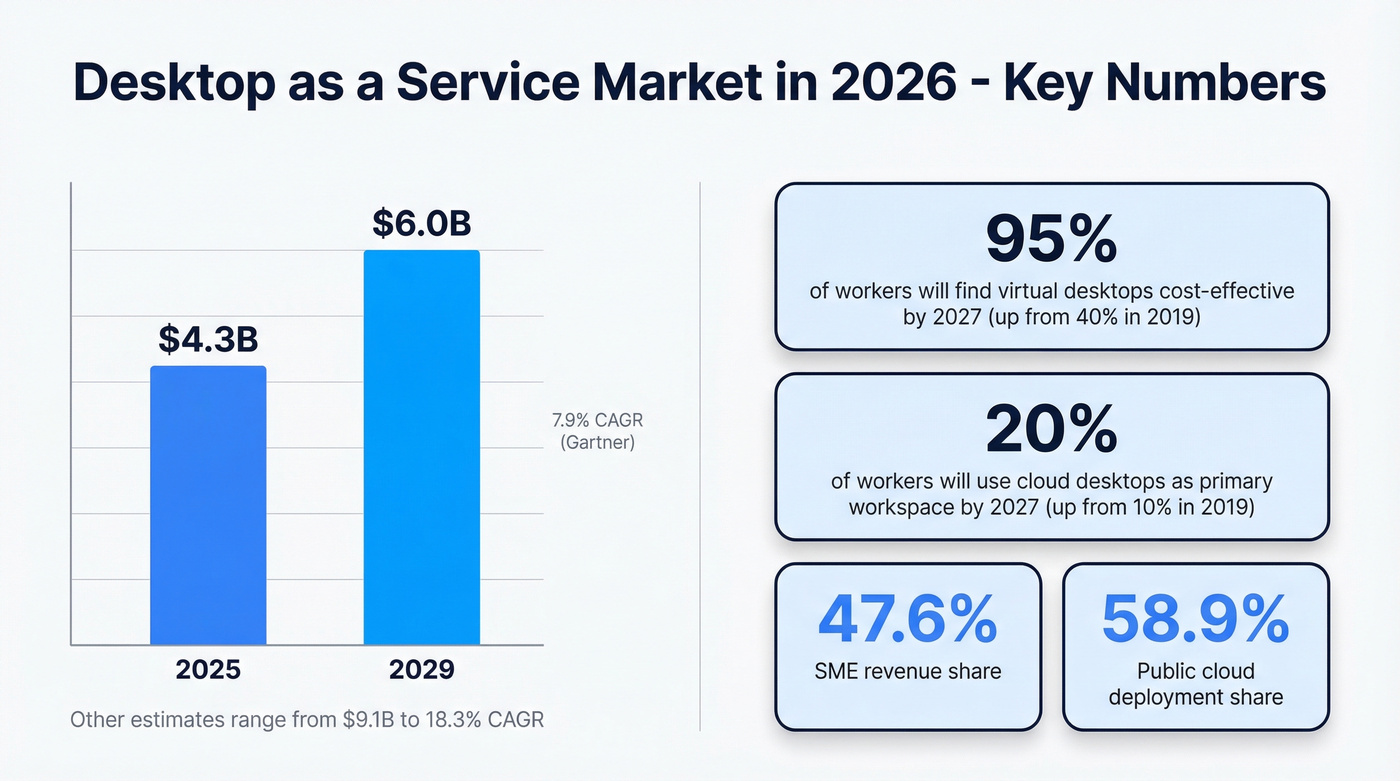
Gartner's strategic planning assumptions are the most striking data points. By 2027, virtual desktops will be cost-effective for 95% of workers, up from 40% in 2019. Cloud-hosted desktops will become the primary workspace for 20% of workers by 2027, double the 10% in 2019. That's not just a prediction about adoption - it's a prediction about economics. The cost curve is bending hard enough that the "it's too expensive" objection is disappearing for most use cases. Remote work normalization is the obvious driver, but IT cost reduction through shifting CapEx to OpEx, centralized security, and reduced hardware footprint are pulling just as hard.
On the data side, the growth story is equally compelling. On-demand data delivery lets teams generate pipeline without the overhead of building and maintaining proprietary sourcing databases. Teams that once spent months assembling data sources now access decision-maker contacts in minutes through API calls.
How DaaS Is Delivered
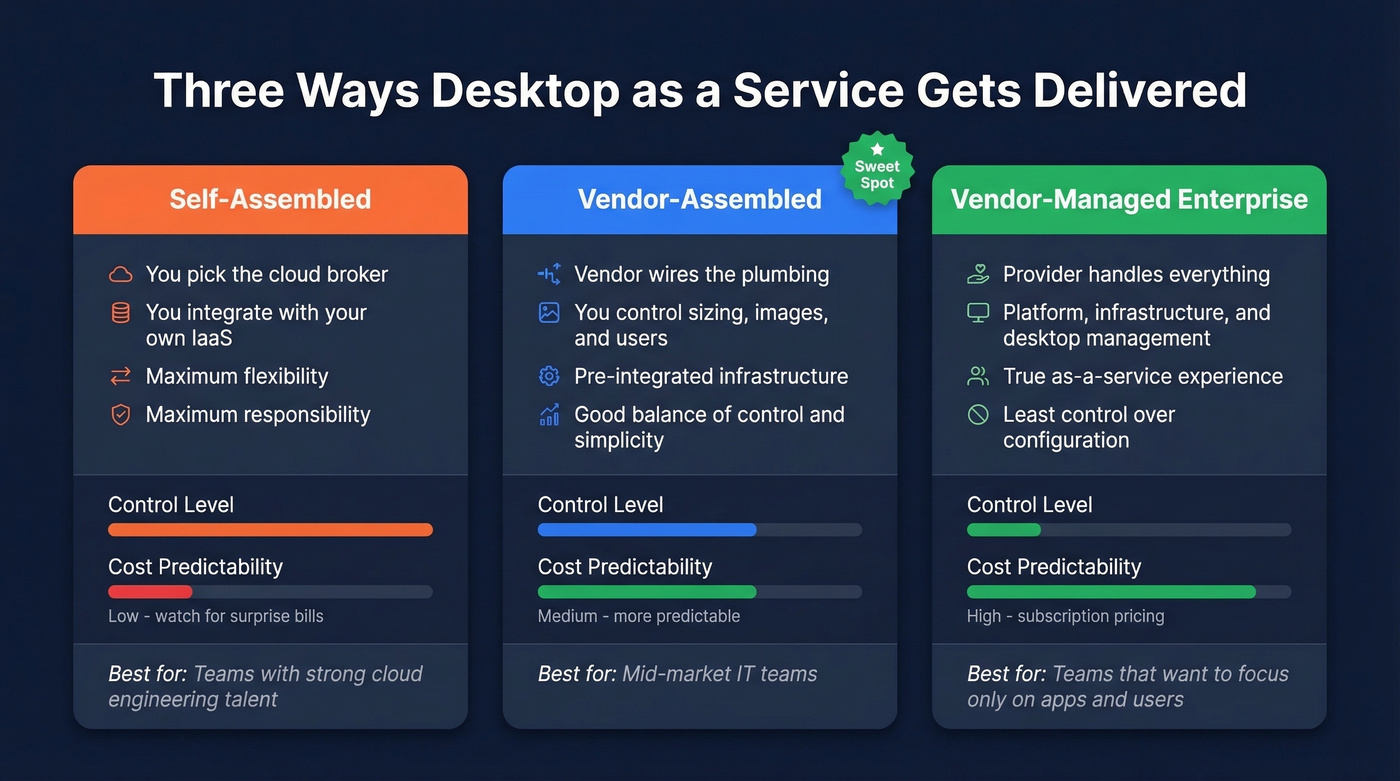
Not all Desktop as a Service is created equal. Gartner breaks the delivery model into three tiers, and the differences matter more than most buyers realize - especially when the first invoice arrives.
Self-Assembled
You pick a cloud virtualization broker and integrate it with your own IaaS. Maximum flexibility, maximum responsibility. You're essentially building a VDI-like environment in the cloud but using a third-party broker for session management. This works for teams with strong cloud engineering talent who want control over every layer. It's also where cost surprises hit hardest, because you're managing consumption billing across multiple services.
Vendor-Assembled
The vendor integrates the broker with cloud infrastructure and orchestrates the underlying services for you. You still make decisions about sizing, images, and user assignments, but the plumbing is pre-wired. It's the sweet spot for mid-market IT teams - enough control to customize, enough abstraction to avoid infrastructure babysitting.
Vendor-Managed Enterprise
The vendor provides everything: platform, cloud infrastructure, and management of the virtual desktops themselves. You hand over the keys and focus on your applications and users. This is the true "as a service" experience, but it comes with the least control. If you need specific network configurations, custom storage tiers, or unusual compliance setups, vendor-managed can feel constraining.
One warning across all three models: consumption-based billing varies dramatically. Teams budget for one number and get invoiced for something higher because egress charges, storage snapshots, and identity services weren't factored in.
Persistent vs Non-Persistent
This is a decision you'll make early, and it's harder to reverse than most vendors suggest.
| Factor | Persistent | Non-Persistent |
|---|---|---|
| Storage cost | Higher | Lower |
| Personalization | Full | Limited |
| Patching complexity | Higher | Lower |
| Best for | Knowledge workers, devs | Shift workers, kiosks |
Persistent desktops give each user a dedicated VM that retains their settings, files, and customizations between sessions. It feels like "their" computer. The tradeoff is higher storage costs and more complex patching - every persistent desktop is a unique snowflake that can drift from your golden image.
Non-persistent desktops reset to a clean state on logout. Cheaper to run, easier to patch (update the master image and you're done), and perfect for shift workers, call centers, or kiosk-style use cases where personalization doesn't matter. The decision usually comes down to user persona: if someone needs to install browser extensions, pin desktop shortcuts, and keep files locally, go persistent. If they log in, do a task, and log out, go non-persistent.
DaaS vs VDI
These two deliver the same end-user experience - a virtual desktop - but the ownership model is fundamentally different.
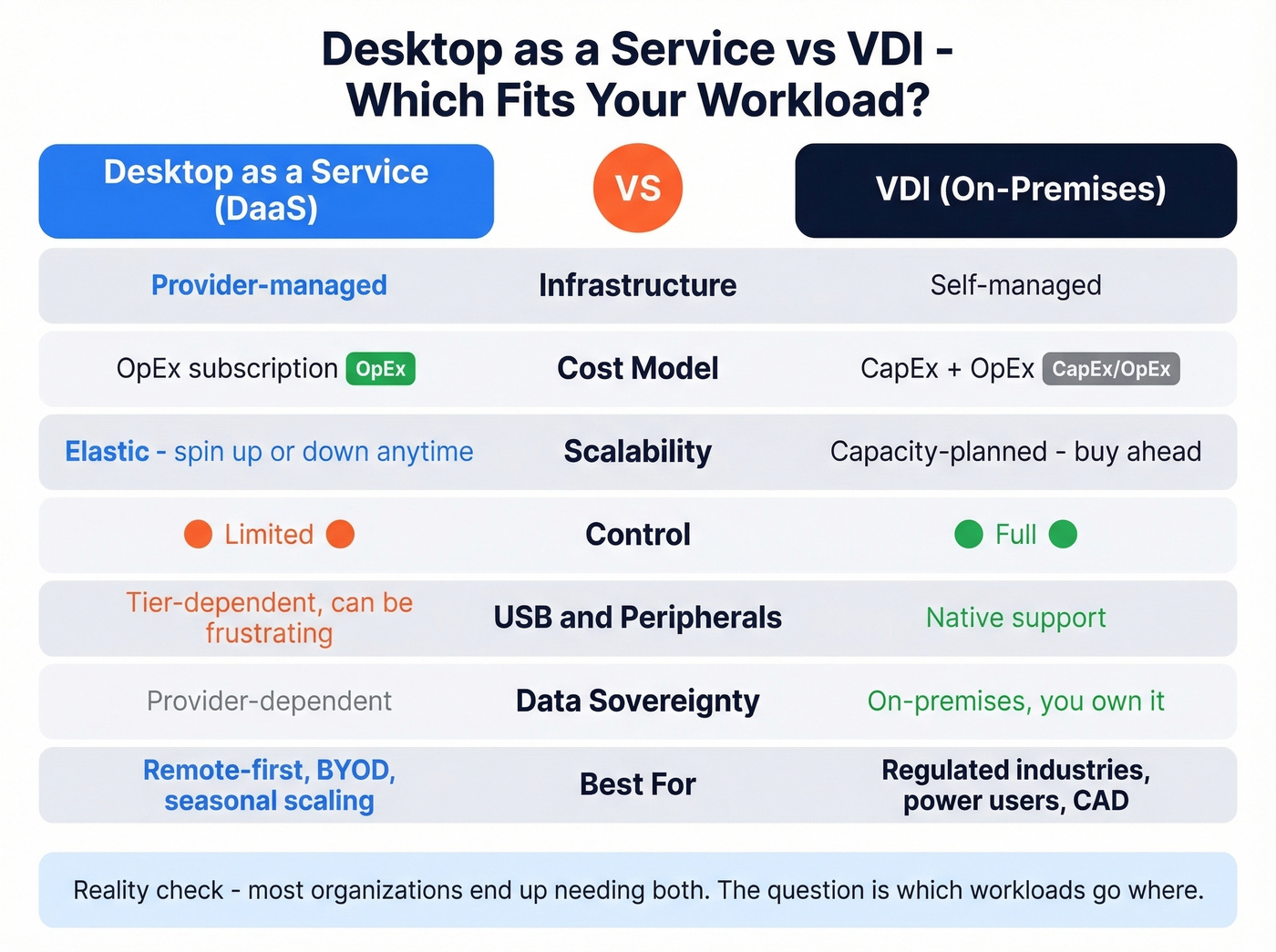
| Factor | Desktop as a Service | VDI |
|---|---|---|
| Infrastructure | Provider-managed | Self-managed |
| Cost model | OpEx (subscription) | CapEx + OpEx |
| Scalability | Elastic | Capacity-planned |
| Control | Limited | Full |
| USB/peripheral support | Tier-dependent | Native |
| Data sovereignty | Provider-dependent | On-premises |
| Best for | Remote-first, BYOD, scaling | Regulated, power users |
With VDI, you own everything - the hypervisor, the storage, the networking, the broker, the management layer. That means full control over performance tuning, peripheral support with USB redirection and multi-monitor setups, and data sovereignty. Your data never leaves your data center.
With cloud-hosted desktops, you trade that control for operational simplicity. The provider handles infrastructure scaling, patching, and availability. You pay monthly instead of buying servers. You can spin up 200 desktops for a seasonal project and shut them down when it's over.
Let's be honest: most organizations end up needing both. VDI wins when data sovereignty is non-negotiable - defense contractors, certain financial services, healthcare organizations bound by strict HIPAA interpretations. Power users who need native USB redirection for CAD peripherals, medical devices, or hardware security keys often find cloud desktop peripheral support frustrating. But for remote-first companies that need elastic scaling and geographic distribution, the hosted model is the obvious choice. The real question isn't "one or the other?" - it's "which workloads go where?"

You just read about Data as a Service - Prospeo is what it looks like in practice. 300M+ profiles, 98% email accuracy, 7-day refresh cycle, and credit-based pricing starting free. No contracts, no infrastructure to maintain.
Access verified B2B data on demand - the way DaaS was meant to work.
The Real Cost
Most providers don't publish straightforward, all-in pricing. Vendors quote a base rate that excludes things you'll actually need.
| Provider | Pricing Model | Typical Range/User/Mo | Notes |
|---|---|---|---|
| Azure Virtual Desktop | Consumption | $20-$50; $60-$120 GPU | Windows multi-session can materially reduce cost |
| AWS WorkSpaces | Monthly or hourly | $25-$75 mo; hourly options available | Hourly suits part-timers |
| Citrix DaaS | License + cloud | $10-$25 license + infra | Two-part cost; HDX premium |
| Omnissa Horizon Cloud | License + cloud | $10-$20 platform + infra | Strong hybrid VDI + DaaS |
| Hidden costs | Egress, snapshots, ID | Add 12-27% to base | Budget 15-25% overhead min |
Those base numbers look manageable until you factor in the hidden cost multiplier. Storage snapshots, outbound bandwidth, identity services like Azure AD or Okta, monitoring tools, and backup add 12-27% to your monthly bill in real deployments. We've seen this firsthand across client conversations - our rule of thumb is to budget 15-25% above whatever the provider's calculator spits out. If the calculator says $35/user/month, plan for $40-$44.
Azure Virtual Desktop's Windows multi-session capability is one of the biggest cost levers in the market right now. If your users are running Office apps and browsers, multi-session is usually the move. AWS WorkSpaces' hourly billing is underrated for part-time users and contractors - run the math for your actual usage patterns before defaulting to monthly.
Top Providers in 2026
Gartner's Magic Quadrant for Desktop as a Service names four Leaders. Here's what each actually brings to the table.
| Provider | Best For | Protocol | Compliance Edge | Gartner MQ |
|---|---|---|---|---|
| Azure Virtual Desktop | Microsoft shops | RDP | Conditional Access | Leader |
| AWS WorkSpaces | Fast deployment | WSP/PCoIP | SOC 2, HIPAA | Leader |
| Citrix DaaS | Best UX | HDX | FedRAMP High | Leader |
| Omnissa Horizon Cloud | Hybrid VDI + DaaS | Blast Extreme | Region pinning | Leader |
Azure Virtual Desktop
If your org runs Microsoft 365 and Azure AD, stop reading - AVD is your default. Windows multi-session is a major cost lever, and the integration with Conditional Access and Microsoft Defender for Endpoint means your security stack extends natively into virtual desktops. The management experience is still rougher than Citrix's, and consumption-based pricing requires active cost monitoring. Default doesn't mean simple, but fighting your existing Microsoft investment rarely pays off.
AWS WorkSpaces
Skip this if you need deep Microsoft 365 integration or Citrix-level multimedia optimization. Pick this if you want desktops running fast with minimal configuration. WorkSpaces is a strong on-ramp and a great option for part-time or intermittent users thanks to hourly billing. It also supports Amazon Linux alongside Windows, making it a solid choice for teams that aren't locked into the Microsoft ecosystem. The feature set is thinner than Citrix or AVD for complex enterprise deployments, but for straightforward use cases, that simplicity is a feature.
Citrix DaaS
Citrix's HDX protocol is widely regarded as the UX benchmark for latency-sensitive workloads and multimedia-heavy sessions. It also holds FedRAMP High authorization, making it a top option for U.S. federal agencies and contractors. The catch is the two-part pricing model - you pay Citrix for the platform license and separately for the underlying cloud infrastructure on Azure, AWS, or Google Cloud. That opacity makes budgeting harder than it should be.
In IT communities, Citrix deployments also generate complaints about slow logon times from profile bloat and VDA registration failures. The consensus on r/sysadmin is that HDX is still the gold standard for user experience - you'll just work harder for those cost projections.
Omnissa Horizon Cloud
The hybrid play. If you're migrating from on-prem VMware Horizon, Omnissa (formerly VMware Horizon Cloud) offers one of the smoothest transition paths in the market. Region pinning gives you explicit control over where data lives for sovereignty requirements. For greenfield deployments without existing VMware investment, the value proposition is less compelling - you'd likely be better served by AVD or WorkSpaces.
Common Pitfalls
Your help desk is drowning in "my desktop is slow" tickets after rollout. It happens more often than vendors want to admit, and it's genuinely frustrating when you've spent months on a migration only to face a wall of complaints in week one. In practitioner communities, the same three issues surface repeatedly: printing and USB peripheral problems, unexpected cost spikes, and profile management headaches.
Network latency and connectivity. Cloud desktops stream pixels over a network. When that network hiccups with packet loss, jitter, or bandwidth congestion, users feel it immediately. Latency above 120ms roughly doubles help-desk call volume. The fix isn't just "get faster internet." You need end-to-end visibility across LAN, Wi-Fi, ISP backbone, and the cloud provider's network to isolate where the bottleneck actually lives.
Undersized provisioning. Teams consistently under-provision CPU, memory, and storage to save money, then wonder why desktops crawl during peak hours. The consumption model makes this tempting, but the penalty for getting it wrong is a flood of performance complaints. Monitor real-time resource utilization from day one, not day thirty.
Application compatibility. Legacy apps and specialized software don't always behave in virtualized environments. GPU-dependent applications, apps with hardcoded local paths, and software with aggressive DRM can all break in ways that are hard to diagnose remotely. Budget for monitoring and digital experience management tools from the start - not as an afterthought when tickets spike.
Data as a Service Challenges
While the desktop side has well-documented pitfalls, data delivery challenges deserve their own attention - especially for B2B teams sourcing data at scale.
The biggest challenge is data quality. Records decay fast: people change jobs, companies merge, and phone numbers go stale. A sourcing database that was accurate six months ago can have 20-30% bounce rates today if the provider doesn't refresh aggressively. Prospeo's 7-day refresh cycle addresses this directly - the industry average sits around six weeks, which means most providers are serving you data that's already going stale by the time you download it.
Data normalization is another headache. Different providers format job titles, company names, and addresses differently, and merging them without duplicates or conflicts requires deliberate tooling. Teams building a B2B data strategy need to define their requirements before signing contracts, or they'll end up paying for datasets they can't actually use.
Compliance adds yet another layer. GDPR, CCPA, and evolving privacy regulations mean that sourcing data - whether for sales outreach or candidate search - requires clear consent chains and opt-out mechanisms. The best providers handle this natively; others leave it to you. (If you need a practical framework, start with B2B compliance and work backward from your outreach motion.)
Benefits of Data as a Service
Despite the challenges, the benefits are substantial for teams that choose the right provider and use case.
Speed to pipeline. A contact dataset that would take weeks to build manually is available in minutes through an on-demand platform. One of our customers, Stack Optimize, went from $0 to $1M ARR by building their outbound engine on verified data - deliverability stayed above 94% with bounce rates under 3% and zero domain flags across all clients.
Market expansion. On-demand access to decision-maker data lets teams enter new markets without building proprietary research operations. Credit-based and pay-per-record pricing means you scale spend with actual usage - no six-figure annual contracts for data you don't need yet.
Data-driven sales and marketing. When marketing and sales share the same verified dataset, campaign targeting improves and handoff friction drops. For teams running outbound campaigns, the ability to export a contact list in CSV and push it directly into HubSpot, Salesforce, or an email sequencer like Instantly eliminates manual data entry entirely.
How to Choose a Provider
Five questions that'll narrow the field fast:
What cloud are you already on? If you're running Azure AD and Microsoft 365, AVD is the path of least resistance. If you're AWS-native, WorkSpaces integrates cleanly. Fighting your existing cloud investment rarely pays off.
What are your compliance requirements? FedRAMP High narrows you toward Citrix. Strict data sovereignty with region-level control points to Omnissa. Standard SOC 2 and HIPAA? All four leaders handle it.
Who are your users? Knowledge workers who need persistent, personalized desktops are a different deployment than call center agents cycling through non-persistent sessions. Map your user personas before you pick a provider - the architecture decisions cascade from there.
How do you want to pay? If predictable monthly billing matters, lean toward fixed per-user pricing. For teams that want to optimize for actual usage, AWS WorkSpaces' hourly model or AVD's consumption billing can save money but require active cost management.
Do you need hybrid? If some desktops must stay on-prem while others move to the cloud, Omnissa's hybrid VDI + cloud desktop story is the strongest. Trying to bolt hybrid onto a pure-cloud provider usually ends in architectural regret.
For Data as a Service buyers evaluating B2B prospecting tools, the questions shift: What's the refresh cycle? What's the verified accuracy rate? Can you export to your existing CRM and sequencing tools? Does the pricing model match your volume - credit-based for variable usage, subscription for predictable high-volume needs? (If you're comparing vendors, start with the best B2B databases and then narrow by workflow fit.)
Building pipeline shouldn't require months of assembling data sources. Prospeo delivers verified emails, direct dials, and intent signals through API, CSV, or Chrome extension - at $0.01 per email. That's 90% cheaper than legacy providers with higher accuracy.
Stop building data infrastructure. Start consuming verified contacts on demand.
FAQ
What does DaaS stand for?
DaaS stands for Desktop as a Service or Data as a Service. Desktop as a Service - cloud-hosted virtual desktops managed by a provider - is the more common enterprise usage. Data as a Service refers to on-demand data delivery via APIs or browser tools.
How much does Desktop as a Service cost per user?
Typical pricing runs $20-$75 per user per month for standard workloads, with GPU workloads pushing $60-$120. Budget 15-25% above the quoted base rate for hidden costs like egress, identity services, and storage snapshots.
Is DaaS better than VDI?
Desktop as a Service is better for remote-first teams, seasonal scaling, and avoiding infrastructure management. VDI wins for strict data sovereignty and advanced peripheral support. Most organizations end up running a hybrid of both based on workload requirements.
Who are the leading providers in 2026?
Gartner's Magic Quadrant names four Leaders: Microsoft (Azure Virtual Desktop), AWS (WorkSpaces), Citrix (Citrix DaaS), and Omnissa (Horizon Cloud). Microsoft and AWS lead on cloud-native simplicity, Citrix on end-user experience, and Omnissa on hybrid migration.
What's a good Data as a Service tool for B2B prospecting?
Prospeo is a strong starting point - 300M+ profiles, 98% email accuracy, 7-day data refresh, and a free tier with 75 credits. For broader analytics datasets, Snowflake Marketplace and AWS Data Exchange cover non-contact use cases. Bombora specializes in intent signals.