

The 8 Best DaaS Providers in 2026 (Compared With Real Pricing)
Less than one in five CISOs say their employees are happy with their virtual desktop solution. That's a damning number for a market growing from $4.3 billion in 2025 to $6.0 billion by 2029. The problem isn't that DaaS doesn't work - it's that most teams pick the wrong DaaS provider, overpay for specs they don't need, and then blame the technology when the experience is terrible.
We've watched this play out across dozens of deployments. The org that buys Citrix because it's the "enterprise standard" when a 30-person team just needs Windows 365. The AWS shop that spins up WorkSpaces without noticing the RDS SAL fee buried in the billing. Let's cut through it.
Our Picks (TL;DR)
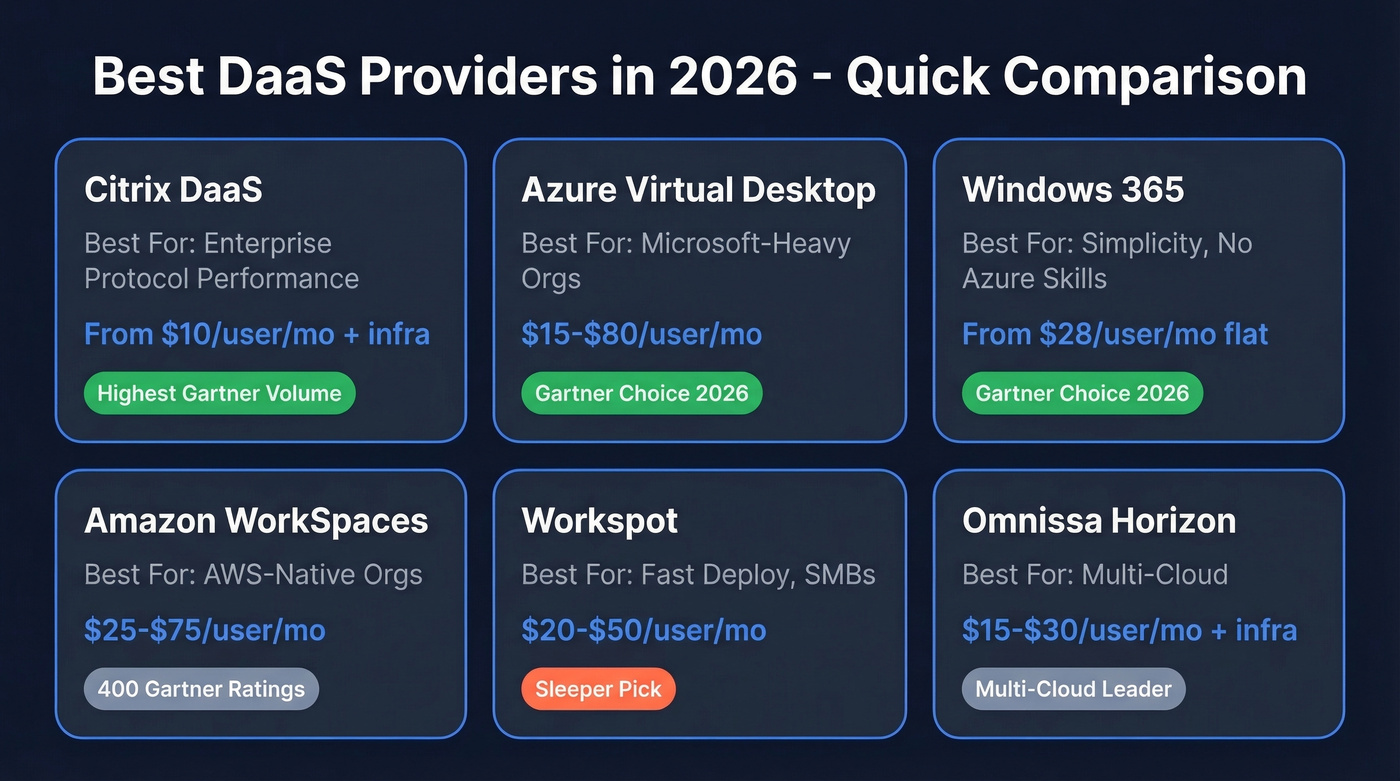
| Best For | Provider | Starting Price |
|---|---|---|
| Enterprise protocol performance | [Citrix DaaS](#citrix-daas - best-for-enterprise-protocol-performance) | $10/user/mo + infra |
| Microsoft-heavy orgs | [Azure Virtual Desktop](#azure-virtual-desktop - best-for-microsoft-shops) | ~$15-$80/user/mo |
| Simplicity (no Azure expertise) | [Windows 365](#windows-365 - best-for-simplicity) | $28/user/mo |
| AWS-native orgs | [Amazon WorkSpaces](#amazon-workspaces - best-for-aws-native-orgs) | ~$25-$75/user/mo |
| Fast deployment / SMBs | [Workspot](#workspot - the-sleeper-pick) | ~$20-$50/user/mo |
| All-in-one for small teams | [V2 Cloud](#v2-cloud - best-for-small-teams) | ~$40-$70/user/mo |
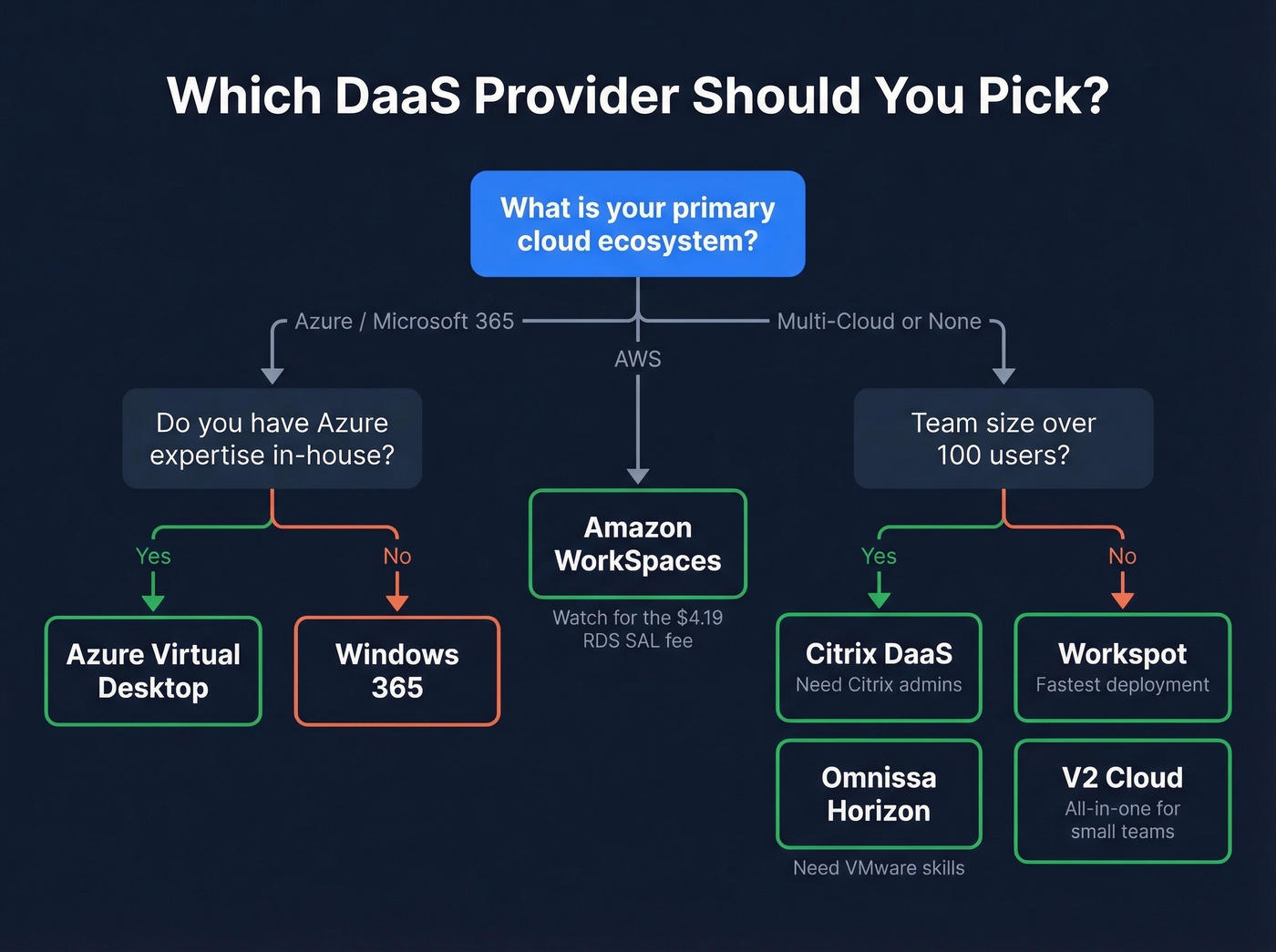
If you already know your cloud ecosystem, the decision is half-made. Microsoft shops should start with AVD or Windows 365. AWS orgs should look at WorkSpaces first. Everyone else, keep reading.
What Is Desktop as a Service?
Desktop as a Service is a cloud-delivered virtual desktop model where the provider manages the control plane - the orchestration layer that handles image updates, session brokering, app publishing, and A/V optimization. You get a full Windows desktop streamed to any endpoint via a remote protocol, without owning or maintaining the underlying infrastructure.
The distinction from traditional VDI: DaaS shifts everything to OPEX. No hardware refresh cycles, no capacity planning spreadsheets, no three-month implementation timelines. Gartner projects that by 2027, virtual desktops will be cost-effective for 95% of workers - up from 40% in 2019 - and will serve as the primary workspace for 20% of the workforce, double the 2019 figure. The economics have fundamentally changed.
A modern DaaS platform supports both persistent desktops and nonpersistent pooled sessions. Most providers offer both, but the pricing gap between them is significant: persistent costs more, pooled scales better.
DaaS vs VDI vs RDS
Before picking a provider, confirm DaaS is the right model:
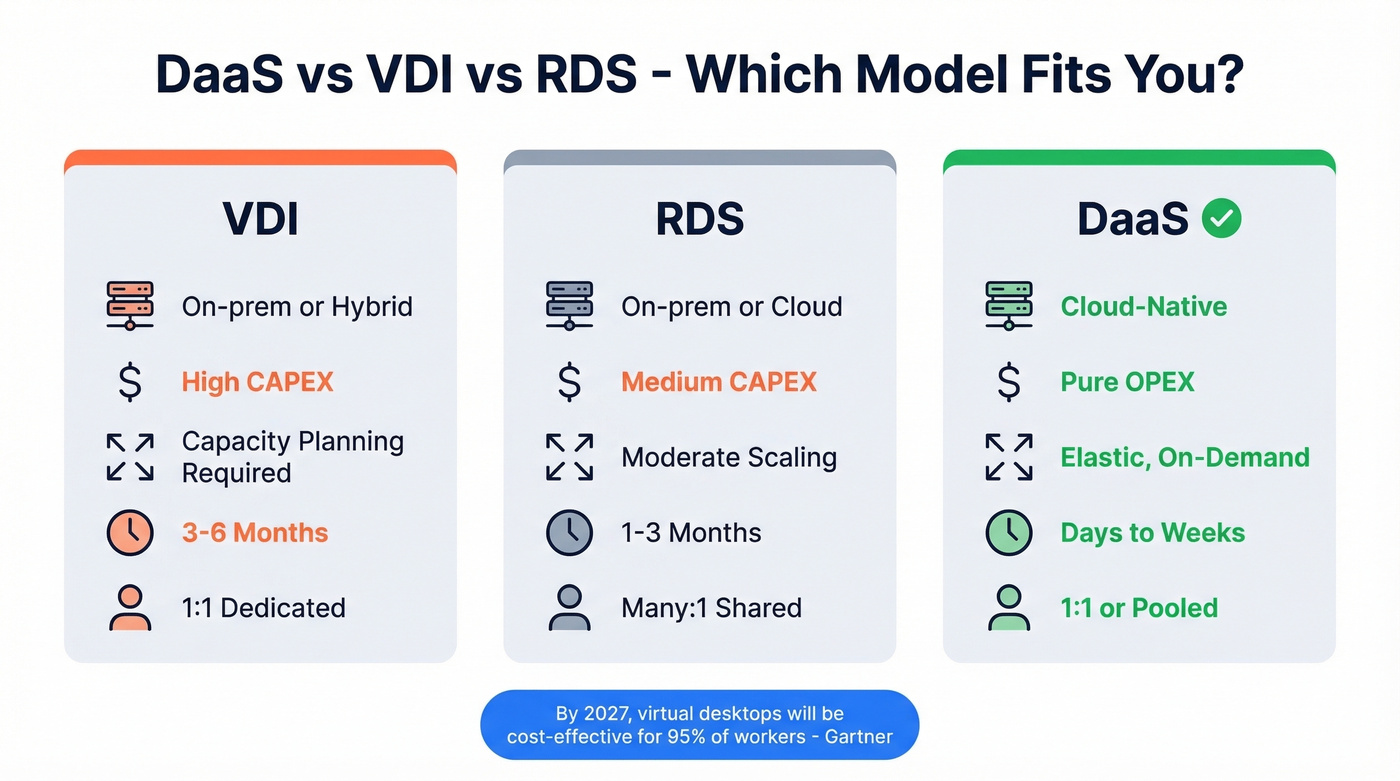
| VDI | RDS | DaaS | |
|---|---|---|---|
| Deployment | On-prem / hybrid | On-prem / cloud | Cloud-native |
| Cost model | High CAPEX | Medium CAPEX | Pure OPEX |
| Scalability | Capacity planning | Moderate | Elastic / on-demand |
| User density | 1:1 | Many:1 | 1:1 or pooled |
| Implementation | 3-6 months | 1-3 months | Days to weeks |
The implementation timeline is the killer differentiator. A cloud desktop service deployed in days versus a VDI rollout that takes a quarter - that's not a marginal improvement, it's a fundamentally different project scope. VDI still makes sense when you need full on-prem control or have already sunk the CAPEX into hyperconverged infrastructure. For everyone else, DaaS is the default in 2026.
How to Choose the Right Provider
Not all desktop as a service providers solve the same problem. Before you demo anything, run through this:
- GPU readiness. Engineers, designers, and data scientists need GPU-enabled instances. Not every provider offers them at reasonable prices.
- Persona-based provisioning. Your finance team and your developers need different specs. Can you provision distinct images and resource tiers without spinning up separate environments?
- Hybrid deployment support. Some workloads can't leave your data center. Does the provider support a cloud control plane with on-prem compute?
- Pricing transparency. Consumption-based billing sounds great until the invoice arrives 3x what you expected. Flat-rate or per-user pricing is easier to budget.
- Compliance certifications. SOC 2, HIPAA, FedRAMP, ISO 27001 - verify your shortlisted vendors hold what your compliance team requires. This isn't negotiable for regulated industries.
- Protocol performance. HDX, Blast, RDP - the remoting protocol determines whether users feel like they're on a local machine or fighting input lag.
- Autoscaling and license sharing. Can the platform scale down during off-hours? For shift-based workers, can you share licenses across non-overlapping schedules?
- BYOD and contractor access. If you onboard contractors or support bring-your-own-device policies, check whether the provider offers secure enclave options or session isolation without full device enrollment.

Choosing the right DaaS provider means reaching the right stakeholders - IT directors, CISOs, and infrastructure leads. Prospeo's 30+ search filters let you target by technographics, so you can build lists of companies already running Citrix, AVD, or WorkSpaces and reach their buyers with 98% verified emails.
Filter by tech stack. Reach DaaS buyers directly. Close faster.
The 8 Best DaaS Providers in 2026
Citrix DaaS - Best for Enterprise Protocol Performance
Use this if: You're a large enterprise with complex app estates, need HDX protocol performance for latency-sensitive workloads, and have dedicated Citrix admins.
Skip this if: You're under 100 users or want a simple setup.
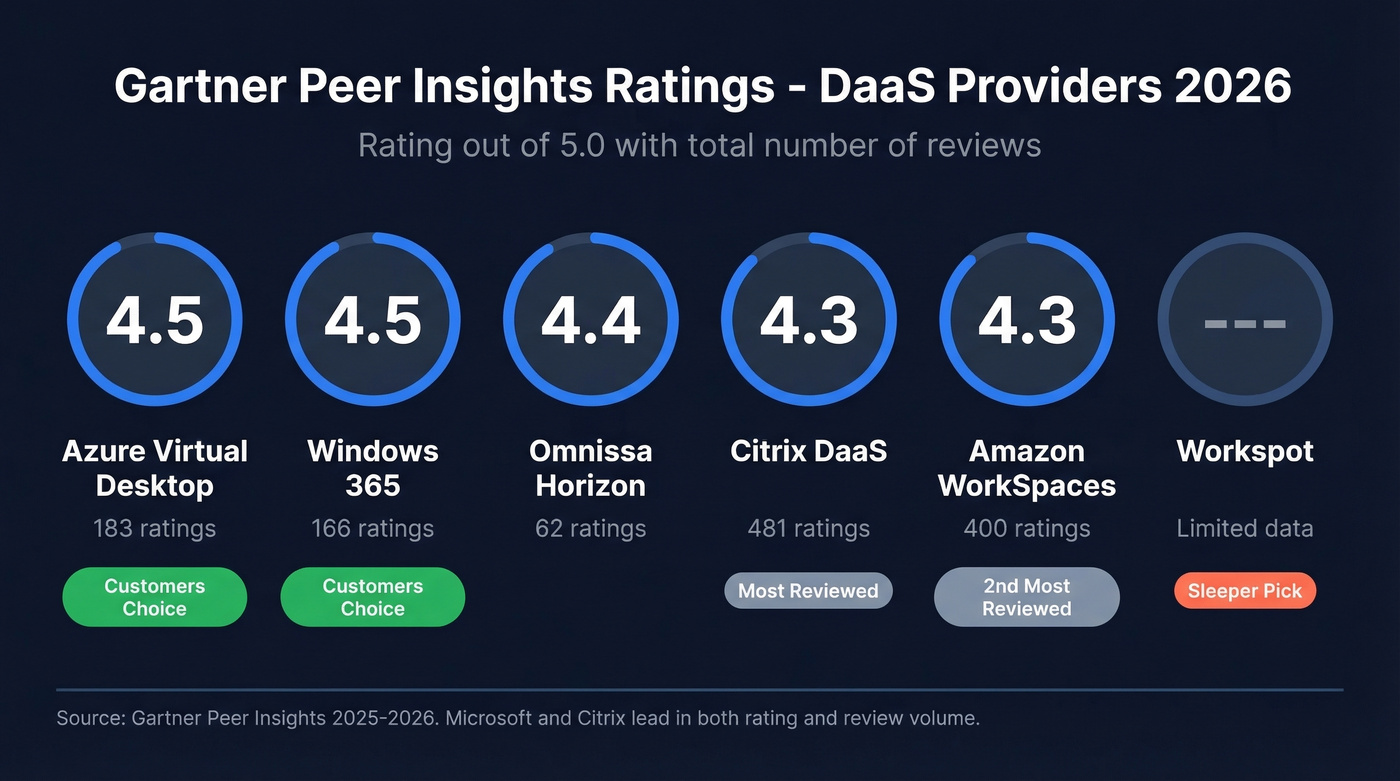
Citrix DaaS is the legacy heavyweight that still earns its spot. The HDX protocol delivers noticeably better multimedia and peripheral redirection than vanilla RDP, and for organizations already running Citrix on-prem, the cloud migration path is well-documented. Gartner Peer Insights gives it 4.3/5 across 481 ratings - the highest volume in the category.
Pricing runs across four tiers: Standard at $10/user/mo (plus cloud infrastructure costs), Advanced Plus at $13, Premium at $20, and Premium Plus at $23. That $10 entry point looks attractive until you add Azure or GCP compute underneath it. A realistic all-in cost for a mid-tier deployment lands closer to $30-$50/user/mo.
Here's the thing about Citrix deployments: they blow past budget not on licensing but on the work around it. Endpoint compatibility testing, legacy app remediation, printing architecture changes, master image problems that replicate at scale, training - budget for all of it.
Azure Virtual Desktop - Best for Microsoft Shops
Azure Virtual Desktop earned its Gartner Customers' Choice 2026 badge (4.5/5, 183 ratings) for good reason. The multi-session Windows 11 capability is unique - you get a full desktop experience at shared-session economics. If you're already paying for M365 E3 or E5, you're entitled to AVD at no additional license cost; you only pay for Azure compute and storage.
That consumption model is both AVD's strength and its trap. There's no fixed per-user price. Depending on VM sizing, storage tier, and usage patterns, expect ~$15-$80/user/mo. Without Azure expertise in-house, you'll either overprovision and bleed money or underprovision and field complaints. If you don't want to hire for it, look at Windows 365 instead. But for teams that already speak Azure, AVD gives you more control and lower per-user costs at scale than any other Microsoft option.
Windows 365 - Best for Simplicity
Windows 365 is Microsoft's answer to "what if DaaS were as simple as buying a SaaS license?" Pick a spec, pay a flat rate, get a Cloud PC. No Azure portal, no VM sizing decisions, no surprise bills. It also carries a Gartner Customers' Choice 2026 badge at 4.5/5 (166 ratings).
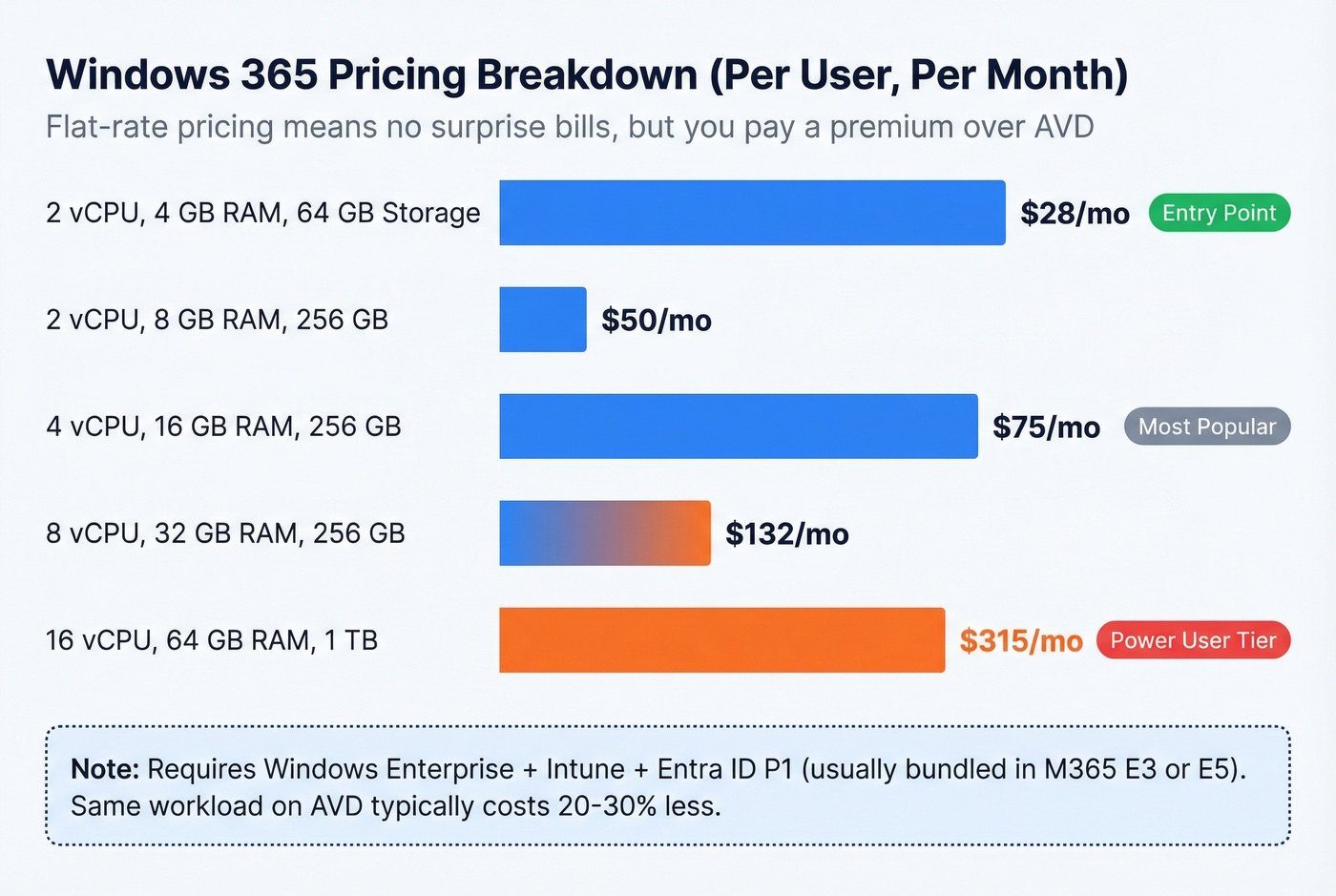
- 2 vCPU / 4 GB / 64 GB: $28/mo
- 2 vCPU / 8 GB / 256 GB: $50/mo
- 4 vCPU / 16 GB / 256 GB: $75/mo
- 8 vCPU / 32 GB / 256 GB: $132/mo
- 16 vCPU / 64 GB / 1 TB: $315/mo
You pay a premium for that simplicity - the same workload on AVD typically costs 20-30% less. Factor in the licensing prerequisites too: Windows Enterprise, Microsoft Intune, and Entra ID P1, usually bundled in M365 Business Premium, E3, or E5. If you're not already on those plans, the total cost climbs fast.
Amazon WorkSpaces - Best for AWS-Native Orgs
Amazon WorkSpaces is the most underrated virtual desktop provider on the market. It doesn't get the marketing attention of Citrix or Microsoft, but it carries a solid 4.3/5 on Gartner Peer Insights across 400 ratings - the second-highest volume after Citrix.
If your infrastructure already runs on AWS, WorkSpaces should be your default, not an afterthought. The billing model alone justifies it. WorkSpaces Personal offers AlwaysOn (flat monthly) or AutoStop (base fee plus hourly usage), and WorkSpaces Pools provides nonpersistent sessions for task workers. One gotcha worth flagging: Windows license-included bundles carry a $4.19/user/mo RDS SAL fee that's easy to miss in the pricing calculator. Expect all-in costs of ~$25-$75/user/mo depending on instance size and usage pattern.
Omnissa Horizon - Best for Multi-Cloud
Formerly VMware Horizon Cloud, Omnissa Horizon is the multi-cloud play. It supports deployments across Azure, IBM Cloud, and on-prem infrastructure from a unified management plane - a genuine differentiator for organizations that refuse to be locked into a single hyperscaler. Gartner rates it 4.4/5 (62 ratings), and Gartner's 2025 Magic Quadrant coverage names Microsoft, AWS, Citrix, and Omnissa as Leaders.
Pricing isn't published, but expect ~$15-$30/user/mo for the license plus your own infrastructure costs. You need VMware expertise to get value here. If your team doesn't already speak vSphere, the learning curve will eat your first quarter.
Workspot - The Sleeper Pick
Workspot is the DaaS provider most IT teams haven't heard of, and that's a shame. It's cloud-native from the ground up - no legacy VDI architecture bolted onto a cloud control plane - and typically deploys in hours rather than weeks. Flat-rate pricing in the ~$20-$50/user/mo range makes budgeting straightforward.
For SMBs and mid-market teams that want desktop as a service without the complexity of Citrix or the Azure expertise AVD demands, Workspot is the fastest path to production. The tradeoff: a smaller ecosystem with fewer third-party integrations, less community documentation, and a thinner partner network. The consensus on r/sysadmin threads is that Workspot punches above its weight for the price, but you'll be more on your own when troubleshooting edge cases.
V2 Cloud - Best for Small Teams
V2 Cloud targets the sub-50-user segment that enterprise providers largely ignore. Pricing is typically ~$40-$70/user/mo with an all-in model that avoids separate cloud infrastructure bills. That transparency is V2 Cloud's real differentiator - you know exactly what you're paying before you sign.
The platform won't scale to thousands of seats. But for a 10-40 person team that needs virtual desktops without an IT department, it's a pragmatic choice.
Parallels RAS - Budget License Layer
Parallels RAS is a license-only play at around ~$5-$10/user/mo - infrastructure is your responsibility. Gartner rates it 4.4/5 (54 ratings). Best for organizations that already manage their own compute and just need a lightweight orchestration layer on top. Don't expect hand-holding.
DaaS Pricing Comparison
We dug through pricing pages, calculators, and community discussions so you don't have to:
| Provider | Entry Price | Mid-Tier | Enterprise | Notes |
|---|---|---|---|---|
| Citrix DaaS | $10/user/mo | $13-$20/user/mo | $23/user/mo | Subscription + infra; infra often doubles the license |
| Azure Virtual Desktop | ~$15/user/mo | ~$40/user/mo | ~$80/user/mo | Consumption billing; unpredictable without FinOps |
| Windows 365 | $28/user/mo | $75/user/mo | $315/user/mo | Flat per-user; M365 licensing prereqs |
| Amazon WorkSpaces | ~$25/user/mo | ~$50/user/mo | ~$75/user/mo | AlwaysOn or AutoStop; $4.19/mo RDS SAL fee |
| Omnissa Horizon | ~$15/user/mo | ~$22/user/mo | ~$30/user/mo | License + infra; VMware expertise required |
| Workspot | ~$20/user/mo | ~$35/user/mo | ~$50/user/mo | Flat rate; smaller ecosystem |
| V2 Cloud | ~$40/user/mo | ~$55/user/mo | ~$70/user/mo | All-in pricing; limited at scale |
| Parallels RAS | ~$5/user/mo | ~$7/user/mo | ~$10/user/mo | License only; you manage infra |
The spread from $5 to $315/user/mo tells you everything about how different these products are. Comparing Parallels RAS to Windows 365 is like comparing a bare-metal server to a managed SaaS app - technically the same category, practically different universes.
The Data Layer Your Virtual Desktops Need
Most DaaS evaluations miss something obvious: the desktop is just a container. A perfectly provisioned Cloud PC is worthless if your CRM is full of stale contacts and bounced emails. For remote sales teams running DaaS environments, the data layer matters as much as the desktop itself.
Selling DaaS solutions or migrating enterprises to virtual desktops? Stop guessing who owns the decision. Prospeo gives you 125M+ verified mobile numbers and intent data across 15,000 topics - so you reach IT leaders actively evaluating desktop-as-a-service providers.
Connect with in-market DaaS buyers before your competitors do.
5 DaaS Deployment Mistakes
1. Picking a provider based on brand name instead of workload fit. Citrix is the "safe" enterprise choice, but a 40-person company is buying complexity it doesn't need. We've seen teams spend six figures on Citrix licensing and implementation when Windows 365 would have had them live in a week.
2. Optimizing cost over user experience. Undersized VMs save money on paper and generate helpdesk tickets in practice. A laggy desktop kills adoption faster than any budget overrun.
3. Ignoring network latency for remote workers. Test latency from your actual user locations before committing, not from your office. This is the single most common oversight in our experience.
4. Skipping user profile management planning. Decide on FSLogix or Citrix Profile Management before day one. Retrofitting profile management after launch is painful.
5. Neglecting endpoint security posture. DaaS shifts the perimeter - unmanaged endpoints connecting to cloud desktops create new attack surfaces. Enforce conditional access and endpoint compliance checks from launch.
When DaaS Is the Wrong Choice
Look, DaaS isn't universal. If your team runs GPU-heavy local workloads where latency degrades the experience - real-time 3D rendering, high-frequency trading - local hardware still wins. Teams with unreliable internet will have a miserable experience regardless of provider.
For very small teams under 10 users, remote desktop tools like Splashtop or a simple VPN are simpler and cheaper. And in highly regulated environments where data must remain on-premises with zero cloud touchpoints, traditional VDI remains the compliant path. No cloud desktop service can fully replace on-prem VDI when air-gapped compliance is a hard requirement.
FAQ
What's the cheapest DaaS provider in 2026?
Parallels RAS starts at ~$5/user/mo for the license alone, but you manage your own infrastructure. For all-in pricing with compute and storage included, Windows 365 starts at $28/user/mo. WorkSpaces AutoStop can undercut that for light-usage workers.
Is DaaS better than VDI?
For most organizations in 2026, yes. A cloud-hosted virtual desktop deploys in days versus months, shifts CAPEX to OPEX, and eliminates hardware refresh cycles. VDI still wins when you need full on-premises control or can't touch a public cloud.
Can I run GPU workloads on DaaS?
Yes - Citrix DaaS, Azure Virtual Desktop, and Amazon WorkSpaces all support GPU-enabled instances. Expect $100-$300+/user/mo depending on the GPU tier, which is still cheaper than buying and refreshing physical workstations every three years.
How do I avoid a failed deployment?
Match the provider to your actual workload - not your brand preference. Test network latency from real user locations. Plan profile management from day one. And budget for end-user training; the helpdesk floods in the first two weeks are predictable and preventable.
Does DaaS work for B2B sales teams?
Absolutely. Virtual desktops give reps secure, consistent access to CRMs, dialers, and prospecting tools from any location. Pair your DaaS platform with a data provider like Prospeo and reps can prospect from any device without worrying about data exports or local storage.