

Dialpad vs Zoom: Which Phone System Actually Delivers in 2026?
A RevOps lead we know ran a Zoom Phone migration last year. Day one after go-live, nobody could make or receive calls. Support was gated behind a broken AI assistant that wouldn't accept their PIN. The ticket came back labeled "low priority." They had a competitor running within 48 hours.
That story captures the real stakes of the Dialpad vs Zoom decision - and it's why picking a phone system based on feature lists alone is a mistake.
30-Second Verdict
Pick Zoom Phone if video meetings are your hub and you want one app for calls, meetings, and chat. It has the better SLA (99.999%), the higher G2 rating (4.6/5 from 2,640 reviews), and documented call-quality benchmarks.
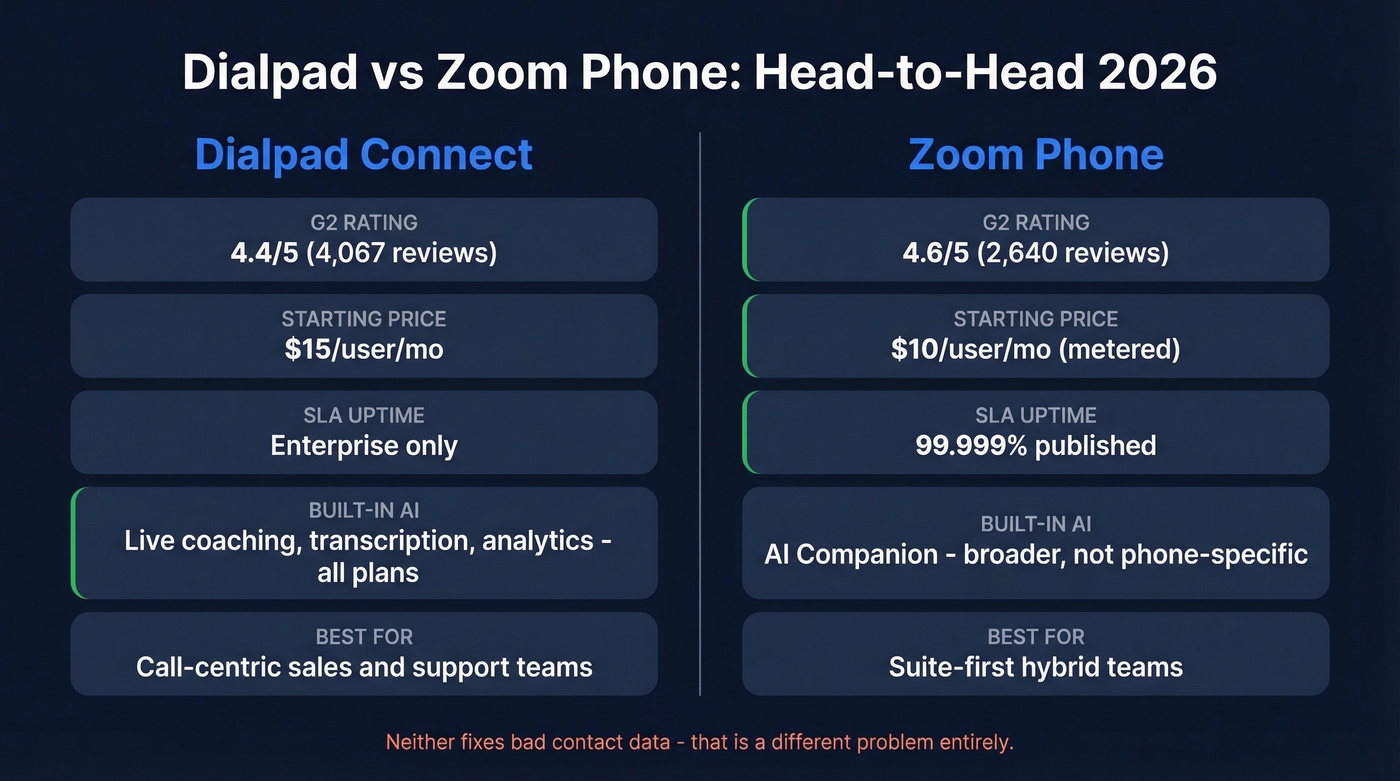
Pick Dialpad if your phone system is a revenue tool. Built-in call coaching, live transcription, and real-time analytics come standard - no add-on fees.
Skip both if your real bottleneck isn't the dialer but reaching the right people. Prospeo gives you 98%-accurate emails and 125M+ verified mobile numbers with a 30% pickup rate, so reps spend time talking instead of dialing dead numbers.
What Are We Actually Comparing?
Zoom sells Zoom Workplace as the suite, Zoom Meetings for video, and Zoom Phone as the VoIP/UCaaS product. Dialpad sells Dialpad Connect for UCaaS, Dialpad Meetings, and Dialpad Ai Contact Center.
This article compares Dialpad Connect vs Zoom Phone - the business phone products. If you're evaluating contact center tiers, that's a different comparison entirely: Zoom starts at ~$69/user/mo, Dialpad at ~$80/user/mo. For upgrade-path planning, Gartner's 2026 CCaaS Magic Quadrant positioned Zoom as a Niche Player, while Dialpad was an Honorable Mention.
Pricing and True Cost
Sticker price is misleading for both platforms. Here's what you actually pay.
Zoom Phone Plans
| Metered | Unlimited | Global Select | Pro Plus Bundle | Business Plus Bundle | |
|---|---|---|---|---|---|
| $/user/mo | $10 | $15 | $20 | ~$18.33 | ~$22.49 |
| Key gate | Per-min outbound | Unlimited domestic | 40+ countries | Up to 99 users | 10-250 users |
| Watch out | Power Pack extra | Power Pack extra | Power Pack extra | Annual billing only | Annual billing only |
Dialpad Plans
| Standard | Pro | Enterprise | |
|---|---|---|---|
| $/user/mo | ~$15 | ~$25 | Quote-based (~$35+) |
| Key gate | 3 ring groups, 250 SMS/mo | 25 ring groups, intl SMS | Unlimited, SLA |
| Watch out | SMS overage $0.008/msg | 3-seat minimum | 100-seat minimum |
What Actually Changes Your Bill
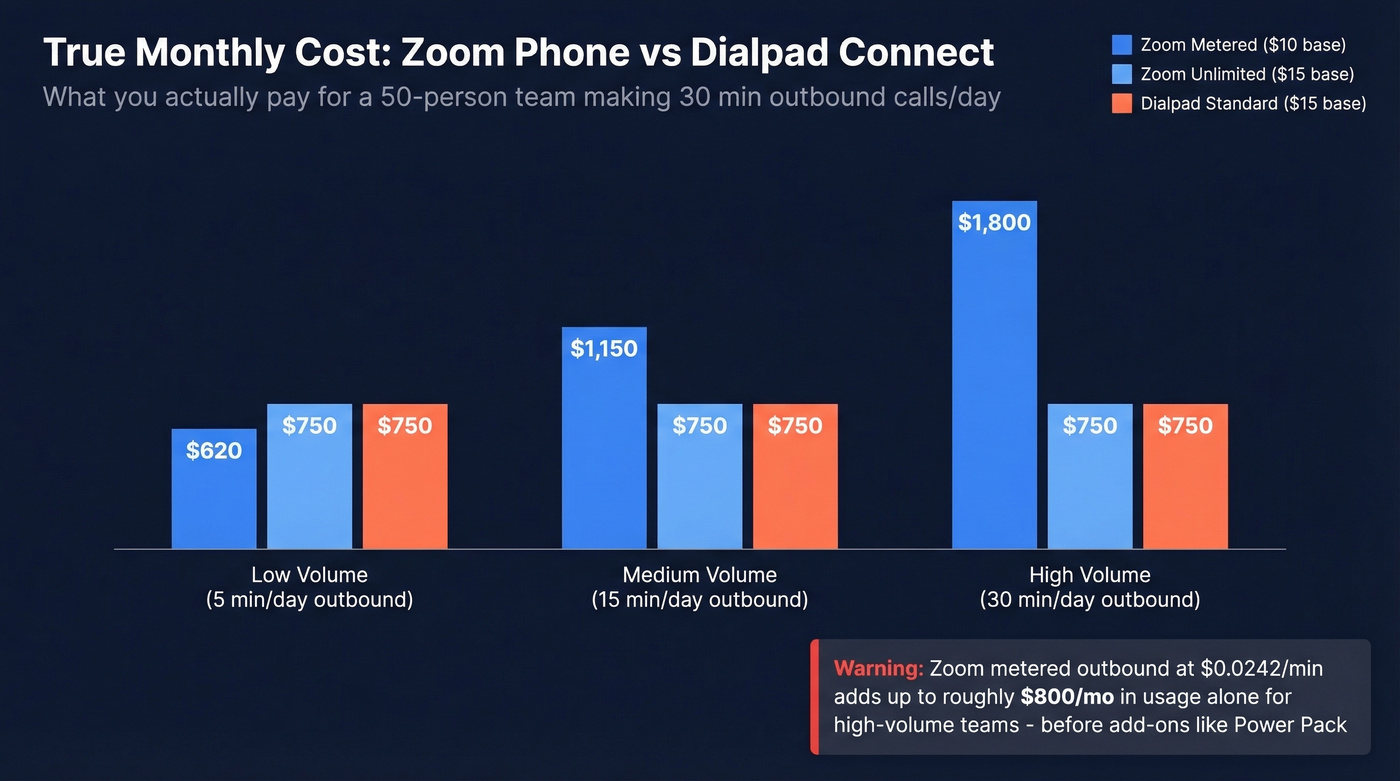
Zoom's metered outbound starts at $0.0242/min. A 50-person team making 30 minutes of outbound calls daily racks up ~$800/month in usage alone, before any add-ons. That number surprises people.
Zoom's Power Pack - often needed for advanced call queue analytics - is an extra line item on every plan. Budget for it from day one. Dialpad's 250 outbound SMS/month cap on Standard means overage charges at $0.008/msg if your team texts prospects, and Pro's 3-seat minimum and Enterprise's 100-seat minimum create awkward thresholds for growing teams.
Best for budget: Zoom metered at $10/user if call volume is low. Best for value: Dialpad Standard at ~$15/user if you need AI transcription from day one.
Call Quality and Reliability
Zoom has the edge on documented reliability. The 99.999% SLA is published, and Zoom Phone serves 10M+ users. Zoom also commissioned TestDevLab to benchmark 600 calls in July 2025 against Dialpad Connect, RingCentral, 8x8, and others - measuring POLQA, ViSQOL, and audio delay. Their report shows a 3.3 MOS even at 70% packet loss. It's a Zoom-commissioned study, so take the specific rankings with a grain of salt, but the investment in third-party testing signals confidence in the product.
Dialpad's weak spot is unstable networks. Reviewers flag choppy calls on shaky internet 43 times across G2 - a real problem for hybrid teams where half the workforce is on home Wi-Fi. If your team's internet is inconsistent, Zoom's architecture handles degradation more gracefully.
AI Features: Depth vs Breadth
Dialpad's AI is deeper for phone-centric workflows. Live transcription (praised in 60 reviews), real-time call coaching, and analytics all come baked into base plans. For sales and support teams where the phone is the primary revenue tool, that's a genuine differentiator.
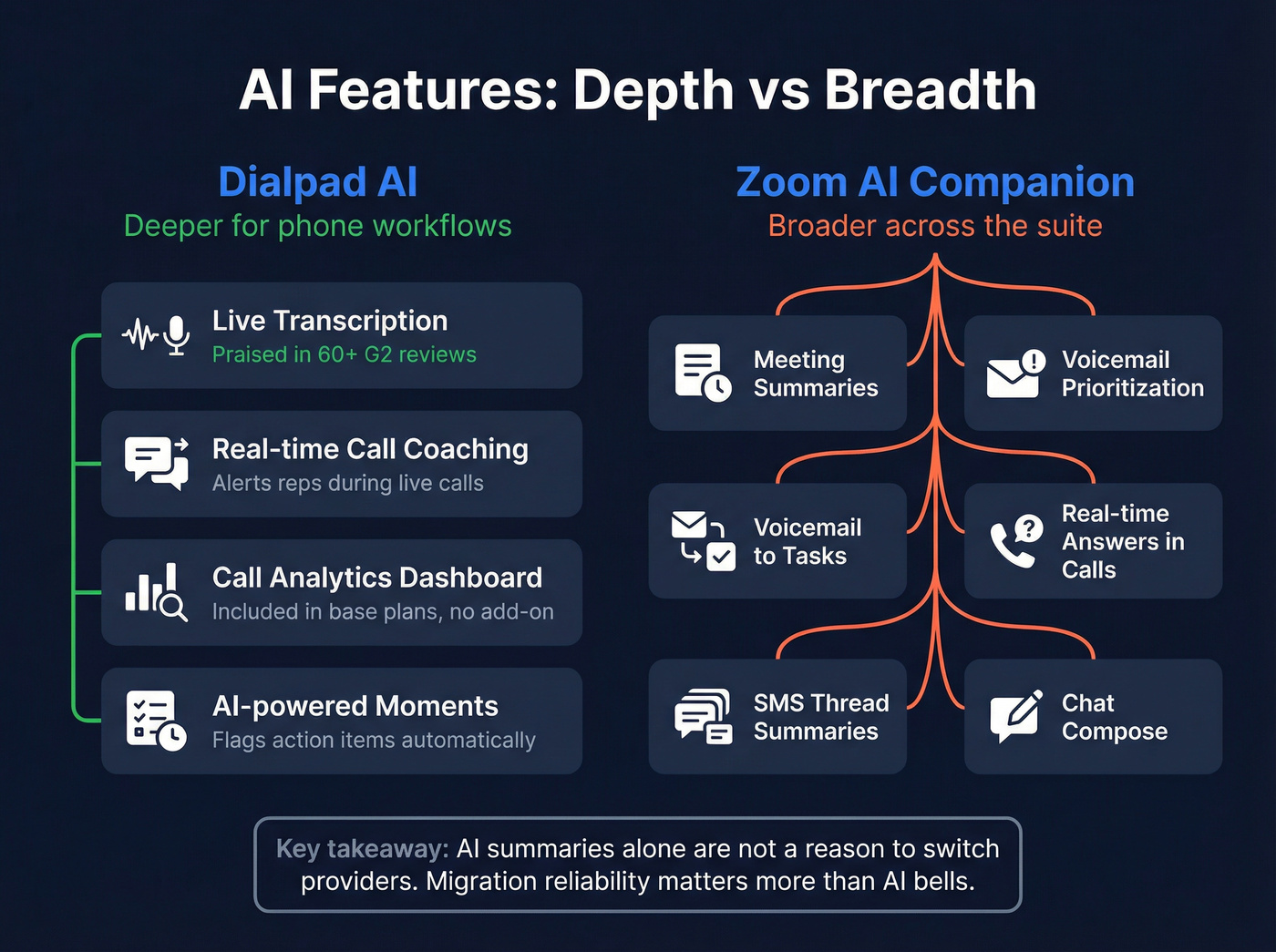
Zoom AI Companion covers more surface area - meeting summaries, voicemail prioritization, voicemail-to-tasks, real-time answers during calls, and SMS thread summaries - but it's broader, not deeper. It's optimized for the "one app for everything" experience rather than phone-specific intelligence.
Here's the thing: AI summaries alone aren't a reason to switch providers. A 400-extension buyer on Reddit noted Dialpad's pitch leaned heavily on AI summaries, but the price wasn't cheaper and customization gaps worried them. Migration reliability matters more than AI bells.

Dialpad and Zoom both route calls. Neither solves the real problem: reps dialing wrong numbers. Prospeo delivers 125M+ verified mobile numbers with a 30% pickup rate - 3x higher than ZoomInfo. At $0.01 per lead, you stop burning connect time on dead lines.
Fix the data before you fix the dialer.
Feature Gating and Plan Limits
Dialpad Standard gives you 3 ring groups, domestic SMS only, 250 outbound SMS/month, real-time analytics, and 24/7 live chat support. Upgrading to Pro unlocks 25 ring groups, international SMS, QoS reports, CRM integrations with Salesforce and HubSpot, and API access - but requires 3 seats minimum.
Zoom Phone includes unlimited domestic SMS on all plans, but advanced phone analytics and IVR/auto-attendant reporting require the Power Pack add-on. Zoom supports bring-your-own-carrier; Dialpad doesn't. For enterprises with existing telecom contracts, that's a dealbreaker.
A few operational limits worth knowing: Zoom caps call queues at 50 members, ring groups have member limits per tier, and group texting maxes out at 10 recipients. Dialpad's meeting duration caps at 5 hours on Standard. These granular limits rarely appear in marketing materials but they'll bite you in production.
On integrations, Zoom touts 2,000+ vs Dialpad's ~10+ native integrations. If your stack is complex, that gap matters a lot.
Security note: Dialpad's vendor comparison page highlights Zoom's historical security incidents, including screen sharing exploits and a Mac malware scare from 2020. Today, both platforms meet enterprise security requirements for most teams, but if your compliance team needs the full audit trail, ask for each vendor's latest penetration test results before signing.
Migration and Go-Live Risk
The go-live week is where phone system projects succeed or fail. Neither platform is immune.
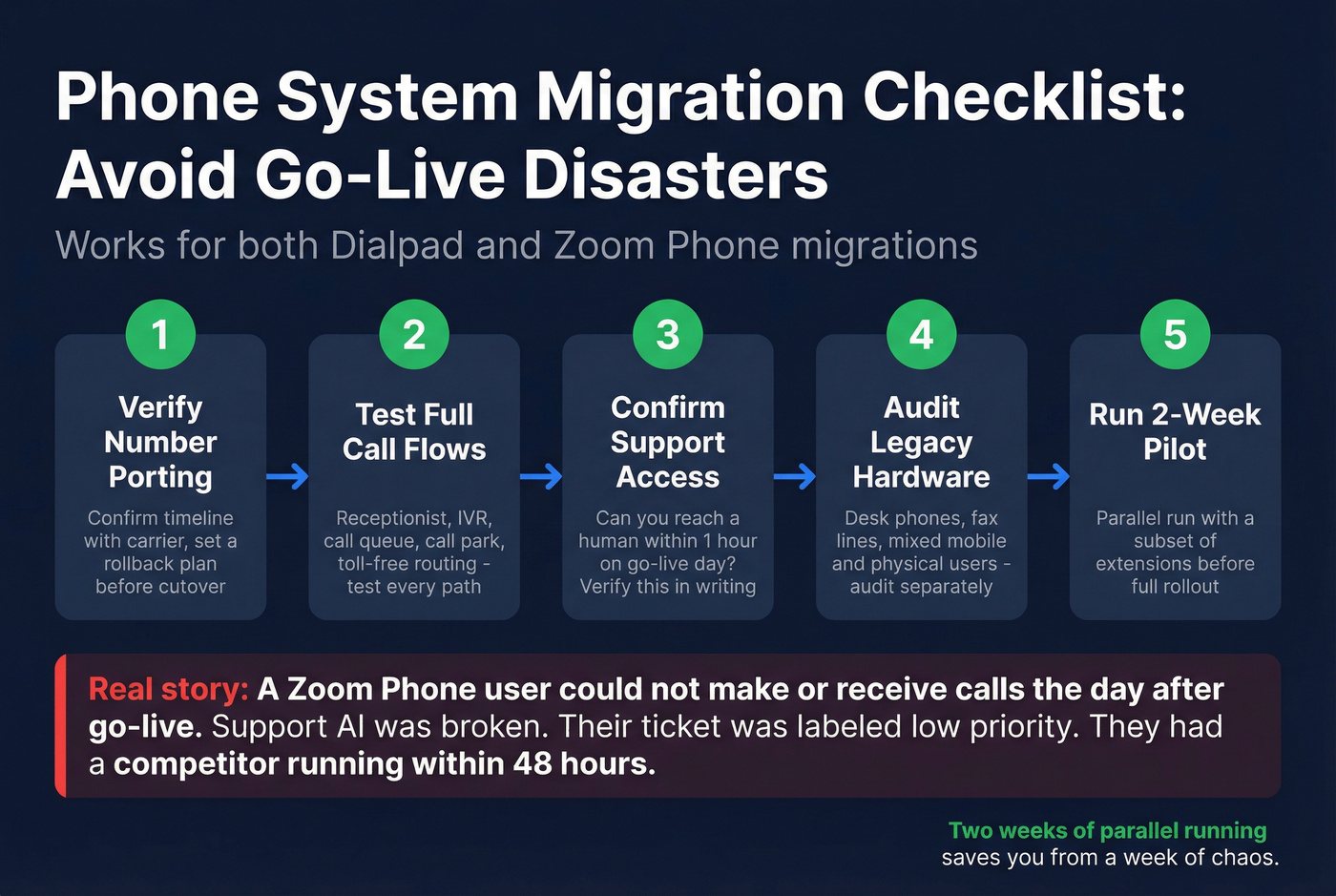
That Reddit horror story from r/VOIP isn't hypothetical - a Zoom Phone user posted about being unable to make or receive calls the day after go-live, with support AI broken and their ticket flagged as low priority. They got a competitor running while still waiting on Zoom. A phone system that can't take calls the day after go-live isn't a "bug." It's an operational outage.
Migration checklist for either platform:
- Verify number porting timeline and confirm a rollback plan before cutting over
- Test full call flows: receptionist, IVR/auto-attendant, call queue, call park, toll-free routing
- Confirm support access - can you reach a human within an hour on go-live day?
- If migrating from on-prem like Avaya, audit desk phones, fax lines, and mixed mobile/physical users separately
- Run a 2-week pilot with a subset of extensions before full rollout
We've seen teams skip the pilot phase to hit a deadline. Don't. Two weeks of parallel running saves you from a week of chaos.
What Users Actually Say
| Dialpad Connect (4.4/5, 4,067 reviews) | Zoom Phone (4.6/5, 2,640 reviews) | |
|---|---|---|
| Top pros | Intuitive UI (130), AI transcription (60), call recording (56) | Ease of use (1,227), reliability (595), unified platform (499) |
| Top cons | Call/forwarding issues (57), choppy on bad internet (43), missing features (29) | Limited reporting + intl texting (306), slow on older machines (278), connection drops (176) |
| Ease of Setup | 9.0 | 9.1 |
| Support Quality | 8.5 | 8.7 |
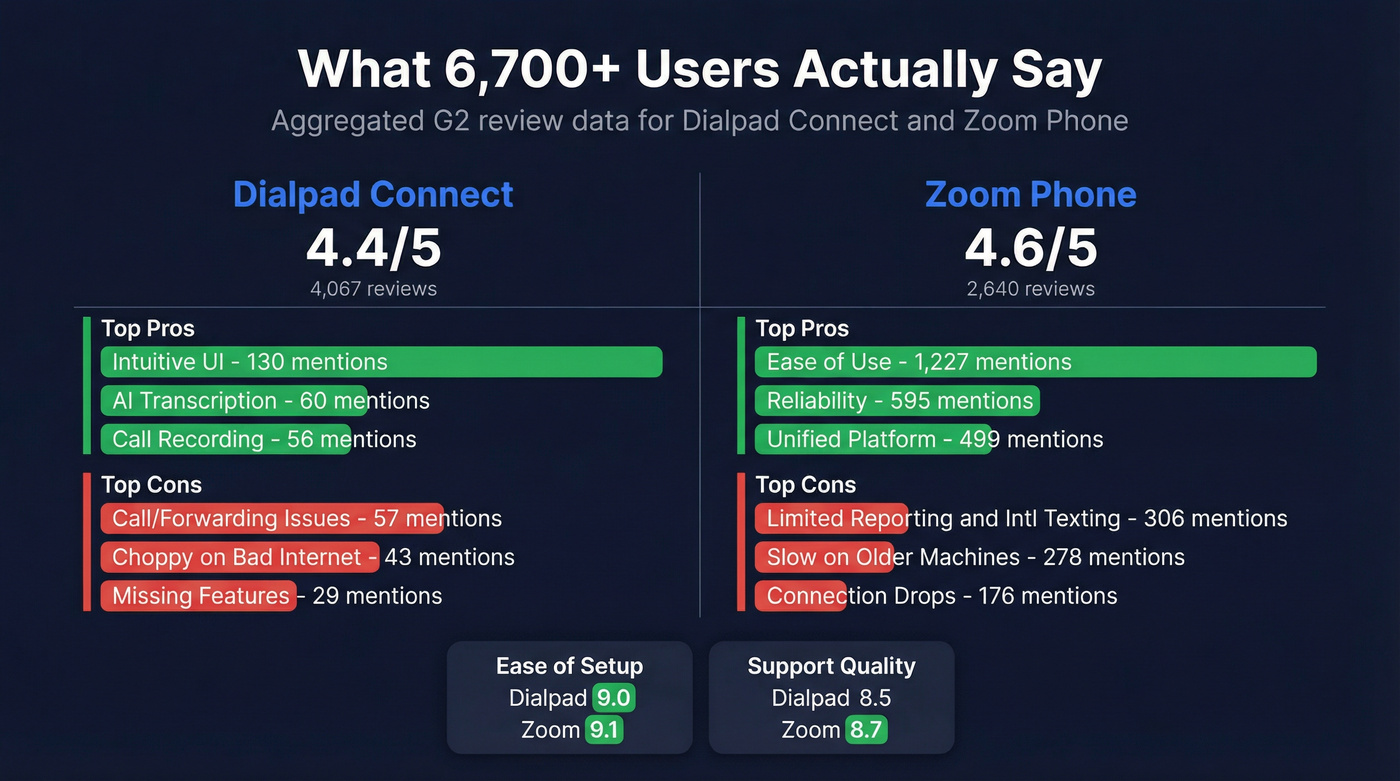
Zoom's sheer review volume - 1,227 mentions of ease of use - gives it statistical weight Dialpad can't match yet. But Dialpad's AI transcription praise is proportionally strong for its review base, and the sentiment around coaching features is consistently positive in ways that Zoom's broader AI Companion reviews aren't.
Verdict by Use Case
Suite-first hybrid teams: Zoom Phone. One app for calls, meetings, and chat. The unified experience is its strongest card.
Call-centric sales/support teams: Dialpad. Coaching, transcription, and analytics built in without add-on fees.
Legacy PBX replacement: Run a porting and call-flow pilot with either before signing. Zoom's BYOC option gives it an edge for complex telecom environments. RingCentral, Nextiva, and 8x8 are also worth piloting - one IT manager on Reddit ended up choosing Aircall after evaluating both, citing simpler CRM integration and better reporting out of the box.
Budget-conscious SMBs: Zoom metered at $10/user if call volume is low. Dialpad Standard at ~$15/user if you need AI transcription from day one.
Let's be honest, though: neither platform fixes bad data. If half your numbers are disconnected, the fanciest dialer in the world won't help.
Better Data, Better Calls
You've settled the Dialpad vs Zoom question. Now your reps need to actually reach decision-makers. In our experience, the single biggest lever for outbound connect rates isn't the phone system - it's the quality of the numbers you're dialing. Prospeo covers 125M+ verified mobile numbers with a 30% pickup rate and 143M+ emails at 98% accuracy, all refreshed on a 7-day cycle. Upload a CSV, get verified contacts back, push them to your sequencer or dialer.
No phone system AI can coach a rep through a call that never connects. Prospeo's 98%-accurate emails and verified direct dials mean your team actually reaches decision-makers - not gatekeepers, not voicemail graveyards. Data refreshes every 7 days, not every 6 weeks.
Stop optimizing the ring. Start optimizing who picks up.
FAQ
Is Zoom Phone cheaper than Dialpad?
At entry level, yes - Zoom's metered plan starts at $10/user/month vs Dialpad's ~$15. But metered means per-minute outbound charges at $0.0242/min, and advanced analytics often require the Power Pack add-on. Total cost depends entirely on call volume and reporting needs.
Does Dialpad or Zoom have better AI features?
Dialpad includes deeper phone-specific AI - live coaching, real-time transcription, call analytics - in base plans. Zoom AI Companion covers meetings and phone but is broader, not deeper. For call-centric teams, Dialpad's AI is more useful out of the box.
Should I switch from Zoom to Dialpad for AI transcription?
Only if phone-based workflows are your primary use case. Dialpad's built-in transcription and coaching are stronger, but migrating phone systems carries real go-live risk. If you're happy with Zoom's reliability and just want transcription, consider a standalone tool like Gong or Fireflies before ripping out your phone infrastructure.