


Dolibarr vs SuiteCRM: Honest Comparison for 2026
You outgrew a spreadsheet. You don't want to pay $50/user/month for HubSpot or Salesforce. So the Dolibarr vs SuiteCRM decision comes down to what you actually need, because these two tools solve different problems, and picking the wrong one wastes months of setup time you won't get back.
30-Second Verdict
Pick Dolibarr if you need ERP + CRM in one tool - invoicing, inventory, purchasing, and a basic sales pipeline - and your team is under 20 people.
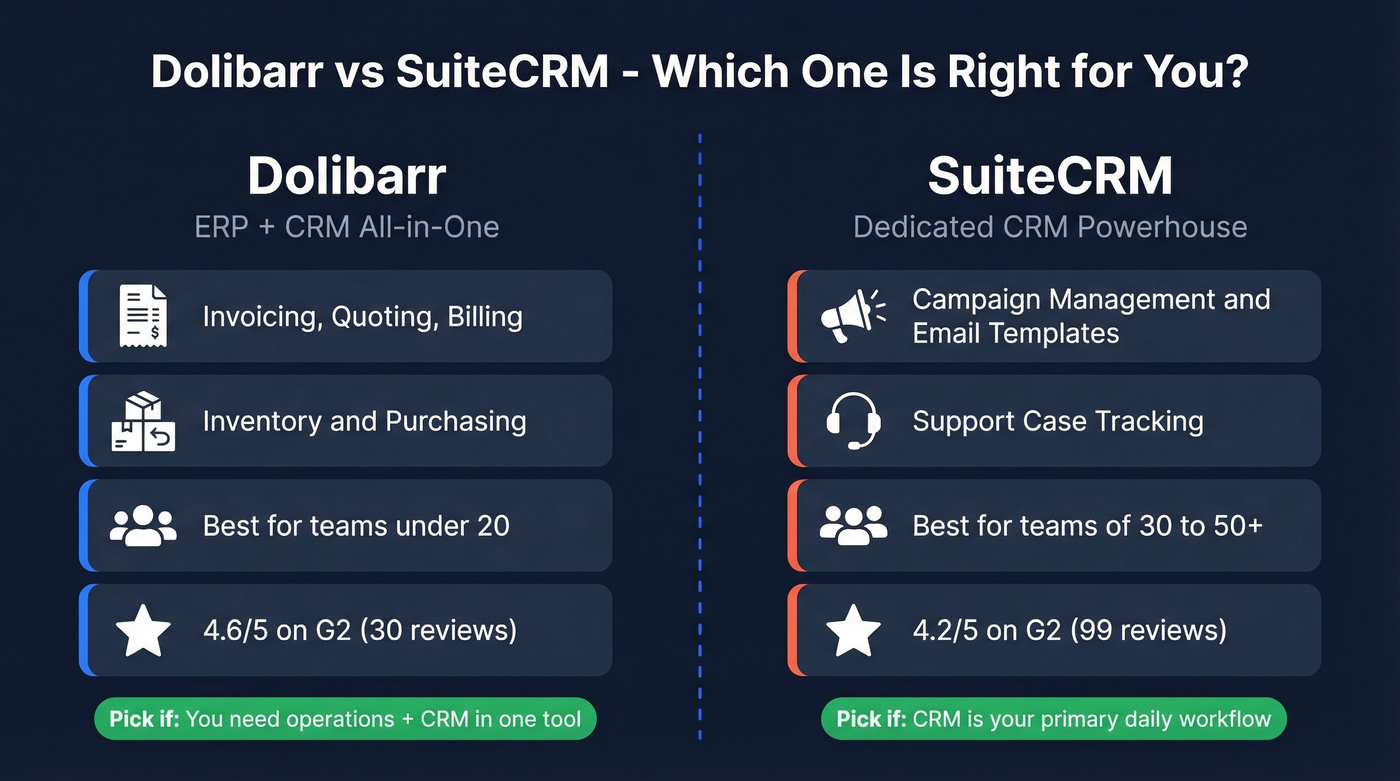
Pick SuiteCRM if CRM is your primary workflow and you need campaign management, support case tracking, and deeper sales pipeline management.
Cloud Pricing Breakdown
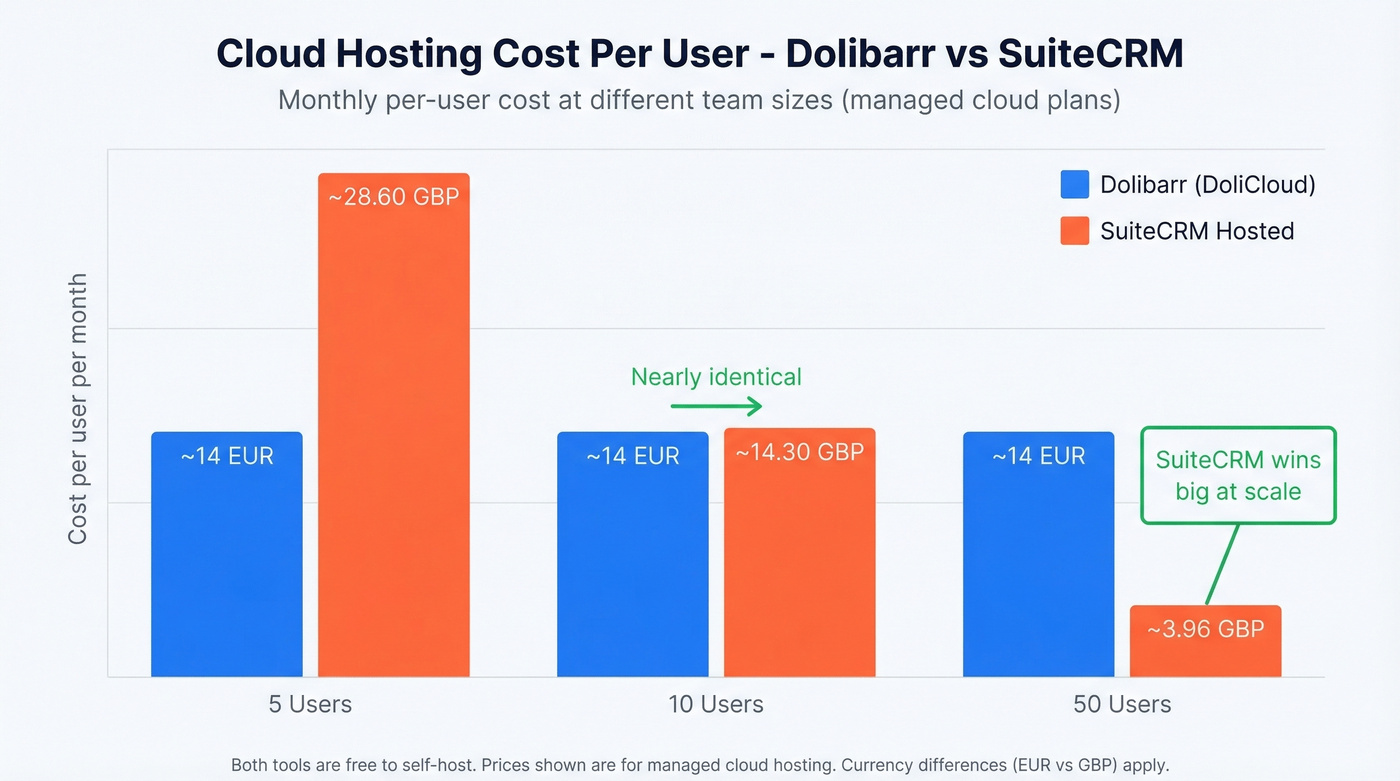
Both tools are free to self-host. The real cost question is what you'll pay for managed cloud hosting, since most teams don't want to babysit a server.
| Dolibarr (DoliCloud) | SuiteCRM Hosted | |
|---|---|---|
| Self-hosted | Free | Free |
| Cloud (Basic) | 14EUR/user/mo | GBP143/mo (up to 10 users) |
| Cloud (Premium) | 30EUR/mo + 15EUR/user/mo | GBP198/mo (up to 50 users) |
| Cloud (Enterprise) | 30EUR/mo + 15EUR/user/mo | GBP308/mo (up to 150 users) |
| Per-user @ 10 users | ~14EUR/user/mo | ~GBP14.30/user/mo |
| Per-user @ 50 users | ~14EUR/user/mo | ~GBP3.96/user/mo |
| Storage (entry tier) | 4 GB | 5 GB |
Annual billing drops SuiteCRM Hosted to GBP130/GBP180/GBP280 per month respectively. A Dedicated tier starts at GBP3,200/year for teams that need isolated infrastructure.
The economics flip at scale. At 10 users, per-user cost is nearly identical. At 50 users, SuiteCRM's package pricing is hard to beat - you're paying under GBP4/user/month versus a flat 14EUR on DoliCloud. Third-party hosts like NovaFirst run 20-30EUR/user/month, so DoliCloud's pricing is competitive for smaller teams.
Workflow automation frequency also scales by SuiteCRM tier: hourly on Starter, every 4 minutes on Business, every 2 minutes on Premium. That matters if you're running time-sensitive automations against a pipeline.
Features That Actually Differ
Forget the 50-row feature matrices. Here's what separates these two in practice:
| Dolibarr wins at | SuiteCRM wins at |
|---|---|
| Invoicing & quoting | Campaign management & email templates |
| Inventory & purchasing | Support case tracking |
| Project management & HR | Workflow automation depth |
| All-in-one ERP breadth | Sales pipeline granularity |
Dolibarr wins on ERP breadth. Invoicing, inventory management, purchasing, project management, HR modules - it's an all-in-one operational suite with CRM bolted on. If your daily workflow is "send quotes, track inventory, invoice clients," Dolibarr handles that loop without a second tool. For a 5-person services firm, that's a genuine advantage over stitching together three separate platforms.
SuiteCRM wins on CRM depth. Campaign management with target lists and email templates, support case tracking, workflow automation that goes beyond basic triggers, and more granular customization for sales processes. If your team lives inside the pipeline all day, SuiteCRM gives you more to work with.
On integrations, SuiteCRM can take more implementation effort than teams expect - G2 reviewers note that many integrations require custom development work. Dolibarr has a marketplace with several hundred add-ons, but you should still expect more manual setup than you'd get with a modern SaaS CRM.

Neither Dolibarr nor SuiteCRM ships with contact data. Prospeo gives you 300M+ profiles with 98% email accuracy and 30+ filters - export verified leads straight into either CRM via CSV or API.
Stop configuring an empty CRM. Start filling it with verified contacts.
UX - Both Are Click-Heavy
Let's be honest: if your team is coming from HubSpot or Salesforce, both of these tools will feel like a step backward in usability.
A r/selfhosted thread comparing open-source CRMs put it bluntly - SuiteCRM "requires a lot of clicks to do basic actions," and Dolibarr has the "same problem with many clicks, but with an arguably worse and older interface." G2 reviews echo this. SuiteCRM's UI gets called "dated" and "clunky." Dolibarr users flag the interface as needing improvement too.
We've seen teams adopt open-source CRMs expecting the cost savings to offset the UX friction. Sometimes it works. But if your reps are logging 50+ activities a day, every extra click compounds into real productivity loss. Budget for training time and expect a rougher onboarding than any modern SaaS tool would give you.
The SuiteCRM 7 vs 8 Problem
Deploying SuiteCRM today means making an uncomfortable choice. SuiteCRM 7 is the mature codebase many teams still run, but SuiteCRM 8 is the modern rewrite - and some major items are still scheduled for later releases.
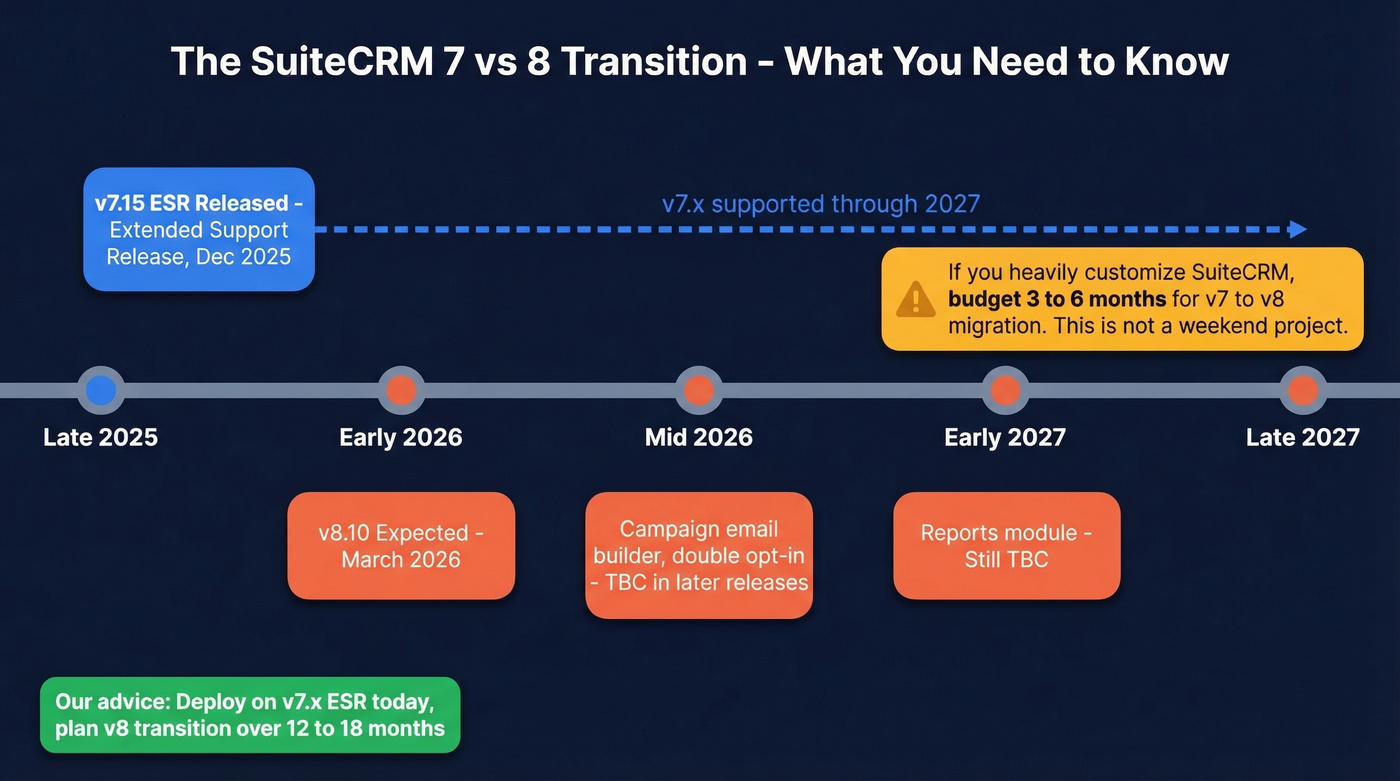
The roadmap shows SuiteCRM 7.15 planned as an Extended Support Release in December 2025, extending the life of 7.x for at least another two years through 2027. Meanwhile, SuiteCRM 8.10 is expected in March 2026, with campaign email builder, double opt-in, and reports still marked TBC in later releases.
Dolibarr doesn't have the same public version split to navigate. For SuiteCRM, the practical advice is to deploy on the 7.x ESR line and plan your transition to v8 over the next 12-18 months. If you heavily customize SuiteCRM, budget 3-6 months for a v7-to-v8 migration. It isn't a weekend project.
Here's our hot take: SuiteCRM 8 will eventually be the better product. But "eventually" has been the story for three years now. If you need a CRM that works today, not one that'll work in 2027, factor that into your decision.
When to Choose Each
Choose Dolibarr if you're:
- A 5-person services business using invoicing and project management daily (scales well to 15-20)
- Looking for ERP + CRM in a single self-hosted package
- Comfortable with "good enough" CRM features alongside strong operational tools
- Rated 4.6/5 on G2 with 30 reviews - users praise ease of setup and flexibility
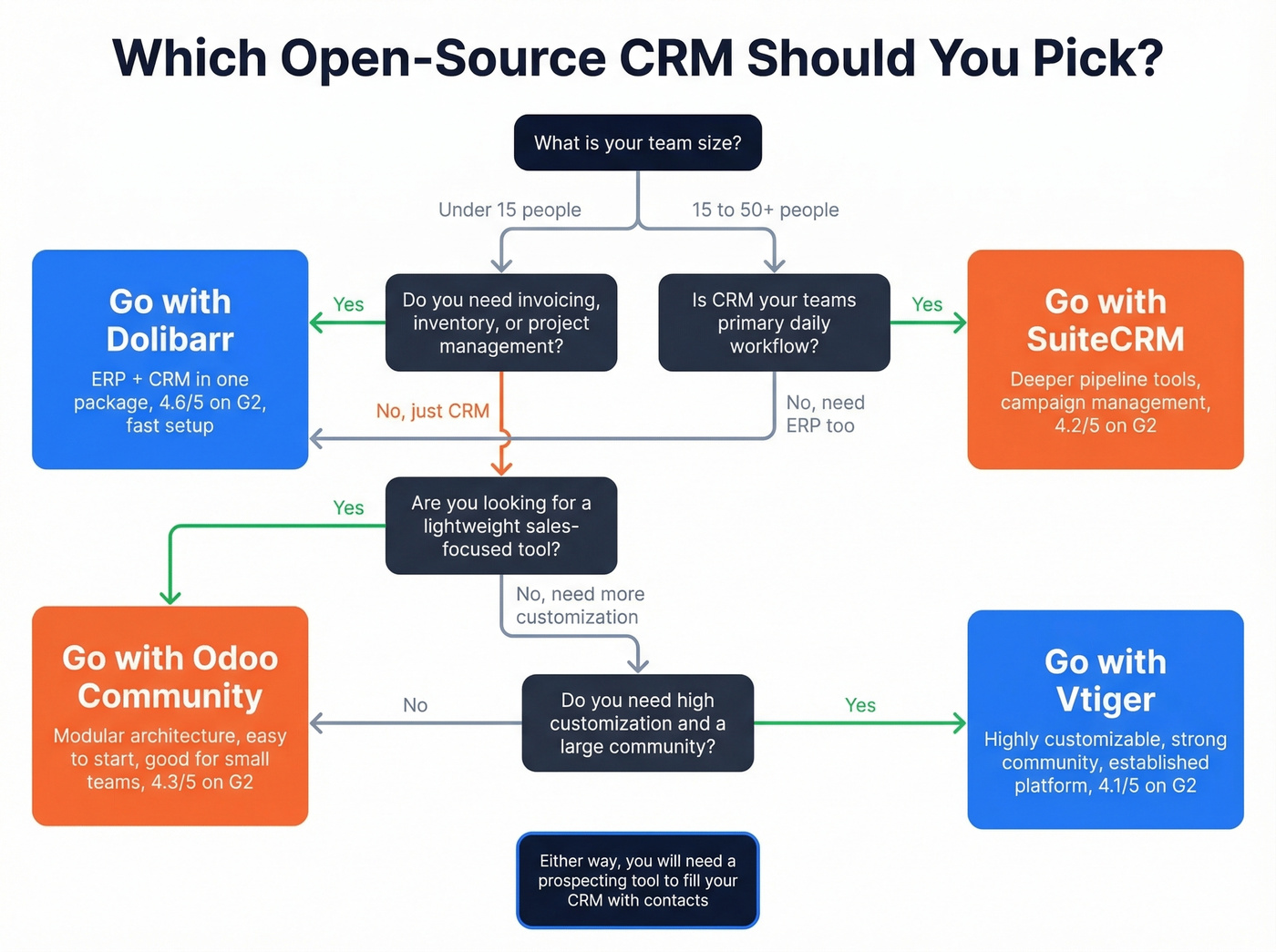
Choose SuiteCRM if you're:
- A 30-person sales team that needs pipeline management and campaign automation (scales to 50+)
- Willing to invest in implementation (benchmarks: ~2 months to implement, ROI in ~5 months)
- Comfortable navigating the v7/v8 transition
- Rated 4.2/5 on G2 with 99 reviews - praised for customizability, dinged for UI
For teams under 10 where budget is tight, Dolibarr's all-in-one approach usually wins. For sales-heavy orgs where the CRM is the center of gravity, SuiteCRM's deeper pipeline tools justify the extra implementation effort.
Filling Your CRM With Contacts
Neither Dolibarr nor SuiteCRM includes a prospecting database. You install them, and they're empty. The CRM is just plumbing - you still need water.
Prospeo covers 300M+ professional profiles with 98% email accuracy and a 7-day data refresh cycle. You can search by 30+ filters, export verified contacts, and push them into either CRM via CSV or API. If you're comparing options, see our guide to sales prospecting databases. The free tier gives you 75 verified emails per month plus 100 Chrome extension credits, and paid plans start around $39/month with no contracts. Twenty CRM has been getting strong praise on r/selfhosted as a modern, lightweight alternative - one user called it "AMAZING" after testing both Dolibarr and SuiteCRM. Odoo is the more polished enterprise option, but its free tier covers only one app and paid plans start around 25-30EUR/user/month.
FAQ
Is SuiteCRM really free?
Self-hosted, yes - zero license fees. Managed cloud hosting starts at GBP143/month for up to 10 users. Factor in server administration, hosting costs, or third-party support packages to get the real number.
Can Dolibarr replace a dedicated CRM?
For basic contact management and pipeline tracking, absolutely. It handles quotes, orders, and invoicing in the same interface. But it lacks campaign management depth - if CRM workflows are your team's primary daily activity, SuiteCRM is the stronger choice.
How do I import contacts into either CRM?
Neither tool includes a built-in prospecting database. Use a B2B data platform like Prospeo to find verified emails and phone numbers, then import via CSV or API. That's the fastest way to go from empty CRM to actionable pipeline.
Which has better community support?
SuiteCRM has a larger community (99 G2 reviews vs Dolibarr's 30) and more third-party developers. Dolibarr's community is smaller but active, with a marketplace of several hundred modules. Both have active forums, but expect faster answers for SuiteCRM edge cases simply because more people are running it.
You're saving thousands by going open-source. Keep that momentum - Prospeo starts at $0.01/email with a 7-day data refresh cycle, so your Dolibarr or SuiteCRM pipeline stays current without enterprise pricing.
Enterprise-grade data at open-source-friendly prices. No contracts.