

Domain Extractor: Every Method Explained (With Formulas and Code)
You've just exported 10,000 backlinks from Ahrefs. Half the URLs point to subdomains three levels deep. You need a domain extractor - but the one you're using is probably broken. You paste the URLs into a spreadsheet, write a quick formula to grab the domain, and everything looks fine until you spot that every .co.uk domain came back as just co. Your "clean" list is garbage, and you didn't notice for two hours.
Domain extraction sounds trivial. Split the URL, grab the domain, move on. But the gap between "extract a hostname" and "extract the correct registered domain" is where most methods quietly fail.
What You Need (Quick Version)
- Paste a few URLs right now? Use RAKKOTOOLS - free, instant, no signup. It extracts domains from raw HTML and text, not just URL lists.
- Working in a spreadsheet? Excel
TEXTBEFORE / TEXTAFTERor Google SheetsREGEXREPLACEformulas - copy-paste versions below. - Processing thousands of URLs? urltodomain.com handles up to 200K entries per batch and validates suffixes against the Public Suffix List.
- Building an automated pipeline? Python +
tldextract. The only correct answer at scale.
Pick your method based on volume and correctness requirements. The rest of this guide gives you the exact formulas, code, and tool comparisons for each approach.
Why Extraction Is Harder Than It Looks
The core problem is .co.uk. And .com.au. And .gov.br. And thousands of other multi-label suffixes.
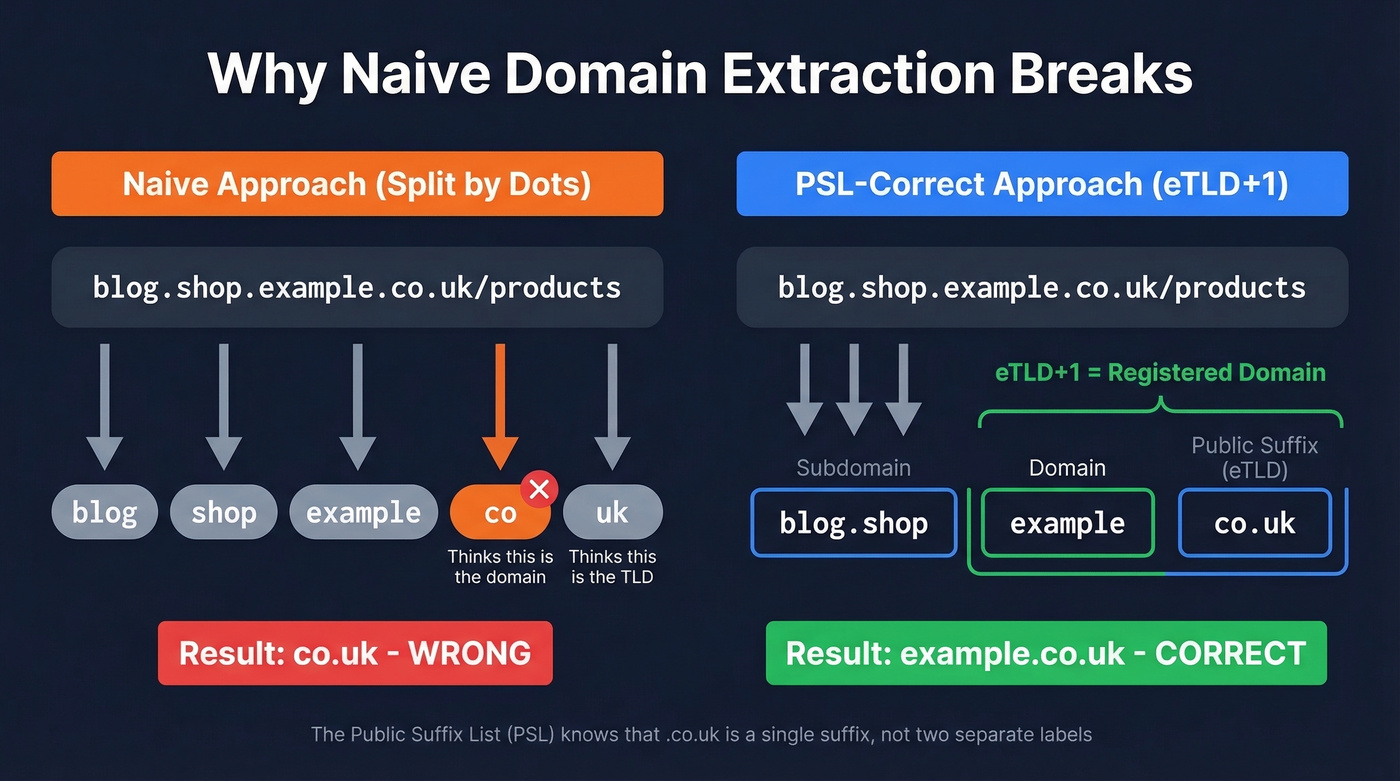
Take the URL blog.shop.example.co.uk/products. A naive approach - split by dots, grab the second-to-last segment - returns co as the domain. Obviously wrong. The registered domain is example.co.uk, but your code doesn't know that .co.uk is a single public suffix.
This is where the Public Suffix List comes in. Maintained as a community project and hosted by Mozilla, the PSL catalogs every domain suffix under which independent organizations can register names. Browsers use it for cookie scoping, and any correct extraction tool needs it under the hood.
The key concept is eTLD+1 - the effective top-level domain plus one label. For www.example.com, the eTLD is .com and the eTLD+1 is example.com. For www.example.co.uk, the eTLD is .co.uk and the eTLD+1 is example.co.uk. That eTLD+1 is your registered domain - the thing you actually want.
Here's the thing: the PSL changes often. New suffixes get added, private domains shift categories. One team on Hacker News described storing PSL-derived domains as primary keys in their database, then having to rebuild tables when the list updated. That's not an edge case. If you're automating at scale, plan for list updates and version consistency.
Free Online Tools Compared
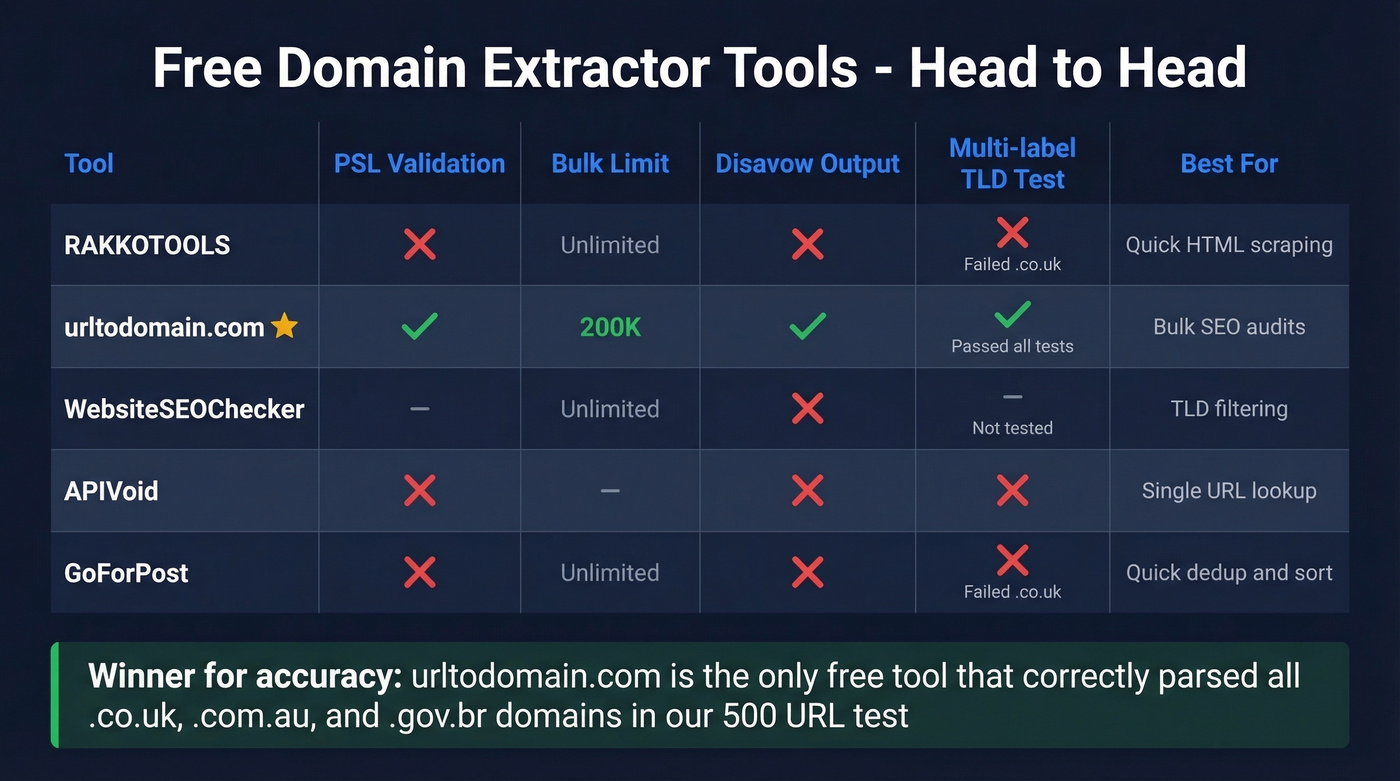
For quick jobs, a web tool is the fastest path. Here's how the main options stack up:
| Tool | Cleanup Features | TLD Filter | Bulk Limit | PSL Validation | Disavow Output | Export |
|---|---|---|---|---|---|---|
| RAKKOTOOLS | Unique domains + sorting | Yes | - | No | No | Copy |
| urltodomain.com | Root-domain extraction | No | 200K | Yes | Yes | TXT/CSV |
| WebsiteSEOChecker | Dedup + subdomain toggle | Yes | - | - | No | Copy |
| APIVoid | - | No | - | No | No | - |
| GoForPost | Dedup + sorted/unsorted | Yes | - | No | No | Copy |
The standout is urltodomain.com. It's one of the only free tools in this space that validates against real-world suffixes using PSL-driven behavior - meaning it'll correctly parse blog.shop.example.co.uk down to example.co.uk. It supports disavow file formatting with a toggle, handles up to 200K entries per batch, and exports as TXT or CSV.
WebsiteSEOChecker has a useful TLD allow/deny filter for isolating specific country domains, plus optional Moz metrics behind a signup wall. GoForPost is handy when you want extension-based matching plus quick deduping and sorted output.
We've tested all five on the same 500-URL list containing a mix of .com, .co.uk, .com.au, and .io domains. RAKKOTOOLS and GoForPost both choked on the multi-label suffixes. urltodomain.com nailed them all. For anything where .co.uk-style correctness matters, it's the clear winner among free tools.
Excel Formulas for Extraction
Modern Excel (TEXTBEFORE / TEXTAFTER)
If you're on Excel 365 or Excel 2021+, this is clean:
=TEXTBEFORE(TEXTAFTER(B5,"//"),"/")
That extracts the hostname from any URL. To strip www.:
=SUBSTITUTE(TEXTBEFORE(TEXTAFTER(B5,"//"),"/"),"www.","")
Two formulas, done. These require the newer dynamic array engine - if you're on Excel 2019 or earlier, you'll need the legacy approach below.
Legacy Excel (FIND / LEFT / MID)
=LEFT(B5,FIND("/",B5,9)-1)
Then remove the protocol:
=MID(C5,FIND("//",C5)+2,LEN(C5))
Stop using FIND/MID hacks if you have modern Excel. The TEXTBEFORE/TEXTAFTER approach is readable, maintainable, and doesn't break when someone pastes a URL without a trailing slash.
Important limitation: Both approaches extract the hostname, not the registered domain. They won't correctly handle .co.uk or .com.au - you'll get the full hostname including subdomains, and there's no formula-native way to apply PSL logic. For most .com domains this doesn't matter. For international domains, it does.

Extracting domains from URLs is just step one. The real goal is turning those domains into verified contact data. Prospeo's Email Finder takes any domain and returns 98% accurate emails - no PSL headaches, no broken formulas.
Go from raw domains to verified emails at $0.01 each.
Google Sheets Formulas
Google Sheets has REGEXREPLACE, which makes this slightly more elegant:
=REGEXREPLACE(A2,"http\:\/\/|https\:\/\/|\/.*|\?.*|\#.*","")
This strips the protocol, path, query strings, and fragments in one pass. To also remove common subdomains like www. and blog.:
=REGEXREPLACE(A2,"http\:\/\/|https\:\/\/|www\.|blog\.|\/.*|\?.*|\#.*","")
If you just need the TLD suffix by itself:
=REGEXREPLACE(A2,".*\.|\/.*","")
What most people try first is REGEXEXTRACT to pull the hostname, then a second pass to strip the TLD and get just the brand name. That approach breaks fast - you can't reliably strip TLDs with regex because you'd need to know whether .co.uk is one suffix or two separate labels. Same PSL problem, just in spreadsheet form.
Same limitation as Excel: these formulas give you the hostname, not the PSL-correct registered domain. Fine for .com cleanup. Unreliable for multi-label suffixes.
Python Methods
Quick and Dirty (urlsplit)
For a fast hostname grab, urllib.parse is built in and reliable:
from urllib.parse import urlsplit
url = "https://blog.example.co.uk/page?q=test"
host = urlsplit(url).netloc  # -> blog.example.co.uk
You can also regex it:
match = re.search(r'://([\w\-.]+)', url)
host = match.group(1)  # -> blog.example.co.uk
Both give you the hostname. Neither gives you the registered domain. For a one-off script where everything is .com, this is fine. For anything else, keep reading.
The Correct Answer (tldextract)
<figure class="article-image my-8" itemscope itemtype="https://schema.org/ImageObject"><meta itemprop="name" content="How tldextract parses a URL into subdomain, domain, and suffix" /><img src="https://static.prospeo.io/directory-assets/images/new_images/domain-extractor/tldextract-url-parsing-anatomy.png" alt="How tldextract parses a URL into subdomain, domain, and suffix" loading="lazy" decoding="async" class="w-full rounded-lg shadow-sm" style="max-height:500px;width:auto;display:block;margin:0 auto;cursor:zoom-in;" itemprop="contentUrl image" /><figcaption class="mt-3 text-sm text-gray-500 text-center" itemprop="description caption">How tldextract parses a URL into subdomain, domain, and suffix</figcaption></figure>

ext = tldextract.extract('http://forums.bbc.co.uk/')
# ext.subdomain -> 'forums'
# ext.domain -> 'bbc'
# ext.suffix -> 'co.uk'
# ext.top_domain_under_public_suffix -> 'bbc.co.uk'

ext = tldextract.extract('http://forums.news.cnn.com/')
# ext.subdomain -> 'forums.news'
# ext.domain -> 'cnn'
# ext.suffix -> 'com'
# ext.top_domain_under_public_suffix -> 'cnn.com'
tldextract accurately separates a URL's subdomain, domain, and public suffix using the PSL. It's the Stack Overflow consensus pick, and for good reason - it handles .co.uk, .com.au, .gov.br, and every other multi-label suffix correctly. The consensus on r/Python threads about URL parsing is basically "just use tldextract" - and we agree.
Operational notes worth knowing: tldextract caches the PSL locally in $HOME/.cache/python-tldextract. Run tldextract - update periodically to pull the latest suffix list. If you're working with private domains like *.github.io, the include_psl_private_domains=True option treats those as suffix boundaries too.
For anything beyond a one-off paste job, tldextract is the correct answer. Every other approach is a compromise.
CLI Methods (Bash / grep / awk)
For quick hostname extraction from log files:
grep -oE "https?://[^ ]+" file.log | awk -F[/:] '{print $4}'
That gives you hostnames. To attempt root domain extraction, some people try grabbing the last two labels:
echo "$host" | awk -F. '{print $(NF-1) "." $NF}'
This works for example.com. It returns co.uk for example.co.uk. Broken.
The advanced option is downloading public_suffix_list.dat and building a multi-step lookup in bash. But at that point, you're reinventing tldextract in a language that doesn't want to do it. Skip it. If you need PSL-correct extraction from a terminal, call Python.
Choosing the Right Method
Let's be honest: if your deals average under $15K and your prospect list is 90% .com domains, you don't need PSL-correct extraction at all. A spreadsheet formula gets you 95% of the way there. Save the engineering effort for something that moves revenue.
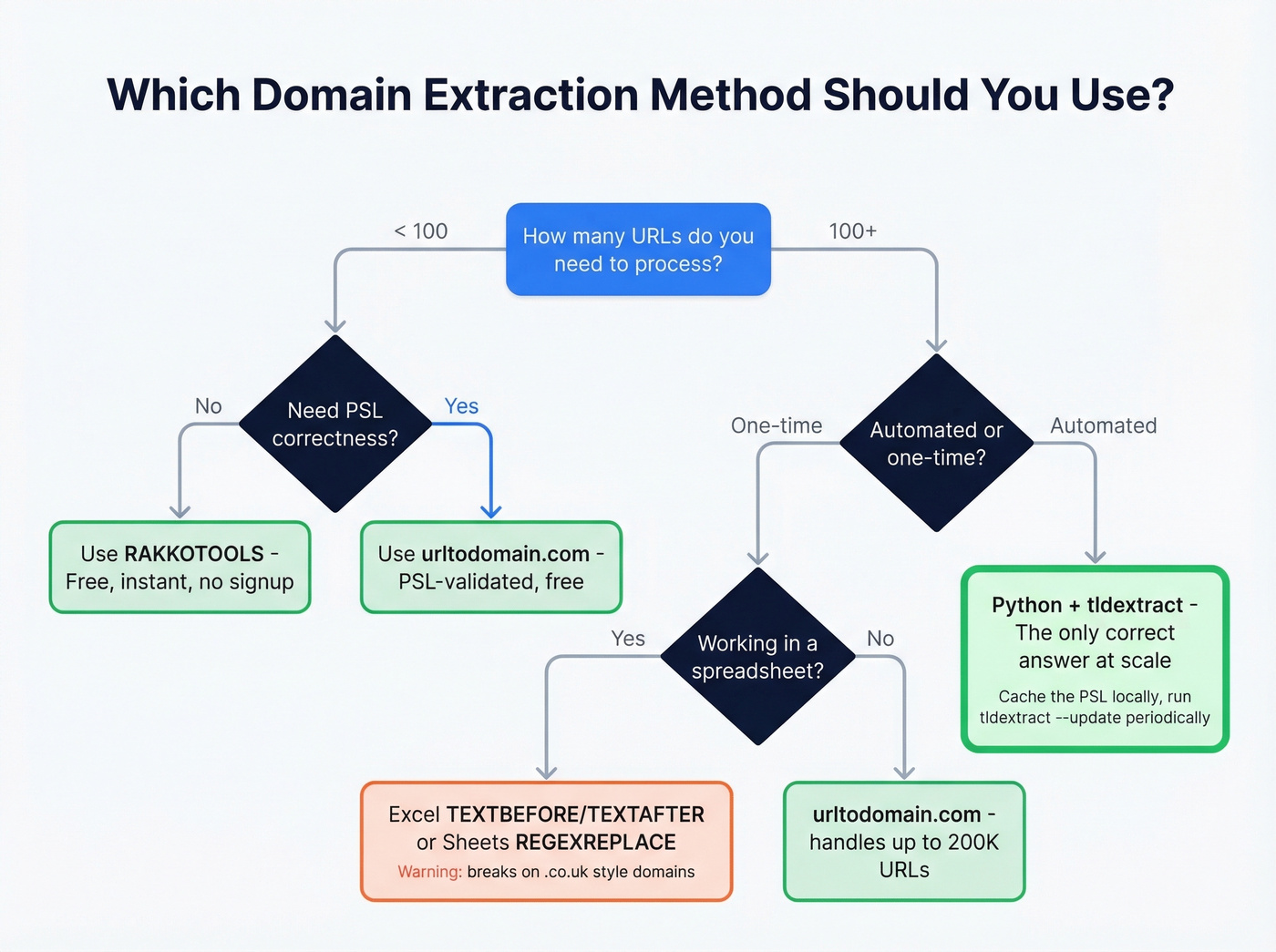
But for international domains, security IOCs, or anything automated - PSL correctness isn't optional. Here's the decision matrix:
| Scenario | Best Method | PSL-Correct? | Effort |
|---|---|---|---|
| Quick one-off (<100 URLs) | RAKKOTOOLS | No | 10 seconds |
| Bulk SEO audit (1K-200K) | urltodomain.com | Yes | 2 minutes |
| Spreadsheet cleanup | Excel / Sheets formulas | No | 5 minutes |
| Automated pipeline | Python + tldextract | Yes | 30 min setup |
| Log file triage | CLI grep/awk | No | 1 minute |
| Lead list building | Domain extraction + Prospeo | Yes (with tldextract) | 15 minutes |
The PSL-correct column is the one most people ignore until they get burned.
Common Use Cases
SEO Backlink Audits
The classic workflow: export referring URLs from Ahrefs or Semrush, extract unique referring domains, deduplicate, and analyze. If you're building a disavow file, you need domain:example.com formatting - urltodomain.com has a toggle for this.
The disavow use case is overblown in 2026. Most sites don't need one, and over-disavowing can hurt rankings more than the spam links themselves. But if you've got a manual action or genuine negative SEO, extracting domains is step one.
Security Log Analysis
This is where PSL correctness isn't optional. A CrowdStrike practitioner described the exact problem: normalizing mixed inputs like sub.example.com, example.com.au, and sub.example.com.au down to their registered domains for IOC lookups. Naive parsing returns garbage. In threat intelligence, garbage means missed indicators - and missed indicators mean breaches. If you're in this world, tldextract with automated PSL updates is the only defensible approach.
Analytics Cleanup
Deduplicating referral traffic sources in GA exports. You've got blog.partner.com, www.partner.com, and partner.com all showing as separate referrers. Extracting the root domain collapses them into one. Spreadsheet formulas handle this fine since most referral domains are simple .com addresses.
Building an Email List from Prospect URLs
Domain extraction is data cleaning. The interesting part is what comes next. Once you've got a clean list - say, 500 companies from a backlink export or a conference attendee list - you need contacts at those companies. Paste company domains into Prospeo's email finder, and you get verified emails for decision-makers with 98% accuracy. The free tier gives you 75 email lookups per month, enough to test the full workflow before committing.
If you’re doing this at scale, pair it with data enrichment services and a repeatable lead generation workflow.
FAQ
What's the difference between a hostname and a registered domain?
A hostname includes all subdomains - blog.shop.example.co.uk. The registered domain (eTLD+1) is example.co.uk. Most free tools and spreadsheet formulas return the hostname, not the registered domain. For PSL-correct results, use tldextract or urltodomain.com.
Can I extract domains in Google Sheets without an add-on?
Yes. Use =REGEXREPLACE(A2,"http\:\/\/|https\:\/\/|\/.*|\?.*|\#.*","") to strip protocol, path, and query strings in one formula. It won't handle multi-label TLDs like .co.uk correctly, but it works for 95%+ of common .com domains.
What's the best Python library for domain extraction?
tldextract. It uses the Public Suffix List to correctly separate subdomains, domains, and suffixes including .co.uk and .com.au. Install with pip install tldextract. For simple hostname extraction without PSL logic, urllib.parse.urlsplit is built in and sufficient.
How do I turn extracted domains into sales leads?
Run your clean domain list through an enrichment tool like Prospeo, which returns verified emails and direct dials for contacts at any company domain - 92% match rate on API enrichment, 50+ data points per record. The free plan includes 75 credits to test the workflow.
Processing thousands of domains through Python scripts? Prospeo's API returns verified emails, direct dials, and 50+ data points per contact with a 92% match rate. Plug it into your pipeline and skip the manual enrichment.
Turn your extracted domain list into a ready-to-dial prospect list.