

Domain Finder: Best Tools for Every Use Case in 2026
There are 360M+ registered domains on the internet right now. The short, catchy .com you want? Almost certainly taken. That's the reality every founder, marketer, and side-project builder faces when they start searching. The right domain finder tool cuts through the noise in seconds - but only if you pick the right one for your specific problem.
"Domain finder" means different things to different people, and most articles lump everything together. There are actually four distinct use cases hiding behind this one search term:
- Availability checking - you have a name in mind and need to know if it's taken, across hundreds of TLDs, instantly.
- Name generation - you're stuck brainstorming and want AI or combinatorial tools to suggest brandable options.
- Expired domain hunting - you want a domain with existing backlinks, authority, or traffic for an SEO play.
- Ownership lookup - you need to find out who's behind a domain, whether that's WHOIS data or the actual decision-makers at a company. Some people call this an email-by-domain workflow: start from a URL, end with a verified contact.
Each use case has its own best-in-class tool. Our hot take: most people actually need two tools, not one - an availability checker and a name generator. Trying to do both in a single tool always means compromising on one.
Quick Picks by Use Case
If you already know what you need, here's the short version.
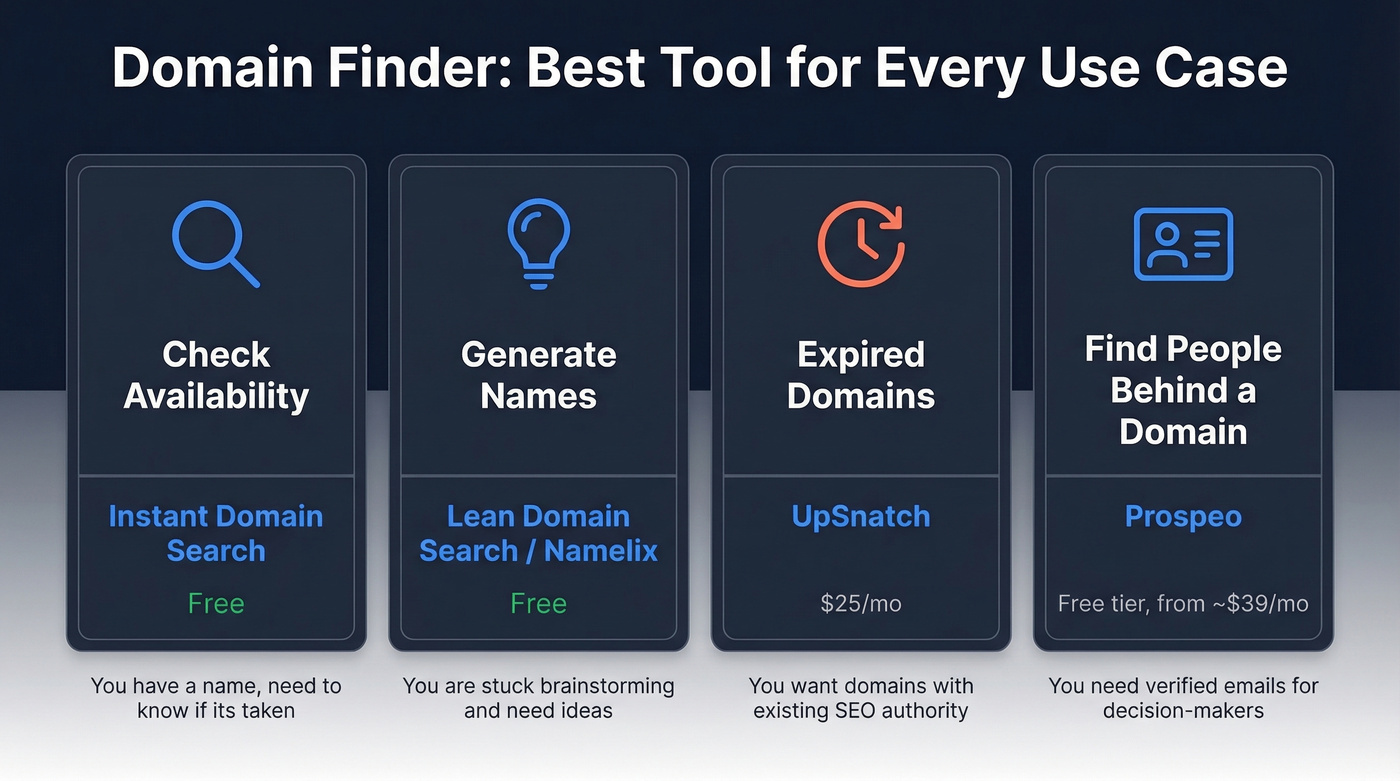
| Use Case | Best Tool | Price |
|---|---|---|
| Check availability fast | Instant Domain Search | Free |
| Generate name ideas | Lean Domain Search / Namelix | Free |
| Find expired domains | UpSnatch | $25/mo |
| Find people behind a domain | Prospeo | Free tier, paid from ~$39/mo |
Best Domain Availability Checkers
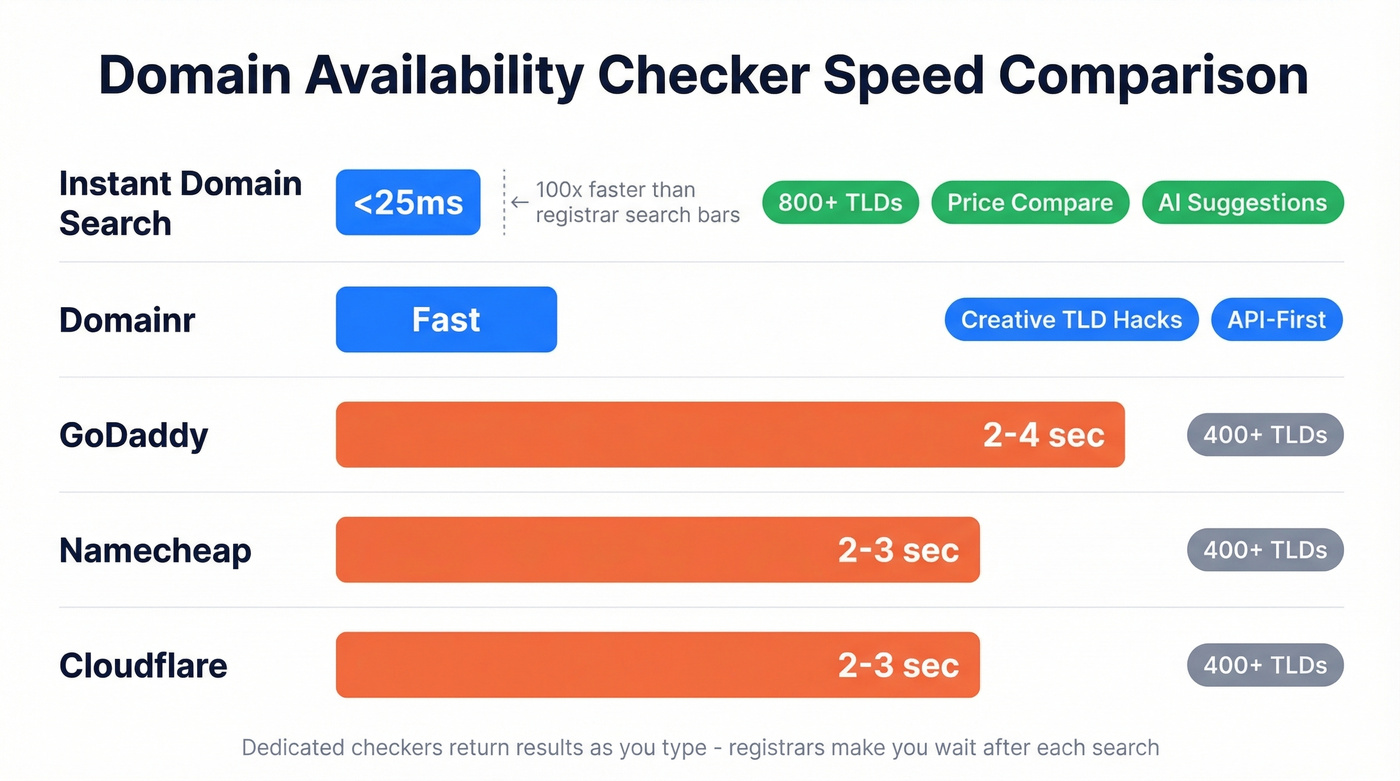
The core frustration with registrar search bars is speed. You type a name, wait three seconds, get a "taken" result, try another, wait again. Do that 50 times and you've burned half an hour. Dedicated availability checkers fix this by returning results as you type.
Instant Domain Search
This is the gold standard for availability checking, and it's free. Instant Domain Search checks 800+ extensions in under 25 milliseconds - results appear as you type, not after you hit enter. The tool has processed over 500M searches, which tells you how widely it's trusted.
What makes it more than a simple checker: it includes AI-powered name suggestions, a registrar price comparison feature so you can see which registrar offers the cheapest rate for your chosen TLD, WHOIS lookup, and domain history insights. It also surfaces premium and aftermarket domains with value estimates - useful if the exact name you want is parked but potentially purchasable. For most people, this is the only availability tool you'll ever need.
Use this if: You're iterating through dozens of name ideas and need instant feedback. Skip this if: You're specifically hunting expired domains with SEO metrics - that's a different category entirely.
Domainr
Domainr takes a completely different approach. It's API-first and built for developers who want to embed domain search into their own products. The UX is minimal and clean - type a word, get creative TLD suggestions like "coff.ee" or "start.up." Less about brute-force checking 800 extensions, more about clever domain hacks. If you're building a tool that needs domain search under the hood, Domainr's API is the way to go. Free to use manually; API pricing varies by volume.
Registrar Built-In Search
GoDaddy, Namecheap, and Cloudflare all have built-in domain search. They work fine if you already know your registrar and have a specific name to check. But for brainstorming sessions where you're testing 20-30 variations? Painfully slow. Reddit threads consistently flag this - registrars "take too much time to return results" when you're iterating. Use them to buy, not to brainstorm.
| Tool | Speed | TLD Coverage | Price Comparison | Cost |
|---|---|---|---|---|
| Instant Domain Search | <25ms | 800+ | Yes | Free |
| Domainr | Fast | Creative hacks | No | Free / API paid |
| GoDaddy | 2-4 sec | 400+ | No | Free to search |
| Namecheap | 2-3 sec | 400+ | No | Free to search |
| Cloudflare | 2-3 sec | 400+ | No | Free to search |
Best AI Name Generators
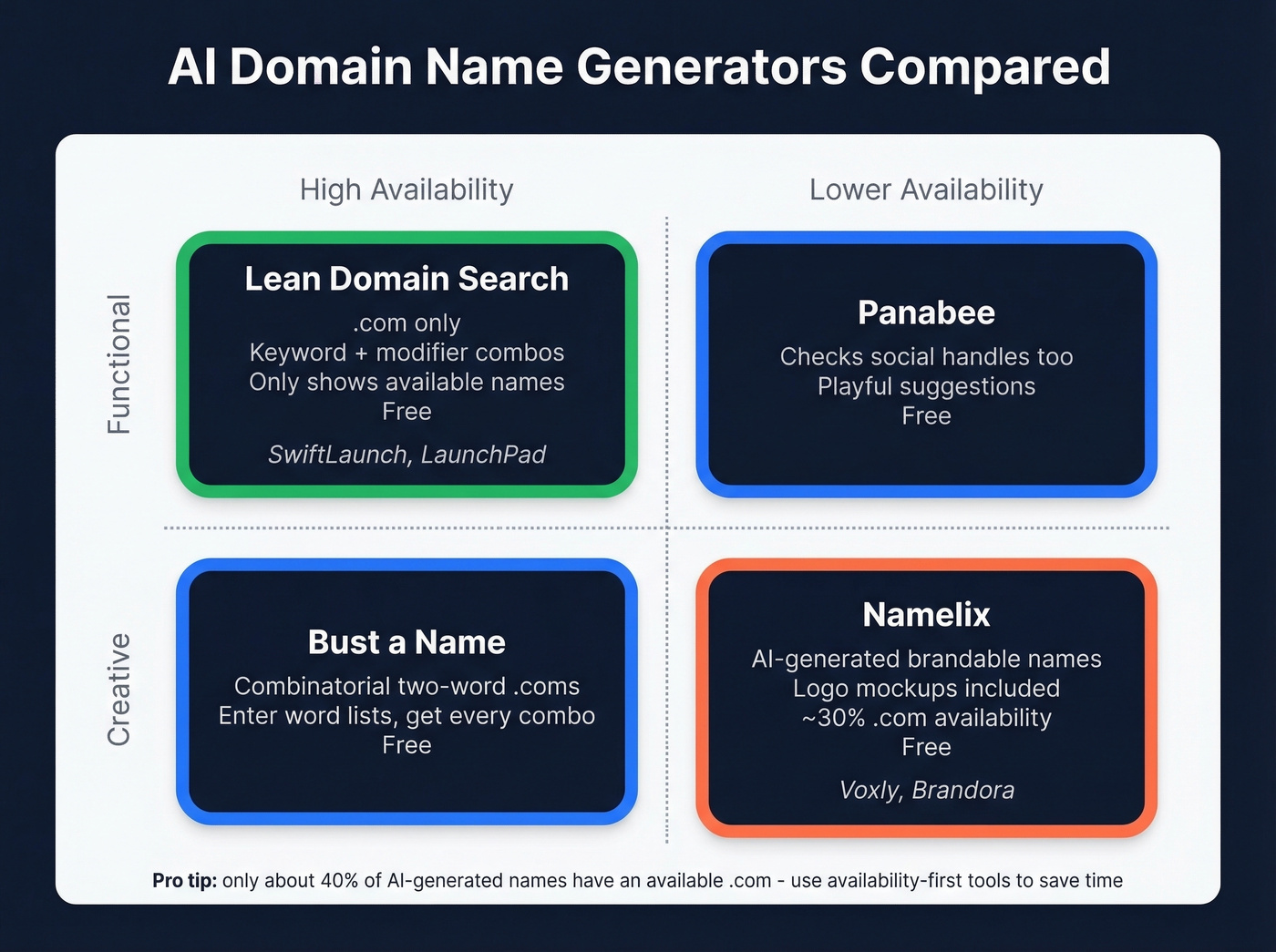
Here's the thing: 99%+ of short .com domains are taken. If you want a two-word, sub-10-character .com, you're competing with 360M+ existing registrations. AI generators solve the brainstorming bottleneck by producing combinations you'd never think of - pairing your keyword with modifiers, portmanteaus, and invented words. The catch is availability: across most generators, only about 40% of suggested names actually have an available .com. Availability-first generators save the most time because you skip the heartbreak of falling in love with a name that's already taken.
Lean Domain Search
Simple, fast, and focused on what matters. Type a keyword and Lean Domain Search pairs it with thousands of modifiers to generate available .com domains. No AI art, no logo mockups - just a massive list of available names sorted by popularity, length, or alphabetically. It's .com-only, which is actually a feature: you won't waste time on creative TLD hacks that look clever but confuse customers.
The suggestions are functional, not creative. You'll get "SwiftLaunch" and "LaunchPad," not "Zephyr" or "Lumino." But the high availability rate - it only shows names with confirmed .com availability - means zero wasted clicks. Free.
Namelix
Namelix goes the opposite direction: creative AI output with logo mockups for each suggestion. It generates brandable, often invented names like "Voxly" or "Brandora" and shows you what they'd look like as a logo. The results feel more creative and brand-ready than Lean Domain Search's functional combinations.
The downside: only about 30% of suggested names have available .com domains, and there's no real-time availability check built in. You'll need to copy names into Instant Domain Search to verify. Still worth using for the creative spark. Free.
Panabee
Panabee's differentiator is checking domain availability and social media handle availability simultaneously. If brand consistency across platforms matters to you - and it should - this saves a step. The name suggestions lean more playful than professional, but it's a solid free tool for early-stage brainstorming.
Bust a Name
A combinatorial tool built for two-word .com brainstorming. Enter two lists of words and it generates every possible combination, filtering for available domains. The UI is old-school, but the approach works well when you have a clear naming direction and want to exhaust every permutation. Free.
Worth knowing separately: Squarespace now offers an AI domain generator (the successor to Google Domains), and Squadhelp runs naming contests starting at $299 with a marketplace of premium names ranging from $1,000 to $25,000+. Different price tier, different audience - but if you've got budget and want a premium brandable name, Squadhelp delivers.

Checking domain availability is step one. But when you find a domain that's taken, the real opportunity is reaching the people behind it. Prospeo turns any domain into verified decision-maker contacts - emails at 98% accuracy and direct dials from 125M+ verified mobiles.
Go from domain to decision-maker in seconds, not days.
Best Expired Domain Finders
Between 100,000 and 500,000 domains expire every day. Some carry existing backlinks, domain authority, and even residual traffic - making them valuable for SEO projects, niche sites, or brand pivots. Specialized expired domain tools aggregate these listings and layer on SEO metrics so you can filter the diamonds from the junk.
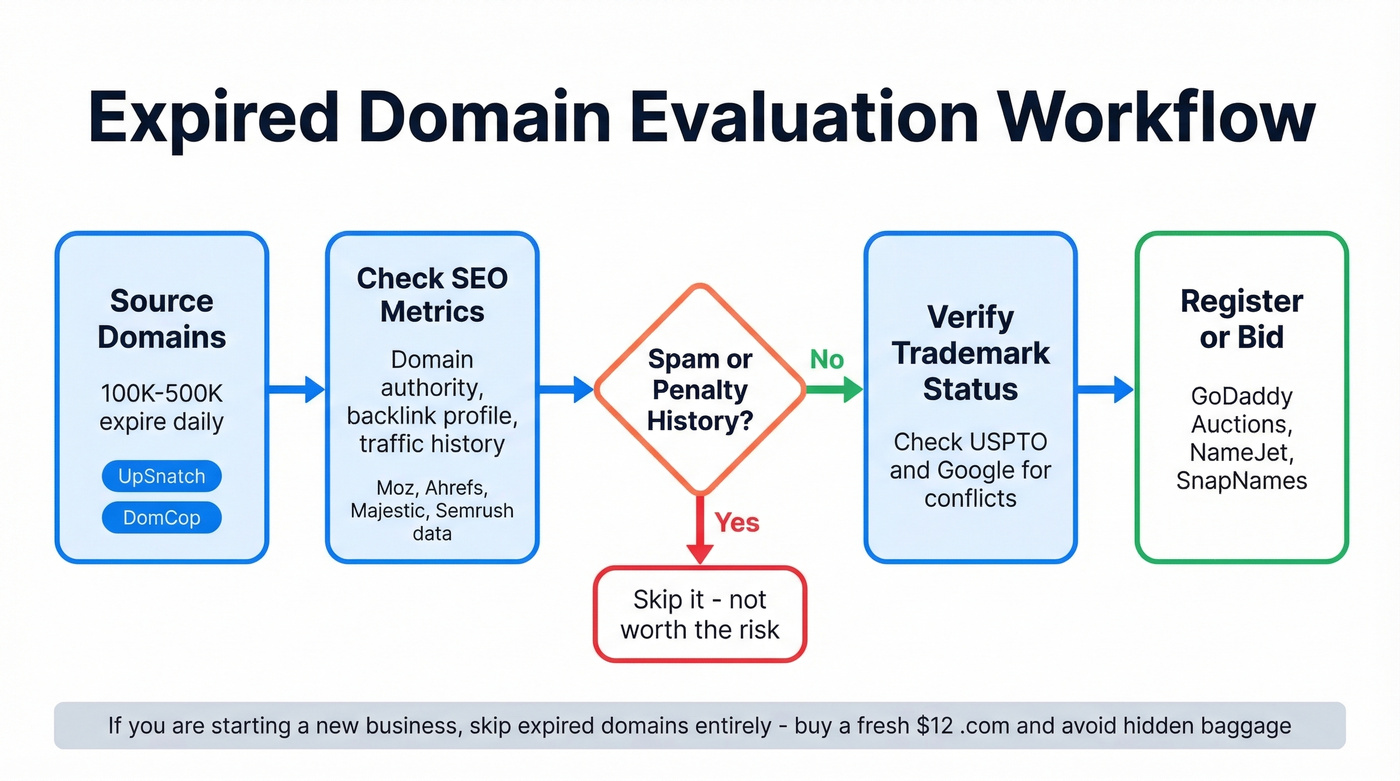
A word of caution: this is a power-user category. If you're starting a new business, buy a fresh $12 .com. Expired domains can carry spam history, Google penalties, or trademark baggage that'll cost you more than they're worth.
UpSnatch
UpSnatch aggregates listings from GoDaddy, Namecheap, and Dynadot auctions, then layers on a proprietary Smart Domain Rating and Spam Quality Score. The semantic search is the standout feature - instead of filtering by keyword match, you describe what you're looking for and the AI finds relevant domains across 100+ languages. Starts at $25/mo with no free plan.
Use this if: You want AI-powered semantic search and built-in quality scoring to avoid spam domains. Skip this if: You need auction sniping across dozens of platforms. UpSnatch covers the big three registrars but not the long tail of auction houses.
DomCop
DomCop has been in the expired domain game since 2014, and it shows in the depth of data. It aggregates auctions from GoDaddy, NameJet, SnapNames, Sedo, and others, providing 90+ SEO metrics from Majestic, Moz, Ahrefs, and Semrush. Auction data refreshes every minute, and you can bulk export up to 10,000 domains per CSV. Starts at $56/mo (Newbie plan, billed annually) with no free plan - just a 2-day money-back guarantee. Pricier than UpSnatch but covers more auction sources and provides deeper metrics.
Domain Hunter Gatherer takes a completely different approach - it's a desktop crawler (Windows-only, around $50 one-time purchase) that finds expiring domains before they hit public drop lists. More technical setup, but you're getting first-mover advantage on domains that haven't been picked over by every SEO in the market.
How to Find Contacts by Domain
What WHOIS Actually Tells You
WHOIS is the original domain ownership lookup. Run a query on ICANN Lookup or Whois.com and you'll see the registration date, expiration date, registrar, and nameservers. Sometimes you'll get registrant contact information - but usually you won't.
Here's why: many domains use privacy protection, and GDPR has forced the redaction of personal data from most registrations. WHOIS tells you when a domain was registered and where - but almost never who to contact. The contact info, when visible, is often a privacy proxy address that leads nowhere.
For basic domain research - checking registration dates, seeing which registrar hosts a domain, verifying expiration - WHOIS works fine. But if you're trying to reach the actual humans behind a company's website, you need a different tool entirely.
Finding the People Behind a Domain
WHOIS tells you the registrar. A contact finder tells you the VP of Marketing's verified email address.
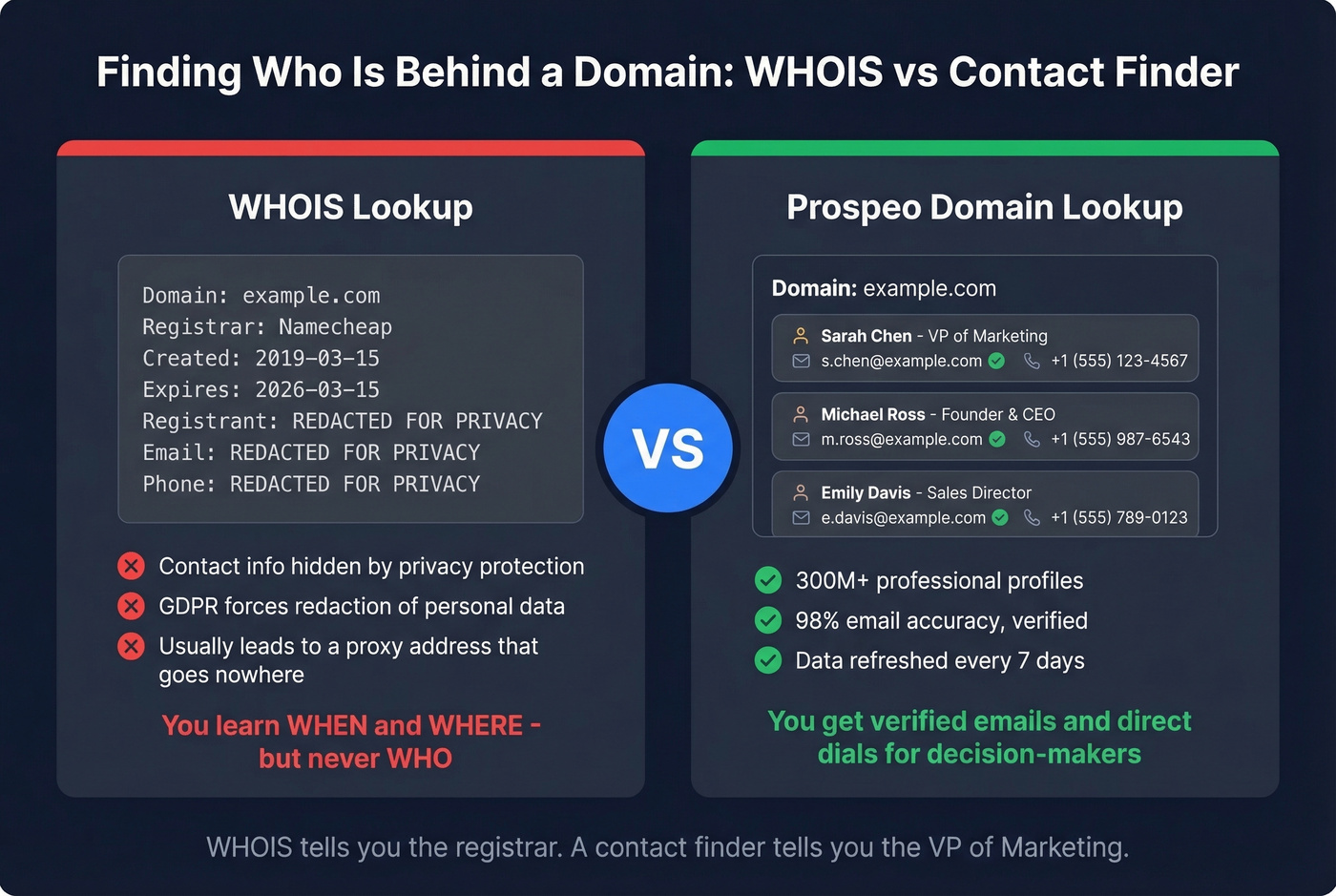
We've tested this workflow hundreds of times: you visit a company website, you want to reach someone specific, and WHOIS gives you nothing useful. Prospeo's Chrome extension solves this - visit any company website and pull verified emails and direct dials for decision-makers in seconds. Enter a company's domain, and it returns the people and contact data behind it, backed by B2B company data from 300M+ professional profiles with 98% email accuracy and data refreshed on a 7-day cycle.
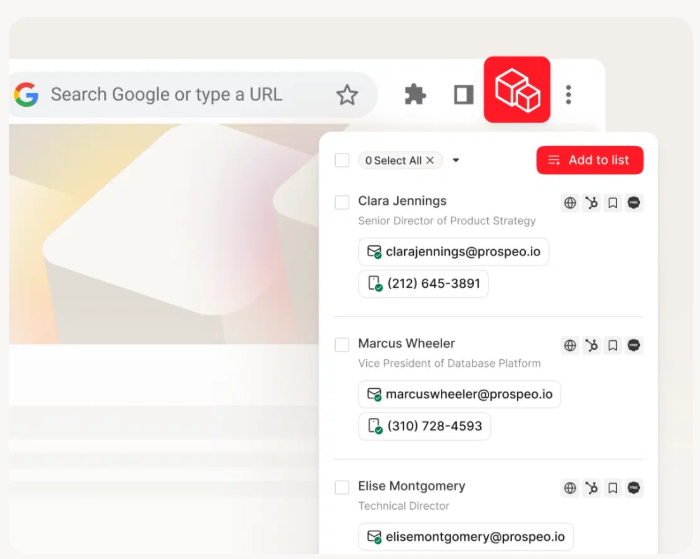
The use cases are straightforward. You visited a competitor's site and want to reach the founder. You have a spreadsheet of 200 company domains and need VP-level contacts for each one. You found an interesting startup's domain and want to pitch them before anyone else does. Paste a URL, get verified contacts, push them to your CRM or sequencer.
The free tier gives you 75 emails and 100 Chrome extension credits per month. No credit card, no contract.
Ownership lookup is the use case most domain finder articles ignore. WHOIS gives you a registrant name buried behind privacy shields. Prospeo gives you every employee's verified email and phone number - 30+ filters to find the exact buyer, founder, or stakeholder you need. Starting at $0.01 per email.
Skip WHOIS. Get the actual contacts behind any company domain.
How to Choose the Right Domain
Picking a domain name feels like it should be simple. It isn't. Here's a checklist that'll save you from the most common mistakes.
.com is still king. It's the most trusted TLD globally, and it's what people type by default. Alternative TLDs like .ai, .io, and .tech can work for specific startup categories - an AI company on a .ai domain makes sense - but renewal costs are often higher.
Keep it under 15 characters. Shorter domains are easier to remember, type, and fit on business cards. Every character you add increases the chance someone misspells it.
Avoid hyphens and numbers. They're confusing when spoken aloud. "Is that dash or no dash?" is a question you never want a prospect to ask.
Brandability beats keyword stuffing. There's a persistent myth that putting your target keyword in your domain helps SEO. The reality, per Dynadot's domain strategy guide, is that keywords in domains offer limited SEO benefit. "Stripe.com" beats "best-payment-processing-online.com" in every way that matters.
Plan for growth. Don't box yourself into a niche with your domain. "ChicagoPlumbing.com" works until you expand to Milwaukee. "AquaFlow.com" works everywhere.
Check security defaults. Make sure your registrar supports DNSSEC and domain lock so your domain can't be hijacked. Cloudflare includes one-click DNSSEC activation and domain lock by default.
Let's be honest: if the perfect .com is taken, check whether it's parked or actively used. A parked domain might be available for a reasonable offer through the registrar's aftermarket. But don't spend $5,000 on a domain for a business that hasn't validated its first customer yet.
The True Cost of a Domain
The sticker price of a domain is almost meaningless. What matters is the renewal price - because you'll pay that every year for as long as you own the domain. We've compared registrar pricing across dozens of TLDs, and the renewal markup pattern is consistent: the intro price hooks you, the renewal price bleeds you.
| Registrar | .com Intro | .com Renewal | WHOIS Privacy |
|---|---|---|---|
| Namecheap | $8.98 | $13.98 | Paid |
| GoDaddy | $11.99 | $21.99 | Paid |
| Hover | $12.99 | $14.99 | Free |
| NameSilo | $17.29 | $17.29 | Free |
| Cloudflare | At-cost (~$10) | At-cost (~$10) | Free |
Look at GoDaddy: $11.99 to register, $21.99 to renew. That's about an 83% jump. Over five years, that $11.99 domain actually costs you ~$100. GoDaddy's renewal pricing is predatory. Cloudflare's at-cost model - where you pay wholesale price with no markup - is the ethical standard the industry should follow.
NameSilo also offers volume discounts: $11.05+ per .com with their Discount Program, and as low as $7.75 for large portfolios. Worth knowing if you're managing more than a handful of domains.
The pain gets worse with specialty TLDs. One Reddit user reported a .io renewal on Namecheap at $75.98 - while the same renewal on Cloudflare or Dynadot runs about $45. That's roughly a 40% spread for the exact same domain. Always check renewal pricing before you buy.
For the most thorough price comparison across registrars, registrar pricing across registrars, TLD-List.com tracks 3,496 domain extensions across 54 registrars with near-real-time updates. Before you register anything, spend 30 seconds checking the cheapest option there.
As a general rule: .com runs $9-$18/year at honest registrars. Newer TLDs like .ai or .io often cost $20-$80/year. Budget for renewal prices, not intro prices.
FAQ
What is a domain finder?
A domain finder is any tool that helps you search for, check availability of, or discover domain names - including availability checkers, AI name generators, expired domain tools, and ownership lookup services like WHOIS. Some tools also let you surface the people behind a company URL, turning a domain into verified contact data.
How much does a domain name cost?
A .com typically costs $9-$18/year to register, but renewals can run 50-80% higher at registrars like GoDaddy. Specialty TLDs like .io often cost $20-$80/year. Always check renewal pricing before buying - the intro rate is bait.
What's the best free availability checker?
Instant Domain Search checks 800+ extensions in under 25 milliseconds as you type, includes AI suggestions and registrar price comparison - all without an account. For name generation, Lean Domain Search is the best free option, showing only confirmed-available .com domains.
How do I find who owns a domain?
Start with ICANN Lookup for basic WHOIS data - registrar, dates, and nameservers. Contact details are usually redacted due to privacy laws. To find actual decision-makers behind a company domain, tools like Prospeo pull verified emails and direct dials from any website.
Should I buy an expired domain?
Only if you understand the risks. Expired domains can carry existing backlinks and authority, but they can also have spam history or Google penalties. For most new businesses, a fresh $12 .com is safer and avoids hidden baggage entirely.