

Dooly vs Scratchpad: What Former Dooly Users Actually Need to Know
The Dooly vs Scratchpad debate is over. Dooly shut down on June 30, 2025, and what you actually need now is a migration plan - not a feature comparison for a product that no longer exists. Here's where to land and what to fix while you're moving.
Dooly Is Gone - Now What?
Dooly merged with Mediafly in August 2024, and the platform officially went dark on June 30, 2025. By July 30, 2025, no CRM or user data was maintained - if you didn't export what you needed in time, it's gone.
Sellers still spend only about 35% of their time on revenue-generating work. Dooly tried to fix that. It didn't survive, but the problem didn't go away.
The 30-Second Verdict
Use Scratchpad if your team relied on Dooly for note-taking, mid-meeting Salesforce updates, and deal inspection. It covers the core workflows most Dooly teams depended on and adds a much deeper AI layer.
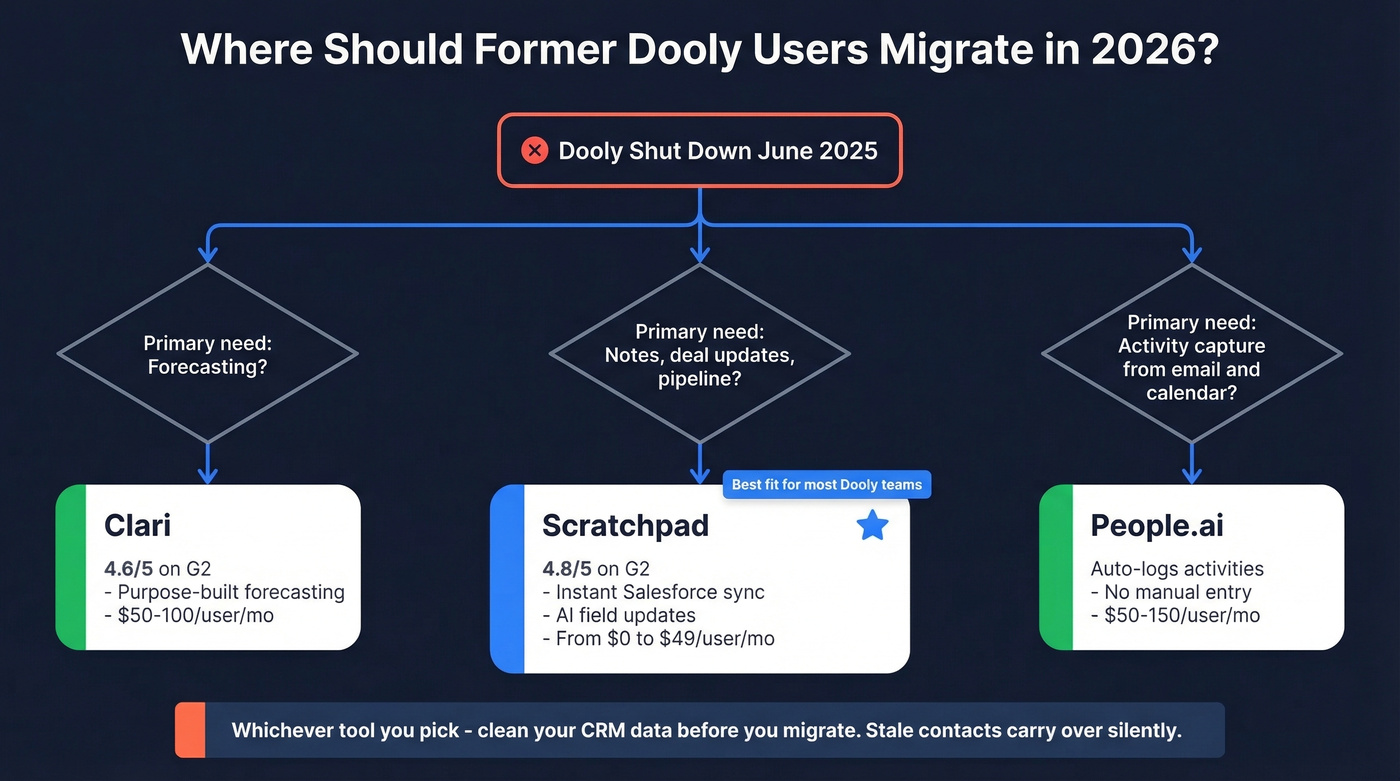
Skip Scratchpad if your primary use case was forecasting - look at Clari instead (or compare broader sales forecasting solutions). If activity capture from email and calendar was the draw, People.ai is the better fit.
Either way, use the migration window to clean your CRM data. Stale contacts carry over silently, and faster workflows on bad data just accelerate outreach to dead ends.
What Dooly Did Well
Dooly earned its 4.8/5 on Capterra by making one thing dead simple: take notes during a meeting, and Salesforce fields update in real time. Templates saved reps from re-entering the same MEDDIC fields call after call, and teams using it consistently reported saving 5+ hours per week on admin.
The cautionary tale? Dooly's sync behavior could overwrite Salesforce data. If you updated a field in SFDC and then synced a Dooly note, your changes could vanish. Keep that in mind when evaluating any tool that writes to your CRM.

Switching CRM tools without auditing your contacts is how bounce rates hit 35%. Prospeo's CRM enrichment returns 50+ data points per contact at a 92% match rate - with a 7-day refresh cycle that catches every record that decayed while Dooly was shutting down.
Don't migrate stale data into a faster workflow. Verify it first.
Scratchpad: The Honest Review
Scratchpad carries a 4.8/5 on G2 across 1,494 reviews, and it's earned that rating by doing one thing exceptionally well: making Salesforce feel fast.

Where Dooly relied on a sync engine with delays and overwrite bugs, Scratchpad connects to Salesforce instantly via API with no intermediary sync layer. Updates are immediate. The interface feels like a spreadsheet sitting on top of your CRM - reps edit fields, add notes, and manage pipeline without ever opening Salesforce.
The AI layer is where Scratchpad pulls ahead for teams that want automation. Scratchpad AI Agents can analyze calls and generate or update field values like next steps, close dates, and deal amounts. You review and approve, or set it to autopilot. It supports MEDDIC, SPICED, Command of the Message, and custom frameworks out of the box. The desktop app handles background recording, and Scratchpad's call recorder/notetaker is built to avoid dropping a bot into your Zoom - a detail reps genuinely appreciate.
One feature worth highlighting for anyone mid-migration: the Hygiene Monitor detects missing fields, stale data, and overdue tasks across your pipeline. We wish more tools shipped something like this, because it catches exactly the kind of rot that accumulates when teams switch platforms.
The gaps are real, though. The mobile experience is weak - G2 reviewers flag it consistently. If your reps do meaningful work from their phones between meetings, that's a problem. And let's be clear: this is a Salesforce-specific productivity layer, full stop. HubSpot or Dynamics teams need to look elsewhere.
Pricing Comparison in 2026
| Scratchpad (2026) | Dooly (Historical) | |
|---|---|---|
| Free | $0 - 100 AI credits/user/mo | $0 - 100 Salesforce field updates/mo, 14-day note history |
| Mid-tier | Solo: $19/user/mo | Growth: $25-30/user/mo |
| Upper tier | Team: $49/user/mo | Enterprise/Premier: ~$65/user/mo |
| Enterprise | Custom | Custom |
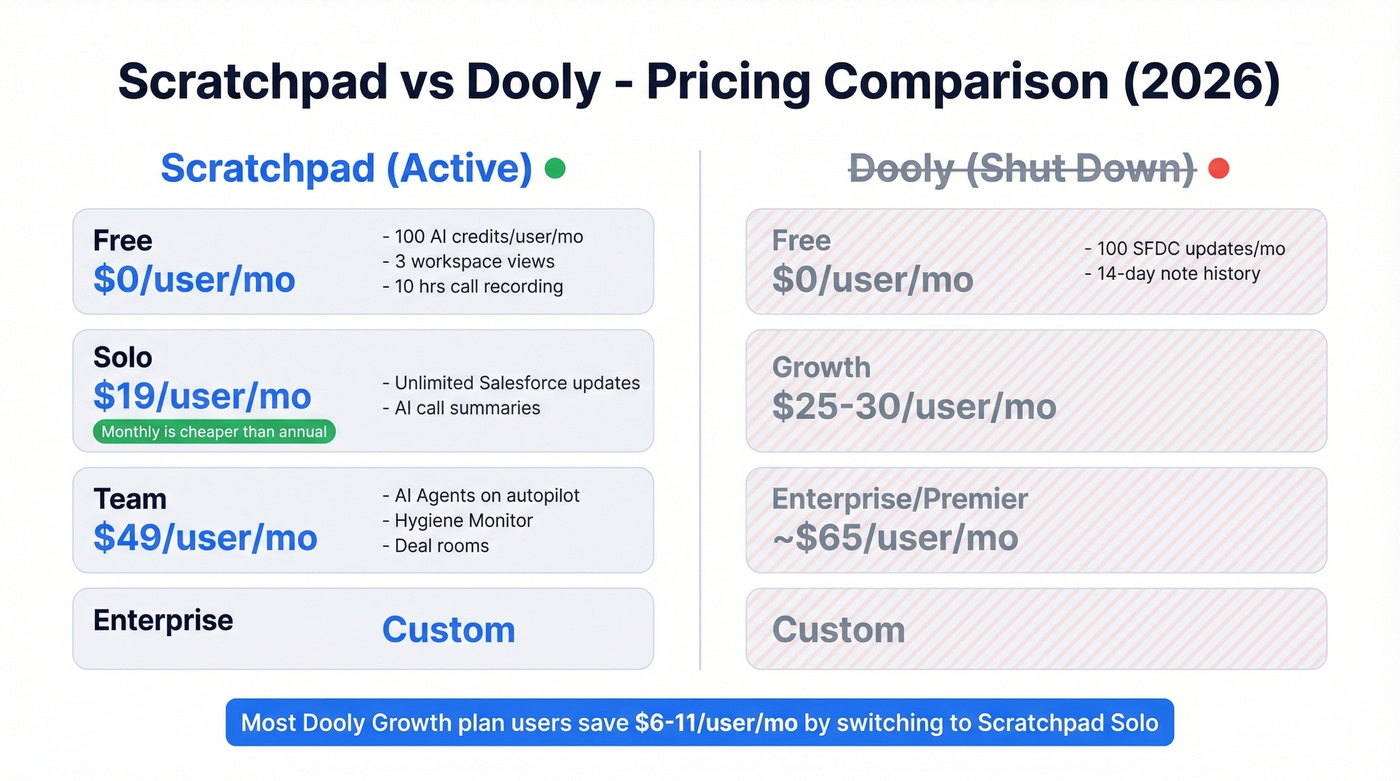
Scratchpad's pricing page is refreshingly transparent - no platform fees, no contracts. The free tier includes three workspace views and 10 hours/month of call recorder/notetaker time, making it genuinely usable for individual reps.
Here's the detail nobody else covers: Scratchpad's monthly price is lower than the "billed yearly" per-month price shown on the pricing page. Solo runs $19/month on monthly billing versus $24/month billed yearly. Team is $49/month versus $62/month billed yearly. If you're testing the waters post-Dooly, there's zero penalty for going month-to-month - which is exactly what a migrating team should do.
For most teams coming off Dooly's Growth plan at $25-30/user, the Solo tier at $19/user is cheaper with more capability.
Other Options Worth a Look
Clari (4.6/5 on G2) is purpose-built for forecasting accuracy. If that was your primary Dooly use case, Clari is the obvious move. Expect roughly $50-100/user/month for mid-market teams. It's a different category entirely, but some Dooly teams were using notes as a lightweight forecasting layer and need a real one now.
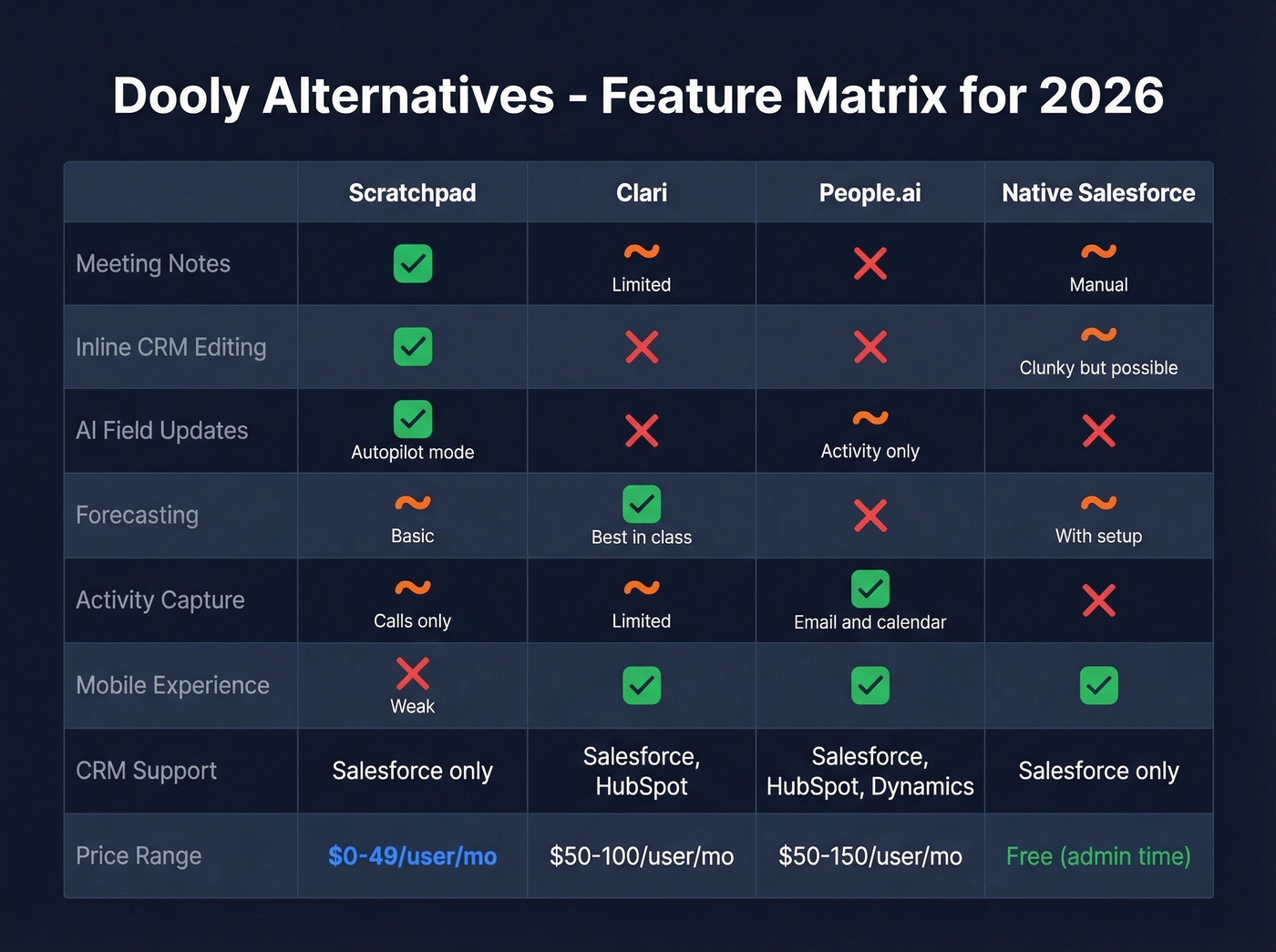
People.ai automatically captures activity data from email and calendar into your CRM. If your team's biggest pain was logging activities rather than updating deal fields, People.ai solves that without reps lifting a finger. Typically $50-150/user/month depending on org size.
Then there's the option nobody wants to hear: build it natively in Salesforce. Custom list views, flows, and Lightning pages can replicate a lot of what Scratchpad does. It's slower, uglier, and requires an admin who knows what they're doing. But after watching Dooly shut down, some teams have decided the third-party risk isn't worth it. We get it. If your org has a strong Salesforce admin, at least evaluate this path before adding another vendor dependency. It's free and it isn't going anywhere.
Fix Your Data Before You Migrate
Here's the thing: the tool you pick matters less than the data underneath it. Scratchpad makes Salesforce updates instant. Clari makes forecasts sharper. Neither does anything useful if the emails and phone numbers in your pipeline are stale.

We've helped teams migrate off dead tools before, and the data quality step is always the one that gets skipped. A team rebuilds workflows, launches sequences - and bounces spike because nobody audited the underlying contacts. One team we worked with saw their bounce rate jump from 4% to 35% after a platform migration, purely because stale records carried over untouched (see email bounce rate benchmarks and causes).
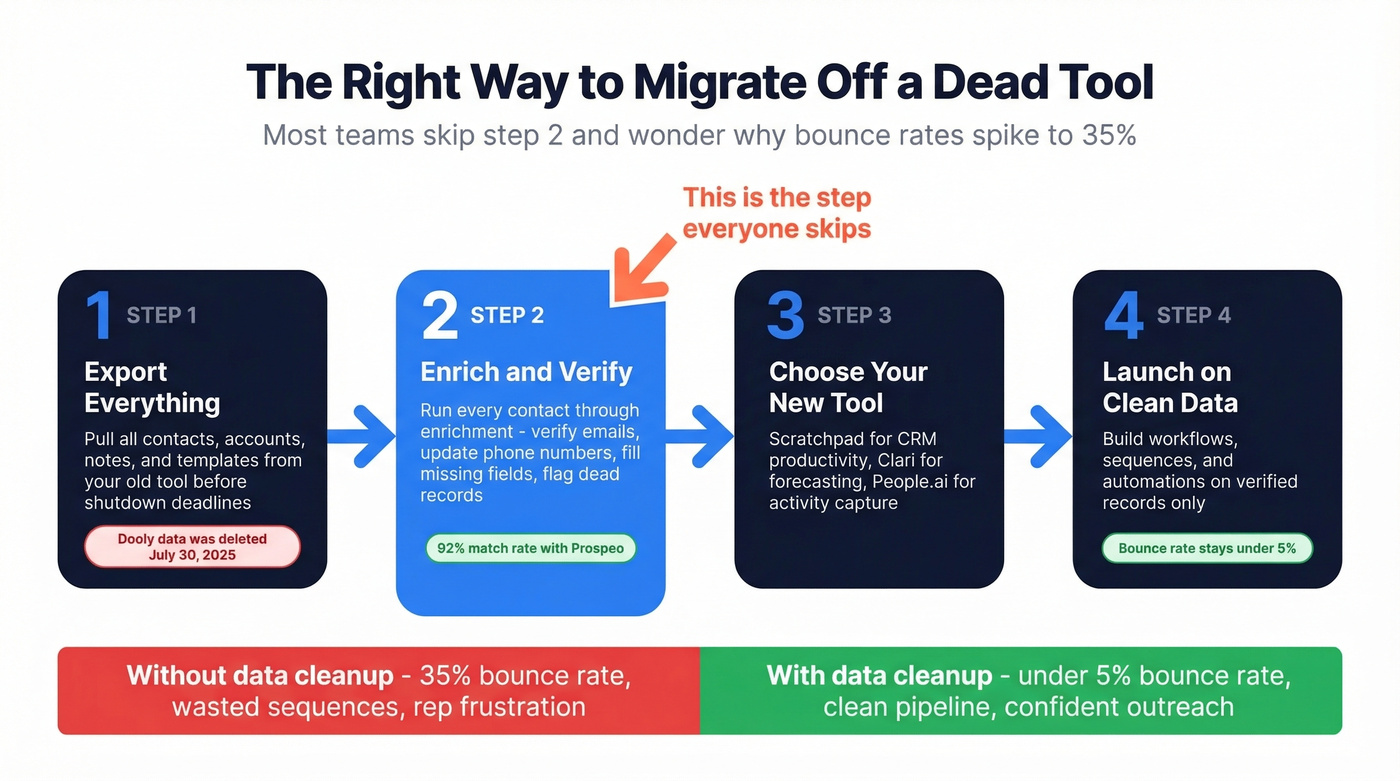
The migration window is the perfect moment to run your pipeline through an enrichment pass. Prospeo's CRM enrichment returns 50+ data points per contact at a 92% match rate, with a 7-day refresh cycle that catches records that decayed while your old tool was winding down. At 98% email accuracy and 125M+ verified mobile numbers, it fills in what's missing and flags what's dead before you build new workflows on top of it (compare data enrichment services).
Scratchpad makes Salesforce updates instant. But instant updates to dead emails and disconnected phones just accelerate wasted outreach. Prospeo gives you 98% email accuracy and 125M+ verified mobile numbers so every record your reps touch is worth touching.
New tool, same bad data? Fix the contacts before you fix the workflow.
FAQ
Is Scratchpad a good replacement for Dooly?
For most teams, yes. Scratchpad covers note-taking, inline Salesforce editing, deal inspection, and AI-powered field updates - the core workflows Dooly users relied on. The main gaps are weak mobile experience and the fact that it's Salesforce-only, so HubSpot or Dynamics teams need to look elsewhere.
Is Scratchpad free?
Scratchpad offers a free plan with 100 AI credits per user per month, three workspace views, and 10 hours of call recording. The Solo plan starts at $19/user/month on monthly billing - unusually, that's cheaper than the annual per-month price of $24.
Can I still export data from Dooly?
No. Dooly suspended all access on June 30, 2025, and no user data was maintained past July 30, 2025. If you didn't export before those dates, your notes and templates are unrecoverable.
How do I clean CRM data during a tool migration?
Run your contact and account records through an enrichment tool before launching new workflows. Stale emails and disconnected numbers are the top reason post-migration sequences underperform. A 7-day data refresh cycle - rather than the 4-6 week industry average - ensures you're catching records that decayed during the transition, not just the ones that were already bad.