

Best Email Cleaners in 2026 (Inbox + List Tools)
"Email cleaner" means two completely different things, and most articles pretend it doesn't. Half the people searching this want to nuke 12,000 unread newsletters from their Gmail. The other half need to scrub a prospect list before launching cold outreach so their domain doesn't get torched. Those are entirely different problems requiring entirely different tools.
The average professional receives 121 emails daily, and spam still accounts for roughly half of all global email traffic. Whether you're drowning in inbox clutter or watching bounce rates climb on your outbound campaigns, you need a cleaner - just not the same one.
Our Picks (TL;DR)
| Pick | Tool | Why | Starting Price |
|---|---|---|---|
| Best overall inbox cleaner | Clean Email | Per-sender rules, Auto Clean, works with all email providers | ~$5-$15/mo |
| Best free inbox cleaner | Cleanfox | Fast bulk cleanup, completely free | Free |
| Best for email list verification | Prospeo | 98% email accuracy, 5-step verification, built for outbound | Free (75/mo) |
If your problem is inbox chaos, start with Clean Email. If you refuse to pay and accept the privacy trade-off, Cleanfox works. If your problem is bouncing outbound emails and a dirty prospect list, Prospeo is the tool.
What Is an Email Cleaner?
The term covers two distinct categories, and conflating them leads to picking the wrong tool entirely.
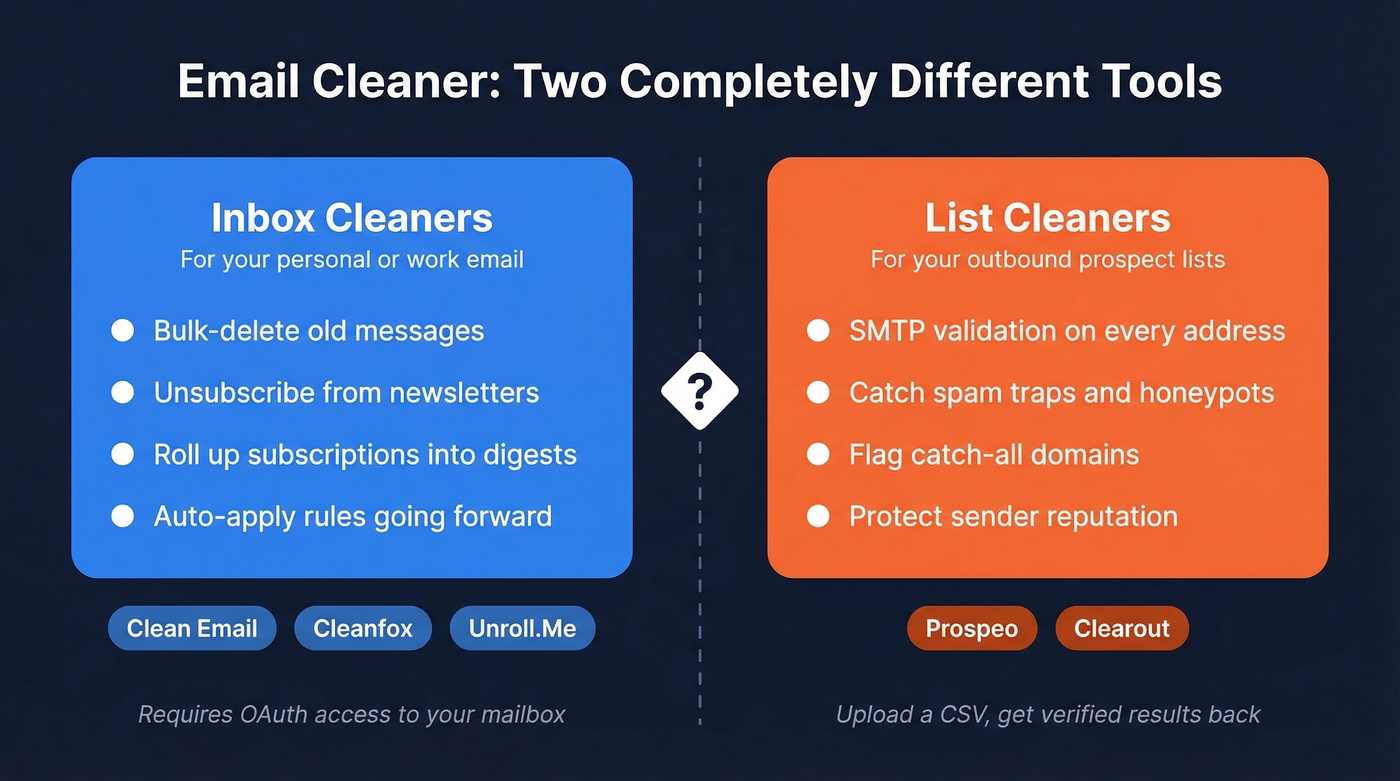
Inbox cleaners work on your personal or work email account. They bulk-delete old messages, unsubscribe you from newsletters, roll up multiple subscriptions into a single digest, and apply rules to keep things tidy going forward. Tools like Clean Email, Cleanfox, and Unroll.Me live here. They all need OAuth access to your mailbox to function.
List cleaners work on the sender side. You upload a CSV of prospect or marketing emails, and the tool checks each address against SMTP servers, catches spam traps, identifies catch-all domains, and flags invalid addresses before you hit send. This protects your domain reputation and keeps bounce rates low - critical for anyone managing email deliverability in Salesforce, HubSpot, or dedicated sending platforms.
Best Tools Compared
Prospeo - Best for List Cleaning
Use this if: You're running outbound campaigns, building prospect lists, or managing email marketing sends where bounces directly damage your sender reputation.
Skip this if: You're trying to clean up a cluttered personal inbox. That's not what this does.
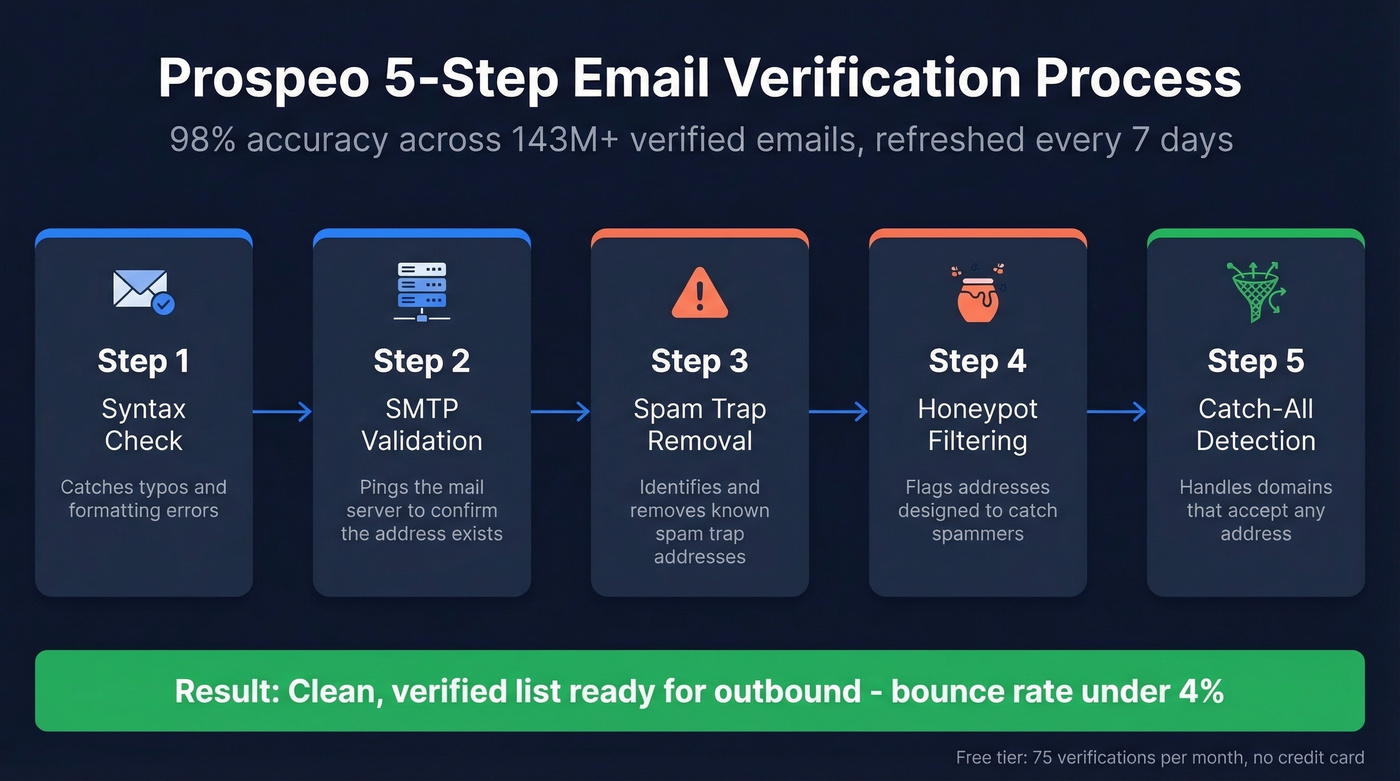
Prospeo runs a 5-step verification process that includes SMTP validation, catch-all domain handling, spam-trap removal, and honeypot filtering. The result is 98% email accuracy across 143M+ verified emails, refreshed on a 7-day cycle. For context, the industry average refresh is six weeks - by which point a meaningful chunk of your list has gone stale.
The free tier gives you 75 real-time email verifications per month with no credit card required. Paid pricing runs about $0.01 per email, making bulk verification genuinely affordable. Upload a CSV, get results in minutes, push clean contacts to Salesforce, HubSpot, Lemlist, or Instantly through native integrations. GDPR compliant, no contracts, self-serve from day one.
We've seen this pattern repeatedly with outbound teams: if your bounce rate is above 4-5%, your data provider is the problem. Meritt, a Prospeo customer, saw bounce rates drop from 35% to under 4% after switching - and that's not an outlier. Stack Optimize built to $1M ARR while maintaining sub-3% bounce rates and zero domain flags across all their clients. The 7-day refresh cycle is what actually moves the needle for teams running ongoing outbound, because a list that was clean last month isn't necessarily clean today.
Clean Email - Best Overall Inbox Cleaner
Use this if: You want a proper inbox management system with automation rules, per-sender controls, and a privacy-first approach.
Skip this if: You only need a one-time cleanup. Gmail's built-in search operators handle that for free.
Clean Email has a 4.5/5 rating based on 3,300 user reviews. Screener holds messages from new senders until you approve them, Auto Clean applies rules automatically, and Sender Settings let you block, mute, or set "keep newest only" on a per-sender basis. The Unsubscriber feature handles newsletter opt-outs without you clicking through each one individually.
The free tier lets you clean up to 1,000 messages but locks out premium features. A 14-day trial - no credit card required - unlocks everything including 25 unsubscribe actions. Paid plans run ~$5-$15/mo depending on how many accounts you connect and whether you pay annually.
What matters most here: Clean Email funds itself entirely through subscriptions. They don't sell your data. That's not a small detail in this category, where the business model behind the tool determines whether your email content stays private or becomes a commodity.
Cleanfox - Best Free Inbox Cleaner
Use this if: You want to obliterate thousands of emails fast and you're comfortable with the privacy implications of a data-company-owned tool.
Skip this if: You care about what happens to your email metadata, or you need the web app to work reliably.
Cleanfox is completely free. Users on Trustpilot give it a 4.8/5 from 8,783 reviews, praising how quickly it can wipe out huge piles of email. Connect your account, see your subscriptions sorted by volume, and nuke the ones you don't want.
The catches are real, though. The web version frequently errors out - multiple Trustpilot reviewers report being forced to download the mobile app instead. More importantly, Cleanfox is owned by NielsenIQ, the same data analytics company behind Unroll.Me. When the product is free and the parent company sells market intelligence, you're the product. We cover this in detail in the privacy section below.
Unroll.Me - Free but Privacy Costs
Unroll.Me's Rollup feature - bundling subscriptions into a single daily digest - is genuinely useful, and the unsubscribe interface is fast. But the privacy policy is unusually blunt: "We may 'sell' or 'share' some types of Personal Information."
The parent company, NielsenIQ, derives "market intelligence, analytics, datasets, and measurement products" from your commercial emails, and the policy also references use cases like lookalike models and audiences for targeted advertising. Data can be retained for up to seven years. Free is free. But Unroll.Me's business model is selling insights derived from your receipts, confirmations, and marketing emails. Go in with your eyes open.
Mailstrom - Budget Inbox Cleanup
Mailstrom doesn't try to be clever. You get smart filters for sorting by sender, subject, size, and date, plus unlimited email removal on every tier. Pricing: Basic at $9/mo ($59.95/yr), Plus at $14/mo ($99.95/yr), and Pro at $29.95/mo ($199.95/yr). The Plus tier with 3 accounts and 250,000 emails is the sweet spot for most people.
No data-selling concerns, no privacy drama - just a functional tool at a reasonable price. The main drawback is the Basic tier's 10,000-email cap, which is tight for heavy inboxes, and the interface feels dated next to Clean Email.
Leave Me Alone - Best for Privacy
Leave Me Alone was built specifically as the anti-Unroll.Me. It doesn't store email content except when needed to create Rollups, and it's funded entirely by subscriptions. You get 10 free unsubscribes with no credit card, and a $19 seven-day pass unlocks unlimited unsubscribes, Inbox Shield, and Rollups. Ongoing plans run around $8-$20/mo, and there's a 14-day money-back guarantee.
Their pricing page puts it bluntly: competitors are free because they "aggregate and sell data generated from your emails." The feature set is narrower than Clean Email - focused on unsubscribing rather than full inbox management - but if privacy is your primary concern, this is the cleanest option in the category. It's also worth considering email aliases alongside a tool like this. Aliases let you compartmentalize signups and reduce the cleanup burden before it starts.
SaneBox - AI Sorting Layer
SaneBox (around $7-$36/mo) isn't really a cleaner. It's an AI-powered prioritization layer that sorts incoming mail by importance. The Snooze and SaneBlackHole features are useful for triage-heavy inboxes, but don't expect bulk cleanup or unsubscribe features. Best for executives and managers who receive 200+ emails daily and need automated prioritization, not deletion.
Clearout - Bulk List Verification
Clearout handles email list verification with a free tier and pay-as-you-go pricing starting around $0.01/email for bulk verification. It's a solid option for one-off list scrubs, though teams running ongoing outbound will benefit more from a tool with a faster data refresh cycle.

Inbox cleaners delete old newsletters. List cleaners protect your domain. Prospeo's 5-step verification catches spam traps, honeypots, and catch-all domains - delivering 98% email accuracy across 143M+ verified addresses. Start with 75 free verifications.
Stop torching your domain with unverified prospect lists.
Meritt dropped bounce rates from 35% to under 4%. Stack Optimize hit $1M ARR with sub-3% bounces and zero domain flags. The difference? A 7-day data refresh cycle - not the 6-week industry average that lets your list rot.
Clean your prospect list before your next campaign goes out.
Side-by-Side Comparison
| Tool | Free Tier | Paid Price | Privacy | Best For |
|---|---|---|---|---|
| Prospeo | 75 emails/mo | ~$0.01/email | Good (GDPR) | Sales teams, agencies |
| Clean Email | 1,000 messages | ~$5-$15/mo | Good | Full inbox management |
| Cleanfox | Unlimited | Free | Caution (NielsenIQ) | Fast bulk cleanup |
| Unroll.Me | Unlimited | Free | Poor (sells data) | Rollup digests |
| Mailstrom | None | $9-$30/mo | Good | Budget inbox cleanup |
| Leave Me Alone | 10 unsubscribes | ~$8-$20/mo | Excellent | Privacy-first users |
| SaneBox | None | ~$7-$36/mo | Good | AI email prioritization |
| Clearout | Free tier | ~$0.01/email | Good | One-off list scrubs |
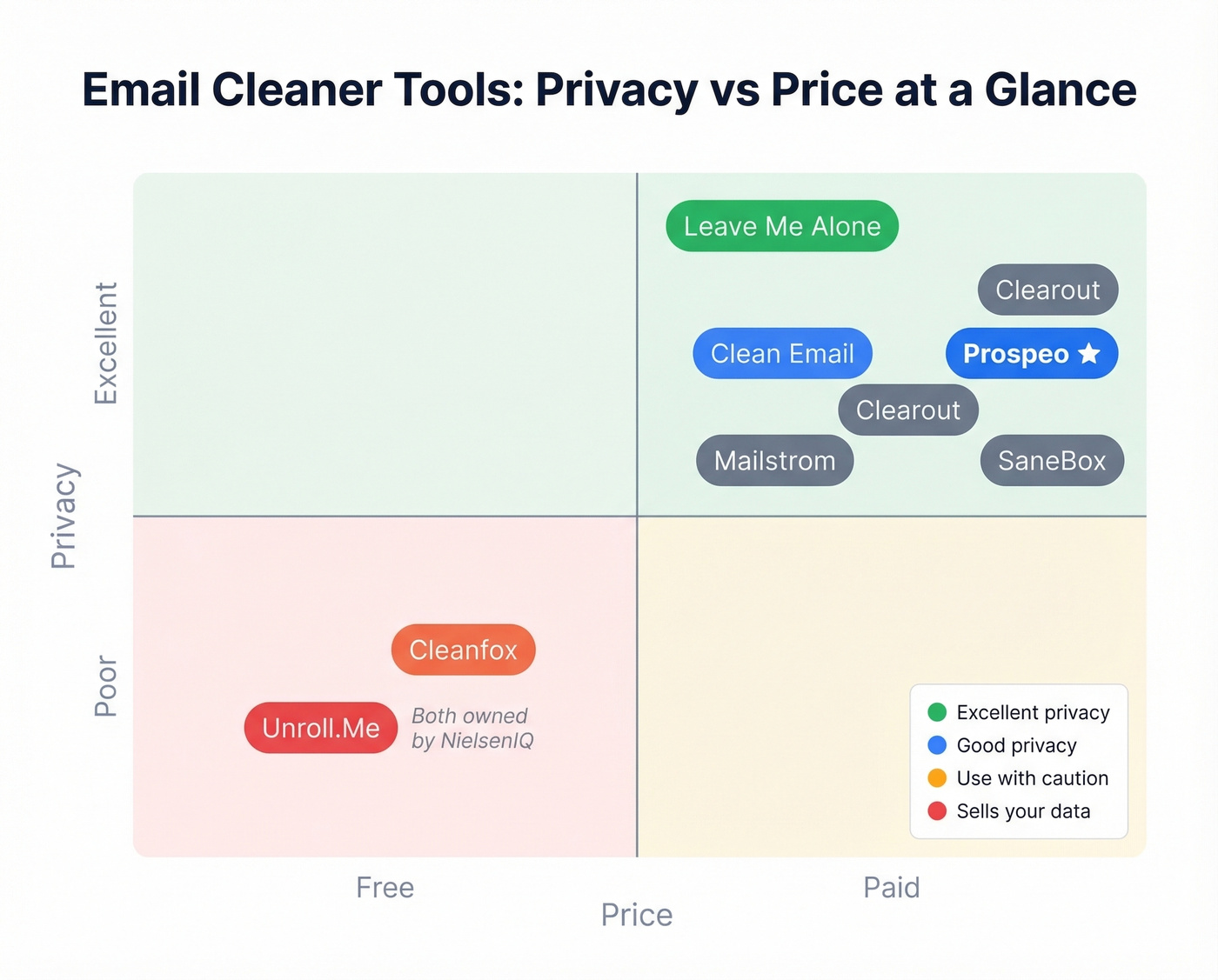
Let's be honest: most people searching for an email cleaner need Clean Email or 30 minutes with Gmail search operators - not a subscription. The people who actually need to pay for cleaning are outbound sales teams, where a single bad list can torch a domain that took months to warm up. If your average deal size is north of $5k and you're sending cold email, list verification isn't optional. If you're just drowning in newsletters, the free DIY method below will get you 80% of the way there.
The Privacy Problem
Every inbox cleaner requires OAuth access - read, modify, and manage permissions on your mailbox. Some tools claim they only scan email headers, but as Proton's analysis points out, there's no way to verify "headers only" claims when the app has full access. You're trusting the vendor's word.
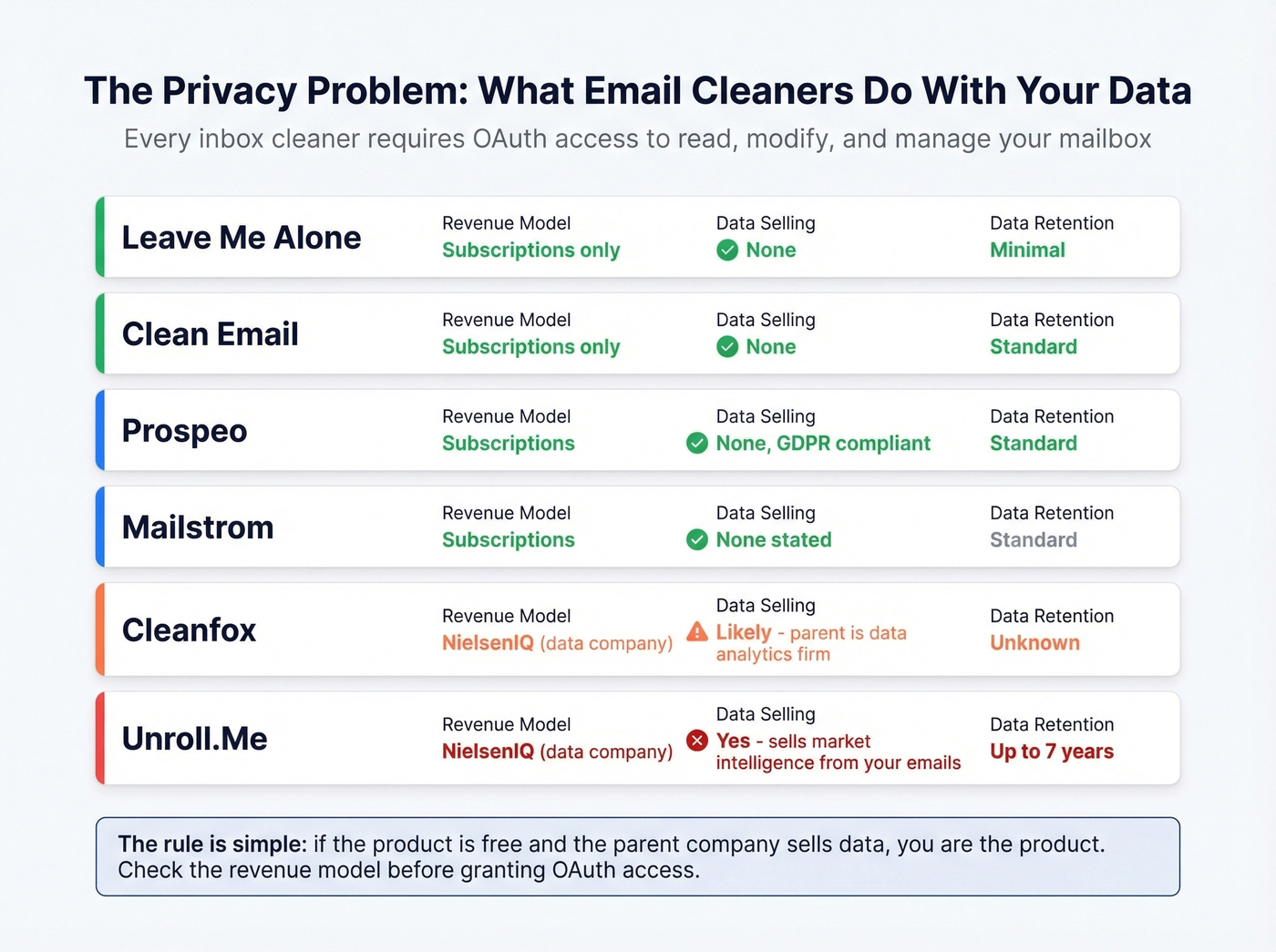
The trust gap widens when you look at ownership. Both Cleanfox and Unroll.Me are owned by NielsenIQ, a global data analytics company. Unroll.Me's privacy policy collects copies of your "Commercial Emails" - receipts, confirmations, promotional messages - and uses them to build "market intelligence, analytics, datasets, and measurement products." Data can be retained for seven years.
Clean Email deletes indexed email data 45 days after you cancel and generates 100% of revenue from subscriptions. Leave Me Alone goes further - they don't store email content except when needed for Rollups. The EFF has warned about the hidden costs of "free" tools, and the pattern holds: if the tool is free and the parent company sells data, your email content is the product. Your purchase history, subscriptions, communication patterns - all of it becomes a commodity the moment you grant OAuth access to a data-monetized app.
Protecting Your Sender Reputation
List cleaning isn't just about removing invalid addresses. It's about defending your domain against threats that erode trust with mailbox providers over time.
One common risk is the lookalike domain - a near-identical domain used in phishing attacks that can get your legitimate domain flagged by association. Verifying your list against known spam traps and honeypots catches these issues before they snowball into deliverability crises that take weeks to recover from.
Apple's tightening of privacy controls adds another wrinkle. With changes to how email opens are tracked, maintaining a clean, verified list becomes more important than relying on engagement signals that are increasingly unreliable. Litmus's deliverability guide covers this shift in detail.
Clean Your Inbox Without Apps
For a one-time cleanup, you don't need an app - you need 30 minutes and some search operators. The consensus on r/productivity and r/gmail is the same frustration we hear constantly: people want to keep their long-held email address but can't stomach clicking "unsubscribe" 500 times. Here's the faster way.
Gmail:
older_than:1y- find everything older than a yearis:unread- surface the thousands you never openedfrom:newsletter@example.com- target specific senderslabel:promotions- hit the entire Promotions tab- Select all, click "Select all conversations that match this search," then delete
Outlook: Home tab, Delete, Clean Up Conversation removes redundant messages in threads. Works on individual conversations or entire folders.
These native tools handle the one-time purge perfectly well. Where third-party cleaners earn their keep is ongoing automation - rules that keep your inbox clean after the initial blitz.
FAQ
Are email cleaners safe?
Paid tools like Clean Email and Leave Me Alone fund themselves through subscriptions and have clear data-handling policies. Free tools like Unroll.Me explicitly sell data derived from your emails. Before connecting any cleaner, check what OAuth permissions you're granting - every inbox tool gets read, modify, and manage access to your mailbox.
What's the best free option?
For inbox cleanup, Cleanfox is completely free and handles bulk deletion fast - but it's owned by NielsenIQ, a data company. For email list cleaning, Prospeo offers 75 free verifications per month with no credit card required and 98% accuracy, making it the strongest free option for outbound teams.
Do these tools sell your data?
Some do. Unroll.Me's privacy policy explicitly states it may "sell or share" personal information. Clean Email and Leave Me Alone both generate 100% of revenue from subscriptions, not data sales. Ownership matters - always check who's behind the free tool before granting OAuth access.
Inbox cleaning vs. list cleaning?
Inbox cleaning removes clutter from your personal or work email - newsletters, spam, old threads. List cleaning verifies that addresses on a prospect or marketing list are valid before you send, preventing bounces and protecting your domain reputation. Different problems, different tools entirely.
Can I clean my inbox without an app?
Yes. Gmail's search operators like older_than:1y and is:unread let you bulk-select and delete thousands of messages in minutes. Outlook has a built-in Clean Up Conversation feature under Home, Delete. These work well for one-time purges but lack the ongoing automation that dedicated tools provide.