

Email Cleaning: The Complete Guide to Inbox Cleanup and List Verification
"Email cleaning" means two completely different things depending on who you are - and most guides only cover one side. Half the internet treats it as inbox decluttering. The other half treats it as marketing list verification. They're different problems with different tools, and nobody bothers to explain that upfront.
We're covering both so you can figure out which problem you actually have and take action in the next 30 minutes.
Two Problems, One Search Term
If you're a regular person, email cleaning means digging out from under 14,000 unread emails, reclaiming storage, and unsubscribing from newsletters you signed up for in 2019. The tools are free or cheap (~$8/mo). The process takes an afternoon.
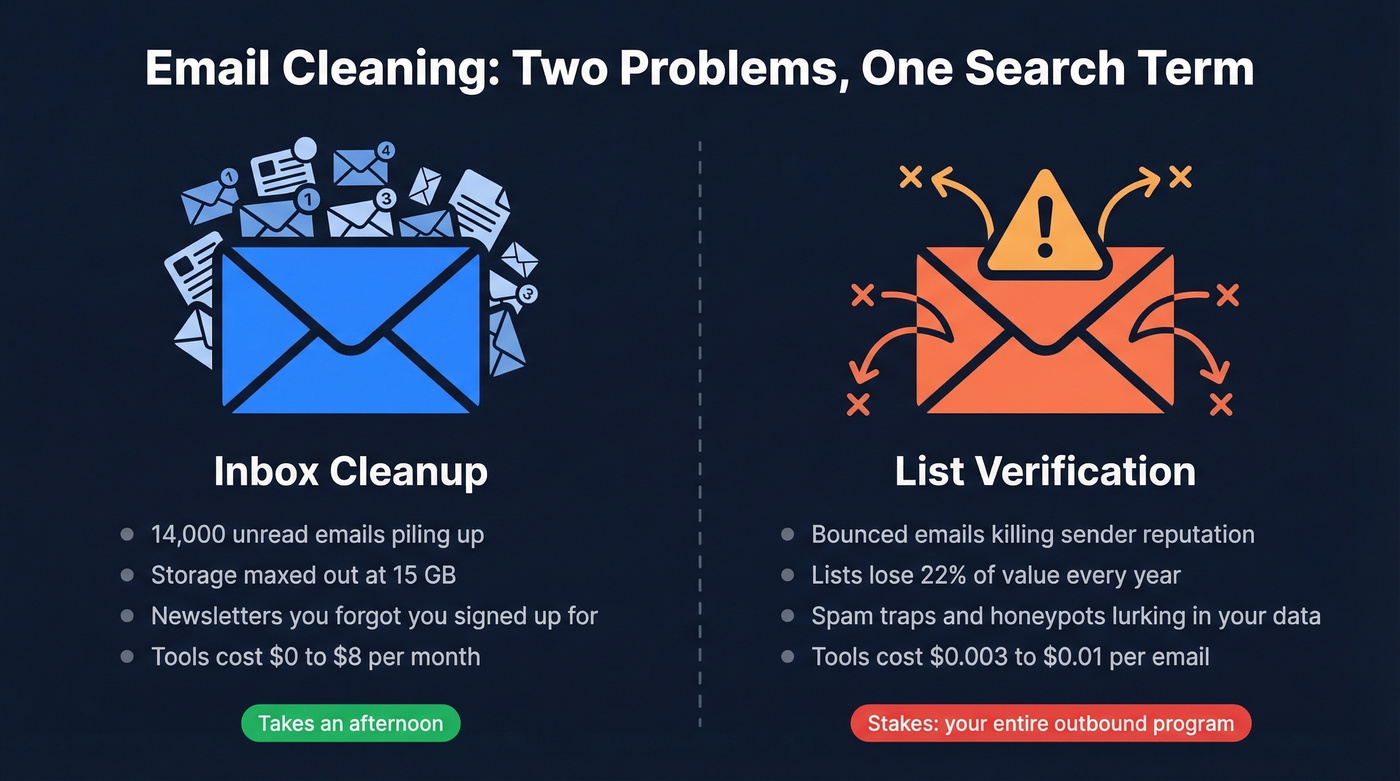
If you're in marketing or sales, it means verifying that the email addresses on your list actually exist before you hit send. Bad addresses bounce, bounces damage your sender reputation, and a damaged reputation means your emails land in spam - even the ones going to valid addresses. The tools cost $0.003-$0.01 per email, and the stakes are your entire outbound program.
Drowning in inbox clutter? Jump to the inbox cleanup section below. Campaigns bouncing? Skip straight to list verification.
What You Need (Quick Version)
Drowning in newsletters and old emails? Start with Gmail's built-in search operators - they're free and surprisingly powerful. If you want an app to automate it, Clean Email runs around $8/month. Skip Unroll.Me; it sells anonymized data.
Marketing or sales emails bouncing? For batch verification of an existing database, ZeroBounce ($45/5K emails) or Bouncer ($40/5K) are solid picks. If you want emails verified at the point of collection so you never need batch scrubbing, Prospeo handles that with 98% accuracy and a free tier of 75 emails per month.
Why Email Cleaning Matters
Your email list is rotting. That's not dramatic - it's math. The average mailing list loses ~22% of its value every year as people change jobs, switch providers, and abandon addresses. And 39% of senders rarely or never clean their lists, which means they're sending into a void and wondering why results keep declining.
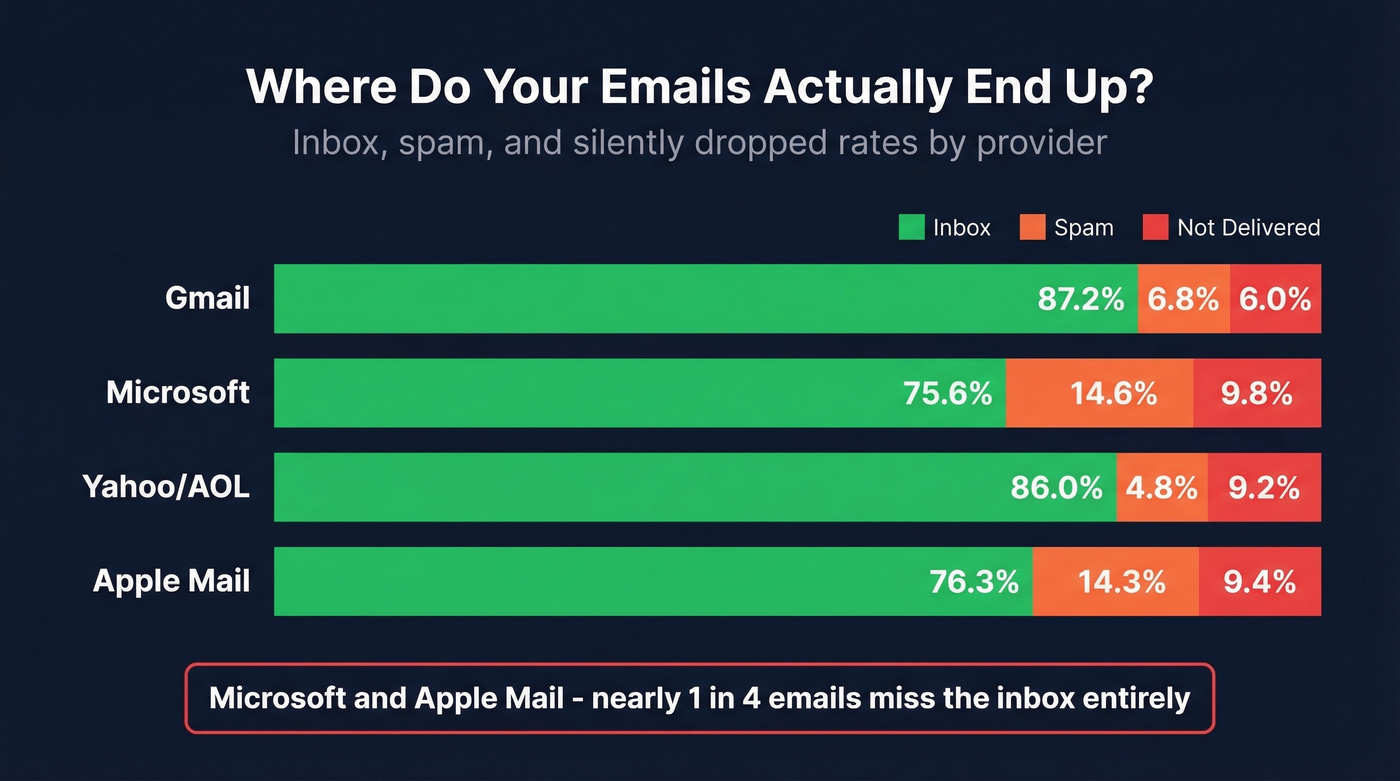
Globally, only about 84% of emails reach the inbox - roughly one in six never arrives. But that average hides massive variation by provider:
| ISP | Inbox Rate | Spam Rate | Not Delivered* |
|---|---|---|---|
| Gmail | 87.2% | 6.8% | 6.0% |
| Microsoft | 75.6% | 14.6% | 9.8% |
| Yahoo/AOL | 86.0% | 4.8% | 9.2% |
| Apple Mail | 76.3% | 14.3% | 9.4% |
Emails that reached neither inbox nor spam - silently dropped or blocked.
Microsoft and Apple Mail are brutal. Nearly 1 in 4 emails miss the inbox entirely. And if your spam complaint rate crosses 0.3%, Gmail will throttle you fast.
For sales teams, the impact is immediate. Meritt saw bounce rates drop from 35% to under 4% after switching to verified data through Prospeo, tripling their pipeline from $100K to $300K per week. That's not a marginal improvement - that's the difference between a functioning outbound program and one that's actively damaging your domain.

On the inbox side, Gmail gives you 15 GB of free storage shared across Gmail, Drive, and Photos. Once you hit that ceiling, Gmail stops accepting new mail until you free up space. Different kind of emergency, just as real.
How to Clean Your Inbox
Gmail Cleanup
Gmail's search operators are the fastest free way to reclaim your inbox. Most people don't know they exist, which is why they're manually scrolling through thousands of emails like it's 2012.
The operators that matter:
from:newsletter@company.com- find everything from a specific senderhas:attachment- surface emails with files (the storage hogs)larger:10M- find emails over 10 MBolder_than:1y- everything older than a yearbefore:01/01/2025- everything before a specific dateis:unread- your unread backlog in one view
The bulk delete workflow: run a search, click the checkbox to select all results on the page, then click "Select all conversations that match this search." Delete. Empty trash. You'll be shocked how much storage you reclaim from old attachments alone - we've seen people free up 3-4 GB in a single session just by targeting larger:5M older_than:2y.
For ongoing hygiene, create filters under Settings > Filters and Blocked Addresses. Route newsletters to a label, auto-archive promotional emails, or auto-delete anything from senders you'll never read. This takes 10 minutes and saves hours over the next year. The unsubscribe button in Gmail actually works now - use it aggressively.
Outlook Cleanup
Outlook has a built-in feature most people miss: Clean Up Conversation. It removes redundant messages in email threads - all the quoted replies that stack up - and moves them to Deleted Items. Find it under Home > Delete > Clean Up Conversation (simplified ribbon) or Home > Clean Up > Clean Up Conversation (classic ribbon). You can run it on entire folders for a one-pass inbox purge.
Outlook's Focused Inbox automatically separates important emails from everything else. Not perfect, but a reasonable first filter if you haven't turned it on.
Inbox Cleaning Apps
| App | Price | Verdict |
|---|---|---|
| Clean Email | ~$8/mo | Most full-featured - doesn't sell your data |
| Cleanfox | Free | Basic unsubscribing |
| Mailstrom | ~$9/mo | Good for bulk actions |
| Edison Mail | Free/premium | Smart inbox features |
| Unroll.Me | Free | Sells anonymized data - avoid |
Clean Email earns revenue from subscriptions, not your data. That's the model you want.

Lists decay 22% per year - but batch scrubbing is a bandaid. Prospeo's 5-step verification and 7-day data refresh mean you start with clean emails, not emails you have to clean later. 98% accuracy, catch-all handling, spam-trap removal built in.
Fix the source, not the symptom. Start with verified emails.
How List Verification Works
Email verification sounds simple - check if an address exists. In practice, it's a multi-step process with real technical nuance.
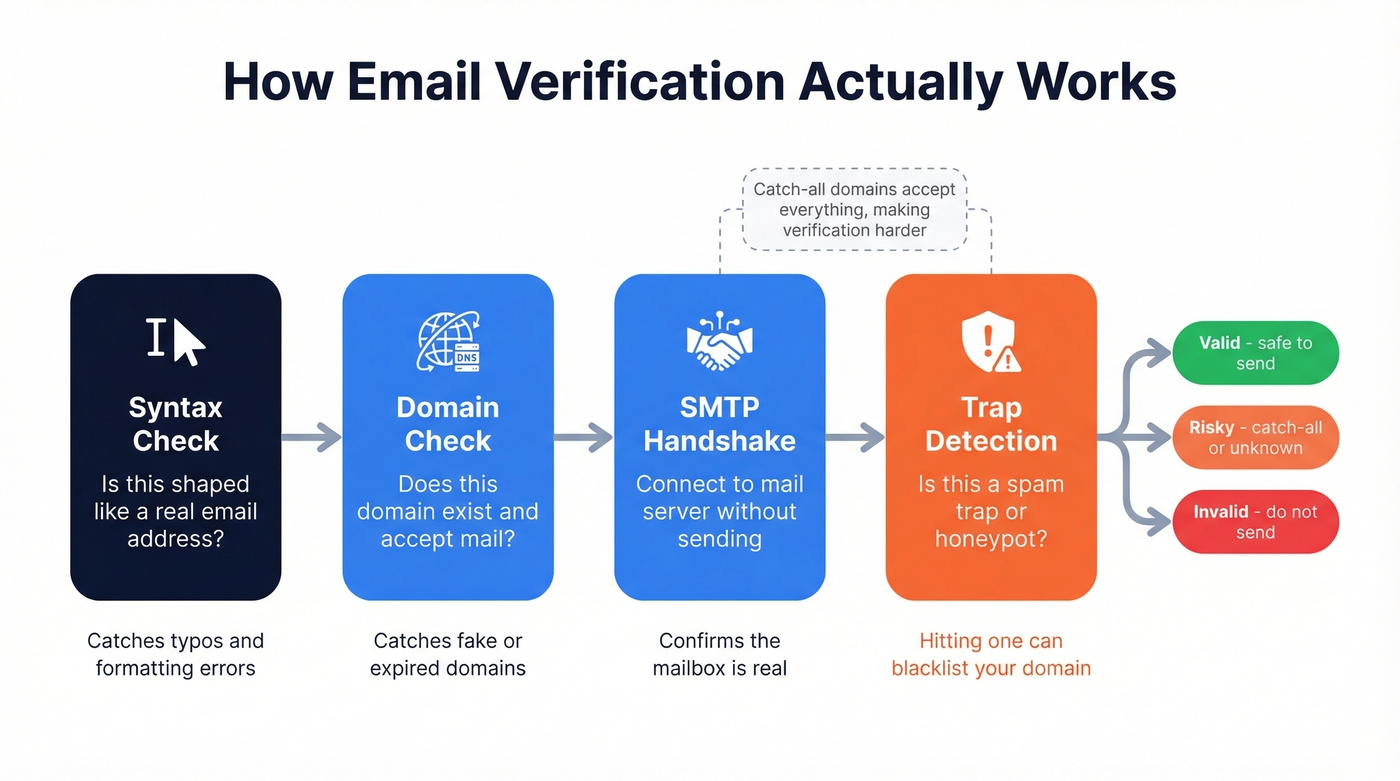
The core mechanism is SMTP verification. The tool connects to the recipient's mail server and initiates a handshake without actually sending an email. The server responds with signals about whether it'll accept mail for that address, and the tool records the result. This catches typos, abandoned addresses, and fabricated emails.
Here's where it gets complicated: catch-all domains. A catch-all domain accepts email sent to any address at that domain, even fake ones. If a company runs a catch-all server, verification tools can't confirm whether john.smith@company.com is a real person or a made-up address. That's why results often show "risky" or "unknown" for these contacts.
Beyond SMTP checks, good verification tools also detect spam traps (old addresses repurposed by ISPs to catch spammers) and honeypots (fake addresses planted to identify scrapers). Hitting either one can get your domain blacklisted fast.
Most vendors won't tell you that "verification" and "validation" aren't the same thing. Validation checks syntax and format - is this shaped like an email address? Verification attempts to determine deliverability by checking how the receiving server responds. You need both, but verification is what moves the needle on deliverability.
In an independent accuracy test with 1,200 emails, tools varied significantly - some misclassified invalid addresses as valid. Most tools market ~99% accuracy. Few publish their testing methodology. If accuracy matters to you, test with your own data before committing.
Best Email List Cleaning Tools
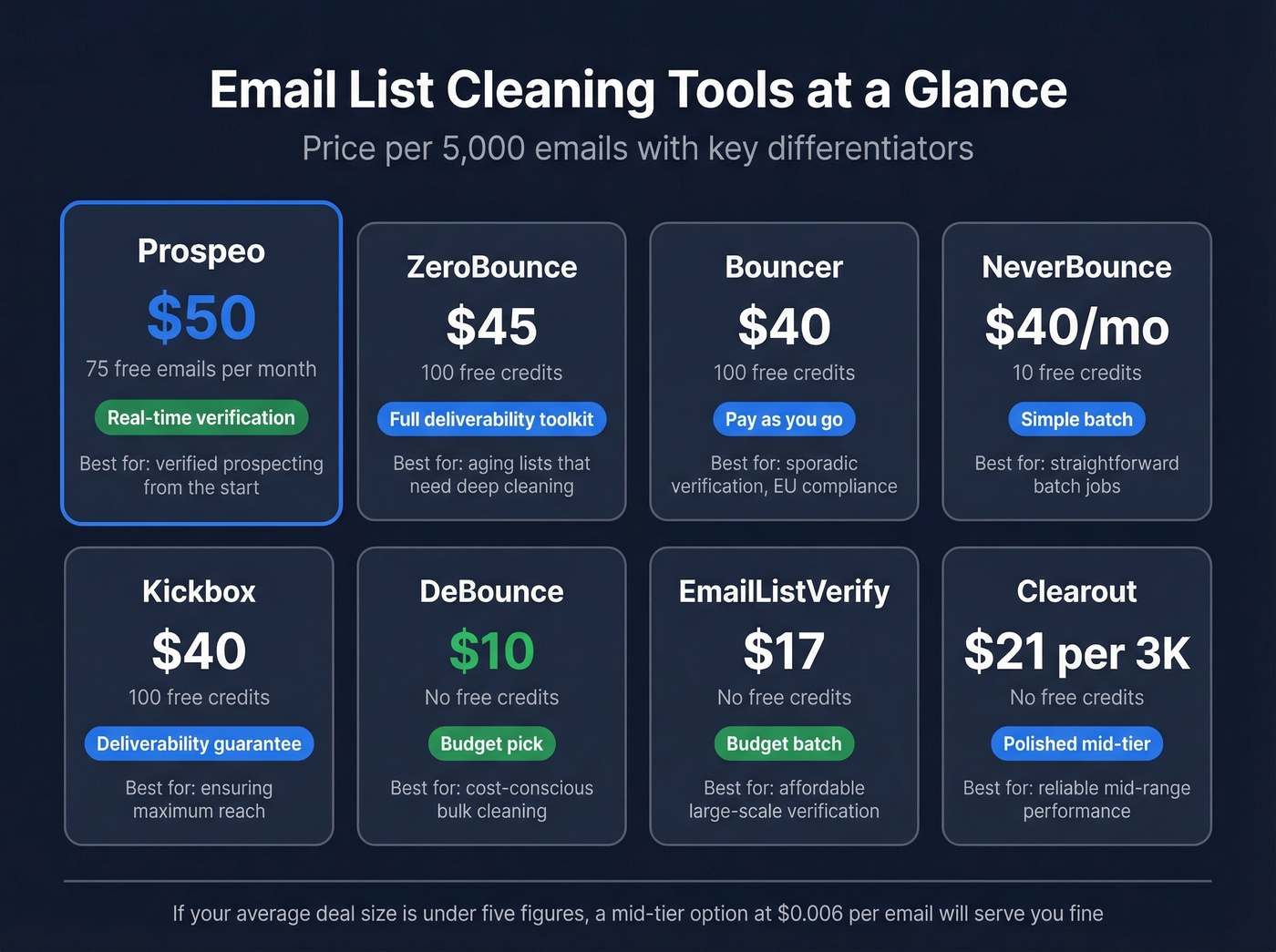
Let's be honest: if your average deal size is under five figures, you probably don't need the most expensive verification tool on this list. A mid-tier option at $0.006/email will serve you just fine. Save the premium tools for when bad data is costing you real pipeline.
| Tool | Price (5K) | Free Credits | Best For |
|---|---|---|---|
| Prospeo | ~$50 | 75 emails + 100 Chrome/mo | Real-time verified prospecting |
| ZeroBounce | $45 | 100 | Full deliverability toolkit |
| Bouncer | $40 | 100 | Pay-as-you-go batch verification |
| NeverBounce | $40/mo | 10 | Simple batch verification |
| Kickbox | $40 | 100 | Deliverability guarantee |
| DeBounce | $10 | - | Tightest budgets |
| EmailListVerify | $17 | - | Budget batch cleaning |
| Clearout | $21/3K | - | Polished mid-tier |
Prospeo
Use this if you're building prospect lists from scratch and want emails verified at the point of collection - not after the fact. The 5-step verification process includes catch-all handling, spam-trap removal, and honeypot filtering using proprietary infrastructure. The 7-day data refresh cycle means you're working with current data, not contacts that were valid six weeks ago.
The real angle: the best list hygiene strategy is not needing to scrub at all. Prospeo verifies emails when you find them, which is a fundamentally different approach than collecting emails from one tool and running them through a separate verifier. Already have an existing list? Batch verification works too - but the real value is preventing bad data from entering your pipeline in the first place.
Free tier includes 75 emails and 100 Chrome extension credits per month. Paid plans start at ~$0.01/email with no contracts.
ZeroBounce
A marketer on Reddit ran a 50K aged list through ZeroBounce and found 75% validity for 2015-era contacts versus 88% for recent ones. That 13-point gap is what a decade of list decay looks like - and exactly why cleaning matters before you warm up an old list.

ZeroBounce runs $45 for 5,000 emails (or $40/mo on a subscription), includes 100 free credits, and carries a 4.7-star G2 rating. The add-on tools - email scoring, activity data, inbox placement testing - make it more than a simple verifier. For teams sitting on aging lists who want the full deliverability toolkit, this is the pick.
Bouncer
One of the highest-rated verification tools on G2 at 4.8 stars, and for good reason: $40 for 5,000 emails with a clean pay-as-you-go model. For teams that verify sporadically rather than on a fixed schedule, that's a meaningful advantage over subscription-based tools.
Bouncer is GDPR compliant with EU-based data centers and deletes verification results after 60 days. European teams or anyone with strict data handling requirements should look here first. The tradeoff is scope - Bouncer does verification well and doesn't try to be a deliverability platform. If you need scoring, activity data, or inbox placement testing, you'll want ZeroBounce instead.
NeverBounce
At $40/mo for 5,000 emails, NeverBounce is straightforward batch verification on a subscription model. One Reddit user estimated ~$750 for 250K emails, which tracks with published pricing. The free tier is only 10 credits - barely enough to test the interface, let alone evaluate accuracy on your data. If you need generous free credits, look elsewhere.
Kickbox
Kickbox charges $40 for 5,000 emails and backs it with a 95% deliverability guarantee - if more than 5% of addresses marked "Deliverable" bounce, you get credits back. Results sort into deliverable, risky, and undeliverable categories. In the independent accuracy test, Kickbox misclassified 4 invalid emails as valid. Not catastrophic, but the guarantee exists for a reason.
Budget Picks
DeBounce is the cheapest at $10 for 5,000 emails. Small list, tight budget, no frills needed - this gets it done.
EmailListVerify runs $17 for 5,000 emails. Slightly more expensive, slightly more established.
Clearout charges $21 for 3,000 credits (~$0.007/email) and holds a 4.7-star G2 rating. The most polished of the budget tier, but do the per-email math before buying - credit-based pricing can be deceptive.
Meritt cut bounce rates from 35% to under 4% and tripled pipeline to $300K/week - not by cleaning their list, but by switching to data that was already verified. Prospeo checks every email against catch-all domains, spam traps, and honeypots before you ever see it.
Get 75 verified emails free and see what clean data actually looks like.
What Email Cleaning Costs
Verification pricing follows a simple pattern: the more emails you verify, the cheaper each one gets. The industry range runs $0.003-$0.01 per email, with most tools clustering around $0.006-$0.008 at moderate volumes.
| Volume | Typical Cost |
|---|---|
| 5,000 | $10-$45 |
| 50,000 | $250-$400 |
| 100,000 | $390-$800 |
| 250,000 | $750-$1,500 |
| 500,000 | $1,250-$1,500 |
For context, one Reddit marketer priced out 250K emails and landed at ~$750 for NeverBounce and ~$875 for ZeroBounce.
The ROI math isn't complicated. A 250K list verification run costs $750-$1,500. A damaged sender domain costs you every email you send for weeks or months while you rebuild reputation. One bad send to an uncleaned list can trigger spam filters, blacklistings, and deliverability drops that take serious time to recover from. We've seen teams lose months of pipeline momentum from a single send to a dirty list.
How Often to Clean Your Lists
Clean quarterly at minimum. Monthly if you're running high-volume outbound or sending to lists that grow quickly. ZeroBounce's research puts annual list decay at 23%, which means roughly a quarter of your list goes stale every year even if you do nothing wrong.
The Reddit case study makes this concrete: a marketer with a 50K list collected over the past decade found that older contacts were only 75% valid, while recent contacts hit 88%. That gap is what years of decay look like in practice - and it's why a regular cleaning schedule is non-negotiable for any serious sender.
What about "risky" and "unknown" results? Don't delete them automatically. The same marketer reported that 50% of catch-all emails in their list were actually valid. Segment risky contacts into a separate sending pool with lower volume and monitor bounce rates. If they hold, keep sending. If they bounce, cut them.
Beyond Cleaning: Waterfall Enrichment
If you're batch-cleaning lists regularly, you're solving the wrong problem.
The better approach is starting with clean data in the first place. Waterfall enrichment - running contacts through multiple data providers in sequence - is how advanced teams handle this. A single provider often yields 60-70% valid emails, but a multi-provider cascade pushes that to 90%+. One Reddit user confirmed similar numbers with their own testing.
The ideal workflow for teams running continuous outbound: start with verified data from a source that refreshes weekly rather than running a batch scrub after your list has already decayed. That eliminates the cleaning step entirely and keeps your domain reputation intact by default.
FAQ
How often should I clean my email list?
Quarterly at minimum, monthly for high-volume outbound. Lists lose ~22% of their value annually through job changes and abandoned addresses. Teams sending 50K+ emails per month should verify monthly to keep bounce rates under 2%.
Is email cleaning the same as verification?
The term covers both inbox decluttering and list verification. In marketing, "cleaning," "scrubbing," and "verification" are used interchangeably, though verification specifically means checking whether an address exists via SMTP handshake.
Are free inbox cleaning apps safe?
Clean Email and Cleanfox don't sell your data. Unroll.Me was caught selling anonymized inbox data to third parties. If the product is free and the company isn't a charity, assume you're the product - read the privacy policy before granting inbox access.
What's a good free tool for list verification?
Prospeo offers 75 free email verifications plus 100 Chrome extension credits monthly - the most generous free tier for teams running real campaigns. ZeroBounce, Bouncer, and Kickbox each offer 100 free credits for one-time testing.
What's a catch-all domain?
A domain configured to accept email to any address, even fabricated ones. Verification tools can't confirm individual addresses on these domains. About 50% of catch-all emails tend to be valid - segment them separately and send at lower volume while monitoring bounces.