

Email Deliverability Tools Comparison: What to Actually Buy in 2026
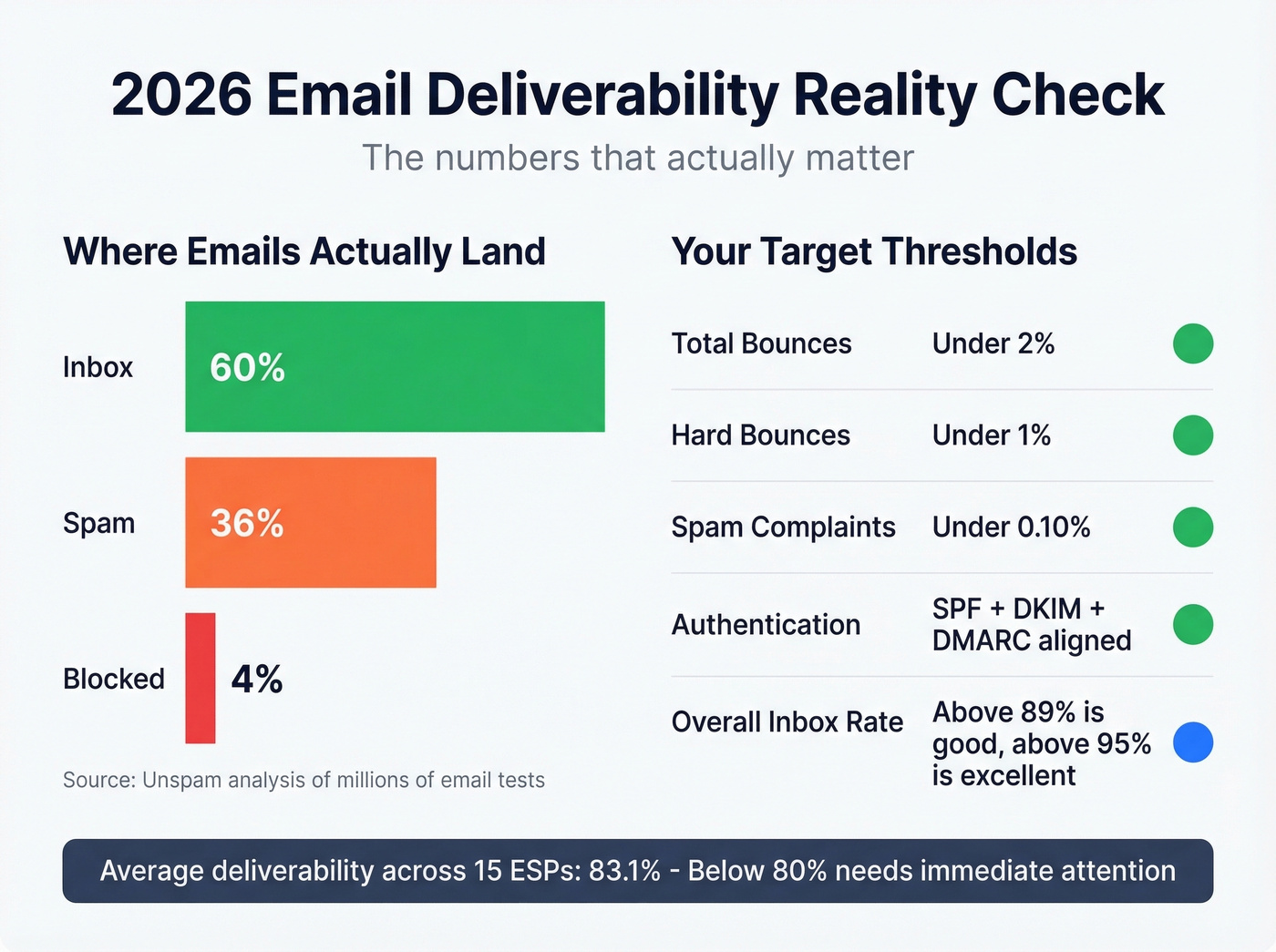
Your SMTP server says "delivered." Your dashboard shows a 97% delivery rate. And yet half your emails are rotting in spam folders where nobody will ever see them. An Unspam analysis of millions of email tests found that only 60% of emails land in the visible inbox - 36% go to spam, 4% get blocked entirely. Technical delivery success overstates real inbox reach by roughly 40%.
One practitioner on r/coldemail reported reply rates dropping from 4% to under 1% before they rebuilt their deliverability stack from scratch. That's the gap between "delivered" and "actually seen."
Here's the thing: "deliverability tools" covers everything from email verification to warmup networks to inbox placement testing to reputation monitoring. Most buyers end up with the wrong tool because they're solving the wrong layer of the problem. No single tool does all of it well, and any honest comparison has to cover the full stack. Let's figure out which pieces you actually need and in what order.
Our Picks (TL;DR)
| Pick | Category | Why | Price |
|---|---|---|---|
| Prospeo | List quality / verification | 98% email accuracy, 7-day refresh, ~$0.01/email | Free tier; paid from ~$39/mo |
| GlockApps | Inbox placement testing | Seedlist tests across major ISPs + 50+ blacklist checks | Free (2 tests/mo); $59/mo Essential |
| Google Postmaster Tools | Gmail reputation monitoring | Free, mandatory for anyone sending to Gmail | Free |
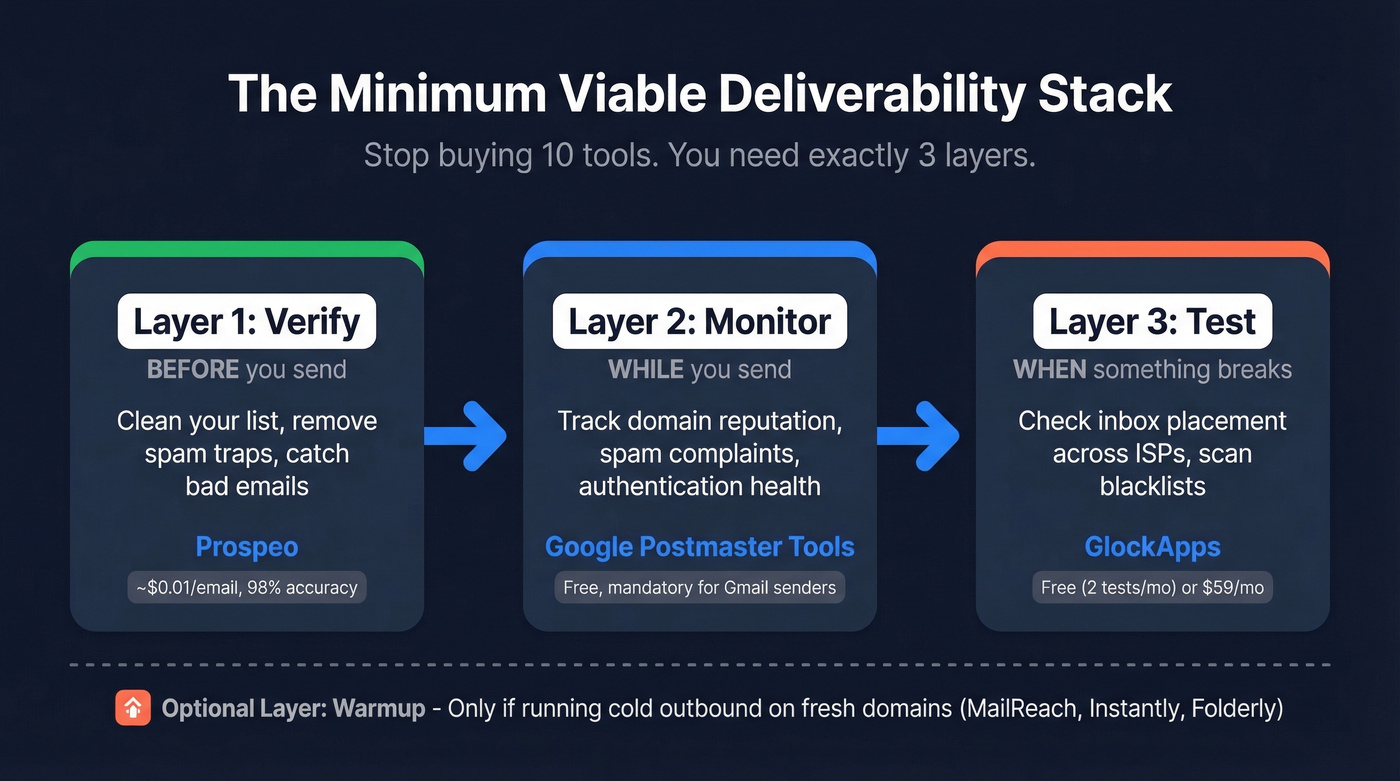
The minimum viable deliverability stack has three layers: verification before you send, monitoring while you send, and placement testing when something breaks. Stop buying 10 tools. Build around these three functions and add warmup only if you're running cold outbound on fresh domains.
2026 Deliverability Reality Check
The rules Gmail and Yahoo introduced for bulk senders haven't changed in principle, but enforcement has tightened. If you're sending more than 5,000 emails per day to Gmail or Yahoo addresses, you need SPF, DKIM, and DMARC authentication, one-click unsubscribe honored within two days, and a spam complaint rate under 0.3%. In practice, the target is 0.10% complaints - anything above that and you're playing with fire.
Authentication alone won't save you. The Unspam dataset shows SPF adoption at 92%, DKIM at 88%, and DMARC at 69% - yet emails with full authentication still land in spam over 30% of the time.
Content and HTML structure are bigger spam triggers than most teams expect. 74% of emails tested had HTML structural issues, and poor structure made emails 18-25% more likely to hit spam. Only 14% of senders include a compliant List-Unsubscribe header. 13% have broken or redirected links. These are fixable problems that most teams ignore because they're obsessing over subject lines.
What does "good" actually look like? EmailTooltester's benchmarks across 15 ESPs put the average deliverability rate at 83.1%. Above 89% is good. Above 95% is excellent. Below 80% needs immediate attention. Microsoft inboxes are the strictest environment - Outlook peaked at just 41.1% inbox placement in Unspam's data, while Gmail fluctuated wildly from 87.5% in May down to 63.5% by December. Provider-level volatility is real, and it's why you need ongoing monitoring, not just a one-time setup.
Thresholds to memorize: Total bounces below 2%. Hard bounces under 1%. Spam complaints under 0.10%. Authentication: SPF + DKIM + DMARC aligned. Hit these numbers and you're in good shape. Miss them and the tools below will tell you where you're bleeding.
How We Evaluated These Tools
We scored every tool across five criteria, weighted by impact on actual inbox placement. Compliance support carried the most weight at 30% - if a tool doesn't help you meet Gmail and Yahoo's bulk sender requirements through authentication checks, complaint monitoring, or unsubscribe handling, it isn't pulling its weight. Monitoring depth came next at 25%, because ISP-level reputation breakdowns matter far more than aggregate scores. Testing realism got 20% - seed tests are directional, not truth, but they catch obvious problems. Workflow fit at 15% penalized tools requiring manual CSV exports every time, since those tools don't get used. Cost efficiency at 10% rounded things out.
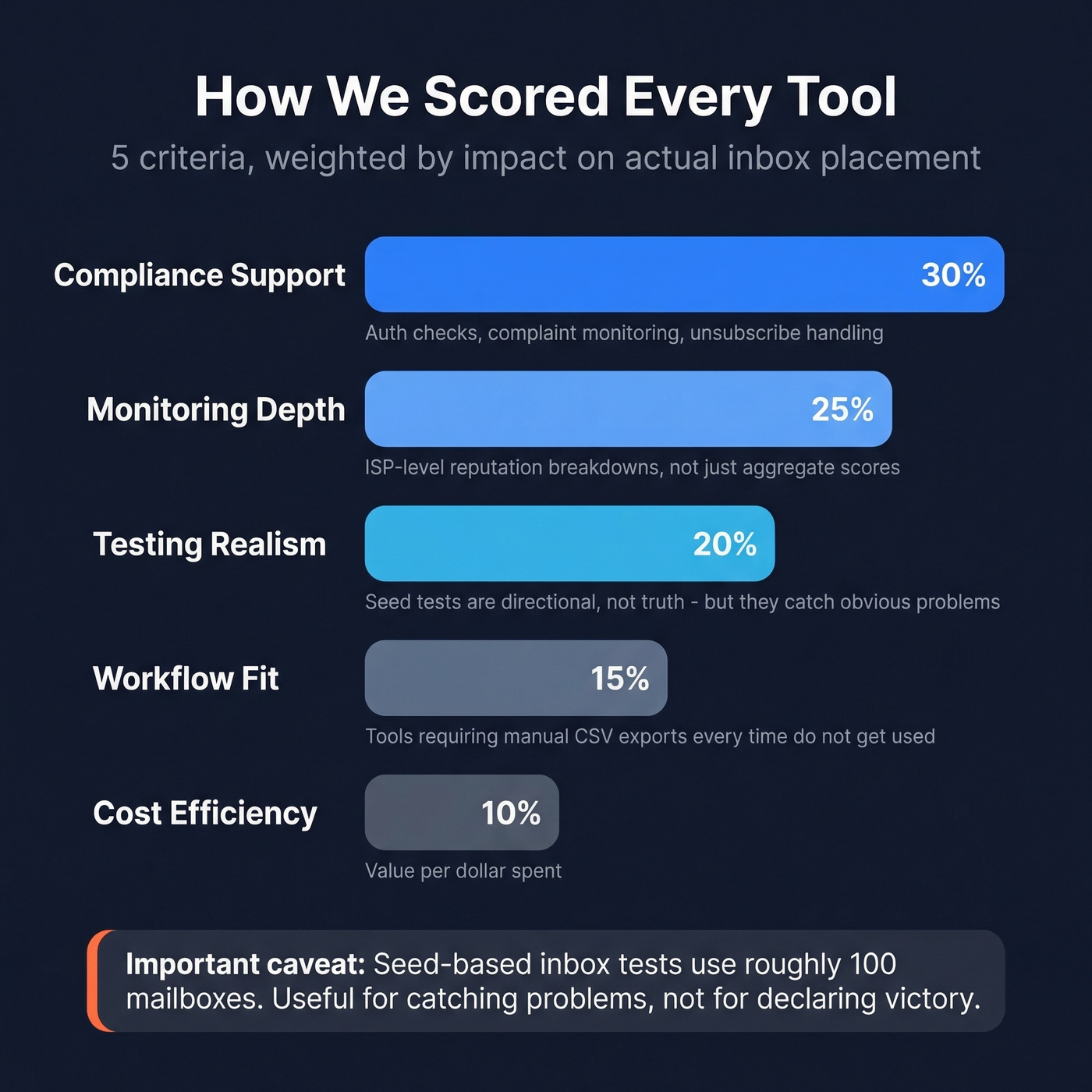
One caveat worth stating plainly: seed-based inbox placement tests use roughly 100 mailboxes. They're useful for catching problems, not for declaring victory.
Full Comparison Table
| Tool | Category | Best For | Starting Price | Focus Area |
|---|---|---|---|---|
| Prospeo | Verification | List quality + bounce prevention | Free; ~$0.01/email | Pre-send verification |
| GlockApps | Inbox testing | Placement tests + blacklists | Free (2/mo); $59/mo | Inbox placement testing |
| Folderly | Full-service repair | Damaged domain recovery | $90-$120/mailbox | Warmup + monitoring + content |
| MailReach | Warmup | Cold outreach warmup | $25/mo per inbox | Continuous warmup network |
| Instantly | Warmup + sending | Agency scale | $37/mo | Unlimited warmup |
| Mailtrap | Dev testing | Transactional sandbox | $14.99/mo | Developer email testing |
| Validity Everest | Enterprise monitoring | ISP-level reputation | From $20/mo; enterprise custom | Enterprise inbox monitoring |
| Google Postmaster | Free monitoring | Gmail reputation | Free | Gmail-specific data |
| ZeroBounce | Verification | Standalone list cleaning | $10/1K emails | High-accuracy verification |
| Warmy | Warmup | Budget warmup | $49/mailbox/mo | Basic warmup + monitoring |
| Microsoft SNDS | Free monitoring | Outlook reputation | Free | Outlook/Hotmail data |
| Mailgun Optimize | Deliverability suite | Transactional + marketing | $49/mo+ | Validation + placement + monitoring |

Bounces above 2% destroy your sender reputation - and no warmup tool can fix dirty data. Prospeo's 5-step verification with catch-all handling, spam-trap removal, and honeypot filtering keeps hard bounces under 1%. At ~$0.01 per email with 98% accuracy, it's the cheapest insurance your domain reputation has.
Fix deliverability at the source - verify before you send.
Capability Matrix
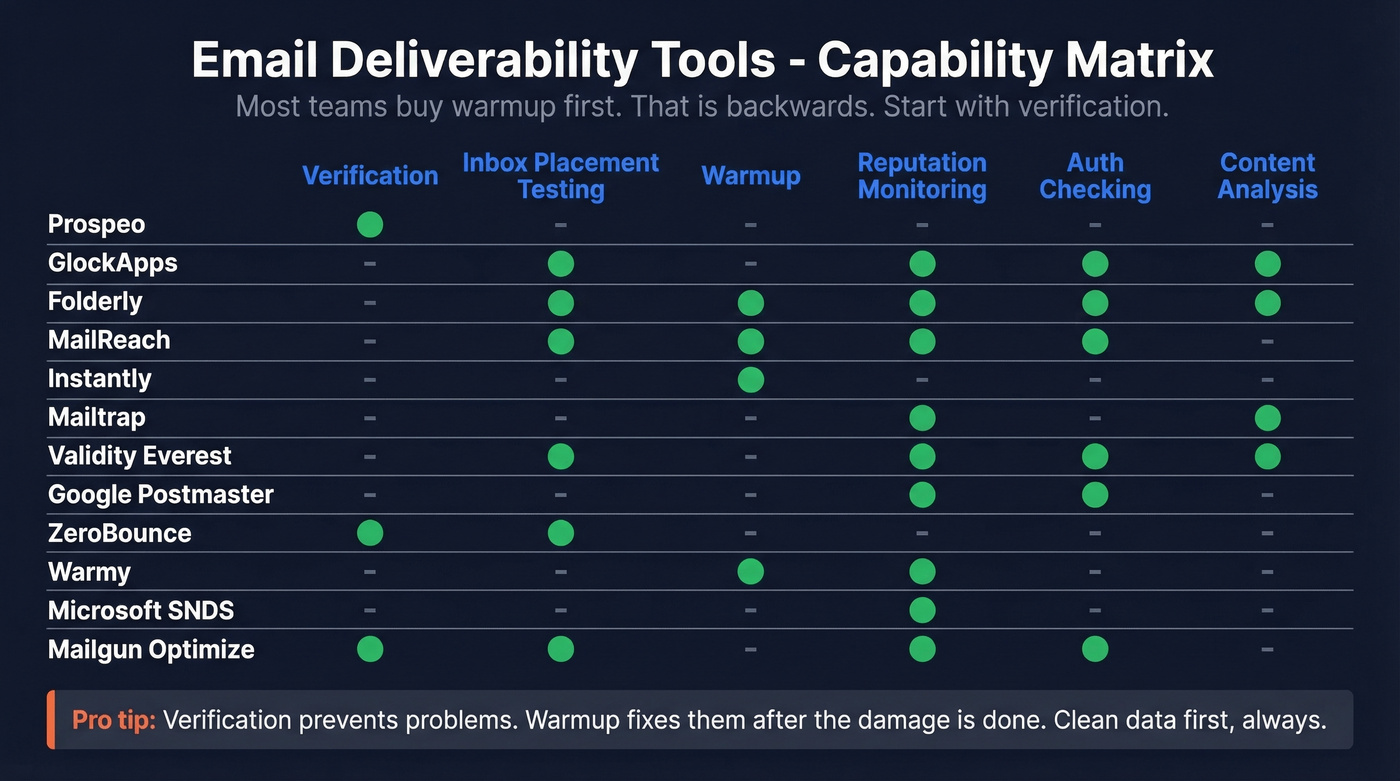
This is what most comparison articles leave out. Not every tool covers every function, and buying the wrong category is the most common mistake we see.
| Tool | Verification | Inbox Placement Testing | Warmup | Reputation Monitoring | Auth Checking | Content Analysis |
|---|---|---|---|---|---|---|
| Prospeo | ✓ | - | - | - | - | - |
| GlockApps | - | ✓ | - | ✓ | ✓ | ✓ |
| Folderly | - | ✓ | ✓ | ✓ | ✓ | ✓ |
| MailReach | - | ✓ | ✓ | ✓ | ✓ | - |
| Instantly | - | - | ✓ | - | - | - |
| Mailtrap | - | - | - | ✓ | - | ✓ |
| Validity Everest | - | ✓ | - | ✓ | ✓ | ✓ |
| Google Postmaster | - | - | - | ✓ | ✓ | - |
| ZeroBounce | ✓ | ✓ | - | - | - | - |
| Warmy | - | - | ✓ | ✓ | - | - |
| Microsoft SNDS | - | - | - | ✓ | - | - |
| Mailgun Optimize | ✓ | ✓ | - | ✓ | ✓ | - |
Most teams buy a warmup tool first. That's backwards. Verification prevents deliverability problems before they start. Warmup fixes problems after the damage is done. If your deal sizes are modest and you're not doing cold outbound, you probably don't need warmup at all - you need cleaner data and better monitoring.
Best Email Deliverability Tools Reviewed
Verification and List Hygiene
Prospeo - Best for List Quality
Use this if you're running outbound sequences and need to guarantee your list won't torch your domain reputation on the first send. Prospeo's 5-step verification process handles catch-all domains, strips spam traps and honeypots, and delivers 98% email accuracy - the highest we've seen in production. The 7-day data refresh cycle means you're not sending to contacts who changed jobs six weeks ago while your database sat stale.
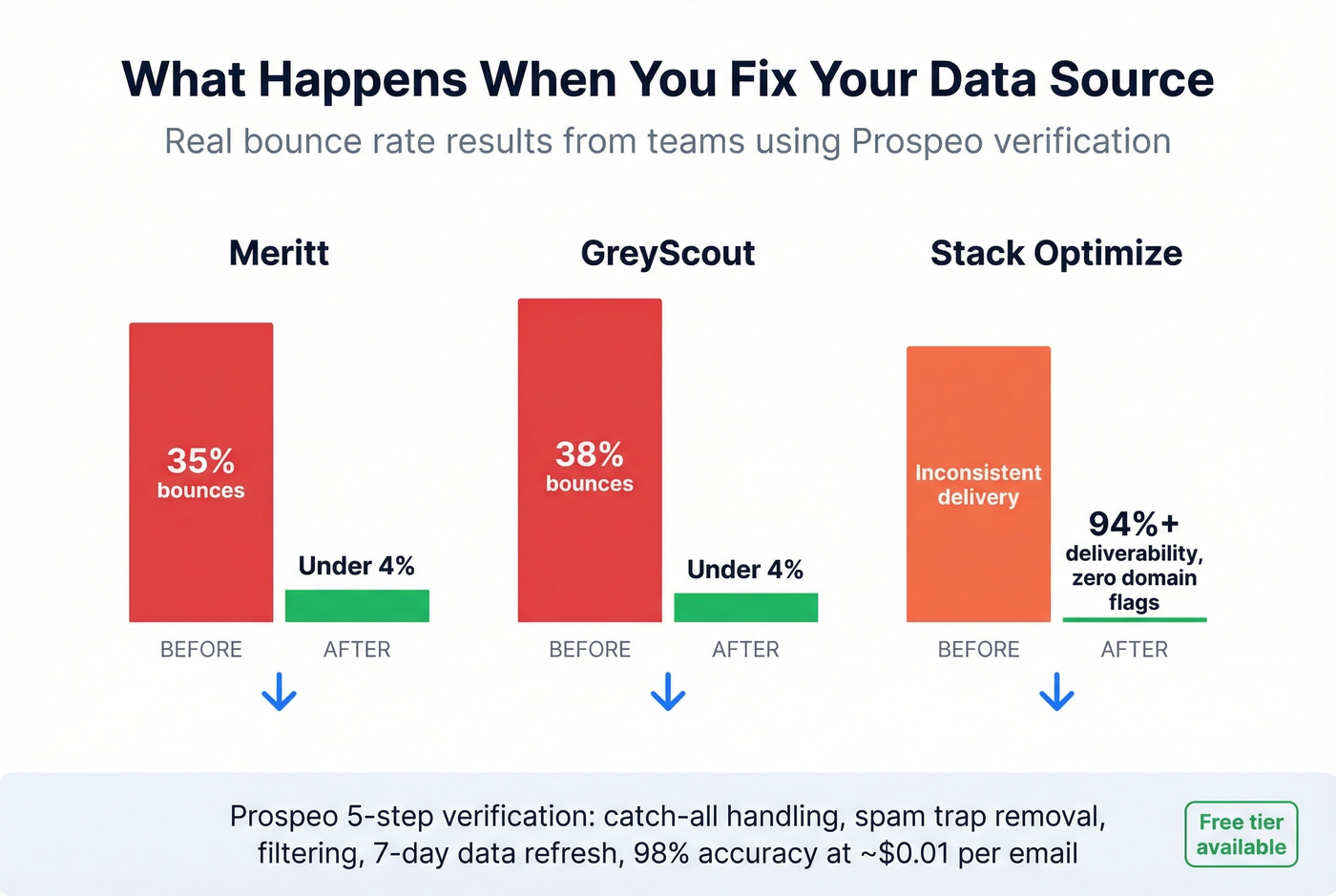
Real results tell the story better than specs. Meritt dropped bounce rates from 35% to under 4% after switching. GreyScout went from 38% bounces to under 4%. Stack Optimize runs client deliverability at 94%+ with zero domain flags across all accounts. These aren't edge cases - they're the pattern we see when teams clean up their data source.
Pricing runs ~$0.01 per email, and you only pay for valid addresses. The free tier gives you 75 emails and 100 Chrome extension credits per month - enough to test verification quality before committing. No contracts, no sales calls.
Most deliverability problems trace back to stale contact data. Other providers refresh every 6 weeks. Prospeo refreshes every 7 days - so the emails you verified last week are still valid this week. That's why teams using Prospeo see bounce rates drop from 35%+ to under 4%.
Stop warming up domains to send to dead inboxes.
ZeroBounce
ZeroBounce delivers 99% accuracy and charges $10 per 1,000 emails (2,000 minimum). It's a solid standalone verification option if you need list cleaning without a prospecting database attached. For pricing context across the verification category, costs range from roughly $1.50/1K (DeBounce) to $24.50/1K (Hunter), with ZeroBounce sitting at the midpoint. More expensive per email than Prospeo, but a reasonable choice if you're already locked into another data provider and just need a hygiene layer.
Inbox Placement Testing
GlockApps - Best Inbox Placement Checker
Use this if you need to know where your emails actually land before launching a campaign - not just whether they were "delivered." GlockApps runs your email through a seedlist of roughly 100 mailboxes across major ISPs and checks against 50+ blacklists. You get a breakdown by provider: Gmail, Outlook, Yahoo, plus country-specific inboxes.
Skip this if you're looking for a warmup tool or ongoing monitoring. GlockApps is a testing tool - you run it when you suspect a problem or before a major campaign push. It won't fix your reputation, but it'll tell you exactly where you stand.
The free plan gives you 2 tests per month plus 10,000 DMARC checks - enough for spot checks. The Essential plan at $59/month includes 360 test credits and 600,000 DMARC checks. For most teams, the free tier plus occasional Essential months during heavy sending periods is the right play.
Roughly 100 seed mailboxes is directional, not definitive. Don't treat a GlockApps result as gospel. Treat it as a smoke detector.
Warmup and Repair
Folderly - Full-Service Repair
Folderly is the closest thing to a deliverability consultant in a box. It combines continuous warmup with content analysis and ongoing monitoring, and G2 reviewers rate it 4.8/5 across 101 reviews with consistent praise for inbox placement improvements and responsive support.
The catch is price. At $120 per mailbox (1-9 mailboxes) or $90 per mailbox (10-24), Folderly is expensive at scale. G2 reviewers note that template formatting can be finicky and initial setup has a learning curve. But if you're staring at a domain that's landing in spam across the board, the price is justified by what it saves you in burned pipeline. Skip this if your deliverability is already healthy - you'd be paying for repair you don't need.
MailReach - Best for Cold Outreach
MailReach operates 30,000+ real Google Workspace and Office 365 inboxes, making it the largest real-inbox warmup network available. It runs inbox placement testing across 30+ inboxes and alerts you on SPF/DKIM/DMARC issues or blacklist hits. At $25/month per inbox, it's affordable for small teams but adds up fast if you're managing 20+ sending accounts.
No free trial - you're committing from day one. The consensus on r/coldemail is clear: warmup has to run continuously, not just for two weeks at setup. MailReach is built for that continuous model.
Instantly - Best for Agency Scale
Instantly is the natural choice for agencies managing dozens or hundreds of sending accounts. It includes provider-targeted warmup - including Outlook-specific warming, which matters given how strict Microsoft's filtering has become. Apollo removed its warmup feature in 2024, so if you were relying on that, Instantly or MailReach are the natural replacements.
The headline price is $37/month, but real costs tend to run higher once you add CRM features and advanced capabilities. For single-domain senders, it's overkill. For agencies juggling 50 inboxes across client accounts, the unlimited inbox model on a single plan is hard to beat.
Warmy
Budget warmup starting at $49/mailbox/month with basic deliverability monitoring included. If Folderly's pricing makes you wince and you just need simple warmup without the full repair suite, Warmy gets the job done. Don't expect deep analytics or content analysis - this is warmup and not much else.
Monitoring and Free Tools
Mailtrap - Developer Email Testing
Use this if you're a dev team testing email before sending it to real inboxes. Mailtrap provides a sandbox for catching emails in staging environments, plus an analytics dashboard for production monitoring. Starting at $14.99/month, it's purpose-built for dev workflows with API access and staging environment support. If you're in sales or marketing, this isn't the tool you're looking for.
Validity Everest - Enterprise Monitoring
This is the deepest monitoring available - the kind of granularity where you can see reputation shifts at individual ISPs before they become deliverability crises. Everest gives you ISP-level reputation data, inbox placement tracking, and enterprise-grade reporting. Pricing starts at $20/month for entry tiers and scales to $525/month+ for higher tiers, with enterprise deployments on custom pricing. The fact that Validity doesn't publish simple, one-line pricing is frustrating, but the tool is genuinely best-in-class for organizations sending 100K+ emails monthly. It also includes a mail server reputation test that tracks your sending IP health across major providers.
Google Postmaster Tools
Every sender targeting Gmail addresses should already be using this. It shows you domain and IP reputation, spam rates, authentication success rates, and delivery errors - all specific to Gmail. It's free. It's mandatory. Set it up today if you haven't.
The limitation is obvious: Gmail only. Zero visibility into Outlook, Yahoo, or anything else.
Microsoft SNDS
Free reputation data for Outlook and Hotmail domains. Pair it with Google Postmaster Tools and you've got visibility into the two strictest inbox providers on the planet. There's no reason not to have both running.
Mailgun Optimize
If you're already on Mailgun for sending, their Optimize add-on bundles email validation, inbox placement testing, and deliverability monitoring into one dashboard starting at $49/month. It's not best-in-class at any single function, but the convenience of having everything in one platform matters if Mailgun is already your sending infrastructure.
Recommended Stacks by Use Case
Cold Outbound Teams and Agencies
This is where deliverability tools matter most, because you're sending to people who didn't ask to hear from you. One bad list burns a domain that took weeks to warm up.
Start with verification - every email gets checked before it enters a sequence, full stop. At ~$0.01 per email, the cost is negligible compared to the cost of a burned domain. Layer in MailReach at $25/inbox/month for smaller teams, or Instantly at $37/month if you're managing 10+ inboxes. Run warmup continuously. Google Postmaster Tools and Microsoft SNDS handle monitoring for free, and GlockApps steps in when something breaks or before a major campaign push.
Total stack cost for a 5-inbox cold outbound operation: roughly $150-300/month, depending on verification volume and whether you add a paid testing month.
Marketing and Newsletter Senders
You're sending to opted-in lists, so warmup is less critical. Your problems are list decay and reputation drift. Verify every list on import and re-verify contacts that haven't engaged in 90+ days. For monitoring, Validity Everest is the right call at enterprise volume, while Folderly handles active reputation repair if you're already in trouble. GlockApps handles pre-campaign spot checks. Google Postmaster Tools is non-negotiable regardless of your sending volume.
Transactional and Developer Teams
Different problem entirely. You need password resets, order confirmations, and onboarding emails to hit the inbox reliably. Mailtrap handles staging sandbox testing before anything hits production. Google Postmaster Tools and Microsoft SNDS track production reputation. For real-time email validation at signup - catching bad addresses before they enter your system and generate bounces - an API-based verification layer keeps your transactional reputation clean from the start.
Keep hard bounces under 1%, total bounces under 2%, and complaints under 0.10%. If your numbers are in range, you don't need more tools. You need discipline.
How to Test Email Deliverability
We've seen teams treat a GlockApps result like a deliverability audit. It's not. A seedlist of roughly 100 mailboxes gives you a directional signal - enough to catch obvious problems like blacklisting or authentication failures, not enough to declare your deliverability "fixed."
If you want to test properly, combine at least two approaches. Run a seed-based placement test through GlockApps, then cross-reference the results with your Google Postmaster Tools and Microsoft SNDS reputation data. Testing an email before sending a campaign catches authentication gaps, content-triggered spam flags, and blacklist issues that would otherwise tank your entire send.
Provider-level volatility makes this trickier than it sounds. Gmail inbox placement swung from 87.5% to 63.5% over the course of a year. Outlook sat at a brutal 41.1% peak. A seed test on Tuesday might look completely different from one on Thursday, because ISP filtering models update constantly. Use seed tests the way you'd use a smoke detector: if it goes off, investigate. If it doesn't, that doesn't mean there's no fire - it means there's no fire where the detector is.
FAQ
What's a good email deliverability rate?
Above 89% is good, above 95% is excellent, and below 80% needs immediate attention. The average across 15 ESPs tested by EmailTooltester is 83.1%. Microsoft inboxes are the hardest to crack - expect lower placement rates there than Gmail or Yahoo.
Do I need a warmup tool if I'm not doing cold outreach?
Probably not. Warmup builds reputation on new or damaged domains by simulating real engagement. If you're sending marketing emails from an established domain with engaged subscribers, focus on authentication, list hygiene, and monitoring instead. Warmup is essential for cold outbound - optional for everyone else.
Can email verification improve deliverability?
Yes - it's the single highest-leverage fix available. Teams routinely drop bounce rates from 35-40% to under 5% after implementing pre-send verification. Keeping hard bounces under 1% directly protects sender reputation, and one bad list can burn a warmed domain in a single send.
Are free deliverability tools enough?
Google Postmaster Tools and Microsoft SNDS are mandatory and free, but they only show reputation after the fact. You still need verification before sending and placement testing when things go wrong. Free tools are the foundation - they won't prevent problems or fix them on their own.
How do I run a mail server reputation test?
Start with the free tools: Google Postmaster Tools shows your domain and IP reputation at Gmail, while Microsoft SNDS covers Outlook. GlockApps checks your sending IP against 50+ blacklists. Together, these three give you a complete picture of how mailbox providers perceive your infrastructure - and whether your reputation is trending up or down.