

Email Permutator: How to Find Any Email in 2026
You've got a name and a company. You don't have an email. So you start guessing - john@, j.smith@, johnsmith@ - and hoping one lands. That's what an email permutator automates. But most people use them wrong, burning verification credits on 40+ combinations when three formats cover 89% of businesses.
What You Need (Quick Version)
One email, right now? Use MetricSparrow's free permutator to generate combinations, verify the top 3 with a free tool, and you're done in two minutes.
Know the company size? Skip 90% of guesses. The pattern prevalence table below shows which formats dominate by headcount - try the top 3 first.
What Is an Email Permutator?
An email permutator takes three inputs - first name, last name, and company domain - and generates every plausible email format. Feed it "Jane Smith" and "acme.com," and it spits out janesmith@acme.com, jane.smith@acme.com, j.smith@acme.com, smithj@acme.com, and dozens more.
Permutators don't search a database. They don't verify anything. They're pattern generators - a brute-force list of guesses you then confirm through a separate verification step. That makes them fundamentally different from email finders, which pull from verified databases, and email verifiers, which confirm deliverability.
MetricSparrow generates up to 46 combinations per lookup. The Foxfire Google Sheets template produces 33. Neither tells you which one actually works. Think of a permutator as step one in a three-step process: generate, verify, send. Skip the middle step and you're blasting unverified guesses into the void, torching your sender reputation in the process.
Most Common Email Formats
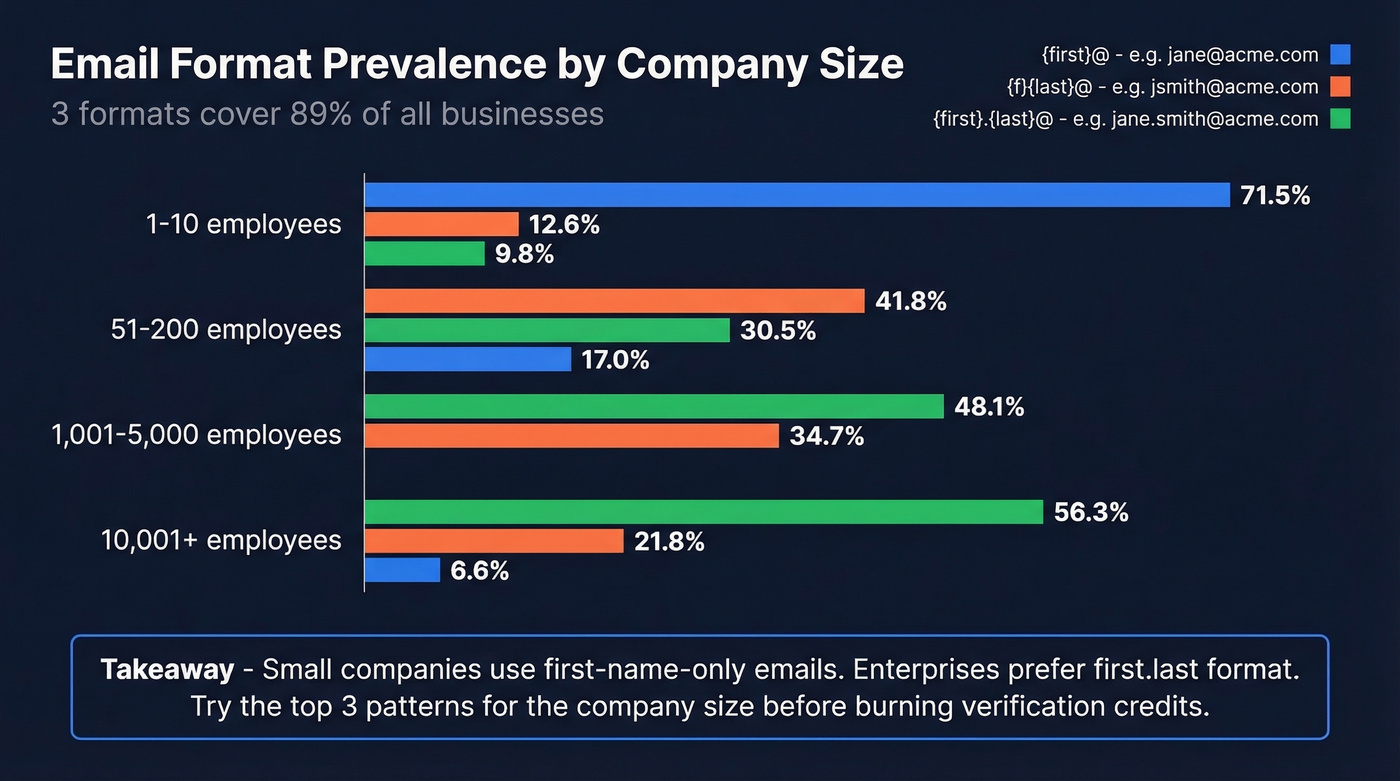
Not all permutations are created equal. An Interseller analysis of 5M+ companies shows that email format usage shifts dramatically by company size - and knowing this saves you from wasting verification credits on unlikely patterns.
| Company Size | #1 Format | % | #2 Format | % | #3 Format | % |
|---|---|---|---|---|---|---|
| 1-10 employees | {first} | 71.48% | {f}{last} | 12.57% | {first}.{last} | 9.82% |
| 51-200 | {f}{last} | 41.76% | {first}.{last} | 30.45% | {first} | 16.99% |
| 1,001-5,000 | {first}.{last} | 48.1% | {f}{last} | 34.74% | - | - |
| 10,001+ | {first}.{last} | 56.31% | {f}{last} | 21.75% | {first} | 6.57% |
The pattern is unmistakable. Small companies under 10 people overwhelmingly use first-name-only addresses - jane@acme.com. It's informal, and when your whole team fits in one room, there's no collision risk. Past 50 employees, companies shift to structured formats like {f}{last} (jsmith@) and {first}.{last} (jane.smith@). Enterprise organizations above 10,000 employees use {first}.{last} more than half the time.
A separate Hunter analysis of 12M+ email addresses found that 49.9% of companies use the {first}@domain pattern overall - heavily skewed by the sheer number of small businesses in the dataset.
Here's the thing: if you're permutating 40+ combinations and verifying all of them, you're doing it wrong. We've seen teams burn through hundreds of verification credits on full permutation lists when three guesses would've done it. Three formats - {first}@, {first}.{last}@, and {f}{last}@ - cover 89.09% of businesses. Verify those first. Verify the rest never.
Complete Permutation Patterns
For reference, here's the full universe of patterns most email permutation tools generate:
| Category | Pattern | Example | Notes |
|---|---|---|---|
| First-name focused | {first}@ | jane@ | Dominant at companies under 50 |
| {first}{last}@ | janesmith@ | Common fallback when {first}@ is taken | |
| {first}.{last}@ | jane.smith@ | #1 at enterprises (1,000+) | |
| {first}-{last}@ | jane-smith@ | Rare outside EU companies | |
| {first}_{last}@ | jane_smith@ | Legacy systems, uncommon | |
| Last-name focused | {last}@ | smith@ | Unusual; mostly academic orgs |
| {last}{first}@ | smithjane@ | Very rare | |
| {last}.{first}@ | smith.jane@ | Occasional in APAC companies | |
| Initial combos | {f}{last}@ | jsmith@ | #1 at mid-market (51-1,000) |
| {f}.{last}@ | j.smith@ | Common variant of {f}{last} | |
| {first}{l}@ | janes@ | Occasional | |
| {first}.{l}@ | jane.s@ | Rare | |
| {f}{l}@ | js@ | Only viable at tiny companies |
The top 3-5 patterns by company size handle the vast majority of cases. The other 30+ exist for edge cases - international naming conventions, legacy systems, or companies that just do things differently.
How to Use a Permutation Tool
The workflow is straightforward. Here's how practitioners on r/sales and r/coldemail actually do it:
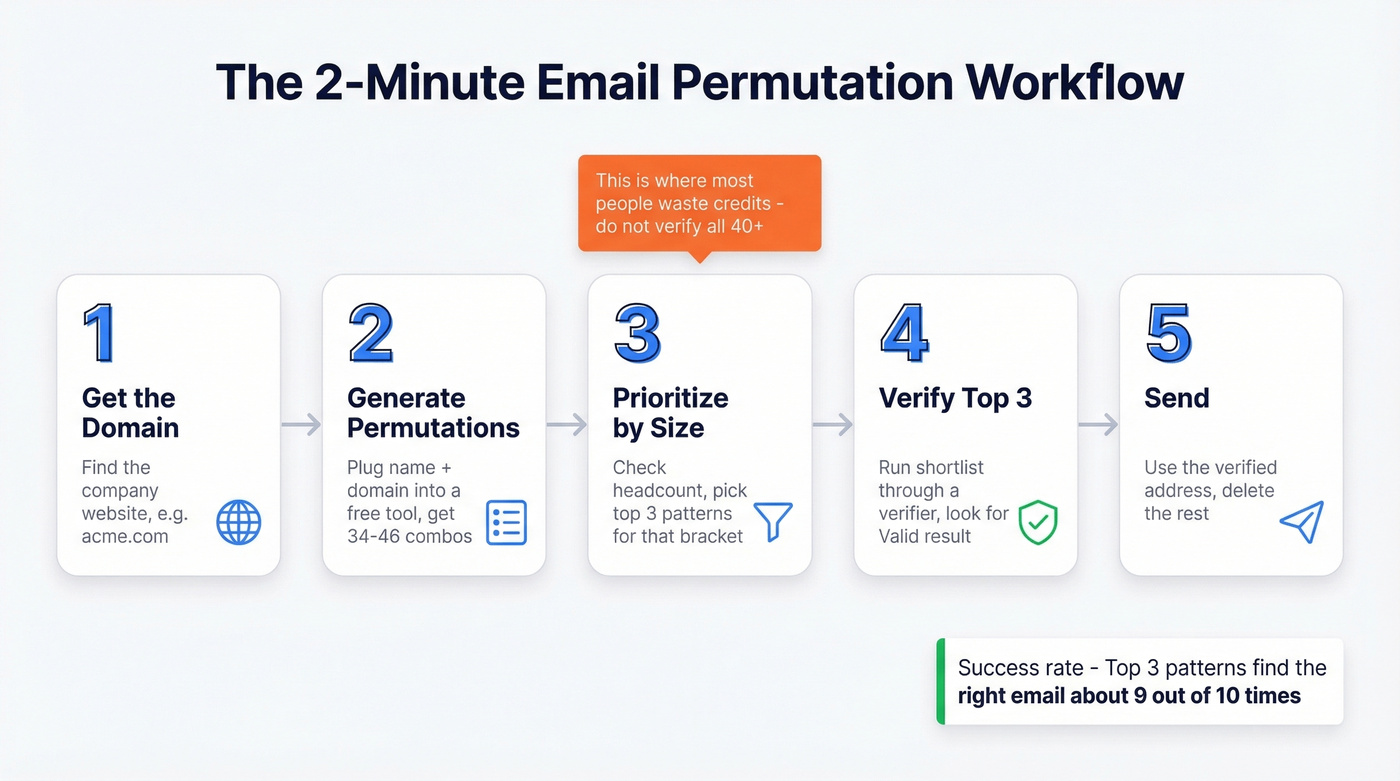
Get the domain. Find the target company's website. If they're at acme.com, that's your domain.
Generate permutations. Plug the first name, last name, and domain into a free tool like MetricSparrow. You'll get 34-46 combinations instantly.
Prioritize by company size. Don't verify all 40+. Check the company's headcount, then verify only the top 3 patterns for that size bracket. A 15-person startup? Try {first}@ first. A 5,000-person enterprise? Start with {first}.{last}@.
Verify. Run your shortlist through a verification tool. A popular budget workflow is MetricSparrow plus GMass's email verifier. Paste in your candidates, look for the one marked "Valid." Practitioners find the right email in under two minutes.
Send. Use the verified address. Delete the rest.
This only works for business emails with known domains. Personal Gmail or Yahoo addresses use user-chosen handles with no predictable pattern - permutators can't help there.
In our testing, the top 3 patterns found the right email about 9 times out of 10. Three verification credits instead of forty.
Permutator vs. Finder vs. Verifier
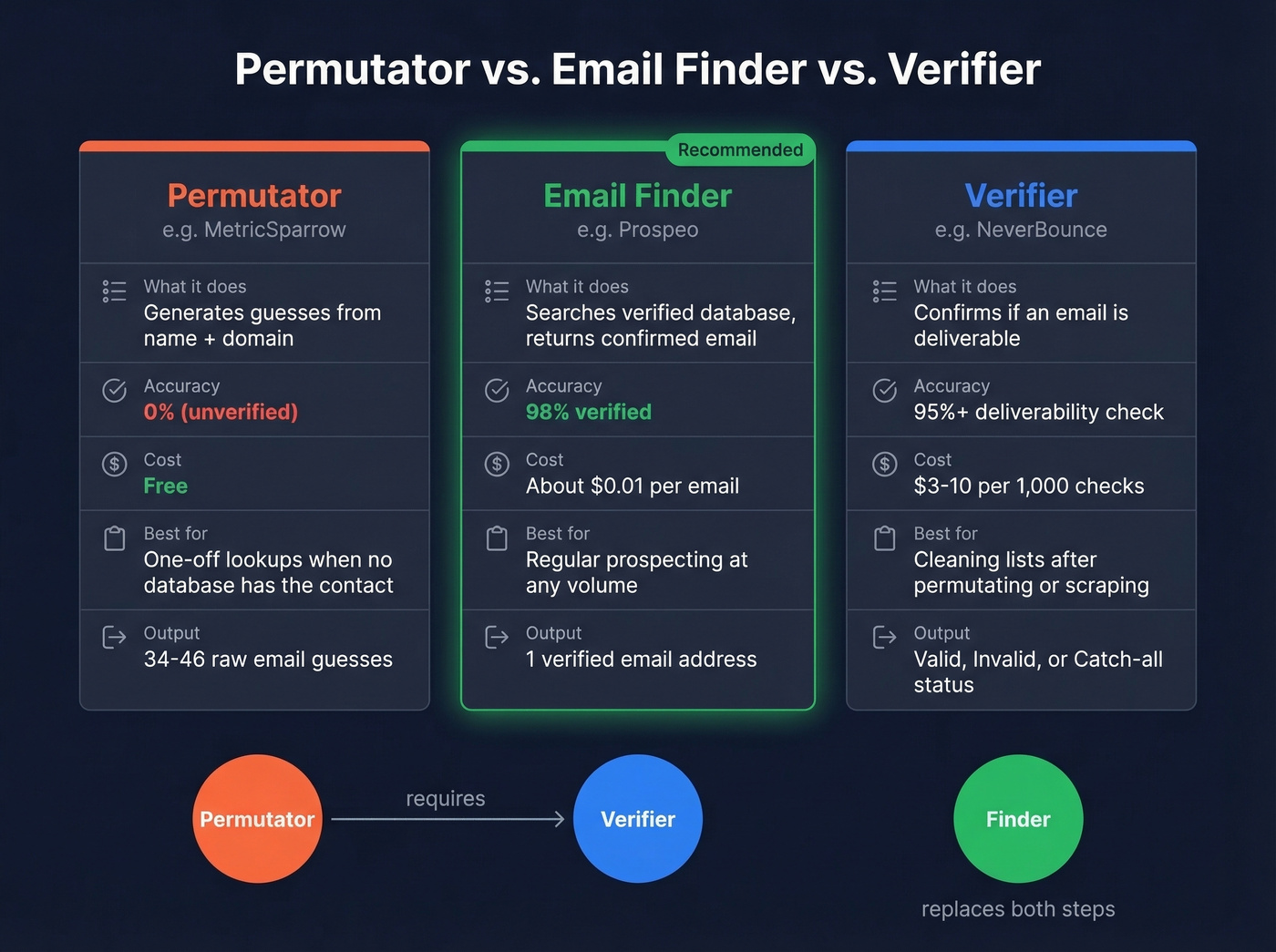
These three tools solve different problems, and most workflows need at least two of them.
| Type | Representative Tool | Accuracy | Typical Cost | Best For |
|---|---|---|---|---|
| Permutator | MetricSparrow | 0% (unverified guesses) | Free | One-off lookups when no database has the contact |
| Email Finder | Prospeo | 98% verified | ~$0.01/email | Regular prospecting at any volume |
| Verifier | NeverBounce | ~95%+ deliverability | $3-10 per 1,000 | Cleaning lists after permutating |
A permutator gives you raw guesses. A verifier tells you which guess is deliverable. An email finder skips both steps by pulling from a database of already-confirmed addresses. The finder approach is faster and more reliable, but permutators remain useful when a contact doesn't appear in any database - and that happens more often than you'd think with niche industries or small companies.

You just learned that 3 email formats cover 89% of businesses. Now imagine skipping the guessing entirely. Prospeo's database holds 143M+ verified emails at 98% accuracy - no permutating, no verifying, no wasted credits. One lookup, one verified email, ~$0.01.
Replace 40 guesses with one verified answer.
Free Email Permutator Tools
MetricSparrow (Email Permutator+)
Use this if you need a quick, no-signup lookup for a single contact. Skip this if you need bulk generation or built-in verification.
MetricSparrow supports up to 3 domains per name and generates up to 46 combinations. No verification included - you'll need a separate tool for that. The interface is bare-bones but functional, and it's the most commonly referenced permutator in Reddit workflow guides. For occasional use, it's the go-to free option. We've used it ourselves for one-off lookups and it does exactly what it promises: spit out a list of guesses, fast.
Lemlist
Lemlist's permutator pairs permutation output with Lemlist's email checker. You get up to 10 free email checks per day - enough to verify your top candidates without leaving the page. For occasional one-off lookups where you don't want to juggle two tools, this is the cleaner workflow.
Hunter
Hunter doesn't offer a standalone permutator, but its Email Finder combines permutation logic with built-in verification. Enter a name and domain, and Hunter checks its database of 12M+ addresses to return the most likely match - already verified. If you want permutation and verification in a single step, Hunter eliminates the need for a separate tool chain.
Google Sheets (DIY)
The Foxfire template generates 33 combinations in a standard Google Sheet. Fully customizable, no tool dependency, no signup, no limits. Good for teams who want to own the logic and modify it over time.
Other Options
Mailmeteor offers a clean, no-signup permutator as part of its mail merge ecosystem. SalesBlink bundles a permutator with its outreach platform, useful if you're already in their stack. Captain Verify includes 100 free email credits alongside permutation, which pairs nicely with any permutator output.
How to Verify Permutated Emails
Generating permutations without verifying them is like mailing wedding invitations to random houses on the right street. Email data decays at roughly 2% per month - people change jobs, companies rebrand, domains get restructured. One study found 2.3% of a sample list went stale in just 8 weeks.
The stakes are real. Accept-all addresses are 27x more likely to bounce than standard addresses. Push your bounce rate above 2% and you're damaging your sender reputation - not just for that campaign, but across your entire domain.

Standalone verifiers like NeverBounce and ZeroBounce typically run $3-10 per 1,000 checks. That's cheap enough for occasional use, but the cost adds up at volume. Full verification - including catch-all detection, spam-trap removal, and honeypot filtering - is what actually reduces bounce risk. Basic SMTP pings alone won't cut it.
The minimum viable workflow: generate your top 3-5 permutations, run them through a verifier, use the one that comes back valid. If none verify, the mailbox either doesn't exist or sits behind a catch-all domain.
The Catch-All Problem
Roughly 20-30% of B2B domains use catch-all configurations. These domains accept every email at the SMTP level - info@, gibberish123@, anything@ - so verification tools can't distinguish real mailboxes from nonexistent ones. The server says "yes" to everything.
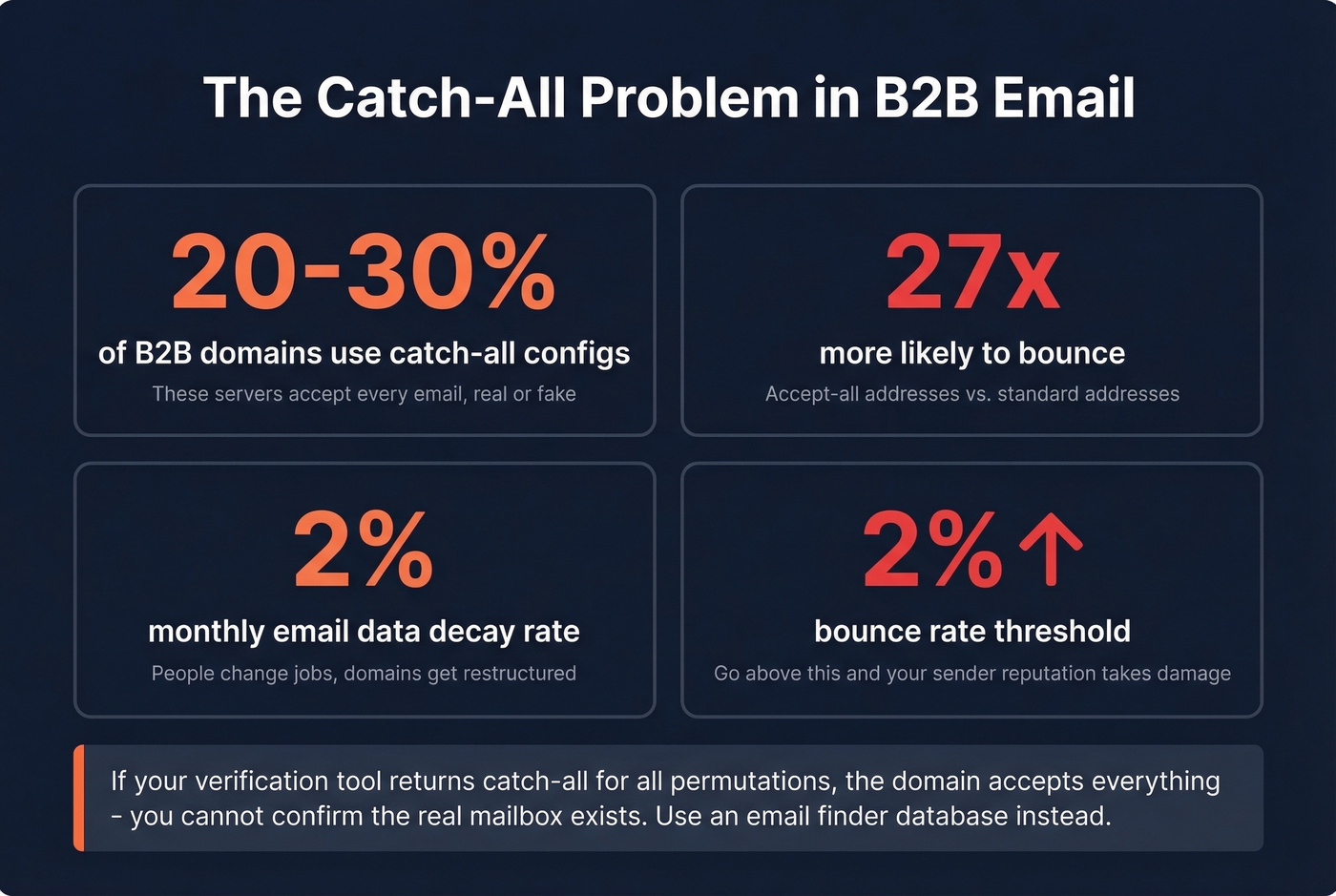
That's a big blind spot. In a typical prospect list, 8.6-15.25% of addresses sit on catch-all domains. Some B2B-heavy lists run as high as 30%. And 23% of unverified catch-all emails will hard bounce when you actually send.
There's no perfect solution. But you can be smart about it. Segment catch-all addresses into a separate list and test in small batches of 20-30 to monitor bounce rates before scaling. Prioritize high-probability patterns like {first}.{last}@ on catch-all domains, since these are the most commonly used formats at larger companies - which are more likely to run catch-all configurations in the first place. Role-based addresses like sales@ or info@ can sometimes be more reliable on catch-all domains than individual mailboxes.
Pros and Cons of Permutator Workflows
Let's be honest about the trade-offs before you commit:
- ✅ Completely free to generate - no subscription or credit card required
- ✅ Works when a contact isn't in any database, giving you a path where finders fail
- ✅ Full control over the process - you own the logic and can customize patterns
- ❌ Zero accuracy until you verify separately, adding time and cost
- ❌ Catch-all domains make verification unreliable for 20-30% of B2B targets
- ❌ Time-intensive at scale - generating, verifying, and handling edge cases for each contact adds up fast
- ❌ Risk of sender reputation damage if you skip verification or send to unconfirmed addresses
For one-off lookups, the pros clearly win. For regular prospecting above 50 emails per month, the cons start to outweigh the savings.
When to Skip the Permutator
Hunter analyzed roughly 905,000 company websites and found that 18.7% list email addresses publicly - on About pages, Contact pages, and author bios. That's nearly one in five companies handing you the answer for free. Before you permutate anything, check the obvious.
If you're permutating more than 5 emails per week, the time cost of generate-verify-handle catch-all-re-verify adds up fast. A recurring complaint on r/coldemail is tool-stacking fatigue - juggling a permutator, a verifier, a catch-all checker, and a spreadsheet just to get one working email. At that volume, a sales prospecting database is the obvious choice.
Some practitioners have started using LLMs like Gemini or ChatGPT to guess email addresses. In practice, it works about half the time. A coin flip - fine for a one-off, terrible for a workflow.
Real talk: if your average deal size is above $5k and you're sending more than 50 cold emails a month, you don't need to permutate addresses. You need better data.

Permutators are step one. Verifiers are step two. Prospeo eliminates both. With 300M+ profiles refreshed every 7 days and a proprietary 5-step verification process, you get deliverable emails without burning credits on brute-force guesses. Teams using Prospeo book 35% more meetings than Apollo users.
Stop permutating. Start connecting.
Compliance Checklist
Using a permutator to find someone's email is legal. Spamming 46 unverified guesses at them isn't. Here's the baseline for compliant cold outreach:
- ✅ GDPR allows B2B cold email under legitimate interest - your offer must be relevant to the recipient's professional role
- ✅ Include your name, company, and reason for reaching out
- ✅ Be clear about why you're emailing
- ✅ Every email needs a visible, easy unsubscribe mechanism
- ✅ Use reputable data sources - permutated-and-verified is fine; purchased lists from shady vendors aren't
- ✅ Only gather what you need for the outreach - don't hoard personal data
FAQ
How many permutations should I verify?
Three formats - {first}@, {first}.{last}@, and {f}{last}@ - cover 89.09% of businesses. Verify those first. Most tools generate 30-46 combinations, but spending credits on all of them wastes money when three guesses handle nine out of ten lookups.
Do permutators work for Gmail and Yahoo?
No. They only work for business emails where the company domain is known. Personal email providers use user-chosen handles with no predictable pattern - you need a database lookup or direct ask instead.
Are email permutators free?
Every major option - MetricSparrow, Lemlist, Mailmeteor, Google Sheets templates - is completely free. The cost comes from verification, typically $3-10 per 1,000 checks with standalone verifiers like NeverBounce or ZeroBounce.
What's the difference between a permutator and an email finder?
A permutator generates unverified guesses from a name and domain. An email finder searches a database of already-verified addresses and returns deliverable results directly - no separate verification step needed. Finders cost more per lookup but save time and protect sender reputation.
How do catch-all domains affect permutator accuracy?
Roughly 20-30% of B2B domains accept every address at the SMTP level, so verification tools can't distinguish real mailboxes from fake ones. Send to catch-all addresses in small batches of 20-30 and monitor bounce rates before scaling up.