

The Best Email Productivity Tools in 2026 - And the Stacks Worth Building
It's 9 AM. You've got 47 unread emails, a calendar that looks like Tetris, and a vague sense that you've already lost the morning. The right email productivity tool changes that equation - because the average office worker receives 121 business emails per day and spends roughly 28% of their workweek managing their inbox. That's McKinsey's number, not ours. Globally, we're on track for 392.5 billion emails sent per day in 2026.
Every email interruption costs you 23 minutes and 15 seconds to refocus. Gloria Mark's research at UC Irvine has been consistent on this for years. The math is brutal: if you check email 10 times a day (and 28% of workers do), you're hemorrhaging nearly four hours just on context switching between sales tools, your inbox, and whatever else is open on your screen.
The right tool won't fix bad habits. But it'll claw back enough time that you can actually do the work you were hired for.
Our Picks (TL;DR)
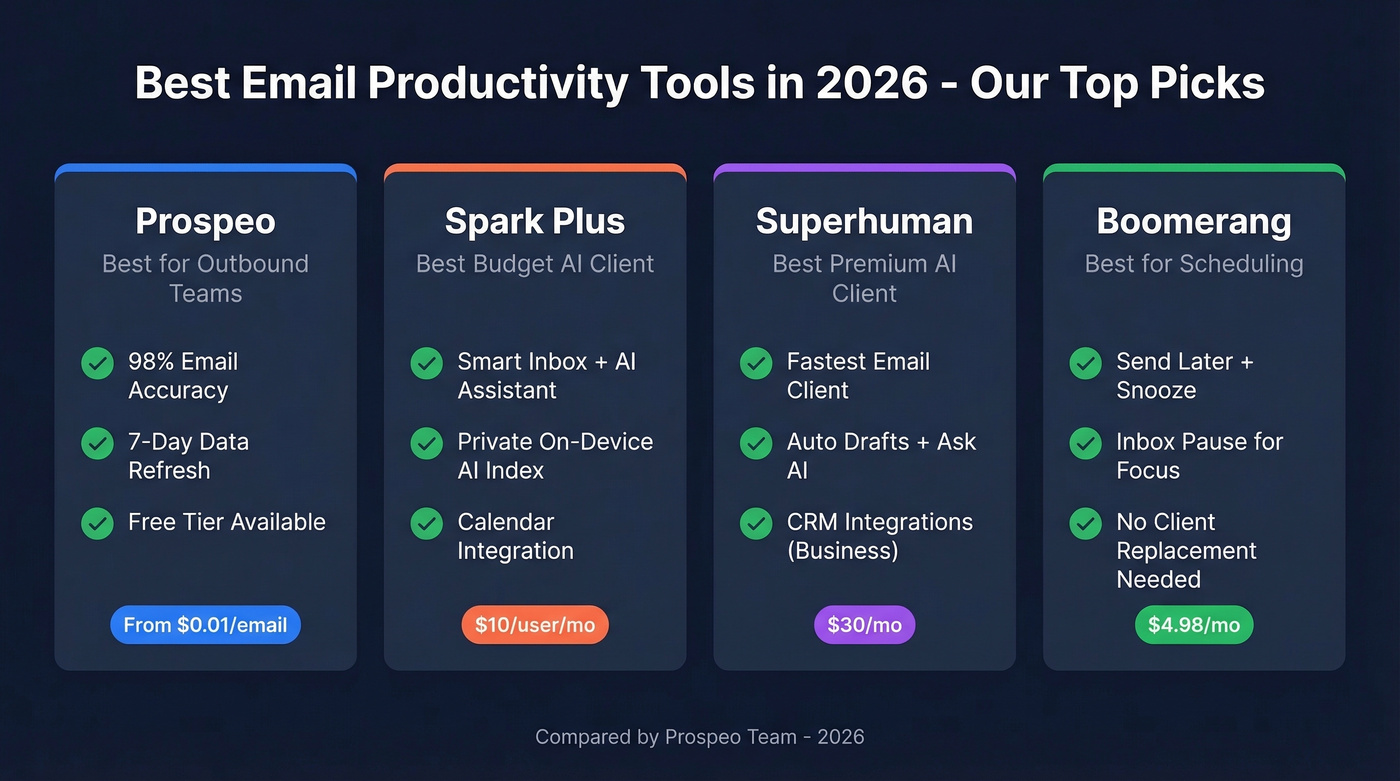
- Prospeo - Best for outbound teams. 98% email accuracy, 7-day data refresh, free tier available. Stops bounced emails before they happen.
- Spark Plus - Best AI inbox management for $10/user/month. Does 80% of what Superhuman does at a third of the price.
- Superhuman - Best premium AI email client. Gorgeous, fast, and expensive. Starts at $30/mo.
- Boomerang - Best for scheduling and follow-up reminders. Dead simple. $4.98/mo after a free trial.
How AI Email Tools Actually Work
Not all "AI email tools" do the same thing, and the marketing makes it worse. Here's a useful taxonomy from Gmelius that clarifies things:
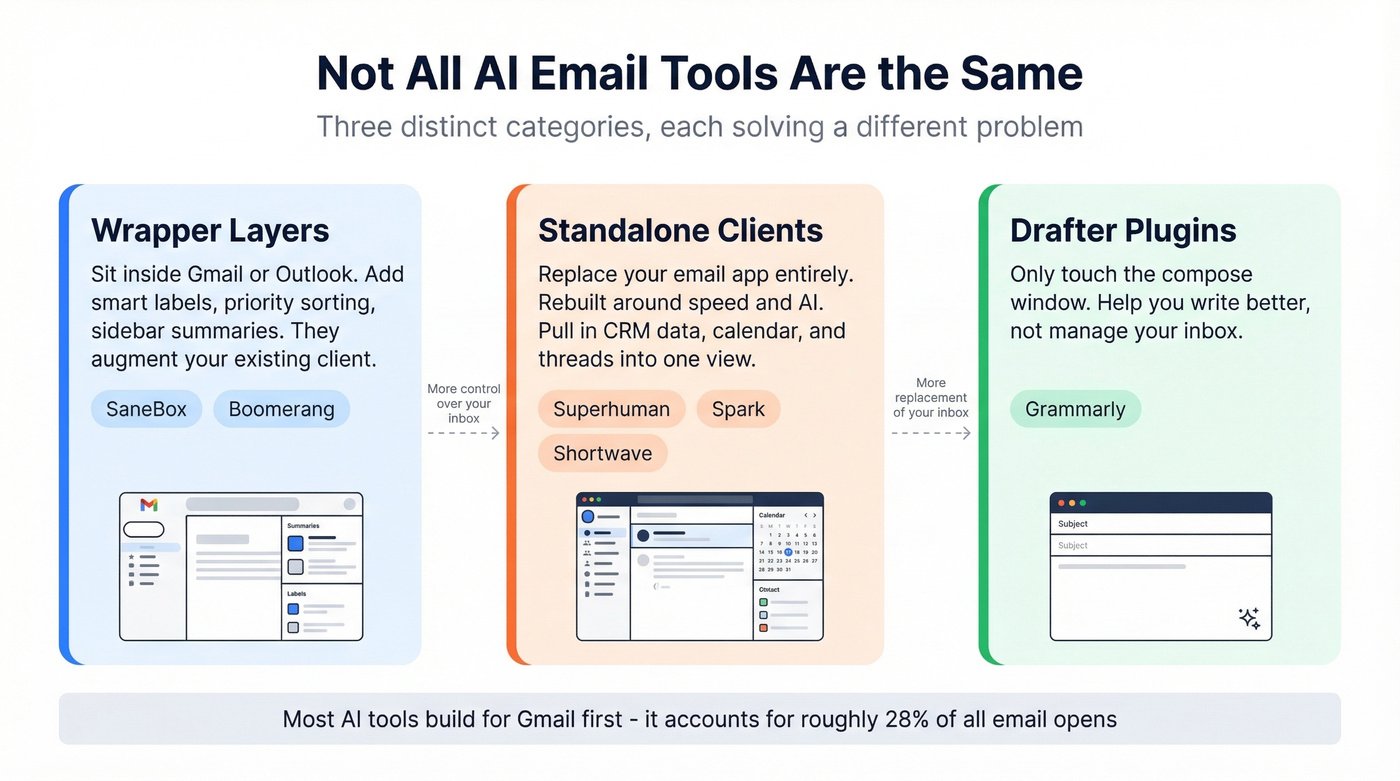
Wrapper layers sit inside Gmail or Outlook and add UI elements - smart labels, priority sorting, sidebar summaries. They don't replace your email client; they augment it. Standalone clients like Superhuman and Spark replace your email app entirely, rebuilding the experience around speed and AI. The best of these function as an inbox-first workspace, pulling CRM data, calendar context, and threads into one view. Drafter plugins like Grammarly only touch the composition window - they help you write, not manage.
Gmail accounts for roughly 28% of all email opens, which is why most AI tools build for Gmail first. Under the hood, they run on large language models for drafting and summarizing. The better ones layer in semantic search - finding emails by concept, not just keyword - and retrieval-augmented generation to ground AI responses in your actual inbox data rather than hallucinating.
Best Email Productivity Tools Compared
Prospeo - Best for Outbound Email Productivity
Here's a productivity problem nobody talks about in these roundups: the hours outbound teams waste sending emails to addresses that don't exist. Bounced emails don't just waste time - they torch your domain reputation, tank deliverability, and make every subsequent email less likely to land. For anyone focused on email efficiency in sales, fixing data quality is step zero.
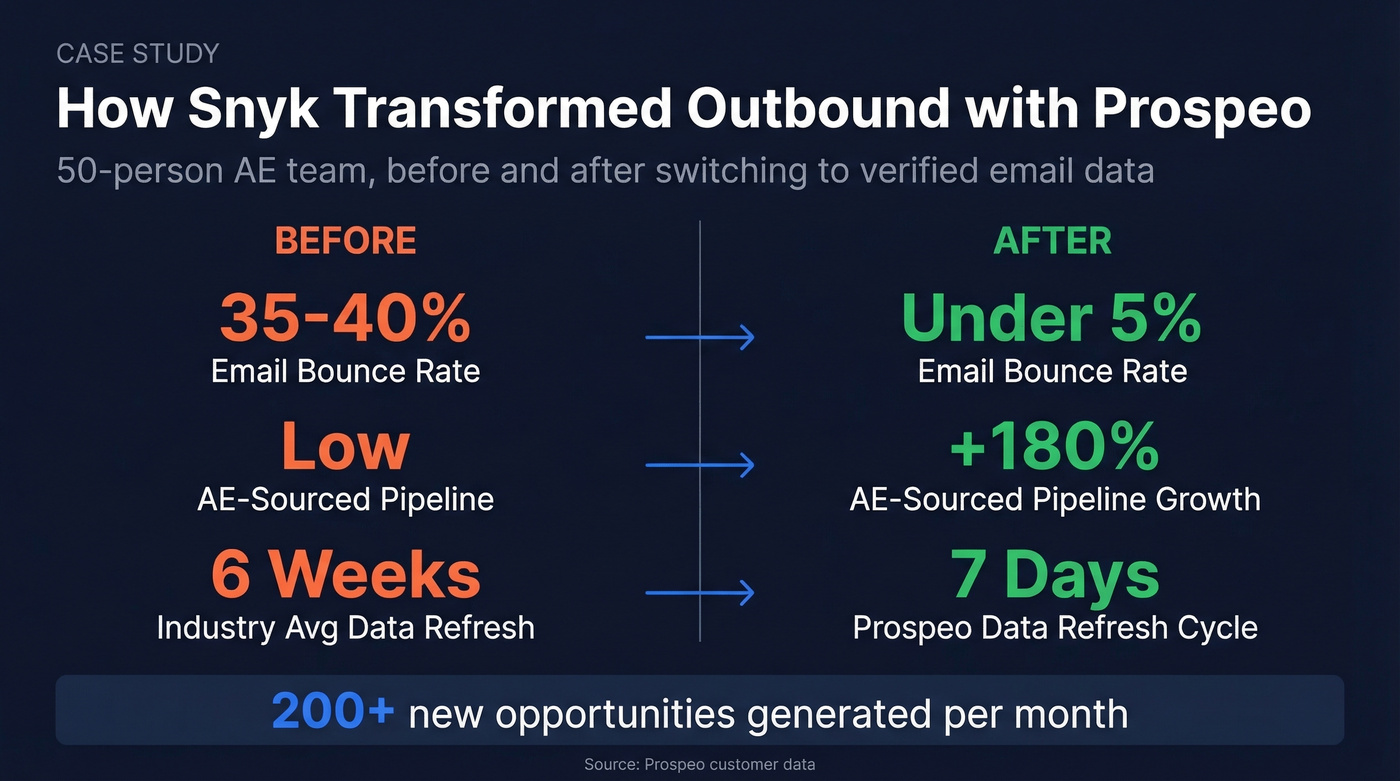
Prospeo solves this with 98% email accuracy across 143M+ verified addresses, refreshed on a 7-day cycle. The industry average refresh is six weeks. That gap matters - people change jobs, companies restructure, and stale data means bounced emails.
Snyk's 50-person AE team was running bounce rates of 35-40% before switching. After rolling out Prospeo, bounces dropped under 5%, AE-sourced pipeline jumped 180%, and they were generating 200+ new opportunities per month. The Chrome extension - with 40K+ users - lets reps verify contacts from any website in one click, which eliminates the copy-paste-pray workflow most teams are stuck with.
Use this if: You run outbound sequences and your bounce rate is above 5%. Pair it with your inbox tool and sequencer for a complete stack.
Pricing: Free tier includes 75 verified emails and 100 Chrome extension credits per month. Paid plans start at roughly $0.01 per email - no contracts, no sales calls.
Superhuman - Best Premium AI Client
Superhuman is one of the fastest email clients on the market. The keyboard shortcuts are genuinely addictive, and Auto Drafts can generate reply drafts automatically. Ask AI lets you query your inbox in natural language. It supports both Gmail and Outlook, with CRM integrations on the Business plan.
The catch: Starter is $30/mo, Business is $40/mo. That's $360-480/year per seat just for email. CRM integrations and Auto Drafts are locked behind Business. And auto-filtering accuracy isn't perfect - we've seen important emails get buried.
Let's be honest: Superhuman is the best AI email client, and most teams shouldn't buy it. If email is genuinely your primary work surface - you're a founder, exec, or account manager living in your inbox - the speed gains are real. It comes closest to a single pane of glass for communication, pulling CRM data, calendar context, and threads into one view. If your deal sizes are modest or email isn't where you close deals, the $30/month is vanity spend. Keep reading.
Spark - Best Budget AI Client
Spark is the tool we recommend to anyone who asks "what should I use for email?" before we know their budget. The free tier is legitimately useful: Smart Inbox, unlimited accounts, calendar integration. Plus at $10/user/mo unlocks the AI Assistant, which can search emails, attachments, and calendar events - and cite the original sources.
The privacy story is strong here. Spark's AI Assistant is opt-in and creates a private index that only lives on your device. That's a meaningful distinction from most other AI inbox tools. You get 40 AI meeting notes per month on Plus, unlimited on Pro at $20/user/mo.
The trade-offs: Pro features like shared inboxes and read statuses are team-oriented, so solo users won't need them. AI history access is limited on Plus - you need Pro for deeper history. For team email management, though, the Pro tier's shared inbox and delegation features make Spark a surprisingly capable collaboration tool at a fraction of Front's price.
Ask "when is my flight to Rome?" and Spark's AI pulls the answer from a booking confirmation buried 200 emails deep. For budget-conscious teams that still want AI-powered email, this is the obvious pick.
Boomerang - Best for Scheduling & Follow-Ups
Use this if: You need Send Later, snooze reminders, and meeting scheduling without replacing your entire email client. Boomerang is a plugin, not a client - it layers onto Gmail and does its job quietly.
Skip this if: You want AI drafting or inbox triage. Boomerang's Respondable feature scores your emails, but it isn't a writing tool.
Free 30-day trial with no credit card. After that, Personal runs $4.98/mo and Pro is $14.98/mo. The Inbox Pause feature alone - which stops new emails from arriving during focus blocks - is worth the Personal plan.
SaneBox - Best for Inbox Cleanup
SaneBox is the most underrated tool on this list. It works on top of your existing email account, sorting unimportant emails into folders before you see them. Only 38% of emails require a meaningful response - SaneBox figures out which 38% that is. No new email client to learn. It just works.
Skip this if: You already use Spark or Superhuman's built-in priority sorting. You'd be paying for redundant filtering.
Pricing starts around $0.07/day billed annually, and the "Lunch" plan is $99/year.
Shortwave - Gmail-Only AI Alternative
Shortwave is the Superhuman alternative for people who only use Gmail and don't want to pay $30/month. The AI leans closer to a personal assistant - it bundles related emails, archives aggressively, and handles Do Not Disturb scheduling. Zapier's comparison noted Shortwave's customization and bundling as standout strengths, while flagging Superhuman's auto-filtering as occasionally unreliable.
Where Superhuman wins: multi-platform support and raw speed. Where Shortwave wins: price (paid plans start at $18/mo, with a free tier) and a more opinionated AI that actively manages your inbox rather than just speeding it up.
Quick Mentions
| Tool | Best For | Starting Price | One-Line Verdict |
|---|---|---|---|
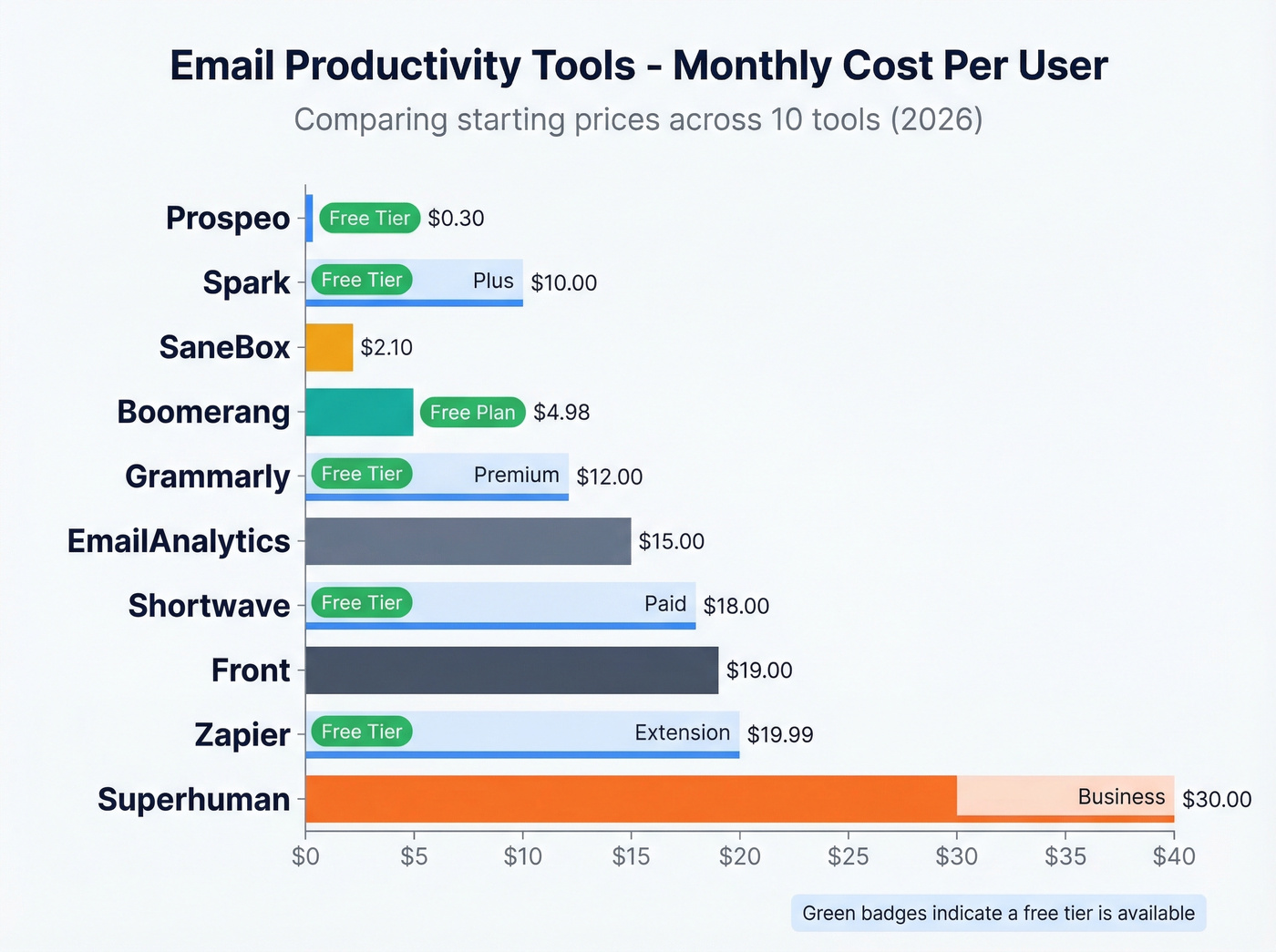
| Zapier | Email automation | Free; Starter $19.99/mo | Connects your email tools to everything else. Essential glue. |
| Front | Team inboxes | ~$19/user/mo | Shared inbox for support/ops teams. Not for individual productivity. |
| Grammarly | Writing quality | Free; Premium ~$12/mo | Drafter plugin only. Catches errors, suggests tone. Pairs with anything. |
| EmailAnalytics | Response tracking | ~$15/mo | Tracks team email response times. Niche but useful for managers. |
Don't overlook Gmail's built-in keyboard shortcuts either - press ? in Gmail to see them. Free, instant productivity gain.

You just read that every email interruption costs 23 minutes to recover from. Now imagine losing that time to emails that never even arrive. Prospeo's 98% email accuracy and 7-day data refresh eliminate bounced emails before they happen - the same way Snyk cut bounce rates from 35% to under 5% and added 200+ opportunities per month.
Stop wasting productivity on emails that bounce. Start with 75 free verified emails.
Pricing Comparison
| Tool | Best For | Starting Price | Free Tier | AI Features | Platforms |
|---|---|---|---|---|---|
| Prospeo | Outbound data | ~$0.01/email | Yes | No | Any (Chrome ext.) |
| Superhuman | Premium inbox | $30/mo | No | Yes | Gmail, Outlook |
| Spark | Budget AI inbox | $0 (Plus: $10/mo) | Yes | Yes | Gmail, Outlook, iCloud |
| Boomerang | Scheduling | $4.98/mo | Yes (30 days + free plan) | Limited | Gmail (plugin) |
| SaneBox | Inbox cleanup | ~$0.07/day | No | Smart filtering | Any |
| Shortwave | Gmail AI client | $0 (paid: $18/mo) | Yes | Yes | Gmail |
| Zapier | Automation | $0 (Starter: $19.99/mo) | Yes | Limited | Any |
| Front | Team inboxes | ~$19/user/mo | No | Yes | Any |
| Grammarly | Writing quality | $0 (Premium: ~$12/mo) | Yes | Yes | Any |
| EmailAnalytics | Analytics | ~$15/mo | No | No | Gmail, Outlook |
Recommended Stacks by Persona
The consensus on r/productivity and r/sales is the same: people keep asking for one app that does email, calendar, and tasks. That app doesn't exist yet - and every "all-in-one" attempt ends up mediocre at all three. The next best thing is a tight 2-3 tool stack where each piece does one job well.
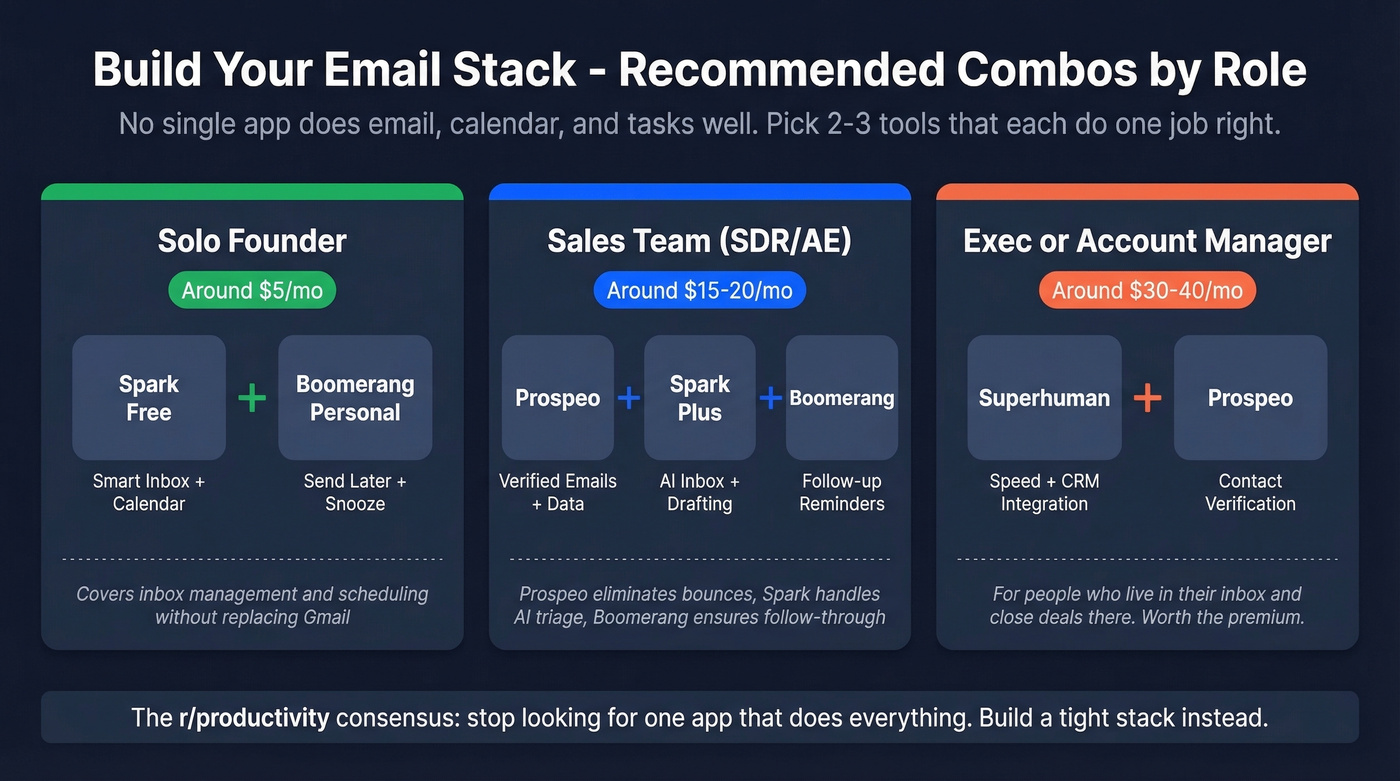
Solo founder (~$5/mo): Spark Free + Boomerang Personal. Smart inbox management plus send-later and follow-up reminders.
Sales rep / SDR (~$15/mo): Spark Plus + Boomerang + Prospeo's free tier for prospecting. AI-powered inbox, scheduling for follow-ups, and verified emails so you're not wasting sequences on dead addresses. This stack is purpose-built for streamlining outbound without blowing your budget.
Mid-budget power user (~$35-50/mo): Superhuman Starter + Boomerang Personal. Premium speed for your inbox plus scheduling and Inbox Pause for focus blocks. If you run outbound, add a contact verification tool and you're still under $50.
Ops / team lead (~$80-100/mo): Superhuman Business + Front + Zapier Starter. Premium speed for your own inbox, shared team inbox for collaboration, and automation connecting everything to your CRM.
The $35-50/month range is the sweet spot for most individual contributors. You get a genuinely powerful email workflow without touching enterprise pricing.
The most expensive email productivity problem isn't inbox management - it's sending sequences to dead addresses. At $0.01 per verified email, Prospeo costs less than a single wasted follow-up. Stack it with Spark or Superhuman and your outbound runs on clean data from day one.
Pair accurate data with your favorite inbox tool. No contracts, no sales calls required.
The 5-Bucket Decision Framework
Merlin Mann coined Inbox Zero back in 2006, and most people still misunderstand it. It's not about having zero emails. It's about zero cognitive load - every email has been decided on, even if it hasn't been answered yet.
For every email, run it through five buckets:
- Delete - doesn't need a response, never will.
- Delegate - someone else should handle this. Forward and archive.
- Respond - takes under two minutes. Do it now.
- Defer - needs thought or action. Snooze it or convert to a task.
- Do - it's the next important action. Block time and execute.
Batch your email into four designated windows per day instead of checking constantly. The refocus cost alone - 23 minutes per interruption - makes this the single highest-ROI habit change you can make.
Mistakes No Tool Can Fix
Stop CC'ing 12 people on every thread. Stop treating email like Slack and expecting instant replies. Unsubscribe from anything you haven't read in 30 days - be ruthless about it.
Look, we've tested dozens of these tools, and the pattern is always the same: teams buy software hoping it'll fix a workflow problem that's really a behavior problem. HBR research shows knowledge workers toggle between apps 1,200+ times per day, and Microsoft's own data puts the number at 275 interruptions daily - roughly one every two minutes. No email productivity tool fixes that. The ROI framing is simple: reclaiming one focused hour per day for a $120k employee is worth approximately $15k/year in recovered productivity. That's not a software problem. It's a discipline problem that software can only support, not solve.
FAQ
What is an email productivity tool?
Any software that reduces time spent managing, writing, scheduling, or sending email. That includes AI inbox clients like Superhuman and Spark, scheduling plugins like Boomerang, inbox filters like SaneBox, and contact verification tools that prevent wasted outbound effort.
Is Superhuman worth $30/month?
If email is your primary work surface and you use Gmail or Outlook, yes - the speed gains compound daily. For most people, Spark Plus at $10/month delivers 80% of the value. Try Spark first and upgrade only if you hit its limits.
Are free inbox management tools good enough?
For personal use, absolutely. Spark Free and Boomerang's 30-day trial cover the essentials. If email drives revenue - outbound sales, client management, recruiting - invest in paid tiers where the ROI is measurable.
Do AI email tools read all my emails?
Most require full inbox access to draft replies, prioritize messages, and summarize threads. Spark's AI Assistant is opt-in and creates a private index stored only on your device - a meaningful privacy distinction. Always check each tool's data policy before granting access.
How do I reduce email bounce rates for outbound campaigns?
Verify every address before sending. Tools with 98%+ accuracy and weekly data refresh cycles keep contact data current, which is why teams using real-time verification consistently report bounce rates under 5%. Stale data from providers refreshing every six weeks is the number-one cause of high bounces and domain reputation damage.