

Email Scoring: The 3 Types, How They Work, and How to Fix Yours
Litmus found that 70% of emails have at least one spam-related issue. That's not a deliverability problem - it's an email scoring problem. Here's the thing: the term means three completely different things depending on who you're talking to, and mixing them up leads to fixing the wrong thing entirely.
What You Need (Quick Version)
Email scoring falls into one of three buckets. Engagement scoring tracks how subscribers interact with your emails. Sender reputation scoring reflects how mailbox providers judge your sending domain. Email risk scoring determines whether an address is safe to send to at all.
If you're a marketer optimizing campaigns, you want engagement scoring. If emails are landing in spam, you need reputation scoring. If your lists are bouncing, it's a risk and verification problem. Jump to whichever section matches your situation.
The Three Types Explained
On r/Emailmarketing, a thread asking about "email scores" will get responses split between engagement points, sender reputation tools, and verification confidence levels - often in the same comment chain. These are fundamentally different systems measuring different things for different audiences.
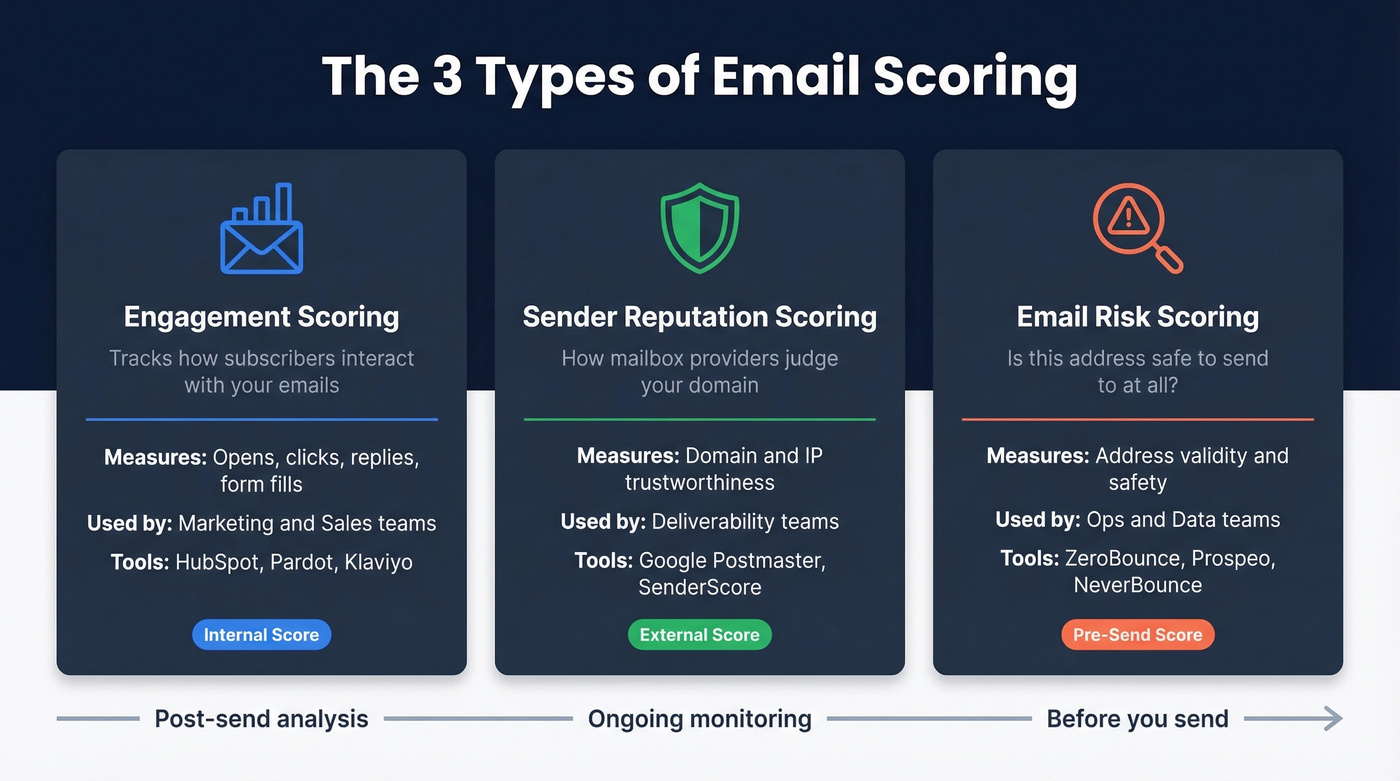
| Type | What It Measures | Who Uses It | Example Tools |
|---|---|---|---|
| Engagement | Opens, clicks, replies | Marketing/Sales | HubSpot, Pardot, Klaviyo |
| Reputation | Domain/IP trustworthiness | Deliverability teams | Google Postmaster Tools, SenderScore.org |
| Risk | Address validity + safety | Ops/data teams | ZeroBounce, Prospeo, NeverBounce |
Email Engagement Scoring
Engagement scoring assigns points to subscriber actions - opens, clicks, replies, form fills - and aggregates them into a composite number that tells you how "hot" a contact is. It's the most common interpretation in marketing teams. It's also the one most teams get wrong.
The Formula
The standard engagement score formula, per Count.co's framework, looks like this:
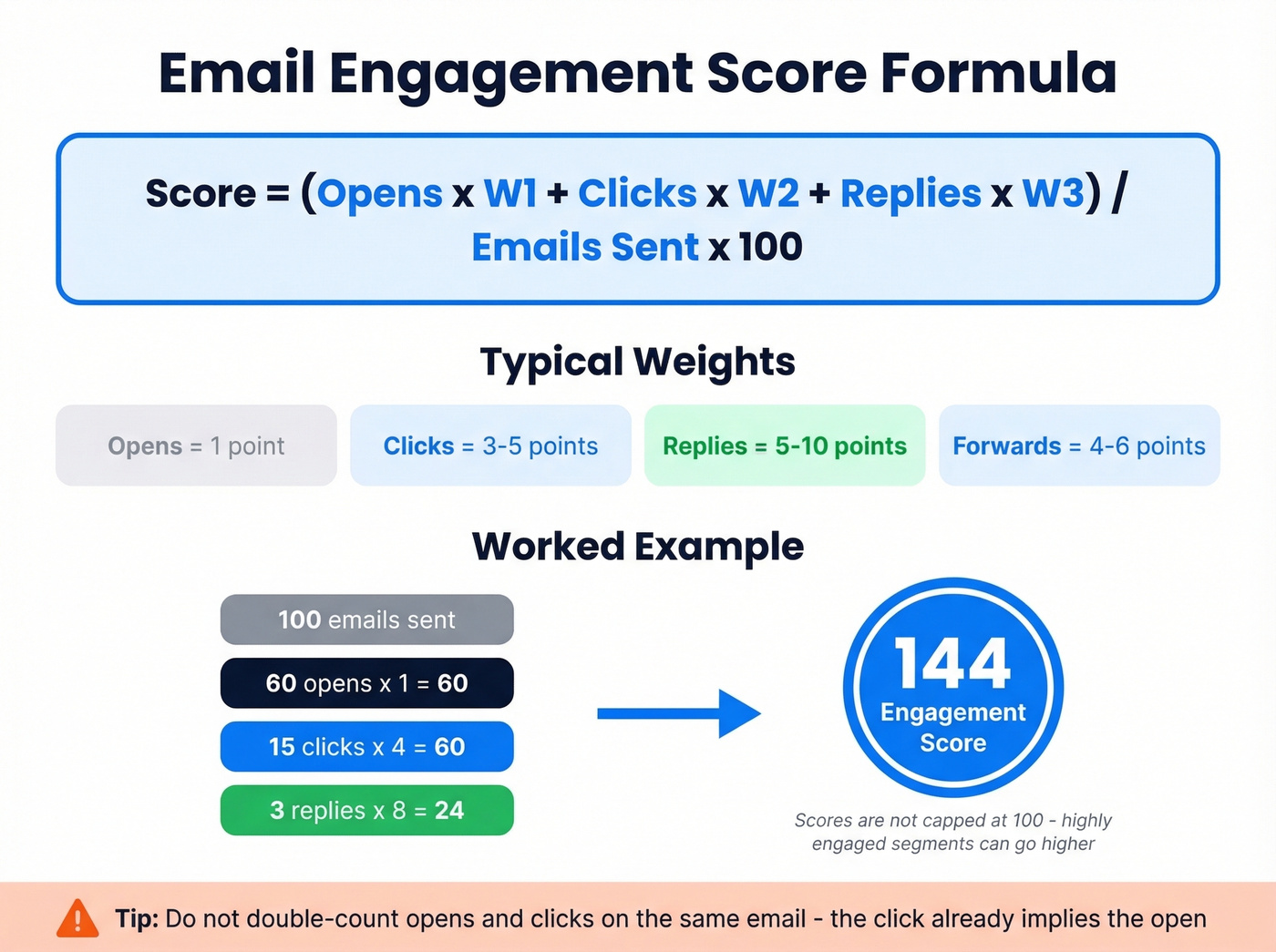
Engagement Score = (Opens x w1 + Clicks x w2 + Replies x w3 + Other x w4) / Total Emails Sent x 100
Typical weights: opens = 1, clicks = 3-5, replies = 5-10, forwards = 4-6. A reply is worth far more than an open because it requires actual intent.
A quick worked example: you send 100 emails, get 60 opens (60x1), 15 clicks (15x4 = 60), and 3 replies (3x8 = 24). Your score is (60 + 60 + 24) / 100 x 100 = 144. Scores aren't capped at 100 - a highly engaged segment can blow past it.
Start simple. We've seen teams build 15-variable models that nobody trusts and nobody maintains. One point for opens, five for form submissions, ten for replies. That's enough to score leads from email interactions and separate engaged contacts from dead weight. Two pitfalls to avoid: normalize by send frequency so heavy senders don't automatically outscore light senders, and don't double-count an open and a click on the same email - the click already implies the open.
Benchmarks by Segment
These ranges come from Count.co's industry estimates and give you a rough calibration point:
| Segment | Good | Excellent |
|---|---|---|
| SaaS B2B | 60-75 | 75+ |
| Ecommerce B2C | 45-60 | 70+ |
| Subscription Media | 70-85 | 85+ |
| Early-stage (<$1M ARR) | 65-80 | 80+ |
If you're running a B2B SaaS list and your engagement score is below 50, you've got a list hygiene problem, a content problem, or both.
Why Open-Based Scoring Is Broken
Apple Mail Privacy Protection pre-fetches tracking pixels for every email, inflating your open rates with phantom engagement. Security scanners at enterprise companies auto-click links before the recipient ever sees them. Both poison your engagement scores if you're weighting opens and clicks heavily.
The fix is straightforward: weight replies and form fills - actions that bots can't fake - at 5-10x the value of opens. Some teams have dropped open-based scoring entirely, and their MQL quality improved because they stopped routing bot-inflated contacts to sales.
If your average deal size is under $15k, you probably don't need a 15-variable engagement model at all. A simple "replied in the last 30 days" flag will outperform most scoring systems because it eliminates the noise entirely.
Sender Reputation Scoring
Your sender reputation score is the number that actually determines whether your email hits the inbox or the spam folder. Unlike engagement scoring, which is internal, reputation scoring is external - it's how Gmail, Outlook, and Yahoo judge your sending domain and IP.
Where to Check
Different providers show different numbers, which is why practitioners keep asking which tool is "authoritative." There's no single source of truth, but here's the hierarchy that matters:
- Google Postmaster Tools - free, and the only tool that shows you how Gmail specifically views your domain. Start here.
- SenderScore.org - a free 0-100 score based on sending behavior. Useful as a quick gut check, not gospel.
- MXToolbox - $129-$399/mo for detailed monitoring across blacklists, authentication, and deliverability metrics. Worth it if you're sending at volume.
An 80+ on SenderScore is solid. Below 70, you've got work to do.
Authentication Is Table Stakes
SPF, DKIM, and DMARC aren't optional anymore. Gmail and Yahoo enforce them for bulk senders, with a maximum 0.3% complaint rate threshold (Gmail recommends under 0.10%) and mandatory one-click unsubscribe via RFC 8058.
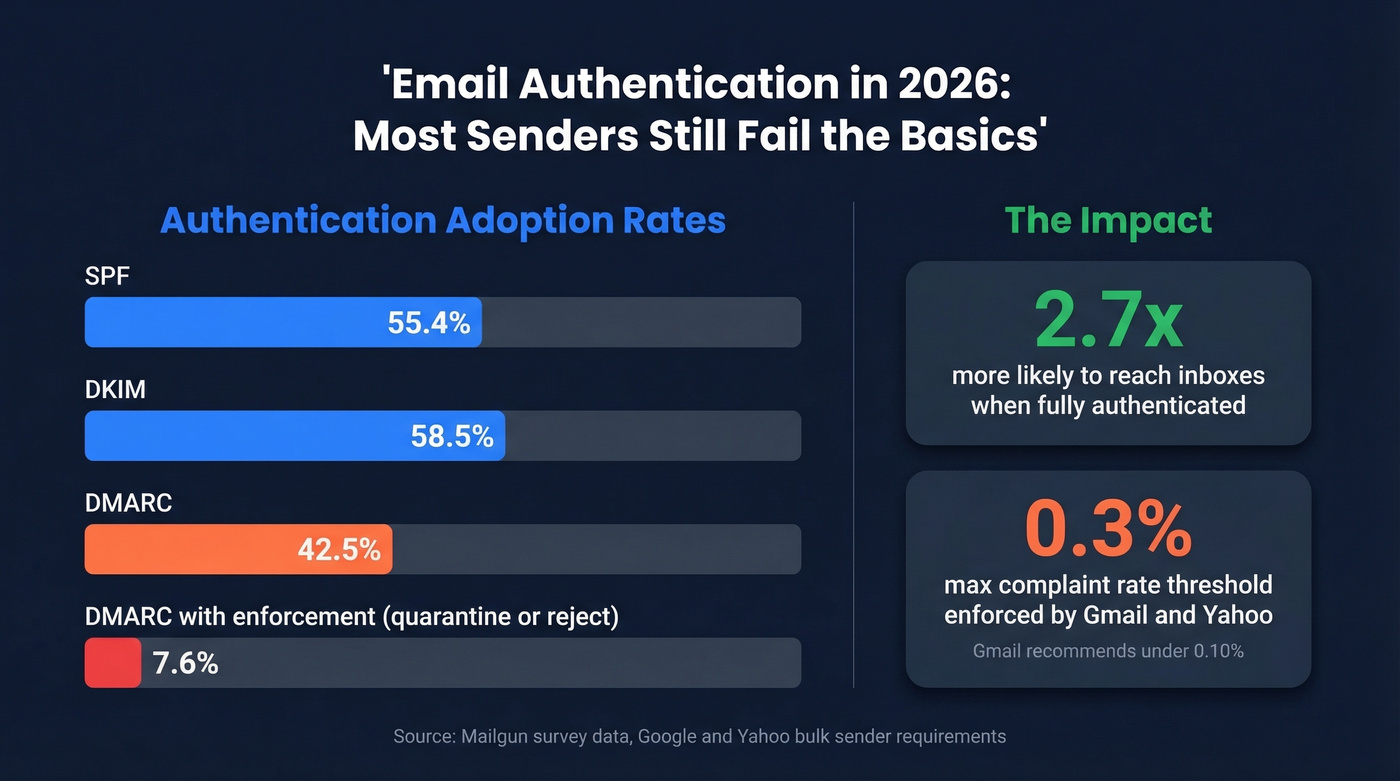
Adoption is still shockingly low. A Mailgun survey found only 55.4% of senders use SPF, 58.5% use DKIM, and just 42.5% use DMARC. Across the top 10 million domains, only 18.2% have valid DMARC records, and a mere 7.6% actually enforce them with quarantine or reject policies. Fully authenticated senders are 2.7x more likely to reach inboxes. In our testing, that multiplier holds up - it's the difference between a functioning email program and one that's slowly dying.
2026 Inbox Placement Reality
The numbers are getting worse, not better. Office 365 inbox placement dropped 26.73 percentage points year-over-year, landing at just 50.70% in early 2025. Outlook/Hotmail fell 22.56 points to 26.77%. High-volume senders pushing 1M+ emails per month saw roughly 27.63% inbox placement.
Only 23.6% of B2B marketers verify their lists before campaigns. Three-quarters of the market is sending blind.

76% of B2B marketers send without verifying their lists - and wonder why engagement scores crater. Prospeo's 5-step verification with catch-all handling, spam-trap removal, and honeypot filtering delivers 98% email accuracy. Fix your risk scores before they wreck your reputation scores.
Start with clean data. Every other score depends on it.
Email Risk Scoring
Risk scoring sits upstream of everything else. It answers one question: should you send to this address at all?
Unlike engagement scoring, which looks backward at behavior, or reputation scoring, which reflects your sending history, risk scoring evaluates the address itself - before you ever hit send.
Signals That Build a Risk Score
A modern risk scoring engine checks multiple layers. SMTP inbox existence confirms the mailbox is real. Disposable email detection catches throwaway addresses from services like Guerrilla Mail. Domain age and type flag brand-new or free-provider domains. Blacklist association checks whether the address or domain appears on known blocklists. Breach exposure data can actually work in your favor - a long-lived address that appears in older breaches is likely a real, active mailbox.
The social footprint signal carries real weight. SEON's internal analysis found that 76% of borrowers with no detectable social media presence ultimately defaulted. In a B2B context, an email with zero professional profile associations is a red flag worth scoring against.
Catch-all domain flagging is the hardest problem in email verification. These domains always return "valid" regardless of whether the specific mailbox exists, which means standard SMTP checks are useless. Advanced tools flag catch-all domains and apply probabilistic models trained on historical bounce data to estimate the real risk. This is where most verification providers fall short - and where the quality gap between tools becomes obvious.
Interpreting Score Bands
Scales vary wildly by provider. Some use 0-10, some use 0-100, and Opportify uses a 200-1000 range where higher means riskier. The VerifiedEmail framework offers a clean 0-10 interpretation:
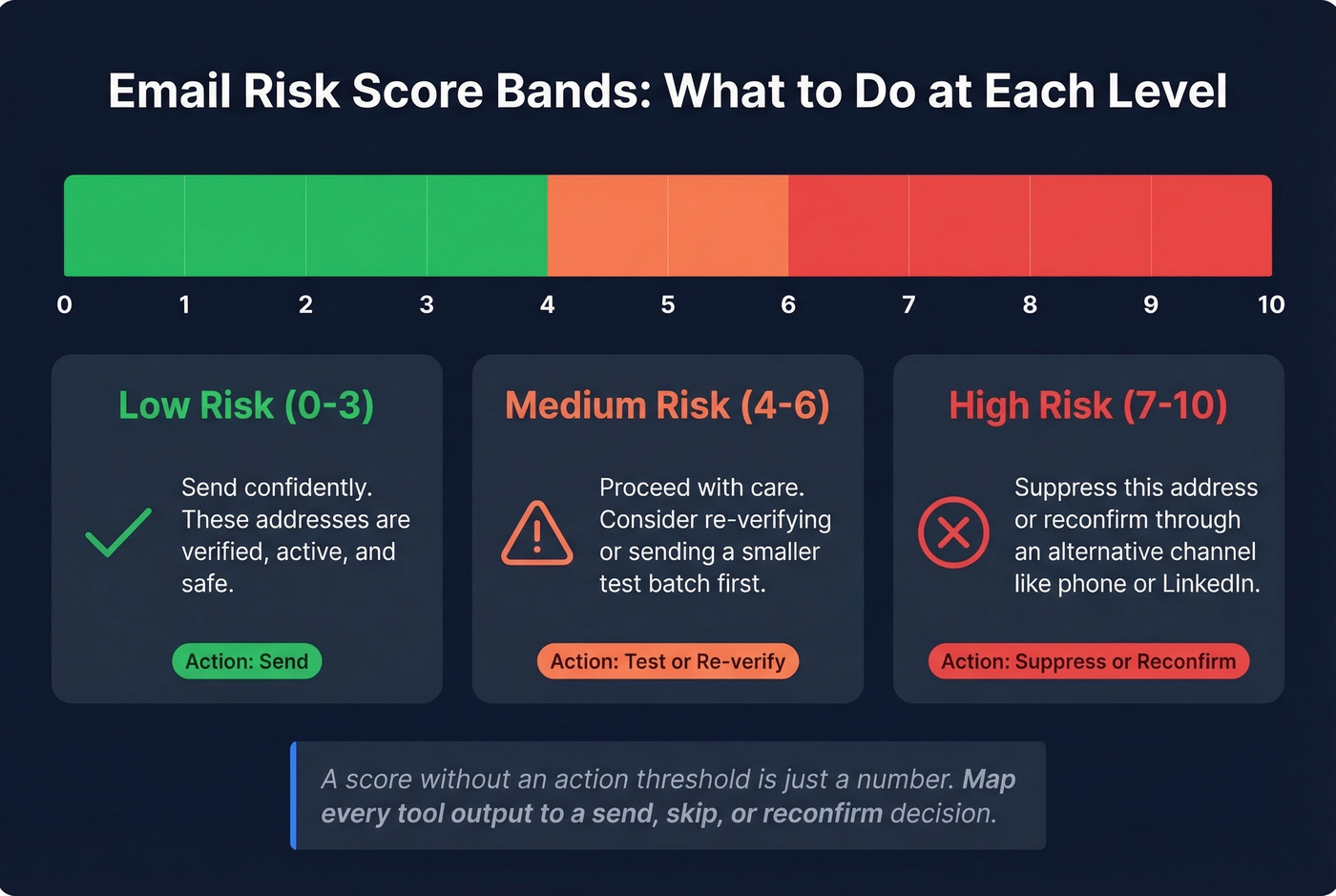
- 0-3 (Low risk): Send confidently.
- 4-6 (Medium risk): Proceed with care - consider re-verification or a smaller test send.
- 7-10 (High risk): Suppress or reconfirm through an alternative channel.
Whatever tool you use, map its output to a send/skip/reconfirm decision. A score without an action threshold is just a number.
How Scoring Works Under the Hood
Every verification and risk scoring tool runs some version of the same pipeline, though the quality of each step varies enormously.
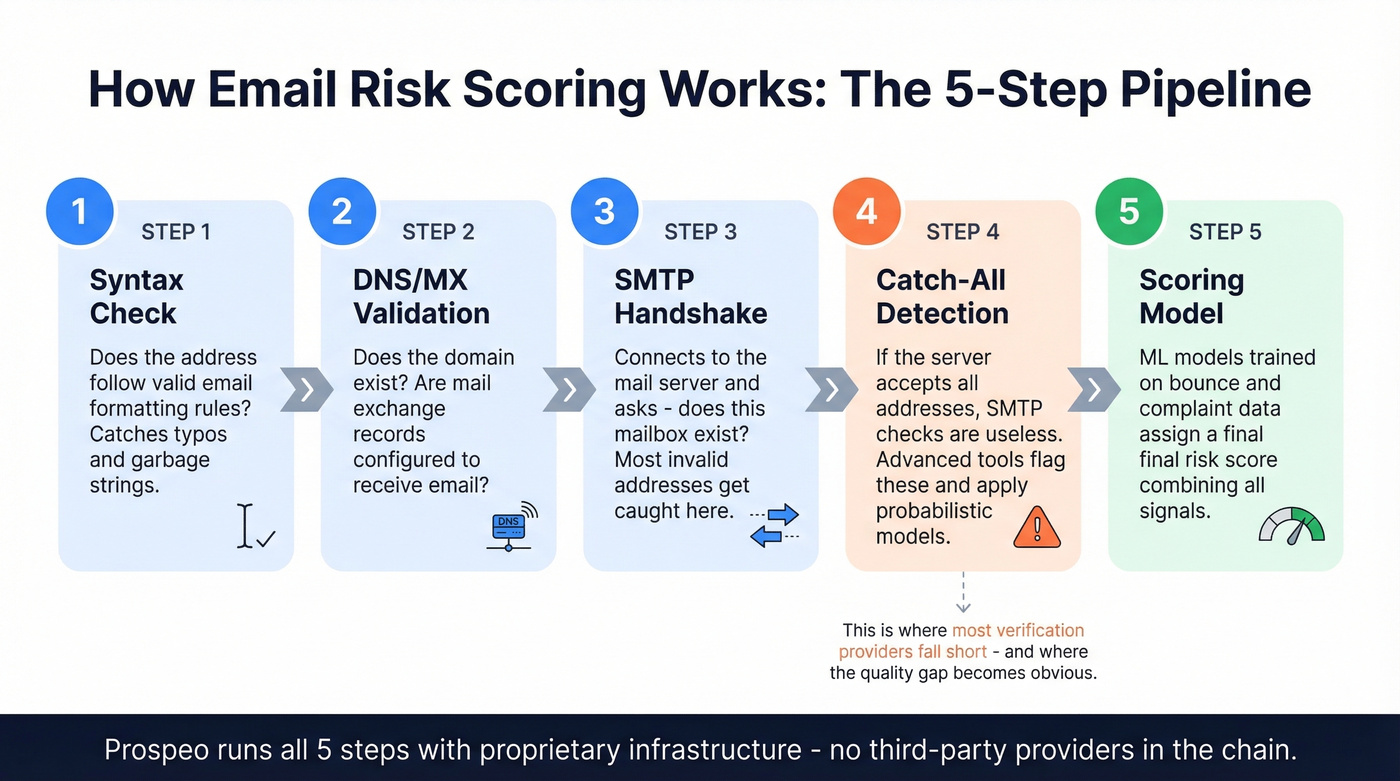
Step 1: Syntax check. Does the address follow valid email formatting rules? This catches typos and garbage strings.
Step 2: DNS/MX record validation. Does the domain exist, and does it have mail exchange records configured to receive email?
Step 3: SMTP handshake. The tool connects to the mail server and asks "does this mailbox exist?" - without actually sending an email. This is where most invalid addresses get caught.
Step 4: Catch-all detection. If the server accepts all addresses, the SMTP check is useless. Advanced tools flag these separately. The best ones apply probabilistic models trained on millions of historical bounce events to estimate the real risk behind a catch-all response.
Step 5: Scoring model. Machine learning models trained on bounce and complaint data assign a final risk score based on all signals combined.
Prospeo's verification pipeline runs all five steps with proprietary infrastructure - no third-party email providers in the chain. The catch-all handling is where it stands out: spam-trap removal, honeypot filtering, and a 7-day refresh cycle that keeps scores current rather than stale.
Email Scoring Tools Compared
| Tool | Scoring Type | Scale | Price | Best For |
|---|---|---|---|---|
| Prospeo | Risk/verification | Valid/invalid + catch-all | ~$0.01/email, free tier | Verified data upstream |
| ZeroBounce | Engagement/risk + verification | 1-10 | From $49/mo | Scoring + catch-all handling |
| Google Postmaster | Reputation | Internal | Free | Gmail deliverability |
| SenderScore.org | Reputation | 0-100 | Free | Quick reputation check |
| Mail-Tester | Spam test | Pass/fail | Free | One-off spam testing |
| MXToolbox | Reputation + delivery | Multiple | $129-$399/mo | Ongoing monitoring |
| GlockApps | Inbox placement | % based | From $85/mo | Placement testing |
| NeverBounce | Verification | Valid/invalid | ~$8/1K | Budget verification |
| MillionVerifier | Verification | Valid/invalid | ~$3.70/1K | High-volume verification |
Free tools handle reputation monitoring well enough for most teams. Where you need to spend money is on the verification and risk side, because bad data actively damages your sender reputation. We've run lists through most of these tools, and the pattern is consistent: the gap between providers shows up almost entirely in catch-all handling and data freshness. A tool that verified an address six weeks ago is telling you what was true six weeks ago - not what's true today.
Bad email scores start with bad data. Prospeo refreshes 300M+ profiles every 7 days - not the 6-week industry average - so you're never sending to stale addresses that spike bounces and tank your sender reputation.
Kill bounce-rate problems at the source with data that's never more than a week old.
How to Improve Your Scores
Engagement scoring fixes
Weight replies and form fills at 5-10x opens. Bot clicks and Apple MPP have made open-based scoring unreliable. Implement negative scoring by subtracting points after 30 days of inactivity - but be aware that scoring model changes can apply retroactively in platforms like HubSpot and Pardot, so communicate changes to Sales before flipping the switch. Sunset contacts who haven't engaged in 6 months. It hurts to shrink your list, but dead contacts drag down every metric.
Reputation scoring fixes
Implement SPF + DKIM + DMARC. Non-negotiable in 2026. Keep complaint rates under 0.10%, which is Gmail's recommendation - the hard ceiling is 0.3%. Add one-click unsubscribe via List-Unsubscribe header (RFC 8058) and process opt-outs within 2 days. Maintain consistent daily sending volume; wild swings from 500 emails one day to 50,000 the next are a reputation killer.
Risk and verification fixes
Verify lists before every campaign. You'll join the 23.6% of B2B marketers who actually do this - and outperform the rest. Re-verify monthly, because email addresses decay faster than most teams realize. Handle catch-all domains explicitly - don't just mark them "valid" and move on. Target under 2% total bounces and under 1% hard bounces.
Skip verification tools that don't flag catch-all domains separately. If a tool just returns "valid" for every address on a catch-all domain, it's giving you false confidence that'll show up as bounces and spam-trap hits later.
Tying All Three Scores Together
The three scoring types aren't isolated - they form a pipeline. Lead scoring in email marketing starts with risk scoring to clean your list, feeds into engagement scoring to identify your most responsive contacts, and the resulting sender reputation reflects how well you executed both.
Teams that use lead scoring automation in platforms like HubSpot or Pardot can wire this pipeline together so that verified contacts enter sequences, engagement scores update in real time, and low-scoring leads get automatically suppressed before they damage deliverability. When you score leads via email interactions, you're building a feedback loop: better data in, better engagement signals out, stronger reputation over time. That loop is the entire point - not just ranking contacts, but continuously improving the quality of every send.
FAQ
What's a good email score?
For engagement scoring, 60+ is good in B2B SaaS and 45+ in ecommerce. For sender reputation, aim for 80+ on SenderScore. For risk scoring on a 0-10 scale, 0-3 means safe to send - anything above 6 should be suppressed or reconfirmed.
How often should I check my scores?
Check sender reputation weekly via Google Postmaster Tools - it's free and authoritative for Gmail. Run verification before every campaign, not just quarterly. Recalibrate engagement scoring models monthly to account for list changes and seasonal shifts.
Does email scoring affect deliverability?
Sender reputation scoring directly determines inbox vs. spam placement. Risk scoring prevents the bounces and spam-trap hits that destroy reputation. Engagement scoring is internal but reflects delivery health - low engagement tells mailbox providers your content isn't wanted.
What's the difference between scoring and verification?
Verification confirms a mailbox exists - binary yes/no. Scoring assesses whether sending to that address is worth the risk based on bounce history, domain signals, and behavioral patterns. Prospeo combines both: 98% verification accuracy plus catch-all risk flagging at ~$0.01 per email, with a free tier of 75 emails per month.
Which tool should I start with?
Google Postmaster Tools for reputation - it's free and the only source for Gmail-specific data. For verification and risk scoring, start with a tool that handles catch-all domains well and refreshes data frequently. A 7-day refresh cycle matters more than most teams think, because stale data is what causes the bounces that tank your reputation in the first place.