

The Best Email Searcher Tools in 2026: Accuracy, Pricing, and What Actually Works
You uploaded 5,000 contacts from your last event, hit send on your first sequence, and 400 emails bounced. Your domain reputation took a hit before a single prospect opened a message. Every email searcher tool plasters "95%+ accuracy" on its landing page, but third-party benchmarks show real-world accuracy ranging from 20% to 90% depending on the tool and dataset. The accuracy number on a homepage is marketing. The bounce rate in your outbox is reality.
Here's how to pick the right tool for finding email addresses without learning that lesson the expensive way - plus the 10 options actually worth testing in 2026.
Our Picks (TL;DR)
| Tool | Best For | Starting Price | Free Tier |
|---|---|---|---|
| Prospeo | Email accuracy & data freshness | ~$0.01/email | 75 emails/mo |
| Hunter.io | Verification layer & brand trust | $49/mo (2K credits) | 50 credits/mo |
| Apollo.io | Database size (250M+ contacts) | ~$49/mo per user | Yes |
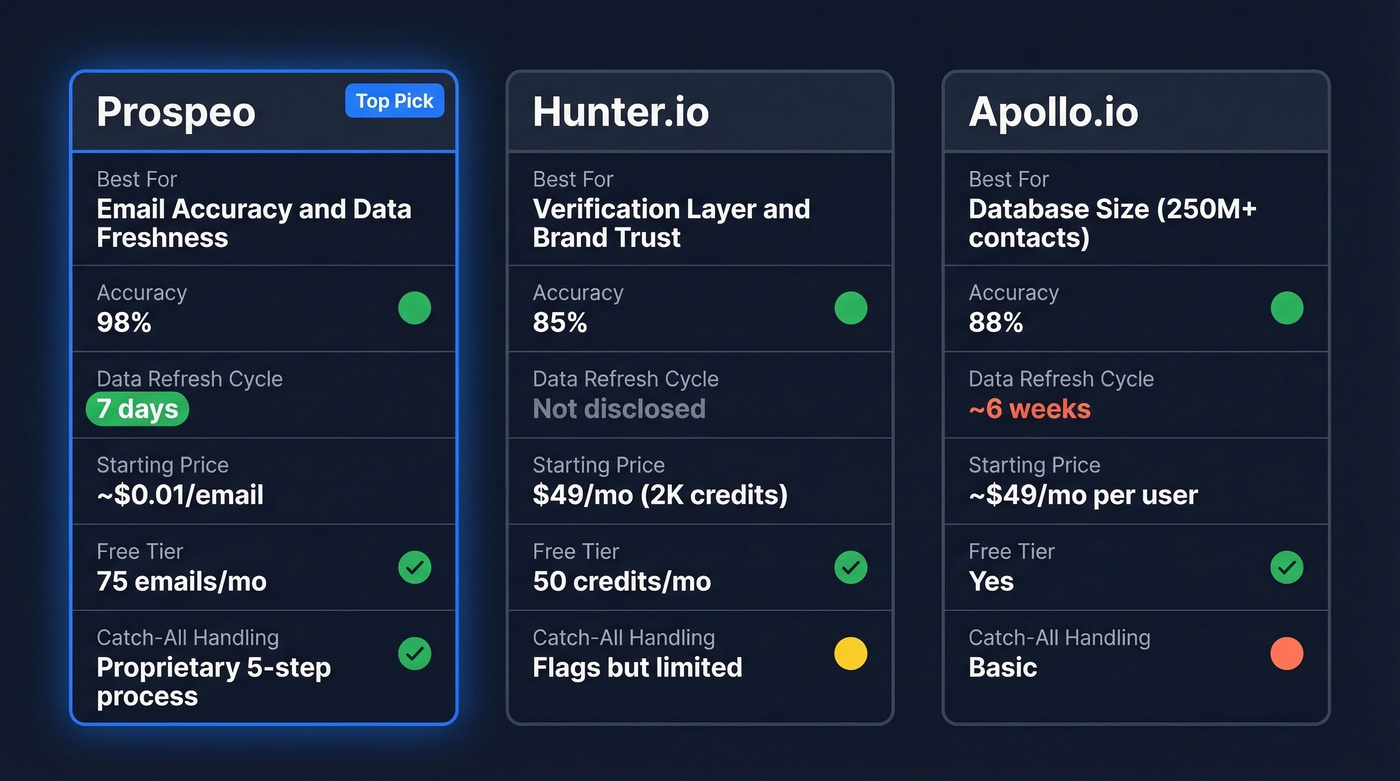
Prospeo wins on accuracy - 98% email accuracy with sub-4% bounce rates in customer deployments - and freshness with a 7-day refresh cycle. Hunter is one of the most trusted verification engines. Apollo gives you one of the biggest self-serve databases, but quantity and quality aren't the same thing.
Here's the thing: if your average deal size is under $10K, you probably don't need a massive all-in-one platform. A focused email lookup tool with high accuracy will outperform a bloated database where half your sends bounce.
What an Email Searcher Actually Does
An email searcher locates professional email addresses from limited inputs - typically a name and company. Under the hood, most tools combine three techniques: pattern generation guesses formats like firstname.lastname@company.com, web scraping crawls public sources for published addresses, and SMTP validation pings the mail server to confirm the address exists without actually sending an email.
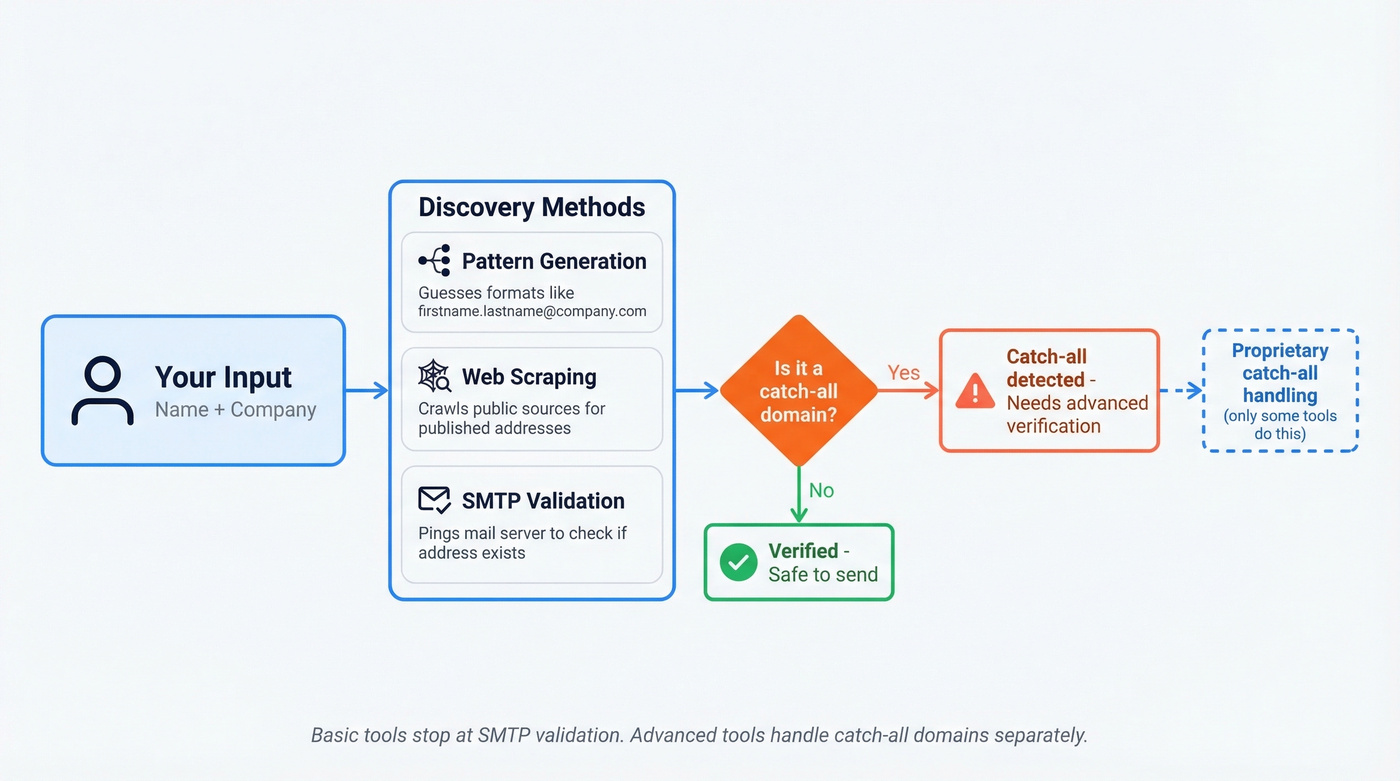
That last step is where tools diverge. Basic SMTP checks can't handle catch-all domains - servers configured to accept all incoming mail regardless of whether the specific address exists. A catch-all domain returns "valid" for literally any address you test. Your "verified" list might be full of ghost addresses.
The tools that handle catch-all verification separately are the ones that actually keep your bounce rate down.
One distinction worth making: an email finder isn't the same as a B2B database. A database like ZoomInfo or Apollo stores pre-built contact records. A dedicated lookup tool takes your inputs and searches in real time. Some tools do both; others like Hunter and Anymail Finder focus purely on finding and verifying.
How to Choose the Right Tool
Not all email finders are built the same. Before you commit budget, pressure-test any tool against these six criteria:
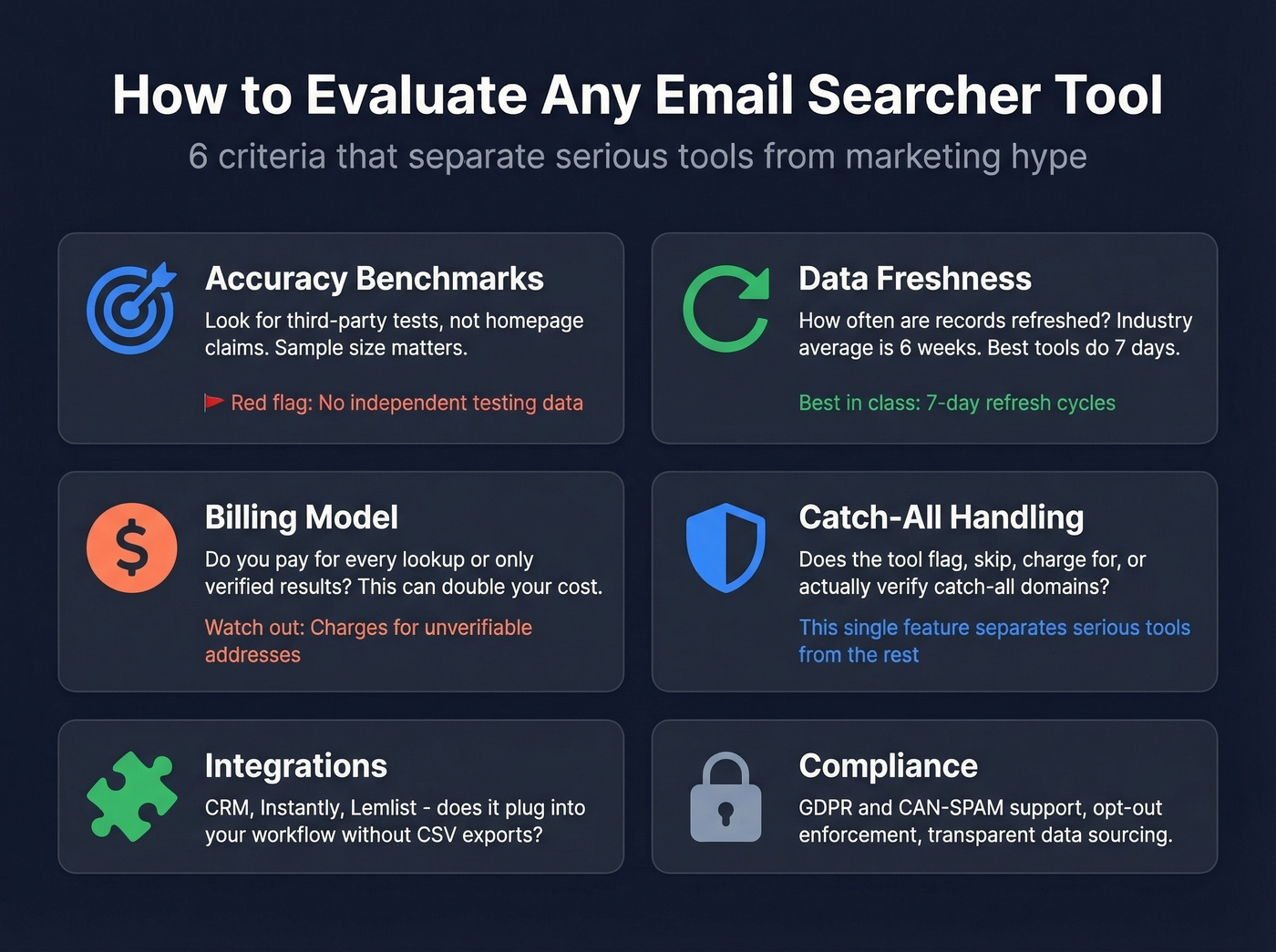
- Accuracy benchmarks, not homepage claims. Look for third-party tests with stated sample sizes. A tool claiming 95% accuracy on its landing page means nothing if a 5,000-contact benchmark shows it hitting 37%.
- Data freshness and refresh cycles. People change jobs. Domains expire. A contact verified six weeks ago might bounce today. Ask how often the tool refreshes its data - the industry average is around six weeks, and some tools are much slower.
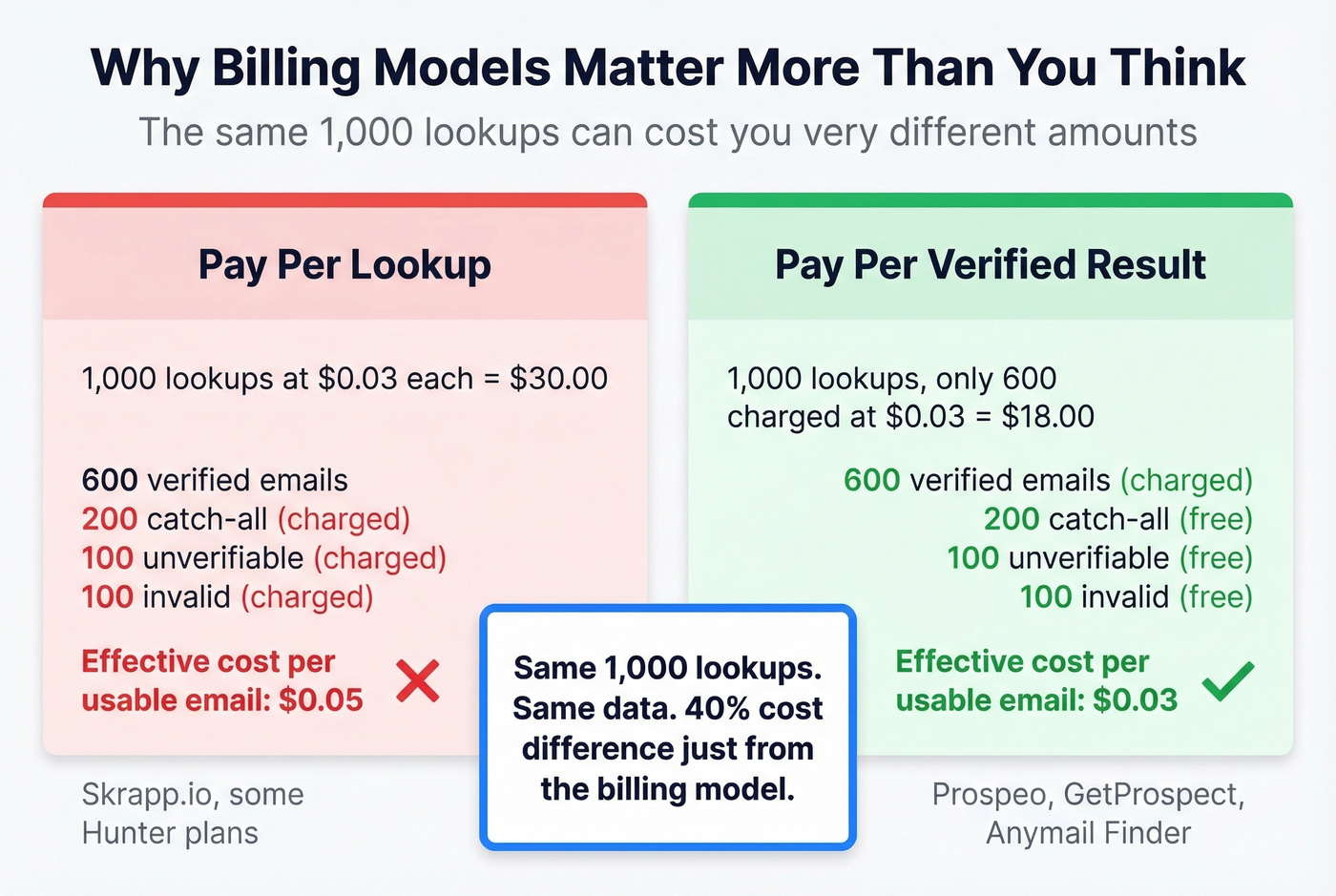
- Billing model. This is where tools quietly take your money. Some charge for every lookup, including catch-all and unverifiable addresses. Others charge only for verified results. That difference can double your effective cost per usable email.
- Catch-all handling. Does the tool flag catch-all domains? Skip them? Charge you for them? Or actually attempt to verify them with proprietary methods? This single feature separates the serious tools from the rest.
- Integrations. If you're running Instantly or Lemlist sequences fed by CRM data, you need the tool to plug into that workflow without manual CSV exports.
- Compliance. GDPR and CAN-SPAM compliance isn't optional. The tool should support opt-out enforcement and be transparent about data sourcing.
The 10 Best Email Searcher Tools in 2026
Prospeo
Prospeo covers 300M+ professional profiles with 143M+ verified emails and delivers 98% email accuracy through a proprietary 5-step verification process that includes catch-all handling, spam-trap removal, and honeypot filtering. It runs its own email-finding infrastructure - no third-party data providers in the chain - which is why accuracy stays consistent across regions and industries.
The real differentiator is freshness. Prospeo refreshes all records on a 7-day cycle, compared to the 6-week industry average. Stale data is the #1 reason "verified" emails bounce, and we've seen teams cut bounce rates from 35% to under 4% just by switching to fresher data. Meritt tripled their pipeline from $100K to $300K/week after making that move.

The Chrome extension with 40K+ users lets you find email addresses in seconds from any website or company profile in one click. Pricing runs about $0.01 per email with a free tier of 75 emails and 100 extension credits per month. No contracts, no sales calls, cancel anytime. You pay only for valid addresses.
Best for: Teams that can't afford bounces - agencies, founders, anyone whose domain reputation is on the line.
Pricing: Free tier available. Paid plans from ~$39/mo. About $0.01/email.

Most email searcher tools charge you for catch-all and unverifiable addresses. Prospeo's 5-step verification handles catch-all domains, strips spam traps, and refreshes every 7 days - so you pay $0.01 only for emails that actually land.
Stop paying for emails that bounce. Start with 75 free searches.
Hunter.io
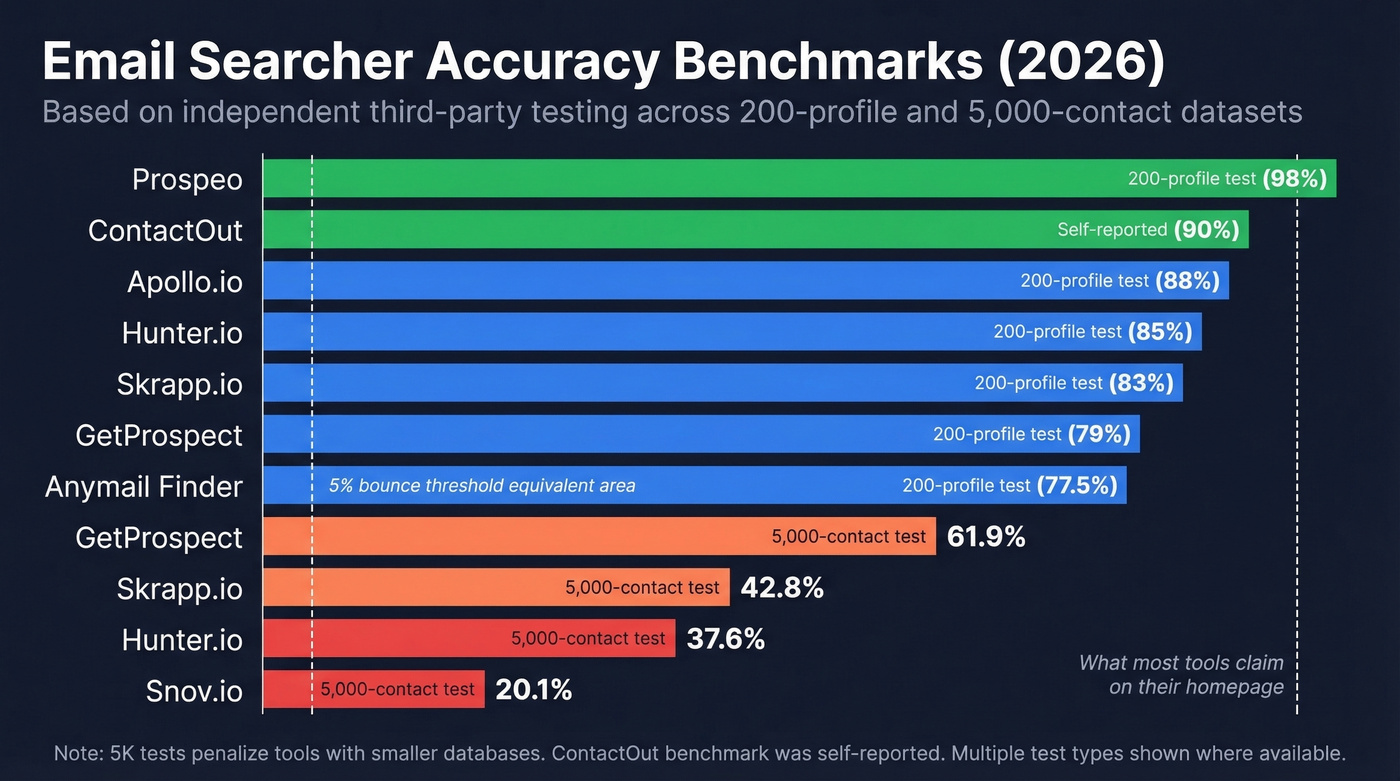
Hunter is probably the most recognized name in email discovery, and for good reason - the verification engine is genuinely solid. In a 200-profile benchmark, Hunter hit 85% accuracy. The 5,000-contact test showed a lower 37.6% verified rate, but that test penalizes tools with smaller databases more heavily.
Here's the thing about Hunter: it works better as a verification layer than as a primary data source. The consensus on r/sales and outbound practitioner threads is that the database is pretty small compared to Apollo, but the verification is reliable and well-trusted. If you already have a list and need to clean it, Hunter is excellent. If you need to build a list from scratch, you'll want a bigger database feeding into it.

Outreach features are included at every tier - connected email accounts, sequences, and recipient limits scale with your plan.
Best for: Verification-first workflows. Teams that source contacts elsewhere and need a reliable cleaning pass.
Skip if: You need a large primary database for prospecting from zero.
Pricing: Free (50 credits/mo). Starter $49/mo ($34/mo annual), 2,000 credits. Growth $149/mo ($104/mo annual), 10,000 credits. Scale $299/mo. Annual billing saves ~30%.
Apollo.io
Apollo's 250M+ contact database is one of the largest self-serve options on the market. A 200-profile benchmark scored it at 88% accuracy, which is solid. But practitioner threads tell a different story for day-to-day use - "data feels bad sometimes" and "lots of bounces on older contacts" are recurring themes on Reddit.
The free tier is genuinely generous and gets teams moving fast. The platform does way more than email searching - sequences, dialer, intent signals - which makes it appealing as an all-in-one but means you're paying for features you might not need.
Best for: SMB teams that want one platform for prospecting, sequencing, and data. The database size means you'll find someone at almost any company.
Skip if: You're sending high-volume cold email and can't tolerate bounce rates above 5%. Apollo's data freshness doesn't match tools with weekly refresh cycles, and stale contacts at scale will hurt your domain.
Pricing: Free tier available. Paid from ~$49/mo per user. Enterprise custom.
Snov.io
Take a look at Snov.io if you're prospecting internationally and want automation baked in. Its strength is combining email finding with drip campaigns and a professional-network automation add-on at $69/mo per slot. Pricing is approachable - Starter at $29.25/mo on annual billing for 1,000 credits, Pro at $74.25/mo for 5,000 credits. Practitioner threads call it "good for international leads" with affordable credits.
The accuracy is the concern. A 5,000-contact benchmark showed a 20.1% verified rate - the lowest in that test. Methodology caveats apply, and Snov.io may perform better on different datasets, but that's a flag worth noting before you commit volume.
GetProspect
GetProspect has one of the fairest billing models in the category: you pay only for verified contacts, accept-all emails can be added for free, and unused credits roll over. The pricing page is refreshingly transparent - Free tier with 50 valid emails, Starter $49/mo for 1,000 valid emails, Growth $99/mo for 5,000. There's also a detail most competitors miss: emails found through GetProspect's own search are verified automatically and don't count against your verification limit. Only externally imported emails do.
A 200-profile benchmark scored GetProspect at 79%, and the 5,000-contact test showed 61.9% verified. Decent, not exceptional. But because you're only paying for valid results, the effective cost per usable email stays competitive.
ContactOut
ContactOut scored 90% accuracy in its own benchmark - but the benchmark was authored by ContactOut. The database covers 800M+ profiles and 400M+ emails, which is massive.
The pricing is where things get frustrating. The "Email" plan at $49/mo on annual billing is marketed as "unlimited" but caps at 2,000 emails/month and 300 exports/month. That's not unlimited - that's misleading. If you're doing serious volume, you'll hit those caps fast and need the $99/mo tier or custom pricing.
Use this if: You need phone numbers alongside emails - the $99/mo plan adds 1,000 phones/mo.
Skip this if: Hidden caps on "unlimited" plans bother you as much as they bother us.
Anymail Finder
Anymail Finder is the budget play with integrity. Their benchmark showed 77.5% verified rate on 5,000 contacts - and they published the methodology. The pay-only-for-valid billing model means you aren't burning credits on catch-all or unverifiable addresses. Plans start at $14/mo with 100 free credits to test. A solid secondary tool for teams watching every dollar.
Instantly
Instantly bundles email finding with its cold email platform using a waterfall enrichment approach across a 450M+ database. Plans run from ~$30/mo. If you want one tool for finding emails and sending sequences, it's attractive. Accuracy data is thinner than dedicated finders, so verify before scaling.
Skrapp.io
Skrapp scored 83% in the 200-profile benchmark and 42.8% in the 5,000-contact test. Free tier available, with credit-based pricing. One catch: Skrapp charges for catch-all emails, which inflates your cost per verified contact. Fine as a supplementary tool, but watch your credit burn.
Voila Norbert
The 5,000-contact benchmark showed a 36% verified rate, which is tough to recommend for primary use. Offers 50 free searches and plans from $39/mo for 1,000 searches. If you're already using Norbert and it works for your niche, keep going - but there are better options for new evaluations.
Honorable mentions: Cognism is strong for EU/UK data but carries enterprise-level pricing that puts it out of reach for most SMBs. Mailmeteor offers a free email finder with no account required. Reply.io includes credits for 5,000 email searches in its $49/mo plan.
Meritt cut their bounce rate from 35% to under 4% and tripled pipeline to $300K/week. The difference wasn't sending more - it was searching with 98% accurate, weekly-refreshed email data across 143M+ verified addresses.
Find verified emails in seconds - no credit card, no sales call.
Accuracy Benchmarks
Every email finder claims 95%+ accuracy. The benchmarks tell a different story.
| Tool | ContactOut (200) | Anymail (5K) | Dropcontact (20K) |
|---|---|---|---|
| Hunter.io | 85% | 37.6% | - |
| Apollo.io | 88% | - | - |
| ContactOut | 90%* | - | - |
| GetProspect | 79% | 61.9% | - |
| Skrapp.io | 83% | 42.8% | - |
| Snov.io | - | 20.1% | - |
| Anymail Finder | - | 77.5% | - |
| Voila Norbert | - | 36.0% | - |
| Dropcontact | - | - | 54.9% |
| Findymail | - | - | 39.9% |
| Fullenrich | - | - | 48.3% |
*ContactOut's benchmark was authored by ContactOut.

A few critical notes on methodology. The 200-profile test is useful directionally but small - and it was authored by a vendor who ranked themselves #1. The 5,000-contact test measures "verified rate" specifically, which penalizes tools that return catch-all addresses as unverified rather than guessing. The Dropcontact benchmark is the gold standard - 20,000 contacts with actual live email delivery to measure hard bounces, not just SMTP checks. Even top performers like Dropcontact at 54.9% and Fullenrich at 48.3% showed significantly lower real enrichment rates than their marketing claims.
The metric that matters is your actual bounce rate after sending. Prospeo's 98% email accuracy reflects live delivery performance through its proprietary 5-step verification, which is why customers consistently report sub-4% bounce rates.
No single benchmark tells the whole story. Sample size, geography, dataset freshness, and what counts as "verified" all shift the numbers. Run your own test on 200-500 contacts before committing budget.
Pricing Compared
| Tool | Free Tier | Starting Price | Credits/Emails | Billing Model |
|---|---|---|---|---|
| Prospeo | 75 emails/mo | ~$39/mo | Pay per email | Valid only |
| Hunter.io | 50 credits/mo | $49/mo | 2,000 credits | All lookups |
| Apollo.io | Yes | ~$49/mo/user | Varies by plan | All lookups |
| Snov.io | Trial | $29.25/mo (annual) | 1,000 credits | All lookups |
| GetProspect | 50 valid emails | $49/mo | 1,000 valid emails | Valid only |
| ContactOut | 5 emails/day | $49/mo (annual) | 2,000 emails/mo cap | All lookups |
| Anymail Finder | 100 credits | $14/mo | Varies | Valid only |
| Instantly | Trial | ~$30/mo | Bundled | All lookups |
| Skrapp.io | Yes | Credit-based | Credit-based | Incl. catch-all |
| Voila Norbert | 50 searches | $39/mo | 1,000 searches | All lookups |
Look, the sticker price is almost irrelevant - the billing model column is where the real cost hides. At 10,000 emails per month, a pay-for-valid tool at $0.01/email costs $100. The same volume on a tool charging for all lookups at 85% accuracy effectively costs $0.029/email - that's $290 for the same number of usable contacts, nearly 3x the difference, and it compounds fast at scale.
GetProspect and Prospeo both use pay-only-for-valid models, which means your budget goes further. Skrapp charges for catch-all emails, a hidden cost multiplier. ContactOut's "unlimited" plan with its 2,000/mo cap means you're paying $0.025 per email at best - and that's before accounting for accuracy.
Keep Your Bounce Rate Under 5%
Practitioners target under 5% bounce rate for cold email. We've tested this workflow across multiple campaigns and it consistently gets teams there:
- Choose a tool with verified accuracy data. Not homepage claims - look for third-party benchmarks or run your own 200-contact test before committing.
- Prioritize data freshness. A 7-day refresh cycle catches job changes and domain expirations before they become bounces. A 6-week cycle means you're sending to contacts who left the company a month ago.
- Verify catch-all emails separately. Don't send to unverified catch-all addresses. Either use a tool with proprietary catch-all verification or remove them from your send list entirely.
- Run a secondary verification pass on any list older than two weeks. Data decays fast. A list that was 98% valid on export day might be 90% valid three weeks later.
- Start with small batches. Send to 50-100 contacts first, measure your bounce rate, then scale. One bad batch of 1,000 emails can tank your domain reputation for weeks.
Your domain reputation is the asset. Protect it like one.
Reaching Hiring Managers Directly
GDPR Compliance Checklist
Using an email lookup tool for cold outreach is legal under GDPR - but only if you follow the rules:
- Identify yourself and your purpose transparently. Your first email should make it clear who you are and why you're reaching out.
- Establish legitimate interest as your legal basis. You don't need consent for B2B cold email if you can demonstrate a genuine business reason to contact someone in their professional capacity.
- Personalize your outreach. Generic mass blasts aren't compliant. The email should be relevant to the recipient's role and company - and it's also what gets replies.
- Include a clear opt-out in every email. An unsubscribe link or a simple "reply STOP" - make it easy and honor it immediately.
- Be ready to disclose your data source. If a prospect asks where you got their email, you need a real answer.
Only collect and store the contact information you actually need for outreach. Don't hoard data you won't use. The ICO's guidance on legitimate interest is worth bookmarking if you're scaling outbound in the UK or EU.
FAQ
Are email searcher tools legal to use?
Yes. Use legitimate interest as your legal basis for B2B outreach, personalize every email to the recipient's professional role, and always include a clear opt-out mechanism. Honor unsubscribe requests immediately and be prepared to explain your data source if asked.
How accurate are email finder tools really?
Independent benchmarks show accuracy ranging from 20% to 90% depending on the tool, dataset, and methodology. The most rigorous test - Dropcontact's 20,000-contact benchmark with live delivery - found even top performers landing between 40% and 55% real enrichment rates. Always run your own 200-contact test before committing budget.
Free vs. paid - what's the difference?
Free tiers typically cap you at 5-75 emails per month and work well for testing accuracy on your specific target market. Paid plans unlock bulk lookup, API access, higher-quality verification, and CRM integrations. The jump to paid is worth it once you're sending more than ~100 emails per week.
What's a catch-all domain and why does it matter?
A catch-all domain accepts all incoming email regardless of whether the specific address exists. Tools that can't verify catch-all addresses either skip them - losing potential leads - or charge you for unverifiable results that bounce. Look for tools with proprietary catch-all verification to avoid wasting credits and damaging sender reputation.
How many email finder tools do I actually need?
Most teams need one primary finder and optionally one verification layer for cleaning imported lists. Using 3+ tools in a waterfall sequence can boost coverage by 10-20% but adds cost and complexity. Start with one strong tool, measure your bounce rate, and only add a second if coverage gaps justify the spend.