

Email Signature Call to Action: Examples, Specs, and Tracking for Every Team
Every person on your team sends 40+ emails a day. Multiply that by 20 employees and you're looking at 800 daily impressions - with no call to action, no tracking, and zero return. That's a marketing channel hiding in plain sight.
Here's the kicker: mid-page CTAs on websites convert at roughly 1.6%. A well-built signature CTA beats that by 4x or more. You're already sending the emails. Make them work.
The System in 30 Seconds
One CTA per signature. Match it to the sender's department. Use a UTM-tagged link so you can measure clicks in GA4. Keep your banner under 600x100px and 50KB. That's it - the rest of this article gives you the specifics.
What Is a Signature CTA?
An email signature call to action is a clickable element - a banner, button, or hyperlinked text - embedded in your signature that drives recipients toward a specific action: booking a demo, downloading a report, registering for an event. The math is dead simple. Forty emails a day across 20 employees means 800 daily impressions. Without a CTA, every single one of those is wasted real estate that costs you nothing to reclaim.
What Results to Expect
A practical target is 3-5% CTR. Well-optimized programs with strong copy and relevant offers reach 7-15%, which crushes traditional display banners.
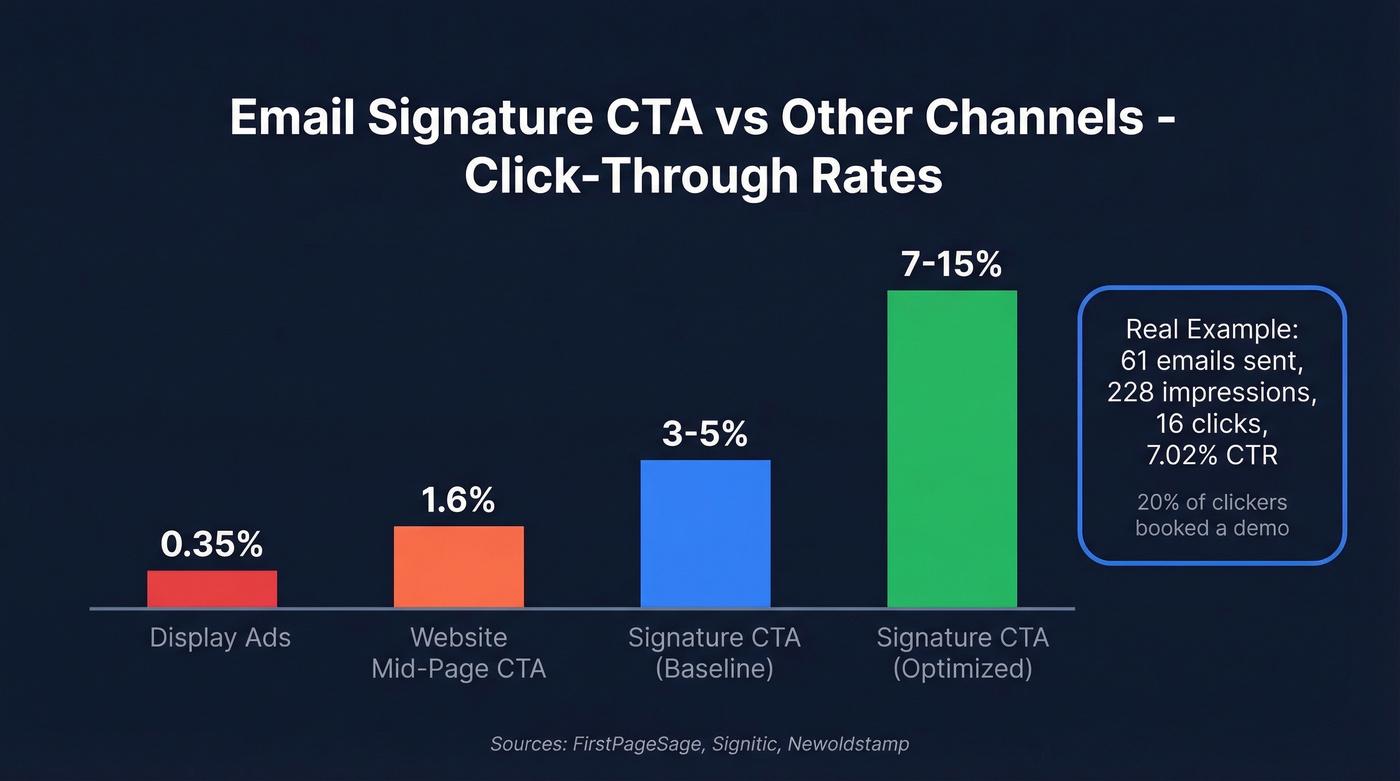
Real numbers: a Newoldstamp banner campaign across just 61 emails generated 228 impressions and 16 clicks - a 7.02% CTR. That same source shares an example where a "Book a Demo" signature link converted 20% of 216 clickers into booked meetings. A signature link turning directly into pipeline. For downstream conversions like click-to-form-fill or booking, target 1-2%.
CTA Examples by Department
We've tested dozens of CTA variations across client teams. The ones that convert share two traits: they match the conversation the sender is already having, and they keep the text to 2-4 words.
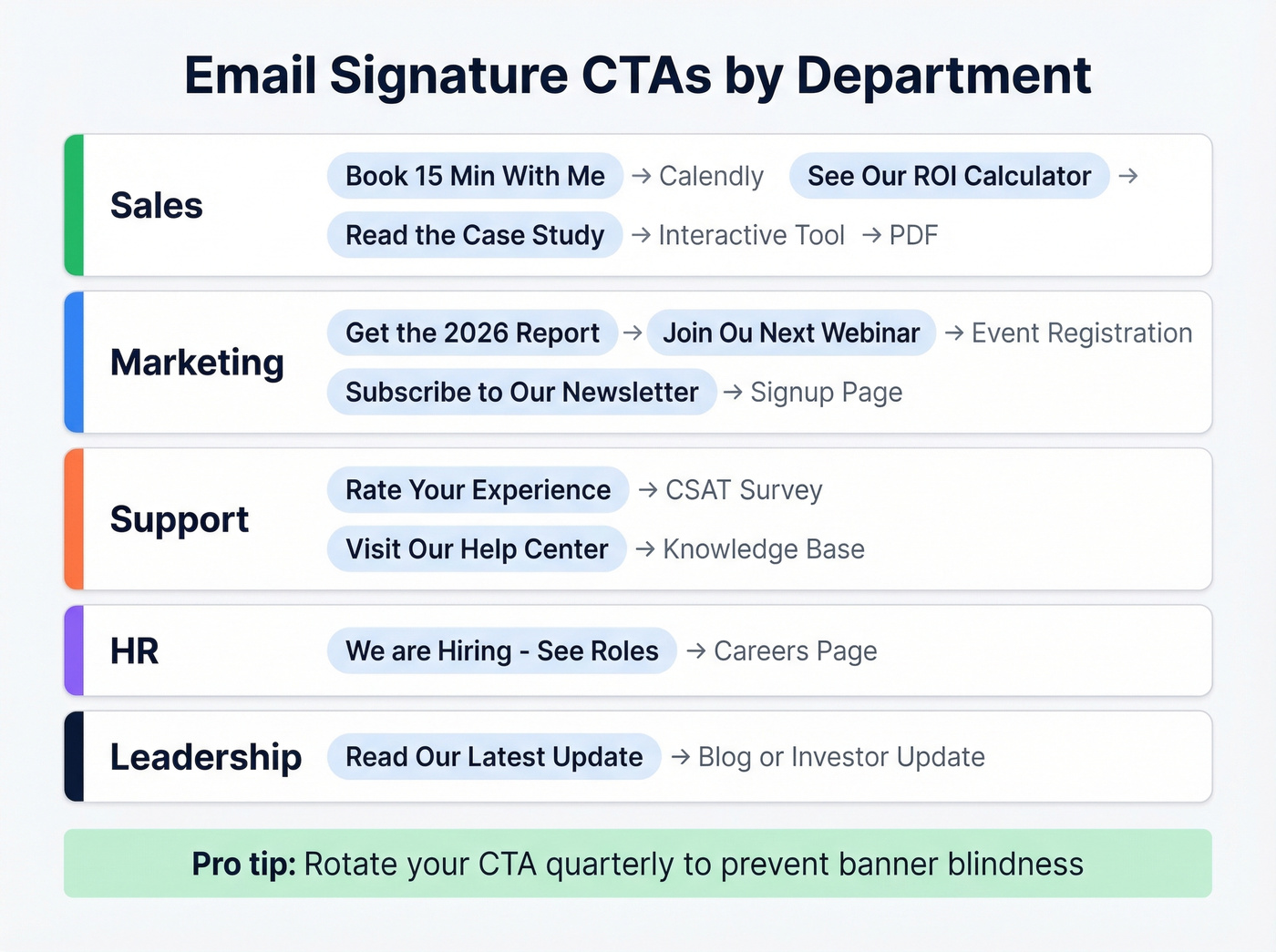
| Department | CTA Copy | Links To |
|---|---|---|
| Sales | "Book 15 Min With Me" | Calendly/booking page |
| "See Our ROI Calculator" | Interactive tool | |
| "Read the Case Study" | Customer story PDF | |
| Marketing | "Get the 2026 Report" | Gated content landing page |
| "Join Our Next Webinar" | Event registration | |
| "Subscribe to Our Newsletter" | Email signup page | |
| Support | "Rate Your Experience" | CSAT survey |
| "Visit Our Help Center" | Knowledge base | |
| HR | "We're Hiring - See Roles" | Careers page |
| Leadership | "Read Our Latest Update" | Blog or investor update |
Why does "Book 15 Min With Me" outperform "Schedule a Call"? Specificity and low commitment. Fifteen minutes feels manageable. "A call" feels open-ended and vaguely threatening. For sales reps, a meeting request email signature that links directly to a Calendly page removes every friction point between interest and a booked slot. "Get the 2026 Report" works because it implies fresh, time-bound value - nobody wants last year's data.
Rotate your CTA quarterly. A stale banner becomes invisible after a few weeks, the same way you stop noticing a poster on your office wall.
Look, in our experience the biggest ROI jump doesn't come from optimizing CTA copy. It comes from simply getting every employee to use one in the first place. Fix adoption before you A/B test button colors.

Your signature CTA drives prospects to book demos and download reports. But what happens after the click? You need verified contact data to close the loop. Prospeo gives you 98% accurate emails and 125M+ verified mobiles so every signature impression turns into a real conversation.
Stop wasting 800 daily impressions on contacts that bounce.
Design Specs That Survive Every Email Client
Broken rendering kills more signature CTAs than bad copy ever will. These specs survive Gmail, Outlook, and Apple Mail consistently.
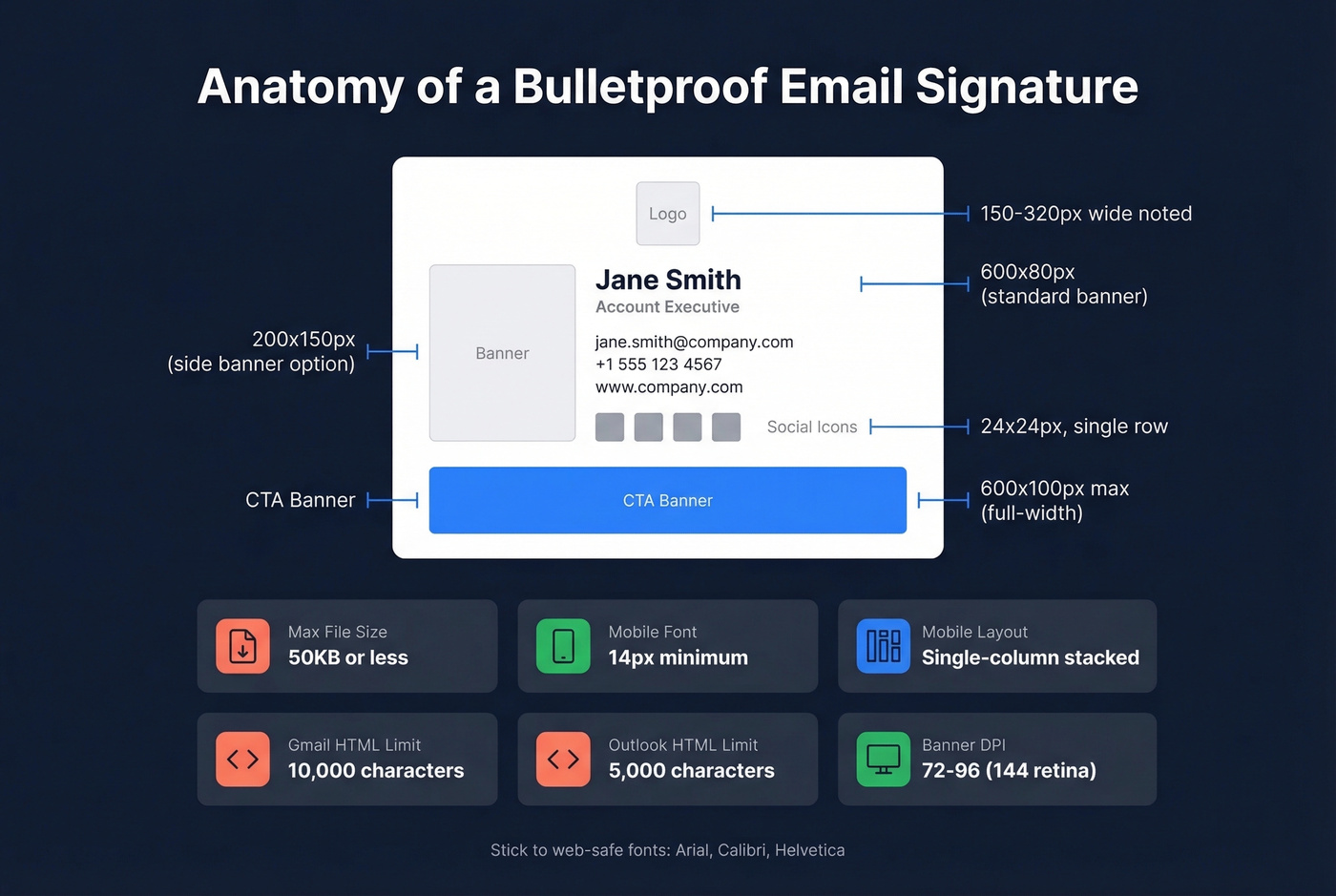
| Element | Spec |
|---|---|
| Banner (below info) | 600x80px |
| Banner (full-width) | 600x100px max |
| Side banner | 200x150px |
| File size | 50KB or less |
| Logo | 150-320px wide |
| Social icons | 24x24px, single row |
| Mobile font | 14px minimum |
| Mobile layout | Single-column, stacked |
| Banner DPI | 72-96 (144 retina source) |
Most people miss the character limits. Gmail caps signature HTML at roughly 10,000 characters, and Outlook cuts you off around 5,000. Base64-encoded images bloat fast - a 50KB PNG becomes about 66KB when encoded inline. Host your images externally instead. It's smaller, faster, and prevents email client truncation.
Stick to web-safe fonts: Arial, Calibri, Helvetica. That custom brand font looks great in Figma and terrible in Outlook 2019.
How to Track Clicks in GA4
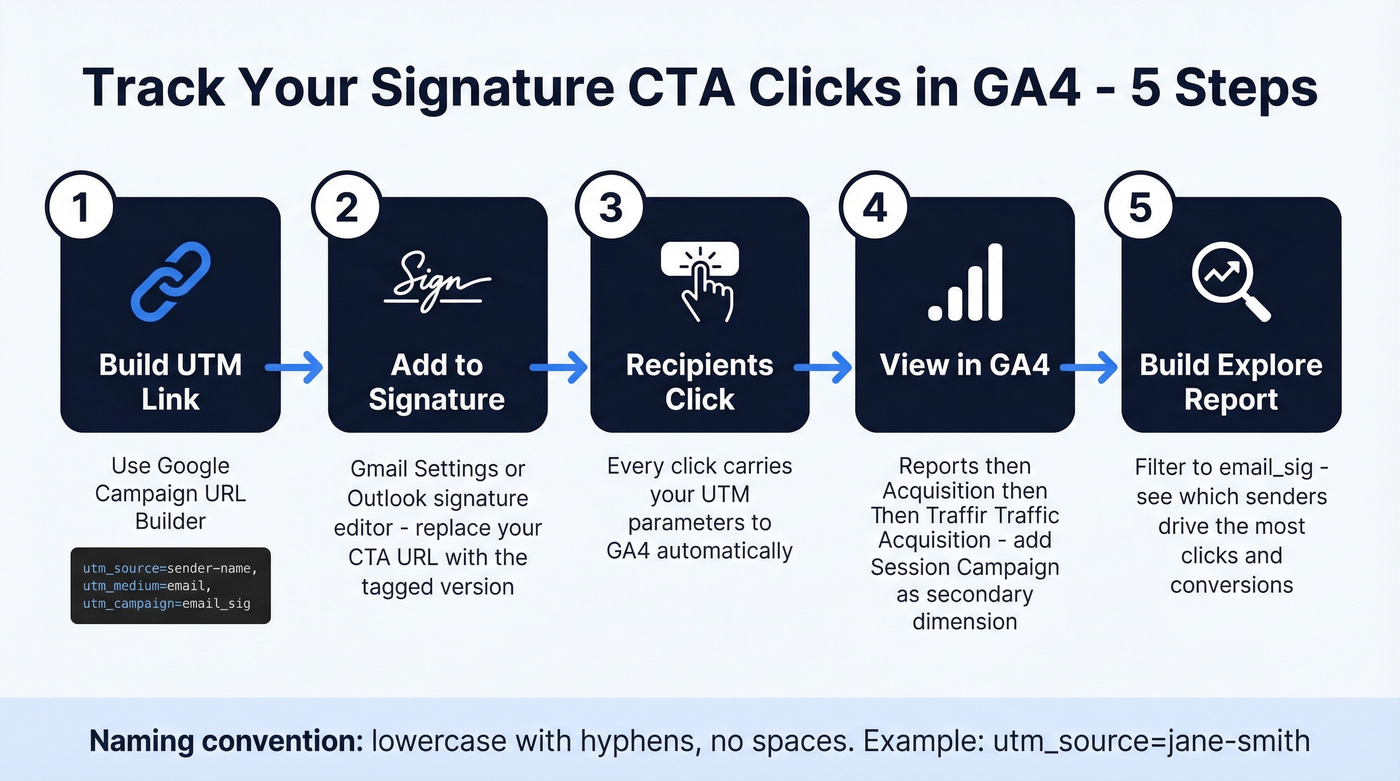
- Open Google's Campaign URL Builder and generate a UTM-tagged link for your CTA destination.
- Use these conventions:
utm_source=sender-name,utm_medium=email,utm_campaign=email_sig. Lowercase with dashes, no spaces. - In Gmail: Settings > See all settings > General > Signature. Replace your CTA's URL with the UTM-tagged version.
- In GA4: Reports > Acquisition > Traffic Acquisition. Add "Session campaign" as a secondary dimension and filter to your signature campaign.
- Build an Explore report with Views, Session source/medium, Session campaign, and Page path. Filter to
email_sigto see which senders drive the most clicks.
Mistakes That Kill Your CTA
Multiple competing CTAs are the number one offender. Pick one per quarter. Two CTAs split attention and reduce clicks on both.
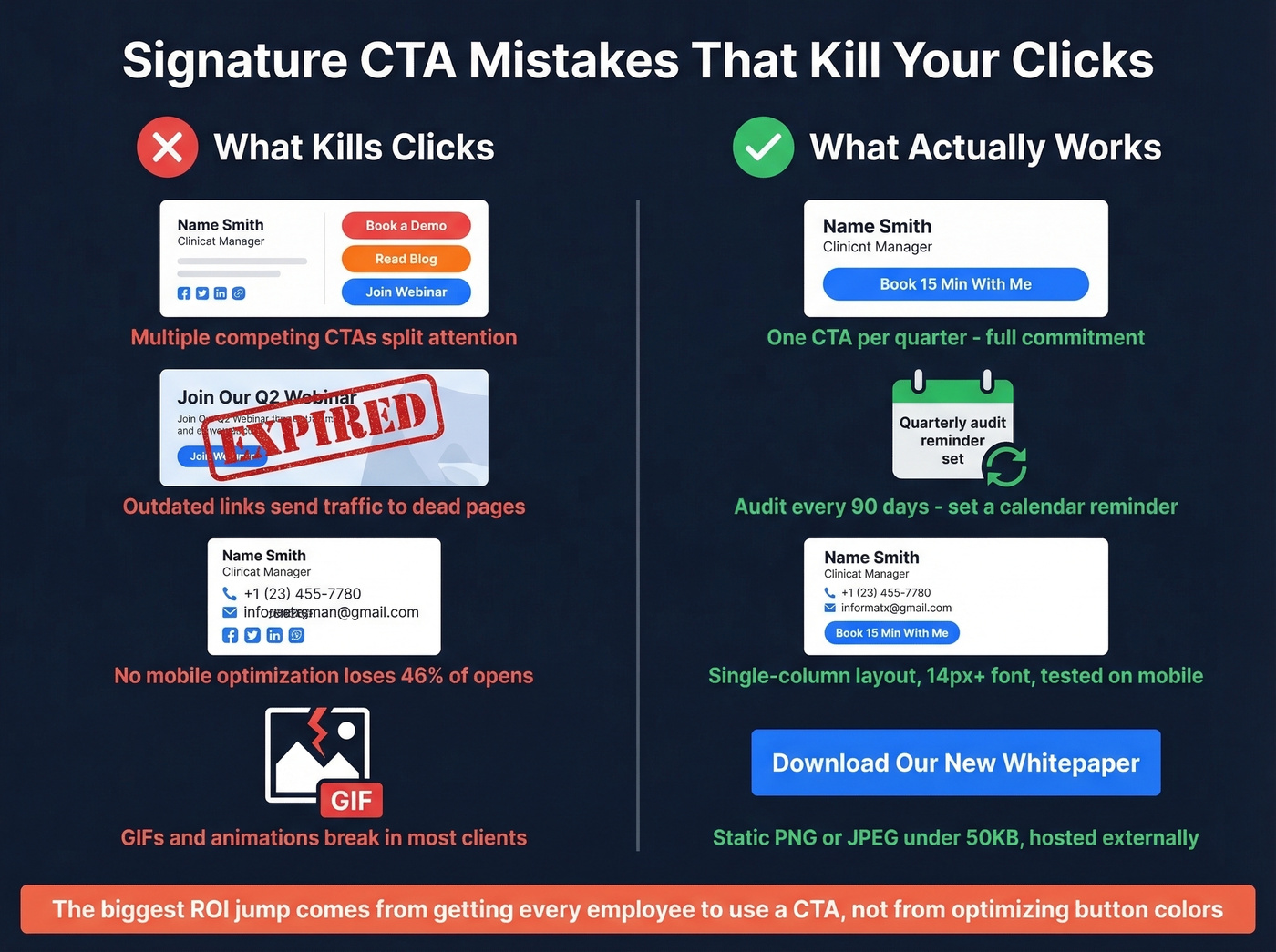
Outdated links are the silent killer. That webinar from Q2 ended three months ago. Audit quarterly or you're sending traffic to a dead page. We've seen teams run stale CTAs for six months without anyone noticing - set a calendar reminder.
No mobile optimization is inexcusable at this point. Over 46% of emails are opened on phones. A signature that doesn't stack into a single column on mobile loses half your audience before they see your CTA.
Skip GIFs and animations entirely. Many email clients don't reliably support them, leaving a broken or missing visual where your CTA should be. And if your team doesn't have standardized signatures, you're not just looking sloppy - you're making phishing impersonation easier and creating compliance risk in regulated industries. Centralize your templates.
Tools for Managing Signatures at Scale
If you're managing signatures for more than five people, you need a tool. Here's what's worth your time:
| Tool | Starting Price | Best For |
|---|---|---|
| Exclaimer | $0.90-$1.75/user/mo | Enterprise M365 teams |
| Newoldstamp | From $4.50/mo | SMBs wanting analytics |
| BulkSignature | ~$1/user/mo | Google Workspace on a budget |
| MySignature | $1.50-$6/user/mo | Small teams, simple setup |
| Letsignit | $24/user/year | Microsoft-centric orgs |
| Signitic | ~$1/user/mo | European/GDPR-focused teams |
Exclaimer and Newoldstamp are the go-to picks for scale. Both support scheduled banner updates, so you can automate quarterly rotations instead of manually updating every employee's signature. For smaller teams under 10 people, BulkSignature gets the job done without fuss. Skip MySignature past that threshold - it wasn't built for it.
Let's be honest: the tool matters less than the discipline. Pick one, standardize your templates, and actually enforce adoption. The fanciest signature management platform in the world doesn't help if half your team is still using a plain-text sign-off from 2019.
That's the full system: one email signature call to action, proper specs, UTM tracking, quarterly rotation. The only thing left is to actually do it.
You just optimized your signature to generate clicks. Now scale the outreach. Prospeo's database of 300M+ profiles with 30+ filters lets you build targeted lists at $0.01/email - then reach every prospect with data refreshed every 7 days, not 6 weeks.
Turn signature clicks into pipeline with data that actually connects.
FAQ
How many CTAs should I put in my email signature?
One. Pick a single action per quarter - a webinar, a case study, a booking link - and commit. Rotate quarterly to prevent banner blindness. Multiple CTAs split attention and reduce clicks on both.
What's a good click-through rate for a signature CTA?
Target 3-5% CTR as your starting benchmark. Well-optimized programs reach 7-15%. Track with UTM-tagged links in GA4 - without measurement, benchmarks are meaningless.
Do email signature CTAs work on mobile?
Yes, but only if designed correctly. Use a single-column layout, fonts above 14px, and test across Gmail, Outlook, and Apple Mail on mobile. Over 46% of emails are opened on phones - broken mobile rendering kills half your impressions.
Can I use a signature CTA to book calls directly?
Absolutely. Link your CTA to a Calendly or HubSpot booking page so recipients can grab time without a back-and-forth thread. Sales teams that embed a direct scheduling link consistently see higher booking rates than those relying on manual outreach.
How do I verify leads that come through my signature CTA?
Run inbound leads through an email verification tool before they hit your CRM. Prospeo's free tier covers 75 verifications per month at 98% accuracy - enough to validate your highest-value leads before sales follows up.