

How to Set Up Email to Lead in Salesforce (5 Methods, Ranked)
The average B2B sales team takes 42 hours to respond to a new lead. Forty-two hours. Leads contacted within 5 minutes are 21x more likely to qualify than those left waiting 30 minutes. If prospects are emailing a shared inbox and someone's manually copy-pasting into Salesforce, you're bleeding pipeline every single hour of every single day.
Automating email to lead in Salesforce fixes the speed problem. But it also exposes a data quality problem - the record you create is only as useful as the information attached to it. A lead with just a name and email address isn't actionable, and your SDRs know it. We'll cover how to fix that with enrichment after we get the plumbing working.
Pick the Right Method
| Scenario | Method |
|---|---|
| Admin, no dev, need it today | Email-to-Case + Flow |
| Developer on staff, full control | Apex Email Service |
| High volume (50+/day), no code | AppExchange app |
| Avoiding Salesforce config entirely | Mailparser or Zapier |
| Already on Pardot / Marketing Cloud | Use your existing platform |
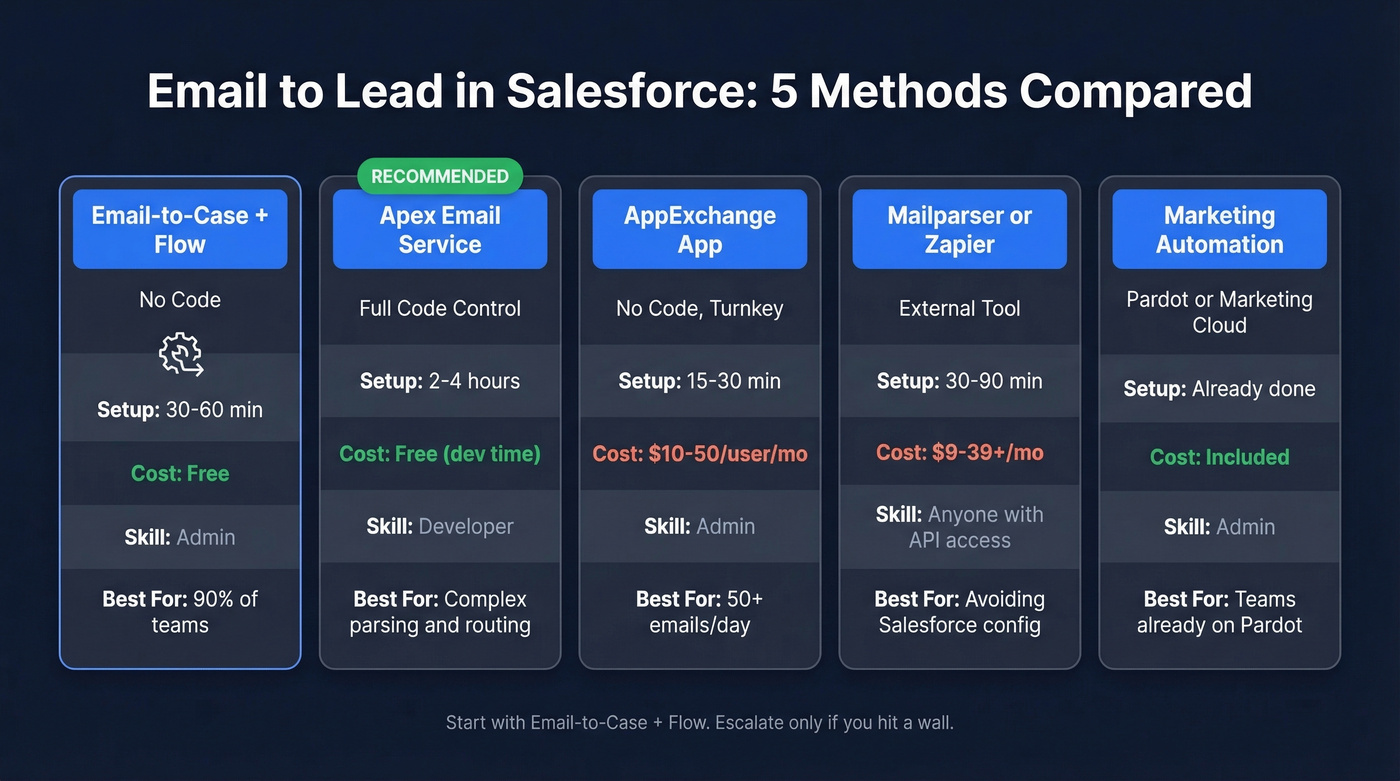
Here's the detailed breakdown:
| Method | Requirements | Setup Time | Cost |
|---|---|---|---|
| Email-to-Case + Flow | Admin | 30-60 min | Free |
| Apex Email Service | Developer | 2-4 hours | Free (dev time) |
| AppExchange App | Admin, varies by app | 15-30 min | $10-50/user/mo |
| Mailparser / Zapier | Anyone with API access | 30-90 min | $9-39+/mo |
| Marketing Automation | Admin | Already done | Included |
Here's the thing: most teams overthink this. The Email-to-Case + Flow method handles 90% of use cases, costs nothing, and takes under an hour. Start there. Only escalate to Apex or AppExchange if you hit a wall.
Why There's No Native Email-to-Lead
Salesforce gives you Web-to-Lead for form submissions and Email-to-Case for support tickets. But a native way to create leads from inbound emails? Doesn't exist.
The community has been asking about it since at least 2012, and admins are still building workarounds today. It's one of those gaps that feels like it should've been closed years ago.
5 Ways to Create Leads From Inbound Emails
Email-to-Case + Flow (No Code)
This is the method most admins end up using, and the one we recommend starting with. It's free, and you can set it up in under an hour.
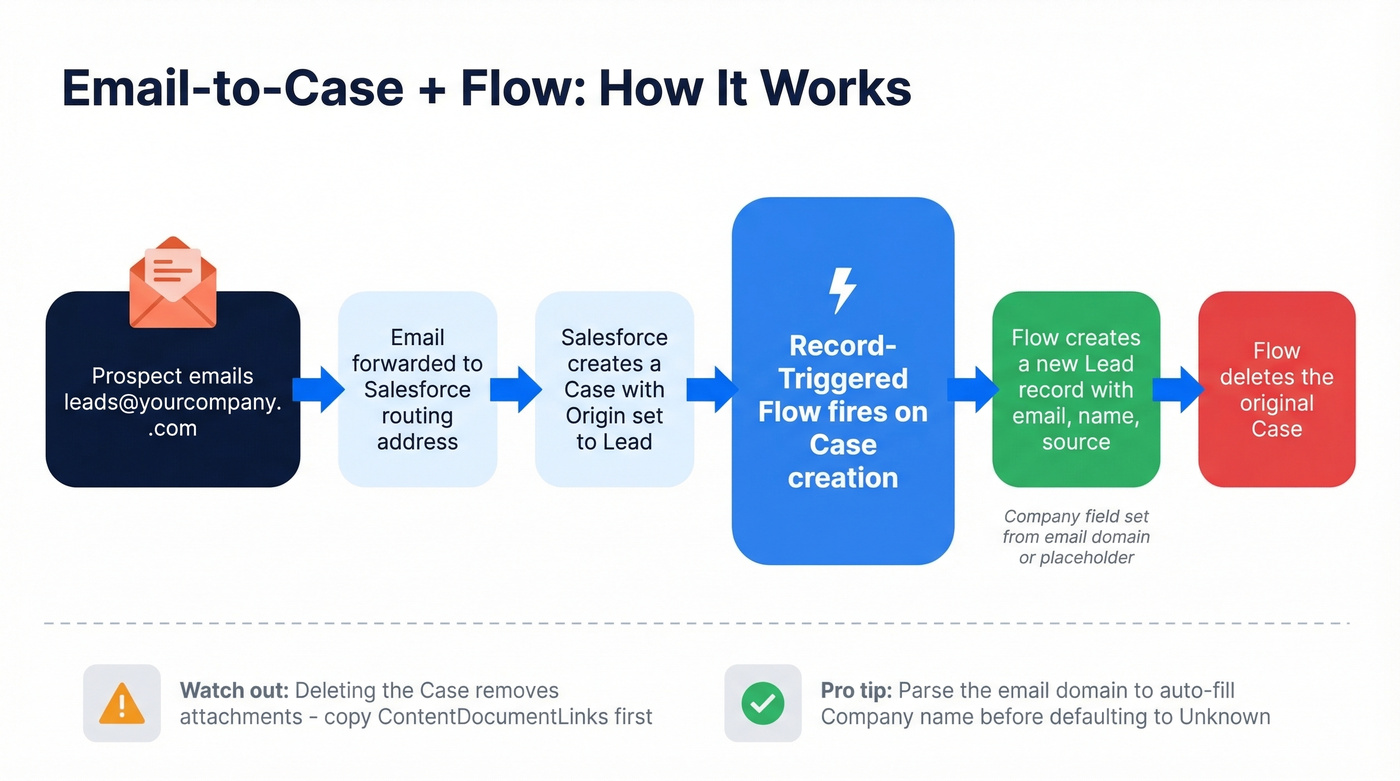
The concept is a hack - you create a Case from the email, use a Flow to spawn a Lead from that Case, then delete the Case. Sounds janky. It works reliably, though, and it's the most common no-code pattern documented across the Salesforce ecosystem.
Setup walkthrough:
Add a "Lead" picklist value to Case Origin. Setup -> Object Manager -> Case -> Fields -> Origin.
Add "Email" to Lead Source if it doesn't already exist. Object Manager -> Lead -> Fields -> Lead Source.
Configure Email-to-Case routing. Setup -> Email-to-Case -> New Routing Address. Set the Origin to your new "Lead" value. Salesforce generates a routing email address - forward your shared inbox (e.g., leads@yourcompany.com) to it.
Build a Record-Triggered Flow on Case. Setup -> Flows -> New Flow -> Record-Triggered. Trigger on Case, "A record is created," after-save. Entry condition: Case Origin equals "Lead."
Add a Scheduled Path set to 0 hours after Created Date.
Create the Lead record. Use a Create Records element:
Case.Web Email->Lead.EmailCase.Web Name-> parse intoLead.FirstNameandLead.LastNameCase.Subject->Lead.Description- Set
Lead.Companyto a placeholder like "Unknown - Needs Enrichment" - Set
Lead.LeadSourceto "Email"
Delete the Case. Add a Delete Records element targeting
{!$Record}.One thing that catches people off guard: if the email has attachments, they're linked to the Case, and deleting the Case kills them. If attachments matter, copy the related file links to the new Lead before the Delete element runs by recreating the relevant
ContentDocumentLinkrecords on the Lead.
Pro tip: Derive a company name from the email domain before defaulting to "Unknown." If someone emails from john@acme.com, you can extract "Acme" and map it to the Company field. Not perfect, but it gives your SDRs something to work with immediately instead of a placeholder.
Apex Email Service (Full Control)
If you've got a developer, Apex Email Services give you complete control over how inbound emails become leads. You implement the Messaging.InboundEmailHandler interface and Salesforce routes emails directly to your code.
global class EmailToLeadHandler implements Messaging.InboundEmailHandler {
    global Messaging.InboundEmailResult handleInboundEmail(
        Messaging.InboundEmail email,
        Messaging.InboundEnvelope env
    ) {
        Messaging.InboundEmailResult result = new Messaging.InboundEmailResult();

        // Check for existing lead
        List<Lead> existing = [
            SELECT Id FROM Lead
            WHERE Email = :email.fromAddress LIMIT 1
        ];

        if (existing.isEmpty()) {
            String firstName = 'Unknown';
            String lastName = 'Unknown';
            if (email.fromName != null && email.fromName.contains(' ')) {
                firstName = email.fromName.substringBeforeLast(' ');
                lastName = email.fromName.substringAfterLast(' ');
            } else if (email.fromName != null) {
                lastName = email.fromName;
            }

            Lead newLead = new Lead(
                Email = email.fromAddress,
                FirstName = firstName,
                LastName = lastName,
                Company = 'Unknown - Needs Enrichment',
                LeadSource = 'Email',
                Description = email.plainTextBody
            );
            insert newLead;
        }

        result.success = true;
        return result;
    }
}
The upside is you can parse email bodies with regex, handle attachments, run deduplication logic, and route leads to specific owners based on content - none of which the Flow method does cleanly. You also get full error handling and logging, which matters when you're processing hundreds of emails daily and need to troubleshoot why a particular lead didn't get created.
Skip this method if you don't have a developer who'll maintain the code long-term. Apex Email Services work great until the person who wrote them leaves and nobody knows how the parsing logic works.
AppExchange Apps
The cleanest no-code option, but it costs money for something that arguably should be native.
Common options include Ortoo Email-to-Anything and Cloud Orca. Expect $10-50/user/month depending on the app and your volume. Ortoo offers a free 30-day trial, which is enough time to validate the approach. These apps handle email parsing, lead creation, duplicate checking, and attachment handling in one package - no Flow hacks, no Apex.
The tradeoff is vendor dependency. For teams processing 50+ lead emails daily, the time savings justify the cost. For 5-10 emails a day, the Flow method is the better call.
Third-Party Parsers
If you'd rather keep the automation outside Salesforce entirely, Mailparser is the standout option. It's processed over 134 million emails and supports a native Salesforce integration.
Forward lead emails to a private @mailparser.io inbox, build parsing rules to extract fields from the email body or signature, and push parsed data directly into Salesforce as Lead records. Capterra reviewers give it 4.9/5 across 54 reviews. The recurring complaint is setup complexity - building parsing rules for varied email formats takes patience.
Zapier is simpler if your emails follow a consistent format. Make is a strong alternative for multi-step workflows. In our experience, Mailparser ends up more accurate than Zapier's built-in parsing when emails are messy and unstructured.
One advantage of the parser approach: you can derive company names from email domains automatically and map them into Salesforce - something the native methods don't do without custom logic.
Marketing Automation
If you're already paying for Salesforce Account Engagement (Pardot) or Marketing Cloud, you can handle lead capture and routing inside your existing marketing automation stack and sync the resulting records into Salesforce. If that's your situation, skip to the enrichment section below - the data quality tips still apply.

Setting 'Unknown - Needs Enrichment' as your Company field? That's a dead lead until someone researches it. Prospeo's CRM enrichment fills in 50+ data points per record - company, title, phone, revenue, headcount - with a 92% match rate and 98% email accuracy. Plug it into Salesforce and every inbound email becomes a fully actionable lead.
Stop creating skeleton leads. Enrich them the moment they hit Salesforce.
Gotchas That'll Bite You
Case metric pollution. Even with the delete step in the Flow method, Salesforce logs Case creation events. If you're processing 200 lead emails a month, that's 200 phantom Cases hitting your support dashboards before deletion. Use a dedicated Record Type or filter your reports by Origin to keep support metrics clean.
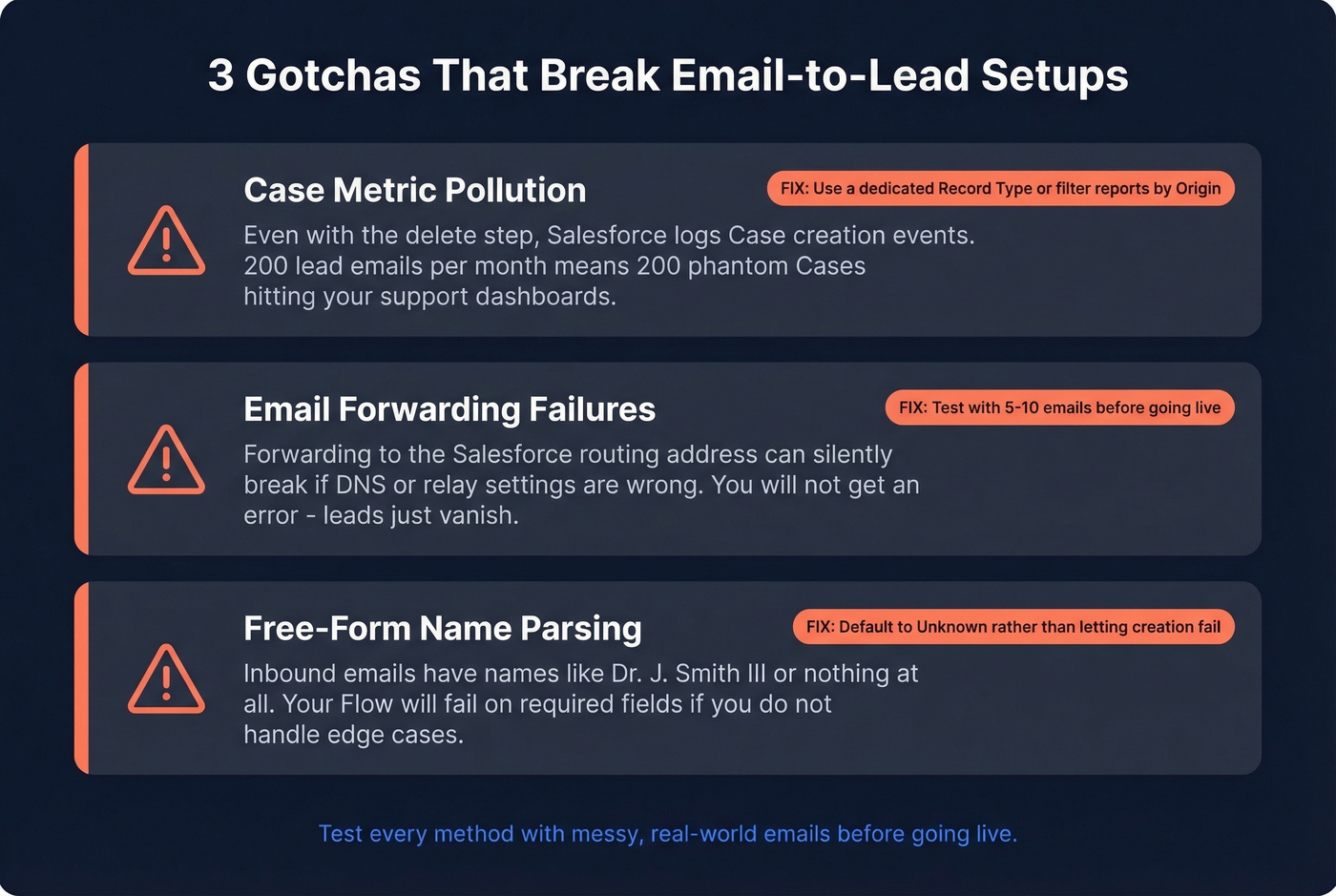
Email forwarding failures. Forwarding emails to Salesforce's routing address can break if your email setup isn't configured correctly. Test with a handful of emails before going live, and check the Email-to-Case setup documentation for DNS and relay requirements.
Free-form name parsing. Inbound emails don't follow a standard format. Case.Web Name might contain "John Smith," "Dr. J. Smith III," or nothing at all. Build your Flow or Apex to handle edge cases gracefully - default to "Unknown" rather than letting the Lead creation fail on a required field.
Prevent Duplicate Leads
Two approaches, depending on your comfort level.
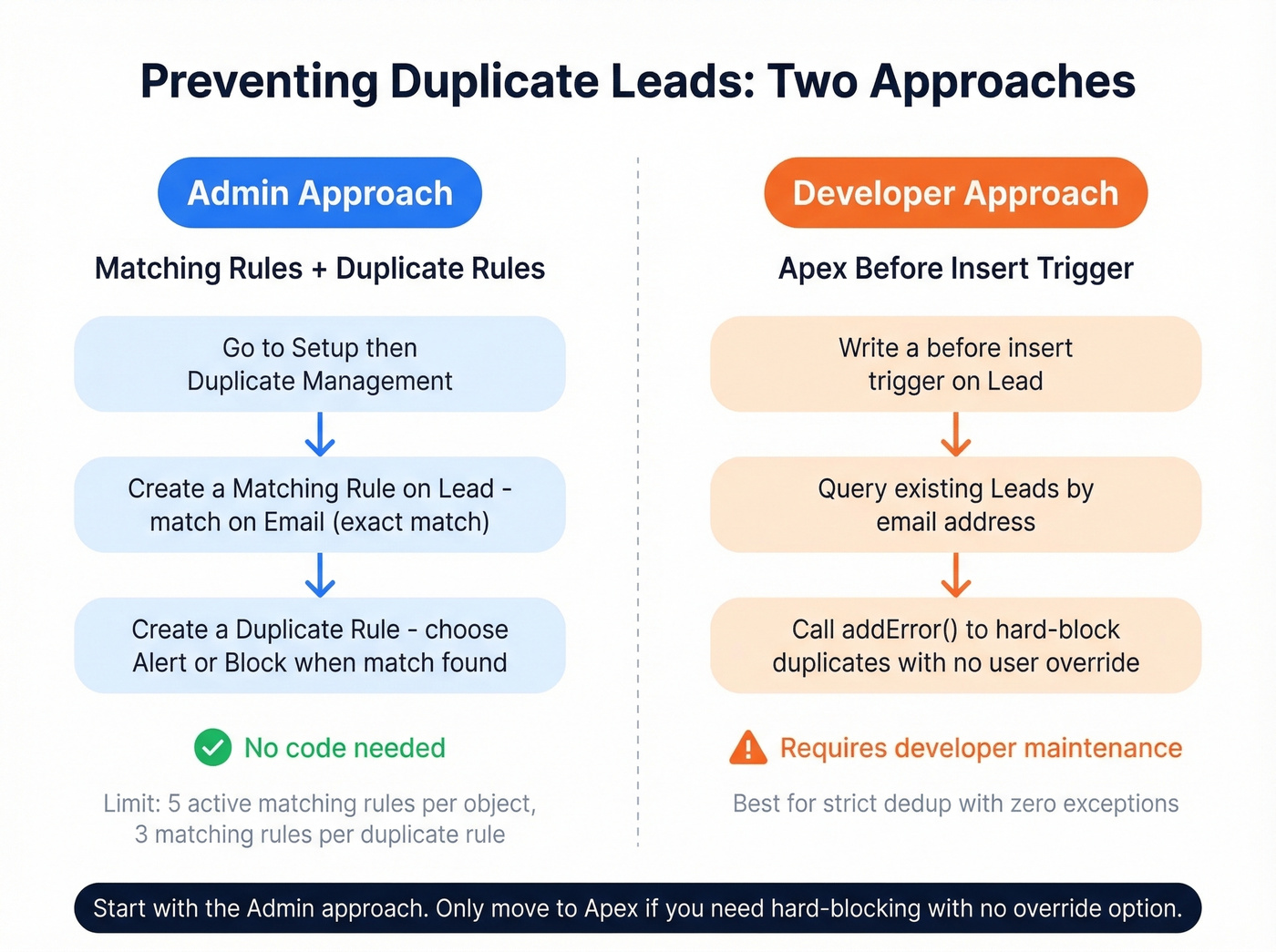
Admin approach: Matching Rules + Duplicate Rules. Go to Setup -> Duplicate Management. Salesforce supports up to 5 active matching rules per object and 3 matching rules per duplicate rule. Create a matching rule on Lead that matches on Email (exact match), then create a Duplicate Rule that either alerts or blocks when a match is found. This is the recommended starting point - it's native, configurable, and doesn't require code.
Developer approach: Apex trigger. For hard-blocking with no user override, add a before insert trigger that queries existing Leads by email and calls addError() on duplicates. More rigid, but it guarantees no duplicates slip through - which matters when emails are creating leads automatically with no human in the loop.
Start with Duplicate Rules. Only move to Apex if you need zero-tolerance deduplication and the alert-based approach isn't cutting it.
Enrich Thin Leads After Creation
Every method above creates the same problem: a lead record with an email address, maybe a name, and a Company field set to "Unknown." SDRs can't prospect with that. They need job title, direct dial, company size, industry - the data that turns a record into a conversation.

Prospeo's native Salesforce integration handles this automatically. When a new lead hits your org, it enriches the record with verified direct dials, job titles, company revenue, headcount, and 50+ additional data points. The enrichment match rate is 83%, email accuracy is 98%, and data refreshes every 7 days - not the 4-6 week cycle most providers run on. No manual research, no CSV uploads, no waiting for a batch job.
For teams running inbound email automation, this is the difference between a lead that sits in a queue and a lead that gets worked the same day.
Routing After Creation
Getting the lead into Salesforce is step one. Closing the loop means routing each record to the right rep without delay.
Lead Assignment Rules. Route leads automatically based on geography, company size, or lead source. Setup -> Lead Assignment Rules. Without this, your freshly created leads land in a default queue and sit there until someone notices.
Auto-Response Emails. Send an immediate acknowledgment with a calendar booking link. Leads that get a response within 5 minutes convert at dramatically higher rates - don't waste the speed advantage you just built by letting the lead wait for a human to notice.
Enrichment-triggered routing. Once a lead gets enriched with company size and industry data, use a Flow to re-route based on those fields. A 500-person SaaS company should go to a different rep than a 10-person agency, and you can't make that routing decision until the data exists on the record.
You just automated email-to-lead creation. Now automate the data quality. Prospeo's Enrichment API returns verified emails, direct dials, job titles, and company firmographics - refreshed every 7 days, not every 6 weeks. At $0.01 per email, enriching 1,000 inbound leads costs less than a single SDR hour.
Turn every inbound email into a lead your reps can actually work.
FAQ
Does Salesforce have a native email-to-lead feature?
No. Salesforce offers Web-to-Lead and Email-to-Case natively, but no built-in email-to-lead functionality. The most common workaround is an Email-to-Case + Record-Triggered Flow that creates a Lead and deletes the Case - free, no code, and takes under an hour to configure.
Will I lose email attachments with the Flow method?
Yes, deleting the Case removes linked attachments unless you copy them first. Before the Delete Records element, recreate the ContentDocumentLink records on the new Lead. Skip this step only if your inbound lead emails never include relevant files.
How do I prevent duplicate leads from inbound emails?
Set up Matching Rules + Duplicate Rules under Setup -> Duplicate Management using an exact-match rule on the Lead Email field. Salesforce supports up to 5 active matching rules per object. For zero-tolerance deduplication in automated flows, add an Apex before insert trigger that blocks duplicates programmatically.
How do I enrich leads that only have a name and email?
Prospeo's Salesforce integration automatically enriches new leads with verified direct dials, job titles, company revenue, headcount, and 50+ data points - 83% match rate, 98% email accuracy, refreshed every 7 days. Alternatives include Clearbit and ZoomInfo, though both require annual contracts and higher per-lead costs.
Which Salesforce editions support this setup?
Any edition with Email-to-Case and Flow Builder - Professional, Enterprise, and Unlimited all qualify. If your edition restricts Flow, third-party tools like Zapier or Mailparser can parse emails and push leads via API without touching Salesforce configuration at all.