

Your Emails Are Going to Spam - Here's How to Actually Fix It
You did the "right" things: SPF, DKIM, DMARC all pass. Mail-Tester gives you a 9/10. Then Gmail quietly drops you into spam anyway, while Apple Mail looks fine and a random regional provider shows 60-70% opens.
When your emails are going to spam despite passing every authentication check, the problem is almost never what you think. That exact mismatch shows up constantly in deliverability threads on Reddit, including this one where Gmail and Hotmail/Outlook spam-filtered despite clean auth. "Auth is correct" doesn't mean "inbox is guaranteed." It means you're allowed to play.
Even permission-based marketing emails land in spam roughly 21% of the time, according to a widely cited Return Path benchmark. Let's break down what actually moves the needle.
Fix These Three Things First
If you fix only three things: authentication, list hygiene, and sending volume consistency.
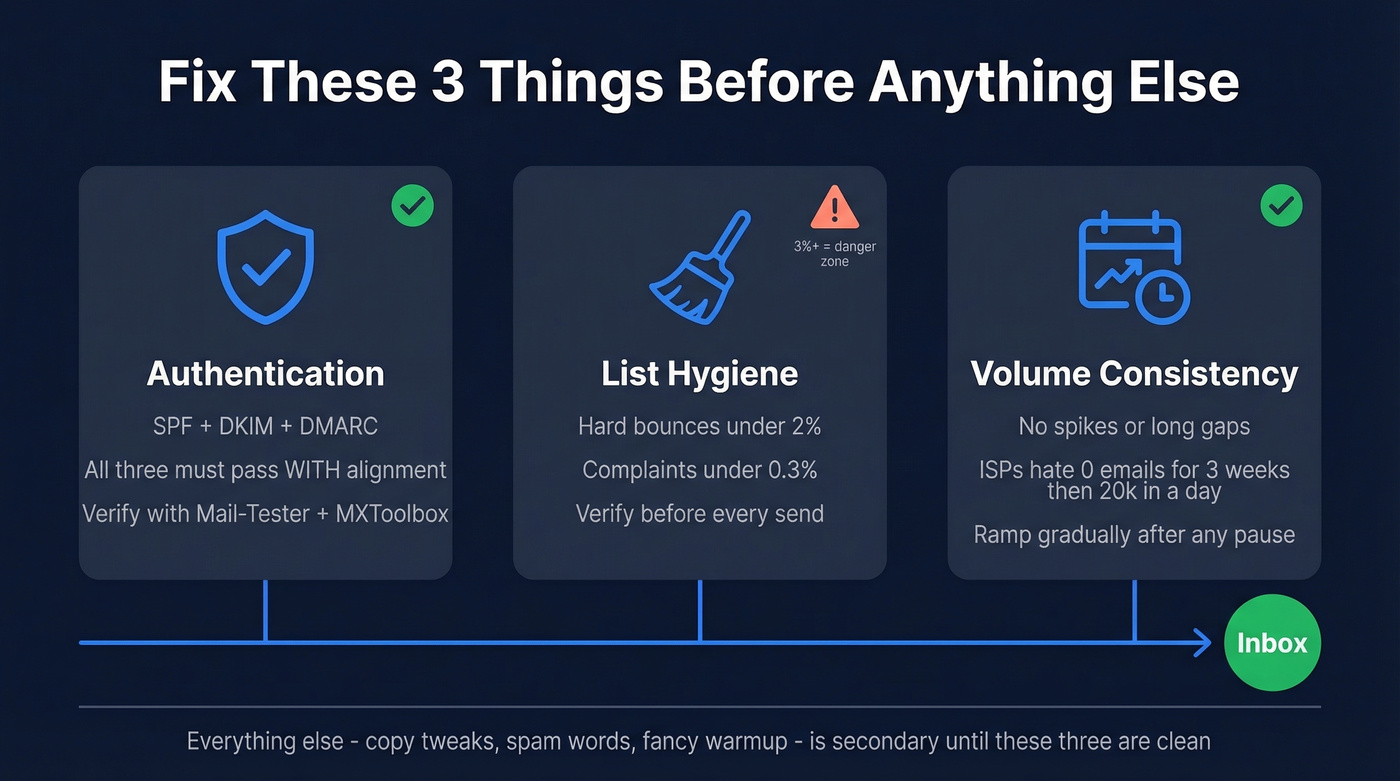
- Authentication: SPF + DKIM + DMARC with alignment. Not "mostly set up" - actually correct and verified.
- List hygiene: target hard bounces under 2%. Once you creep past ~3%, you're in major spam-signal territory.
- Volume consistency: no spikes. ISPs hate "nothing for 3 weeks then 20k in a day."
Everything else - copy tweaks, "spam words," fancy warmup - is secondary until those three are clean. Diagnose with Mail-Tester first, then check Google Postmaster Tools and Microsoft SNDS to see whether it's reputation, authentication, or content. And if you're doing cold outreach from your main domain, stop today.
Inbox Rates by Provider
Deliverability isn't one number. It's provider-by-provider, and Microsoft is where good senders go to get humbled.
| Provider | Inbox % | Spam % | Missing % |
|---|---|---|---|
| Gmail | 87.2% | 6.8% | 6.0% |
| Microsoft | 75.6% | 14.6% | 9.8% |
| Yahoo | 86.0% | 4.8% | 9.2% |
| Apple Mail | 76.3% | 14.3% | 9.4% |
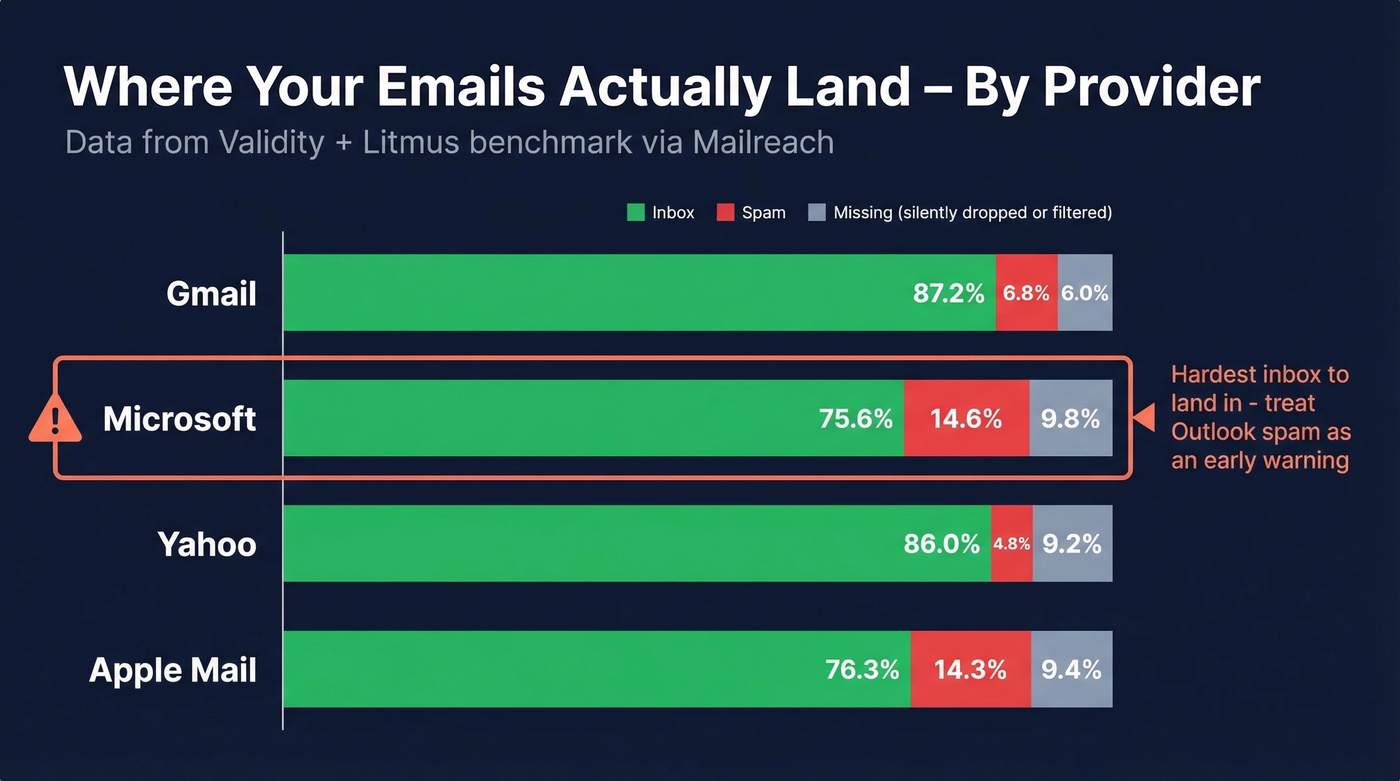
Data summarized by Mailreach from a Validity + Litmus benchmark table, viewable here.
Microsoft is one of the hardest inboxes to land in. If Outlook is spamming you, don't assume your whole program is broken - but treat it as an early warning. "Missing" is real too: those are messages that never clearly show up as inbox or spam, often from upstream filtering, throttling, or silent drops.
Diagnose Before You Fix
Don't "fix" deliverability by randomly changing five things and hoping. Triangulate, then change one variable at a time.
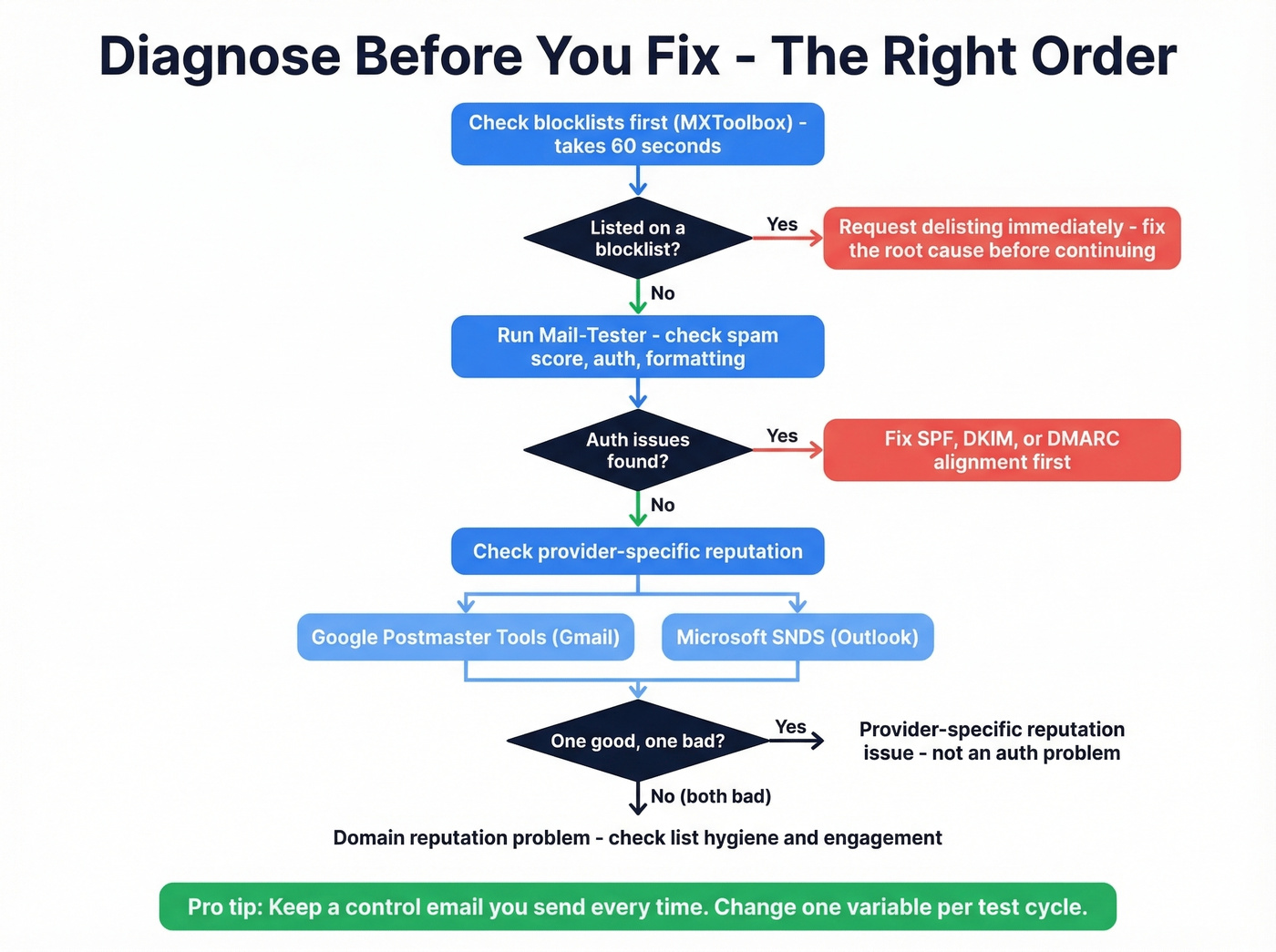
Mail-Tester is the fast sanity check. Send a test email and check the spam score, auth status, blocklists, and formatting. It catches dumb mistakes quickly.
Provider reputation telemetry is where you get specific. Google Postmaster Tools shows Gmail-specific reputation. Microsoft SNDS gives Outlook/Hotmail visibility. If one says "good" and the other says "bad," you've got a provider-specific reputation issue, not an authentication problem.
Seed tests matter for serious volume. Tools like GlockApps show real inbox placement across providers using controlled inboxes. If you're sending meaningful volume, this is the closest thing to a lab environment. This diagnostic tools roundup covers the major options.
Keep a "control" email you send every time so you can compare apples-to-apples. Change one major variable per test cycle. And check blocklists with MXToolbox before anything else - it's a 60-second step that can save a week of guessing.

Bad contact data is the #1 reason emails go to spam. Every bounced email chips away at your sender reputation - and once it's gone, recovery takes months. Prospeo's 5-step verification with spam-trap removal and 7-day data refresh keeps your bounce rate under 2% where it belongs.
Stop diagnosing deliverability problems your data provider created.
Root Causes and How to Fix Them
Authentication Done Right
Authentication is the minimum. It won't fix deliverability by itself, but if it's wrong, nothing else matters.
SPF - A basic Google Workspace record:
v=spf1 include:_spf.google.com ~all
If you have multiple senders (ESP + helpdesk + CRM), include them all. Don't exceed SPF's 10 DNS lookup limit, or SPF "passes" in your head but fails in reality.
DKIM - Use 2048-bit RSA keys, rotate every 6 months, and use a selector naming convention like jan2026 or 2026q1:
selector._domainkey.yourdomain.com TXT "v=DKIM1; k=rsa; p=MIIBIjANBgkq..."
DMARC - Start with reporting, then move to enforcement:
v=DMARC1; p=reject; rua=mailto:dmarc@yourdomain.com
Set TTL to 3600 while iterating so changes propagate in a reasonable window. If you're on Microsoft 365, enable DKIM through the Defender portal under Email & Collaboration > Policies & Rules > Threat Policies > Email Authentication Settings. Verify everything with MXToolbox and a Mail-Tester run. This walkthrough covers the DNS steps in detail.
Once SPF/DKIM/DMARC are solid, BIMI lets you display your brand logo in supported inboxes - a nice trust signal for brand recognition, though it won't move the deliverability needle by itself.
Sender Reputation
Domain reputation and IP reputation are different things. Domain reputation follows you even on shared infrastructure.
Use Google Postmaster Tools for Gmail and Microsoft SNDS for Outlook. Check Spamhaus and other blocklists via MXToolbox when inboxing suddenly collapses. Skip obsessing over dedicated IPs - a dedicated IP with bad list hygiene just gives you a private place to burn. And micro-optimizing DMARC tags while you're bouncing 6% of your list? That's optimizing the wrong thing entirely.
Shared IP is fine for most teams if your ESP is reputable and your list hygiene is strong. Dedicated IP makes sense when you've got consistent volume, stable sending patterns, and you want tighter control.
List Quality and Data Hygiene
Here's the thing: list quality is the fastest way to ruin deliverability - and the slowest thing to recover from once you've burned it. If your messages keep landing in junk after a campaign to a new segment, dirty data is the first suspect.
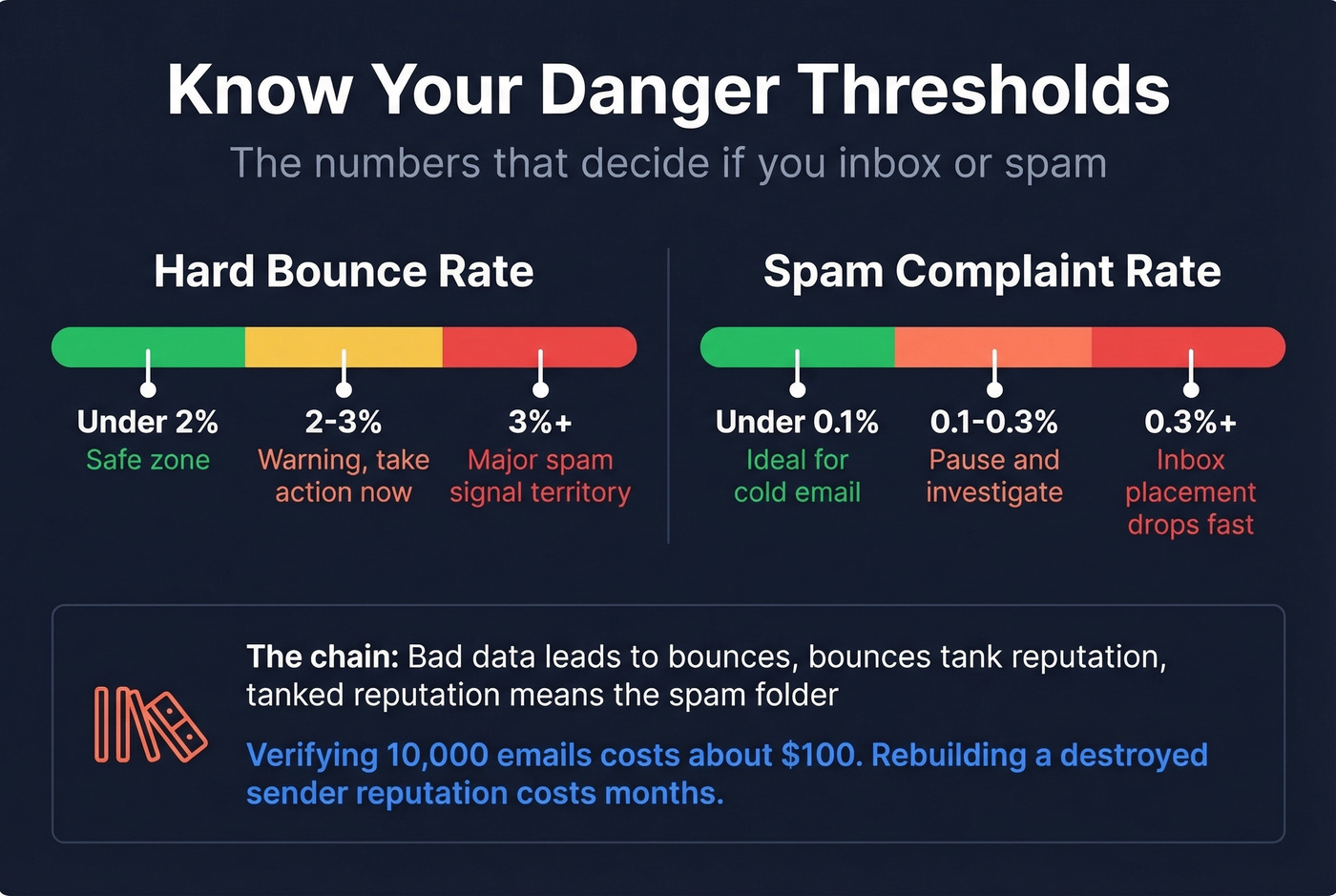
Keep hard bounces under 2%. Once you cross ~3%, you're in major spam signal territory. Above 0.3% complaints, inbox placement drops fast. For cold email, we treat 0.1% as a "pause and investigate" line because complaint spikes compound quickly.
Spam traps are why "but the email exists" isn't good enough. Pristine traps never opted in anywhere and exist to catch scrapers. Recycled traps are old addresses reactivated after abandonment. Typo traps punish bad data entry and weak validation. The chain is brutally consistent: bad data leads to bounces, bounces tank reputation, and tanked reputation means the spam folder. We've run bake-offs where the "best copy" lost because the list was stale and the domain got throttled within days.
Verifying 10,000 emails costs about $100 at ~$0.01/email. Rebuilding a destroyed sender reputation costs months. Prospeo's 5-step verification catches spam traps, honeypots, and catch-all domains - with all records refreshed on a 7-day cycle versus the 6-week industry average. Stack Optimize's clients run 94%+ deliverability with zero domain flags by treating verification as mandatory hygiene.
For marketing email, double opt-in is still the cleanest way to reduce traps and complaints. Twilio SendGrid's guidance is blunt about avoiding purchased lists and leaning on confirmed opt-in.
Content and Formatting
"Spam trigger words" are the most overrated deliverability lever on the internet.
Modern filters care about reputation and engagement, not whether you wrote "free" or used a percent sign. A sender with strong reputation can get away with imperfect copy. A sender with bad list hygiene can't copywrite their way out of spam. We've tested this repeatedly - the same email with "FREE TRIAL" in the subject line inboxes fine from a clean domain and gets spam-filtered from a dirty one.
That said, content can still hurt you during recovery. Keep a sane image-to-text ratio, or go text-only temporarily. Don't cram in 8 links and a tracking redirect chain. Avoid complex HTML and heavy signatures while you're rebuilding. Tracking pixels are a real risk for cold email - open tracking creates predictable "machine" patterns that some filters treat as suspicious. We'd rather lose open-rate visibility than lose the inbox. Postmark's breakdown covers content-related causes without pretending they're the only factor.
Engagement and Sending Patterns
Send to your most engaged recipients first - don't blast the full list. Sunset unengaged contacts after 60-90 days without opens, clicks, or replies. Keep volume consistent because sudden spikes trigger filters and throttling. Use one-click unsubscribe headers, which reduce "mark as spam" clicks and align with bulk sender expectations.
Major providers now expect bulk senders to have SPF + DKIM + DMARC in place, offer one-click unsubscribe, and keep spam complaint rates under 0.3%. Non-compliance causes spam placement or non-delivery, and these requirements are already being enforced.
Legal Compliance
Compliance won't magically inbox you, but non-compliance will get you filtered and reported. CAN-SPAM requires a working unsubscribe link for 30 days, a physical address, and non-deceptive headers/subjects. FTC fines run $11,000+ per offense. GDPR requires a lawful basis and prompt opt-out honoring. CASL penalties run $1-10M per violation - enough to make "just send it" a terrible strategy.
Cold Email Deliverability
Cold email is where teams accidentally torch their core domain. The consensus on r/coldemail is consistent: protect the main domain, go slower than you want to, and treat verification as mandatory. There's also growing skepticism about cold email's ROI as inboxes get more crowded - which makes infrastructure discipline even more important for teams still running it.
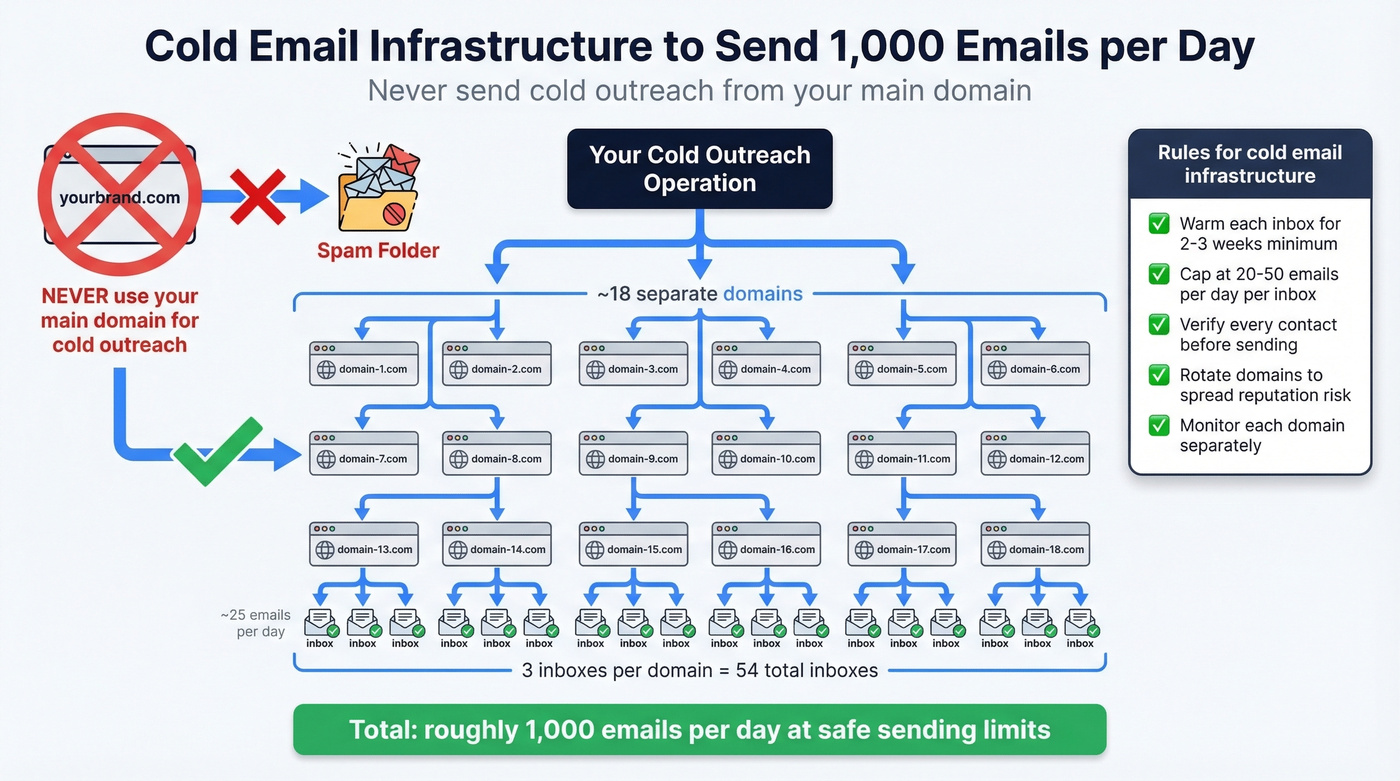
First rule: never send cold outreach from your main domain. If your outbound is already hitting the spam folder, stop sending from that domain immediately.
Operators range from 20-50 emails/day per inbox depending on risk tolerance; many cap at ~25/day to stay safe. To send 1,000 emails/day, you typically need about 18 domains running 3 inboxes each at ~25 emails/account/day. That's not a typo - the infrastructure math is real, and skipping it is how domains get burned.
Warmup takes 2-3 weeks. Start at 5-10/day, ramp gradually. Don't spike on Mondays because "pipeline" - filters don't care about your quarter. Use custom tracking domains if you track links. Disable open tracking entirely. If you're already flagged, strip to plain text, remove images, keep links minimal, and run blocklist checks.
Does Email Warmup Still Work?
Warmup tools work by joining a network that automates send/receive/open/reply behavior, even "moving from spam" to simulate engagement. Mechanically, it's clever. In practice, it's getting less reliable.
Google has gotten better at detecting bot-like patterns and discounting that engagement for reputation scoring. Warmup networks generate repetitive templates that look inorganic. This analysis captures the mechanics and why results have declined.
Warmup won't save you if your list is dirty or your infrastructure is sloppy. Pair it with list hygiene and sane volume, then validate with Google Postmaster Tools plus an independent seed test. If there's no objective lift after two weeks, stop paying for it.
Recovery Playbook
When your emails are going to spam across multiple providers, here's the sequence that actually works:
- Stop sending from the flagged domain. Don't "test a little." Stop.
- Check blocklists with MXToolbox and confirm Spamhaus status.
- Purge your list - remove bounces, unengaged contacts, and anything unverified.
- Simplify content - plain text, no images, minimal links, no attachments.
- Restart at low volume to engaged-only segments. Tens per day, not thousands.
- Monitor weekly in Google Postmaster Tools. Watch trends, not day-to-day noise.
Reputation recovery takes weeks to months, not days. There are no shortcuts - it's hygiene, patience, and consistency.
FAQ
Why do my emails go to spam in Gmail but not other providers?
Gmail weighs sender reputation and engagement signals more heavily than most providers. Check Google Postmaster Tools for Gmail-specific domain reputation, then compare against Microsoft SNDS. If Gmail says "low" while Outlook is fine, it's a provider-specific issue - not a global authentication problem.
What's an acceptable bounce rate?
Keep hard bounces below 2%. Anything above ~3% is a major spam signal that tells ISPs you're sending to stale addresses. Verify your list before every campaign - it's far cheaper than rebuilding a burned domain.
Do spam trigger words actually matter?
Less than you think. Modern filters prioritize sender reputation, engagement, and bounce/complaint rates over individual words. "Free" in a subject line won't tank a strong sender, but clean copy won't rescue one that's bouncing 4%.
Why are my emails going to spam even with authentication passing?
Authentication only proves you're authorized to send from your domain - it doesn't guarantee inbox placement. The cause is almost always poor sender reputation, high bounce rates, low engagement, or a combination of all three. Diagnose with Google Postmaster Tools and seed tests before changing anything.
How long does reputation recovery take?
Expect 4-12 weeks depending on damage severity. Stop sending from the damaged domain, clean your list, restart at low volume to engaged contacts only, and monitor Google Postmaster Tools weekly. Consistency matters more than clever hacks.