

EngageBay Pricing, Reviews, Pros and Cons: The Honest Breakdown
You just opened the HubSpot renewal email. $890/mo for Professional - plus that $3,000 onboarding fee you're still paying off. Your four-person team uses maybe 30% of the features. So you start looking for cheaper all-in-one CRMs, and EngageBay keeps coming up. The question isn't whether it's cheaper - it obviously is. The question is whether it's actually good enough.
We dug through 1,500+ verified reviews so you don't have to.
EngageBay at a Glance
| Overall rating | 4.7/5 across 617 G2 reviews and 907 Capterra reviews |
| Best for | Teams of 1-5 needing CRM + marketing + helpdesk under $15/user/mo at the entry tier |
| Skip if | You need advanced reporting, territory management, or 100+ native integrations |
| Pricing range | $0-$101.99/user/mo (All-in-One, biennial billing) |
| Top pro | Ease of use - 244 mentions across verified reviews |
| Top con | Limited reporting - 74 mentions |
| Verdict | A launching pad CRM, not a forever home - and that's perfectly fine |
EngageBay Pricing Breakdown
EngageBay's pricing page shows three billing options: Monthly, Yearly, and Biennial. The per-user price swings significantly depending on which you pick.
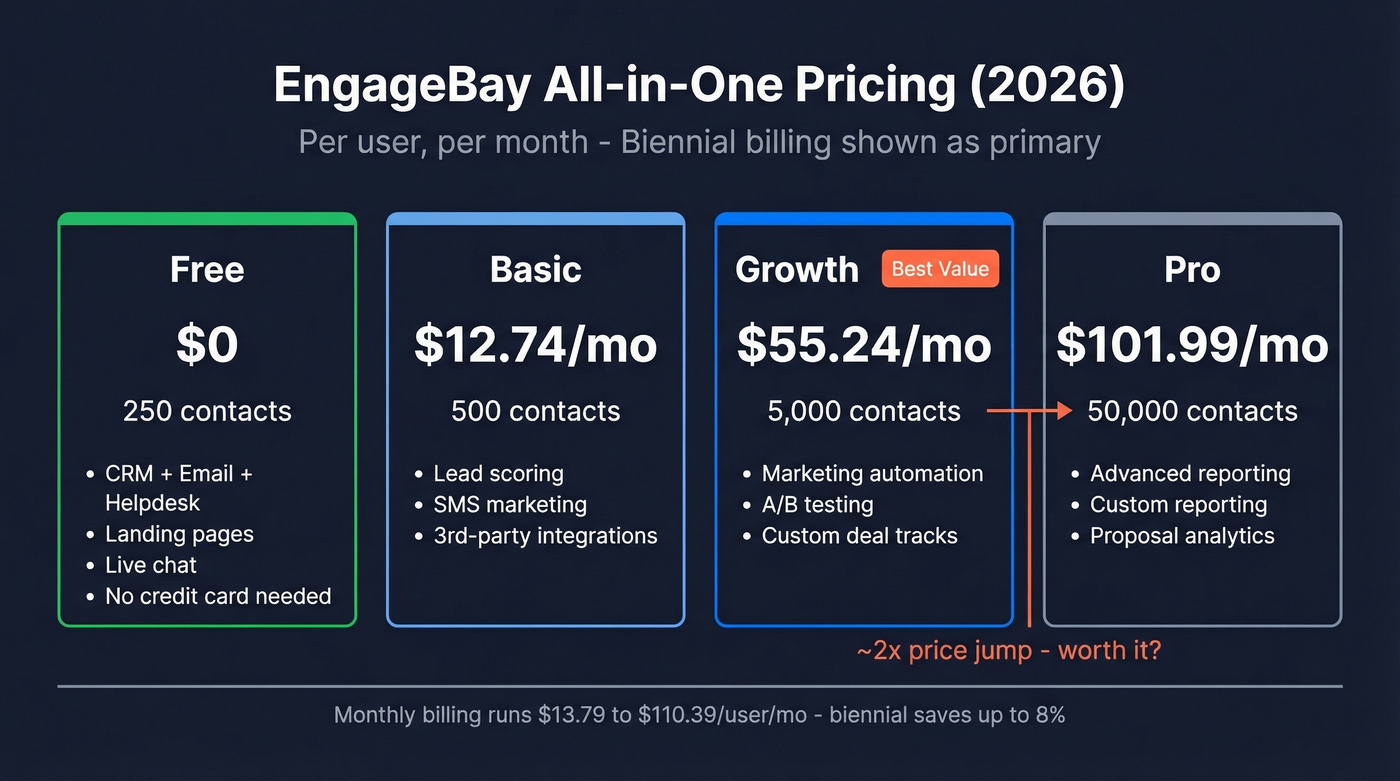
| Plan | Contacts | Monthly (per user/mo) | Yearly (per user/mo) | Biennial (per user/mo) |
|---|---|---|---|---|
| Free | 250 | $0 | $0 | $0 |
| Basic | 500 | $13.79 | $14.99 | $12.74 |
| Growth | 5,000 | $59.79 | $64.99 | $55.24 |
| Pro | 50,000 | $110.39 | $119.99 | $101.99 |
All prices per user/month. All-in-One plan.
The free plan is genuinely generous - CRM, email marketing, autoresponders, sequences, landing pages, helpdesk, and live chat for up to 250 contacts. No credit card, no time limit. In our testing, the feature set on the free tier surprised us.
Basic unlocks lead scoring, SMS marketing, and third-party integrations, but caps you at 500 contacts. We've seen teams outgrow that within their first month.
Here's the thing: the Growth-to-Pro jump is brutal. You're going from $55.24 to $101.99/user/mo on biennial billing - nearly double - mainly to get 50,000 contacts plus higher-end reporting features. For most small teams, Growth is the ceiling where EngageBay's value holds. Beyond that, you're in price territory where ActiveCampaign ($49+/mo) or Pipedrive ($24/user/mo) start making more sense for their respective strengths.
If you only need CRM and sales tools without marketing automation, the standalone CRM & Sales Bay starts at $12.99/user/mo for 500 contacts.
EngageBay vs HubSpot: The Real Cost Gap
| EngageBay Growth | HubSpot Professional | |
|---|---|---|
| Monthly cost | $276/mo (biennial) | $890/mo |
| Annual total | ~$3,312 | ~$13,680 |
| Onboarding fee | $0 | $3,000 |
| Helpdesk included | Yes, in the All-in-One suite | Service Hub is a separate add-on |
| Native integrations | ~50-60 | 1,500+ integrations |
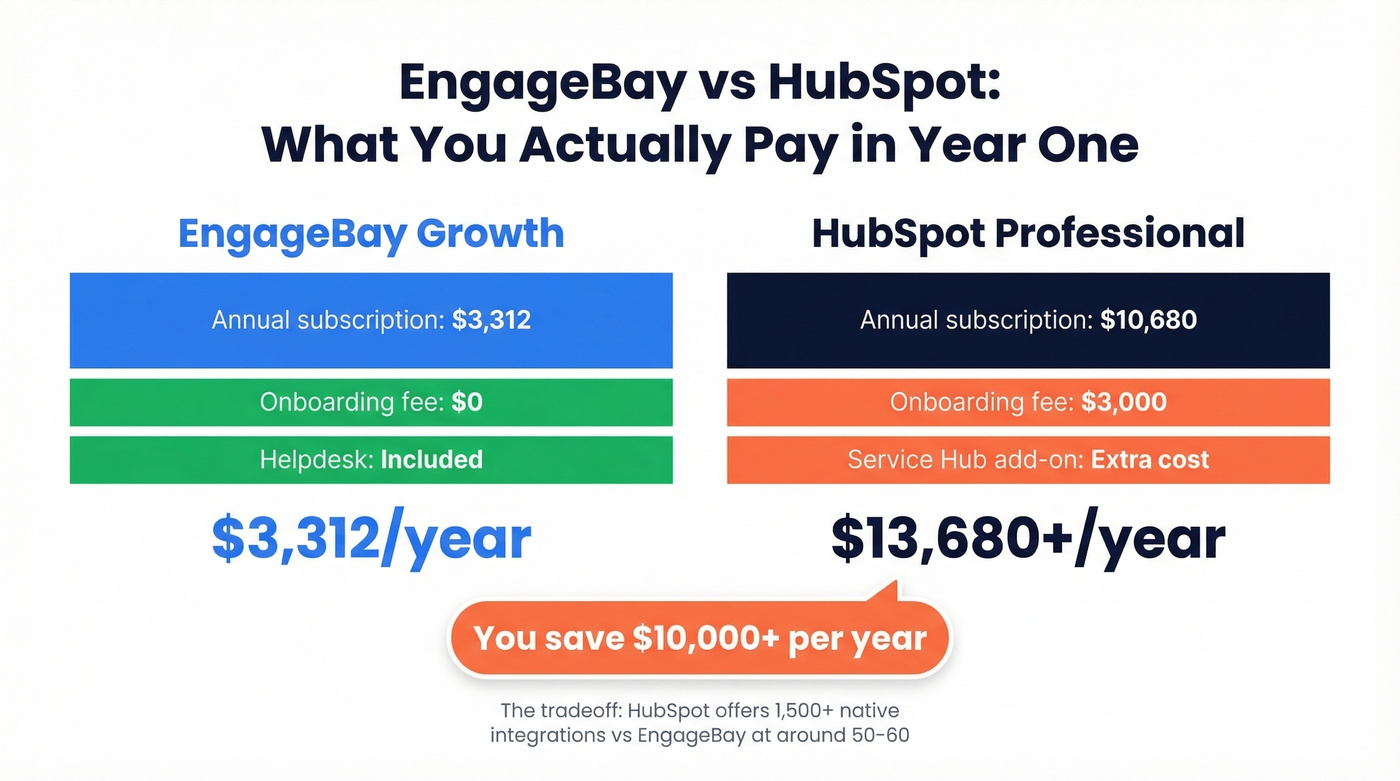
That's a $10,000+/year gap.
EngageBay includes helpdesk and live chat in every All-in-One tier - features HubSpot typically sells in separate hubs. No contracts, no onboarding fees. The tradeoff is real though: HubSpot's 1,500+ integrations versus EngageBay's ~50-60 is a meaningful gap. Zapier bridges most of it, but "bridges most of it" isn't the same as native.

Switching CRMs saves you money. Feeding your CRM bad data wastes it. EngageBay's email deliverability complaints almost always trace back to unverified contacts - not the platform. Prospeo's 98% email accuracy and 5-step verification keep your bounce rate under 4%, no matter which CRM you choose.
Start with 75 free verified emails and see the difference yourself.
What 1,500+ Reviewers Love
Across 617 G2 reviews and snapshots on Software Advice and Capterra, four themes dominate.
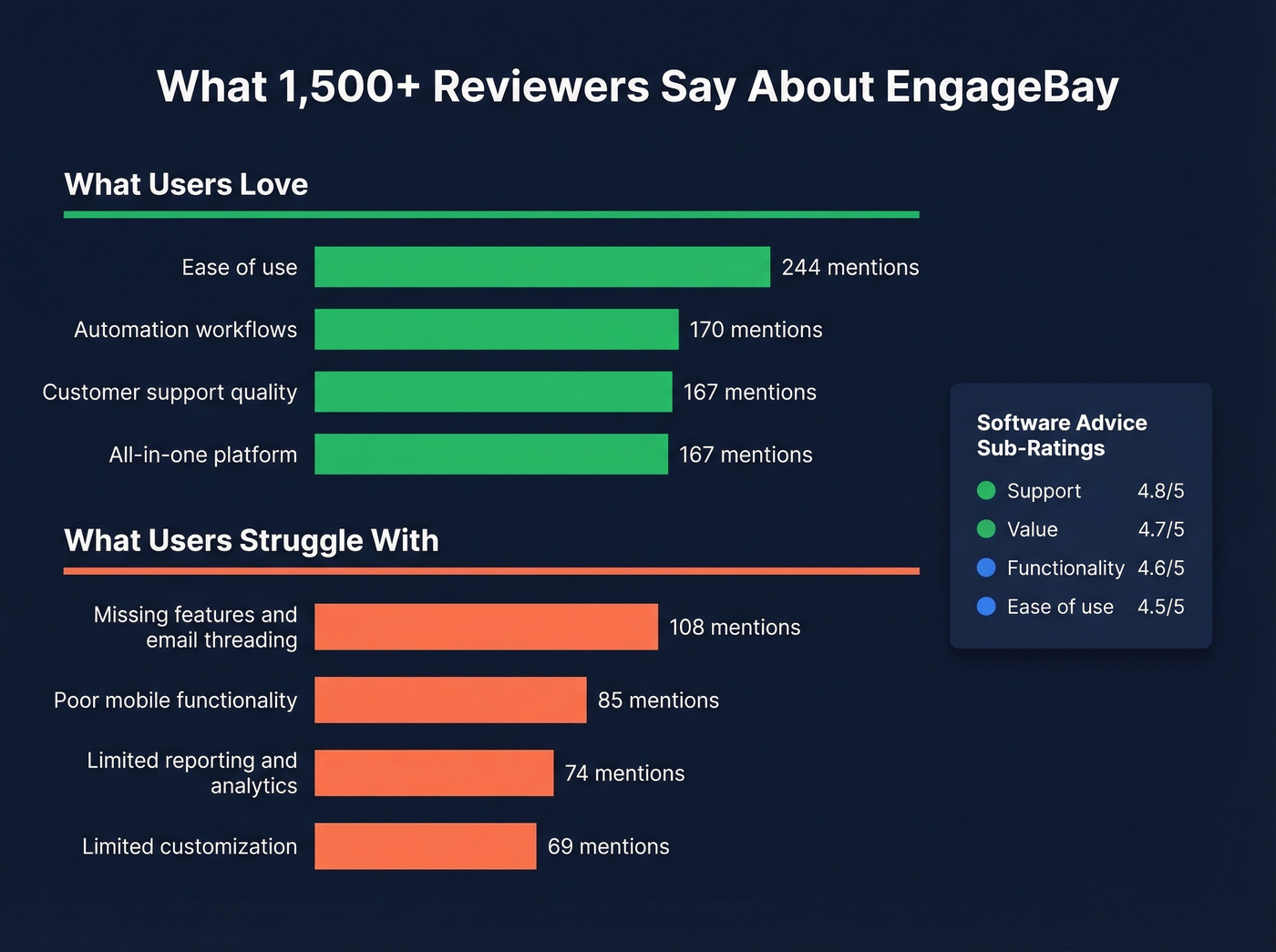
Ease of use leads with 244 mentions - people genuinely find the interface intuitive. Automation workflows come in at 170 mentions, with users calling out how quickly they build sequences and triggers. Customer support quality hits 167 mentions, and the "CRM + email + automation in one place" theme also lands at 167.

Software Advice's sub-ratings tell a similar story: Support 4.8/5, Value 4.7/5, Functionality 4.6/5, Ease of use 4.5/5. That support score at 4.8 matters more than most buyers realize. When you're paying entry-level pricing, responsive support is the difference between a tool you adopt and one you abandon after two frustrating weeks.
Reddit discussion on EngageBay is sparse - most threads are questions without detailed replies, which itself tells you something about the tool's mindshare compared to HubSpot or Pipedrive.
The Limitations That Matter
Reporting and analytics. This is the #1 pain point with 74 mentions. It isn't just dashboards - there's no quota tracking, no territory rules, and no advanced forecasting. According to crm.org's review, analytics refresh times can lag. If your VP of Sales wants a real-time pipeline view with multi-touch attribution, EngageBay isn't it.
Mobile and email experience. On G2's review summary, "missing features" including email threading shows up in 108 mentions, and "poor mobile functionality" is a recurring complaint at 85 mentions. For reps who live in their inbox, missing email threading is daily friction.
Customization and ecosystem. Limited customization for landing pages and workflows gets 69 mentions. The integration ecosystem tops out around ~50-60 native connections, so you'll lean on Zapier for anything beyond the basics. The UI is English-only, and the knowledge base has gaps that make self-serve troubleshooting harder than it should be.
Email deliverability. Users on Software Advice flag that "email broadcast is slow... some emails not reaching corporates." Let's be honest though - most inbox placement issues trace back to unverified contact data, not the CRM itself. Before blaming EngageBay's sending infrastructure, clean your lists. Prospeo verifies emails at 98% accuracy, and the free tier covers 75 emails/month - enough to audit a segment before you blast it.

Who Should (and Shouldn't) Buy
Buy it if you're a solo founder or team of 1-5 who needs CRM, email, and helpdesk in one tool. It works well for teams comfortable with basic reporting, looking to start under $15/user/mo without sacrificing core automation, or migrating from spreadsheets and finally wanting one system of record.
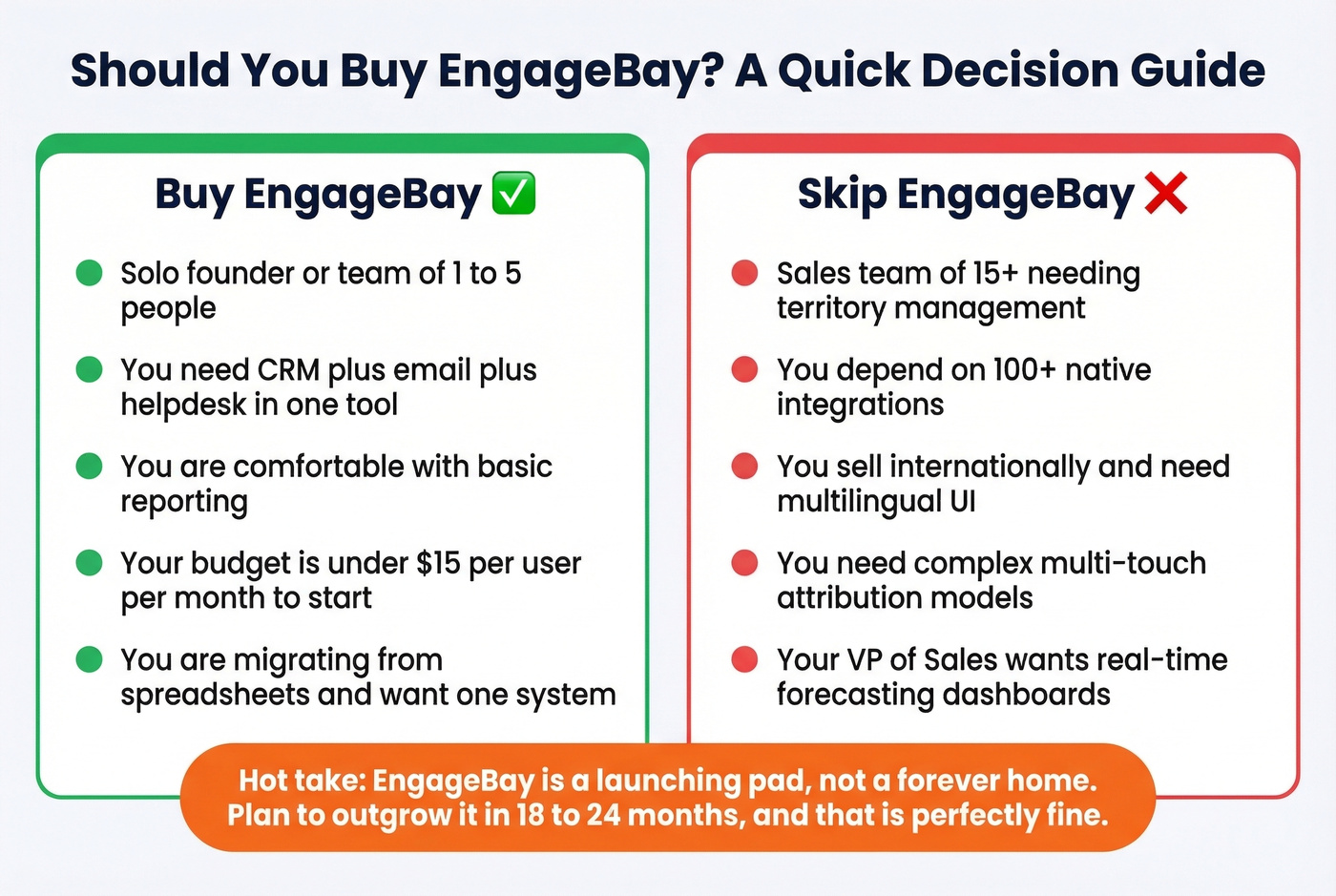
Skip it if you're running a 15+ person sales team that needs territory management and forecasting. Same goes if you depend on 100+ native integrations without Zapier workarounds, sell internationally and need multilingual UI support, or you're building complex attribution models across channels.
Here's our hot take: EngageBay is a launching pad, not a forever home. You'll likely outgrow it in 18-24 months if you're growing fast - and that's fine. Use it to build your systems, nail your workflows, and graduate to something bigger when the reporting limitations start costing you deals. Not every tool needs to be your last tool.
Final Verdict
The sweet spot is Growth (All-in-One, biennial) at $55.24/user/mo. It unlocks automation workflows, 5,000 contacts, and lead scoring - the features that actually move the needle for small teams. Skip Pro unless you genuinely need 50,000 contacts.
After weighing the full picture, the conclusion is straightforward: EngageBay is one of the best value all-in-one CRMs for small teams with basic reporting needs. Start free, upgrade when you hit 250 contacts, and don't overthink it.
You just saved $10K switching from HubSpot to EngageBay. Now protect that investment with data that actually connects. Prospeo delivers verified emails at $0.01 each and 125M+ direct dials - so your lean team books meetings instead of chasing bounces.
Spend less on your CRM and less on your data. No contracts required.
FAQ
Is EngageBay really free?
Yes - the free plan includes CRM, email marketing, sequences, landing pages, helpdesk, and live chat for up to 250 contacts with no credit card and no time limit. It's a real free tier, not a 14-day trial. Most solo founders can run their first few months entirely on it.
What's the best EngageBay plan for a small team?
Growth (All-in-One, biennial) at $55.24/user/month. It unlocks automation, 5,000 contacts, and lead scoring without the Pro premium. The Growth-to-Pro jump nearly doubles your cost for features most teams under 10 reps won't use.
How do I improve email deliverability in EngageBay?
Set up SPF, DKIM, and DMARC authentication first, then clean your contact list before importing. Bad data - not the CRM's sending infrastructure - is the #1 cause of inbox placement issues. Verifying emails before import with a tool like Prospeo (98% accuracy, 75 free verifications/month) catches bounces before they hurt your sender reputation.
Is EngageBay a good HubSpot alternative?
For teams of 1-5 spending under $300/month, absolutely. You save $10,000+/year versus HubSpot Professional and get CRM, marketing, and helpdesk in one suite. The tradeoff is fewer integrations (~60 vs 1,500+) and weaker reporting - a fair deal at one-quarter the price.