

Gmail Click Tracking: What Works, What's Broken, and What to Use
You sent a proposal Monday. It's Thursday. No reply. Did they open it? Did they click the pricing link? Gmail tells you nothing - and even if you had a tracker installed, the open data would probably be wrong anyway. Gmail click tracking is the one engagement signal that still holds up, and getting it right matters more than most reps realize. One agency found that following up within 24 hours of a first open led to roughly 3x more replies than waiting three days.
The Short Version
Open tracking is statistically unreliable after Apple Mail Privacy Protection. Link click tracking is the engagement metric that still works in 2026, even though security scanners add some noise.
- Mailtrack Pro (from $5.99/user/mo billed monthly, or $2.99/user/mo billed yearly) - cheapest way to add link tracking to Gmail. Skip the free tier.
- Boomerang ($4.98/mo) - the only tracker that's honest with recipients about being tracked.
- GMass ($25/mo) - overkill for light senders, essential for bulk Gmail campaigns.
None of this matters if your emails bounce. Before you install a tracker, verify your list. Prospeo's 5-step verification catches dead addresses, spam traps, and catch-all domains at 98% accuracy - and the free tier gives you 75 verifications to start.
How Email Click Tracking Works
The mechanism is straightforward. When you compose an email with a link, your tracking tool replaces the original URL with a unique tracking URL that routes through a tracking server. The recipient clicks, their browser hits the tracking server first, the server logs the event - who clicked, when, which link, their IP address, and user agent - then redirects to the original destination via an HTTP 301 or 302 redirect. The whole thing takes milliseconds.
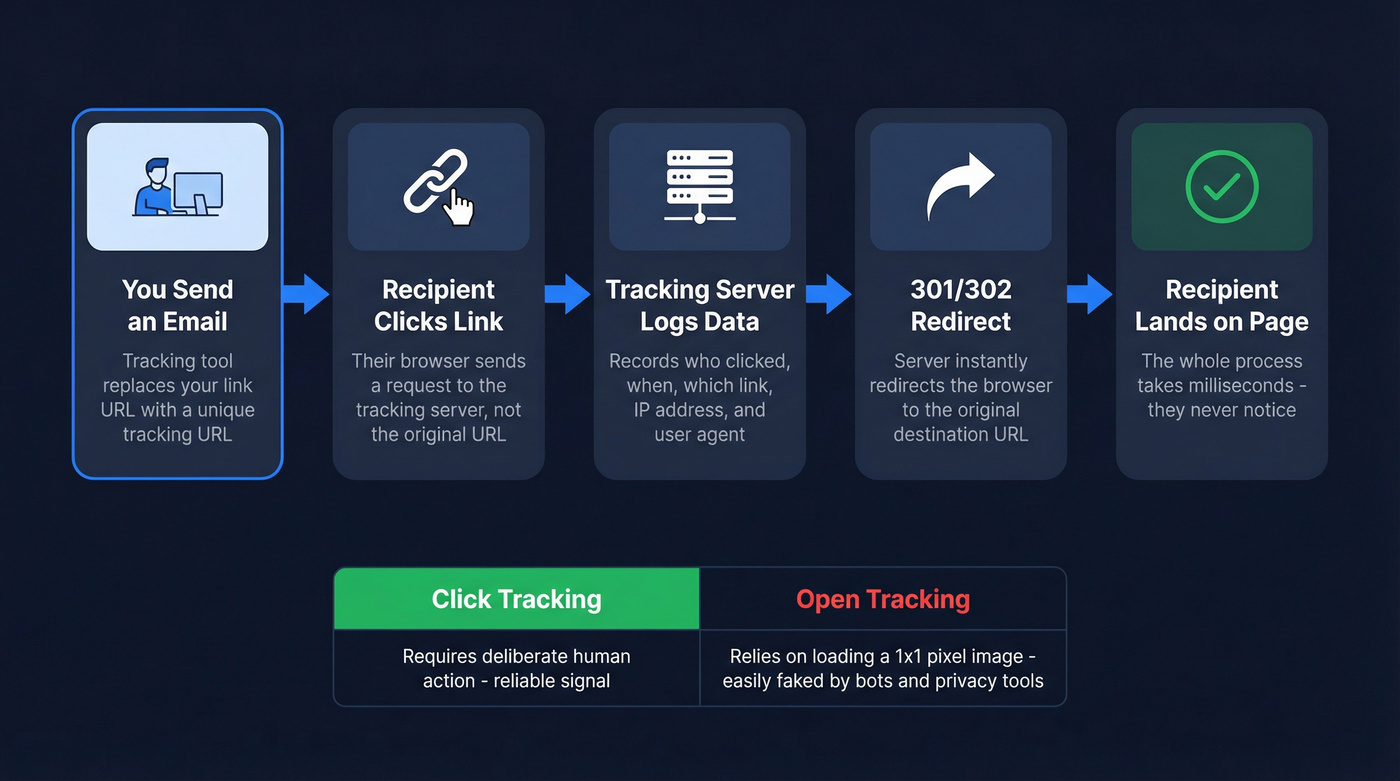
This is fundamentally different from open tracking, which relies on loading an invisible 1x1 pixel image embedded in the email body. Click tracking requires a deliberate action - the recipient has to actually click something. That's what makes it far more reliable than opens, and it's why we've shifted all our engagement reporting away from opens entirely.
You can also track email clicks in Gmail for free using UTM-tagged links and Google Analytics. Tag your URLs with utm_source, utm_medium, and utm_campaign parameters, and GA4 will show you what got clicked. The downside: it's manual, there's no per-recipient attribution, and Apple's Link Tracking Protection strips tracking parameters in Mail and Safari - so you'll lose attribution data from a meaningful share of Apple users.
Why Open Tracking Is Dead
Apple Mail Privacy Protection launched in September 2021, and it broke open tracking for good. MPP preloads all images - including tracking pixels - through Apple's proxy servers, regardless of whether the recipient actually reads the email. The result: phantom opens everywhere.
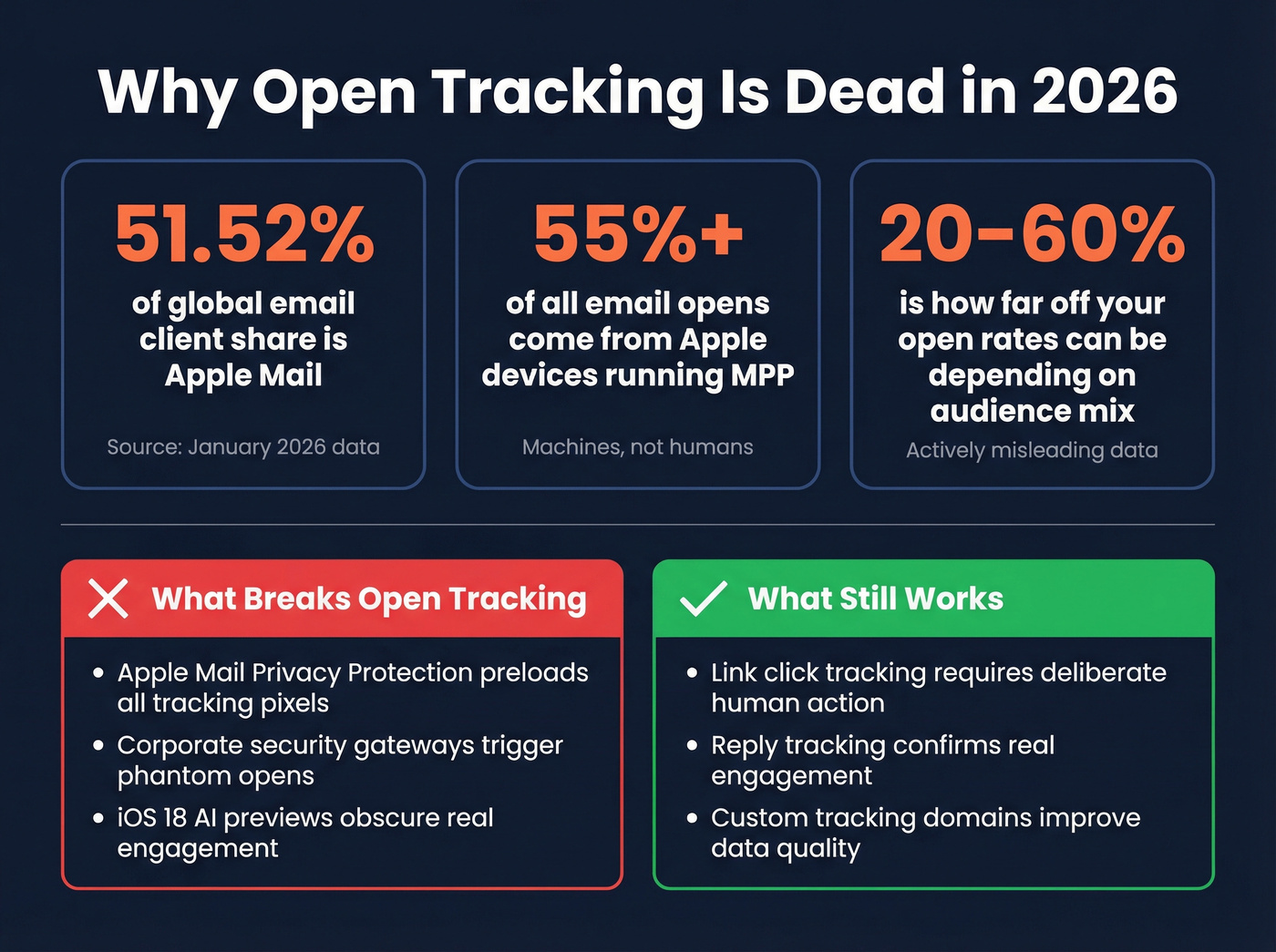
Apple Mail holds 51.52% of global email client market share as of January 2026. Bird's analysis found that 55%+ of global email opens came from Apple devices running MPP as of early 2024, and that number has only grown. More than half your "opens" are machines, not humans.
Here's a misconception that makes this worse: 77% of marketers believe MPP activates automatically. It's technically opt-in, but adoption is so high it might as well be universal. iOS 18 piled on with AI-generated previews, inbox categories, and branded sender icons - changes that further obscure whether a human actually engaged with your message.
Corporate environments compound the problem. Security gateways like Proofpoint, Mimecast, and Barracuda don't just trigger false opens - they auto-click links during scanning, generating phantom engagement data. Apple's Link Tracking Protection strips tracking parameters like UTMs in Mail and Safari, breaking your attribution even when someone does click. Open rates can be off by 20-60% depending on your audience mix. Click tracking isn't perfect either, but it's the last signal that consistently correlates with actual human intent.
Let's be honest: if your deal sizes are small and your audience skews Apple-heavy, stop looking at open rates entirely. They're not just inaccurate - they're actively misleading. Build your follow-up cadence around click data and reply data. Nothing else.

Every phantom open and bot click pollutes your engagement data. But none of that matters if 35% of your emails never arrive. Prospeo's 5-step verification catches spam traps, dead addresses, and catch-all domains - cutting bounce rates to under 4% with 98% email accuracy.
Fix your list before you track a single click.
Best Tools for Tracking Clicks in Gmail
Here's what's actually worth using for Gmail-native link click tracking in 2026.
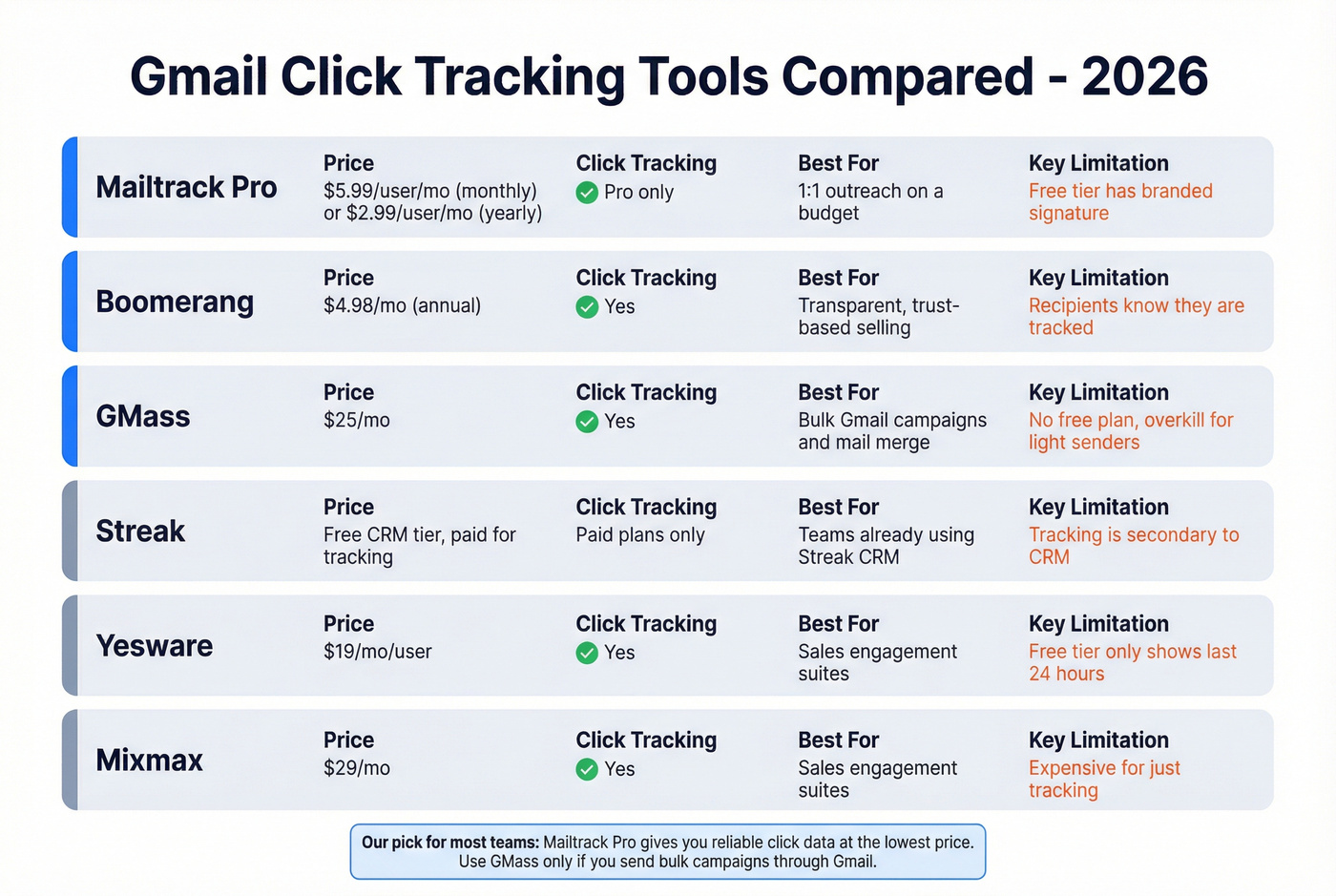
| Tool | Free Tier | Paid From | Click Tracking | Key Limitation |
|---|---|---|---|---|
| Mailtrack | Yes (branded) | $5.99/user/mo (monthly) | Pro only | Branded signature on free |
| Boomerang | 10 credits/mo | $4.98/mo | Yes | Low free-tier limit |
| GMass | Trial only | $25/mo | Yes | Built for campaigns, not 1:1 |
| Streak | Yes (CRM tier) | Paid plans | Paid plans | CRM-first, tracking secondary |
| Yesware | 10 recipients/mo | $19/mo/user | Yes | 24h visibility on free |
| Mixmax | Yes (branded) | $29/mo | Yes | Pricey SMB plan |
Mailtrack
Mailtrack Pro is one of the cheapest trackers that actually works. It removes the branded signature, adds link click tracking, and carries a 4.6/5 on G2. We've tested it across several outreach campaigns and the click data is consistent and reliable for individual sends.
Don't bother with the free tier if you're emailing prospects. The "Sent with Mailtrack" signature is a credibility killer. The Reddit complaint pattern is consistent on this one - visible branding on free tiers is the top reason people abandon trackers.
Boomerang
Most email trackers hide from recipients. Boomerang does the opposite. It embeds a visible tracking image and gives recipients an opt-out, making it the only Gmail tracker that treats tracking as a two-way street. It doesn't store or read your email content, which matters if you're in a regulated industry or just want to build trust with prospects who are increasingly savvy about surveillance.
Pricing runs from free (10 credits/month) through $4.98/mo Personal up to $49.98/mo Premium, all billed annually, with a 30-day Pro trial and no credit card required. The tradeoff is obvious: recipients know they're being tracked. For relationship-driven sales, that transparency is a feature. For cold outreach at scale, it's a dealbreaker.
GMass
Who it's really for: teams running mail merge campaigns through Gmail who need campaign-level click analytics, not just per-email tracking. GMass supports custom tracking domains (click.yourdomain.com), filters bot opens, and handles bulk sends natively. At $25/mo with no free plan - they removed the free plan in January 2024 - it's the most expensive option on this list. But for campaign tracking in Gmail where you need aggregate click-through rates across hundreds of emails, nothing else in the Gmail ecosystem comes close.
If you send fewer than 50 emails a day, GMass is overkill. Mailtrack does the core job for far less.
Streak, Yesware, and Mixmax
Streak's real value is CRM pipeline reporting baked into Gmail. It surfaces click data across five reporting levels, from individual messages to pipeline-wide "magic columns" for total and last link clicked. If you already use Streak's CRM, the tracking is a bonus. Skip it if you're paying just for tracking.
Yesware's free tier limits tracking visibility to the last 24 hours, which makes it nearly useless for follow-up timing. Paid plans start at $19/mo per user. Mixmax enters at $29/mo for the SMB plan - hard to justify when Mailtrack does the core job for a fraction of the price. In our experience, both tools make more sense when you're already paying for their broader sales engagement features.
Accuracy and Deliverability
Click tracking data isn't as clean as it looks. Here's what actually trips people up, especially when you're relying on tracked links to time your follow-ups.
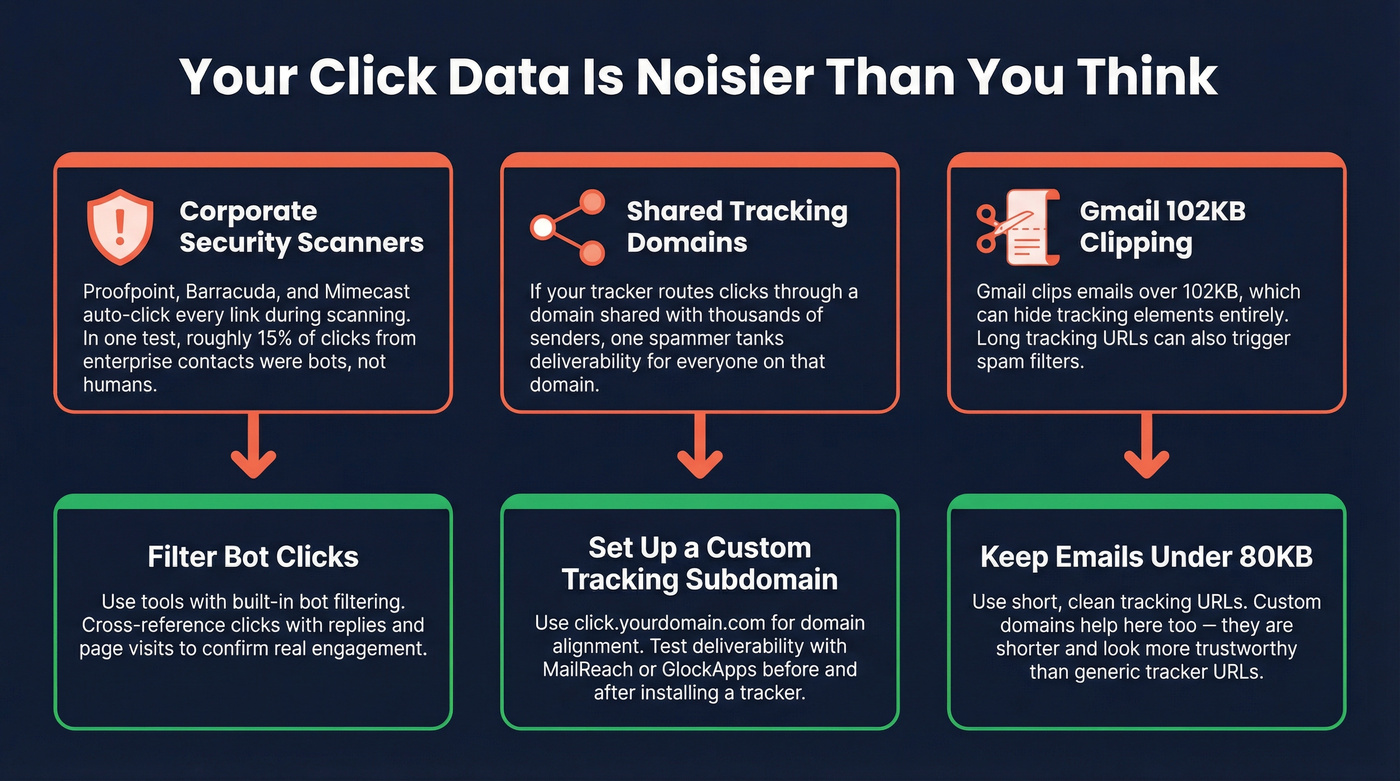
Corporate security scanners like Proofpoint and Barracuda auto-click links in inbound emails during scanning. Those show up as "clicks" in your dashboard. Some tools attempt bot filtering, but expect noise in your data when emailing enterprise prospects. We ran a test campaign to 200 enterprise contacts last quarter and roughly 15% of "clicks" came from security scanners, not humans.
Shared tracking domains carry serious reputation risk. If your tracker routes clicks through a domain shared with thousands of other senders, one spammer tanks deliverability for everyone. Set up a custom tracking subdomain (click.yourdomain.com) for domain alignment and trust. Look for tools that offer personalized tracking subdomains per customer and use the same subdomain for all link types - opens, clicks, unsubscribes. Run a deliverability test with MailReach or GlockApps before and after installing a tracker to measure the actual impact.
Gmail clips emails over 102KB, which can hide tracking elements entirely. Keep emails under 80KB to stay safe. Long tracking URLs can also break in some email clients or trigger spam filters - another reason custom domains matter.
Privacy and Compliance
Here's the thing most tracking tool vendors won't tell you: email click tracking is increasingly regulated like cookies.
The EDPB Guidelines 2/2023, adopted October 7, 2024, clarify that URL tracking and pixel tracking fall under ePrivacy Directive Article 5(3) - even if you don't ultimately process personal data. The UK ICO treats tracking pixels similarly under PECR, requiring prior consent unless the tracking is "strictly necessary." France's CNIL issued draft recommendations in June 2025 suggesting that consent to receive marketing emails should be separated from consent to be tracked within those emails.
If you're tracking emails to EU recipients without consent, you're on thin legal ice. At minimum, disclose tracking practices in your privacy policy. GDPR requires it, and enforcement is tightening.
Verify Before You Track
Click tracking is pointless if a big chunk of your list bounces. Dead addresses don't just waste tracking credits - they damage your sender reputation, which makes future emails less likely to reach anyone's inbox. High bounce rates can also invalidate click tracking analysis because your domain gets throttled before most emails even arrive.
Prospeo runs every address through a 5-step verification process: syntax check, domain validation, catch-all handling, spam-trap removal, and honeypot filtering. The result is 98% email accuracy across 143M+ verified emails. The free tier gives you 75 email verifications plus 100 Chrome extension credits per month - enough to clean a prospect list before your next campaign. Paid plans work out to roughly $0.01 per email, with no contracts.
Fix the data before you track the data. Every bounced email is a click you'll never measure.
You're investing in click tracking to know who's engaged. But tracking links in bounced emails generate zero data. Teams using Prospeo's verified emails see bounce rates drop from 35%+ to under 4% - meaning every click you track is a real signal from a real prospect.
Clean data in, reliable click signals out - starting at $0.01 per email.
FAQ
Does Gmail have built-in click tracking?
No. Gmail offers read receipts on paid Google Workspace accounts, but recipients can decline, and there's a 100-address whitelist limit. There's no native link click tracking - you need a third-party extension like Mailtrack, Boomerang, or GMass.
Is email click tracking legal?
Under EU ePrivacy rules (EDPB Guidelines 2/2023), tracking pixels and URL redirect tracking require consent. The UK ICO treats them similarly under PECR. At minimum, disclose tracking in your privacy policy and get explicit consent for EU recipients. US rules are less strict but evolving.
Do click trackers hurt deliverability?
They can if you use shared tracking domains, which carry reputation risk from other senders. Use a custom tracking subdomain aligned with your sending domain, keep total email size under 80KB to avoid Gmail clipping, and test inbox placement with GlockApps or MailReach before and after setup.
Can I track link clicks in Gmail for free?
Mailtrack's free tier tracks opens but not clicks, and it adds a branded signature. Your best free option is UTM-tagged links with Google Analytics - you'll get aggregate data but no per-recipient tracking, and Apple strips UTM parameters for many users. For reliable per-email click tracking, expect to pay $5-25/mo. To make sure those tracked emails actually arrive, Prospeo's free tier lets you verify 75 addresses per month before sending.