

Hard Bounce vs Soft Bounce: What Every Email Sender Needs to Know
You just sent a campaign to 50,000 contacts. The dashboard loads, and there it is - 1,200 bounces. That yellow warning icon isn't just annoying; it's your sender reputation taking damage in real time. With 392.5 billion emails expected daily in 2026, mailbox providers have zero patience for senders who can't keep their lists clean.
Here's the hard bounce vs soft bounce breakdown - what's actually happening when emails bounce, which bounces matter, and how to fix the problem before your domain ends up on a blocklist.
Quick Version
- Hard bounce = permanent failure. The address doesn't exist, never will. Remove it immediately.
- Soft bounce = temporary failure. Full inbox, server hiccup, message too large. Your ESP will retry.
- Keep your total bounce rate under 2%. Hard bounces should sit as close to 0% as possible.
- The single most important prevention tactic: verify your list before you send. Not after. Before.
What Is an Email Bounce?
An email bounce is a non-delivery report - the receiving server's way of telling your sending server "no." Every email goes through an SMTP handshake: your server connects to the recipient's server, presents the message, and waits for a response. If the receiving server rejects the message, it sends back a bounce code explaining why.
That bounce code is everything. It tells you whether the problem is permanent or temporary, whether you should retry or give up, and whether your list has a data quality issue or just bad timing.
Hard and Soft Bounces: The Full Breakdown
What Is a Hard Bounce?
A hard bounce means the email can never be delivered to that address. The recipient doesn't exist, the domain is dead, or the server has permanently blocked you. Common causes:
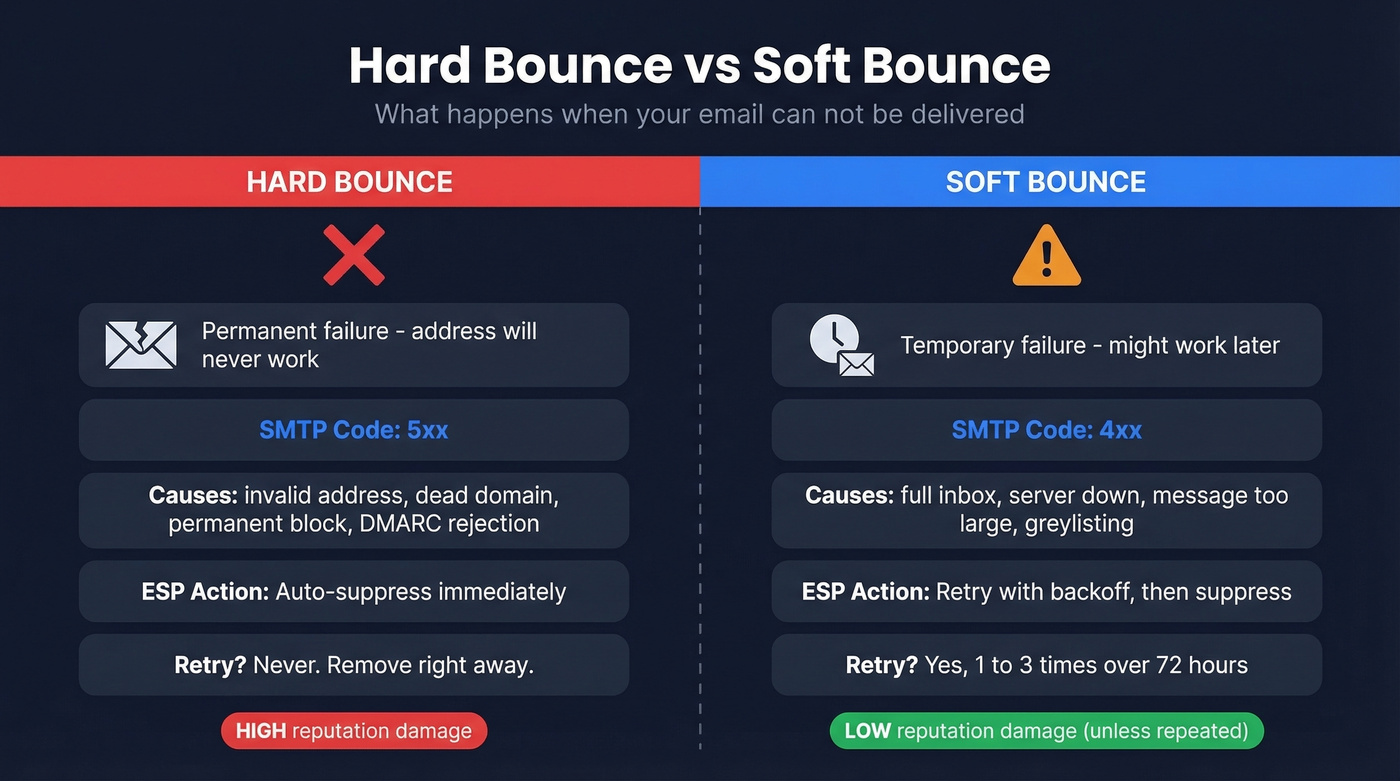
- Invalid or non-existent address - typos, former employees, made-up emails
- Non-existent domain - the company changed domains or shut down
- CSV import formatting errors - a stray space or invisible character in the email column creates addresses that look valid but aren't
- Permanent server block - your IP or domain is blocklisted
- DMARC authentication failure - this one catches people off guard. If you're sending from a free email address (Gmail, Yahoo) as your From address, receiving servers enforcing DMARC can reject the message outright. It looks like a bounce, but it's really an authentication problem.
When you see a hard bounce, remove the address immediately. Don't retry. Don't wait. Every hard bounce you send to again actively damages your sender reputation.
What Is a Soft Bounce?
A soft bounce means the email couldn't be delivered right now, but it might work later. The address exists, the domain is real - something temporary got in the way. Common causes:
- Full inbox - the recipient hasn't cleaned out their mailbox
- Server temporarily down - maintenance, overload, or outage
- Message too large - attachments or heavy HTML exceeding the server's limit
- Greylisting) - the receiving server deliberately rejects first-time senders, expecting a retry
- Rate limiting - you're sending too many emails too fast to that domain
- Non-existent domain timeout - some receiving servers classify dead domains as soft bounces because there's no server to return a hard 5xx failure; the connection simply times out, and your ESP may categorize these differently than you'd expect
Let your ESP retry soft bounces. If the same address soft bounces across two or three campaigns, treat it like a hard bounce and suppress it.
Side-by-Side Comparison
| Factor | Hard Bounce | Soft Bounce |
|---|---|---|
| Definition | Permanent failure | Temporary failure |
| SMTP code | 5xx | 4xx |
| ESP action | Auto-suppress | Retry, then suppress |
| Example causes | Invalid address, dead domain | Full inbox, server down |
| Should you retry? | Never | Yes, 1-3 times |
| Reputation impact | High - immediate damage | Low, unless repeated |
SMTP Bounce Codes Explained
The bounce code your ESP reports tells you exactly what happened. Here's a reference for the codes you'll actually encounter.
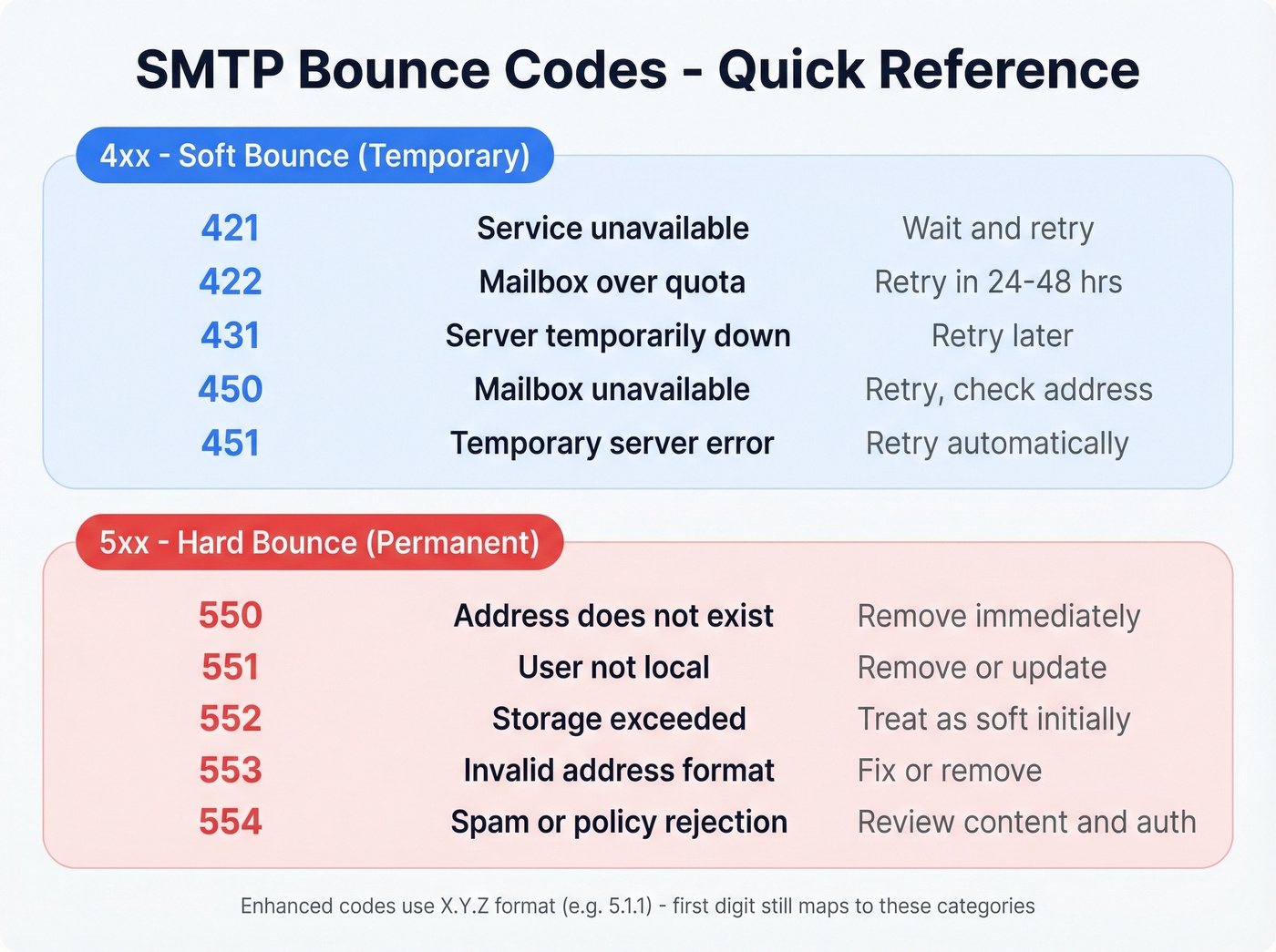
4xx codes (soft bounces - temporary):
| Code | Meaning | What to Do |
|---|---|---|
| 421 | Service unavailable | Wait and retry |
| 422 | Mailbox over quota | Retry in 24-48 hrs |
| 431 | Server temporarily down | Retry later |
| 450 | Mailbox unavailable | Retry; check address |
| 451 | Temporary server error | Retry automatically |
5xx codes (hard bounces - permanent):
| Code | Meaning | What to Do |
|---|---|---|
| 550 | Address doesn't exist | Remove immediately |
| 551 | User not local | Remove or update |
| 552 | Storage exceeded | Treat as soft initially |
| 553 | Invalid address format | Fix or remove |
| 554 | Spam/policy rejection | Review content + auth |
Many modern servers use enhanced status codes in X.Y.Z format (e.g., 5.1.1 = bad destination mailbox). The first digit still maps to the 4xx/5xx categories above.
The "4xx = soft, 5xx = hard" rule is useful until it isn't. Mailgun's deliverability team points out that some 4xx failures never succeed even with retries - policy blocks, greylisting loops, missing MX records. And some 5xx failures become deliverable later when DNS gets fixed or an account is reactivated. The codes are a guideline, not a law. What matters is separating two distinct decisions: "should I retry this message?" and "should I trust this address in the future?" Those aren't the same question.

Every hard bounce on your list is sender reputation damage you chose to accept. Prospeo's 5-step verification - with catch-all handling, spam-trap removal, and honeypot filtering - delivers 98% email accuracy. That's why teams like Snyk cut bounce rates from 35% to under 5%.
Stop sending to dead addresses. Verify before you hit send.
Why Bounces Wreck Deliverability
Look, bounces don't just waste sends. They actively erode your ability to reach real inboxes. Mailbox providers track your bounce rate as a signal of list quality, and high bounces tell Gmail and Microsoft that you're either buying lists, not maintaining them, or both.
Global inbox placement sits at roughly 84% according to Validity's benchmark data - meaning one in six emails never reaches the inbox even under normal conditions. That average drops fast when your sender reputation takes hits from bounces. Here's how the major providers break down:
| Provider | Inbox | Spam | Missing |
|---|---|---|---|
| Gmail | 87.2% | 6.8% | 6.0% |
| Microsoft | 75.6% | 14.6% | 9.8% |
| Yahoo/AOL | 86.0% | 4.8% | 9.2% |
| Apple Mail | 76.3% | 14.3% | 9.4% |
Pair a high bounce rate with spam complaints above 0.1%, and you're in the danger zone. Gmail and Yahoo's bulk sender rules set the hard line at 0.3% complaint rate - cross that, and your sends get throttled or blocked entirely.
2026 Bounce Rate Benchmarks
The cross-industry average bounce rate is 2.48%.
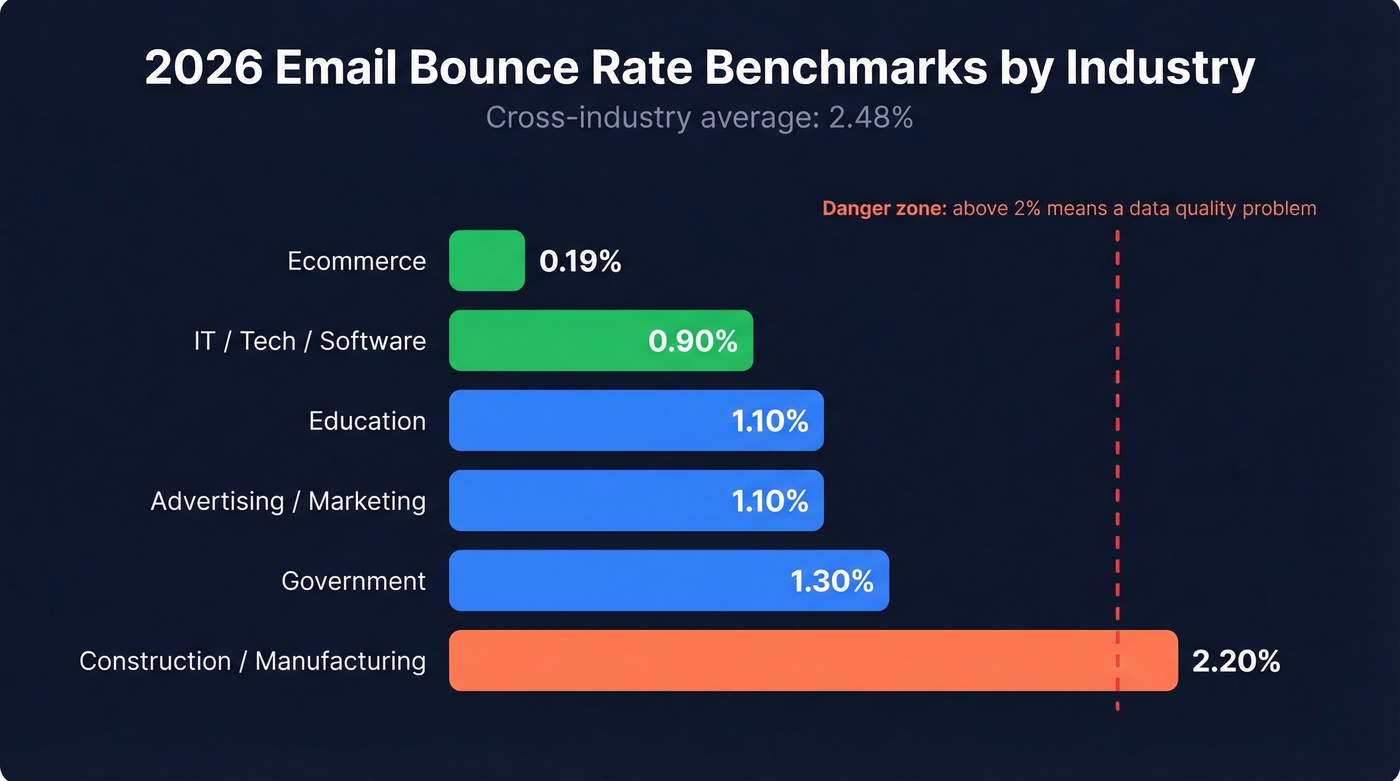
| Industry | Avg Bounce Rate |
|---|---|
| IT/Tech/Software | 0.90% |
| Ecommerce | 0.19% |
| Education | 1.10% |
| Advertising/Marketing | 1.10% |
| Government | 1.30% |
| Construction/Mfg | 2.20% |
If your bounce rate is above 2%, you have a data quality problem, not a deliverability problem. Deliverability is the symptom. The disease is bad data - stale lists, unverified imports, purchased contacts. Fix the data, and deliverability follows.
How ESPs Handle Bounces
Your ESP doesn't just report bounces - it manages them. Understanding the automation helps you know when to intervene and when to let the system work.
On a soft bounce, most ESPs automatically retry with exponential backoff. The first retry happens within minutes, the next after a longer delay, and so on. A common retry window runs up to about 72 hours. After that, platforms typically stop retrying and treat the address as undeliverable for future sends, though the exact labeling and suppression behavior varies by ESP.
Some platforms add their own categories. HubSpot tracks pending bounces during the retry window and uses global bounces - addresses dropped across all HubSpot accounts when they've bounced repeatedly across multiple senders. Mailchimp cleans addresses after roughly 7-15 bounces depending on subscriber activity and engagement history. SendGrid continues attempting delivery for soft bounces for up to 72 hours, then adds the address to a block/deferral list.
For hard bounces, every major ESP auto-suppresses immediately. No retries, no second chances.
How to Prevent Bounces
Every deliverability guide says "clean your list." That's like telling someone to "eat healthy" - technically correct and completely useless without specifics.
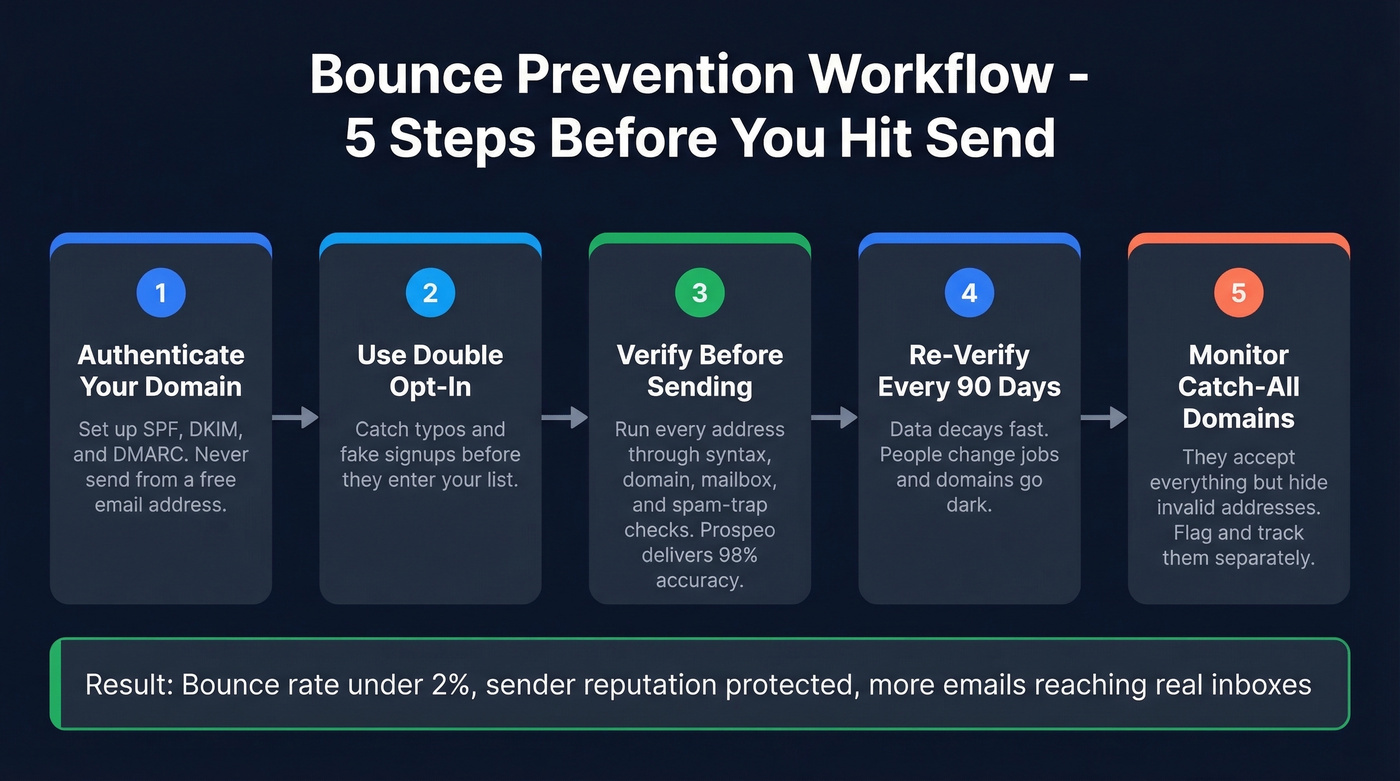
Authenticate Your Domain
SPF, DKIM, and DMARC aren't optional anymore. Gmail and Yahoo's bulk sender requirements - enforced since February 2024 - mandate all three for anyone sending more than 5,000 emails per day. DMARC adoption climbed to 54% as of late 2024, up from under 43% in 2023. That still means nearly half of senders lack DMARC protection and risk authentication-related bounces.
Never use a free email address (Gmail, Yahoo, Outlook) as your From address. Receiving servers enforcing DMARC will reject those messages outright, and they'll show up as bounces in your reports.
Use Double Opt-In
Double opt-in catches typos and fake signups at the source. Yes, it adds friction. Yes, it reduces list growth slightly. But every fake address you prevent from entering your list is a hard bounce you'll never have to deal with.
Verify Before You Send
This is where the "clean your list" advice becomes actionable. Good verification means running every address through multi-step checks before it touches your sending infrastructure: syntax validation, domain verification, mailbox existence checks, spam-trap detection, and catch-all handling.
We've tested this extensively with our own sends and with customer data. Prospeo runs this entire process on proprietary infrastructure - no third-party email providers in the chain - delivering 98% email accuracy on data refreshed every 7 days, not the 6-week industry average. The results speak for themselves: Snyk's team of 50 AEs went from a 35-40% bounce rate to under 5%, and Stack Optimize built an agency maintaining under 3% bounce rates across all clients.
Re-Verify on a Schedule
Data decays fast. People change jobs, companies rebrand domains, mailboxes get deactivated. Initial verification accuracy matters, but freshness matters more at scale - re-verify your active lists every 90 days at minimum.
Only 60% of senders do any list hygiene at all. And 70% don't use free monitoring tools like Google Postmaster Tools. As one sender running ~1M cold emails per month put it on r/Emailmarketing: "verification is damage control - most tools work, none are perfect, and the differences show up at scale." If you're verifying and monitoring, you're already ahead of most senders.
Monitor Catch-All Domains
Catch-all domains accept every email sent to any address at that domain - whether the mailbox exists or not. Your verification tool will flag these as "accept-all" or "catch-all," and they'll look valid. But they can still bounce later when the actual mailbox doesn't exist.
Flag catch-all addresses separately in your CRM and monitor their bounce behavior over time. Don't treat them the same as fully verified addresses.
You just read that the #1 bounce prevention tactic is verifying your list before you send. Prospeo refreshes 300M+ profiles every 7 days - not every 6 weeks like competitors. Stack Optimize built a $1M agency on Prospeo data with bounce rates under 3% and zero domain flags.
Clean data at $0.01 per email. No bounces, no blocklists.
How to Fix a High Bounce Rate
If you're already dealing with a high bounce rate, here's the triage sequence.
Step 1: Separate hard from soft bounces in your ESP. Most platforms let you export or filter by bounce type. Do this first - the fix is different for each.
Step 2: Suppress all hard bounces immediately. No exceptions. If your ESP hasn't auto-suppressed them, do it manually. Every send to a hard-bounced address is pure reputation damage.
Step 3: Segment soft bounces by bounce message content. Create a dynamic segment where the bounce message contains "spam" or "blocked" - these soft bounces are reputation-related, not just temporary failures. Exclude that segment from sends until the issue resolves. The r/Emailmarketing community has flagged this as one of the fastest ways to stop the bleeding.
Step 4: Run your full list through verification. In our experience, the teams with the worst bounce rates aren't the ones with bad ESPs - they're the ones who skip verification entirely. Audit a problem segment first to identify the worst offenders, then commit to a full list clean.
Let's be honest: if your bounce rate is above 5%, don't send another campaign until you've verified the entire list. I know that feels extreme when you have pipeline targets. But every send at that rate makes the problem worse, not better. You're not just losing those emails - you're poisoning your domain for the emails that would have landed.
FAQ
What bounce rate is too high?
Keep total bounces under 2%, with hard bounces near 0%. The 2026 cross-industry average is 2.48% - IT/Tech averages 0.90%, while construction and manufacturing run closer to 2.20%.
Do soft bounces hurt sender reputation?
Individual soft bounces cause minimal reputation damage compared to hard bounces. Repeated soft bounces to the same address signal a stale list, though, and ESPs will eventually suppress future sends. The most generous platforms allow 7-15 bounces before cleanup; others cut off after 72 hours of retries.
Should I remove soft-bounced addresses?
Don't panic and don't mass-delete after one campaign. Let your ESP retry automatically. If an address soft bounces across two consecutive campaigns, suppress it. Three or more times? Treat it as a permanent failure and remove it from your list entirely.
Can email verification prevent all bounces?
Verification eliminates the biggest cause of bounces - invalid addresses - but it can't prevent every temporary server failure. A strong verification process catches invalid emails, spam traps, and catch-all risks before they reach your sending list. Snyk cut their bounce rate by about 86-88% after adding dedicated verification to their workflow.
What's the difference between a bounce and a block?
A bounce rejects a specific message - bad address, full inbox, wrong format. A block rejects your sending IP or domain entirely because of poor reputation. High bounce rates are one of the most common triggers for blocks, which is why keeping bounces low protects your entire sending infrastructure. Skip verification for long enough, and you won't just see bounces - you'll see your domain blacklisted across multiple providers.