

How to Find Business Email Addresses: 8 Methods That Actually Work
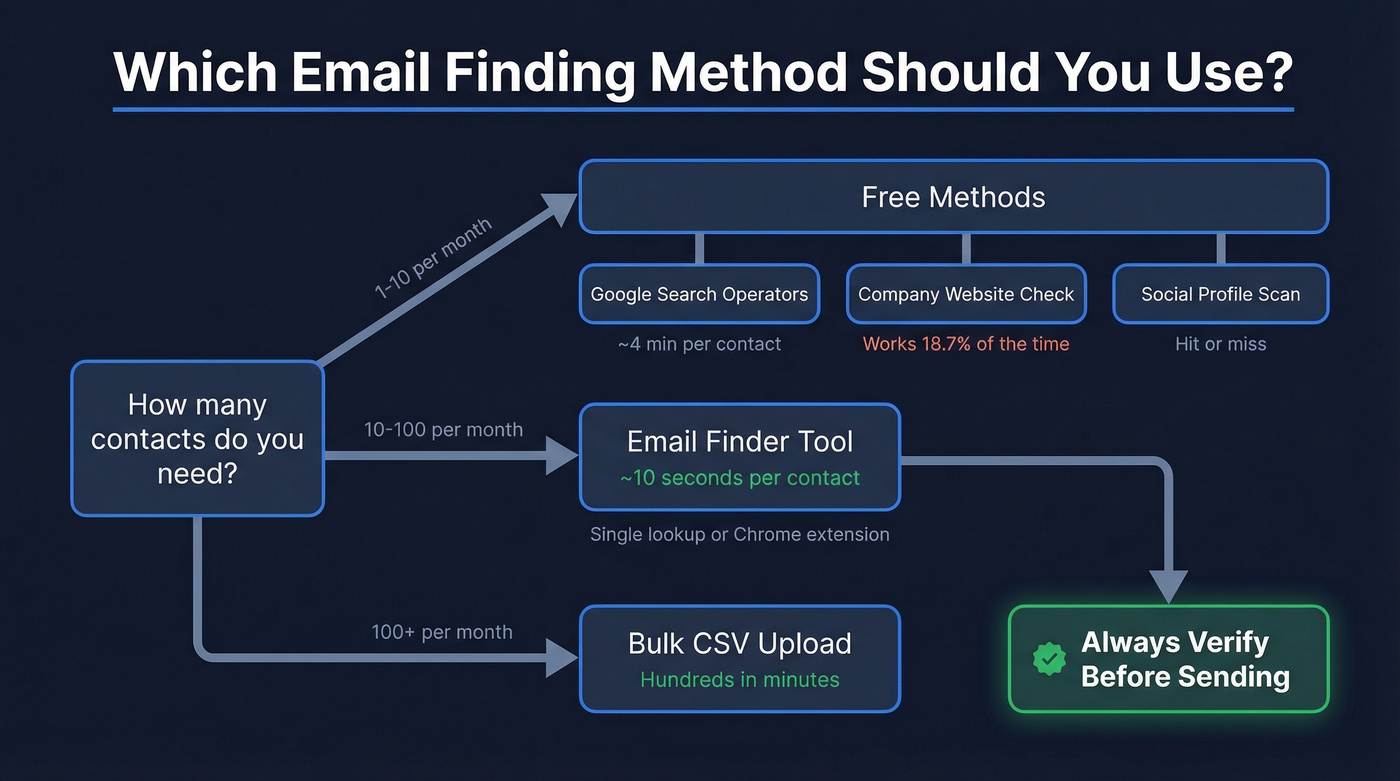
You've got 500 companies in a spreadsheet and zero contact info. The VP of Marketing at your dream account is right there on the org chart, but the company website gives you a generic info@ address and a contact form. After analyzing roughly 905,000 company websites, Hunter found that only 18.7% publicly list an email address. For more than four out of five companies, you're on your own - and knowing how to find business email addresses becomes the difference between a full pipeline and an empty one.
There are reliable ways to uncover B2B contact info quickly, from free manual tricks to tools that do it in seconds. Here are eight methods that work in 2026.
Quick Version
Fastest: Use an email finder tool - paste a name and domain, get a verified email back in seconds.
Free: Google advanced search operators plus manual verification. Zero cost, but slow.
At scale: Bulk CSV upload through a platform with built-in verification. Upload hundreds of names, get verified emails back in minutes.
8 Ways to Find Business Email Addresses
1. Use an Email Finder Tool
This is the default workflow for most outbound teams. Enter a person's name and their company domain, and the tool returns a verified email address. The best tools find and verify in a single step, so you're not paying for an email that bounces.
Prospeo runs its own proprietary email-finding infrastructure rather than reselling third-party data, which is why its accuracy numbers hold up in practice. It performs a 5-step verification on every search - syntax check, domain validation, MX record lookup, SMTP handshake, and spam-trap removal - so what you get back is genuinely deliverable. The results speak for themselves: 98% email accuracy on returned results, a 7-day data refresh cycle versus the 6-week industry average, and a database of 143M+ verified emails drawn from 300M+ professional profiles. The free tier gives you 75 emails per month, enough to test the workflow before committing. Paid plans run about $0.01 per email with no annual contract.

Hunter is the most recognized alternative and a solid option if you're just getting started. Its free plan caps at 25 searches per month, with paid plans starting at $24/mo for 500 searches. The key difference across the market: many tools separate finding from verifying, which means you pay for the lookup and then pay again to confirm the email works. Tools that combine both steps save you money and time.
One outbound agency, Stack Optimize, built from $0 to $1M ARR using Prospeo's verified data - maintaining 94%+ deliverability with bounce rates under 3% across every client campaign. That's the difference between "found an email" and "found a verified email."
Use this if: You need to find prospect email addresses fast and don't want to cobble together manual methods.
Skip this if: You're researching fewer than 10 contacts a month - the free manual methods below will work fine.
2. Search the Company Website
The simplest approach, and sometimes it works. But remember that 18.7% stat - you'll strike out four times out of five.
When you do check, look at these pages:
- About / Team page - individual bios sometimes include direct emails
- Contact page - usually a generic address, but occasionally lists department-specific ones
- Blog author bios - writers often have their email in the byline
- Press / Media page - PR contacts are frequently listed
This method is fine for one-off research. It doesn't scale for outbound campaigns, and you'll burn time clicking through sites that don't list anything useful.
3. Guess the Format + Verify
An analysis of 12M+ email addresses found that 49.9% of companies use the {first}@domain pattern. If you know someone's name and company, you can often guess the format.
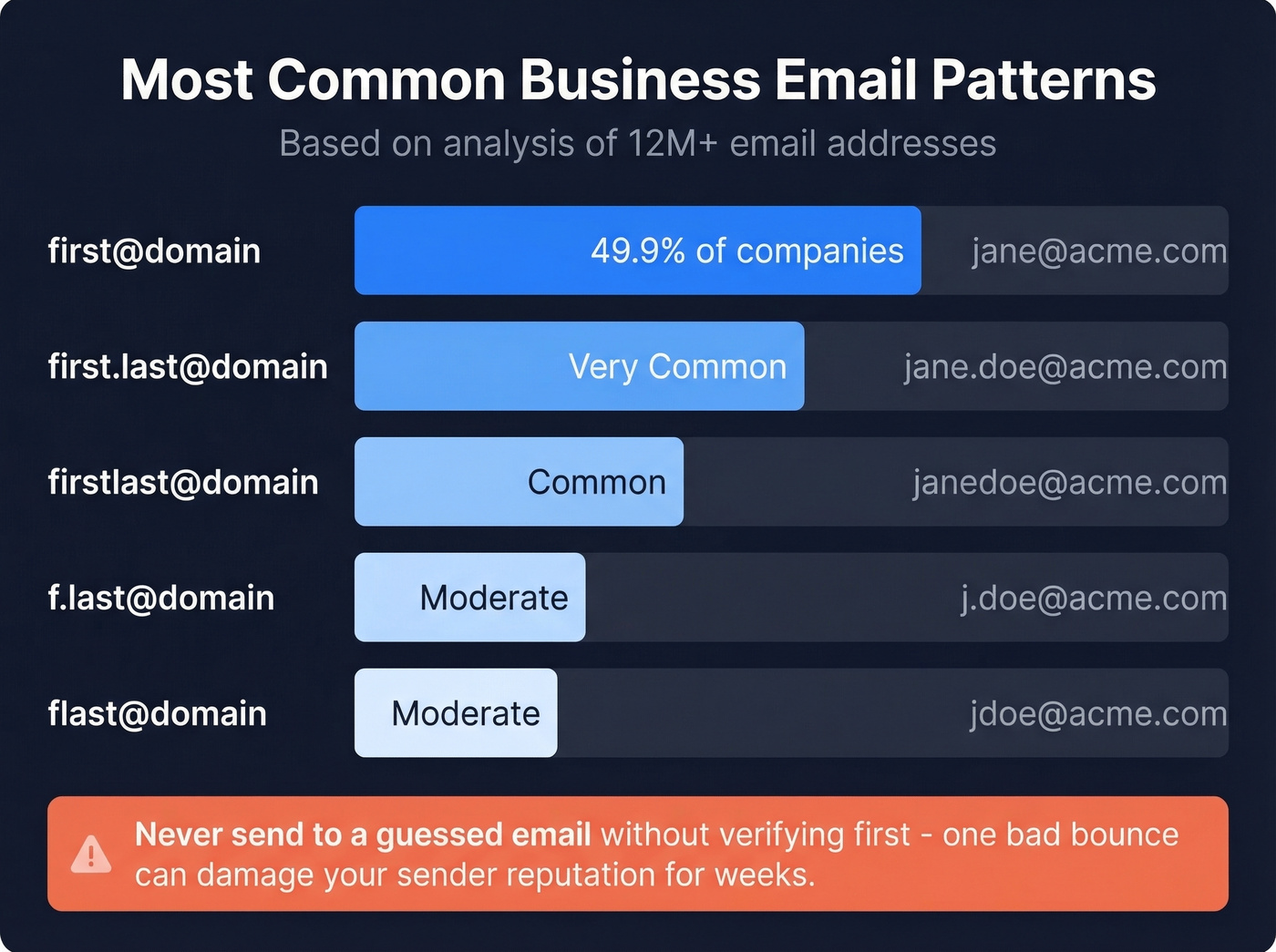
| Pattern | Example | Prevalence |
|---|---|---|
| first@ | jane@acme.com | Most common |
| first.last@ | jane.doe@acme.com | Very common |
| firstlast@ | janedoe@acme.com | Common |
| f.last@ | j.doe@acme.com | Moderate |
| flast@ | jdoe@acme.com | Moderate |
Here's the thing: guessing without verifying is worse than not emailing at all. Every bounced email chips away at your sender reputation. A single high-bounce campaign can land your domain on blocklists that take weeks to recover from. If you're going to guess, run the result through a verification tool before you hit send. No exceptions.
4. Use Google Advanced Search Operators
This is the free power-user method most people skip because it looks intimidating. It shouldn't be. Copy these templates, swap in your target domain, and let Google do the digging.
Find emails on a specific domain:
site:example.com ("@example.com" OR "contact" OR "team")
Find emails buried in PDFs:
site:example.com filetype:pdf (email OR "@")
Find a specific person's email:
"John Smith" "@example.com"
See older versions of pages that listed emails before removal:
cache:example.com/team
Add negation operators to cut the noise - append -jobs -careers -recruiting to filter out job listings that clutter results.

These operators work surprisingly well for one-off research. But if you're prospecting at 50+ contacts a week, the time cost exceeds the price of a tool within a day or two. We've timed it internally - manual Google searches average about 4 minutes per contact, while a tool takes under 10 seconds.
5. Use a Chrome Extension
If you're already browsing company websites or professional profiles during research, a Chrome extension lets you pull verified contact info without leaving the page. One click, done.
6. Bulk Lookup via CSV Upload
This is the method for anyone working with 100+ prospects at once. You export your target company list from your CRM or spreadsheet, format a CSV with first name, last name, and domain columns, upload it to your email finder tool, and download verified results. What takes hours of manual searching collapses into minutes of processing time.
Most serious tools handle bulk CSV enrichment. For teams sending 100+ emails per week, this is the workflow that actually matters - everything else is a warmup act.
7. Check Social Profiles and Bios
Sometimes the email you need is sitting in plain sight. Worth a quick check before you move to paid tools:
- Professional profile contact info sections (some people make their email public)
- Twitter/X bios - surprisingly common for founders and executives
- Facebook About pages for small business owners
- Personal websites linked from social profiles
This is hit-or-miss and doesn't scale. But for that one hard-to-reach prospect, it's a two-minute check that occasionally pays off.
8. Ask Directly
The last resort. Send a message through the company's contact form, DM the person on social media, or call the front desk and ask for a direct email. It's the lowest-efficiency method, but for senior executives at large enterprises who've scrubbed their digital footprint, sometimes it's the only option.
Don't spend more than five minutes on this before moving back to the tools.

You just read 8 ways to find business email addresses. One of them does it in under 10 seconds with 98% accuracy, a 5-step verification process, and no third-party data reselling. Prospeo gives you 75 free emails per month to prove it.
Stop Googling for emails. Start finding verified ones in seconds.
Best Tools for Finding Prospect Emails
Not all email finders deliver the same results. A benchmark test of 5,000 searches across nine tools found discovery rates ranged from 16.9% to 80.3% - a massive spread. That test was published by Tomba (who won it), so take the exact rankings with a grain of salt. But the underlying point holds: discovery rate and verification accuracy are two completely different numbers, and the second one matters more.
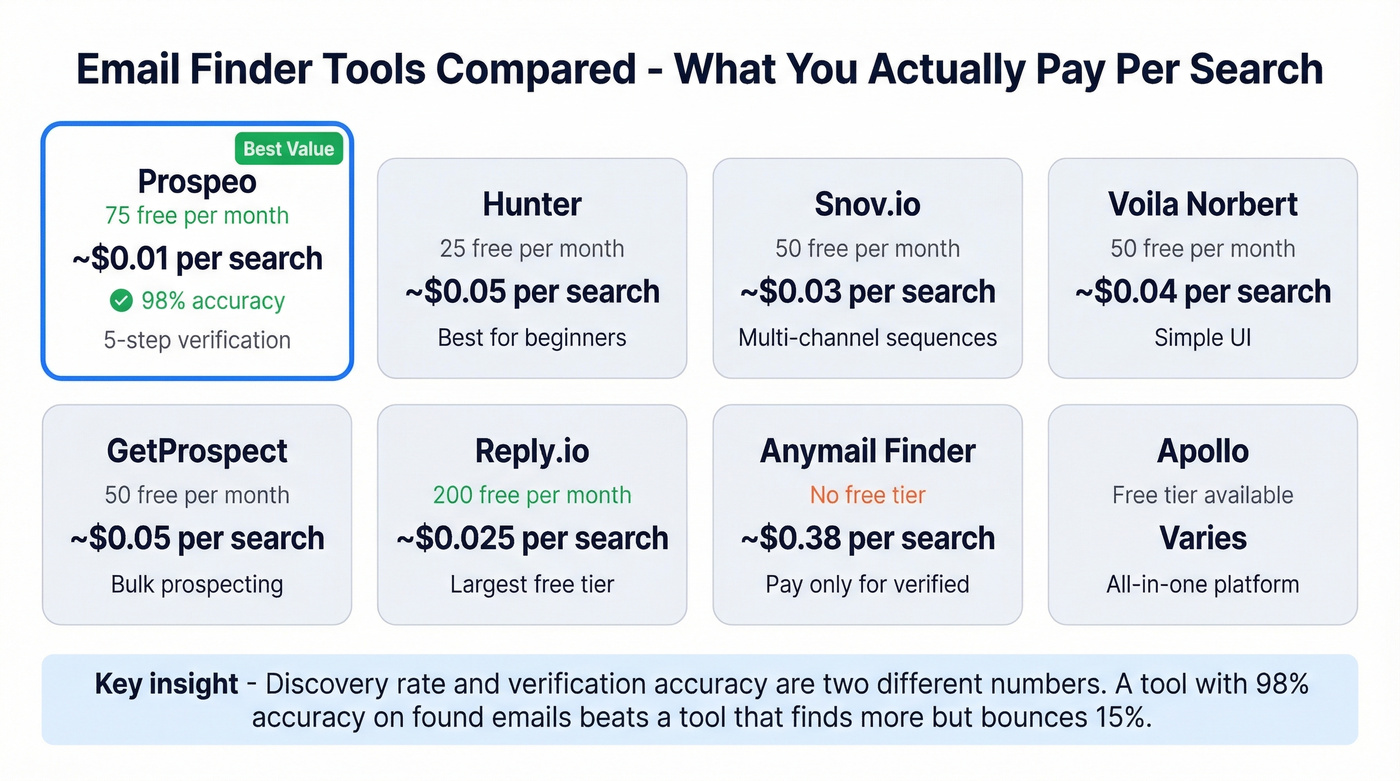
Let's break this down. Discovery rate tells you how many emails a tool finds out of total searches. Verification accuracy tells you how many of those found emails actually work. A tool with a lower discovery rate but 98% accuracy on returned results will outperform a tool that "finds" more emails but delivers a 15% bounce rate. This distinction explains why some tools score low on discovery benchmarks but deliver excellent real-world campaign results.
| Tool | Free Tier | Starter Price | Searches Included | ~Cost/Search | Best For |
|---|---|---|---|---|---|
| Prospeo | 75/mo | ~$39/mo | Varies by plan | ~$0.01 | Accuracy + free tier |
| Hunter | 25/mo | $24/mo | 500 | ~$0.05 | Brand recognition, beginners |
| Snov.io | 50/mo | $30/mo | 1,000 | ~$0.03 | Multi-channel sequences |
| Voila Norbert | 50/mo | $39/mo | 1,000 | ~$0.04 | Simple UI, small teams |
| GetProspect | 50/mo | $49/mo | 1,000 | ~$0.05 | Bulk prospecting |
| Reply.io | 200/mo | $49/mo | 2,000 | ~$0.025 | Large free tier |
| Anymail Finder | None | $19/mo | 50 | ~$0.38 | Pay-only-for-verified billing |
| Apollo | Free tier | ~$49-99/mo | Varies | Varies | All-in-one sales platform |
Reply.io's free tier is one of the most generous at 200 searches per month. But free tier volume isn't the deciding factor - accuracy is. Snov.io's own blog ran a test on just 10 prospects and reported wildly different results from tool to tool, which mostly proves that tiny sample sizes produce noise, not data.
Anymail Finder deserves a mention for its billing model: you only pay for verified results. For budget-sensitive teams willing to trade database size for cost certainty, it's worth a look.
Our take: If your average deal size is under $5K, you don't need a $15-40k/year ZoomInfo subscription. A $39/mo email finder with 98% accuracy will get you 90% of the way there. Save the enterprise budget for when you're actually enterprise.
Why You Must Verify Every Email
A practitioner on r/salestechniques shared a story we see constantly: their team was running an 18-22% bounce rate. After adding a proper verification step - source, verify, enrich, then send - bounces dropped to 7% within three weeks. Their call connect rate jumped from 12% to 19% in the same period.
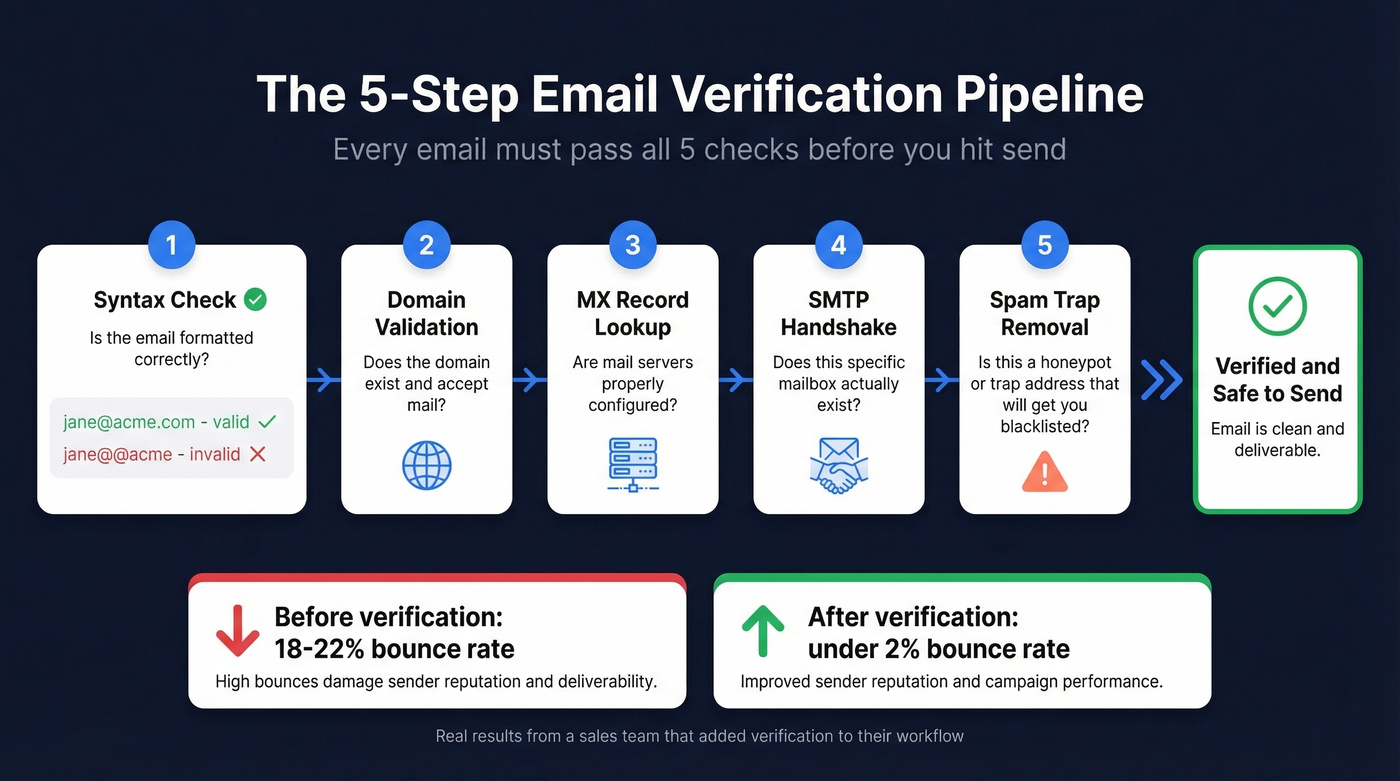
A proper verification pipeline checks five things:
- Syntax - is the email formatted correctly?
- Domain - does the domain exist and accept mail?
- MX records - are mail servers configured?
- SMTP handshake - does the mailbox actually exist?
- Spam-trap and honeypot removal - is this a trap address that'll get you blacklisted?
The industry target is a bounce rate under 2%. Above 5%, you're risking ESP warnings and domain reputation damage that takes weeks to undo.
One wrinkle that trips people up: catch-all domains. These accept mail to any address, so verification tools can't confirm whether a specific mailbox exists. The smart play is to send to catch-all addresses in small batches using a secondary domain, so a bad result doesn't torch your primary sending reputation.
Email data decays at roughly 2% per month. People change jobs, companies restructure, domains expire. Re-verify your lists every one to two months. If you're using a tool that separates finding from verifying, build that verification step into your workflow before you ever hit send.
Stop collecting emails. Start collecting verified emails. The distinction sounds pedantic until your domain gets flagged.
Guessing email formats and running Google searches works - until you need 500 verified contacts by Friday. Prospeo's bulk CSV upload returns verified emails from 143M+ contacts at $0.01 each, with bounce rates under 3% in real client campaigns.
Upload your prospect list and get verified emails back in minutes.
Is Cold Emailing Legal?
Short answer: yes, in most jurisdictions, with rules.
| Jurisdiction | Consent Required? | Opt-Out Window | Key Requirement | Penalty |
|---|---|---|---|---|
| CAN-SPAM (US) | No | 30 days | Physical address | $51,744-$53,088 per email |
| GDPR (EU/UK) | Legitimate interest OK | Without undue delay | Document LIA | Up to EUR 20M or 4% revenue |
| CASL (Canada) | Implied in some cases | 10 business days | Keep opt-out records 3 yrs | Up to $10M CAD |
In the US, CAN-SPAM is an opt-out model. You can send unsolicited commercial email as long as you include a physical mailing address, a working unsubscribe link, accurate sender information, and a truthful subject line. Honor opt-outs within 30 days.
Under GDPR, legitimate interest is a valid legal basis for B2B outreach - but you need to document it. Be transparent about how you got the recipient's email, make sure your message is relevant to their professional role, include an easy opt-out, and clean your lists regularly.
CASL is the strictest. Canada requires some form of consent, though implied consent applies in certain business contexts. Keep your opt-out records for three years.
FAQ
What's the most common business email format?
The pattern {first}@domain is used by 49.9% of companies, based on an analysis of 12M+ email addresses. Other common formats include first.last@, firstlast@, and flast@. Always verify before sending - guessing without verification damages your sender reputation.
Are email finder tools legal?
Yes. In the US, CAN-SPAM allows unsolicited commercial email as long as you include an opt-out mechanism and physical address. Under GDPR, legitimate interest is a valid legal basis for B2B outreach when properly documented. Always include an unsubscribe link in every message.
What's a good free tool to find business emails?
Prospeo's free tier offers 75 verified emails per month - the best balance of volume and accuracy at no cost. Hunter gives 25 free searches, Snov.io offers 50, and Reply.io provides 200. For light research, Google search operators cost nothing and work surprisingly well.
How do I verify an email before sending?
Use a verification tool that checks syntax, domain, MX records, and performs an SMTP handshake. The best tools verify automatically during the search so you skip the extra step. Target a bounce rate under 2% to protect your domain reputation and deliverability.
What bounce rate is acceptable for cold outreach?
Below 2% is the industry best-practice target. Above 5% risks ESP warnings and domain reputation damage. One practitioner reported reducing bounces from 22% to 7% just by adding a verification step - the ROI on data hygiene is immediate.