

How to Know If an Email Is Active - Without Sending a Single Message
A cold email that bounces doesn't just disappear. It dings your sender reputation, nudges your domain toward blocklists, and quietly tanks deliverability for every message that follows. At least 23% of any email list degrades every year - people change jobs, inboxes get deactivated, domains expire. You need to know if an email is active before you hit send on that next sequence.
Here's the thing: "active" isn't quite the right word. What you really want to know is whether an email is deliverable - whether a mail server will accept a message for that address. No tool can tell you if someone checks their inbox every morning.
Valid means the syntax is correct. Deliverable means the server accepted it. Active means someone's reading - and no tool on earth can guarantee that. Let's work with what we can actually prove.
What You Need (Quick Version)
- Single email, fast: Use a free verification tool. Prospeo gives you 75 free checks per month; Clearout gives 100 credits per month.
- List of thousands: Use a bulk verifier. Clearout runs $40/10k emails, Bouncer $49/10k.
- Want to avoid the problem entirely? Source emails from a platform that verifies before delivery, so you never ask "is this address real?" after the fact.
Why Dead Emails Wreck Campaigns
Bounce rates are the canary. Under 2% is healthy. Between 2-5% means your list has issues. Above 5% and you're actively damaging your sender reputation with every send.

Industry benchmarks vary more than people realize: IT and tech companies average a 0.90% bounce rate, financial services sit at 1.20%, and construction hits 2.20%. If you're above your industry's baseline, your list is the problem.
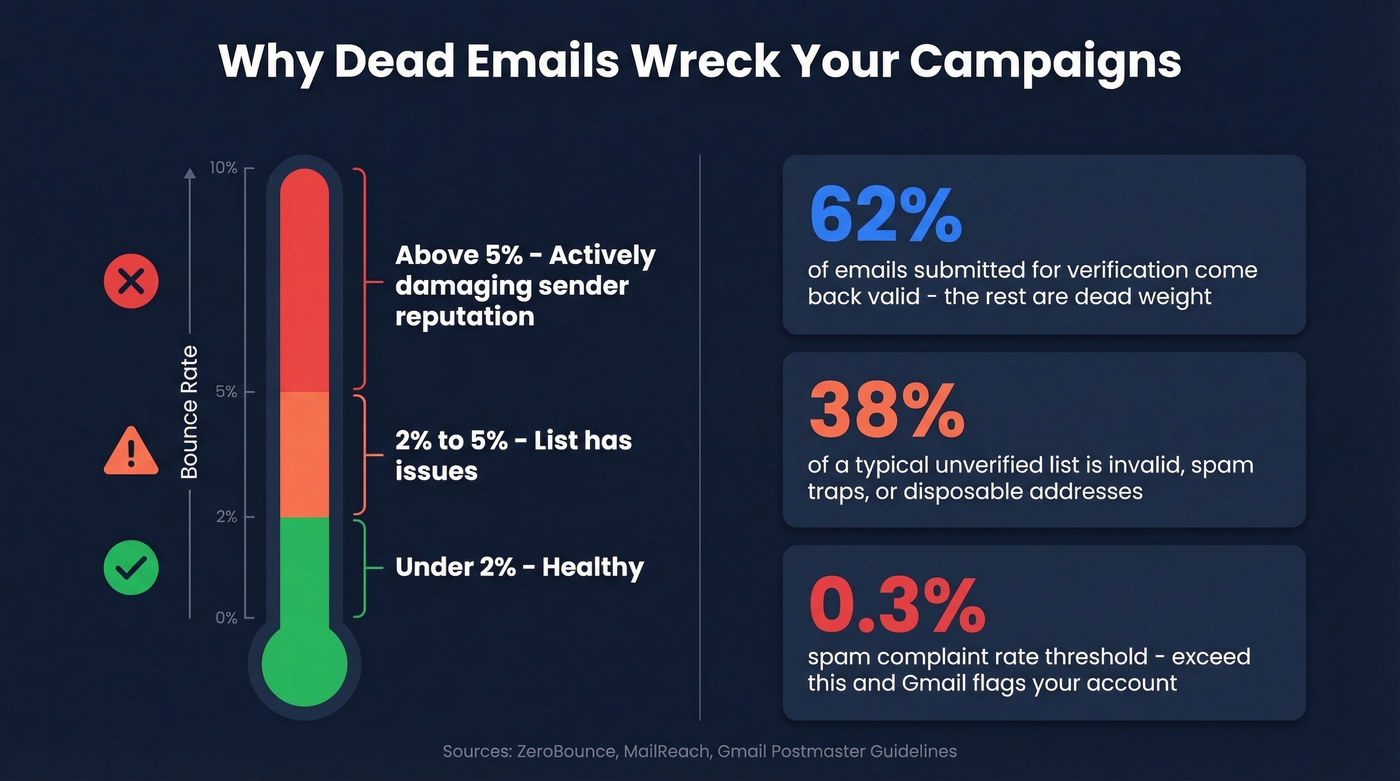
ZeroBounce's dataset found only 62% of emails submitted for verification came back valid. Nearly four in ten addresses on a typical unverified list are dead weight - or worse, spam traps. Global inbox placement averages around 84%, meaning one in six emails never reaches the inbox even when they don't bounce. Gmail flags accounts that exceed a 0.3% spam complaint rate, so even a small number of bounces can cascade into deliverability problems across your entire domain.
If you're running outbound at any scale, list hygiene isn't optional. It's infrastructure.
Three Ways to Verify an Email Address
Send a Test Email? Don't.
The most intuitive approach - just send something and see what happens - is the worst one. Every bounce chips away at your sender score. Hit enough invalid addresses and you'll land on blocklists, where recovery takes 15-45 days of warm-up and reputation repair. About 15% of emails gathered through signup forms contain typos, so you're not just testing bad addresses - you're testing addresses that were never right in the first place. Skip this method entirely.
Check Manually via Command Line
If you're technical and want to find out whether an email exists without any tool, you can do it with a terminal. This is the old-school way to probe a mailbox at a given domain.
Step 1: Find the MX record.
On Windows:
nslookup -type=MX example.com
On macOS/Linux:
dig MX example.com
Step 2: Connect via SMTP and probe.
telnet mail.example.com 25
HELO verify.test
MAIL FROM:<test@yourdomain.com>
RCPT TO:<target@example.com>
Step 3: Read the response code.
A 250 response means the server accepted the recipient - the mailbox likely exists. A 550 means the address is invalid or doesn't exist.
Gmail, Outlook, and Yahoo all block or obfuscate SMTP enumeration, though. You'll get inconclusive results for the majority of addresses you actually care about. This method lets you check if an email exists without sending an actual message, but it only works reliably for smaller or self-hosted mail servers. For any real volume, it's impractical.
Use an Email Verification Tool
This is what most teams actually do, and it's the right call.
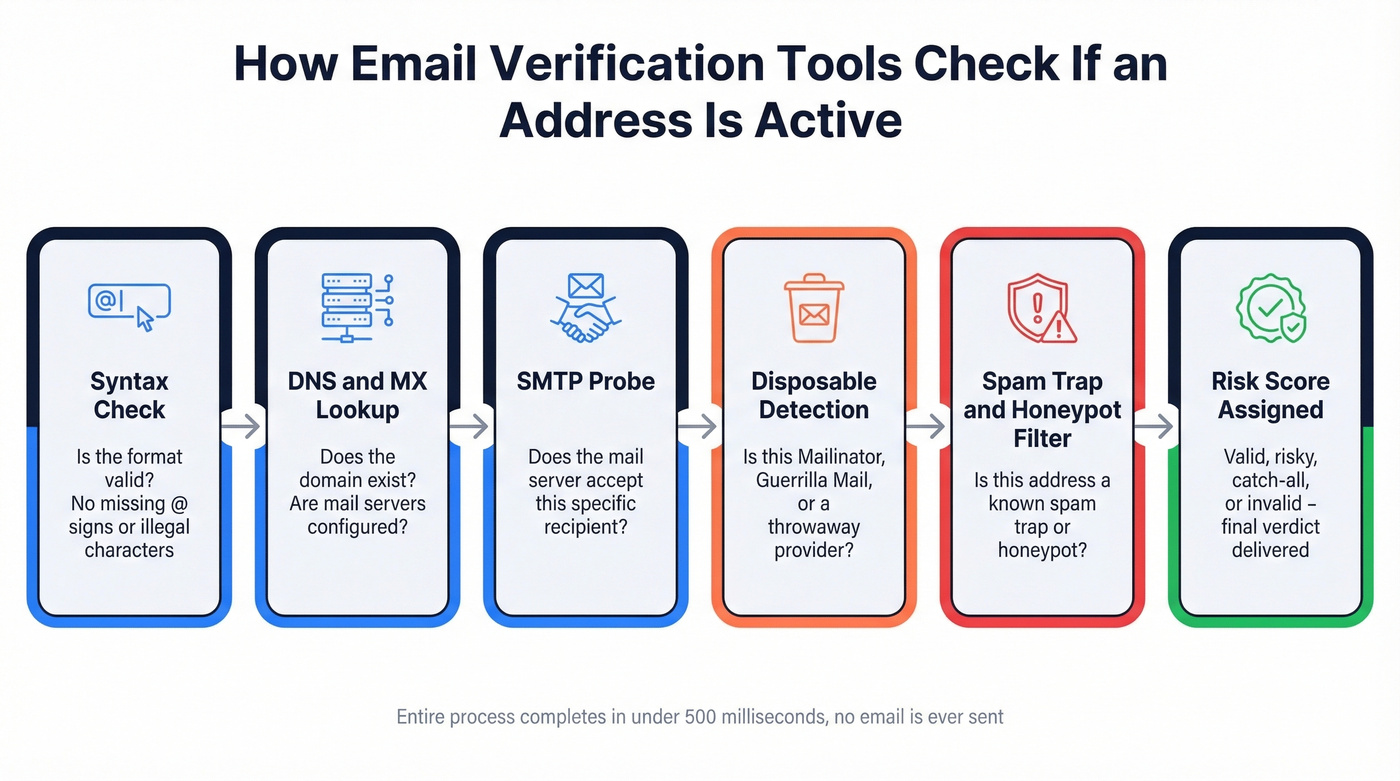
Modern verification tools run a multi-layer pipeline without sending a single email. The core sequence mirrors the manual approach - syntax check, DNS/MX lookup, SMTP probe - but automated. On top of that, they detect disposable email providers like Mailinator and Guerrilla Mail, identify spam traps, flag role-based addresses like info@ and support@, and assign risk scores. Some tools run 30+ discrete checks, and real-time verification commonly completes in under 500 milliseconds.
The practical difference between manual and tool-based verification isn't just speed. It's the additional signals - disposable detection, spam traps, catch-all handling - that you can't replicate with a terminal command.

Why verify after the fact when you can start with clean data? Prospeo's 5-step verification pipeline - including catch-all handling, spam-trap removal, and honeypot filtering - delivers 98% email accuracy across 143M+ verified addresses. Every record refreshes every 7 days, not 6 weeks.
Get emails that are already verified. 75 free checks per month, no card required.
Why Results Aren't Always Clear-Cut
Catch-All Domains and "Unknown" Results
About 30-40% of B2B email addresses sit on catch-all domains. These servers accept mail for any address at the domain, whether the specific mailbox exists or not. ZeroBounce's data found catch-all emails made up over 9% of all addresses checked. When a verification tool hits a catch-all server, it can't confirm whether jane.doe@company.com is a real person or a black hole. The result comes back as "unknown," "accept-all," or "risky."
Enterprise security layers make this worse. Gateways like Proofpoint, Mimecast, and Barracuda often block SMTP probes entirely via greylisting or rate limiting. A perfectly valid mailbox behind one of these gateways can look "unknown" to a verification tool.
Don't delete these results, and don't treat them as verified. Segment them, send a small test batch, monitor bounces, and re-verify periodically.
Why Different Tools Disagree
A user on r/coldemail tested info@lukons.com - a known working address - across multiple tools. Hunter, site24x7, and mails.so all returned "invalid." Verifalia and Clearout returned "valid." The company replied to a test email.
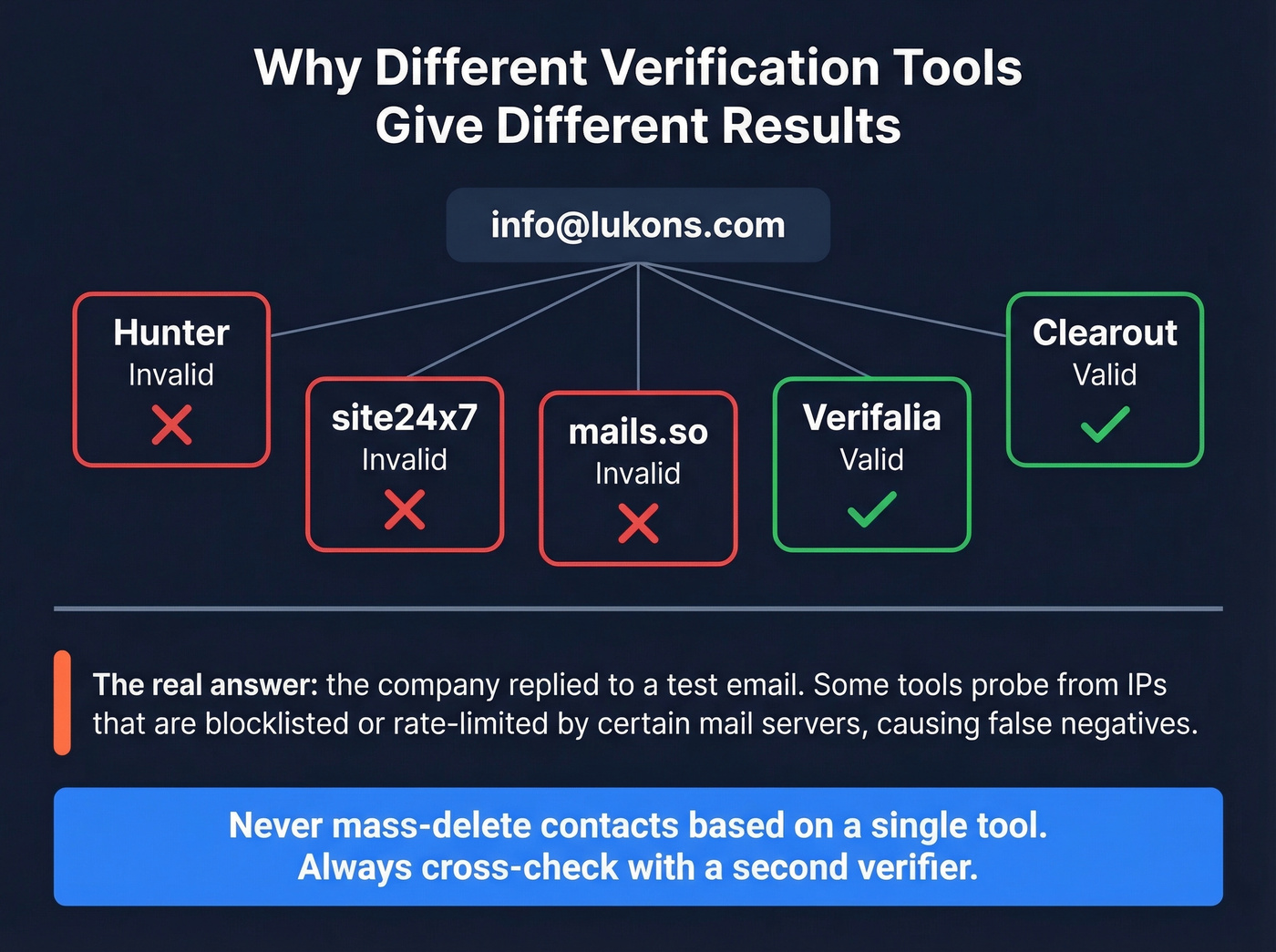
What happened? Some verification services probe from IP addresses that are blocklisted or rate-limited by certain mail servers. The server rejects the probe, and the tool misclassifies the address as invalid. It's not a bug in the tool's logic - it's a consequence of the infrastructure it's running on.
Never mass-delete contacts based on a single tool's verdict. If a batch comes back with a high invalid rate, cross-check a sample with a second verifier before nuking your list. Two data points are always better than one.
How Accurate Are Verification Tools?
A benchmark of 15 verifiers tested against 3,000 real business emails found the top accuracy scores at 70%, 68.37%, and 67.53% for the top three tools. Those numbers include "unknown" and "accept-all" results that drag down the overall score. Accuracy drops further on mid-market and enterprise domains where mail servers are locked down tighter.
Look, no verifier is perfect, and the accuracy gap between the top five tools is smaller than their marketing would have you believe. The real differentiator isn't verification accuracy in isolation - it's data freshness. A tool that was 95% accurate last month is worthless if half those emails have since churned. Stale data is the #1 reason verification results degrade over time. If you're trying to confirm whether an address is still deliverable, the recency of the underlying data matters more than the algorithm.
Best Tools to Check If an Email Is Active
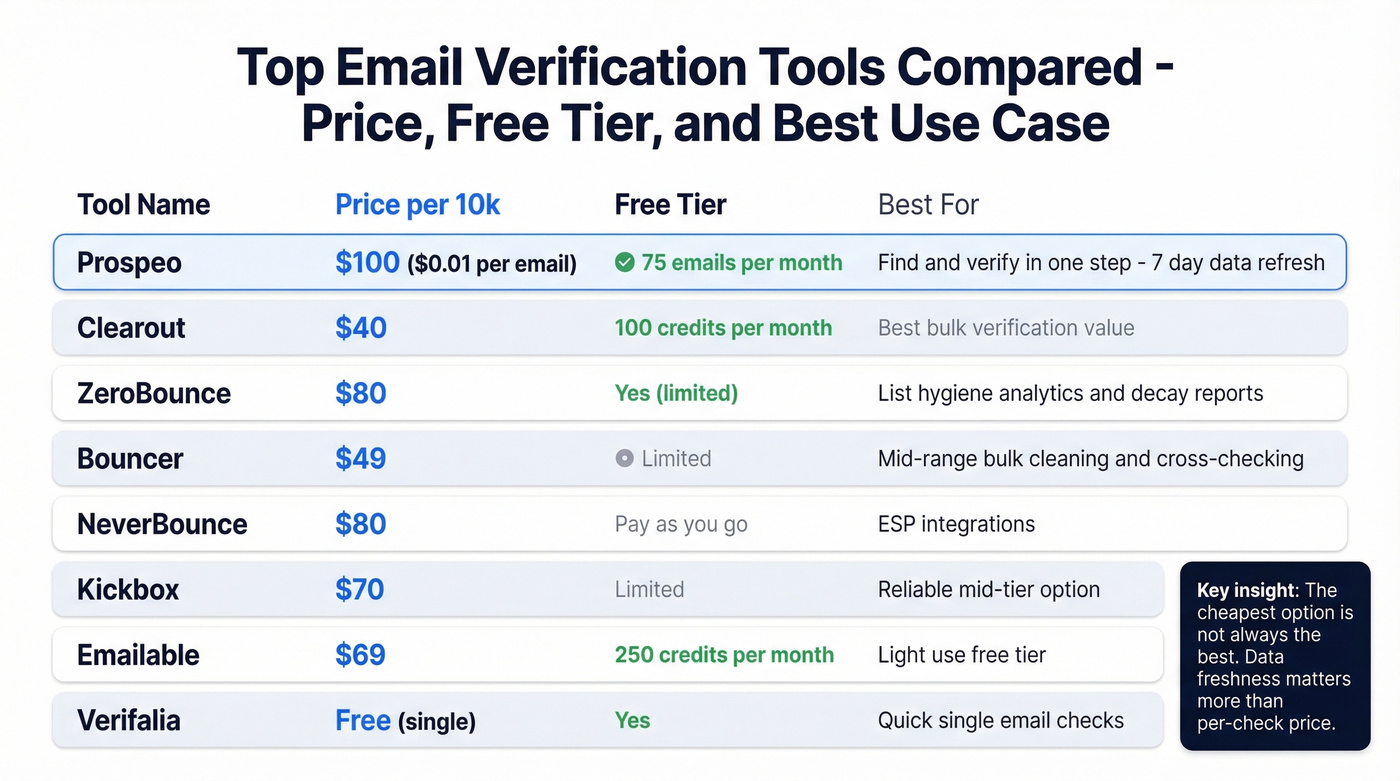
| Tool | Price per 10k | Free Tier | Best For |
|---|---|---|---|
| Prospeo | ~$100 ($0.01/email) | 75 emails/mo | Find + verify in one step |
| Clearout | $40 | 100 credits/mo | Bulk verification value |
| ZeroBounce | $80 | Yes (limited) | List hygiene analytics |
| Bouncer | $49 | Limited | Mid-range bulk cleaning |
| NeverBounce | $80 | Pay-as-you-go | ESP integrations |
| Kickbox | $70 | Limited | Reliable mid-tier |
| Emailable | $69 | 250 credits/mo | Light-use free tier |
| Verifalia | Free (single) | Yes | Quick single checks |
Prospeo
The only tool on this list that finds and verifies emails in one workflow. The Email Finder pulls from 300M+ professional profiles and runs every result through 5-step verification - syntax, domain, SMTP, catch-all detection, and spam-trap removal - delivering only verified addresses at 98% accuracy. You pay $0.01 per email, only for valid results.
The 7-day data refresh cycle is what sets it apart. Most tools verify against a snapshot; Prospeo re-verifies continuously, which directly addresses the freshness problem we talked about above. For teams building prospect lists from scratch, this eliminates the two-tool dance of "find emails in one platform, verify in another." We've seen outbound agencies like Stack Optimize maintain 94%+ deliverability and sub-3% bounce rates across all their clients using this approach - zero domain flags. 75 free emails per month to test it yourself.

Clearout
The best pure-verification value on the market. At $40 per 10,000 emails, it's half the price of ZeroBounce and NeverBounce. The 100 free credits per month make it easy to test. If you already have a list and just need to validate addresses, Clearout is the obvious first stop. The tradeoff: it's verification only. You won't find emails here, just validate ones you already have.
ZeroBounce
Use this if you want list hygiene analytics beyond pass/fail. ZeroBounce's reporting breaks down your list by risk category - spam traps, abuse emails, catch-alls - and their annual decay reports are genuinely useful for understanding how fast your data rots. At $80/10k it's pricier, but the diagnostic layer justifies it for teams managing large, aging databases.
Skip this if you just need a quick bulk clean and don't care about the analytics dashboard.
Bouncer
Solid mid-range option at $49/10k. Nothing flashy, nothing broken. We've seen teams use it as a secondary verifier to cross-check results from their primary tool - at that price point, running a sample through Bouncer as a sanity check is cheap insurance.
NeverBounce
A safe choice if you're already embedded in an ESP ecosystem that has a native NeverBounce integration. It connects with most major ESPs and offers pay-as-you-go pricing with no commitment. The downside: at $80/10k you're paying the same as ZeroBounce without the analytics layer, and there's no email-finding capability.
Kickbox
$70/10k. Reliable results and a clean API, but it scored 67.53% in the 15-tool benchmark and costs nearly double Clearout. Fine if you're already integrated; not worth switching to.
Emailable
Best free tier for light use: 250 credits per month at no cost. If you're verifying a handful of addresses weekly and don't want to pay anything, start here. Paid plans run $69/10k.
Verifalia
Use this for one-off checks through their free web interface. It correctly validated an address that multiple other tools flagged as invalid in the Reddit test mentioned above. Worth bookmarking for quick single-address verification when you need a second opinion.
The article above shows why nearly 4 in 10 unverified emails are dead weight. Prospeo's proprietary email-finding infrastructure doesn't rely on third-party providers - it sources and verifies in one step, so you never ask "is this email active?" after building your list.
Skip the guesswork. Source pre-verified emails at $0.01 each.
Mistakes That Still Get You Bounced
Treating verification as one-and-done. After four weeks, roughly 2% of a verified list will be invalid again. List decay has been consistent for years - 23% annually in recent measurements. Re-verify before every major campaign, or at minimum monthly.
Conflating "valid" with "accept-all." A "valid" result means the server confirmed the mailbox. An "accept-all" means the server accepts everything - that's not confirmation. Treat these differently in your sending logic.
Verifying after bounces happen. By the time you see bounce notifications, the reputation damage is done. Verify before you send. The entire point is confirming deliverability ahead of time.
Thinking verification replaces warm-up. Clean lists and warm sender reputation are separate problems. You need both. I've watched teams with perfectly clean lists still land in spam because they skipped warm-up on a new domain.
FAQ
Can you check if an email is active without sending a message?
Yes. Verification tools check syntax, DNS/MX records, and probe the mail server via SMTP without delivering an actual email. The process takes milliseconds and doesn't touch the recipient's inbox.
How do you tell if an email address is active?
Run it through a verification tool that checks MX records and performs an SMTP handshake. A "valid" result means the mail server confirmed the mailbox exists. For catch-all domains, the result will be inconclusive - segment those contacts and test carefully with small batches.
Why do different verification tools give different results?
Tools probe from different IP addresses and use different algorithms for interpreting server responses. If a tool's IP is blocklisted by a particular mail server, it'll misclassify a valid address as invalid. Always cross-check suspicious results with a second verifier - Clearout plus Verifalia is a reliable free combo for this.
What does "catch-all" mean in verification results?
The domain's mail server accepts messages for any address, so the tool can't confirm whether a specific mailbox actually exists. About 30-40% of B2B domains are configured this way. Prospeo's 5-step verification includes catch-all detection and flags these separately so you can segment them rather than blindly sending.
How often should I re-verify my email list?
Before every major campaign, or at minimum every 30 days. Email lists decay at roughly 2% per month - that compounds to 23% per year. Re-verify regularly rather than assume a past result still holds.