

How to Verify an Email Address: 5 Methods, Real Accuracy Data, and Tools Worth Using
You sent 5,000 cold emails last Tuesday. Bounce rate came back at 8%. Your ESP flagged the account, your domain reputation took a hit, and three days of pipeline work evaporated. That scenario plays out constantly - and it's almost entirely preventable if you verify email addresses before hitting send.
With email marketing ROI benchmarks often cited around $39 for every dollar spent, protecting that channel from bounce-rate damage isn't optional. Here's exactly what happens under the hood when you verify an address, which methods actually work, and which tools are worth your money in 2026.
What Is Email Verification?
Most people use "verification" and "validation" interchangeably. They're not the same thing.
Email validation is a surface-level check - does the address have an @ symbol, a real domain, no illegal characters? It catches typos and formatting errors. Email verification goes deeper: it confirms the mailbox actually exists and can receive mail, typically by querying the mail server directly.
Think of validation as checking that a street address is formatted correctly. Verification is driving to the house and confirming someone lives there. You need both, but verification is what actually prevents bounces.
The uncomfortable baseline: roughly 1 in 5 email addresses are invalid at any given time, based on an analysis of nearly a billion addresses across 23 industries. If you're not verifying, you're gambling with a 20% failure rate before you send a single message.
Why Verification Matters in 2026
Email lists decay at 22-28% per year - roughly 2% per month. People change jobs, companies rebrand domains, inboxes get deactivated. A list that was clean in January is noticeably degraded by April.
The consequences are immediate. ISPs and ESPs watch your bounce rate closely, and the industry benchmark is to keep total bounces below 2% with hard bounces under 1%. Go above that and you're looking at throttled sending, spam folder placement, or outright suspension. Google and Yahoo bulk-sender standards also require SPF/DKIM/DMARC authentication, one-click unsubscribe, and spam complaint rates below 0.3%.
Here's a real example: one sales team saw bounce rates drop from 35% to under 4% after switching to pre-verified data, and their pipeline tripled in the same period. That's not a coincidence. Bad data doesn't just waste sends; it actively destroys the infrastructure you need to generate pipeline.

Bounce rates vary by industry, which is useful for benchmarking where you stand:
| Industry | Avg. Bounce Rate |
|---|---|
| Ecommerce | 0.19% |
| IT / Software | 0.90% |
| Financial Services | 1.20% |
| Government | 1.30% |
| Construction / Mfg | 2.20% |
If you're in tech or financial services and seeing bounce rates above 2%, your list hygiene is the problem. Not your copy, not your subject lines - your data.
5 Methods to Verify an Email Address
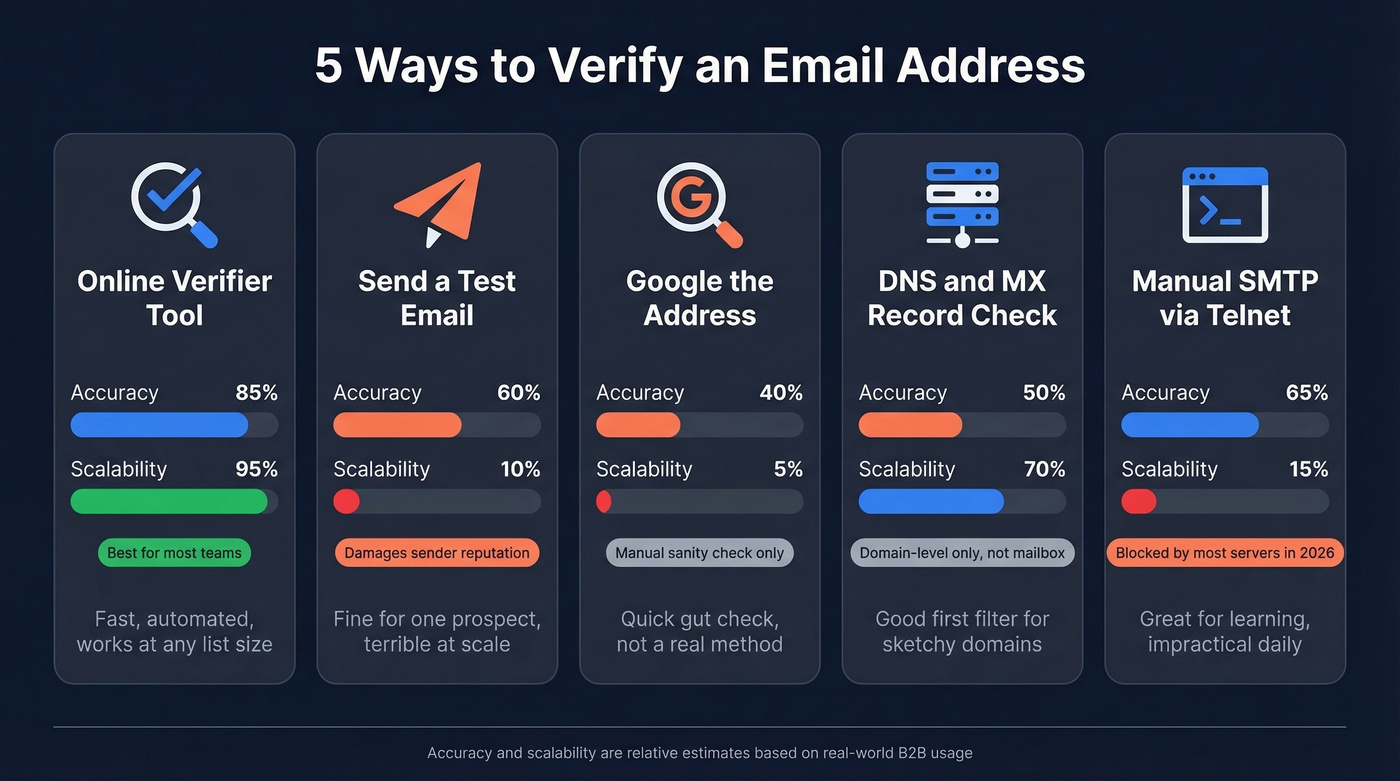
1. Use a Free Online Verifier
The fastest method. Paste an email address into a tool like ZeroBounce, Hunter, or Verifalia, and you'll get a result in seconds. The tool checks syntax, queries DNS records, and probes the mail server to determine if the mailbox exists.
Results typically fall into four categories: valid (safe to send), invalid (mailbox doesn't exist), risky/unknown (can't confirm - often catch-all domains), and disposable (temporary inbox). Valid and invalid are straightforward. The risky/unknown bucket is where things get complicated - more on that in the catch-all section below.
2. Send a Test Email
You can always just... send an email and see what happens. If it bounces, you have your answer.
This is terrible at scale. Every bounce damages your sender reputation. And even if the email doesn't bounce, you haven't confirmed anyone's monitoring that inbox - it could be abandoned. For a one-off check on a high-value prospect, fine. For anything beyond that, use a real tool.
3. Google the Address
Search the address in quotes. If it appears on a company website, a conference speaker page, or a public directory, that's a signal it's real and active. Quick sanity check for important contacts, not a scalable method.
4. Check DNS and MX Records
This confirms whether a domain can receive email at all. Open your terminal and run:
nslookup
set type=mx
example.com.
If MX records come back, the domain has a mail server configured. If nothing returns, that domain can't receive email - period. This tells you about the domain, not the specific mailbox, but it's a useful first filter for unfamiliar or suspicious domains.
5. Manual SMTP Verification via Telnet
This is the technical deep-dive. You're doing what verification tools do - connecting directly to the mail server and asking if a mailbox exists.
First, install Telnet if you don't have it:
- Windows:
dism /online /Enable-Feature /FeatureName:TelnetClient - Mac:
brew install telnet - Linux:
sudo apt install telnet
Then connect to the mail server and run the SMTP dialogue:
OPEN mail.example.com 25
EHLO yourdomain.com
MAIL FROM:<test@yourdomain.com>
RCPT TO:<target@example.com>
A 250 OK response to RCPT TO means the server accepted the recipient. A 550 rejection means it didn't. Simple in theory.
In practice, this barely works anymore. Gmail, Outlook, and most enterprise mail servers block or rate-limit these probes. We've walked teams through this exercise to help them understand what verification tools actually do under the hood - it's great for learning, but impractical for daily use.
What Happens Inside a Verification Tool
When you upload a list to a verification service, your emails run through this pipeline:
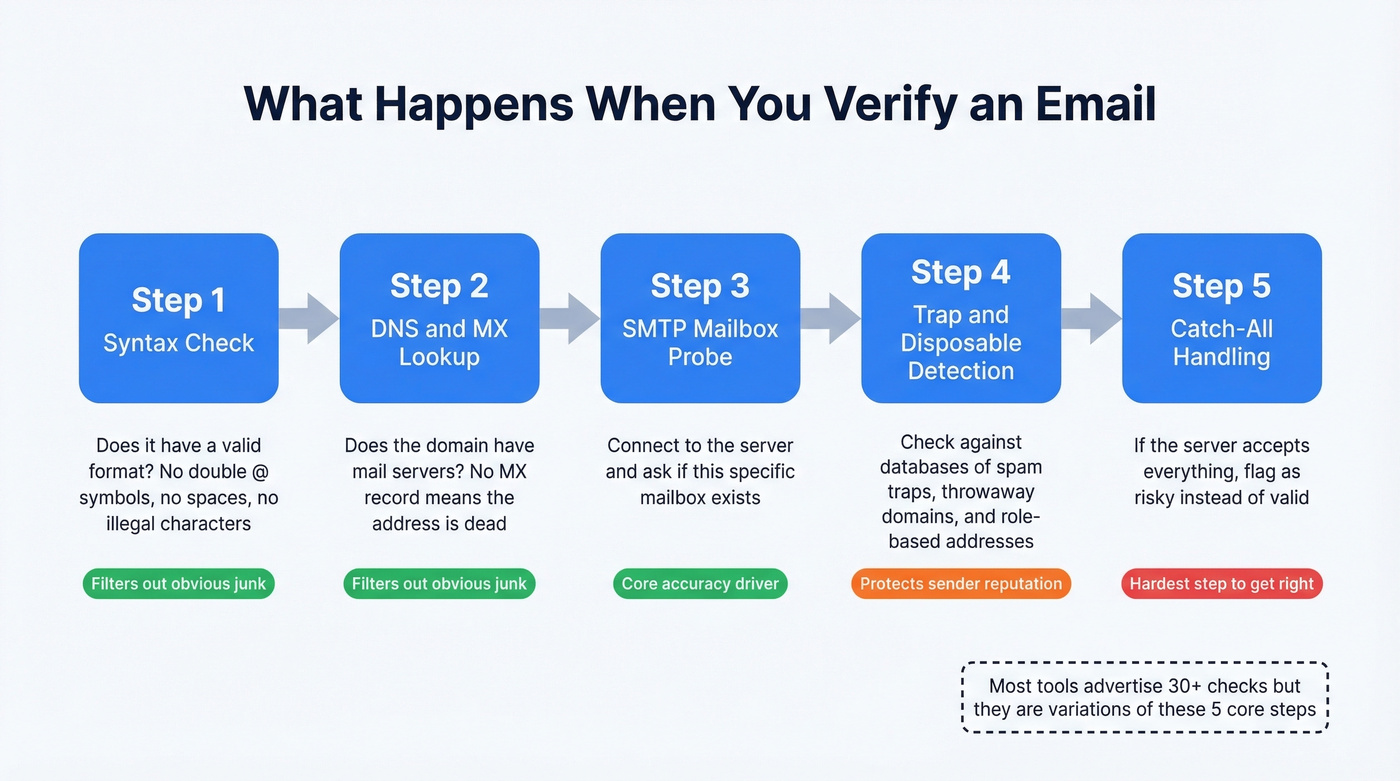
Step 1: Syntax check. Does the address follow valid formatting rules? No double @ symbols, no spaces, no illegal characters.
Step 2: DNS and MX record lookup. Does the domain have mail servers configured? No MX record means the address is dead regardless of what comes after the @.
Step 3: SMTP mailbox probe. The tool connects to the mail server and asks if the specific mailbox exists, using the same RCPT TO command from the Telnet method - just automated and distributed across multiple IPs.
Step 4: Disposable, role-based, and spam-trap detection. The tool checks against databases of known throwaway domains (Mailinator, Guerrilla Mail), role-based addresses (info@, support@), and known spam traps.
Step 5: Catch-all domain handling. If the server accepts all addresses regardless, the tool flags it as catch-all/risky rather than valid. This is the hardest step to get right.
Most tools advertise "30+ checks," but they're variations of these five core steps. The real differentiator is how well a tool handles steps 4 and 5.

You just read about the 5-step verification pipeline. Prospeo runs exactly that - syntax checks, MX lookups, SMTP probes, spam-trap removal, and catch-all handling - on every single record, refreshed every 7 days. The result: 98% email accuracy across 143M+ verified addresses. One team dropped their bounce rate from 35% to under 4% and tripled their pipeline.
Get pre-verified emails at $0.01 each. No bounces, no guesswork.
The Catch-All Problem
This is the single biggest headache in email verification, and most guides gloss over it.
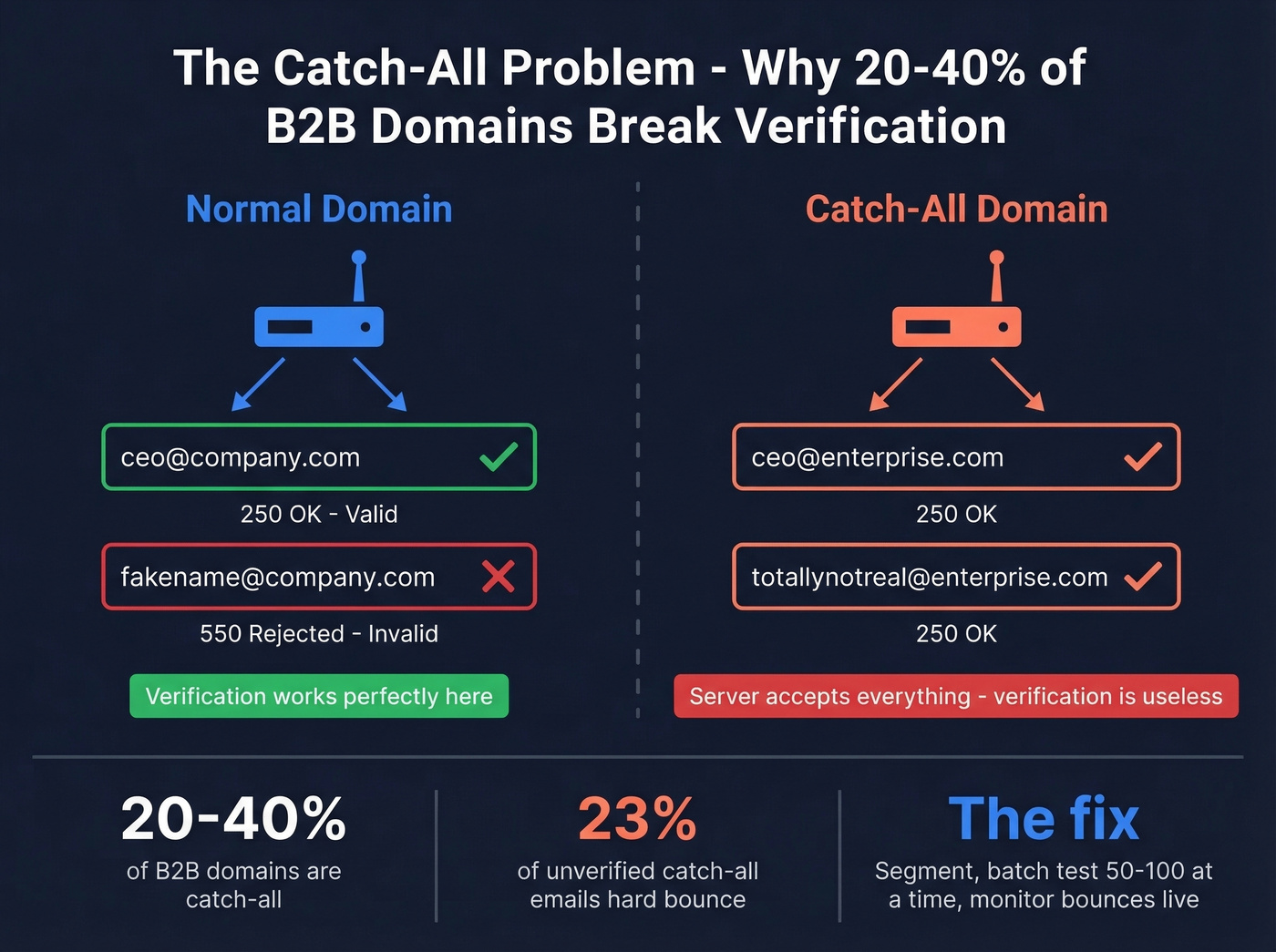
A catch-all domain is configured to accept mail sent to any address - real or fake. Send an email to totallynotreal@catchalldomain.com and the server returns 250 OK just like it would for the CEO's actual inbox. This makes SMTP verification useless for these domains.
Somewhere between 20-40% of B2B domains use catch-all configurations. Enterprise companies are especially likely to run them. The risk is real: 23% of unverified catch-all emails hard bounce when you actually send to them. This is a constant debate in cold email communities - practitioners on r/coldemail regularly see "unknown" rates of 20%+ on enterprise-heavy lists, which makes the problem impossible to ignore.
Enterprise security gateways - Proofpoint, Mimecast, Barracuda, Microsoft Defender - actively block verification probes through greylisting and rate limiting. So even valid mailboxes behind these gateways come back as "unknown."
The handling strategies are straightforward but tedious: segment catch-all results into a separate list, test in small batches of 50-100, monitor bounce rates in real time, and use activity scoring to prioritize addresses that show engagement signals.
The structural fix is to start with verified data in the first place. Integrated verification - where finding and verifying happen in one step - outperforms standalone cleaning on both cost and workflow efficiency.
The Truth About Accuracy
Let's be honest: the marketing claims fall apart under scrutiny.
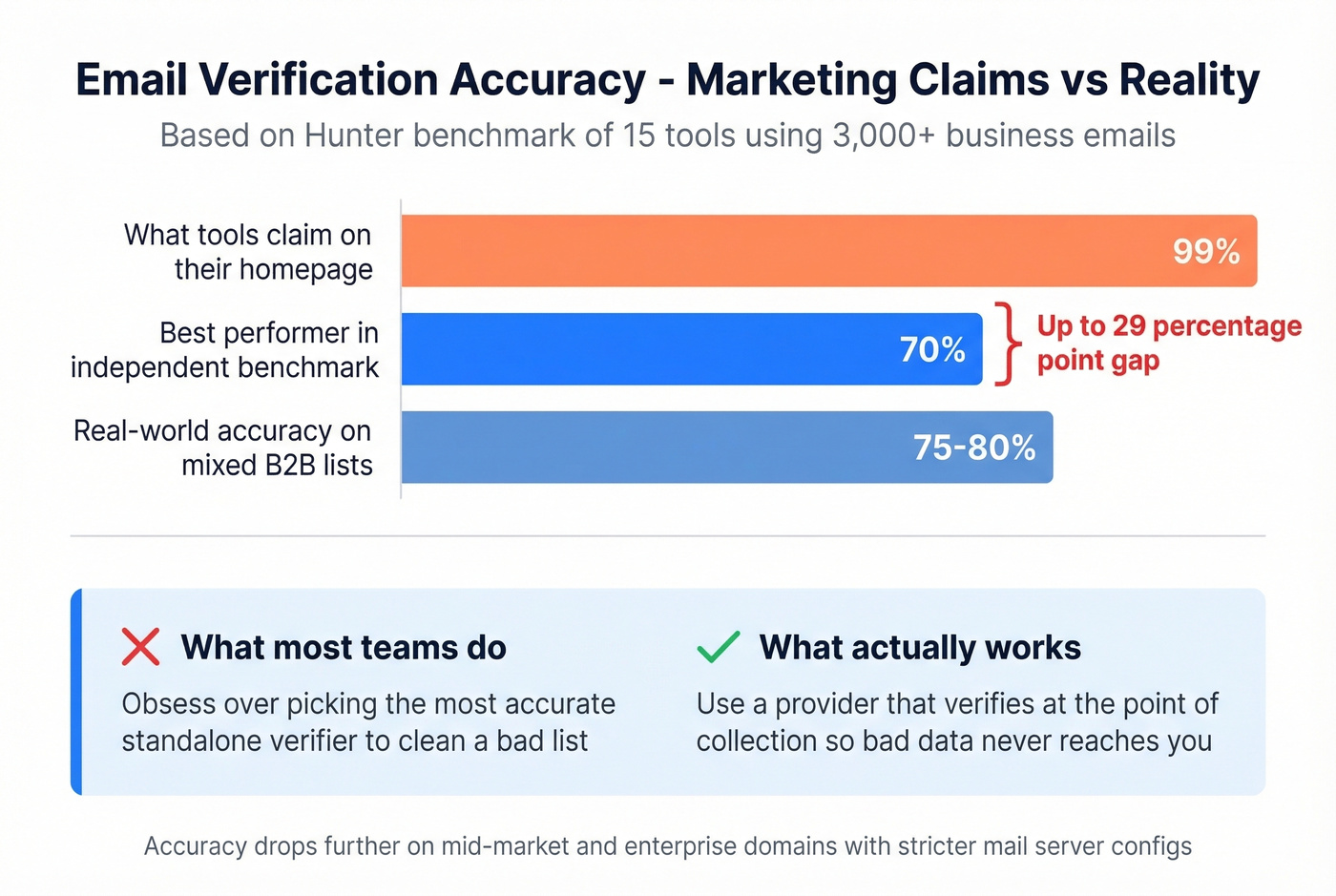
Hunter published a benchmark of 15 email verification tools using over 3,000 business emails (including 300 known invalids) segmented by company size. The best performer hit 70% accuracy. Not 99%. Not 95%. Seventy percent.
Accuracy dropped further on mid-market and enterprise domains with stricter mail server configurations - exactly the domains you care about most if you're selling B2B. Hunter disclosed that their dataset came from their own email activity patterns, which may have given them an edge, but the broader point stands: when a tool claims "99% accuracy," that number was almost certainly measured under ideal conditions on cooperative mail servers. We've seen real-world accuracy on mixed B2B lists land closer to 75-80%, still well below what most tools advertise.
Here's the thing: most teams obsess over picking the "most accurate" standalone verifier when the real gain is in the data source. A 99%-accurate verifier cleaning a garbage list still gives you garbage. A provider that verifies at the point of collection - before the data ever reaches you - eliminates the problem upstream. That's where the industry is heading, and the teams already there are outperforming everyone else.
Don't pick a verification tool based on the accuracy number on their homepage. Pick it based on how it handles the hard cases: catch-all domains, enterprise gateways, and role-based addresses.
7 Verification Mistakes to Avoid
- Verifying once and forgetting. Lists decay 22-28% per year. Verify quarterly at minimum, and always re-verify before any major campaign - even a list cleaned last month can have enough decay to push you over the 2% bounce threshold on a large send.
- Relying only on syntax checks. A perfectly formatted address can still be a dead mailbox. Syntax validation is step one, not the finish line.
- Ignoring role-based addresses. Sending to info@, support@, or sales@ carries high bounce risk and low conversion. Filter them out.
- Skipping real-time validation at signup forms. If you're collecting emails through web forms, validate at the point of capture. Cleaning later costs more and catches less.
- Not using double opt-in for marketing lists. It's the single best way to ensure the person behind the address actually wants your emails.
- Ignoring spam traps and honeypots. These are addresses planted specifically to catch senders with poor list hygiene. Hit one and your domain reputation can take a serious hit. (If you need a remediation plan, see spam traps and honeypots.)
- Treating all "valid" results equally. A valid result from a cooperative mail server is far more reliable than one from a catch-all domain. Segment accordingly.
Best Verification Tools Compared
| Tool | Accuracy | Free Tier | Price / 10K | Best For |
|---|---|---|---|---|
| Prospeo | 98% | 75/mo | ~$100 | Find + verify in one step |
| Bouncer | 99%+ | 100 | $45 | Standalone bulk cleaning |
| ZeroBounce | 99% | 100/mo | $64 | Integrations + workflows |
| Hunter | N/A | 100/mo | $149 | Hunter ecosystem users |
| NeverBounce | 97% | 10 | $50 | Reliable mid-volume |
| Emailable | 99%+ | 250 | $50 | Speed-critical bulk jobs |
| MillionVerifier | - | - | ~$37 | Budget high-volume |
| DeBounce | - | - | ~$15-20 | Cheapest per email |
| EmailListVerify | 97% | 100 | $24 | Budget + integrations |

Prospeo
Instead of buying a list and cleaning it separately, Prospeo finds and verifies in one step. The Email Finder searches 300M+ professional profiles, draws from 143M+ verified emails at 98% accuracy, and runs every result through a 5-step pipeline including catch-all handling and spam-trap removal. Data refreshes every 7 days - faster than the 6-week industry average. You pay only for valid results at roughly $0.01 per email, and the free tier gives you 75 emails per month. Native integrations push directly to Salesforce, HubSpot, Smartlead, Instantly, Lemlist, Clay, Zapier, and Make. If you're comparing broader options, start with email search tools and email list providers.
Bouncer
Use this if you already have lists and need a reliable standalone cleaner. Bouncer carries a 4.9 on Capterra (233 reviews) and 4.8 on G2 (232 reviews) - among the highest ratings in the category. At $45 per 10K verifications with 180K emails/hour throughput, it handles bulk jobs efficiently. If you want more options in this category, see Bouncer alternatives.
Skip this if you need a tool that also finds emails. Bouncer is verification-only.
ZeroBounce
ZeroBounce's strength is its integration ecosystem - 60+ integrations across common marketing and CRM platforms. At $64 per 10K it's pricier than Bouncer, but the breadth of integrations can justify the premium for teams that will actually use them.
Hunter
Hunter published the most transparent verification benchmark in the space, which earns them credibility. But at $149 per 10K verifications, they're the most expensive tool on this list by a wide margin. If you're already paying for Hunter's email finder and outreach tools, the verification is a natural add-on. Otherwise, you're overpaying. If you're evaluating similar tools, check Hunter alternatives.
NeverBounce vs. Emailable
These two occupy the same tier at $50 per 10K. NeverBounce covers the basics without standout features - a solid default for teams that need reliable bulk verification without a strong opinion on tooling. Emailable is the speed champion at 2M emails per hour, making it the clear pick if you're cleaning massive lists on tight deadlines. Emailable also offers the most generous free tier in the category at 250 verifications.
Budget Picks
MillionVerifier runs about $3.70 per 1K - the budget king for high-volume cleaning. DeBounce is even cheaper at $1.50-$2 per 1K when cost is the primary constraint. EmailListVerify splits the difference at $24 per 10K with 11 integrations and 100 free verifications. Any of these three will get the job done if you're optimizing for cost over features.
Manual SMTP checks, DNS lookups, Googling addresses - none of it scales. Prospeo's proprietary email-finding infrastructure verifies 300M+ profiles through 5 layers of validation, catches spam traps and honeypots, and handles catch-all domains automatically. Your lists stay clean without the busywork.
Replace your entire verification workflow with one platform that actually works.
FAQ
How can I verify an email address for free?
Paste the address into a free verifier like Hunter (100/month), ZeroBounce (100/month), or Prospeo (75/month with full enrichment). These tools check syntax, DNS records, and SMTP responses to confirm whether the mailbox exists. For single addresses, any free tier works.
How often should I re-verify my email list?
Quarterly at minimum. Email lists decay at 22-28% per year - roughly 2% per month. Always re-verify before any major campaign, even if you cleaned the list recently. A list that was clean 90 days ago can have enough dead addresses to push you past the 2% bounce threshold on a large send.
Why does my verifier return "unknown" for some emails?
Usually because the domain is catch-all (accepts mail for any address) or uses an enterprise security gateway that blocks verification probes. Segment these contacts into a separate list and test in small batches of 50-100 before sending at scale. Monitor bounce rates in real time and pull back immediately if they spike.
What's the difference between email verification and validation?
Validation checks formatting - does the address have an @ symbol, a real domain, no illegal characters. Verification confirms the mailbox actually exists and can receive mail by querying the mail server directly. You need both, but verification is what prevents bounces. Most tools run both checks automatically.