

HubSpot vs Keap: Which CRM Actually Fits Your Business?
The HubSpot vs Keap decision is simpler than most comparison pages make it: HubSpot is built to scale, and Keap is built to run a small service business end-to-end. Pick based on sticker price alone and you'll hate your choice six months from now.
The 30-second verdict:
- Pick HubSpot if you want a free starting point, serious reporting, and a platform that can grow to 50+ users without a rebuild.
- Pick Keap if you're a solo operator or small service business that wants CRM + email marketing + SMS + invoicing/payments in one place.
- Skip both if you already have a CRM and your real problem is filling it with verified contacts - a data layer like Prospeo handles that for about $0.01 per verified email.
Pricing Side-by-Side
This is where the conversation gets interesting - and where vendor marketing gets creative.
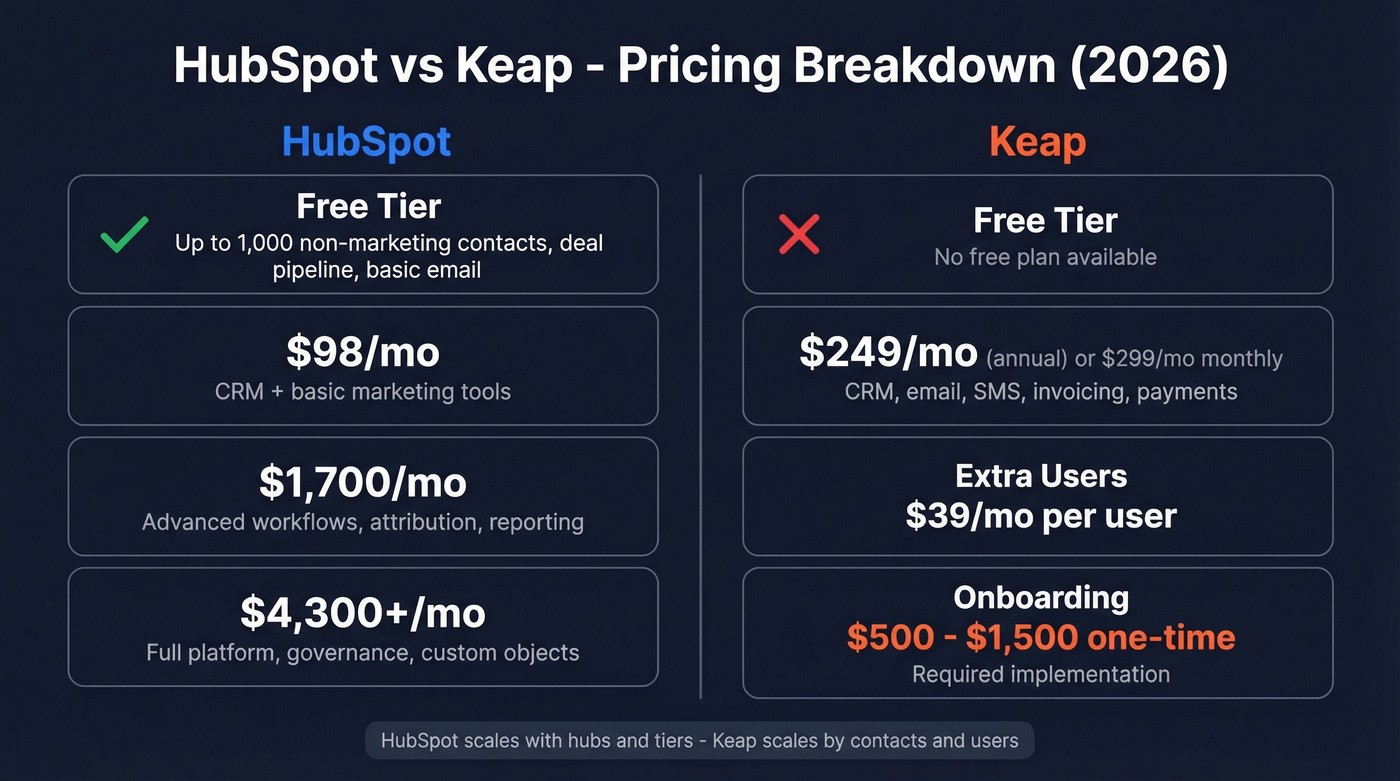
| HubSpot | Keap | |
|---|---|---|
| Free tier | Yes (up to 1,000 non-marketing contacts) | No |
| Entry paid | $98/mo Starter Bundle | $249/mo (annual) or $299/mo (monthly) |
| Includes | CRM + basic marketing tools | CRM, email, SMS, invoicing, payments |
| Mid-tier | ~$1,700/mo (Professional) | One plan, scales by contacts and users |
| Enterprise | ~$4,300+/mo | N/A |
| Extra users | Varies by hub/tier | $39/mo per user |
| Onboarding | Often DIY on Starter | Required implementation; packages commonly run $500-$1,500 one-time |
Keap's comparison page leans hard on HubSpot's "18X price jump" from a $98/mo Starter Bundle to roughly $1,700/mo for Professional. That's technically true. It's also intellectually dishonest - you're comparing a basic bundle to a tier that adds advanced workflows, attribution, and reporting that Keap doesn't match at any price.
The real HubSpot pricing trap is complexity. Between marketing vs. non-marketing contacts, seat types, and hub bundles, you can spend more time modeling costs than building your sales pipeline. We've seen plenty of threads on r/CRM where people describe HubSpot pricing as "rocket science-level complicated," and that tracks once you get past the free tier.
Keap is simpler: you pay real money from day one, and you also pay to get set up.
The "hidden cost" math
Here's the quick calculator most comparison pages skip:
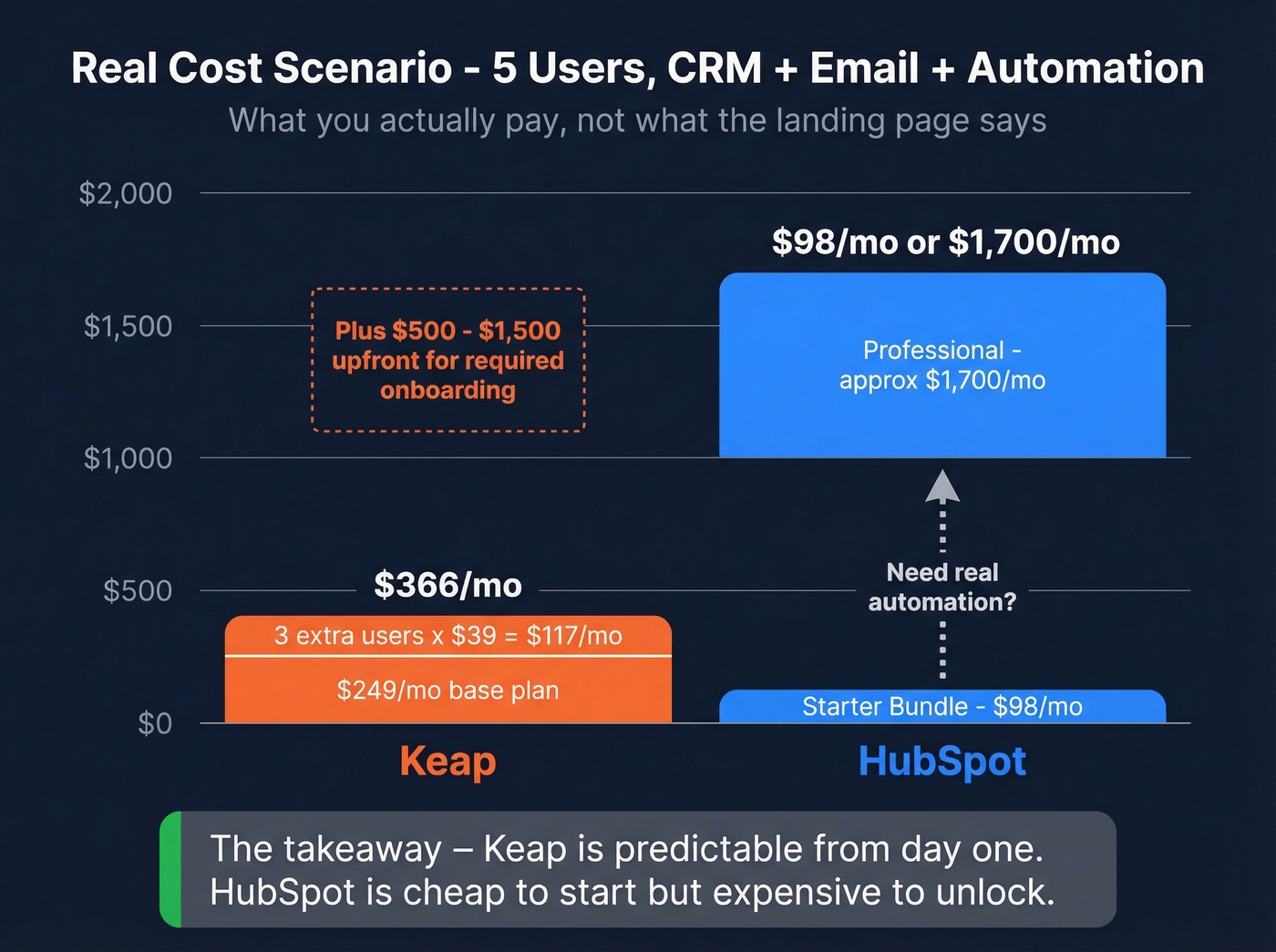
- Scenario: 5 users, you want CRM + email marketing + automation.
- Keap: $249/mo (annual) + 3 extra users x $39/mo = $366/mo, plus $500-$1,500 implementation upfront.
- HubSpot: $98/mo gets you in the door, but the moment you need the deeper automation and reporting that teams actually use, you're staring at ~$1,700/mo.
That's the whole game. Keap is predictable; HubSpot is modular. If you'll stay small, Keap's bundling is a bargain. If you'll grow, HubSpot's ceiling is the reason you buy it.
Automation & Workflows
Keap's automation builder is the best part of the product. The drag-and-drop canvas makes it straightforward to build real service-business flows - lead capture to follow-up to booked call to invoice to payment to review request - without duct-taping five tools together. Keap has also been pushing toward AI agents for lead qualification and send-time optimization based on engagement patterns, which is exactly where SMB automation should go.
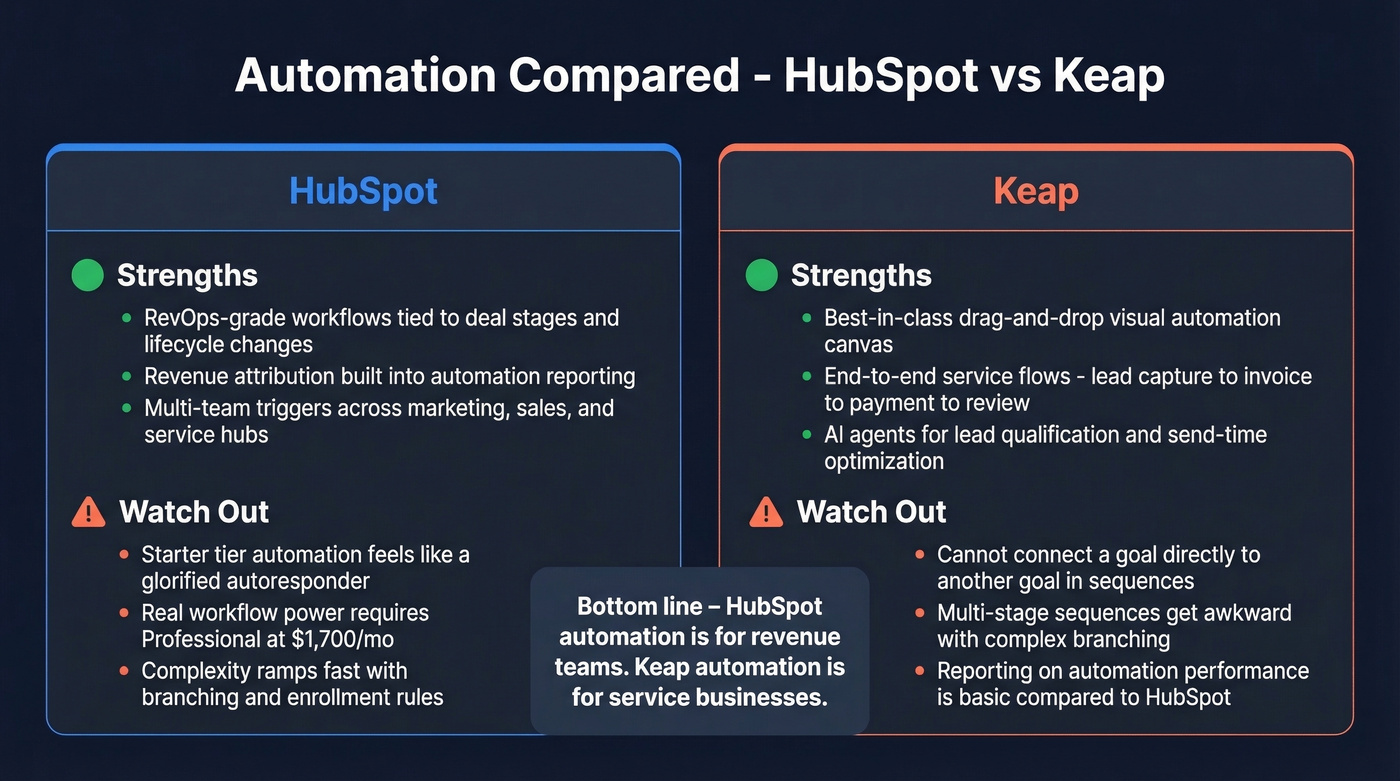
HubSpot's automation is less "small business clever" and more "RevOps serious." When you're triggering workflows off deal stages, company properties, and lifecycle changes - and you want reporting that ties those workflows back to revenue - HubSpot pulls away hard.
Two blunt truths:
- HubSpot Starter automation feels cramped. The workflow limits make it closer to an autoresponder than a real automation engine. If you're buying HubSpot for automation, you're really buying Professional, and that's a different budget conversation.
- Keap can get weird when you push complexity. The automation builder has a known limitation: you can't connect a goal directly to another goal, which makes multi-stage sequences more awkward than they should be.
Features & Ecosystem
If you care about integrations, HubSpot wins by a mile. The App Marketplace is enormous, and the ecosystem is built for multi-team scale: governance, permissions, lifecycle reporting, and clean handoffs between marketing automation and sales.
Keap's ecosystem is smaller but practical. It covers the basics (Google Workspace, Microsoft 365, Zoom) and leans on Zapier when you need to connect the rest of your stack.
Where Keap punches back is bundling: invoicing, payments, and SMS are core to the product. HubSpot can do a lot, but you'll often add paid add-ons or third-party tools to match what Keap includes out of the box. For a five-person landscaping company or a coaching practice that needs to book calls and collect payment in the same flow, that bundling saves real time and money.
HubSpot's free CRM is also a legitimate starting point, not a toy. You can run contact management, a deal pipeline, forms, and basic email marketing without paying on day one. Keap doesn't play that game.
Helpful links for sanity-checking details:
- HubSpot pricing
- HubSpot Marketing Hub on G2
- Keap vs HubSpot comparison

HubSpot or Keap - neither CRM generates leads for you. Prospeo fills either one with 98% accurate emails at $0.01 each. 300M+ profiles, 30+ filters, and native HubSpot integration mean your pipeline stays full no matter which CRM you pick.
Stop debating CRMs. Start filling the one you have.
Ratings & User Sentiment
| Platform | Rating | Reviews | Source |
|---|---|---|---|
| HubSpot Marketing Hub | 4.4/5 | 14,556 | G2 |
| Keap | 4.1/5 | 1,297 | SoftwareAdvice |
| Keap (By Thryv) | 3.8/5 | 13 | G2 |
The 13-review G2 listing for "Keap (By Thryv)" is too small to treat as meaningful data; it's what happens when branding and listings split review volume. The larger SoftwareAdvice dataset is the better signal.
What people consistently say:
- HubSpot: loved for integrations and breadth, resented for pricing complexity and the "now you have to upgrade" moment.
- Keap: loved for automation and all-in-one service-business workflows, criticized for cost and the learning curve.
Here's the thing - once you're tracking lead sources and trying to keep attribution clean, Keap can feel clunky compared to HubSpot's reporting model. We've noticed this especially when teams try to juggle marketing automation and sales pipeline reporting in the same view. If attribution matters to your business, that's a real factor.
Who Should Pick What
Pick HubSpot if you:
- Want a CRM that can grow from 5 users to 50+ without switching systems
- Need strong reporting, lifecycle tracking, and revenue attribution
- Expect multiple teams (marketing + sales + service) to live in the same platform
- Care more about ecosystem depth than bundled invoicing
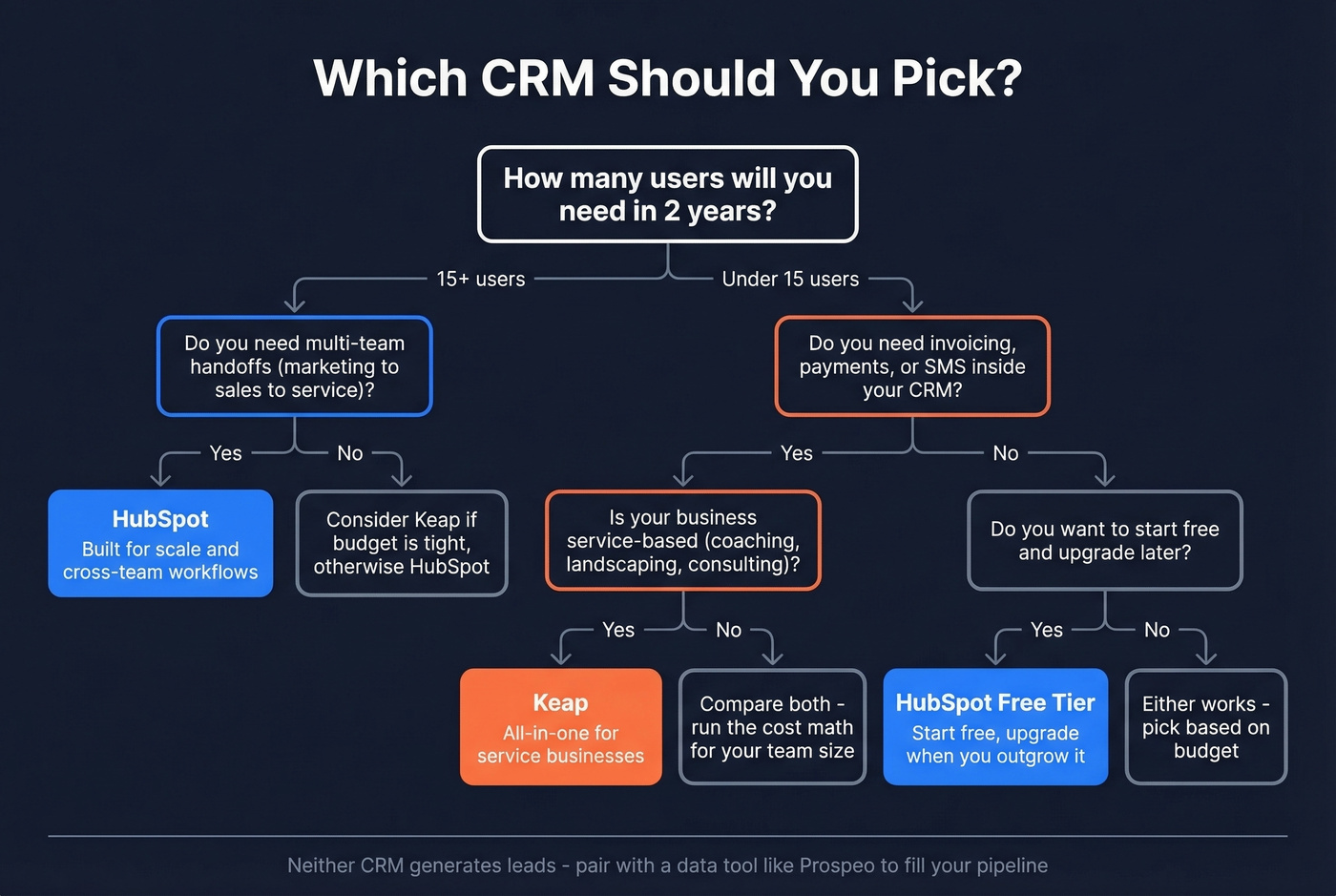
Pick Keap if you:
- Run a service business and want invoicing + payments inside your CRM
- Rely on SMS follow-ups and appointment-driven workflows
- Prefer one predictable plan over a menu of hubs, seats, and contact types
- Plan to stay under roughly 10-15 users
Skip Keap if you're a B2B SaaS company with a complex sales cycle and multiple handoff points between marketing and sales. It wasn't built for that, and you'll fight the tool constantly.
Let's be honest: if your average deal size is under five figures or you're not running a real marketing automation program, HubSpot Professional is overkill. You'll pay for power you won't use. Keap is the better "get paid and follow up" machine for most small service teams.
One Thing Neither CRM Gives You
Whether you choose HubSpot or Keap, both ship as empty databases. Your workflows can be perfect and still produce nothing if you don't have verified emails and phone numbers entering the system.
That's the layer Prospeo fills: 300M+ professional profiles, 143M+ verified emails, and 125M+ verified mobile numbers with 98% email accuracy and a 7-day refresh cycle. It also enriches CRMs and CSVs with 50+ data points per contact and returns matches for 83% of leads. One of our customers, Snyk, went from a 35-40% bounce rate to under 5% after switching their data source - and their AE-sourced pipeline jumped 180%. If you're serious about outbound, good data is the difference between "we bought a CRM" and "we booked meetings."

Paying $249/mo for Keap or $1,700/mo for HubSpot Pro means nothing if your contact data bounces. Prospeo's 7-day refresh cycle and 5-step verification keep your CRM clean - with 83% enrichment match rates and 50+ data points per contact.
Your CRM costs enough. Don't waste it on bad data.
FAQ
Is Keap the same as Infusionsoft?
Yes. Keap rebranded from Infusionsoft in 2019. It's the same core product lineage, so older "Infusionsoft" advice and tutorials still apply to today's Keap platform.
Does HubSpot have a free plan?
HubSpot's free CRM includes contact management (up to 1,000 non-marketing contacts), a deal pipeline, forms, and basic email marketing. Keap has no free plan; its lowest tier starts at $249/mo on an annual commitment.
Can I use a data tool with both HubSpot and Keap?
Yes. You'll need a separate data source for verified emails and direct dials flowing into either CRM. Prospeo connects natively to HubSpot and sends contacts into Keap through Zapier, so you can enrich records and keep contact management clean without manual imports.
Which CRM is better for teams under 10 people?
For service businesses under 10 users, Keap usually wins on total cost because it bundles invoicing, SMS, and payments. HubSpot's free tier is hard to beat at 1-2 users, but once you need real automation the price jumps fast. Run the math for your specific user count before committing.