

Marketing Automation Workflows: What to Build, What to Skip, and Why 64% Fail
You build a welcome series on a Friday afternoon. By Wednesday, a quarter of those emails are bouncing, your sender reputation is tanking, and the "automation" you spent three hours configuring is actively hurting you. That's not a hypothetical - it's the most common first experience with marketing automation workflows, and it happens because teams automate before they clean their data.
64% of marketing automation projects fail due to poor data quality. Not bad strategy. Not the wrong tool. Bad data.
Automated emails account for just 2% of total sends but drive 37% of email sales revenue. The gap between those two numbers is where the opportunity lives - and where most teams leave money on the table.
The Short Version
- Start with ONE workflow - a welcome series - not twelve. Master it, then expand.
- Clean your contact data before you automate anything. That 64% failure rate is a data hygiene problem.
- Pick a tool that matches your budget: ActiveCampaign ($15/mo) for SMBs, Klaviyo ($20/mo) for eCommerce, HubSpot ($890/mo) if you need the full stack.
What Is an Automated Workflow?
When someone fills out your demo request form, three things should happen automatically: they get a confirmation email, their CRM record gets tagged, and their sales rep gets a Slack ping. That's a workflow - a sequence of actions that fires when someone does something specific.
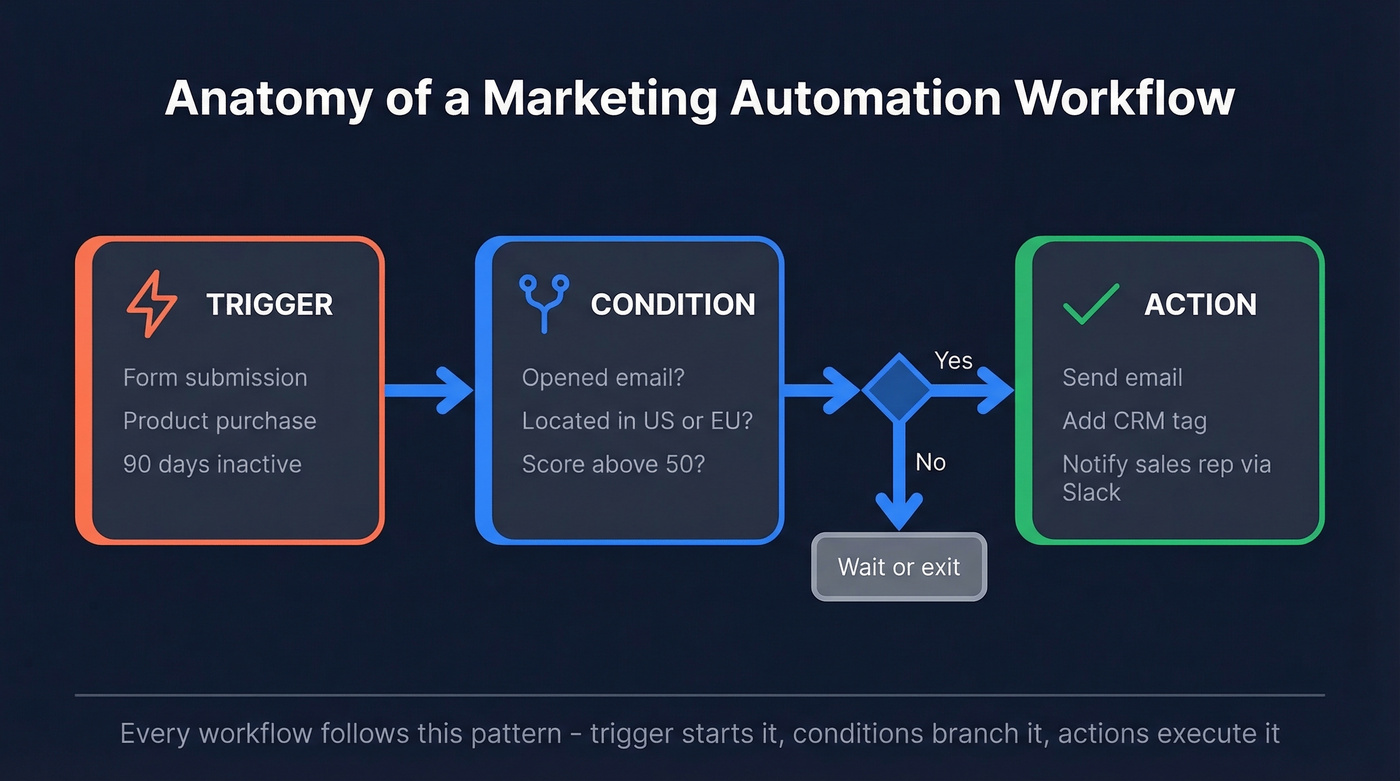
Every workflow has three building blocks. The trigger starts the sequence: a form submission, a purchase, a page visit, 90 days of inactivity. The condition is the branching logic: did they open the first email? Are they in the US or the EU? The action is what happens next: send an email, add a tag, notify a rep, wait three days and send another email.
This is fundamentally different from batch-and-blast email marketing. A newsletter goes to everyone on Tuesday at 10am. A campaign workflow responds to individual behavior in real time across email, SMS, push notifications, and WhatsApp - modern platforms like Klaviyo orchestrate all of these from a single visual builder. The workflow doesn't care what time it is. It cares what the contact just did.
Why Automated Campaigns Drive Revenue
Every $1 invested in marketing automation returns $5.44 over three years. Companies using automation see a 451% increase in qualified leads. Marketers save an average of 2.3 hours per campaign on execution alone. The market is projected to grow from roughly $47B to $81B by 2030.
About 76% of businesses now use some form of marketing automation. If you aren't automating, you're competing against teams that are.
But those returns only materialize if the workflows actually run correctly. A welcome series that bounces 25% of its emails doesn't generate $5.44 per dollar - it generates spam complaints and a trashed domain reputation. The ROI stats assume your foundation is solid. For most teams, it isn't.
Here's the thing: if your deal sizes are under $5K and your list is under 2,000 contacts, you don't need a $890/month platform. You need a $15/month tool and a clean list. The tool is never the bottleneck. The data always is.
12 Workflow Examples (B2B and B2C)
B2B nurture sequences run for months. B2C flows fire in hours. One solo founder running Loops.so, Airtable, and Stripe automations reported saving 10+ hours per week by automating sequences like these - time that went straight back into product development.
B2B Workflows
Welcome/Onboarding Sequence
Trigger: form fill or signup. Channel: email. Timing: 3 emails over 7-10 days.
First email goes out immediately - confirm the subscription, deliver the asset, set expectations. Email two (day 3) introduces your core value prop with a case study. Email three (day 7) makes a soft ask: book a demo, start a trial, or reply with their biggest challenge. If your welcome series open rate drops below 30%, check your list quality before you touch the copy.
Lead Nurturing
Trigger: content download or webinar registration. Channel: email + retargeting. Timing: 4-8 weeks.
This is the long game. Each email moves the prospect one step closer to buying - problem awareness, solution education, social proof, then a conversion ask. B2B buyers don't want daily emails. Weekly or biweekly keeps you present without becoming noise. A single email rarely converts a B2B lead, but a well-paced sequence of five to eight touches consistently does.
Lead Scoring & Routing
When a contact hits your scoring threshold - say, they've visited pricing three times and downloaded two whitepapers - the workflow auto-assigns them to the right sales rep and fires a Slack notification. This replaces the "check the CRM every morning" habit that nobody actually maintains. Build it once, and it runs forever.
Re-engagement
Ninety days of silence is the standard trigger. Send a "we miss you" email, follow up with your best-performing content, then make a final ask. If they don't engage after three touches, suppress them. Continuing to email unengaged contacts tanks your email deliverability for everyone else.
Webinar/Event Follow-Up
Trigger: attendance or no-show. Timing: within 24 hours, split path. Attendees get a recording plus a next-step CTA. No-shows get the recording plus a "sorry we missed you" angle. Treating both groups the same wastes the engagement signal you just collected.
Renewal/Expansion
This workflow pays for your entire automation platform if it saves even one churning account. Start 60-90 days before renewal with a value recap - usage stats, ROI delivered, features they haven't tried. Midway through, introduce expansion options. Final emails loop in the account manager for a personal touch.
B2C Workflows
Welcome Series
The most important workflow you'll build. First email delivers the promised incentive - a discount code or free resource. Subsequent emails introduce your brand story, bestsellers, and social proof. For eCommerce, this is the workflow that gets contacts engaged enough to add items to a cart in the first place.
Abandoned Cart
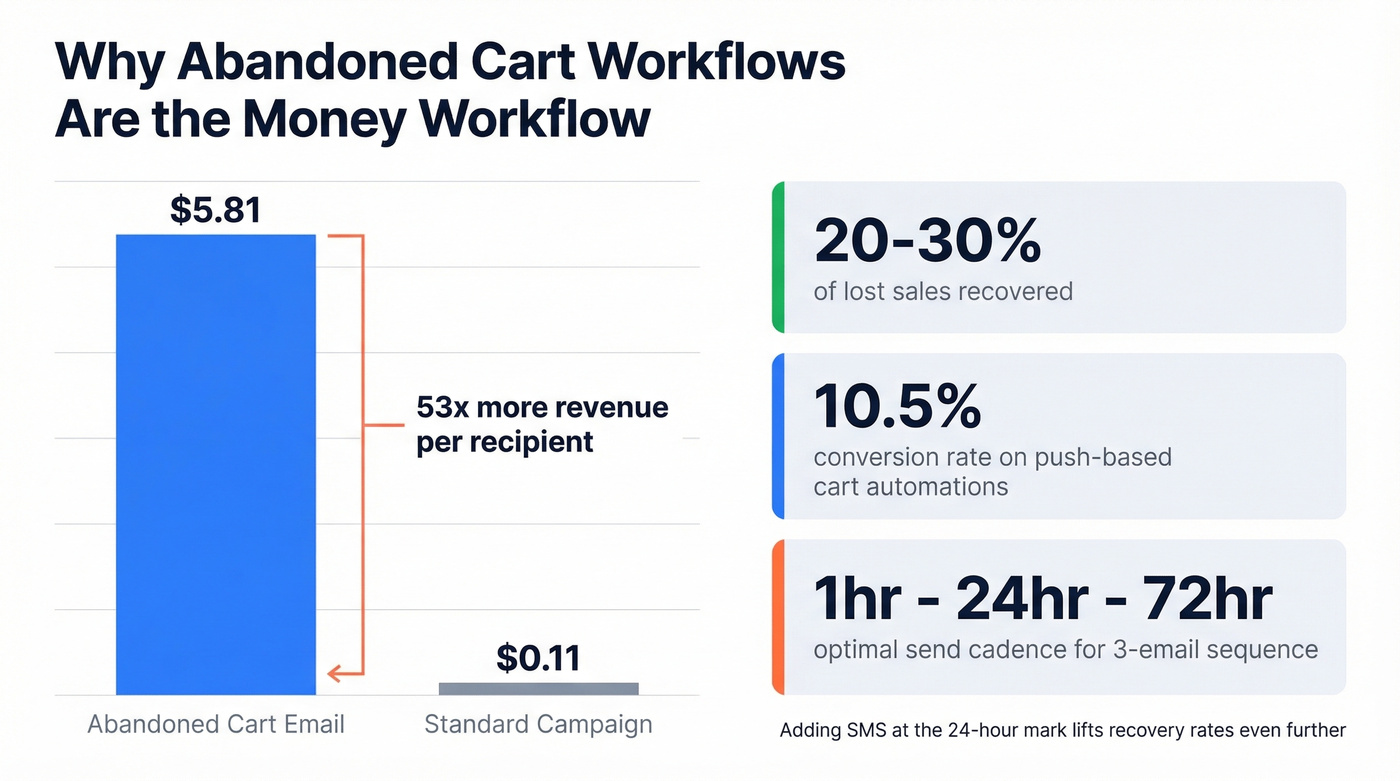
The money workflow. Abandoned cart sequences recover 20-30% of lost sales, generating $5.81 per recipient versus $0.11 for standard campaigns. Push-based cart automations deliver a 10.5% conversion rate. The standard cadence is three emails at 1 hour, 24 hours, and 72 hours: reminder, social proof, urgency. Adding SMS at the 24-hour mark lifts recovery rates further.
Post-Purchase
Trigger: order confirmed. Timing: delivery day + 7 days + 14 days. Confirm the order, request a review after delivery, then cross-sell related products. This builds repeat purchase behavior and generates the user-generated content your marketing team is always asking for.
Browse Abandonment
Lighter touch than cart abandonment - the intent signal is weaker. A single email with the viewed product and 2-3 similar recommendations, sent 2-4 hours after the browse, is usually enough. Don't stack this with cart abandonment for the same contact. Frequency caps matter.
Birthday/Loyalty
A discount or reward tied to a personal milestone. Low effort, high goodwill. These workflows run themselves once configured and consistently drive incremental revenue. Set them up on day one and forget about them.
Win-Back
Trigger: 60-120 days since last purchase. Timing: escalating incentive over 3 emails. Start with a "we miss you" message, escalate to a small discount, then offer your best incentive. If they don't convert after three touches, move them to a suppression list. Don't let sentiment override deliverability.
How to Build Your First Workflow
Don't try to build all twelve at once. In our experience, teams that start with more than two workflows end up maintaining zero by month three.
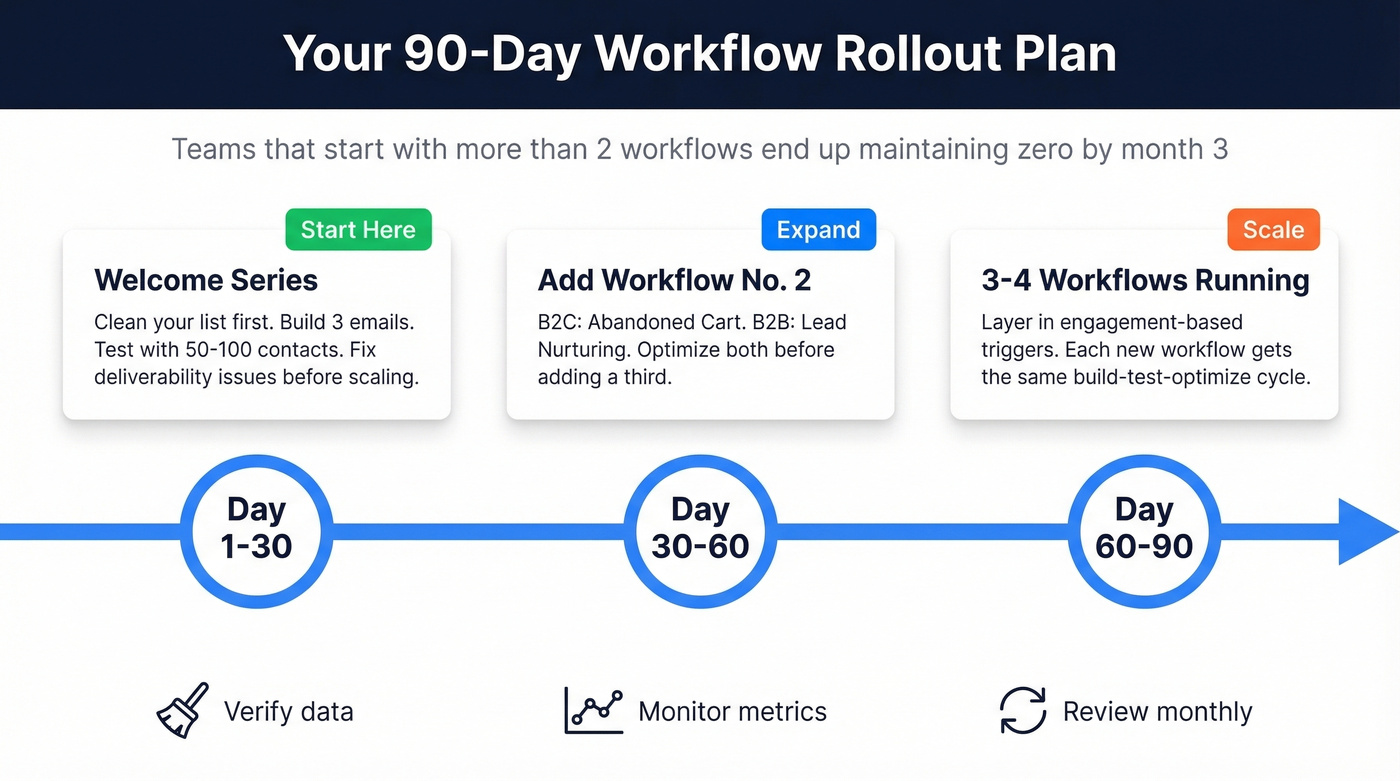
Step 2: Pick your first workflow. Start with a welcome series. It's the highest-ROI, lowest-complexity workflow, and it forces you to nail your messaging fundamentals before adding branching logic.
Step 3: Map the flow on paper. Don't start in the tool. Sketch the trigger, branches, actions, and exit conditions. A 3-email welcome series should take 15 minutes to map.
Step 4: Build and test with a small segment. Send to 50-100 contacts first. Check deliverability, open rates, and link tracking. Fix what's broken before scaling.
Step 5: Add your second workflow at day 30. For B2C, that's abandoned cart. For B2B, it's lead nurturing. Don't add a third until both are optimized.
Step 6: Expand on a 30/60/90-day cadence. By day 90, you should have 3-4 workflows running smoothly. Each new workflow gets the same build-test-optimize cycle. At this point you can start layering in engagement workflow automation - triggering sequences based on how contacts interact with your existing flows rather than just their initial action.

64% of automation projects fail because of bad data. Prospeo's 5-step verification and 7-day refresh cycle mean your welcome series, nurture sequences, and re-engagement flows hit real inboxes - not spam traps. 98% email accuracy at $0.01 per lead.
Fix the data before you automate. Your sender reputation depends on it.
Data Quality: The Foundation Nobody Talks About
That 64% failure rate? It's a data problem. Contact databases decay fast - people change jobs, emails go stale, companies get acquired. Typical B2B databases contain 15-25% duplicate contact records. You're automating on top of a foundation that's actively crumbling.
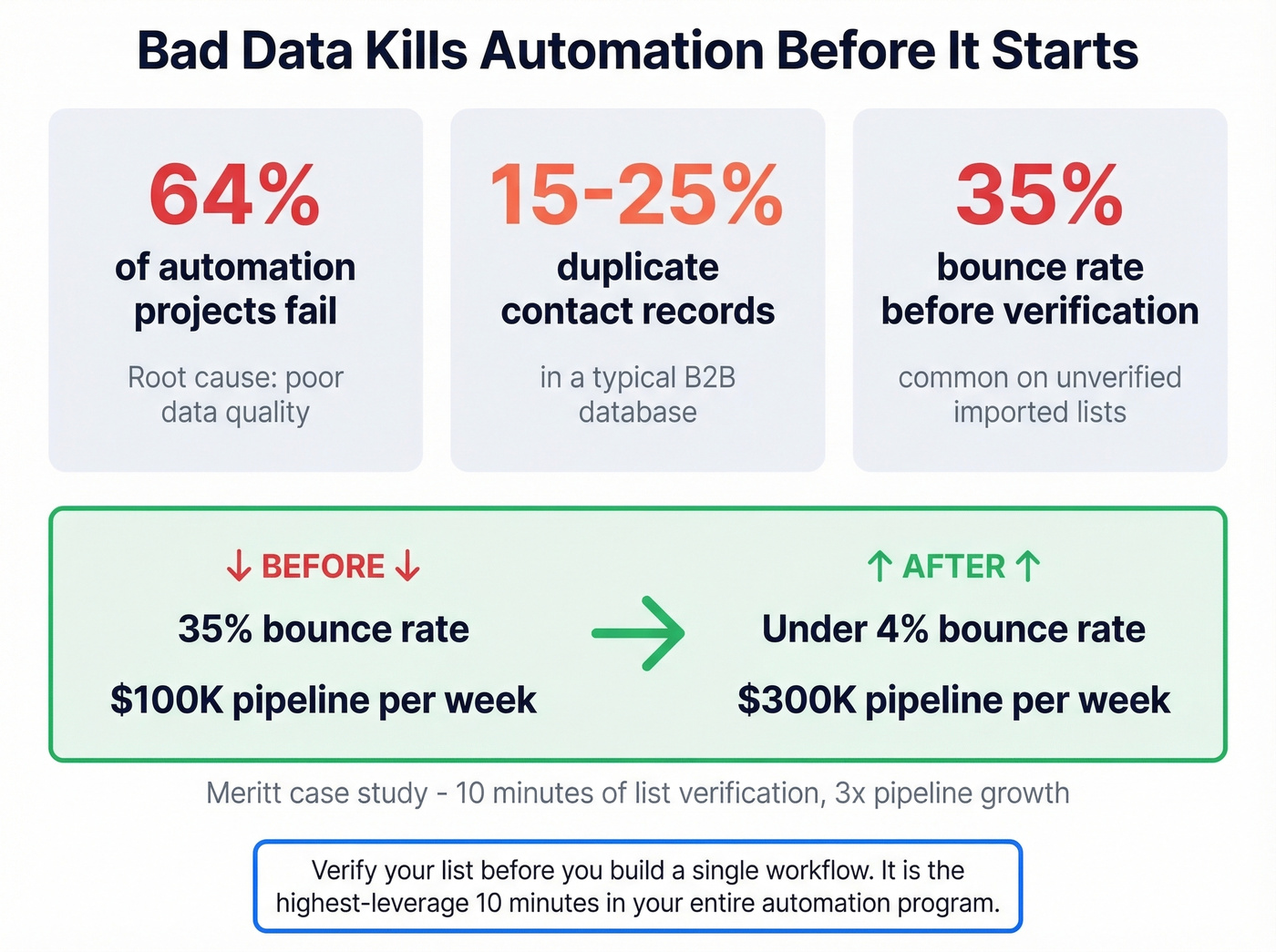
Remember that welcome series that started bouncing by week three? That's what happens when you import an unverified list. Bounces spike, your sender reputation drops, and suddenly even your good emails land in spam. The automation didn't fail. The data did.
Before you spend a single hour building workflows, verify your list. Meritt's bounce rate dropped from 35% to under 4% after running their list through verification, and their pipeline tripled from $100K to $300K per week. That's the highest-leverage 10 minutes you'll spend on your entire automation program.
Mistakes That Kill Workflows
Automating a broken process. If your manual welcome sequence doesn't convert, automating it just delivers bad results faster. As Forbes put it, automation without optimization is just "faster chaos."
Buying tools before fixing process. The consensus on r/AskMarketing is blunt: teams buy tools, the stack grows, but decisions don't improve. A $15/month ActiveCampaign plan with a clean process beats a $890/month HubSpot plan with a messy one.
Set-it-and-forget-it mentality. Workflows need monthly review. Open rates shift, offers expire, market conditions change. A 30-minute monthly audit of your top 3 workflows prevents slow decay.
Batch-and-blasting instead of segmenting. Sending the same email to your entire list isn't automation - it's spam with extra steps. Segmented lists under 500 subscribers perform far better than giant unsegmented ones.
Over-automating without guardrails. "AI will fix it" is the new "set it and forget it." A thread on r/automation nailed it: DM auto-replies feel robotic. Anything requiring empathy - a customer complaint, a sensitive renewal conversation - needs a human in the loop.
Skipping A/B testing. Your first version of any workflow is a guess. Test subject lines, send times, delays between emails, and CTA copy. The teams that test consistently outperform the teams that "optimize" based on gut feel.
Ignoring compliance. GDPR fines run into the billions. "We didn't know" isn't a defense. Build consent collection and unsubscribe handling into every workflow from day one.
Measuring What Matters
Track these metrics for every workflow: open rate, click-through rate, conversion rate, revenue per recipient, deliverability score, bounce rate, unsubscribe rate, and customer lifetime value. Most teams track opens and stop there - which is like measuring a sales pipeline by counting first calls.
The insight that changed how we think about measurement: for some workflows, clicks matter more than conversions. If your abandoned cart email gets a 15% click rate but a 2% conversion rate, the problem is your checkout page, not your email.
Here are the diagnostic thresholds we use. Welcome series open rate below 30%? Your list quality is the first suspect. Click-through rates on any workflow below 2%? Test your CTA placement and copy before touching anything else. Bounces above 5% on any send? Stop the workflow and re-verify your segment immediately.
One guardrail that prevents list fatigue: if a contact hasn't opened or clicked in the last 3 messages, drop them from longer flows. Continuing to email unengaged contacts hurts deliverability for your entire domain.
Best Automation Tools (With Pricing)
The decision is simpler than vendors want you to think. Here's what matters: automation builder quality, multi-channel support, integrations, and price-to-value.
| Tool | Best For | Starting Price | Key Strength |
|---|---|---|---|
| Prospeo | Data verification layer | Free (75/mo), ~$0.01/email | 98% email accuracy, 7-day refresh |
| ActiveCampaign | SMBs | $15/mo | Best builder for the price |
| Klaviyo | eCommerce | $20/mo | Predictive analytics for ecom |
| Brevo | Budget teams | $9/mo | Multi-channel: email + SMS |
| Mailchimp | Beginners | $13/mo | Easiest learning curve |
| Omnisend | eCommerce (Shopify) | $16/mo | Pre-built ecom workflows |
| HubSpot | Mid-market/enterprise | $890/mo | All-in-one CRM + automation |
| Customer.io | Product-led teams | $100/mo | Event-driven messaging |
| Ortto | Data-first teams | $199/mo | Built-in CDP + journeys |
| Zapier | Workflow glue | $19.99/mo | Connects 7,000+ apps |
HubSpot is the obvious choice if you can afford $890/month and will actually use the CRM, reporting, and content tools. For everyone else, ActiveCampaign delivers most of the automation features you'll actually use at about 5% of the cost. Its visual automation builder is genuinely excellent - especially for designing multi-step campaign workflows with complex branching logic.
For eCommerce, Klaviyo is purpose-built. Its predictive analytics - churn risk, next order date, CLV forecasting - give you workflow triggers that generic tools can't match. At $20/month to start, it's the clear winner for Shopify teams.
Budget-conscious solo founders can get surprising power from a Brevo + Zapier stack for under $30/month total. Skip Ortto unless you're already running a CDP strategy - it's overkill for teams under 50K contacts.
Compliance: Don't Skip This
Let's be honest: most teams treat compliance as an afterthought. That's how companies end up in enforcement actions. Cumulative GDPR fines have reached EUR5.88B across 2,245 enforcement actions, with maximum penalties of EUR20M or 4% of global annual turnover - whichever is higher.
The core distinction: GDPR requires opt-in consent. CAN-SPAM allows opt-out. If you're emailing anyone in the EU, you need explicit, freely given, specific, informed, and unambiguous consent before sending. Pre-checked boxes don't count. Silence doesn't count.
Build these into every workflow from day one:
- Collect explicit consent at signup with double opt-in for EU contacts
- Include a one-click unsubscribe link in every automated email
- Maintain a data retention policy - don't keep contacts forever
- Document your legal basis for processing each contact's data
- Honor opt-outs immediately
Retrofitting compliance into a running automation program is painful, expensive, and exactly how companies end up paying seven-figure fines.
FAQ
What's the best marketing automation workflow to start with?
A welcome series. It's the highest-ROI, lowest-complexity workflow and forces you to nail messaging fundamentals before adding branching logic. Get it running with consistent 30%+ open rates and sub-5% bounces before building anything else.
How many workflows should a small business run?
Start with 2-3: a welcome series, cart abandonment or lead nurture, and re-engagement. Most teams running 10+ workflows are maintaining zero of them well. Add one new workflow per month only after existing ones are optimized.
Do I need a CRM for marketing automation?
Not to start. Tools like ActiveCampaign and Brevo include built-in contact management that handles segmentation, tagging, and basic pipeline tracking. A dedicated CRM helps at scale, but it isn't required for your first workflows.
How do I verify contact data before automating?
Run your list through an email verification tool before importing into your automation platform. Prospeo's free tier lets you verify 75 emails per month with 98% accuracy - enough to test your first segment. Stale emails bounce, tank deliverability, and waste every workflow you build.
What is engagement workflow automation?
It's when you trigger actions based on how contacts interact with your existing content - opens, clicks, page visits, or inactivity. Use it once your foundational flows are running smoothly, typically around the 60-90 day mark, to create more personalized follow-up paths.
Every workflow in this guide - lead scoring, cart recovery, renewal sequences - breaks the moment a quarter of your emails bounce. Prospeo delivers 143M+ verified emails with catch-all handling and honeypot filtering built in, so your automations actually reach buyers.
Stop automating bounces. Start automating revenue.