

How to Send Mass Email Without Destroying Your Domain
Your boss just asked you to email the entire list. You're about to send your first mass email to 3,000 contacts in a spreadsheet, and three things are about to go wrong: you'll hit a sending limit you didn't know existed, half your emails will land in spam, and a chunk will bounce off addresses that haven't been valid since 2023.
Mass email, bulk email, email blast - people use these terms interchangeably. The difference between doing it well and torching your sender reputation comes down to method, list hygiene, and a few technical boxes most people skip. And if you need to send bulk emails individually - so each recipient gets a unique, personalized message rather than a generic blast - the approach matters even more.
What You Need (Quick Version)
Here's the decision in 30 seconds:
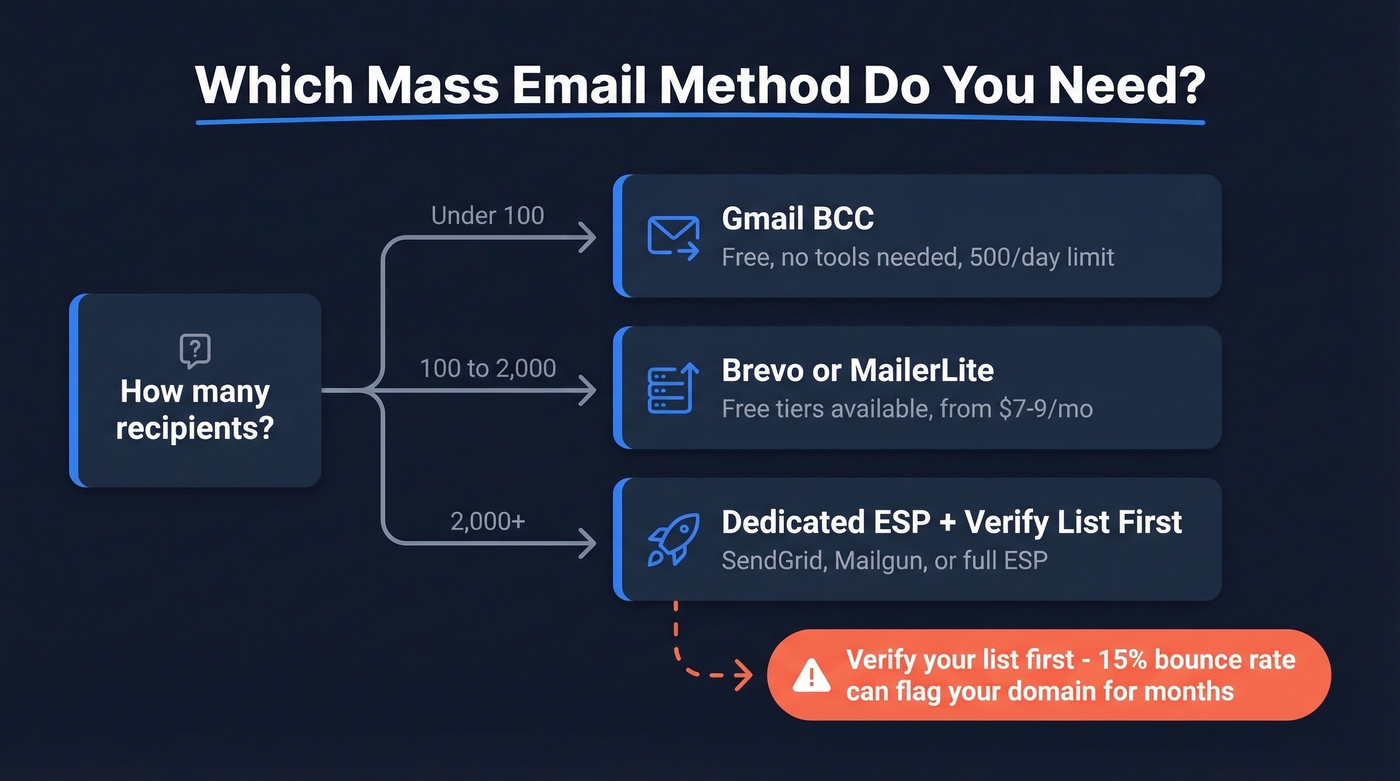
- Under 100 recipients: Gmail BCC. Free, no tools needed.
- 100-2,000 recipients: Brevo (free tier, 300 emails per day) or MailerLite (paid plans start at $9/mo with unlimited emails).
- 2,000+ recipients: A dedicated ESP, and verify your list first.
The #1 mistake is skipping email verification. A 15% bounce rate on your first send can flag your domain for months.
Pick Your Sending Method
Most people overcomplicate this. What actually matters:
| Method | Best For | Daily Limit | Cost |
|---|---|---|---|
| Gmail BCC | <100 people | 500/day | Free |
| Gmail Mail Merge | 100-500 | Up to 2,000 messages/day (Workspace) | Workspace req'd |
| GMass / YAMM | 500-2,000 | Varies | ~$25/mo |
| ESP (Brevo, MailerLite) | 2,000-50,000 | 10K-100K+/day | From ~$7/mo |
| API (SendGrid, Mailgun) | 50,000+ | Custom | Volume-based |
Most of you should skip straight to the ESP row. If you're sending to more than a few hundred people on any regular basis, Gmail and Outlook aren't built for this.
Method-by-Method Walkthrough
Gmail (BCC + Mail Merge)
Open Gmail, compose a new message, add recipients in the BCC field. Done. For Mail Merge, create a Google Sheet with columns for name, email, and any personalization fields, then use Google's built-in mail merge (Google Workspace accounts, not Business Starter) or a Sheets add-on. Mail merge is the simplest way to send bulk emails one by one - each recipient gets their own message with personalized fields, rather than one blast to a BCC list.
The limits are strict. Free Gmail caps you at 500 recipients per day. Google Workspace bumps that to 2,000/day. Gmail counts every recipient - To, CC, and BCC all count against your daily cap on a rolling 24-hour window, not a midnight reset. New accounts get throttled even harder, often to 100-200/day for the first few weeks.
And you get no open tracking, click tracking, automated follow-ups, or unsubscribe management. For anything beyond a quick one-off, you need a real tool.
Outlook Mail Merge
Build your recipient list in Excel, open Word, connect to the Excel file via the Mailings tab, compose your message, insert merge fields, and send through Outlook. The cap is 300 emails per day, desktop app only - not Outlook on the web. Word's mail merge also can't handle CC/BCC or attachments in a single send flow, which makes it painful for anything beyond small internal sends.
Gmail Extensions (GMass, YAMM)
Skip these if you send more than 2,000 emails or rely on your Gmail account for daily work. GMass runs $25/mo and gives you mail merge, tracking, and automated follow-ups without leaving Gmail - but you're still subject to Gmail's sending limits. If Gmail flags your account, you lose your primary email too. That's a risk we wouldn't take.
For teams sending 500-2,000 emails occasionally, it's a reasonable bridge. For anything regular, graduate to a dedicated platform.
Dedicated Email Platforms
This is the right choice for anyone sending to 500+ people on a recurring basis. Dedicated ESPs handle unsubscribe management, open/click tracking, SPF/DKIM authentication, and deliverability monitoring - all the things you'd otherwise have to jury-rig yourself. They also make CAN-SPAM compliance much easier, though you're still responsible for following the rules. The cost difference is smaller than most people expect.
Best Bulk Email Platforms Compared
| Tool | Starting Price | Free Tier | Best For |
|---|---|---|---|
| Brevo | ~$8/mo | 300 emails/day | Best-value all-in-one |
| MailerLite | $9/mo | 1K subs, 12K emails | Simplest UI |
| Moosend | $7/mo | None | Budget pick |
| Mailchimp | $13/mo | 500 contacts | Most recognizable |
| ActiveCampaign | $15/mo | None | Advanced automation |
| HubSpot | $20/mo | Limited free | CRM-first teams |

Brevo and MailerLite are the two we'd start with. Brevo's free tier - 300 emails per day - is genuinely useful for small lists. MailerLite's free plan covers 1,000 subscribers and 12,000 emails per month, with unlimited emails on paid plans, which is plenty for early-stage campaigns.
Mailchimp's contact-based pricing makes no sense for high-volume sends. You pay based on list size, not sends, so your bill climbs even if you're emailing the same people. The consensus on r/MarketingAutomation is that ActiveCampaign has a brutal learning curve and pricing that ramps fast with contact count. HubSpot's full feature set gets expensive quickly - fine if you're already in their CRM, overkill if you just need to send emails.
Here's the thing: if your deals typically close under five figures, you almost certainly don't need ActiveCampaign or HubSpot. Brevo's free tier will outperform what 80% of teams actually use Mailchimp for, at zero cost.
Verify Your List Before Sending
This is the step every guide skips, and it's the one that matters most.
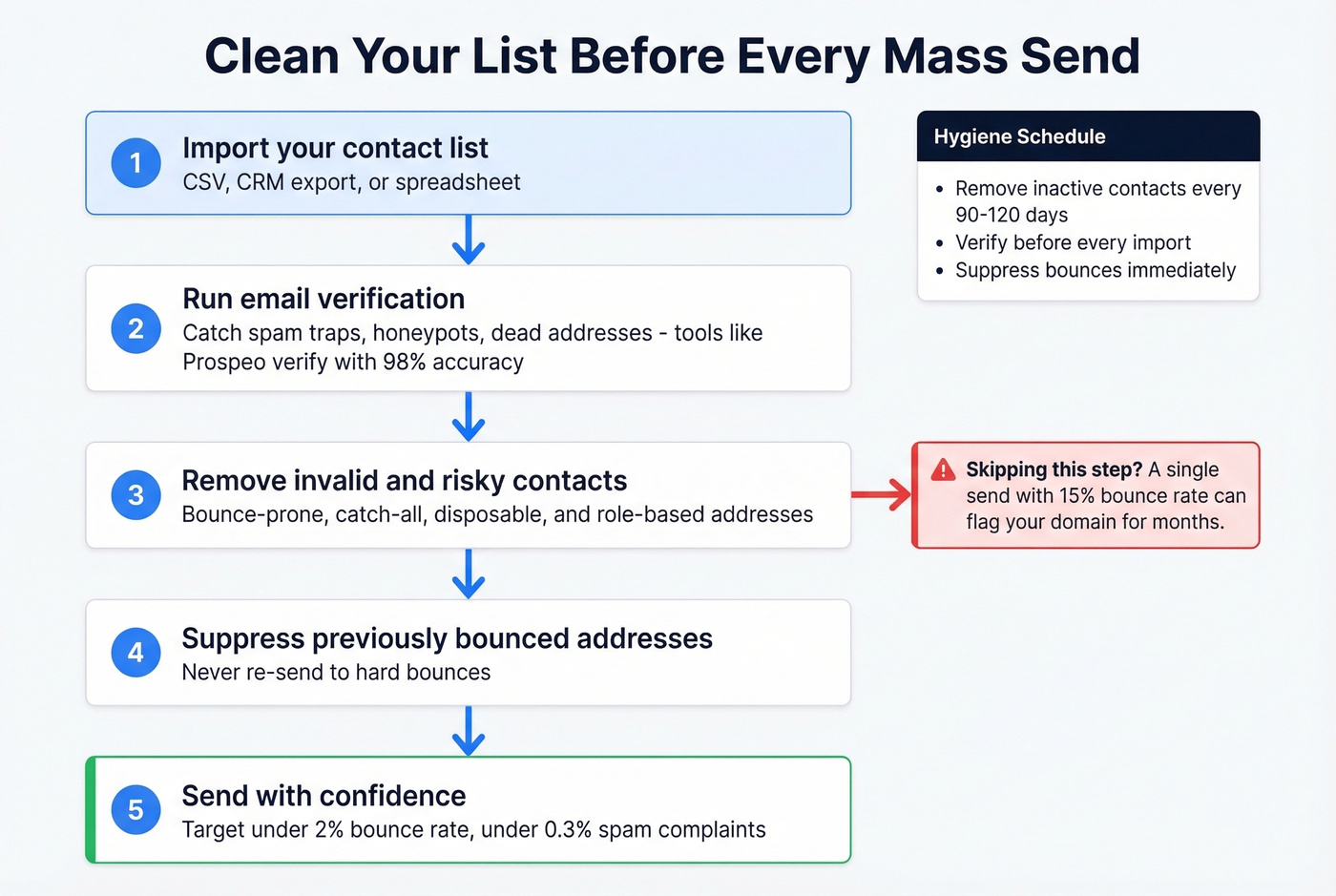
When you send to a dirty list, bounces spike, ISPs notice, your sender reputation drops, and future emails - even to valid addresses - start landing in spam. We've seen a single send with a 15% bounce rate flag a domain for months. Stale data accumulates faster than people think: people change jobs, companies shut down inboxes, and email addresses go dead quietly. And never buy an email list. Purchased lists are loaded with dead addresses, spam traps, and people who never opted in.
Run your list through an email verification tool before every send. In our experience, lists that skip verification bounce above 10% on the first campaign. Prospeo's 5-step verification process catches spam traps, honeypots, and catch-all domains before they ever hit your ESP, with 98% accuracy across 300M+ profiles. The free tier covers 75 emails - enough to test before committing. Other solid options include NeverBounce and ZeroBounce, though neither includes catch-all handling at the same depth.
Your hygiene cadence should look like this: remove inactive contacts after 90-120 days, verify before every import, and suppress bounced addresses immediately. Don't wait for your ESP to flag the problem - by then the damage is done.

Every bounced email in a mass send chips away at your sender reputation. Prospeo's 5-step verification catches spam traps, honeypots, and dead addresses before they hit your ESP - with 98% accuracy across 300M+ profiles. At $0.01 per email, cleaning a 5,000-contact list costs less than one month of Mailchimp.
Verify your entire list before you hit send. 75 emails free, no card required.
Building the list is half the battle. Prospeo's database gives you 300M+ verified contacts with 30+ filters - job title, industry, intent signals, tech stack - so you start with real addresses instead of cleaning up dead ones later. Data refreshes every 7 days, not every 6 weeks like most providers.
Stop mass emailing stale contacts. Start with verified data from day one.
Deliverability Checklist
Even with a clean list, your emails won't land if your domain isn't set up correctly. These are non-negotiable:
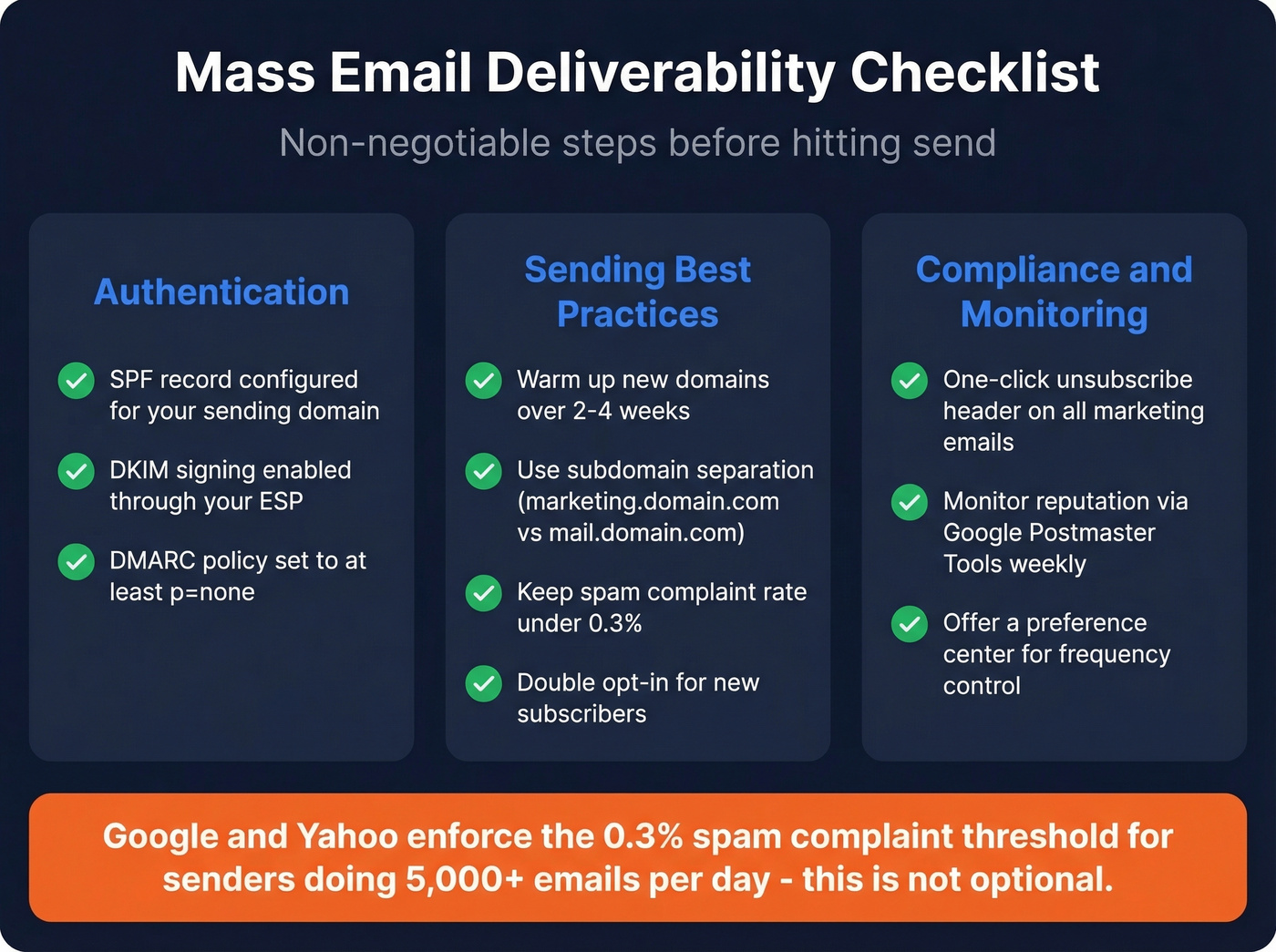
- SPF record configured for your sending domain
- DKIM signing enabled through your ESP
- DMARC policy set to at least
p=none(with alignment) - One-click unsubscribe header for all marketing emails
- Spam complaint rate under 0.3% - Google and Yahoo enforce this for bulk senders doing 5,000+ emails/day
- Warm-up new domains and IPs gradually over 2-4 weeks
- Double opt-in for new subscribers (reduces complaints dramatically)
- Subdomain separation - send marketing email from
marketing.yourdomain.comand transactional frommail.yourdomain.comso a spam complaint on one doesn't tank the other - Reputation monitoring via Google Postmaster Tools and Microsoft SNDS - check weekly
- Preference center so subscribers can choose frequency and content type instead of unsubscribing entirely
Gmail uses a rolling 24-hour sending window and counts every recipient (To/CC/BCC). Plan your sends accordingly so you don't get throttled mid-campaign.
How to Send Unique Messages at Scale
One of the most common questions we get is whether you can personalize each message for bulk recipients - not just swap in a first name, but craft genuinely different content per person. Yes. And it's worth the effort.
Most ESPs support dynamic content blocks and conditional logic, letting you build unique messages from a single template. You define variables in your spreadsheet or CRM - company name, pain point, recent trigger event - and the platform assembles a distinct email for each contact. The result: every recipient sees a message that feels one-to-one rather than one-to-many, which is exactly what inbox providers want to see.
This matters for deliverability too. ISPs are more likely to flag identical messages sent to thousands of addresses in rapid succession. Varying subject lines, body copy, and CTAs across your list reduces that risk significantly.
CAN-SPAM Rules (Don't Skip This)
CAN-SPAM applies to every commercial email, including B2B. Violations carry penalties of up to $53,088 per email. Per email - not per campaign.
The seven requirements:
- Accurate header information (From, To, Reply-To, routing)
- Honest subject lines that reflect the email's content
- Clear identification that the message is an ad
- A valid physical postal address
- A clear, conspicuous unsubscribe mechanism
- Opt-out mechanism that works for at least 30 days after sending
- Honor opt-out requests within 10 business days
You can't charge a fee or require extra steps beyond replying to an email or visiting a single web page to unsubscribe. And you're responsible even if a third party sends on your behalf - you can't contract away compliance.
Benchmarks Worth Knowing
Before you send, know what you're aiming for. These benchmarks come from analysis of 3.3 million campaigns:
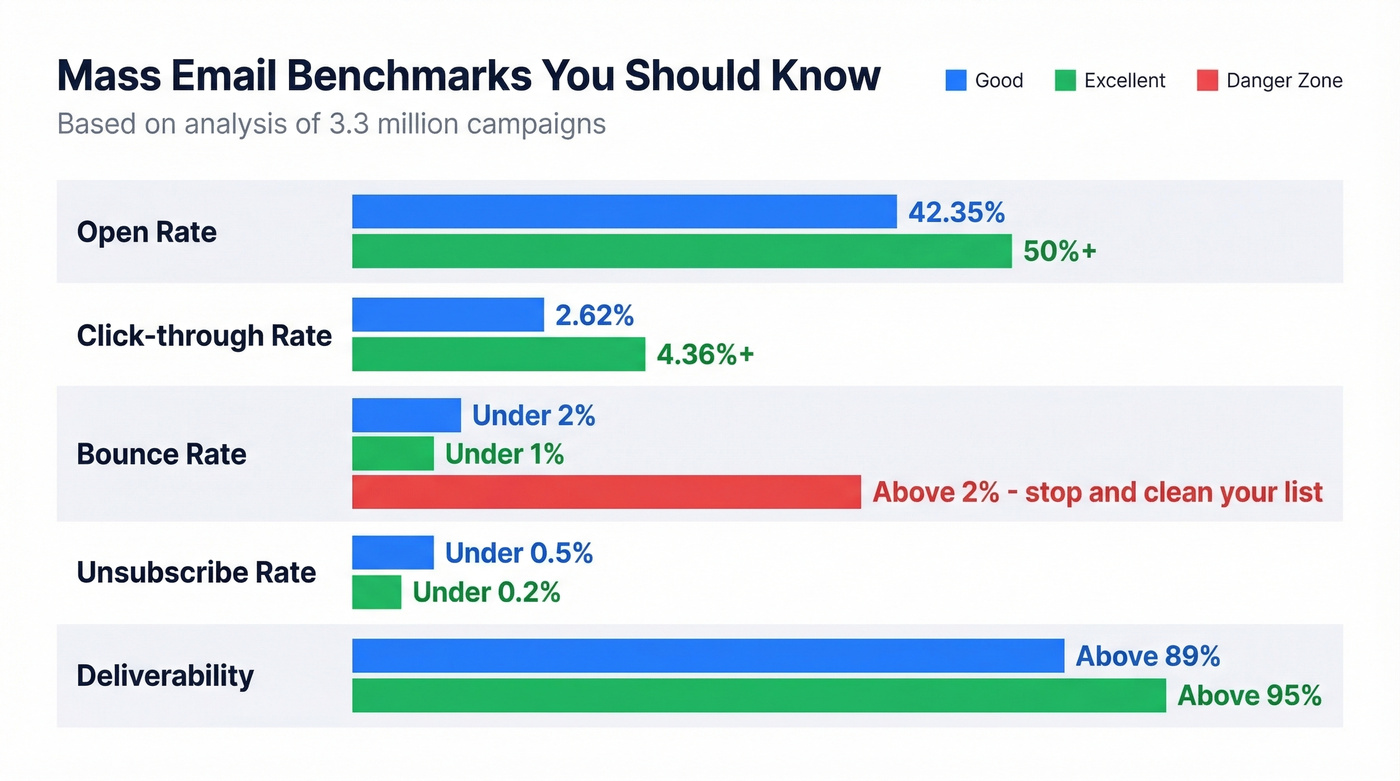
| Metric | Good | Excellent |
|---|---|---|
| Open rate | 42.35% | 50%+ |
| Click-through rate | 2.62% avg | 4.36%+ |
| Bounce rate | <2% | <1% |
| Unsubscribe rate | <0.5% | <0.2% |
| Deliverability | >89% | >95% |
If your bounce rate is above 2%, stop sending and clean your list. Below 80% deliverability means something is seriously broken - check your authentication, your list quality, or both.
Scaling Past 2,000 Emails/Day
Let's be honest about the math here. Inbox rotation gets expensive fast: 5,000 emails per day means roughly 50 emails across 100 accounts. At $6 per mailbox on Google Workspace, that's $600/month just in mailbox costs, plus $150+/month for cold email infrastructure tooling. Every domain needs SPF, DKIM, and DMARC configured, and warm-up takes 2-4 weeks per account.
For truly high volume - hundreds of thousands of emails per month - you'll want a dedicated IP. Shared IPs are fine for a few thousand emails a month, but at scale, other senders on the same IP can tank your reputation without you doing anything wrong.
That's a lot of overhead for something that might not apply to you. If you're sending marketing emails to opted-in lists, a platform like Brevo or MailerLite handles all of this automatically. Inbox rotation is a cold email tactic, not the right approach for legitimate bulk sends.
FAQ
Can I send mass email from Gmail for free?
Yes, but only to 500 recipients per day (2,000 with Google Workspace). Gmail counts recipients on a rolling 24-hour window, not a midnight reset. For anything beyond a few hundred contacts, use a dedicated email platform like Brevo or MailerLite.
How many emails can I send per day?
Free Gmail: 500. Google Workspace: 2,000. Outlook: 300. Dedicated ESPs handle tens of thousands per day. The real limit is your sender reputation - send too fast or bounce too many, and ISPs will throttle you regardless of platform limits.
Is sending mass email legal?
Yes, if you follow CAN-SPAM (US) or GDPR (EU). Include a physical address, offer one-click unsubscribe, honor opt-outs within 10 business days, and never use deceptive subject lines. Penalties run up to $53,088 per email.
How do I keep bulk emails out of spam?
Authenticate your domain with SPF, DKIM, and DMARC. Verify your email list before sending - tools like Prospeo, NeverBounce, and ZeroBounce catch invalid addresses before they damage your reputation. Keep spam complaints under 0.3%, warm up new domains over 2-4 weeks, and never buy email lists.
Can I send bulk email so each person gets a unique message?
Yes. Use mail merge in Gmail or Outlook for small lists, or use an ESP with dynamic content blocks for larger sends. Map personalization fields - name, company, pain point - to your contact data so each recipient gets a tailored message instead of a generic blast.