

Mutual Action Plans: How to Build Ones Your Buyers Actually Use
Your champion said they'd fill out the MAP. That was three weeks ago. The deal's stalling, procurement hasn't been looped in, and your forecast is looking shakier by the day. As one rep put it on r/sales, "Most of the time buyers just ignore them."
That's not a MAP problem - it's a design problem. The mutual action plans that actually close deals look nothing like the ones gathering dust in your Google Drive.
What you need (quick version): A MAP is a shared plan between seller and buyer that tracks milestones, owners, and deadlines from first meeting through go-live - not just to signature. They fail when they're seller-centric checklists. They work when they reduce buyer effort and centralize everything the buying committee needs. And before you build the MAP, make sure you can actually reach every stakeholder on it - bad contact data kills more deals than bad templates.
What Is a Mutual Action Plan?
A mutual action plan is a shared roadmap between a seller and a buying committee that spells out who does what, by when, and what success looks like at each stage. You'll hear it called a mutual close plan, joint action plan, go-live plan, mutual success plan, or just MAP. Same concept, different branding.
The key word is "shared." A MAP isn't your internal deal tracker or your manager's pipeline hygiene tool. It's a project plan for the deal - not a business case for the budget. When both sides co-own the plan, it creates accountability. When only the seller owns it, it's just a fancy to-do list the buyer never opens.
Why MAPs Work (And Why Most Don't)
The math is straightforward. Deals where AEs engage buyers with a MAP show a 26% higher win rate than those without. That's a meaningful lift for something that costs nothing to implement.
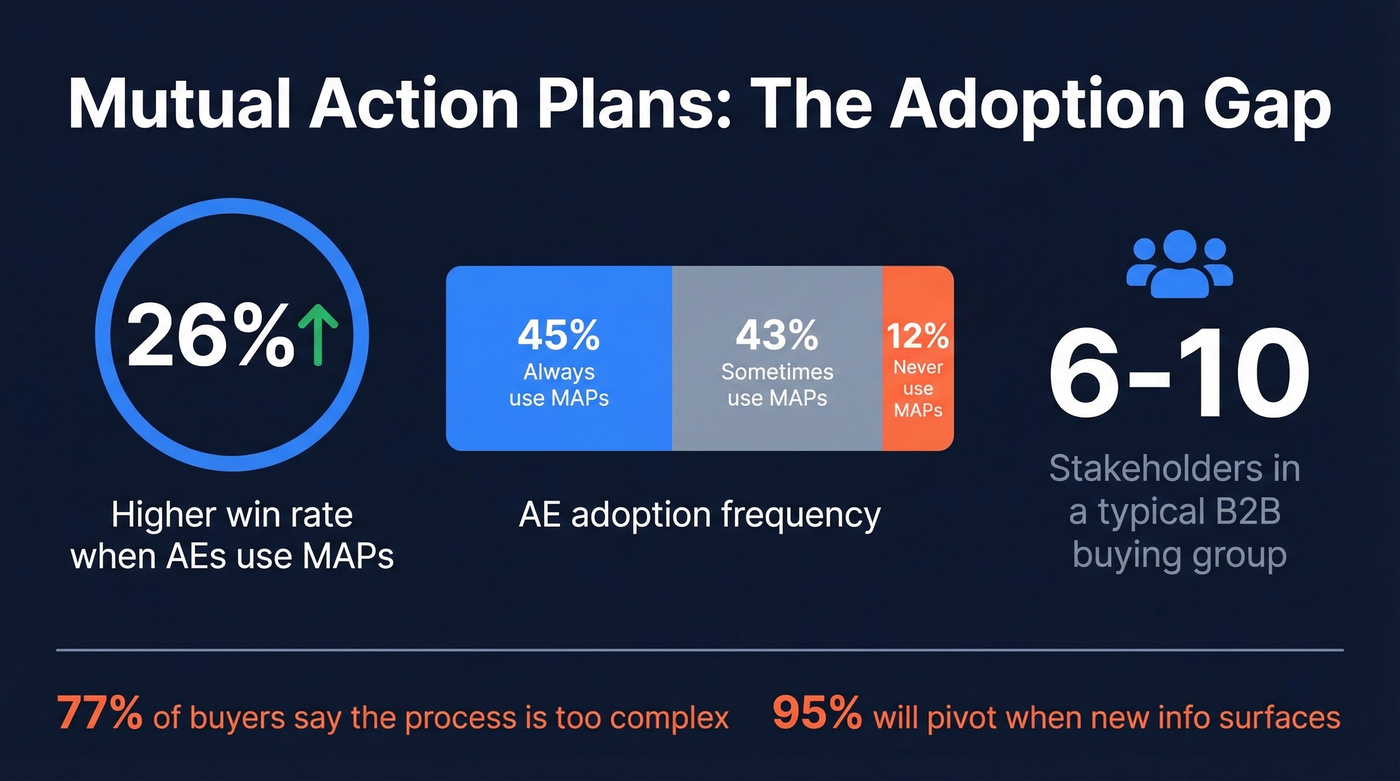
But here's the adoption reality: only 45% of sellers consistently use MAPs. Another 43% use them sometimes. And 12% never touch them. The gap between "this works" and "people actually do it" is enormous.
Most MAPs fail in one of three ways. The buyer ignores it entirely because it feels like extra work. Or it targets the wrong audience - executives don't care about your task list; they need a business case. Or it adds friction instead of removing it. Jason Fishkind, AVP Sales at Cresta, nailed it: "The worst mutual plans are selfish. You need to anchor them to the customer's problem."
The buying environment makes this harder than ever. A typical B2B buying group involves 6-10 stakeholders, each consulting 4-5 sources, and 77% of them say the process is "too complex." When 95% of those stakeholders will pivot the moment new information surfaces, your MAP needs to be the single source of truth - not another attachment in the inbox.
MAP vs. Business Case
This is where teams get confused.
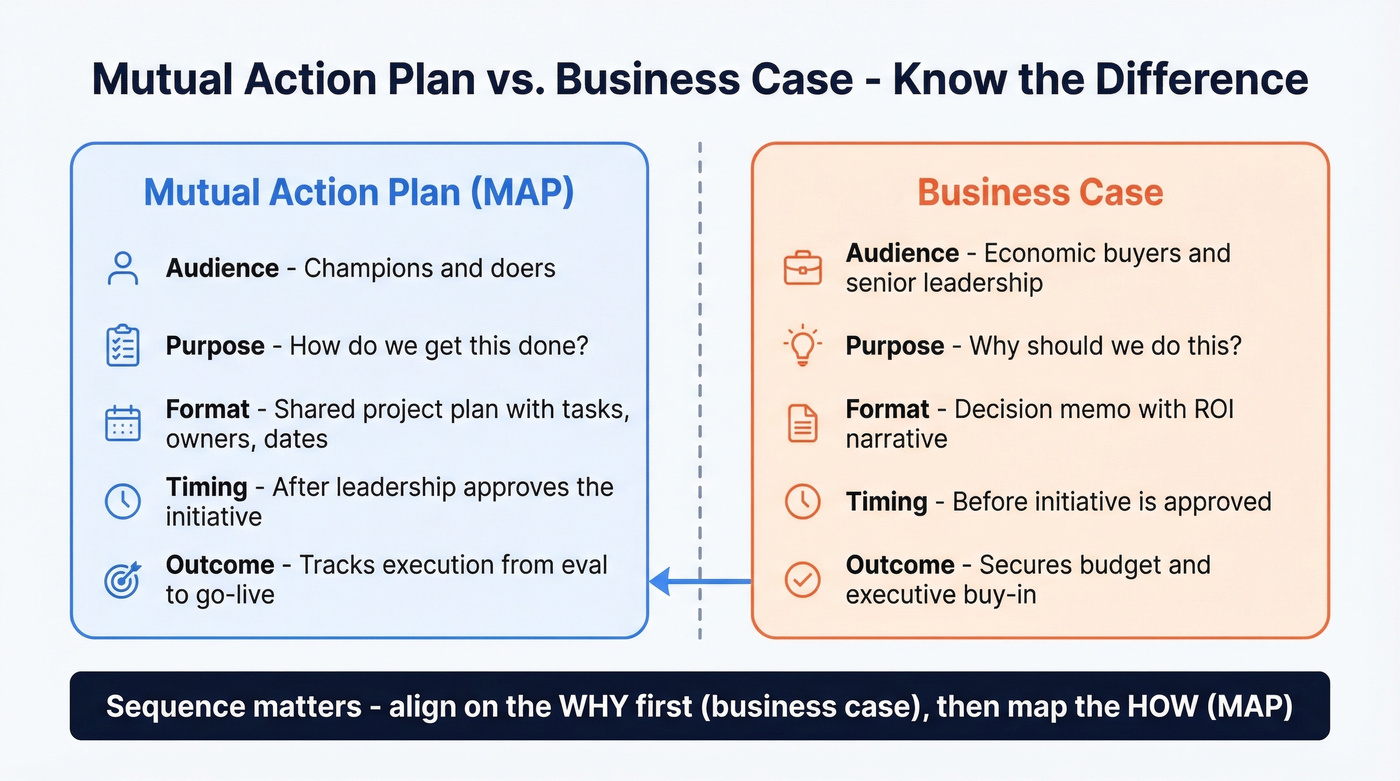
A Senior DevOps Director managing $2M in annual spend explained it clearly: a project plan (MAP) helps them estimate level of effort and decide how interested they are. But it's not what they take to executives. Executives need a decision memo - a business case narrative that answers "why should we do this?"
The distinction matters for sequencing. Align on the "why" first. Once leadership is bought in, the MAP answers "how do we actually get this done?" Hand a MAP to an executive who hasn't approved the initiative and you've skipped a step. MAPs are for champions and doers. Business cases are for economic buyers and senior leadership. Get the audience wrong and neither document works.

You mapped every stakeholder on the buying committee. Now you need to actually reach them. Prospeo gives you verified emails and direct dials for 300M+ professionals - refreshed every 7 days so you're never chasing someone who changed roles last quarter. 98% email accuracy means your outreach lands, not bounces.
Don't let bad contact data stall a deal your MAP already mapped out.
How to Build a MAP That Gets Used
Start With the Go-Live Date
Most sellers anchor their MAP to the close date. That's backwards. Work backward from the go-live or launch date - the moment the buyer starts realizing value. Make ROI the last milestone, not contract execution.
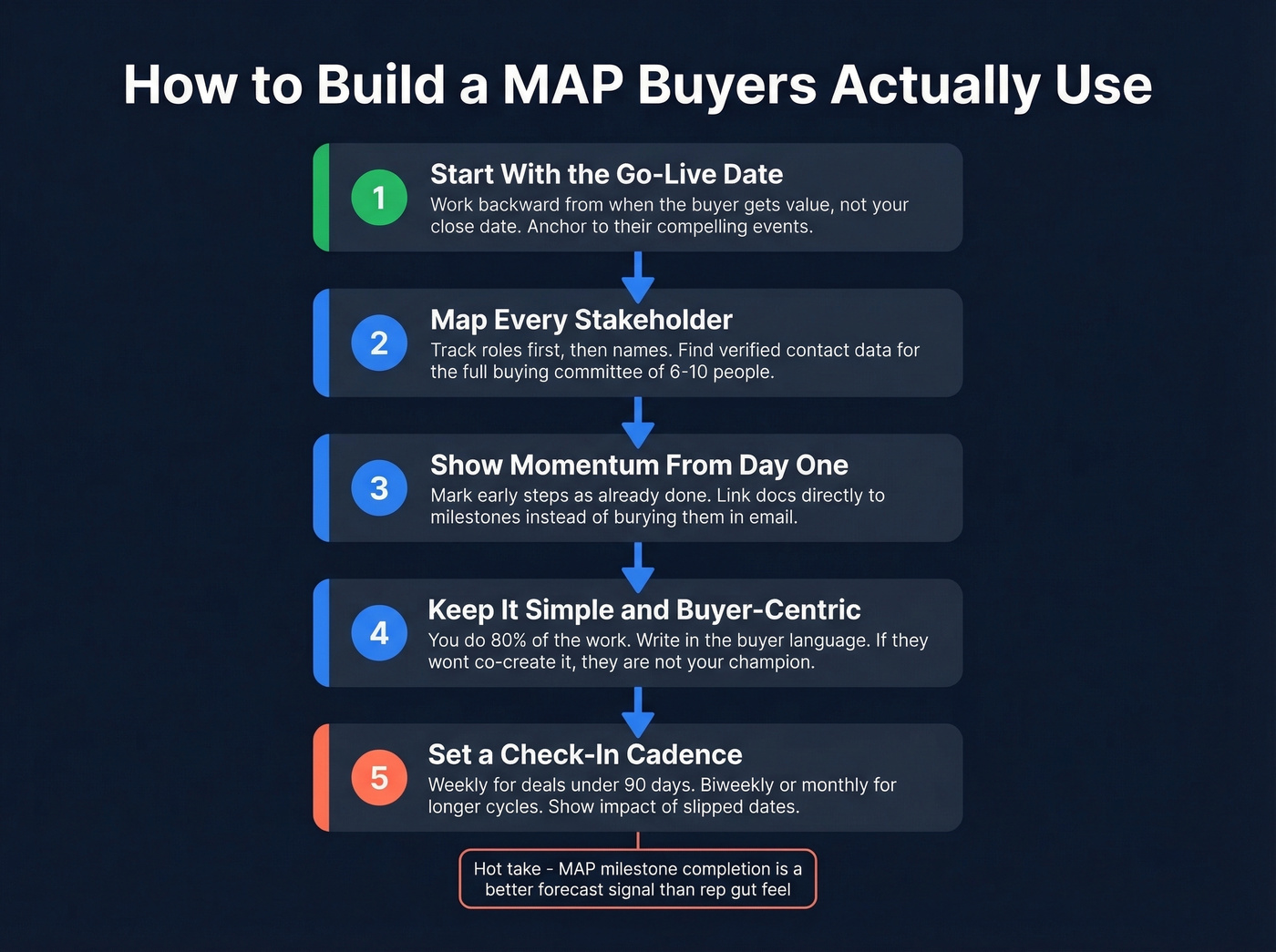
Anchor the timeline to the buyer's compelling events: a board meeting, a fiscal year cutoff, a product launch. When the buyer sees their own deadlines reflected in the plan, it stops feeling like your sales process and starts feeling like their project. Let the buyer's calendar drive the timeline, not your quota deadline.
Map Every Stakeholder (Then Find Them)
Track roles first, then names. This forces stakeholder discovery early instead of scrambling when legal or procurement surfaces in week eight. With 6-10 people typically involved in a B2B purchase, you need to reach someone outside your champion's direct team - a CISO for security review, a VP of Finance for budget approval, a procurement lead for contract terms. Treating stakeholder mapping as part of your strategic account management plan ensures you're not just closing one deal but building a foundation for long-term expansion.
Here's where deals quietly die: you've mapped the roles, you know who needs to sign off, but you don't have a working email or direct dial for half the buying committee. We've seen this kill deals that were otherwise on track. Prospeo helps here - search by role and company across 300M+ professional profiles, pull verified emails and direct dials, and push them straight into your CRM. Data refreshes every 7 days, so you're not chasing someone who changed jobs last quarter.

Show Momentum From Day One
When you first share the MAP, show the early steps as already complete. "Discovery call - done. Technical requirements gathered - done. Security questionnaire submitted - done." This creates momentum and demonstrates diligence before you've asked the buyer to do anything.
The Reddit consensus backs this up: introduce the MAP early as a broad milestone overview, not a detailed task list. Use it as a document hub - link your security docs, legal templates, and pricing summaries directly to the relevant milestones instead of burying them in email threads.
Keep It Simple and Buyer-Centric
The Fluint buyer transcript makes this clear: too much complexity kills engagement. Every additional field or task you add needs to earn its place. Even though it's called "mutual," you should do 80% of the work. The buyer's job is to confirm, not to build.
Write milestones in the buyer's language, not yours. "Security questionnaire review" means nothing to a VP - "Confirm data handling meets your compliance requirements" does. Don't stop at closed-won. Include onboarding, go-live, and ROI milestones so the buyer sees the full picture. This is what separates mutual success planning from a basic sales checklist: the plan extends past the signature into real value delivery.
Here's the thing: if your buyer won't co-create the MAP with you, they're not your champion. A real champion wants the deal to move forward and will invest 15 minutes to align on next steps. Refusal to engage is a qualification signal, not a process problem.
Set a Check-In Cadence
A MAP without recurring reviews is just a document. Set the rhythm:
- Active deals (under 90 days): Weekly check-ins, even if it's a 10-minute async update
- Longer cycles (6+ months): Biweekly or monthly, with quarterly executive reviews
- Every check-in: Show impact of slipped dates - how many days off schedule, which stakeholders are bottlenecks
Share the MAP widely across the buying committee. The more people who see it, the harder it is for any single stakeholder to stall without visibility.
And here's the hot take most sales leaders won't say out loud: MAP milestone completion is a better forecasting signal than rep gut feel. Hope isn't a forecast. If your milestones aren't completing on schedule, the deal isn't on track - no matter what the rep says in pipeline review.
Mutual Action Plan Template
A Google Sheet beats a fancy digital sales room tool if the rep actually updates it. Here's a starting framework based on the Arrows.to template structure:
| Phase | Task | Owner | Due Date | Status |
|---|---|---|---|---|
| Getting Started | Discovery call | Seller | Week 1 | Done |
| Getting Started | Share MAP draft | Seller | Week 1 | Done |
| Evaluation | Technical demo | Seller + SE | Week 2 | In progress |
| Evaluation | Security review | Buyer (CISO) | Week 3 | Not started |
| Decision | Executive briefing | Buyer (VP) | Week 4 | Not started |
| Legal/Procurement | Redline contract | Buyer (Legal) | Week 5 | Not started |
| Onboarding | Kickoff call | Both | Week 7 | Not started |
| Go-Live | Production launch | Buyer (Ops) | Week 9 | Not started |
| ROI Review | 90-day value check | Both | Week 21 | Not started |
Customize the phases to your sales cycle, but keep the structure. Every task needs an owner - a person, not a team - a date, and a status. If you can't name the owner, that's a gap in your stakeholder map. Go find them.
How MAPs Fit Into MEDDPICC
If your team runs MEDDPICC, the MAP is where the methodology becomes operational. Here's how each element maps:
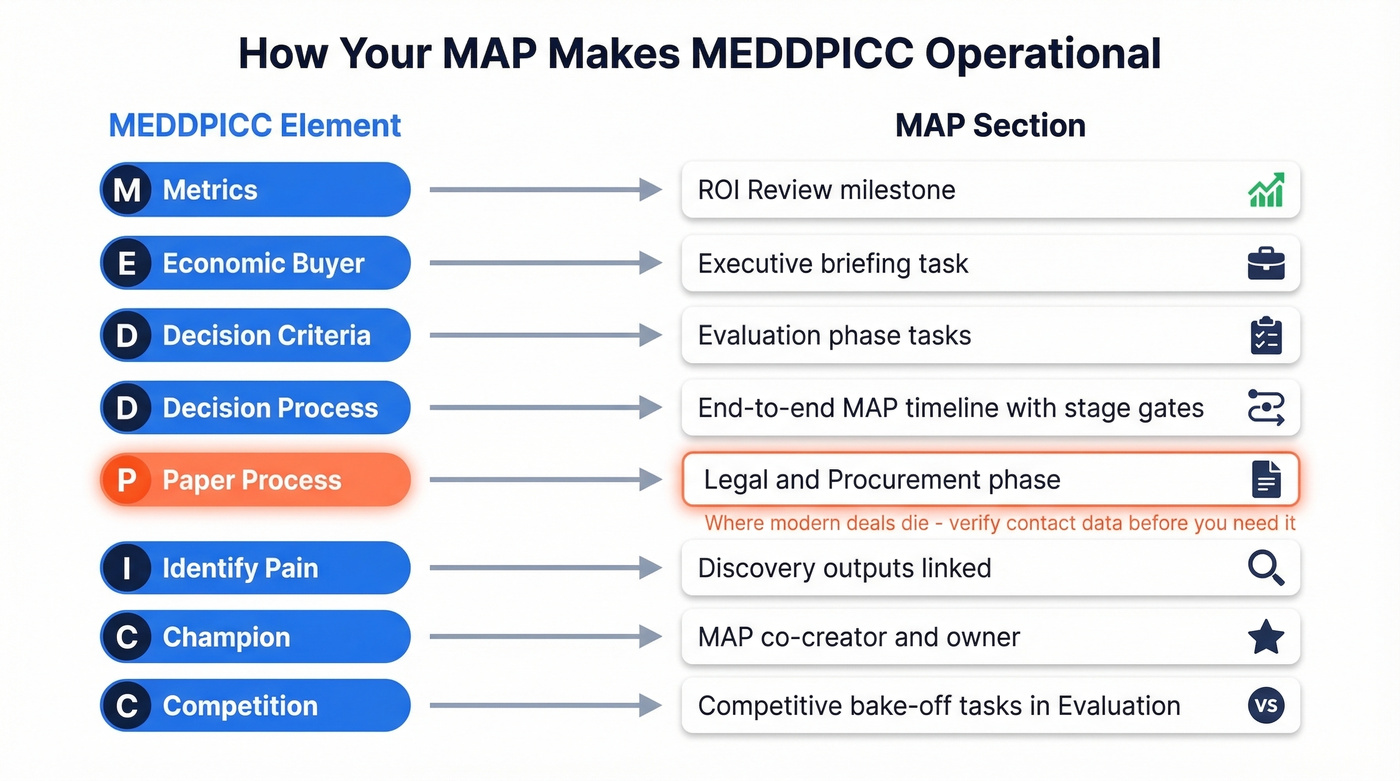
| MEDDPICC Element | MAP Section |
|---|---|
| Metrics | ROI Review milestone |
| Economic Buyer | Executive briefing task |
| Decision Criteria | Evaluation phase tasks |
| Decision Process | End-to-end MAP timeline with stage gates |
| Paper Process | Legal/Procurement phase |
| Identify Pain | Discovery outputs linked |
| Champion | MAP co-creator + owner |
| Competition | Evaluation phase: competitive bake-off tasks |
Paper Process is where modern deals die. Security reviews, legal redlines, procurement approvals - these stages stall when you can't reach the right person at the right time. SalesHood's framework positions MAPs as the execution layer for Decision Process and Decision Criteria, but in our experience, the biggest value shows up in Paper Process. Verify your stakeholder contact data before you need it - scrambling for a procurement lead's email when the contract is already late is a deal killer.
Sync your MAP milestones to CRM deal stages. When a MAP milestone completes, set up automation to keep your CRM stage and forecast aligned - either through your MAP tool's native integration or a workflow in Salesforce or HubSpot. This turns your MAP from a standalone document into a forecasting engine. Your pipeline review becomes a milestone review, and your forecast is grounded in buyer actions rather than rep optimism.
MAP Software Worth Knowing
The digital sales room market is projected to hit $7.9B by 2031, so there's no shortage of options. Here's what's worth evaluating in 2026:
| Tool | Best For | Starting Price | Key Feature |
|---|---|---|---|
| Dock | Testing MAPs in a real shared workspace | Free (50 workspaces) | Clean UI, free tier |
| Accord | MAP tracking at scale | Custom | Deep MAP workflows |
| Outreach | Teams already on the platform | Custom | Built-in MAP features |
| Highspot | Enablement-first orgs | Custom | Content + MAP combo |
| Clari Align | Forecasting-heavy teams | Custom | Pipeline + MAP visibility |
Let's be honest: start with Dock's free tier to test whether your team will actually use a MAP tool before committing budget. If you're already on Outreach or Highspot, use their built-in MAP features first - adding another tool to the stack rarely solves an adoption problem.
The tool matters less than the habit. A rep who updates a Google Sheet daily will outperform a rep who has Accord but never logs in. Skip dedicated MAP software entirely if your team hasn't proven they'll maintain a shared spreadsheet first.
MAPs fail when you can't reach the CISO, VP of Finance, or procurement lead who shows up in week eight. Prospeo's 30+ search filters let you find every stakeholder by role, company, and seniority - then push verified contacts straight into HubSpot or Salesforce. At $0.01 per email, filling gaps in your buying committee costs less than a coffee.
Every stakeholder on your MAP should have a verified email next to their name.
FAQ
When should I introduce a MAP?
After the first discovery call, once you've confirmed mutual interest. Frame it as a broad milestone overview, not a detailed task list. Early introduction normalizes collaboration and prevents the MAP from feeling like a last-minute close tactic. Waiting until mid-cycle makes it look like a desperation move.
What's the difference between a close plan and a mutual action plan?
A close plan ends at contract signature and serves the seller's timeline. A mutual action plan extends through onboarding, go-live, and ROI realization, serving both parties. If your plan stops at "ink dry," it's a close plan in disguise - and your buyer knows it.
How do I get buyers to engage with the MAP?
Make it useful, not bureaucratic. Use the MAP as a hub for everything the buyer needs - security docs, pricing summaries, legal templates. When it reduces their effort instead of adding to it, engagement follows. If they still won't engage, that's a qualification signal. They're probably not your champion.
How do I find contact info for stakeholders on the MAP?
Use a B2B data platform like Prospeo to search by job title and company, pulling verified emails and direct dials for each role on your buying committee. With 98% email accuracy and a 7-day refresh cycle, you avoid bounced outreach to stakeholders who've changed roles.