


OneCal Alternatives: 5 Calendar Sync Tools That Won't Overcharge You
You signed up for OneCal's Starter plan, connected your two main calendars, and it worked perfectly. Then you got a third client. Suddenly you're staring at the Essential plan at $10/mo - double the price - just to add one more calendar. If you're looking for OneCal alternatives, the pricing escalation is usually what triggers the search.
But it's not the only issue. OneCal lacks native mobile apps (you get a mobile-friendly web view, not an actual iPhone or Android app). The #1 complaint on Reddit about multi-calendar sync tools? Being forced into higher tiers for features you'll never touch.
OneCal is a solid product. It holds a 4.7/5 on G2 with 30 reviews, and the syncing itself is reliable. But when knowledge workers attend 8.3 meetings per week across multiple clients and teams, the pricing math gets uncomfortable fast. OneCal's tiers - $5/mo for 2 calendars, $10/mo for 5, $25/mo for 50 - aren't unreasonable in isolation. The friction hits when you're a freelancer or consultant who just needs busy blocks across three or four calendars and nothing else.
We tested all five alternatives below with a 3-calendar Google/Outlook setup. Here's what actually held up.
Our Picks (TL;DR)
| Pick | Tool | Why |
|---|---|---|
| Best overall alternative | CalendarBridge | Closest feature match, unified calendar apps (web/iPhone/Android), cheaper entry tier |
| Best budget pick | SyncThemCalendars | $3.99/mo for 5 sync connections, privacy-first busy blocks |
| Best beyond sync | Morgen | Unified calendar + tasks, but only worth it at the $15/mo annual rate |
Pricing Comparison
Here's what you're actually paying across the field. All prices reflect annual billing.
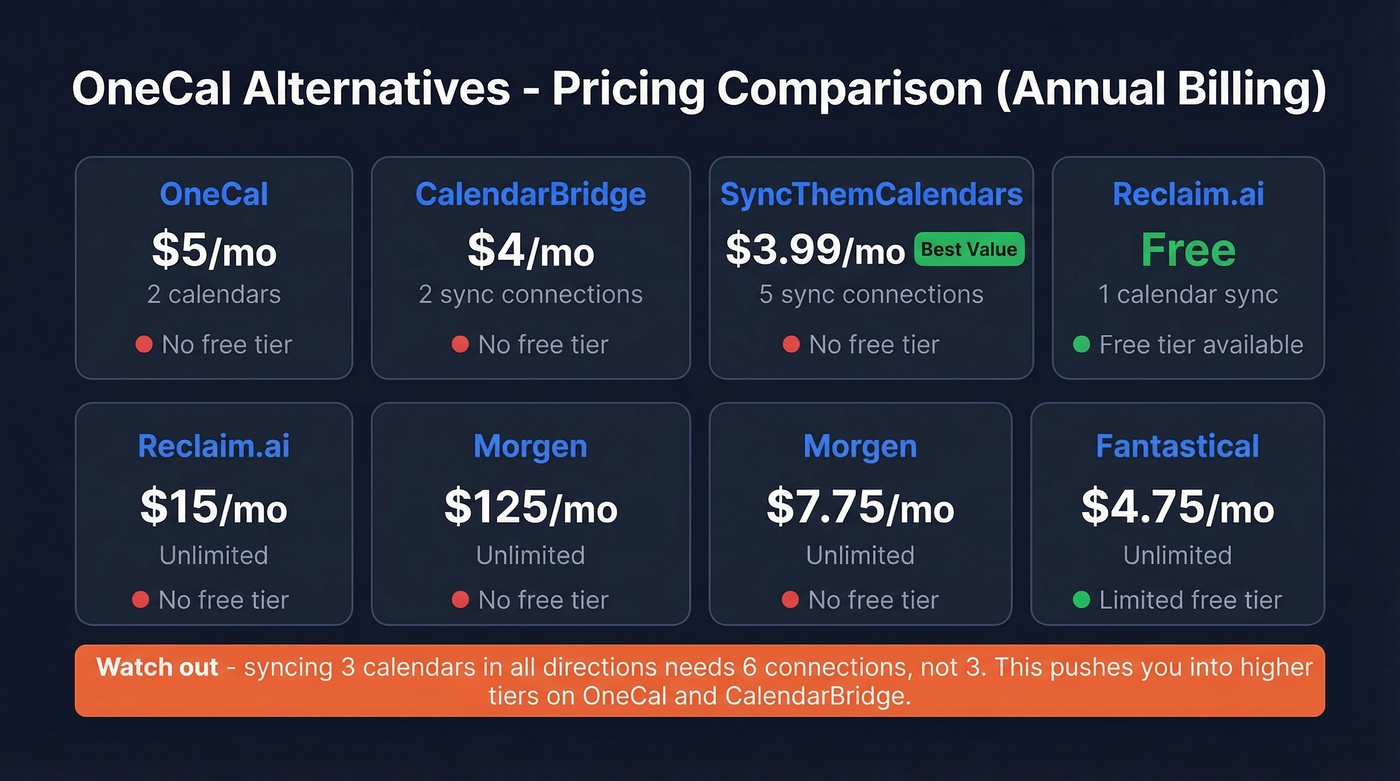
| Tool | Starting Price | Cals/Syncs Included | Free Tier? | Best For |
|---|---|---|---|---|
| OneCal | $5/mo | 2 calendars | No (14-day trial) | Simple 2-cal sync |
| CalendarBridge | $4/mo | 2 sync connections | No (free trial) | OneCal replacement |
| SyncThemCalendars | $3.99/mo | 5 sync connections | No (14-day trial, no CC) | Budget busy blocks |
| Reclaim.ai | Free | 1 calendar sync | Yes | Google Cal + AI |
| Morgen | $15/mo | Unlimited | No (14-day trial) | All-in-one calendar |
| Fantastical | ~$4.75/mo | Unlimited | Yes (limited) | Apple ecosystem |
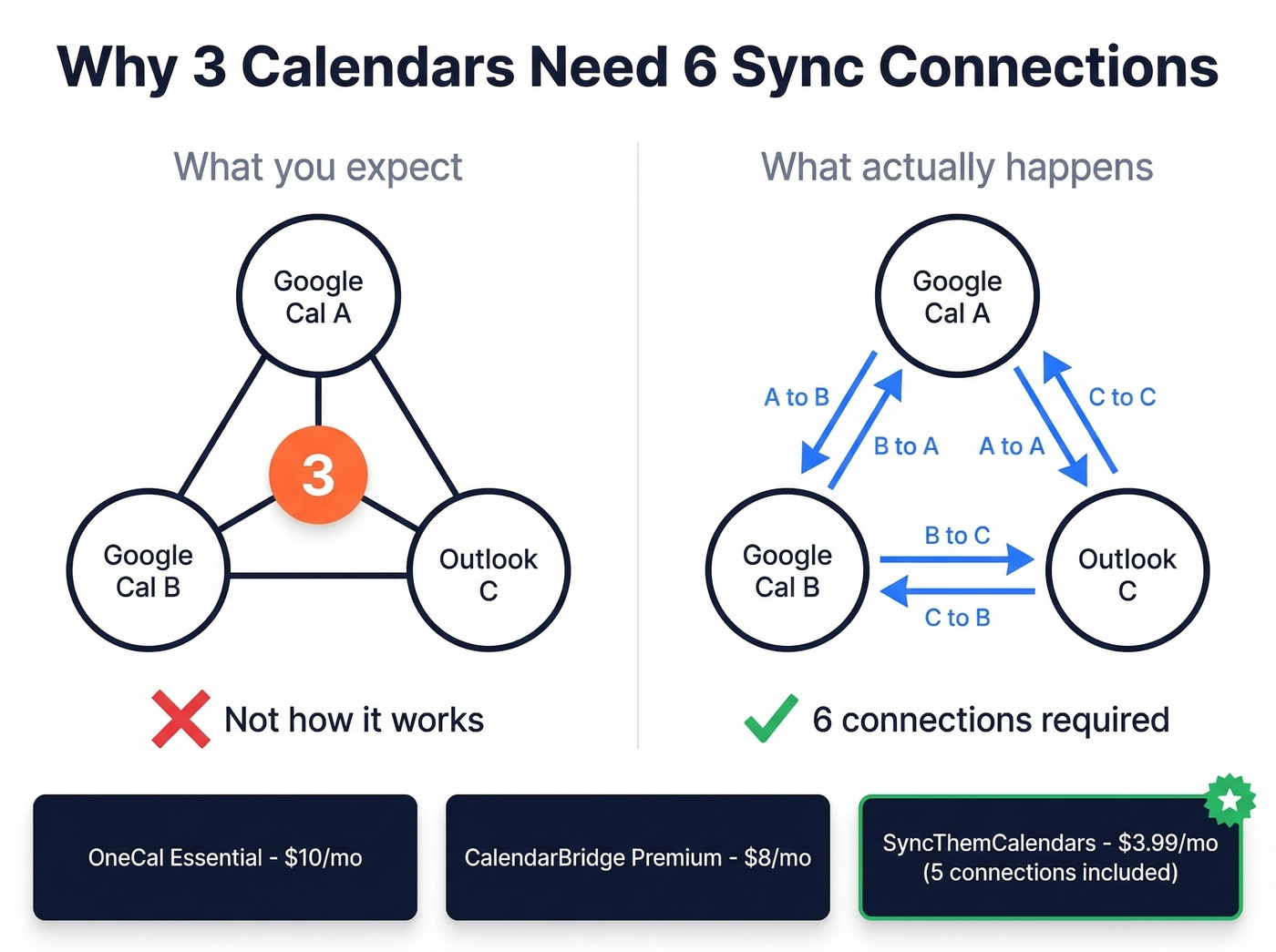
One thing that catches everyone off guard: syncing 3 calendars in all directions requires 6 sync connections, not 3. That pushes you into higher tiers on both OneCal and CalendarBridge. Most competitor pages conveniently skip over this math.

You're optimizing your calendar to handle more meetings. Make sure those meetings are with the right people. Prospeo gives you 98% accurate emails and 125M+ verified mobile numbers so every slot on your synced calendar counts.
Stop syncing calendars full of meetings that go nowhere.
Best OneCal Alternatives Reviewed
CalendarBridge
The closest 1:1 OneCal replacement - with unified calendar apps on web, iPhone, and Android.
CalendarBridge's pricing runs $4/mo (Basic), $8/mo (Premium), and $32/mo (Pro) on annual billing. Plan limits are defined by sync connections: Basic includes 2, Premium includes 16, Pro includes 36.
You get a unified calendar app across all platforms, real-time syncing for Google and Outlook events (typically under a minute), and HIPAA BAA availability on Premium and Pro. Those higher tiers also include an AI Executive Assistant - a feature OneCal doesn't offer at any price.
Here's the catch. The same sync connections math that plagues OneCal applies here too. Three calendars synced in all directions means 6 connections, which means Premium at $8/mo - not Basic. Four calendars? Still Premium. Five or six? You're looking at Pro. CalendarBridge is at least transparent about this in their help docs, which is more than most competitors offer.
Skip it if you only need busy blocks and don't care about a unified calendar view. You'd be paying for features you won't use.
SyncThemCalendars
At $3.99/mo annually for up to 5 sync connections, SyncThemCalendars is the best value in this category. Full stop. It supports Google, Outlook, and Apple iCloud with one-way or two-way sync, and privacy controls let you rename events to "Private Appointment" - exactly what the r/selfhosted crowd wants. The 14-day free trial requires no credit card, so there's zero friction to test it.
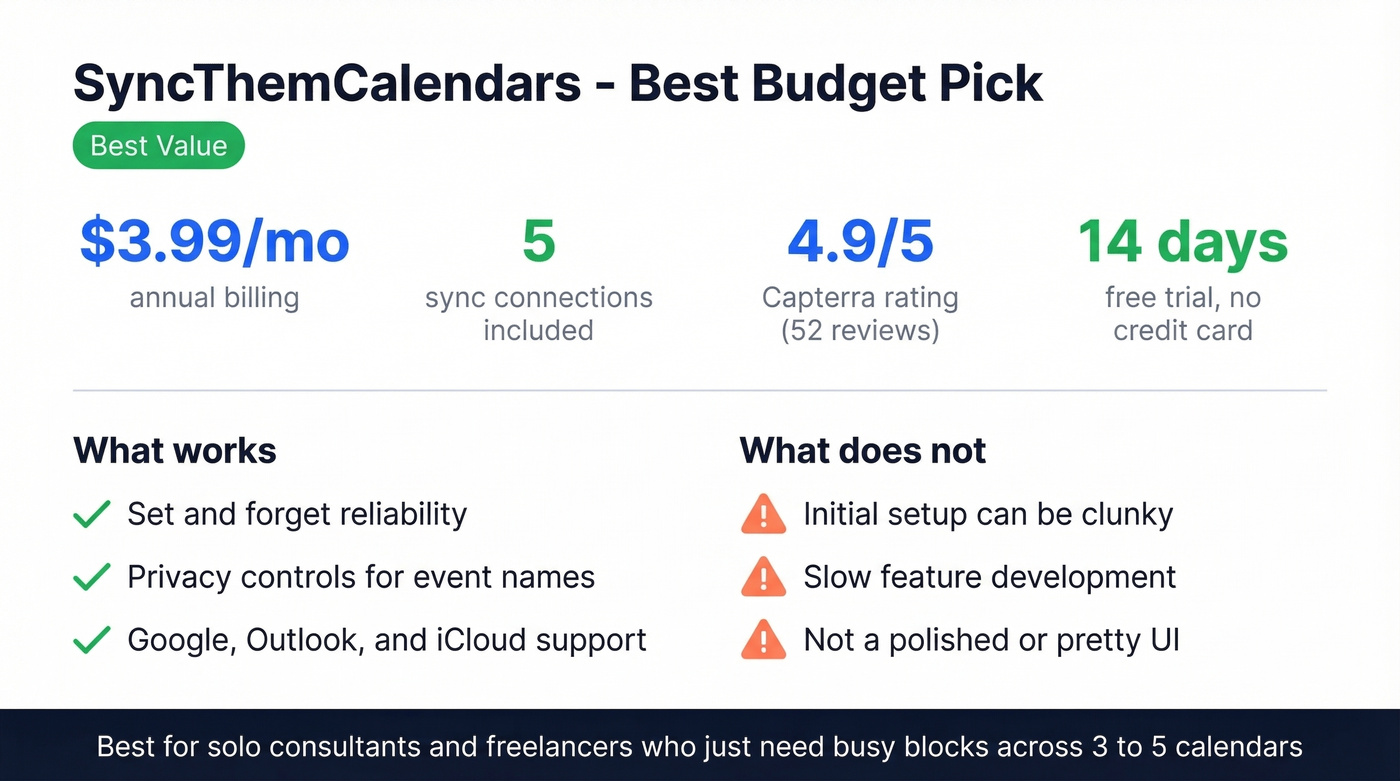
The 4.9/5 on Capterra across 52 reviews tells the story: once it's running, it's a "set and forget" tool. Complaints center on initial setup being clunky and sometimes requiring a support ticket, plus slow feature development. But for pure busy-block syncing, nothing beats the price. If you're a solo consultant closing deals under $15k, this is probably all the calendar sync tool you need.
Skip it if you want a polished UI or rapid feature updates. This is a utility, not a product you'll enjoy using.
Reclaim.ai
Reclaim is the odd one out on this list. It's not really a calendar sync tool - it's an AI scheduling layer that happens to include sync. The free tier includes 1 calendar sync and works indefinitely, making it the only permanently free option here. Starter at $10/seat/mo unlocks unlimited sync plus smart habits, task defense, and AI-driven time blocking.
We found the AI features genuinely useful for protecting focus time, but they're the point of the product - you're paying for them whether you use them or not. For just busy blocks, Reclaim is overkill. Reclaim has also historically been Google Calendar-centric, with Outlook support lagging behind, so check their current integrations before committing if Outlook is your primary calendar.
Best for: Google Calendar power users who want AI scheduling on top of sync. Start free, upgrade if the AI features stick.
Morgen
Morgen wants to be the one app that replaces your calendar, task manager, and scheduling tool. It connects Google, Outlook, and iCloud with integrations into Notion, Todoist, Linear, and more. Swiss-hosted, GDPR compliant, apps on every platform including Linux. Over 248,000 professionals use it.
Let's be honest: at $30/mo on monthly billing, Morgen is hard to justify. Reddit users have pushed back hard on that price tag, and we agree. The annual rate of $15/mo is the only way this makes sense. They also offer 15% off if you're switching from a competitor like Reclaim or Fantastical, and 25% off for students and nonprofits.
Skip it if you just need calendar sync. Paying $15/mo for busy blocks alone is like buying a Swiss Army knife to open envelopes.
Fantastical
Fantastical is a beautiful calendar app for the Apple ecosystem. At ~$4.75/mo billed annually, it aggregates all your calendars into one view and uses push sync to keep events and tasks updated across your devices in real time. But it's not a sync tool in the OneCal sense - it doesn't create busy blocks on other accounts.
The free tier lets you view calendars but locks scheduling and advanced features behind the paywall. For cross-calendar blocking, look elsewhere. For the best calendar UI on Mac and iPhone? Unmatched.
SyncGene (Skip It)
SyncGene is transitioning to CiraHub. Free accounts are limited to 1 manual sync per month, and the product roadmap is unclear. Skip it.
How to Pick the Right Tool
Three personas, three answers.
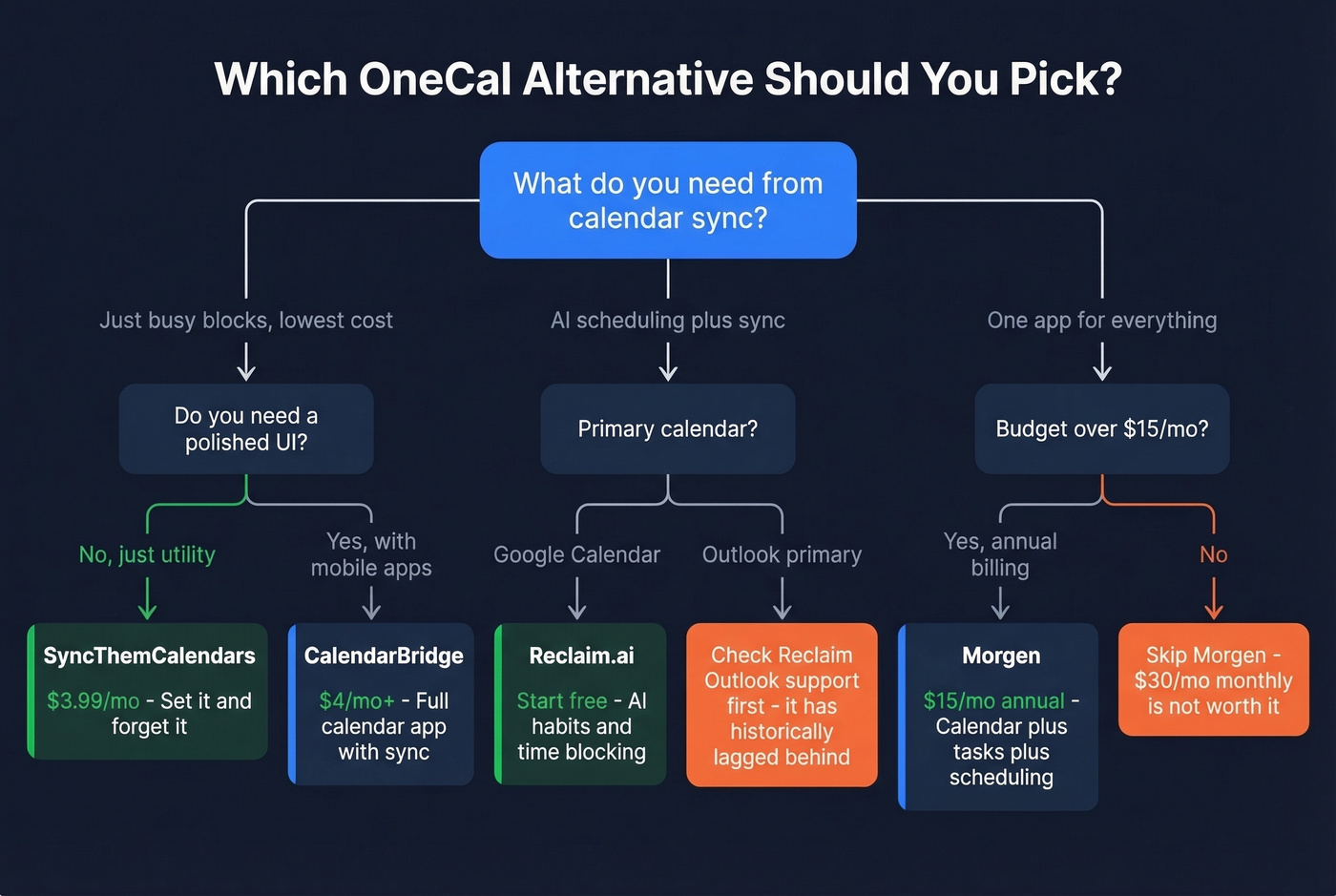
Freelancer or consultant with 3+ client calendars: CalendarBridge if you want a full calendar app with mobile access, SyncThemCalendars if you just need busy blocks at the lowest price. Most freelancers should start with SyncThemCalendars and upgrade only if they outgrow it.
Google Calendar power user who wants AI scheduling: Reclaim.ai. Start free, upgrade if the AI features stick. Don't pay for Starter unless you're actually using habits and task defense.
"I want one app for everything" person: Morgen at the annual rate. Don't pay monthly - you'll resent it within two billing cycles.
Beyond Calendar Sync
If you're juggling multiple client calendars, you're probably also hunting for prospect emails before those meetings. We've found that the same consultants and freelancers frustrated by calendar pricing are often cobbling together contact data from three different free tools. Prospeo covers 300M+ professional profiles with 98% email accuracy and a 7-day data refresh cycle - there's a free tier with no contracts, which makes it a good fit for consultants who need verified contact data without committing to an enterprise platform. If you're building a repeatable outbound motion, start with sales prospecting techniques and then layer in data enrichment services to keep records fresh.
Consultants and freelancers hunting for better calendar tools are usually scaling their client pipeline. Prospeo finds decision-maker emails at $0.01 each with 30+ filters - so you actually need that third calendar.
Fill every calendar on your roster with meetings that close.
FAQ
Is there a free OneCal alternative?
Reclaim.ai's free tier includes 1 calendar sync and works indefinitely - it's the only permanently free option for calendar syncing. SyncThemCalendars and CalendarBridge both offer free trials but no permanent free plan. Fantastical has a limited free tier, but it doesn't do busy-block syncing.
Can I sync Google Calendar with Outlook for free?
Reclaim.ai's free plan supports 1 calendar sync between Google and Outlook at no cost. For full two-way sync across multiple accounts, expect to pay $4-10/mo. CalendarBridge and SyncThemCalendars both support Google-to-Outlook syncing on their lowest paid tiers.
What's the cheapest way to sync 3 calendars?
SyncThemCalendars at $3.99/mo covers up to 5 sync connections - enough for 3 calendars in most configurations. For all-direction sync (6 connections), CalendarBridge Premium at $8/mo handles it. Both are cheaper than OneCal's Essential plan at $10/mo for the same setup.