

The 10 Best Pipeline Management Tools in 2026
A lot of pipeline never converts. It sits there, aging, inflating forecasts, and making your board deck look better than reality. Sales cycles are 21% longer than they were in 2020, and a healthy pipeline coverage ratio is still 3-5x quota. The tools you use matter - but not as much as the data flowing into them.
Here are 10 options worth evaluating, ranked by what they actually do well, plus the benchmarks and pricing context you need to choose without wasting a quarter on trials.
Our Picks (TL;DR)
| Tool | Best For | Starting Price |
|---|---|---|
| Pipedrive | Visual pipeline under 50 reps | $14/user/mo |
| Prospeo | Feeding your pipeline clean data | Free (75 emails/mo) |
| HubSpot Sales Hub | Free starting point + upgrade path | $0 (up to 2 seats) |
| Salesforce Sales Cloud | Enterprise customization | $25/user/mo |
| monday CRM | Teams already on monday.com | €12/seat/mo |
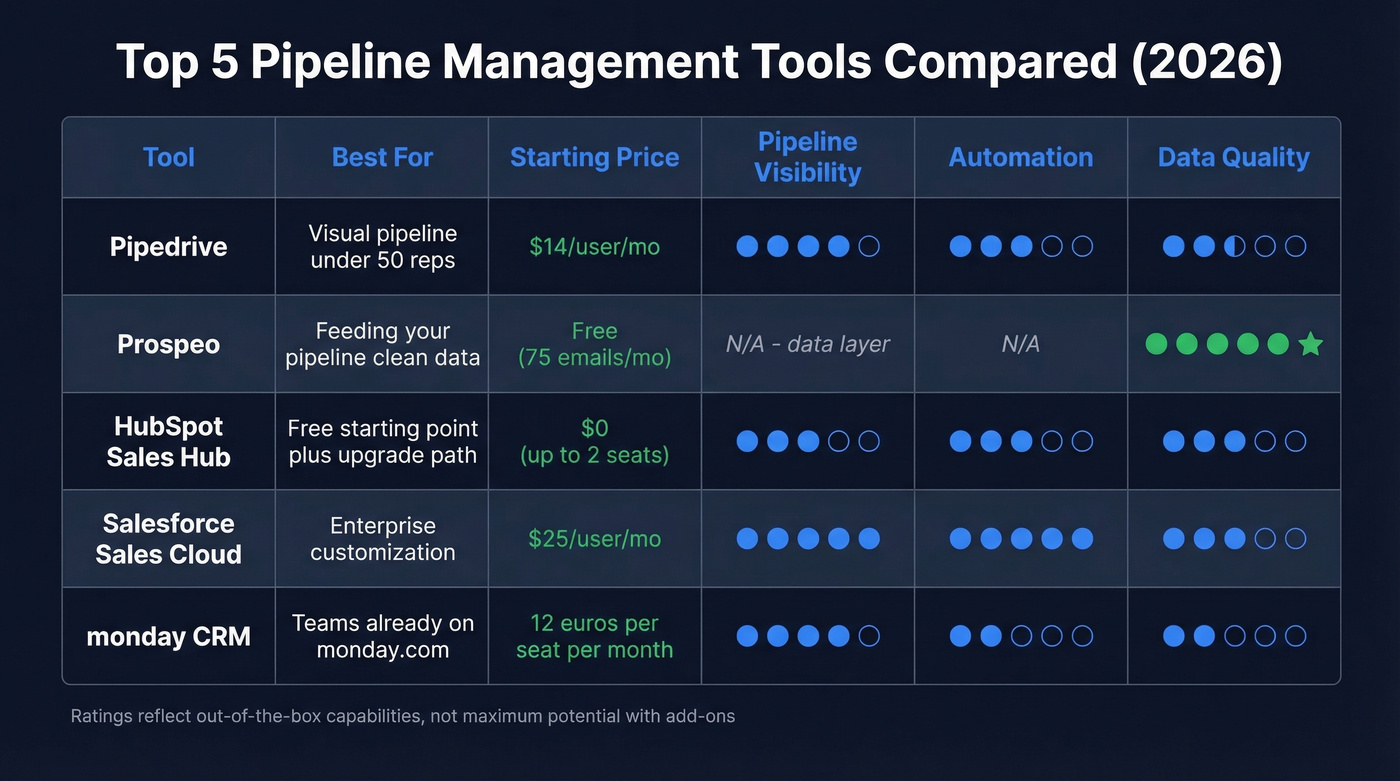
Pipedrive is the best pure pipeline tool for SMBs. HubSpot is where most teams start. Salesforce is where enterprise teams end up, for better or worse. None of them matter if the contacts inside your pipeline have changed jobs, bounced emails, or dead phone numbers - which is where a data layer like Prospeo earns its keep. Snyk dropped bounce rates from 35-40% to under 5% after deploying it across 50 AEs, with AE-sourced pipeline up 180%.
Pipeline Benchmarks Before You Buy
Before you pick a tool, you need to know what "good" looks like. These benchmarks should inform how you configure stages, set alerts, and evaluate whether your pipeline is healthy or just large.
Coverage Ratio
A healthy pipeline carries 3-5x your quota in value. If your quarterly target is $500K, you need $1.5M-$2.5M in active pipeline to hit it reliably. Below 3x, you're flying blind. Above 5x, you're probably hoarding stale deals that should've been disqualified weeks ago.
Stage Conversion Rates
These are aggregate benchmarks from MarketJoy's 2024-2025 data, useful as a baseline:
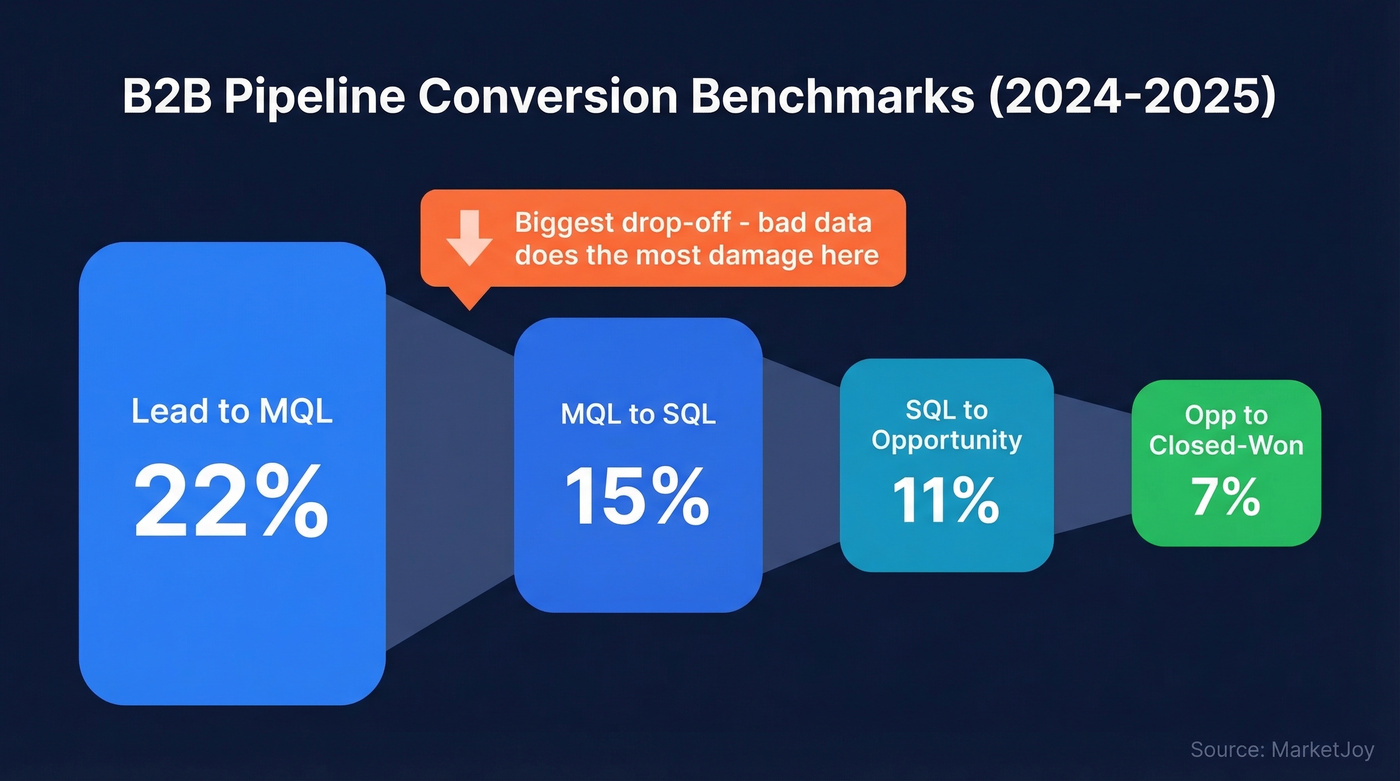
| Stage Transition | Benchmark Rate |
|---|---|
| Lead to MQL | 22% |
| MQL to SQL | 15% |
| SQL to Opportunity | 11% |
| Opp to Closed-Won | 7% |
The biggest drop-off is MQL to SQL. That's where bad data does the most damage - contacts who've changed jobs, emails that bounce, phone numbers that ring out. Your pipeline software will show you the conversion rate. It won't tell you why it's low.
Sales Cycle Length
Your pipeline stages need to reflect how long deals actually take to close. Here are 2026 benchmarks by ACV:
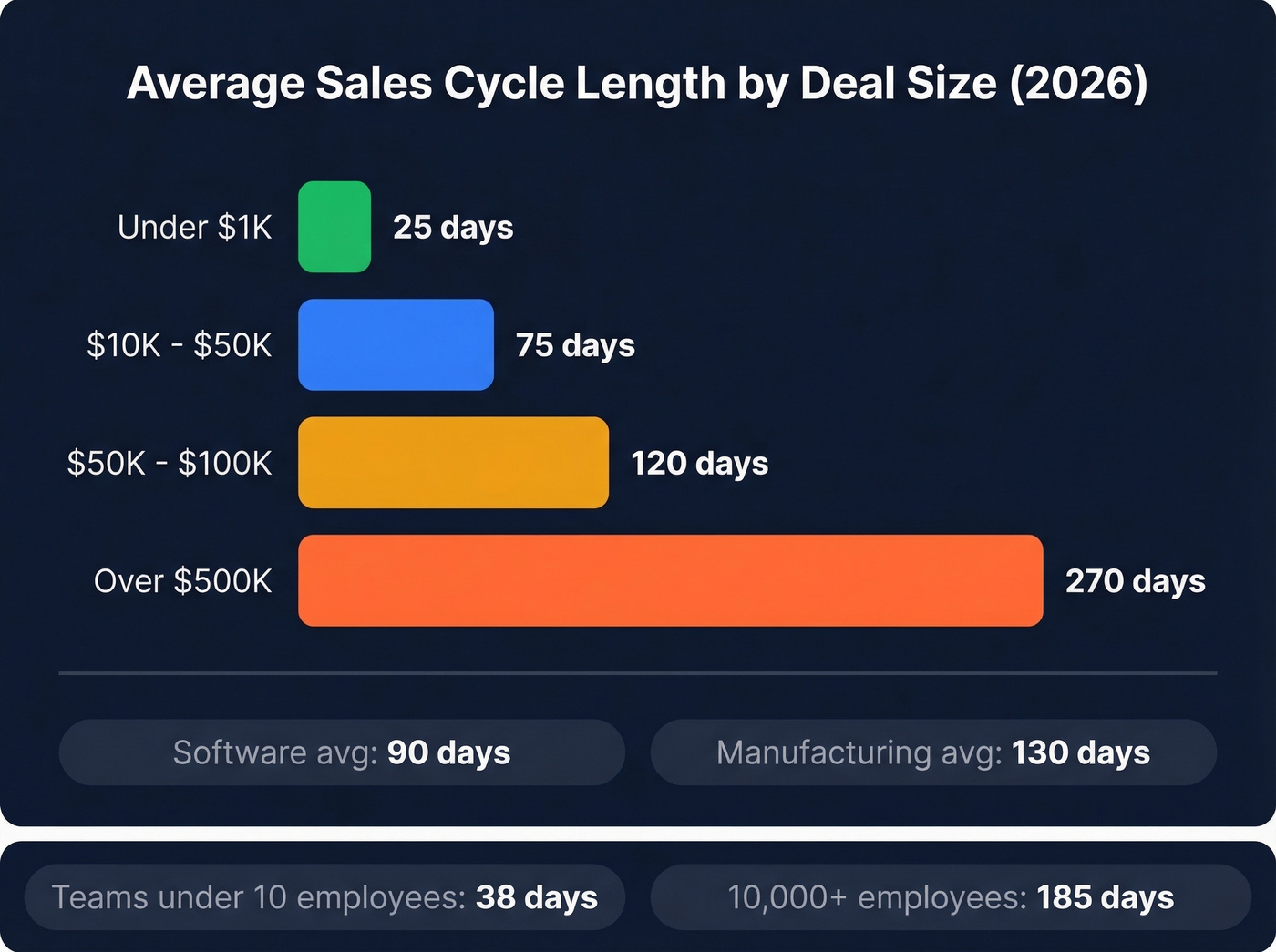
| ACV Range | Avg Sales Cycle |
|---|---|
| Under $1K | 25 days |
| $10K-$50K | 75 days |
| $50K-$100K | 120 days |
| Over $500K | 270 days |
For context, software companies average 90-day cycles while manufacturing runs 130 days. Company size matters too: teams under 10 employees close in roughly 38 days, while 10,000+ employee organizations stretch to 185 days.
If you're selling six-figure deals and your pipeline tool doesn't have stage aging alerts, you'll lose deals to neglect. Running high-velocity sales under $1K? You need speed over sophistication.
Pipeline Velocity
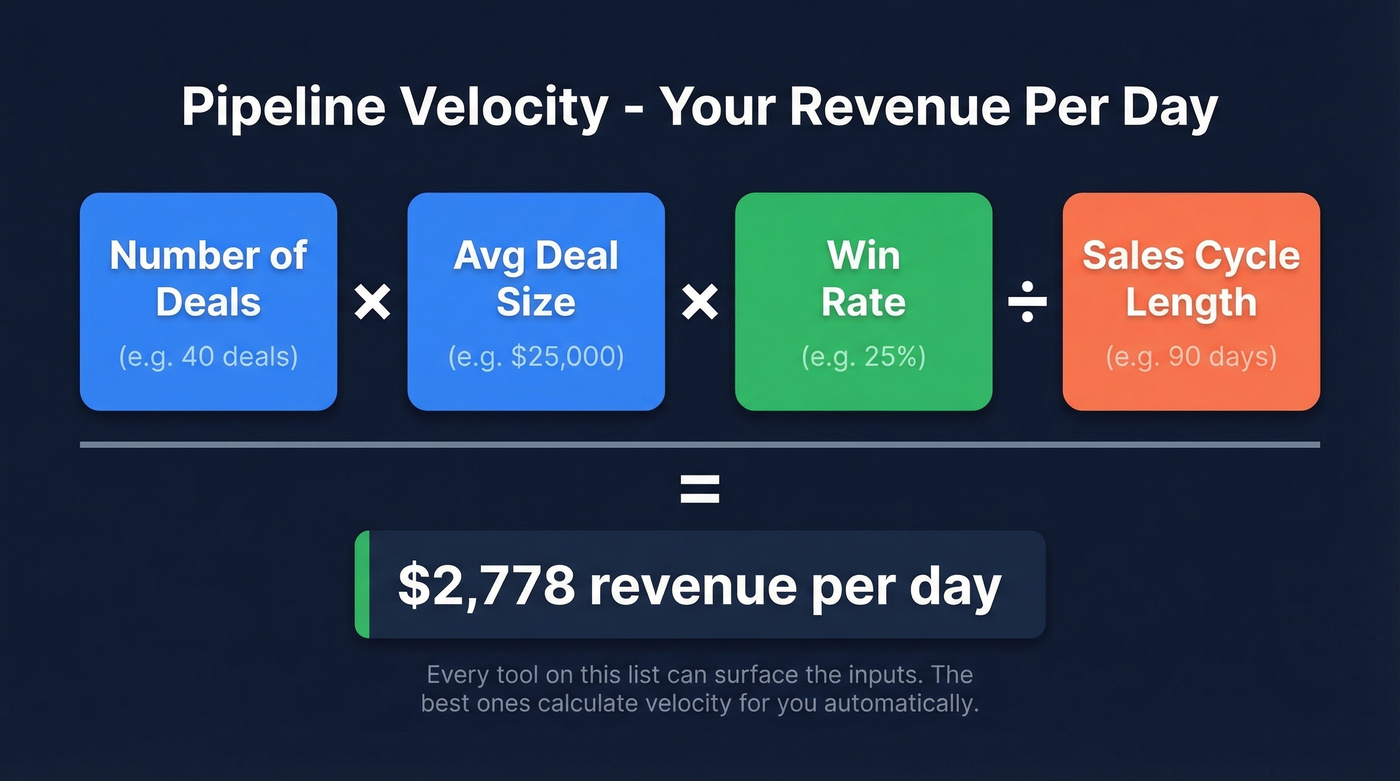
The formula is straightforward: (Number of deals x Average deal size x Win rate) / Sales cycle length. This single number tells you how much revenue your pipeline generates per day. Every tool on this list can surface the inputs. The best ones calculate velocity for you automatically.
How to Evaluate Pipeline Tools
Not every CRM is a good pipeline tool, and not every pipeline tool is a good CRM. Here's what to prioritize.
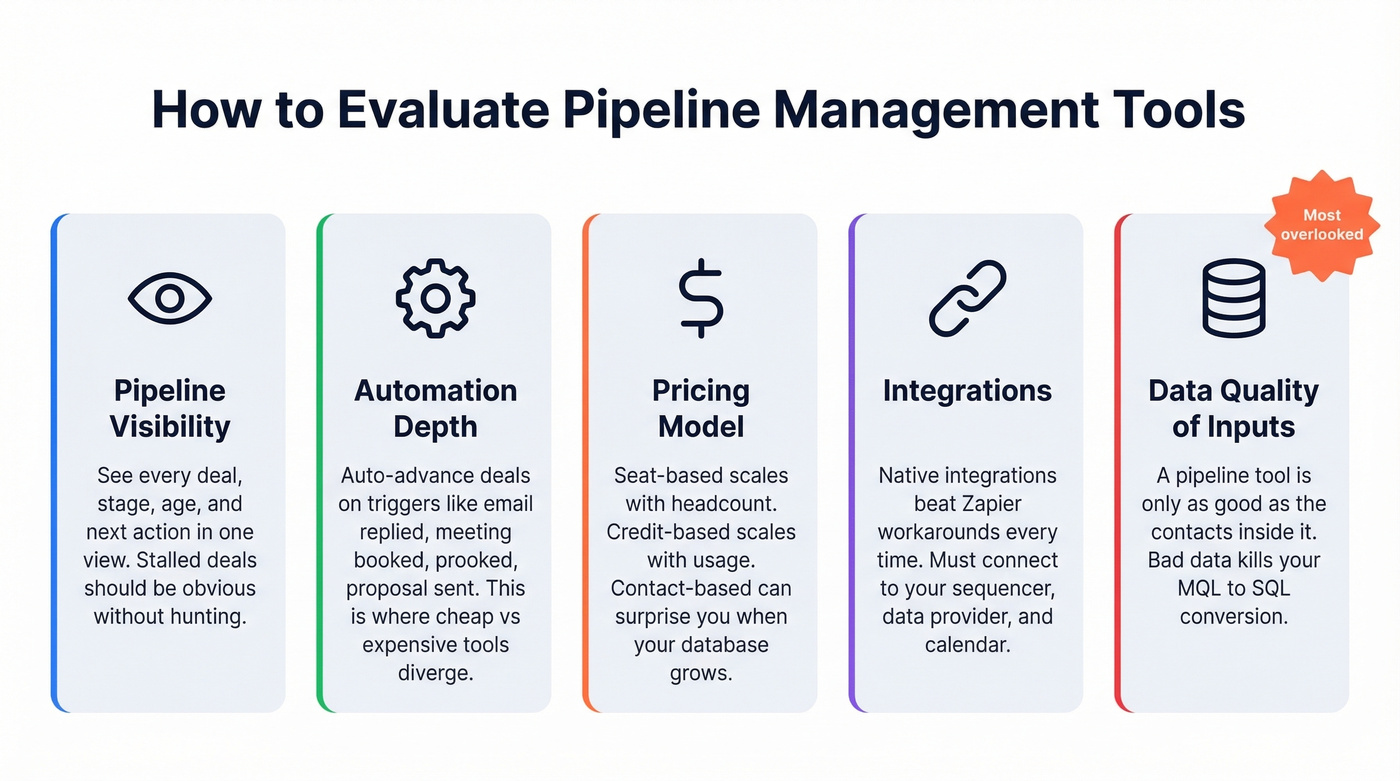
Pipeline visibility is table stakes. Can you see every deal, its stage, its age, and its next action in one view? Kanban boards are everywhere now. The real question is whether the tool makes stalled deals obvious without you hunting for them. AI-powered forecasting is emerging as a differentiator - Pipedrive's AI Sales Assistant and Freshsales' Freddy AI both flag at-risk deals automatically, which saves managers from manually scanning boards every morning.
Automation depth separates the cheap tools from the expensive ones. Moving deals between stages manually is a waste of rep time. Look for solutions that auto-advance based on triggers: email replied, meeting booked, proposal sent. The difference between a $14/mo tool and a $100/mo tool usually lives here.
Pricing and integrations deserve equal scrutiny. Seat-based pricing (Pipedrive, HubSpot, Salesforce) scales linearly with headcount, while credit-based pricing scales with usage and contact-based pricing can surprise you when your database grows. Your deal tracking software also needs to talk to your sequencer, your data provider, and your calendar - native integrations beat Zapier workarounds every time for reliability.
Data quality of inputs is the one everyone ignores. A pipeline tool is only as good as the contacts inside it. And reporting and forecasting - weighted pipeline, stage-based forecasting, and deal aging reports - are non-negotiable for any team running a weekly pipeline review.

The biggest drop-off in your pipeline - MQL to SQL - happens when contacts have changed jobs, emails bounce, and phones ring out. Prospeo refreshes 300M+ profiles every 7 days with 98% email accuracy, so your pipeline stays filled with reachable buyers, not dead leads.
Stop managing a pipeline full of ghosts. Start with clean data.
The 10 Best Tools for 2026
1. Pipedrive - Best Pure Pipeline Tool
Pipedrive introduced a new pricing structure in 2025, renaming Essential to Lite, Advanced to Growth, and so on. Pricing landed at $14/user/mo (Lite), $39 (Growth), $59 (Premium), and $79 (Ultimate), all billed annually with a 14-day free trial and no credit card required. Lite bumps the per-user leads and deals cap to 2,500 (up from 2,000 on the old Essential plan), and Growth allows 5,000.

Use it if you want the cleanest visual pipeline experience on the market. Pipedrive's kanban view is genuinely best-in-class for teams under 50 reps. The Growth tier at $39/mo hits the sweet spot - full email sync, automation, and two-way integrations. Premium bundles LeadBooster (chatbot, live chat, prospector, web forms), which costs $32.50/mo as an add-on on lower tiers. The AI Sales Assistant, available from Growth up, flags deals going cold and suggests next actions.
Skip it if you need deep marketing automation, customer support ticketing, or enterprise-grade reporting. Pipedrive does pipeline management and does it well. It doesn't try to be Salesforce, and that's the point. The Ultimate tier introduced caps where Enterprise previously had "unlimited" - 500 custom fields, 25 permission sets - so large teams should check limits before committing.
2. Prospeo - Best for Pipeline Data Quality
Your CRM can't fix bad inputs. Prospeo fixes the inputs.
Prospeo is a B2B data platform with 300M+ professional profiles, 143M+ verified emails, and 125M+ verified mobile numbers, used by 15,000+ companies. It combines a leads database with 30+ search filters, real-time email and mobile verification, CRM enrichment, intent data tracking 15,000 topics via Bombora, and API access - all on a 7-day data refresh cycle where the industry average is six weeks.
With 98% email accuracy, the contacts entering your pipeline are verified and current. Snyk deployed Prospeo across 50 AEs and dropped their bounce rate from 35-40% to under 5%, with AE-sourced pipeline up 180% and 200+ new opportunities per month. Among the tools on this list, Prospeo is unique because it doesn't manage your pipeline - it ensures the contacts inside it are worth managing. Pair it with Pipedrive, HubSpot, or Salesforce via native integrations, and you've got a pipeline that's both well-organized and filled with reachable people.
3. HubSpot Sales Hub - Best Free Starting Point
HubSpot's free tier gives you up to 2 seats, a basic pipeline view, and enough functionality to manage deals if you're a small team just getting started. It's the gateway drug of CRM - and HubSpot knows it.
Use it if you want a free starting point with a clear upgrade path. Starter runs $9/seat/mo annual ($15/seat/mo monthly), which is genuinely cheap. The jump to Professional at $90/seat/mo plus a $1,500 onboarding fee is where it gets real. Enterprise hits $150/seat/mo with a $3,500 onboarding fee. HubSpot's seat model splits into Sales Seats and Core Seats at Professional and above, which adds complexity but also flexibility if not every user needs full sales features.
Skip it if you're a 20-person sales team that needs Professional-tier features. At $90/seat/mo, that's $21,600/year before onboarding - and you'll likely need marketing or service hubs too. The total HubSpot bill for a mid-market team can climb to $40K-$80K/year when you add enrichment tools, calling add-ons, and extra contacts.
4. Salesforce Sales Cloud - Best for Enterprise
Salesforce is the most powerful and most expensive option on the market. Both of those things are true simultaneously.
The pricing ladder runs from Free Suite ($0, max 2 users) through Starter Suite ($25/user/mo), Pro Suite ($100/user/mo), Enterprise ($175/user/mo), Unlimited ($350/user/mo), all the way to Agentforce 1 Sales at $550/user/mo. But the sticker price is misleading. A real mid-market Salesforce deployment - with implementation, a dedicated admin, third-party integrations, and the add-ons you'll inevitably need - runs $50K-$150K/year in total cost of ownership. Salesforce's own pricing page doesn't make this obvious, which is part of the problem.
Use it if you're an enterprise team that needs full customization, complex approval workflows, territory management, and CPQ. Salesforce can do literally anything. The question is whether you have the admin resources to make it do those things.
Skip it if you're under 50 reps and don't have a dedicated Salesforce admin. We've seen teams buy Salesforce because it's "the standard," then spend 6 months configuring it while reps track deals in spreadsheets anyway. The tool is only as good as the implementation behind it.
5. monday CRM - Best for monday.com Teams
If your company already runs on monday.com for project management, stop reading and just add the CRM module. The learning curve is essentially zero, and the visual board layout works surprisingly well for deal tracking.
Basic starts at €12/seat/mo, Standard at €17, Pro at €28 (annual billing). The catch: Basic caps you at 1,000 active contacts and deals, which will bite fast for growing teams. Standard bumps it to 10,000, and Pro removes the limit entirely. Skip monday CRM if you need deep sales-specific features like built-in calling or advanced forecasting - it's a generalist that does pipeline well, not a sales-first platform.
6. Close - Best Built-In Calling
Here's the thing: your reps make 50+ dials a day. They're toggling between their CRM, a separate dialer, and a call recording tool. That's the problem Close solves.
Close offers built-in calling and SMS without needing a separate dialer add-on. Plans start at $59/user/mo, with higher tiers around $109/user/mo and $149/user/mo. It's positioned for outbound-heavy teams that want the communication layer tightly coupled to the CRM. The pipeline visualization is functional but not Close's strength - you're paying for the communication layer. If you're primarily an email-first or inbound team, look elsewhere.
7. Freshsales - Best Budget Option
| Pros | Cons |
|---|---|
| AI deal scoring (Freddy AI) from $9/mo | Thin integration ecosystem outside Freshworks |
| Free plan available | Pipeline UX less polished than Pipedrive |
| Enterprise at $59/mo - fraction of Salesforce | Limited third-party marketplace |
| Built-in phone and email | Reporting depth lags behind HubSpot Pro |
Freshsales offers a free plan, with Growth at $9/user/mo, Pro at $39, and Enterprise at $59. Freddy AI scores deals and suggests next actions, which is genuinely useful for teams that don't have the discipline to manually update deal stages. If you're already in the Freshworks suite, the data flows are seamless. Outside of it, the connector options thin out compared to HubSpot or Pipedrive.
8. Zoho CRM - Best All-in-One Ecosystem
Zoho's pitch is simple: CRM, email marketing, support desk, accounting, and HR from one vendor. CRM pricing runs in the $14-$52/user/mo range depending on tier. For teams already using Zoho Books or Zoho Desk, data flows between apps without third-party middleware.
The pipeline UX is adequate but not inspiring. Pipedrive and HubSpot both offer a more polished deal management experience. Zoho wins on breadth, not depth - if you want one vendor for everything and you're willing to accept "good enough" deal tracking in exchange, it's the right call.
9. Nimble - Best for Solopreneurs
Nimble runs a single plan at $29.90/user/mo. It's a relationship-focused CRM that pulls in social context and communication history automatically. For solo founders or consultants managing a personal pipeline, it's simple and effective. Don't overthink it.
10. Copper - Best for Google Workspace
Copper is built for Google Workspace workflows. Plans start at $12/user/mo, and the Business tier is $134/user/mo. If your entire workflow runs through Gmail and Google Calendar and you want a CRM that doesn't feel like a separate app, Copper is the obvious choice. It won't win any awards for pipeline sophistication, but the low-context-switching experience is worth the trade-off for Google-native teams.
Pricing Comparison
All rates are annual-billed unless noted:
| Tool | Starting Price | Mid-Tier | Enterprise | Pricing Model |
|---|---|---|---|---|
| Pipedrive | $14/user/mo | $39/user/mo | $79/user/mo | Per seat |
| Prospeo | Free (75 emails/mo) | ~$0.01/email | - | Credit-based |
| HubSpot | $0 (2 seats) / $9/seat/mo | $90/seat/mo | $150/seat/mo | Per seat |
| Salesforce | $0 (2 users) / $25/user/mo | $175/user/mo | $350/user/mo | Per seat |
| monday CRM | €12/seat/mo | €17/seat/mo | Contact sales | Per seat |
| Close | $59/user/mo | ~$109/user/mo | $149/user/mo | Per seat |
| Freshsales | $0 / $9/user/mo | $39/user/mo | $59/user/mo | Per seat |
| Zoho CRM | ~$14/user/mo | ~$23/user/mo | ~$52/user/mo | Per seat |
| Nimble | $29.90/user/mo | Single tier | Single tier | Per seat |
| Copper | $12/user/mo | - | $134/user/mo | Per seat |
| SalesLoft* | ~$125/user/mo | ~$180/user/mo | Custom | Per seat |
*SalesLoft doesn't publish pricing. The ~$125-$180 range reflects negotiated estimates per Vendr-based analysis.
| Tool | Onboarding Fee | Notes |
|---|---|---|
| Pipedrive | None | 14-day free trial, no credit card |
| HubSpot | $1,500 (Pro) / $3,500 (Ent) | Free tier available |
| Salesforce | $15K-$50K (est.) | Implementation + admin costs |
| monday CRM | None | Basic caps at 1,000 contacts and deals |
| Close | None | - |
| Freshsales | None | Free plan available |
| Zoho CRM | None | - |
| Nimble | None | - |
| Copper | None | - |
| SalesLoft | Custom | Not public |
Let's be honest: if your average deal size is under $10K, you probably don't need Salesforce-level infrastructure. A $14/mo Pipedrive seat with clean data flowing in will outperform a $175/mo Salesforce seat filled with stale contacts every single time. Most teams over-buy on CRM and under-invest in the data quality layer that actually drives conversions.
The Cost Nobody Mentions - Bad Data
Your pipeline is lying to you if your contact data is stale. And it's almost certainly stale.
The average B2B database decays at roughly 30% per year. People change jobs, companies get acquired, email domains shift. If you loaded 10,000 contacts into your CRM in January, 3,000 of them are unreachable by December. Your pipeline tool will still show those deals as active. Your forecast will still count them. And your reps will still waste time sequencing contacts who left the company six months ago.
A HubSpot Professional subscription plus the enrichment tools you need to keep data fresh can run $10K-$30K/year on top of the CRM cost. Salesforce deployments are even worse - the TCO for clean data inside Salesforce is a line item most teams don't budget for until it's too late. The consensus on r/sales is that data quality is the single most underrated factor in pipeline health, and we've found the same thing in our own testing across client teams.

Snyk deployed Prospeo across 50 AEs and saw bounce rates drop from 35-40% to under 5%, with AE-sourced pipeline up 180%. Your pipeline management tool tracks deals. Prospeo makes sure those deals have valid contacts behind them - at $0.01 per email.
Feed your pipeline verified contacts, not stale records from six weeks ago.
Weekly Pipeline Review Playbook
The best pipeline management tools in the world won't help if you don't review your pipeline consistently. Here's a four-step agenda we've seen work across dozens of teams:
Step 1: Top deals check (5 min). Review your top 5 deals by value. What's the next action? When is it scheduled? If a rep can't answer both questions in under 10 seconds, the deal isn't being worked - it's being hoped on.
Step 2: Stalled deal diagnosis (10 min). Pull every deal that hasn't moved stages in 14+ days. For each one, decide: advance it, re-engage, or kill it. Most teams are too slow to kill dead deals, and that inflates coverage ratios with phantom pipeline. In our experience, the single biggest forecast improvement comes from getting ruthless here.
Step 3: Stage aging review (5 min). Compare average time-in-stage against your benchmarks. If SQL to Opportunity normally takes 10 days and you've got deals sitting there for 30, something's broken - usually a missing champion or unclear next step.
Step 4: Forecast update (5 min). Adjust commit, best-case, and upside numbers based on what you just reviewed. A forecast that only updates monthly is a guess. A forecast that updates weekly is a tool.
Keep your pipeline at 5-7 stages with clear entry and exit criteria for each. Fewer stages create blind spots. More stages create friction that reps route around by skipping updates entirely.
FAQ
What's the difference between a CRM and a pipeline management tool?
A CRM covers contacts, marketing, support, and sales broadly, while a pipeline management tool focuses on deal tracking, stage progression, and forecasting. Most CRMs include pipeline features, but dedicated tools like Pipedrive prioritize pipeline UX over everything else. If deal management is your primary need, a pipeline-first tool often beats a full CRM.
How many stages should a B2B pipeline have?
Five to seven stages work for most B2B teams. Fewer creates blind spots where deals disappear between qualification and close. More creates friction that reps ignore. Each stage needs clear entry and exit criteria - a deal can't move to "Proposal Sent" until the proposal is literally sent and confirmed received.
What's a good pipeline coverage ratio?
Three to five times your quota is the standard benchmark. If your quarterly target is $500K, you need $1.5M-$2.5M in pipeline value to hit it reliably. Below 3x, you're at serious risk of missing. Above 5x, audit for stale deals inflating the number.
Do I need a separate data tool alongside my CRM?
Yes - most CRMs lack built-in data enrichment and verification. Without verified contacts, your pipeline numbers are fiction. Standalone enrichment add-ons from CRM vendors often cost $10K-$30K/year, while credit-based options like Prospeo run around $0.01/email with native integrations for Salesforce, HubSpot, and Zapier.
When is a spreadsheet enough for pipeline tracking?
If you have fewer than 5 active deals and one rep, a spreadsheet works fine. Beyond that, you need automation, stage tracking, and reporting that spreadsheets can't reliably provide. The moment you're manually calculating weighted pipeline in Google Sheets, you've outgrown it.