

Plain Text vs HTML Email: What to Actually Send in 2026
You switched your cold outreach to "plain text" last month. Open rates went up. But your ESP still tracks opens and clicks - which requires a tracking pixel - which requires HTML. So what did you actually send?
Probably not plain text. The plain text vs HTML email debate is built on a misunderstanding most marketers never question. And here's the contradiction nobody talks about: you can't follow "always send plain text" and "always include a clickable unsubscribe link" at the same time. True plain text can include an unsubscribe URL, but it can't create an anchor link with custom text. The moment you need a clickable unsubscribe link for compliance and UX, you're already in HTML territory.
The short version:
- Cold outreach: Plain-text style HTML. No images, no logos, minimal links.
- Newsletters and promos: Lightweight HTML with a readable text part.
- All email, always: Send
multipart/alternative. Make the text part readable, not auto-generated garbage.
Format is the least important deliverability lever you have. List quality, sender reputation, and authentication matter ten times more.
What "Plain Text" and "HTML" Actually Mean
When marketers say "plain text," they almost never mean true text/plain. They mean a stripped-down HTML email that looks plain - no banner images, no colored buttons, no multi-column layouts. Word to the Wise nailed this distinction: the industry has conflated two very different things, and it causes real implementation mistakes.
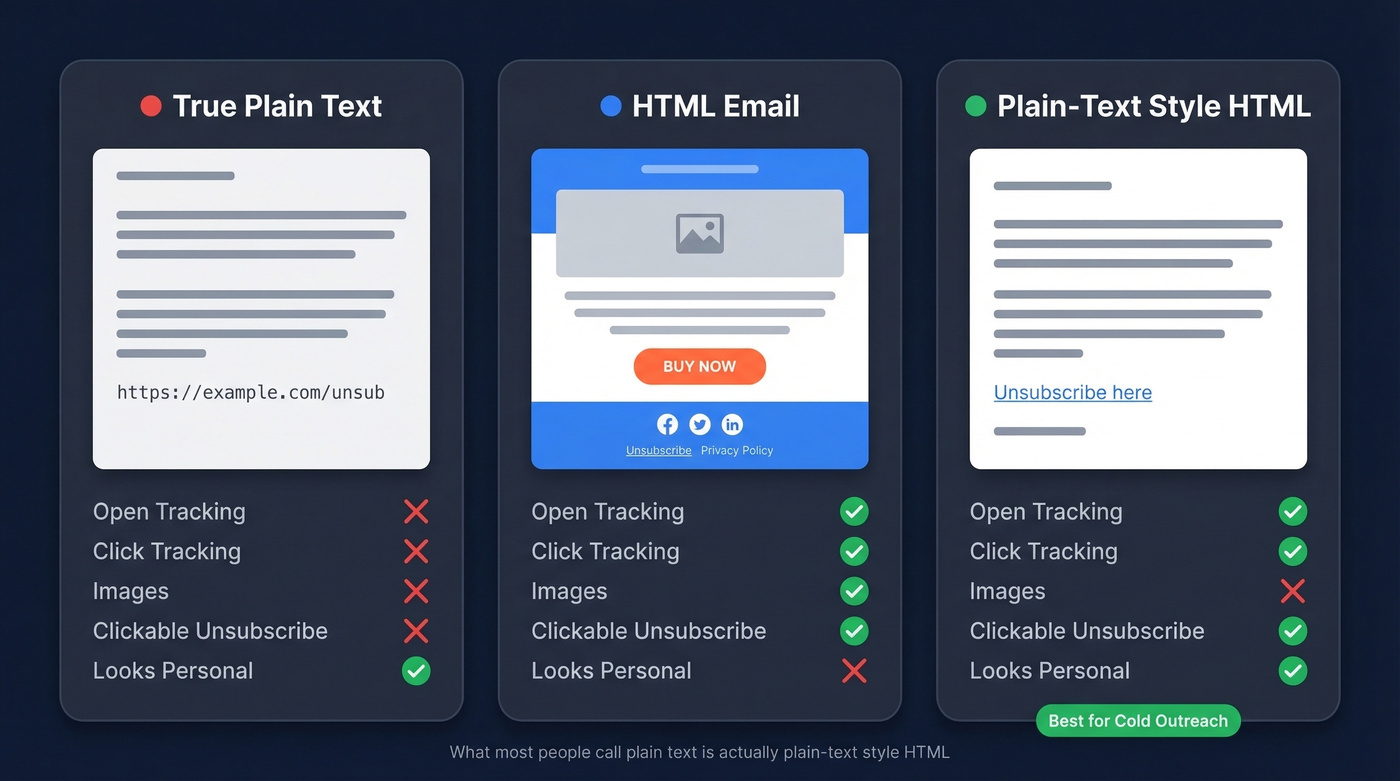
| Feature | True Plain Text | HTML | "Plain-Text Style" HTML |
|---|---|---|---|
| Formatting | None | Full CSS/layout | Minimal |
| Open/click tracking | No | Yes (pixel + links) | Yes |
| Images | No | Yes | No |
| Links | Raw URLs only | Anchor text | Anchor text |
| Responsive design | No | Yes | Limited |
| Unsubscribe link | URL only | Yes | Yes |
That last row is the one cold emailers on r/coldemail argue about constantly. The resolution is simple: use plain-text style HTML so you get the clickable unsubscribe link, then strip everything else.
How Multipart Email Works
Most commercial email isn't plain text or HTML. It's both. The standard format is multipart/alternative, a MIME structure that bundles a text/plain part and a text/html part in a single message, and the recipient's email client picks the last part it can render - which, for any modern client, means the HTML version.
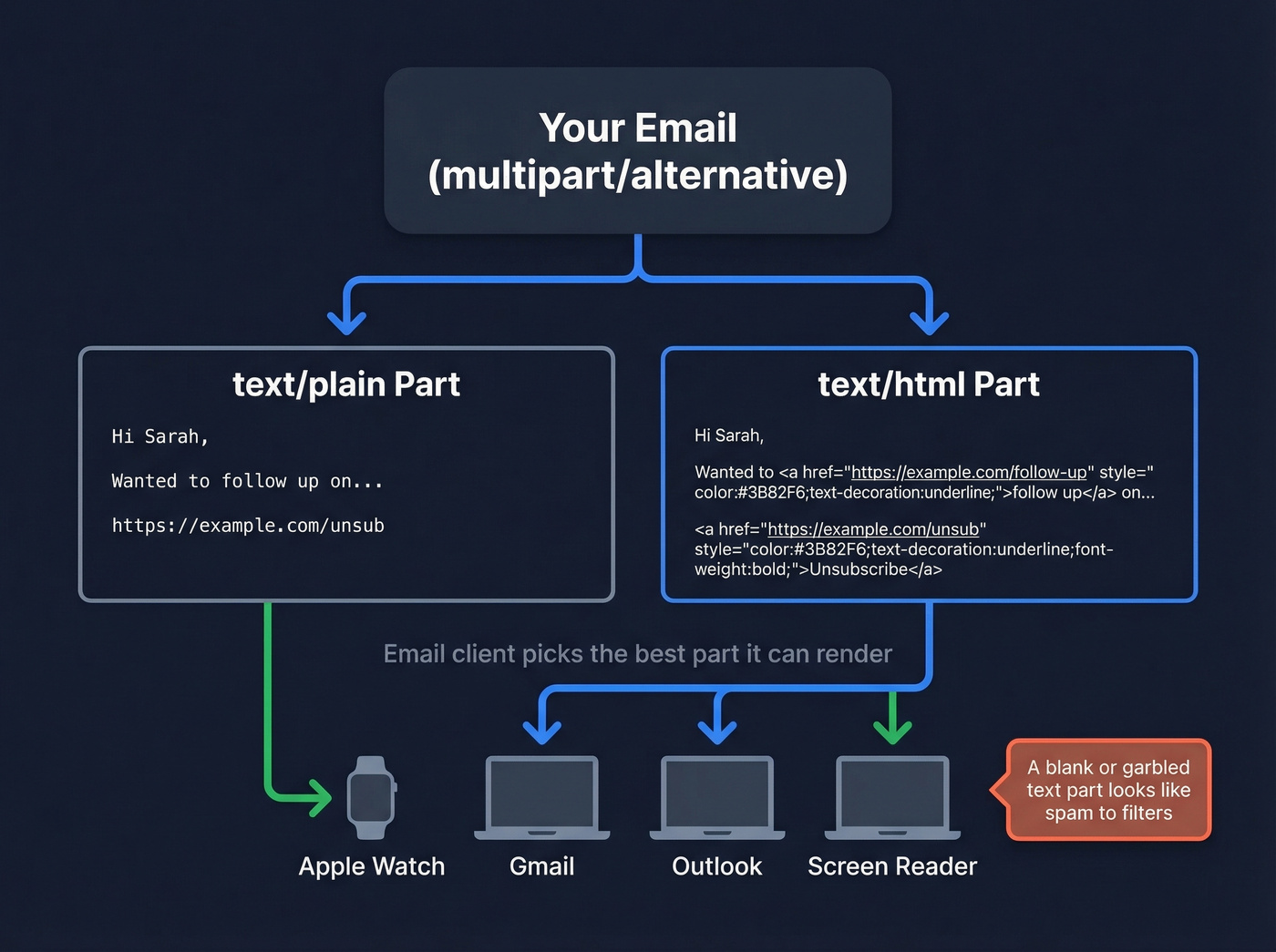
The text part isn't decorative. It's the fallback for clients that can't or won't render HTML, plus accessibility tools and edge cases like the Apple Watch, which drops to text/plain when HTML contains externally linked images. Both parts should convey the same message - not identical wording, but the same content and intent.
Most ESPs auto-generate the text part from your HTML. That's where problems start.
What A/B Tests Actually Show
The two most-cited studies both point the same direction, with a critical nuance.
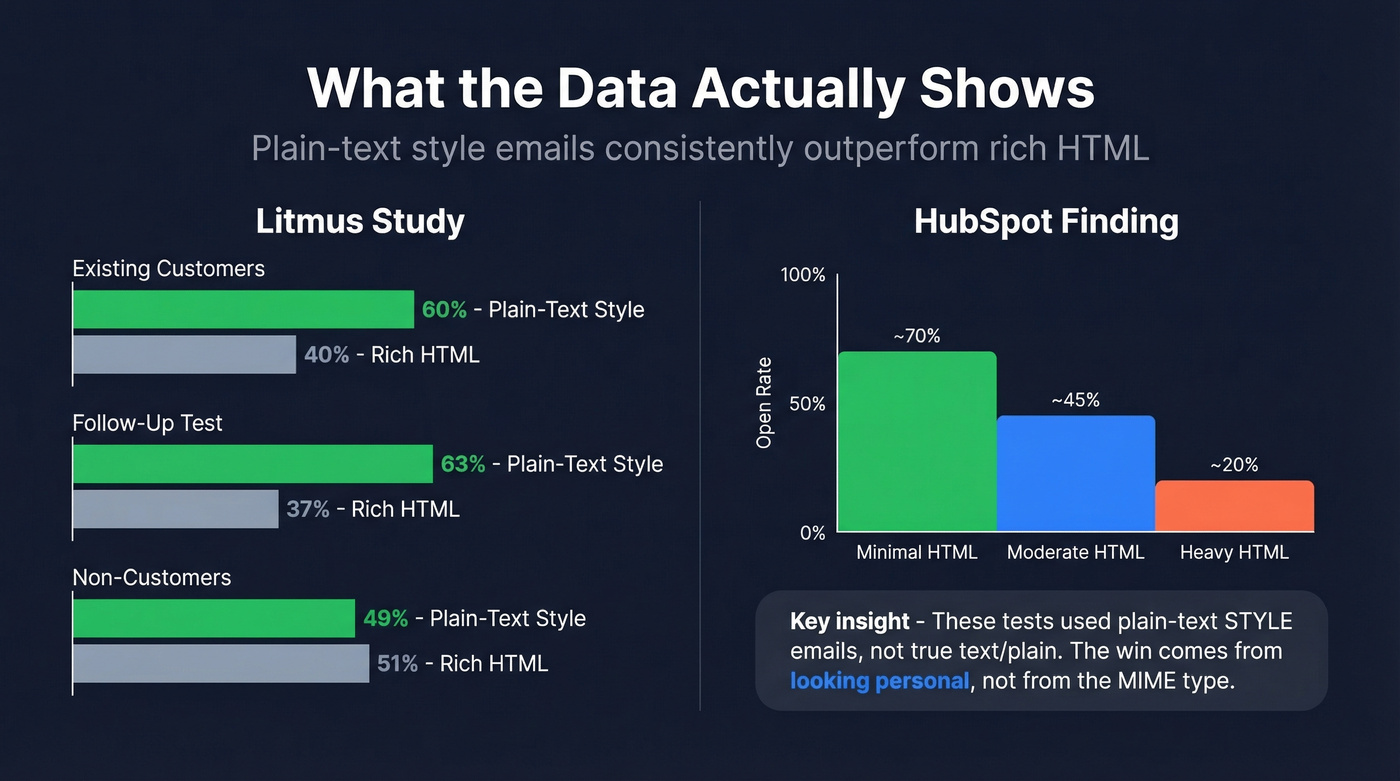
Litmus tested webinar promo emails, splitting audiences 50/50 between plain-text style and regular HTML. Among existing customers, 60% of conversions came from the plain-text version - jumping to 63% in a follow-up test. Among non-customers, it held steady at 49%.
HubSpot's A/B testing found the same pattern from a different angle: the more HTML-rich an email, the lower its open rate. Simpler emails consistently won on both opens and clicks. Individual practitioners on Reddit report the same - plain text "wins significantly" in their own tests.
Here's what both studies actually tested, though: "plain-text style" emails, not true text/plain. These test emails still had hyperlinks, tracking pixels, and basic formatting. The takeaway isn't that text/plain is magic. It's that looking personal and simple outperforms looking commercial and designed. Format is a proxy for perceived intent.

Plain-text style emails win on opens and replies - but only if the addresses behind them are real. Bounces above 2% wreck sender reputation faster than any format choice. Prospeo verifies emails at 98% accuracy and refreshes data every 7 days, so your carefully crafted cold emails reach inboxes, not spam folders.
Fix the lever that actually moves deliverability - start with your list.
Deliverability: What Actually Matters
Let's be honest - HTML doesn't kill deliverability. Bad implementation and bad lists do. HubSpot confirmed this explicitly: choosing between formats matters far less than how you build and maintain your sending infrastructure. The format debate is a distraction from what actually determines inbox placement.
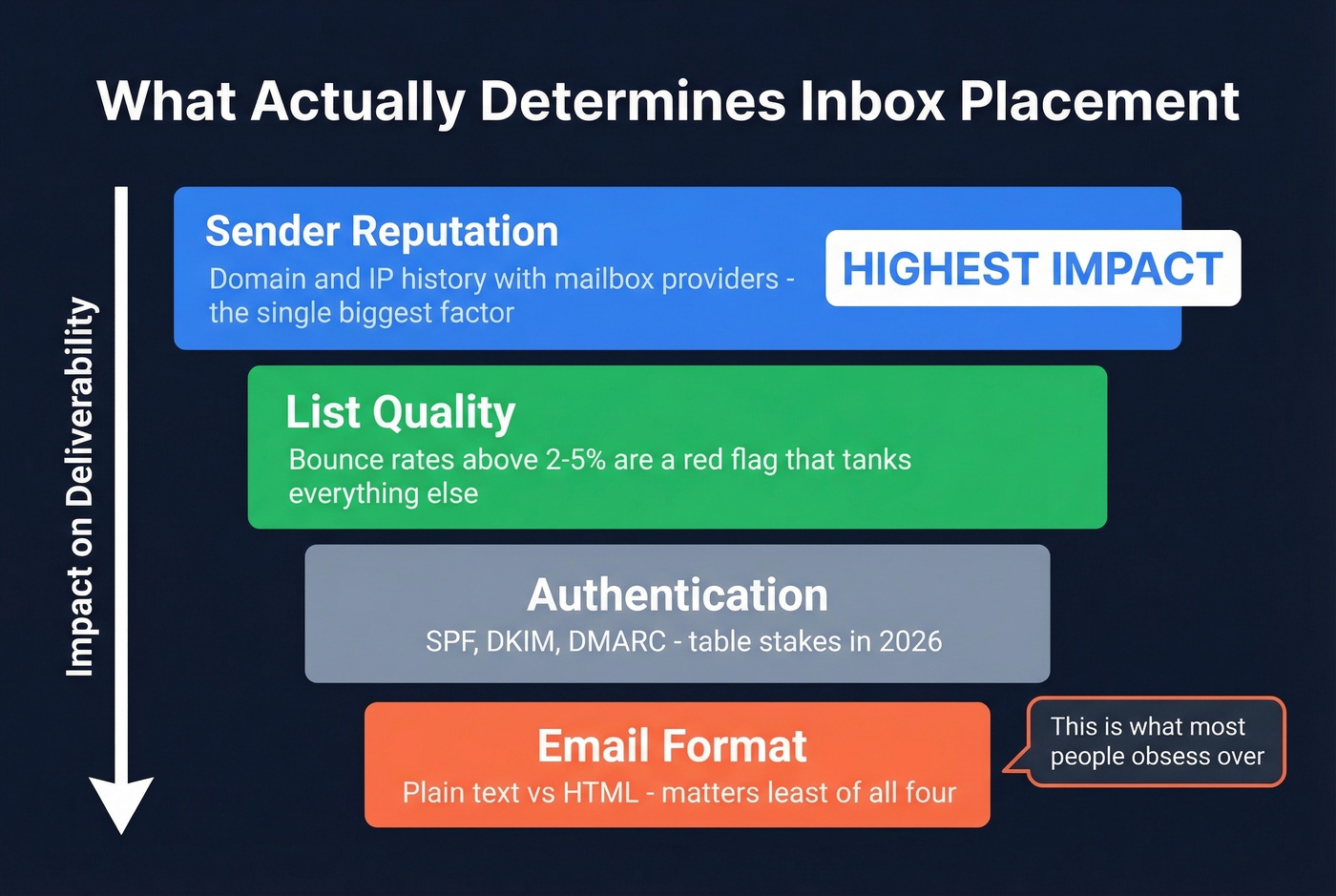
Sender reputation - your domain and IP history with mailbox providers - outweighs everything else. A pristine plain-text email from a burned domain still lands in spam. List quality is right behind it: bounce rates above 2-5% are a common red flag, and once you cross that threshold, no format optimization saves you. Authentication is table stakes: SPF, DKIM, and DMARC.
Format sits below all of those. Where it does matter is Primary vs. Promotions tab sorting. Image-heavy HTML with marketing templates signals "commercial" to Gmail. That's a visibility problem, not a deliverability problem.

One specific trap: auto-generated text parts. Some ESPs convert bold text to ALL CAPS in the plain-text version, which triggers Microsoft's spam filtering. A blank or garbled text part can also look like hashbusting - a spammer technique - which compounds other risk signals.
We've audited a lot of cold email setups, and format is never the real problem. List quality always is. Bad addresses and bounces overwhelm any format gains. If you're sending at scale, verify your list first - tools like Prospeo check emails in real time with 98% accuracy and refresh data every 7 days, so you're not burning domain reputation on stale contacts.
When to Use Each Format
| Email Type | Format | Why | Watch Out For |
|---|---|---|---|
| Cold outreach | Plain-text style HTML | Personal feel, skips Promos tab | HTML signatures hurt signals |
| Lifecycle/nurture | Plain-text style or light HTML | Tracking + personal feel | Over-designed check-ins kill replies |
| Newsletter/promo | Lightweight HTML + real text part | Needs branding, images, CTAs | Bad text part triggers spam |
| Transactional | HTML with strong text fallback | Needs receipts, links, structure | Text fallback must be readable |
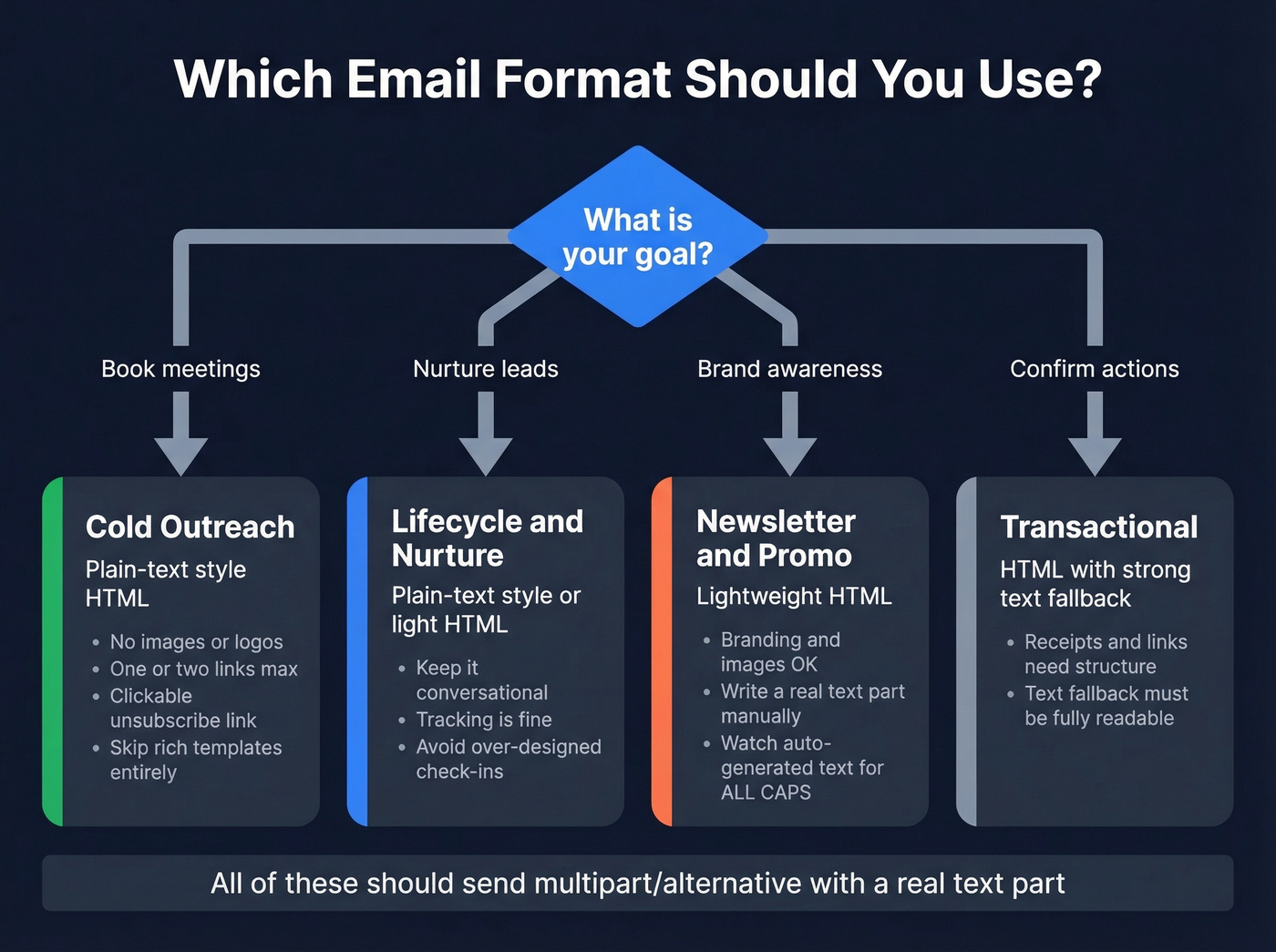
For cold outreach specifically: the moment you add a logo, social icons, and a styled footer, replies drop. We've seen this across dozens of campaigns. The email stops looking like a message from a person and starts looking like a message from a marketing platform.
The fix is clean. Use plain-text style HTML for the clickable unsubscribe link, but strip everything else. No images, no colored buttons, no multi-column layouts. One or two links max.
Skip rich HTML templates entirely if your goal is booking meetings. They're built for brand awareness and click-throughs, not conversations.
Dark Mode and Accessibility
With 70% of iOS users enabling dark mode and Apple Mail commanding 56% of email consumption market share, dark mode rendering isn't an edge case. And there's no standard for it - every client does its own thing.
Gmail on iOS does a full color inversion. Transparent PNG logos can disappear against the now-dark background, and brand colors shift dramatically. Outlook's Word rendering engine selectively replaces near-white backgrounds and near-black text, creating edge cases where borders vanish and contrast tanks.
Plain text is immune to all of this. It just works. On accessibility, screen readers handle clean, semantic HTML well, but table-heavy layouts are harder to navigate - especially when the markup is optimized for rendering hacks instead of structure. If your email is critical enough that everyone needs to read it, a well-written text part is your insurance policy.
Multipart Best Practices
- Always send
multipart/alternative- both atext/plainandtext/htmlpart - Write the text part manually, or at minimum review what your ESP auto-generates
- Never ship a blank text part - it's a spam signal
- Maintain content parity between both parts
- Format links as readable URLs in the text part
- Check for ALL CAPS artifacts from bold-to-text conversion - Microsoft flags these
The whole plain text vs HTML email question comes down to context, not dogma. Match the format to the use case, nail your authentication, and keep your list clean. That last part matters more than anything you do with formatting.
You just optimized your email format. Now make sure you're not sending to dead addresses. Prospeo's 5-step verification catches spam traps, honeypots, and catch-all domains before they torch your domain reputation. At $0.01 per email, clean data costs less than one bounced campaign.
Stop blaming HTML when stale data is burning your domain.
FAQ
Does HTML hurt email deliverability?
No - properly coded HTML with a readable text fallback doesn't hurt deliverability. Inbox placement depends far more on sender reputation, list hygiene, and authentication (SPF/DKIM/DMARC) than on format. Image-heavy HTML can push you to Gmail's Promotions tab, but that's a visibility issue, not a spam issue.
Can I track opens with true plain text?
Not with true text/plain. Open tracking requires a 1x1 tracking pixel, which is an HTML <img> tag. "Plain-text style" emails - minimal HTML that looks plain - support tracking while still feeling personal. That's what most ESPs actually send when you select their "plain text" option.
What format works best for cold outreach?
Plain-text style HTML is the sweet spot. It gives you the personal feel of a text message while supporting clickable unsubscribe links and basic tracking. Avoid rich templates with images and branded headers - they signal "marketing" to both recipients and spam filters, tanking reply rates.
How do I keep my list clean enough that format doesn't matter?
Use real-time email verification before every send. Bounce rates above 2-5% damage sender reputation fast, and once that's gone, no format trick brings it back. The cheapest deliverability insurance your domain has is verifying every address before it hits your sending queue.